Problems? See this thread at archive.org.
Microsoft Security Essentials is a free anti-virus and spyware package which is so unintrusive and fast that you find yourself checking to be sure it really is there!
Of course, there are those who feel that Microsoft should have competition from Norton, etc., but my "take" on this is that the developers of the operating system have the obligation to ensure its safe function. The fact that reverse engineering on an OS likely leads to more cumbersome anti-virus software is also a consideration.
Just my "opinion" but my campus tech also swears by SE, as well.
-
Okay everyone in regards to the "Are dead pixels covered under the 1 year limited warranty from Sony" question, I have hit up a number of Sony people and gotten you an answer.
Here is a transcript of me talking to sonystyle support:
info: Please allow a moment for an agent to respond.
info: You are now chatting with 'Colin M'
Colin M: Hello and thank you for visiting Sonystyle. How may I help you today?
Holden Magroyn: Hi I was wondering if you can return or exchange a Vaio if it got a dead pixel within the normal warranty coverage?
Colin M: You would need to speak with Technical Support on this matter.
Holden Magroyn: Is there a link I could follow to do so? I just want to know if it is covered?
Colin M: You can chat them, via the eSupport web site. This option is under Contact Us. You can also call them at*****
Colin M: eSupport
Holden Magroyn: ok thank you Colin.
Colin M: This link will take you to the eSupport website Holden.
Colin M: Is there anything else that I can assist you with today?
Holden Magroyn: I can't think of anything, thanks.
Colin M: Thank you for visiting Sonystyle. Have a great day!
Colin M: If you have a moment, can you please take my 5 question survey? Please press the "CLOSE" button at the right corner to start. Your feedback is appreciated.
So of course I went to the support people, here is the next transcript:
Part 1
http://img694.imageshack.us/img694/5387/33631593.png
![[IMG]](images/storyImages/33631593.png)
Part 2
http://img519.imageshack.us/img519/788/86903852.png
![[IMG]](images/storyImages/86903852.png)
After doing this, here is a link to the pages she referred me to:
http://www.kb.sony.com/selfservice/documentLink.do?externalId=C221627
http://esupport.sony.com/US/perl/contact-relation.pl?mdl=VPCF1190X
Basically, you have to call up sony to get a case by case answer. -
Thanks. I stepped into Bestbuy and they had a sale on for Kaspersky Internet Security 2010 ($49.99) for 3 machines, which made it around $20 cheaper than the equivalent Norton. I decided to go for it.
Don't have any direct experience with Kaspersky but I believe it is pretty popular in Europe and Asia. -
hahahahahahha Holden Magroyn
-
It's supposed to be very good. Especially the anit-virus suite which is licensed by Zone Alarm.
-
Do you think Larissa got it? Do you think she smelled a "set up" because of that name and might have been goofing with him?
-
Dirt 2
Ultra Settings: http://www.youtube.com/watch?v=Lper2Nzft6Y
Automatic Settings: http://www.youtube.com/watch#v=EfHkJGoDW8E&feature=channel -
Just checked Sonystyle.ca, F Series CTOs are not available again.
-
To clarify the "16.4" VAIO Display (1600x900) with NVIDIA® GeForce® 310M GPU (512MB VRAM)" is still availble.
But the "16.4" VAIO Premium Display (1920x1080) with NVIDIA® GeForce® 310M GPU (512MB VRAM)" is NOT available. It says the product is no longer available and the estimated shipping date is unknown. -
Yes, the GT330 is just not available - anywhere. It will also dry up in the States and Europe. I was warned the 1920 X 1080 screen was also in very short supply. This is because demand for the F was greater than anticipated, the GT330 has poor yields, and the 1920 X 1080 had more defects than expected.
-
Re-Read my post it's the 310M 1920x1080 that is no longer available on ss.ca as of now!!!
And yes, the 330M has not been available for quite a few weeks now... -
@MelodyMaster,
Can you elaborate on what the poor yields are for the GT330M?
Are you refering to user performance, more defects produced vs good ones, etc? Just trying to understand that bit..Thks -
Yes, as I say, the 1920 X 1080 had more defects than expected, so that ALSO is running low. I think we'll find that the next 1920 X 1080 screen will be something completely different, maybe sourced from the same supplier as a competitor, possibly with a slightly different size. It can't simply be the European matte screen, because that is more expensive, and also has its own supply problems.
Good luck, I hope we both get our systems some time this year....
-
This is discussed in the Nvidia forums. It's a die shrink. This means you can get more units per template, but also more units on that plate will be bad. It's a tradeoff. Hopefully the yield,the number of units per stamping, will INCREASE because of the larger number, but in this case it's decreased because of a higher than expected failure rate.
-
Thanks for the posts, mangosango. Did you do anything to "prep" your Vaio to play these games, like kill any processes before starting them? Or is what we're seeing how the games play on your laptop right out of the box?
-
Preconfig, pre-order available in Canada: 1600 x 900 with GT 330M with 1GB VRAM: http://www.sonystyle.ca/commerce/se...1&catalogId=10001&langId=-1&productId=1007406
This configuration is faster than running games on a 1080p 330M & scaling down. You can play in native 1600 x 900 resolution. A lcd runs faster & sharper @ his native resolution.
This laptop still can output to external TV & monitors @ 1080p & up:
Max. External Resolution via VGA: 2048x1536
Max. External Display Resolution via HDMI: 1920x1080
OS UI will be also easier to read for older eyes on a 16.4" screen with 112 DPI vs. 134 DPI for the 1080p.
Windows Support Laptop screen size Recommended resolution:
- 13- to 15-inch widescreen laptop screen: 1280 × 800 (100 to 116 DPI)
- 17-inch widescreen laptop screen: 1680 × 1050 (116 DPI)
See this interesting DPI (Fineness) of Displays table with images showing the difference between more small windows on a high resolution display vs. larger UI with lower resolution.
The Comment at the bottom of this article: "Starting from approximately 110 DPI a display is for most users (with operating systems, which make the representation size dependent on the resolution, like Windows XP) too finely resolved (representation too small).
High DPI values especially are an advantage for the handling with images and tasks of programming (much place at the screen). In addition it must be considered with laptops, that the user sits usually much nearer at the screen (because of the close, fixed keyboard)".
So it really depends on your eyes & your needs. I would like to see a test with some F's 1080p side-by-side with a 900p. I wonder if the average user would see any sharpness differences?
Don't get sucked in by the 1080p hype, choose according to your needs.
If you are shopping between different screen sizes & resolutions, use this PPI Calculator / DPI Calculator to determine the "fineness" (PPI =commonly called DPI). The XPS 1080p with a smaller 15.4" LCD has an even smaller UI representation with 143 DPI while the same 1080p on a 18.4" LCD will have 119 DPI.
Before buying, the best is to look at some monitors with different DPI's to see how you like the OS UI appearance. Desktop > right click > Properties > Settings > Advanced.
I had no choice because of time constraints & desire to get the more powerful GT 330M & ordered the US 1080p but checking on my present 19" CRT monitor, when jacked up @ 120 DPI, the OS UI is too small for me.
I know that I will have to scale up the UI with this method, use NoSquint add-on in Firefox, scale up the UI in programs that can do it like Lightroom & very often will be forced to use the Win 7 Magnifier for programs that are impossible to scale like Skype, for example.
The easiest way to see everything bigger all the time on a 1080p 16.4" is to change the display's resolution but while it works well for a CRT, it's bad for a LCD to use anything but it's native resolution. It's better to use a 900p @ native vs. a 1080p scaled down.
If you don't mind a larger & heavier notebook, absolutely want 1080p and your eyes are not so good then maybe a 18.4" LCD with 119 DPI is the best compromise. -
What is the deal with this "refresh" that I've read about? And how do we know it will come out in March? I was all set to order one (CTO), but now I wonder if I should wait another month.
-
Refresh speculations, same as stock market speculations. It works once in a while.

-
2 Joe Bleau:
Wow, I'm quite impressed by such a detailed post addressing the DPI issues with 1080p As for me, I've decided to try an return my F back to sony (I might experience some problems as I've scratched the bottom a bit with my metal cooler; the SZ carbon chassis was much tougher that F's plastic) and get a decent AW2 with 3 RGB chip (which is just the same as Premium Display) that is some $200-300 more expensive than my F.
P.S. In case I fail returning the laptop to Sony, does anybody from US/Canada want a Premium Display laptop with a Russian warranty?
-
Nope, this is straight out of the box. All of the original "bloatware" is still there. I assume that uninstalling these programs would improve performance a bit as well.
-
Thanks. I had an office with 6 employees & 8 computers so I did see the DPI issue for different eyesight's & I am not getting any younger... Thankfully , as I mentioned, it's easier to scale the UI with modern tools & built in Win 7 tools & settings compared to XP, for example.
I saw you photo where it showed that you removed the bottom of your F, I would be surprised if Sony would accept a return, especially if it's not defective.
There must be a Russian fleabay equivalent?
In your case, if you don't mind a larger & heavier notebook, absolutely want 1080p and your eyes are not so good then maybe a notebook with a 18.4" LCD @ 119 DPI is the best compromise. -
Example from the How to Optimize Any Son*y VAI*O With a Semi-Clean Install thread:
Before:
HD Space: 130 GB Free
Processes: 66-70
Memory Usage: @40%
After:
HD Space: 162 GB Free
Processes: 54-58
Memory Usage: @28-30%
Check also: Windows 7 Service Configurations optimization, just don't follow blindly every recommendations, check his reasoning for each Services and decide for yourself. -
If they expected higher yields than what they are actually getting, the price of the 330M GPU may go up by quite a bit, since their original part costing was based on a more optimistic yield factor.
And these kinds of things simply cannot be re-worked, once QA rejects it, which means the cost of the good pieces - which finally gets sold to customers like Sony - will in turn go up to make up for the lower-than-expected yield. -
Hi all. I've looked up some info on the i5 processor, and it is stated that it has embedded graphic capabilities. Question: why do we still need the GT330, and can it take any advantage of the gfx caps of the i5? If not, it seems a waste...
-
Because a discrete GPU like the 330M is FAR more powerful than the puny "embedded graphics" ?
-
thoughts on changing the MATA BD-MLT UJ240AS's blu-ray region setting?
Currentlly it's unmarked and I can't play Region A dvd's....just ones that are uncoded. -
Aaaah ok. Thanks!
-
I updated the VAIO F 2nd Hard Drive Caddy in Optical Bay post with links to an inexpensive eBay 12.7mm HDD caddy that fits the F Series.
Thanks to nando4 for the heads-up!
![[IMG]](images/storyImages/Sony_Caddy_Laptop.jpg)
-
Thank youuu thank you. I go by many aliases online, Holden Magroyn///Galieo Humpkins///Burton "Oil Can" Guster///Scooney "U-Turn" Singleton///Nick Nack///Fuquan Jackson///Lemongrass Gogolupe///Trapezius Milkington///Dequan "Smallpox" Randolf///Longbranch Pennywhistle///Zebra3///D. Starsky///Cap'n Tightpants///Doughnut Holschtein///Felicia "T-Bone" Turner///Mork Frumork
I'm sure she got it, I got the feeling that she was annoyed with me just being another jerk customer pushing her day along.
I'm in the same boat. I am happy with all but the screen. My greatest hope is that Sony gives the F a better screen and puts in on sale after the refresh.
So does world peace.
Thanks for reading my nicknames above, took a while to type. -
Thanks for posting that, very nice, frame rate seems nice, you have good perception of where the car is going, nice control, but maybe need a better car and some practice. Just a guess.
-
Good evening fellow Vaio owners!
Anybody help me with this issue?
i have the mata bd-mdl uj240AS and my blu-ray region isn't selected and I can't select one. Unfortunately, it's preventing me from watching Zombieland.
All my Blu-rays have been purchased in Pennsylvania at retail stores and are Region A or Region free. Nearly all my blu-rays work except Zombieland.
![[IMG]](images/storyImages/bd.jpg)
The DVD region is properly set.
![[IMG]](images/storyImages/dvd.jpg)
-
Hey guys is there any color calibrating software out there? The colors on my vaio screen seem a little washed out.
-
My understanding is that the "refresh" is already here, we're getting them now as CTOs and the prebuilts for March are second run also.
This time around changes in model features are going to be driven by what can best be made of spotty parts availablility, not by an intent to offer exciting new options. -
thats bleak sounding. basically some people will be getting the shaft.
-
Yes. Search for Data color spyder or eye one. They come with hardware which measures the colors on your monitor.
Or use profiles which were posted here. -
Hey, is there a guide on what programs can be safely deleted, how to stop useless processes and services w/o installing windows again. Want to speed up my computer.
I made soo many customization options already to windows and my programs so I don't want to do a fresh install. -
Did those that bought their CTOs late January/early March from sony style US, after they were removed for a while due to issues, get this "refresh" you are referring to?
-
Here's a good site for info on anti-virus software:
http://www.av-comparatives.org/
And a cut to the chase article:
http://blogs.pcmag.com/securitywatch/2009/12/av-comparativesorg_torture-tes.php -
-
It seems so.
-
Not really, the first run is fixable, and the second run doesn't offer anything that early buyers would regret missing.
-
Hi all, long time lurker but now newly proud owner of F series! You guys have been an invaluable source of info...even did the phone order for 10% off.
Okay, so, now I'm trying to install the syper profile for a better calibrated screen but nothing happened. I followed the instructions perfectly 3 times already and still have no results. hmmm. One test I tried was to switch profiles repeatedly between the sony default profile and the Spyder2express profile...not a single hint of color change.
This is my first time using win7 and, while pretty and neat, I have a real hard time navigating around to look at other settings and such. Any ideas on what I might need to enable and /or disable for the spyder profile to take? Or maybe something else I need to do aside from the instructions in the document? Thanks -
You mean, like an SSD with RAID for $65 Canadian, or 1 GB of VRAM available for either GPU and either resolution screen?
And it is not outside the realm of possibility that the CTO will have some other tweaks in March.... -
New owners too lazy to post feedback on their machine do not get any replies. :0
-
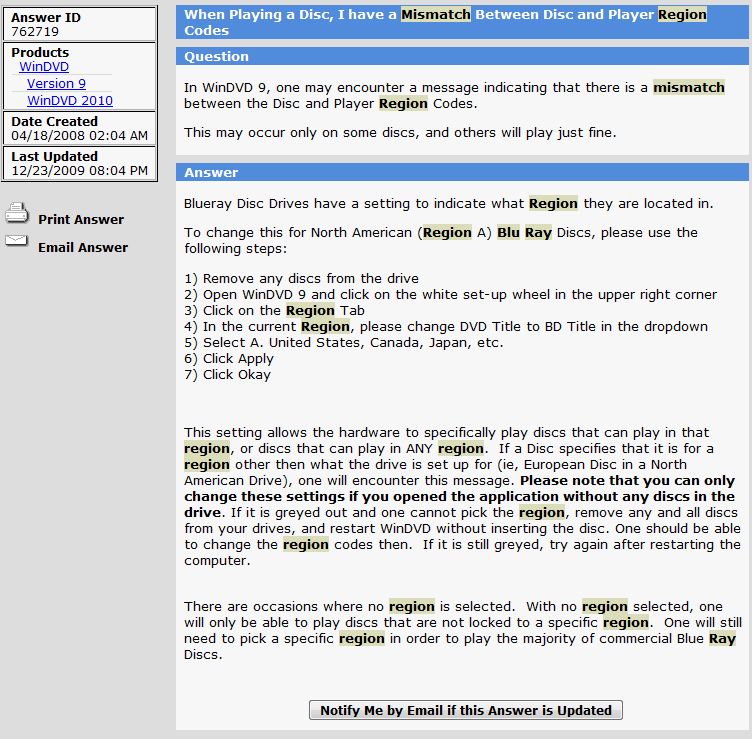
I've just had exactly the same problem myself with Twilight--maybe it's just monster movies Seriously, I've watched several BluRay movies, all US, and this is the only time this has happened. I've attached a screen grab from Corel's tech support database where they address the problem. Unfortunately, I followed the few steps they suggest (removing the disk, restarting the computer, opening the software without disk and then try to specify the region) without success--all the region choices are there, but greyed out and unselectable. If I find a fix I'll let you know, and please do the same if you find one. Meanwhile, I'll probably survive without watching Twilight.
Attached Files:
-
-
Are you implying that ALL first run F have problems or need fixing? That would contradict many feedback reports in this thread.
-
oops, I'm not familiar with message board etiquette! Total newb, I'll admit. What kind of feedback...as in my first impressions of this fine piece of machinery?
-
Maybe Sony wisely used Matt800's profile as their default in the latest shipment of Vaio Fs including yours. That would explain why there was no difference between the two profiles I'm joking obviously, but if Sony has improved their default screen profile (and it sounds like they may have base on a few previous posters) there may not be much difference between the default, and Matt's Spyder profile--calibrated is calibrated.
Official Sony VAIO F Series Owners lounge
Discussion in 'VAIO / Sony Owners' Lounge Forum' started by eagle17, Jan 7, 2010.

![[IMG]](http://img694.imageshack.us/i/33631593.png/)
![[IMG]](http://img519.imageshack.us/i/86903852.png/)