Problems? See this thread at archive.org.
Joe is no longer banned. Whether he comes back or not is another story.
-
Man you were soooo right! I got an email today in reply to one of my complaints saying that they would upgrade me for free to 2-day shipping. The estimated ship date is 8/2.
However, seconds ago got another email confirming shipment with my FEDEX tracking number!
goooood call justme2010 -
Rent one from your local video store. I had ripped a blu ray disc once to see how it would play back. Could only get it to play in VLC (didn't try power dvd), and it started to lose smoothness after about 15 seconds of playback. On disc, however, I think it's fantastic. I'd love to know how you see it.
Check out any of the BBC Planet Eearth or BBC Life episodes. Also, even though I'm not a huge avatar fan, it's a model of blu ray quality. -
HAHAHA, so true, so true. Well, I absolutely love my F series. Can't live my life regretting if I shoulda got a Mac, or something else. -
I know right.. lightning fast responsiveness.. and Sony's first quad core lol
just that I would have been really happy if it had a better GPU, eg. GTS 360M. GTX 260M etc -
So close you can almost taste it!
-
Same here. I'm not a gamer or anything, but knowing that the GPU were upgradeable would've made me happy. It's not, but I can live with that, cuz I don't need it anyway. I just like having my options open.
-
I feel for you guys. Waiting blows. I'm lucky to be living near a Sony Style store. The preconfigured model went on sale for a great price. I got my $ figured out and went in the next day and bought it. Waiting several weeks would have killed me.
-
maaaaan i wish
-
VAIO Update says that no update is available, shouldn't he be smart enough to get new drivers from nvidia ?
Can i just go to nvidia, get the drivers for 330 and install myself ?
Thanks -
VAIO Update is smart enough to get the SONY approved drivers from the Sony Support site. To my knowledge, the NVIDIA drivers may not be supported by Sony (as opposed to the Sony approved NVIDIA drivers), so we're on our own to retrieve them.
You definitely can go to NVIDIA to get the drivers yourself.
http://www.nvidia.com/Download/index.aspx?lang=en-us -
yes, why vaio update does not inform us for new drivers?
also, i have 2 audio codecs, realtek and nvidia. Is this normal? And i can't find the realtek audio manager. -
Can someone tell which are the best and latest drivers for this laptop?
i want for vga,audio,alps pointing device, wlan, ethernet.
Thanks in advance. -
I'm sure this is a loaded question capable of tons of answers. You'll most likely be advised to stick with drivers from Sony Support. It just so happened that NVIDIA finally came out with an updated video driver directly.
-
We have similar laptops, so we need the same drivers. What do you have?
Does realtek audio manager open to you? -
I have all of the Sony drivers, and I just manually upgraded the NVIDIA driver this week (though I didn't really need to).
I manage my sounds via the sounds properties from clicking on the speaker icon. From there, I make changes. I don't have a "realtek audio manager" program. What are you looking for it to do? -
I downloaded the 258.96 WHQL International directly from NVIDIA's site. No mods/changes needed. Everything works smoothly
Got slight performance increase -
It's more easy to contol the sound options. It's boring all the time to open the sound and go to the options.
It says that installed with driver, but i cant find it... -
Sounds super useful. I don't think it's there, that we only really have the drivers and the options in speaker management. But... I'm new to all of this. Perhaps we should wait for someone who really knows what they're talking about.

-
You have also the nvidia audio codecs? they conflict with the onboard realtek audio codecs.. In my laptop bios there is no option to enable onboard audio..
-
EDIT: Wait, is there no sound coming through the speakers at all, or just no realtek software tool on the computer?
Are you guys talking about the F12? My F11 doesn't have the realtek software installed. The realtek manager is (from what I gather) simply a software tool that makes it easier to adjust sound effects settings (environment reverb, EQ, etc). This is all possible through the control panel (the method that I assume anseio is using), but the software just packages it into a nice user interface.
Also, the nvidia drivers should work now (I think from that 256.xx drivers onward work with Sony laptops). TBH though the new 256.xx drivers are mostly improvements for the gtx 4xx series and SLI setups. The 197.xx driver series (which need to be modded to work with the F-series) offer the most noticeable performance improvements in games and CUDA applications.
Just remember to uninstall an older driver before installing a newer one for the maximum performance benefit, and to make sure that there aren't any leftover fragments from the older driver. -
![[IMG]](images/storyImages/4821907558_1abefc990b_b.jpg) [/IMG]
[/IMG]
![[IMG]](images/storyImages/4821290179_71aa3cdfcb_b.jpg)
This is the audio manager I am looking for- or something similar. However, just downloading the driver I cannot find the manager anywhere on my computer. Please advise. -
I agree 100% with MelodyMaster, Mangosango did & is still doing a tremendous contribution about the real world gaming settings & capabilities of the Vaio_F Series.
See by yourself, from the post #1 on page one of this thread ( Unification Post): (7) MangoSango's extensive game testing post with youtubes.
You can see his most recent gaming with the Vaio_F videos in his Youtube page: MrChowderClam's Channel. You can also use the Search this Thread > Advanced Search utility top right of this page, & search game name and restrict the search to specific user Mangosango.
![[IMG]](images/storyImages/Search_MelodyMaster_Ani.gif)
While I like notebookcheck & posted dozens of links & screen captures from their site, I don't see how older benchmarks done on a generic system could be better than this F owner's work with updated video driver & custom tweaking & safe overclocking tips.
******Could you name that game where you have to press continuously for ever the same key, must be fun!
![[IMG]](images/storyImages/Furmark_Stability_Test_Shift_Key_Press.jpg)
![[IMG]](images/storyImages/Furmark_Stability_Test_Shift_Key_Press_SIW_2010.jpg)
More details about the "test" here, including links to free utilities so you can test your Vaio_F Series yourself & contribute to the thread too: VAIO F_Series Key Press > Fan + Temperature Graphs. -
mangosango - I'm on the F11, and think the other person is on the same. We both get sound, just couldn't find the manager being talked about. I've been using the speaker icon in my system tray.
-
Good to see you back Joe.
-
Just click on your Speakers icon near the clock > click again on the Speakers icon > Enhancements > select Immediate mode > select Equalizer > in the bottom, you have a drop-down menu with presets like Rock, Jazz, etc. If you want to tweak and see the graphic equalizer: click on the button with the 3 dots: "...". Et voilà! Note the Dolby tab while you are there.
![[IMG]](images/storyImages/Realtek_R2.45_Enhancements_Equalizer.jpg)
Personally, I don't use it ( Disable all sound effects). I simply use the equalizer in my music player when needed. If you try to use 2 different equalizers (or 2 different sound effects like Dolby + Rock or whatever other program tweaking sounds) at the same time, it will mess-up the sound.
*****Thanks! It's not good for my personal work though...
-
Breather, really good advice mate, but i have always been insecure about buying things lol. I know there is not perfect laptop but i want to make sure most of the main components are great. Also i know that the 8gb version and 6gb version of the F12 matte screen is RGB 100%, which is awesome. Just hat i wanted.
Ok can can anyone tell me how much they paid for the 8gb version here in the UK, as im getting mine from trade for £1440, but pc pro had got it for £1380 i think, so am i getting ripped of or what. -
I think you should start at the Sony site to get their selling price and then shop down from there. If anyone is charging MORE, then you're being ripped off. Prices shift, so getting advice may not be the most useful if it involves waiting. On Friday, my f11 was $1200 USD. On Saturday, it was $1000. Not too long after that it was out of stock.
You're going to love owning it. The problem with forums is that you have a higher concentration of people with advanced knowledge and capable of detailed criticism of flaws. To outsiders, those little things seem like gigantic issues, when they really aren't.
Good luck and buy it soon. It's going to be more fun actually using your VAIO than reading about using it. -
Trust me i do want to get it, but sony Uk are charging £1500, i assuem that is virtually the price with all onlne and other retailers. But problem is some review sites such as pc pro have said the 8gb one is cheaper than than he price i have been told. Dont want to pay extra as well.
-
Wondering what wifi card is in the F series? Need one that supports 300 Mbps. Any help appreciated.
-
it has an a/b/g/n card, so it should be able to support 300 MBps. -
I ordered a custom built F12 from the UK Sonystyle store for £1380-ish. 8Gb Ram, 500Gb 7200RPM hard drive and free bluray-writer upgrade. Standard Windows 7 Home edition. I've roughly saved £220 on the Sony Centre price, and Play.com's best available model. I've seen a 6Gb model on Tottenham Court Road for the same price.
(Still waiting for it to be made & delivered though) -
I was talking about a matte screen protector not actually replacing one
-
Read this also : Board Message
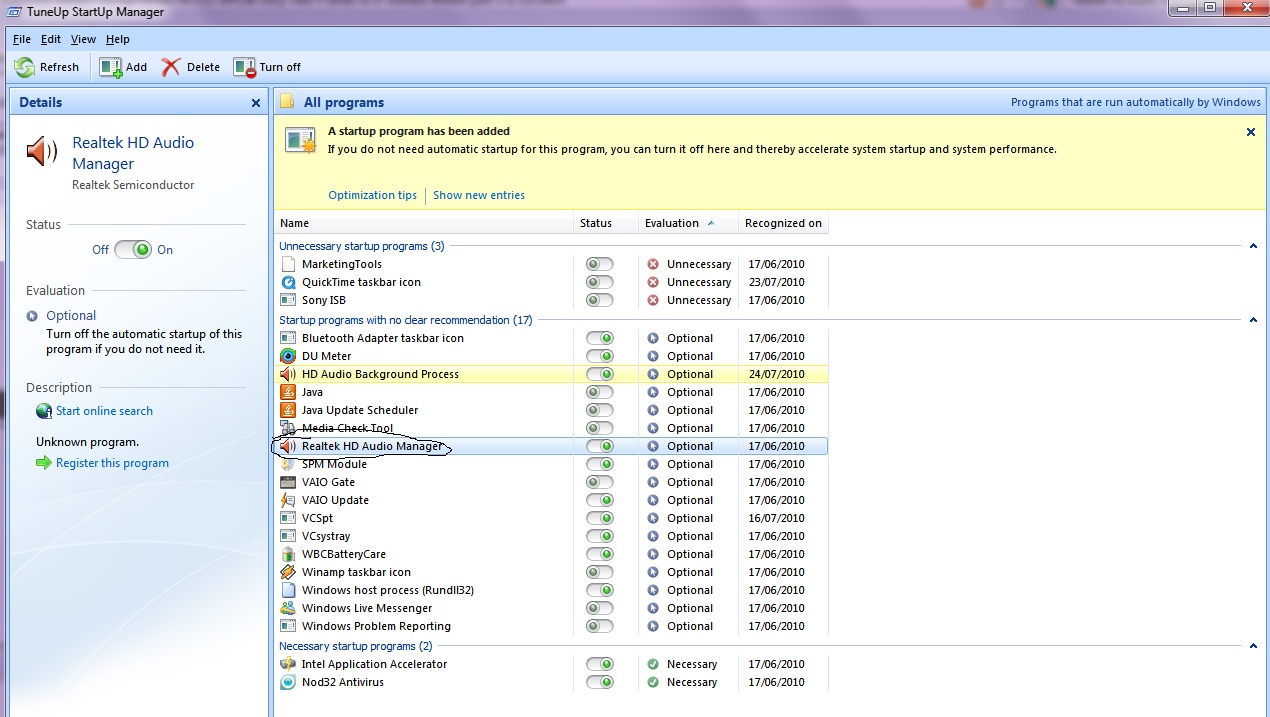
My bios doesn't have an option to enable on-board audio.. So what can we do??
See also in the picture, the process is enabled, but no manager loading..Attached Files:
-
-
I have a serious problem with my vaio F11: I place my cold drinks on the left side of the notebook and they are heating up in no time with all this fan blowing. I am gonna return the dumb thing or ask for a free cooler!
-
Yes indeed.
-
My advise : Drink coffee or tea
Best regards
--- Lars --- -
Buy a USB refrigerator
-
sniff* sniff* whats that smell ...
OMG ... i think it might be ... my computer on a FedEx truck.
im thinking of camping out over the weekend in front of the FedEx office so i can be the one to take it off the truck.
-
![[IMG]](images/storyImages/4821687541_c7aa9c6ab8_b.jpg)
Thank you for the info Joe, however I am familiar with what you posted. I'm looking for this type in interface (see above). I've always had this and have always kept it in my taskbar. Since all laptop speakers are a little tinny in their sound, I do use the audio enhancement often- clicking on environment 'live' or 'rock', equalizer 'room' often for music and no effects for spoken word. I'm looking for convenience (less mouse clicks), prefer an interface like this, and for some reason my equalizer does not come up like yours, only 'live', 'pop', 'rock' etc,. Anyone have advise on how to obtain this audio manager. I have spend a surprising amount of time searching with no results. -
Yay! Joe is back! WB Joe! I shall hold down a few keys on my vaio tonight (J O E) to celebrate lol.
-
Beware: FedEx just left my laptop sitting for half a day in front of my front door. Depending on your neighbors you may wish to do just that.
-
I appreciate the input, however, many a/b/g/n cards only support up to 150 Mbps.
If anyone has a new F series, could you please look in device manager and post what card you have. This would be greatly appreciated. -
Have never come across a speed limit of 150 Mbps in any n-device here in Sweden.
-
Depending on the card, there are limits,certain Intel, Atheros, and Broadcom models only support up to 150 Mbps.
-
Then I have been lucky to not have encountered a 50% slower device in my whole life. However, I remember the first models had a limitation of proximity 150 Mbps. xD
Thanks for the input
EDIT: Looked it up, I found only budget devices to have the 150Mbps limit. -
I am also interested in the audio side. I'm most interested in being able to turn the mic input into a line input to rip vinyl records. I'm real disappointed that you can't with a $1200 computer.
And suggestions. -
Maybe some are confusing Mbps with M Bps and theoretical vs. real world speed. See: What Is the Difference Between Mbps and MBps?. Check also IEEE 802.11n-2009 and How Can I Get 300 Mbps Speed on My 802.11n Network?
Check this Intel Centrino Ultimate-N 6300 and Intel Centrino Advanced-N 6200 product page: "...a family of IEEE 802.11a/b/g/ n wireless adapters that operate in both the 2.4 GHz and 5.0 GHz spectra. These adapters are available in a PCIe Half Mini Card* form factor and deliver up to 450 Mbps of bandwidth".
This VAIO_F11 owner DIY upgraded his wifi card. It includes photos & how-to: Installing Intel Wireless Card 6200.
In my US Vaio_F11 according to the free and standalone (meaning no install needed) SIW 2010 utility > Hardware > Network Adapters:
Now there could be wifi cards variations depending on your country's model. Maybe some F12_owners could report their data? Check the Marketing Specifications on your local esupport or call Sonystyle. For example in the VPCF126FM pdf doc, the wifi card model is not specified:
Wireless/Networking
Ethernet Protocol: 10Base-T/100Base-TX/1000Base-T
Ethernet Speed: Fast Ethernet (RJ-45)
Wi-Fi: 802.11 b/g/n
Bluetooth® Technology: Integrated Stereo A2DP (2.1 +
EDR) -
Thanks for posting your card. And you are correctThere is no real specs on the Sony page.
-
ALL of the F11s I work with have Atheros cards. The driver on the Sony website claims the card is an AR9285, but when the driver is installed, it is recognized by windows and updated as an AR9287.
All of these computers latch onto my wireless router at 300Mbps WHEN 40MHz channel bandwidth is enabled in the router settings. Of course, this is a nominal speed and may not be realized. For instance, right now I have 3 wireless laptops communicating with my wireless router and they are actually communicating at speeds of 300Mbps, 270Mbps and 108Mbps. All are capable of 300Mbps, however, the lowest rated speed is between the modem and a laptop that is nearly 60' away with several walls and quite a bit of metal ductwork between them. If I move all 3 laptops close to the wireless router, I usually get 300Mbps, 300Mbps and 270Mbps readings simultaniously. I have never seen all 3 at 300Mbps, but that is probably due to the router's inability to process all streams any faster.
Official Sony VAIO F Series i5/i7 owners thread *Part 3*
Discussion in 'VAIO / Sony Owners' Lounge Forum' started by eagle17, Jan 7, 2010.