 Problems? See this thread at archive.org.
Hi, guys is there some kind of update from sony regarding the speed going up and down when plugged in.
-
I guess I really don't know about throttling on battery, as I barely ever use the battery. I do know that I have the minimum processor state (on Windows 7 performance tab) set to 100%. This should stop throttling...but it also drastically reduces battery life, down to 45 minutes to an hour tops.
As I said earlier, i7Turbo allows me to turn of C1E and IEST. This should allow for full power state at all times as these programs are meant to manage power usage.
Edit: This expalins C1E state: http://www.hardwaresecrets.com/article/611
Here is a Wikipedia explanation of EIST: http://en.wikipedia.org/wiki/SpeedStep -
Great stuff philm94- thank you for your efforts. So, if we have the desire to rip vinyl, we need a good external sound card/express card which has it's own line-in. It should also have full 96khz/24bit recording capabilities. I'm going to start to look for one and will post my findings. Has anyone already accomplished this task with their F? Any other input on this topic would be appreciated. I really want to use my F for this.
-
Thanks m8. Just making sure this is deliberately implemented by Sony, and is not a problem, can you get CPU-Z and pull off your AC adapter and go in battery mode and check how many MHZ your CPU is on CPU-Z
Thanks.. its just its really retarded since blu-ray movie is not playable on battery mode due to the CPU down clocking and being too weak. So ironic that a laptop with a blu-ray drive cannot play blu-ray movies in battery mode without lagging
I hope they fix this in a future bios update.. or even allow us to mess with the clock multipliers for OCing
-
1. I checked my clock speeds on battery, and even at 100% power state, it is throttled down to 1.2Ghz when the power brick is unplugged and battery power is being used.
2. I doubt that they want you to watch 2 hour BluRay movies on battery power. I would think that the battery on the F11/F12 would drain before an entire movie could be watched. If you want this feature, you probably want to purchase a lesser processor AND a bigger battery.
3. TurboBoost IS basically overclocking, with Intel setting the maximum safe parameters for you. Instead of having 4 cores running at a maximum of 1.6 or 1.73GHz, intel is allowing greater speeds when fewer cores are needed. This is done in such a way as to prevent damage to the processor. While overclocking is still possible, why would you want to risk damaging such a nice machine, especially when it is not an easily repaired desktop? -
I sent an F-11 in for a new motherboard and requested a new screen becuase of inversion and a stuck red pixel. I was hesitant to send it in an really didn't think they'd replace the screen. I got the laptop with no visible damage at all. The motherboard was replaced and so was the screen which is better than the one I had but guess what? It has a red stuck pixel right in the center of the screen. Well, at least I tried.
I'll now have to learn to live with the pixel as massing he screen, and using js pixel fixer didn't work. It seems that when a pixel gets stuck on a Sony (Sharp) screen...it really gets stuck.
-
Well, I'm using a German system with all the dialogs in my language. So it might not be of such a great help for the majority here.
But anyway I've made some screenshots.
Main page of the "VAIO Care Rescue":
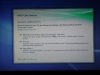
To have more control I used the second entry called "Extras":
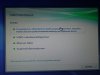
In this panel I selected the first entry called "Erweiterten
Systemwiederherstellungsassistenten starten"
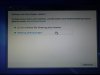
Next you can save your data
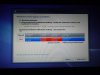
In this panel you can change the partitions of the drive.
Sorry about the screenshots, I Haven't found out yet, how to properly
paste them into the post. And also not how to get rid of the attachments...
No, sorry, I can't really remember how many task where started. I think around 51-53. Also I didn't look at the OS size.
Servus,
kcirtaPAttached Files:
-
-
Go for something like the Creative Xi-Fi ExpressCard - there are USB solutions .. but USB space is precious on the F
I think it's 24bit/48khz ... but honestly, that's enough. It's still (done right) better than CD quality. -
Hi kcirtaP,
did you could choose the software components like the tutorial said? When i run this recovery, i only got the full system restored, with all crapware and 'manipulated' system settings.
Best regards
--- Lars ---
PS: I'm german too, if you like to PM me, you can do that in german. -
I'm thinking about ordering a CTO F12 for use as a desktop replacement for my work, and have a couple of critical questions that I'm having trouble finding answers to. Can anyone here shed some light on the following?
1. Is it possible to connect two external monitors to the F12 -- one to the VGA port, and another to the HDMI port -- each displaying its own extended area of the desktop (not a mirrored configuration)? Does the F12's built-in screen continue to work in this case?
2. Is there a port replicator or docking station available that is compatible with the F12? Since I'd be using the notebook as a desktop workstation replacement, it would be nice to gain a few ports so that I could use a keyboard, mouse, and two monitors while keeping the notebook's lid closed and out of the way.
Thanks! -
No it's not "retarded". The CPU automatically goes into LFM: Lowest Frequency Mode: the power saving CPU clocking mode used by the Vaio_F Series (and other brands of laptops with i7 CPU's) when running on battery which has a power output too low ( 54W) to be able to feed an F working @ full speed which needs up to 100W + 10% according to_Sony's power requirement specs. That's why the VAIO_VPCF11 and_F12 comes with a 120W A/C power adapter.
Lowest Frequency Mode is also used @ idle on the Power Saver & Balanced power plans even when the F is plugged to save energy & reduce heat & wear & tear. As soon as you run any task requiring more computing power, it will kick in higher speed and/or Turbo Boost as task(s) requires & max TDP permits ( Thermal Design Power). If you set to High Performance plan, you are turning off the LFM feature when plugged with the Core Frequency as the minimum but NOT when running on battery as explained above. Note that that plan's downside is more heat so more fan work > more noise & more wear & tear and all that w/o any benefits for the max computing power a given CPU can produce (max TDP).
LFM is a CPU characteristic by design and made by Intel. This was talked about so many times, see this post: VAIO_F Series CPU Speed, Turbo Boost & Battery.
For example:
i7-720QM:
Max Turbo Boost Frequency
4 Core: 1.73 GHz
3 Core: 1.73 GHz
2 Core: 2.40 GHz
1 Core: 2.80 GHz
Core Frequency: 1.60 GHz with DDR3-1333
LFM* Frequency: 0.933 GHz (same as 933 mHz)
Now if you want to play Blu-ray disc on battery, you can easily create your own optimized power plan and use Task Manager to turn off useless stuff when watching a movie like anti virus, media programs scanning drives in the background, unused ports & whatnot bloatware running in the background. My Corel WinDVD Pro created a custom power plan that kicks-in when playing a movie on battery:
![[IMG]](images/storyImages/Power_Plan_Corel_WinDVD.jpg)
This said, I never tried playing a Blu-ray disc on battery but even with an optimized power plan, the F can barely play the complete movie. That's not why it was designed. It's not a 8 hours on battery netbook. You can play DVD's or rip to your hard disk to reduce power demand on battery.
So no, it cannot "be fixed in a future BIOS update" and no, the user cannot mess up the TDP management with overclocking. That's what the Turbo Boost was designed for and it's extremely efficient IMO.
-
Just picked up a F12 series (VPF126FM) from Best Buy and was curious....Am I SOL if I want to have the resolution up to 1920x900?
-
Guten tag. Haben Sie spass mit der laptop?
-
I should be receiving my F12 tomorrow according to FedEx .... finally!
I will be wiping it right away in order to install Ubuntu (I run Windows in a virtual machine)
Wondering if anyone also runs linux ... and if so ... did you have an install issues that you had to work around?
Examples would be ... keyboard backlight was tricky to get working ... some of the function buttons didn't quite work right ... the processor or memory needed to be adjusted to receive full performance ... multi-touch issues etc etc ...
So anyone out there like me? Thanks! -
1920 x 1080 = 2,073,600 pixels and 1 is stuck red right in the middle of the display? That's bad luck.
I don't mind a stuck pixel in the corners but not in the center of the display. Why not try to get the LCD replaced again?
-
I would do the exact opposite, but hey, it's your machine.
Make sure to burn a set of recovery discs before messing up and check this: vaio-f11-linux project.
Check also this post with links like How to Install Ubuntu on VirtualBox: VAIO_F Series Virtual Machine: Virtual PC vs. VirtualBox.
Good luck! -
^^ thanks!
will check those out.
haha ya i have to run ubuntu as my primary because of development work ... i only need windows for photoshop and skype (cuz skype beta on ubuntu is sad) -
^^
Skype and Photoshop support ... the exact two reasons I ditched Linux in favour of a 'operating' system instead of a 'hey, look .. we had a go' system
-
Thank you for that informative post. +1 for your rep power
![[IMG]](images/storyImages/reputation.gif) .
.
I am a newbie when it comes to sound and I'll follow & research some of your pointers including the external sound cards suggestions.
I'm not an audiophile & the F suits my needs with a good pair of headphones & for my semi-advanced-amateur video production but will try to run some tests like you did.
Thanks again for all the work & sharing! -
Can you tell me which of the following can i delete without problem?
Vaio Gate
Vaio Gate Default
Vaio Event Service ( Its related with Fn Brightness? )
Setting Utility Series
Sony Home Network Library
Vaio BD Menu Data
Vaio Window Organizer
Vaio Screensaver
Vaio Wallpaper Contents
I removed all the other Vaio Software and i will keep only these :
Vaio Care
Vaio Power Management
Vaio Control Center
Vaio Update
Vaio Smart Network
Vaio Data Restore Tool
Also, can you tell me what processes can i remove with safety and some tweaks? -
ASSIST > VAIO_Care > Recovery > Create Recovery Media.
Or even better: ASSIST > VAIO_Care > One Click Care and it will tell you everything you should do on your F with links + important optimization stuff like registry & hard drive defrag, etc, etc.
![[IMG]](images/storyImages/Vaio_Care_one_Click_Report.jpg)
-
Sorry it took so long to reply.. You are right that WEI is not a good benchmark. I didn't have time to do the before and after. Been quite busy with vacations and the such. I just like to stay current on drivers and you and the rest have helped in that respect. As long as I get no BSOD's, I'm happy.
Regards
JJ -
Why F11 has Dolby Home Theater v3? Isn't it stereo only?
-
Thank you for the effort, it should be useful to F users speaking German. I added links to your posts in the Vaio_F Series Windows 7 64-bit Clean Install Guide Using OEM Recovery Discs.
I see that you are from Bavaria. I had the chance to live for a while with friends near Bodensee & in München and gave a try at learning the language but short & ear pleasing words like Systemwiederherstellungsassistente made me trow the towel. Besides all my friends spoke either English, French or Italian so I switch to studying Czech instead as it was my next destination and it turned out to be useful when visiting small villages & remote areas. That was in '89.
I'll always remember that farmer in the Bavarian countryside wearing the traditional leather shorts. I was trying to ask him some stuff in my very elemental German then asked him if he spoke some other language so we could try to better communicate and he replied: no, I speak only German and Bayerisch.
Now maybe somebody with a F12_w/ an English OS could contribute? Or PM me for my mailing address & send me some F12_recovery discs?
-
In addition to my earlier question about the F12's support of multiple simultaneous external displays, does anyone know which make and model drive Sony is currently installing in the F12 if you order the 256GB SSD? I believe they were putting the Toshiba HG2 in the F11. Are they still using that one?
-
Does someone if the F12 has a SATA 2 controller. I will buy a ssd to it but do not want to spend money one something that isn't fully usable.
-
Yes it does.
![[IMG]](images/storyImages/Intel_Rapid_Storage_Technology.jpg)
BTW I downloaded the Intel Rapid Storage Technology from the VPCF126FM esupport page ( Intel 5 Series 4 Port SATA AHCI Controller Driver) & installed on my_F11 after uninstalling the older Intel Matrix and it works fine with 4 HDD's connected simultaneously to my F. It loads faster on my F than the generic Intel Rapid Storage Technology driver found on the Intel site because it does not try to find RAID stuff that the F_Series does not support anyway. I tried both.
***** -
On a two-lamp cold cathode display both lamps are on the bottom. It's normal on a GOOD TN panel for the top and bottom edges to be a bit brighter, what's called "Bleed," That is a function of the lamp diffuser interreacting with the LCD matrix. That it's "Brilliant" doesn't mean it's a two lamp display either, it is probably still a one-lamp. A two-lamp CCFL is no brighter than a one-lamp, but the brighter light source allows for a wider viewing angle; a display with a wider angle passes less total light through the LCD matrix.
-
No, for 44.1 Khz samplng there should be NO signal at all at half that, 22.1 Khz, otherwise, if any passband still exists at 22.1 then an input against 22.1 causes inversion. For instance a 20 Khz tone going in would also produce a strong 2100 Hz note, whats called a heterodyne. There is no such thing as a "brick wall" filter either, even in the digital domain, that would cause a massive phase shift approaching the rollof, blurring transients. Best is a 12DB rollof between 18 Khz to 20.5 Khz, that's typical on a good CD player. The curve can be made steeper by oversampling and resampliing, to gain maybe an unoticeable 500 Hz to 700 Hz increase at the high end. If the trailoff only STARTS at 19 Khz then that is incredibly good performance for a piece of consumer audio hardware. That is not an issue at all.
Otherwise your analysis is spot-on.
-
Finally received my spare US backlit keyboard from ebay.
The finish is exact to the US black version and the dimensions identical.
Nice deal for for $27 plus $10 for shipping from Hong Kong.
Haven't tested it yet though
baarcodes and serial numbers at the back
Darfon P/N: 9Z.N3S82.201
--550102H03-035-G
--D9460006187 Ver: US
Sony P/N: 148781111 -
Hello,guys. I have Sony Vaio F12Z1R. Yesterday uninstalled Windows 7 and missed Sony Vaio monitor profile as a default. Could you send me this one?
-
Hey All. My friend owns a VPC-F1190X and he had somehow managed to crack the screen. I promised to help him out replacing it.
So I need your help with two things. First, I need the model of the LCD screen to look for on eBay. Second, a disassembly guide or a service manual to this model.
Thank you all! -
Hi mfractal,
Joe has made a nice guide on how to replace the screen:
Vaio F Series Laptop How To Replace the LCD Display & Inverter
There you should find all the information you need.
Servus,
kcirtaP -
It's good idea to put a SSD Hard Disκ in my F11;
-
If the ";" at the end of your sentence was meant to be a "?", then I don't think you'll find anyone here who'll tell you that getting a SSD into your F11 is a bad idea. I think that's what most of us want to do, but it's cost prohibitive for some.
If you do it, let me know what you think. I'm leaning toward saving up for one. -
Yeah, the cost is very large. If i'll buy, it will be 64gb only.
-
thanks!
i've read it, seems to me he has a slightly different version thought.
Disassembly instructions are fine, but i am having troubles locating a lcd model that fits the laptop. -
As Joe says, it is SATA 2, but is that what you meant? The latest SSD drives require SATA 3 to get the most out of them, such as the Crucial C300 which I use.
I bought the C300 anyway as it was the same price as Crucial's M225 SATA 2 SSD, and may be useful in the future if I use the drive elsewhere. -
When you install an SSD into a VAIO F, do you have to sacrafice the CD Drive?
or is there a slot where you can put it in without removing other parts -
You mean the Blue-Ray Drive.
I think you put it in place of the original hard disk. -
What is the screen you are replacing? 900 or 1080p? I updated the guide with a user's Vaio_FW LCD dual CCFL part # that he installed successfully in a_F11: VAIO_F Series DIY LCD Replacement
![[IMG]](images/storyImages/LCD_Removal_LCD_Keyboard.jpg)
-
Yes, you need to cut your finger, let 2 drops of blood fall on it (not 3!), set it on fire with petrol and dance 4 times counter-clockwise around it.
-
-.- I was wondering.. because some laptops have 2 hard drive slots.. I want to keep both my blu-ray drive and my hard drive if possible
well since its not.. -
Then follow the link in my sig below and yes you need to move the ODD into in external enclosure as I did because there is no secondary HDD bay in the F. Bigger & heavier laptops with screens 16" & up have such extra HDD bays. Can't have your cake & eat it.
-
Hi kcirtaP,
any info on this would be most welcome. -
Having your cake and eating it --> Hitachi-LG goes official with HyDrive: SSD-equipped optical drives landing in August -- Engadget
-
I should add not available yet, but still an interesting development.
-
Thanks a lot for this! The screen is 1080p.do you think the one you mention in the article will fit in my model?
-
I posted about this a while ago: Optical Drive + SSD Hybrid! but it ain't 500 to 750 GB (yet).
Last edited by a moderator: May 8, 2015
Official Sony VAIO F Series i5/i7 owners thread *Part 3*
Discussion in 'VAIO / Sony Owners' Lounge Forum' started by eagle17, Jan 7, 2010.


