Problems? See this thread at archive.org.
Is it ok to use the laptop plugged in all the time? Should I take out the battery while it's plugged in?
-
Never got around to fix the problem (vacation), but now that I'm home again I had a look at it.
I installed the newest driver (nVIDIA says VAIO notebooks are not supported, but it runs perfect anyway). Didn't fix the problem though..
But now I have found the problem - the power scheme is the troublemaker.
The "Balanced" setting uses 16bit colors as default and switches back every time the system reboots. I have looked through all the power scheme settings to change it to 32bit permanently but with no luck.. -
Has anyone run a PCMark Vantage test on their F11/12 system?
-
I had same issues on my F12S1E (EU model).
So is there any way to fix fan resonance and slowing fan speed (if a key is continuously pressed) issues ?? -
No whine on my VPCF12S1E/B , but the fan does slow down if I press and hold any key except touch pad buttons.
-
Fan sloving down is covered by the warranty.
Im missing processor power managment in Power Options - anybody experienced that ? I have Vaio Power Managment installed though. -
Yes! Modern batteries are well enough designed that not being discharged often won't cause much ill effect. The Vaio is also a cool-running laptop, and heat is the major enemy of longevity.
Still, if you're concerned there is the 'Battery care' mode that you'll find in the Vaio control panel.
LEAVE the battery in. If nothing else they're an invaluable and very cheap UPS
-
Really? Guess I'll have to send it in for repair if I want the problem fixed then?
I haven't even noticed it before trying now, so its not like it bothers me or create any problems regarding cooling.
I'm a little annoyed now that I know it has a defect, but not enough to live without my laptop for 2-3 weeks haha. -
My F12 went to the service center regarding display but I asked about fan slowing down while key pressed and they said its covered and if I will experience such behavior I should send them my unit for a fix. In Poland, shipping to and from Sony is free so thats a good deal.
-
Are you sure it's really associated with fan speed? For me, I think the noise is related to fan speed - but slightly earlier - the noise disappear just as the fan starts to speed up, and comes back just before the fan slows back down - ie the noise reappears while the fan is still high but just about to spin down.
-
One thing the CSR asked me to do during my call to report the problems was update the BIOS. Today as I turn on my computer from hibernation, I get an error saying that the system firmware did not preserve memory map during hibernation and I couldn't come out of hibernation. I had to restart normally and some files are corrupted. Anyone else experience this? New BIOS = R1110Y6
-
All of a sudden my wireless connection doesn't work!! It connects to the network but I get the message no internet access.
Troubleshooting the network adapter gives me: "your computer appears to be correctly configured, but the device or resource (DNS server) is not responding".
I can still connect with my mobile phone, so there is nothing wrong with the internet.
I also restored the computer to previous points (I was installing/uninstalling the vaio smart network) but with no results. HELP!!! -
Reset your router, even though your phone is still working.
Sometimes Wi-Fi just like to make trouble. -
First time watching a dvd on my F series and I noticed a problem it would be really clear then go blurry every few seconds as if its auto zooming in.. but it wasn't.
any idea on how I can fix this? -
Didn't help.
-
Maybe the (very annoying) auto brightness function? Should not make your screen blurry though, but maybe it could look like blur when watching a movie.
Try covering the sensor with your finger and see if that looks like what you saw during DVD playback. If so, auto brightness can be disabled. -
Ah I had a feeling it may be that... I will test this out a little later today to see if it works..
Oh yeah is there a way to disable it but still be able to use it at night by pressing a key or something? -
I don't think there is any shortcut for it, but you don't need one anyway.
Brightness can be adjustet using Fn+F3/F4
That way you can set the brightness as YOU like it and avoid the annoying constant adjustments.
The problem is that in darker light conditions the sensor reacts to the screen rather than the environment, causing the sensor software to adjust brightness every time something changes on the screen.
If they had placed the sensor next to the webcam it would be far less of a problem, but anyway, I perfer adjust brightness manually. -
Hi bigriderfan,
The replacement that sony provided is much better. I wouldn't say it is 100% perfect but is a much improved screen.
And I didn't have any trouble from sony regarding the replacement process. As soon as I emailed them that I had shipped the defective product they started the replacement process & I received the new laptop within a week courtesy expedited overnight shipping, which was provided free of cost from sony.
I apologise for the delayed response as I had not logged on to the forum for a while. -
Was just on the phone with Sony support in my search for a screen upgrade from 1600x900 over to 1920x1080 for the VPCF126FM/B that I picked up from Best Buy.
I'm kind of new to this but posting this in case this helps anyone else looking for screen info:
Sony Part number for the LCD is A1707449D
Additional part number that they said for the screen was LP164WD1/TLA1
Doing a quick search on the 2nd part number, it seems to point to a LG screen with possibly the following specs:
LG LP164WD1-TLA1 16.4 inch LCD Screen Description:
Item: LCD Panel Screen
Model: LP164WD1-TLA1
Manufactory: LG
Size: 16.4 inches
Resolution: 1600*900 pixels
Aspect ratio: WXGA+, Widescreen
Screen Type: TFT Active Matrix Glossy
Backlight Type: 1 CCFL
Data connector: 30 pins
Based on that, does anyone know which 1920x1080 screen would fit properly on this laptop given the specs above. Also, does anyone know if I would need to change/add an inverter?
The mentioned in a couple of other posts, the Sharp LQ164M1LA4A is the only 1920x1080 that *seems* to be compatible but with one issue that I'm not exactly sure is an issue or not. From the specs for the LQ164M1LA4A, it looks like it has 2 CCFL backlights instead of the 1 that my screen has. Would that make the LQ164M1LA4A incompatible with my f12?
Thanks -
One owner had to replace the screen out of need (Roweraay) and bought a 2 CCFL version from Sharp (LQ164M1LA4A). Why go 1 CCFl again? The two CCFL screens were used in the FW screens and is a superior screen with Xbrite. It also has a wider vertical viewing angle, no perceptible light bleed etc.
My laptop will be sent out to a shop next week for an FW screen (finally)
You should check the previous posts as there was a lengthy discussion on this as well as picture guides from Joe Bleau and Roweraay on screen removal and replacement.
Also, are you planning on doing this yourself or by a non-Sony certified shop? If so, your warranty is voided. You could always wait until your warranty period is over?
EDIT: The Sharp LQ164M1LA4A 2CCFL screen requires the purchase of a 2 lamp inverter that will replace the 1 lamp inverter. -
Ah, I thought that since I had a 1CCFL setup, I was forced to stay 1CCFL which would make the LQ164M1LA4A incompatible. If all it takes is to pick up the LQ164M1LA4A and a lamp inverter, I will go that route instead.
Good heads up on the warranty aspect. I'm still seeing if I can get used to the 1600x900 display before I push forward with this so I have some time. In regards to a shop, will a "certified" Sony shop install a screen that you bring in to them? -
I don't think a Sony Certified shop can honor the warranty unless it's part of Sony's 'repair' program. It's worth talking to a sony technician but not customer support unless it's to forward you to the tech department.
-
If you haven't been able to fix the problem yet, I'd recommend that you go to a coffee shop and try connecting to a free wireless internet network. Need to completely rule out your network as the problem and isolate your laptop.
-
Wow, quite the difference w/ your SSD involved. Oh, I so want one. Don't have the money, or really even the need for that matter. Just the love for it. I might have to sleep with it under my pillow or something. LOL
What surprises me are the CPU and CD marks. Have you done a clean install on your maching yet? I've removed and disabled many of the bloatware and programs and stuff. Perhaps that is why my CPU score is so different. My BD drive had a BluRay disc in it during the test. I wonder if that's why the results are so different than yours.
Will put a dvd in and see what happens.
UPDATE - ran the CD test with a DVD then a BD and scored 436.6 and 2516.8 respectively. So, the media in the drive makes quite a difference. -
Hello, this is my first post at this forum, I recently bought a Sony Vaio VPC-F12S1E/B and everything was great until I ran into a major problem, I'm sorry if a similar post already exists, but I've tried my best searching. It all started when I put a Blu ray movie into the drive and the application Corel windvd bd for sony started, after a couple of minutes of watching the video and audio got distorted and then finally after aprox. half a minute the software reports "media not supported", which I'm having a hard time believing since it played well, I reboot the computer and try again, with the same results, I try finding a update but it seems to be up to date. I have emailed sony support several times, but nothing has helped, I've tried reinstalling the windvd software but it wont help. Then I also installed Powerdvd 8 with the same results except the "media not supported" has been swapped for a sudden ending of the software. the software has been updated, and I have now no idea how to continue, I'm feeling very reluctant to return the computer, So I beg you guys at the forum, if you know how to fix this it would be aprecciated very much.
I'm thinking the problem should be some kind of driver or something since it plays fine for a period of time or something about the hardware acceleration. -
This is bad advice. There is no reasons to send your unit because the fan is slightly slowing down w/o any overheating consequences on the F.
Instead of water cooler anecdotal stories, I ran Furmark benchmarks w/ temperature monitoring both before and after updating the BIOS on my VAIO_F11. While the BIOS changed the way the fan goes faster and slower depending on temperature triggers, in BOTH cases, my laptop never overheated.
So again: the fan slowing down when a key is continuously pressed is of no consequences. It's a quirk at best. Besides when do you press the same key for ever in real life???
Now if you send your unit for some other reasons, yes you can mention the quirk but if it's your only "issue" then it's ridiculous to risk scratches and damages & deprive yourself of the F while it's being "repaired", if even that's possible. Nobody reported such a "repair" so far.
Proofs instead of imaginary worries:
![[IMG]](images/storyImages/Furmark_Stability_Test_Shift_Key_Press_After_BIOS_258_96.jpg)
As you can see, the temperature never went over 79c with the GPU running @ 99%. For comparison, metril, an Envy_17 owner reported GPU temperatures of 97C AND CPU throttling when plugged here. So considering that no F owners ever reported such major flaws, who cares about the continuous key press quirk?
***** -
For those that have replaced their screens on the F11/F12, if your original screen was perfectly fine, what did you end up doing with the screen? Wondered if possibly there's a way to put it into an enclosure of some sort to possibly use the screen for another purpose.
-
-
I have a 2nd hard disk 7200rpm sata. It's better to replace it with the current hard disk laptop has?
Or better to buy a SSD hard disk? But it's expensive!!
If i do a clean format, i need a windows 7 vista dvd, right? Where can i find exactly what version of windows i have? Also, it's sure that it will recognize my serial number? -
Hi Freduvaio - a few questions:
1a - What blu ray movie are you trying to watch?
1b - Have you tried any other blu ray movies yet?
2 - Try PowerDVD10 instead of 8. With blu ray, it's important to have the latest versions of things to keep up with the encoding/encryption.
3 - Have you tried this blu ray movie on any other device? ie: display model at the store from where you made your purchase?
4 - Have you updated to the latest NVIDIA driver, though I do not think that this is the problem?
It's important to isolate where the problem is happening and with what. Will it be disc, software, or hardware? I'm kinda leaning toward hardware, but you need to be able to fully answer 1, 2, and 3 to know for sure.
Report back and maybe someone here will have some good advice for you.
Good luck! -
Look for the link at the bottom of Joe Bleau's signature for his clean install. It uses your recovery discs. It has all of the hardware drivers/profiles, so you don't have to hassle with finding and downloading the right ones. It aslo uses your OEM version of Windows 7, so you don't have to authenticate it again.
-
That's strange, I have the same HDD as you but with an older firmware but get faster HD Tune results + SATA Gen 2.
What is you exact F model, memory, CPU? Did you do a clean install with a generic Windows 7 DVD?
Did you disable your anti virus & other media programs scanning the drive in the background, clean the HDD & defrag it before running HD Tune? Is that your C drive or is it in an eSATA enclosure? What is your HDD's driver as seen in Device Manager?
I get much faster Average read transfer rates than yours: 82 vs. 66.9 MB/s + shorter Access time + better Burst rate!
![[IMG]](images/storyImages/Intel_Rapid_Storage_Technology.jpg)
![[IMG]](images/storyImages/HD_Tune_Seagate_Momentus-02.jpg)
![[IMG]](images/storyImages/Device_Manager_Seagate_Driver.jpg)
-
So why in some clean installs they give link to windows 7 ?
Are you sure the only i need is my recovery discs? I have 4 recovery discs and i create them the first time i open my vaio F11.
Also, can you tell me if the AEOLUS cooler is ok for my laptop? -
I fixed it. The "automatically obtain DNS server address" was disabled in the wireless network properties (TCP/Ipv4) after installing/removing the vaio smart network.
-
I actually didn't even notice the defect before it was mentioned here, so obviously it hasn't created any problems for me so far.
I am not a big gamer or anything but do like the occasional FPS time waster, maybe it could be problematic then..
It sounds like the fan slows down a lot though. I think I'll have to do a test while monitoring temp. to see if it could cause overheating to my F12. -
Those people are clean installing over the counter versions of Windows 7. What they have to do, in addition to installing, is backup their windows authentication, which will be needed to reactivate. Then, they have to manually install a ton of hardware drivers in a very specific order.
Joe Bleau's method uses the OEM version of Windows that came on your machine, which bypasses a ton of work for you and negates the need to reactivate windows.
FOUR discs? Why 4? Did you use CD rom's or something? I've got the 2DVD recovery discs and also make a 1DVD recovery disc.
I don't know anything about coolers. I just prop up the back of my vaio like some others here do. It makes a difference in how much heat is put out on the side. -
Excellent troubleshooting tips, I did not try playing a Blu Ray disc yet as there is none in my village but will remember those tips in case of a problem.
Meanwhile: +1 for your rep power![[IMG]](images/storyImages/reputation.gif) .
.
-
My girlfriend does not have any defects. She has some quirks & some interesting character traits. :wink:
"...I think I'll have to do a test while monitoring temp. to see if it could cause overheating to my F12" - Please do and could post a screen capture as I did. I am curious to see a test for the_F12. -
Thank you, thank you! I don't know too much about computers, but troubleshooting, in any area, is my specialty. I think it's very fun.
You haven't tried a blu ray yet! OMG, you really need to get your hands on one. It's life changing, I tell you! -
I have 4 recovery DVDs. Why too many? I don't want to install the Sony Vaio Bloatwares!
-
Search the entire notebookreview site using the box at the very top right of this page with: LQ164M1LA4A.
Also click on LCD replacement link in my sig below. -
Now that is just wrong!
Absolutely, I'll do that sometime tomorrow. Its 2:16 a.m. here so I'm not really up for it right now haha. -
I was talking about my real girlfriend, not my lappy. I'm happier since I appreciate her for what she really is instead of that perfect person I spent too many years looking for.
Now if she would only stop trying to make me a "better man", it would be nirvana.
-
I have tested:
Full factory restet
clean install from your guide
and from Win7 disc from Microsoft.
No change, it says Generation 1 all the time. I have E-mail the support and will get an answer on monday.
My modell is: VPCF12Z1E
Intel Core i7-740QM
8 GB DDR3 1333 MHz
NVIDIA GeForce GT 330M GDDR3 1GB
Seagate 500 GB 7200rpm
1920x1080 Vaio Premium Display
Blu-ray Writer
Clean install with no extra software, turned off anything that could disturb, did defrag and it is an internal disk.
![[IMG]](images/storyImages/F12_mon.png)
-
Yeah, it's all bloatware except on the day you need some of it. :smile: Did you try them all to see if some was useful to you?
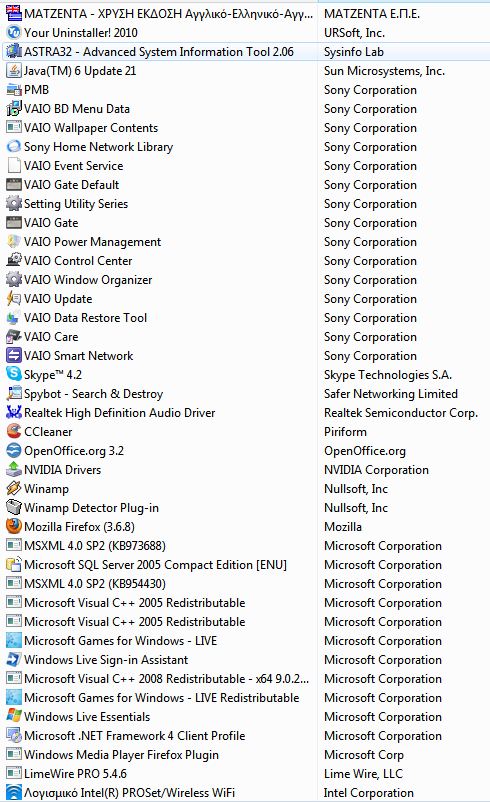
Could you post a screen capture of all the Vaio_software (including version #) seen in your Control Panel > Programs like I did for my F11_OEM state to show before vs. after clean install with OEM recovery discs? Tip: use the Snipping Tool and sort by Publisher.
![[IMG]](images/storyImages/Vaio_Software_Joe_Bleau_OEM_Home.jpg)
-
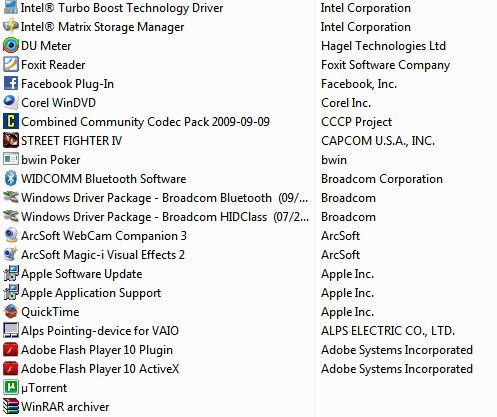
This is what i have now and 66 processes with 45sec boot time.
Can you tell me which of these ( Sony Vaio Bloats ) it's safe to delete? In order not to make a clean install. ( But likely i do, because i want to put faster hard disk )
Also, it's safe to delete the intel turbo boost technology driver? -
Thanks for the additional info.
Could you explain this, did you do both? "clean install from your guide and from Win7 disc from Microsoft".
My OEM HDD Samsung 5400 showed as Gen 1 but when I swapped it for the Seagate 7200, it showed as Gen 2.
That Samsung is now in my ODD bay, running as my secondary drive & still shows as a Gen 1. Note that my slower Samsung shows better results than your normally faster Seagate 7200.4 and that's in the ODD bay!
![[IMG]](images/storyImages/Intel_Rapid_Storage_Technology_Samsung_ODD_Bay.jpg)
![[IMG]](images/storyImages/HDD_ODD_Bay_Samsung_500GB_HD_Tune.jpg)
Anyway those drives are slower than Gen 2. Gen 1 is 150 MB/s, much faster than your drive. The real test would be to try with an other fast drive to see if it shows as Gen 2.
What is strange & more preoccupying is why is your drive much slower than mine since they are both identical? And you have + 2 GB memory & the faster i7-740QM vs my 720QM.
You could try:
- Go to your esupport page & download latest Intel chip software & BIOS if any.
- Download latest HD Tune
- Run test several times
- How much free space do you have on your drive?
An other strange thing is that your HD Tune transfer speed graph is flat before falling at the end. Usually that means that something is choking the drive & impeding it's maximum performance like in an external enclosure with a slower USB 2.0 interface for example.
The curves on my HD Tune benchmarks are normal for a HDD: beginning high & falling gradually as the test progress.
You think that your F may be defective, I suspect that it's either your settings or your HDD. -
Sometimes firefox crashes ( not responding ). I wait 3,4 seconds and its come to normal. Why this happen?
Most of the time i use the power saver mode, to reduce the temperature. -
Ran Everest CPU test at the same time as Furmark Stability Test at custom 1200x900. Stayed remarkably cool for 20 minutes.
![[IMG]](images/storyImages/4845402720_ee61fb3f25.jpg)
Thanks, Joe, for getting me going on this.
Official Sony VAIO F Series i5/i7 owners thread *Part 3*
Discussion in 'VAIO / Sony Owners' Lounge Forum' started by eagle17, Jan 7, 2010.


![[IMG]](images/storyImages/sata1-900.png)