Problems? See this thread at archive.org.
My screen, also premium EU, has the same plus a dark line at the bottom. I haven't done anything about it, just learned to live with it.
On an other issue, the black leather-like pad started forming "bubbles" underneath at the left corner.
-
I've asked this question in the what notebook should I buy section, but I got redirected to this portion of the forum.
I am looking to buy a new laptop. I want a powerful laptop that is great for the price I am purchasing it for. I have always enjoyed Vaio, therefore I am looking at the F series, specifically this one
Sony - VAIO Laptop / Intel® Core i7 Processor / 16.4" Display / 6GB Memory / 640GB Hard Drive - Black - VPCF126FM/B
Is this a good price for the F12? How does this laptop compare to the big name laptops out in the market such as the Macbook Pro, G73, and Studio 16. Thank you for all the help. -
The F is cooler, faster, and with options cheaper.
-
It reflects a difference in block size setting, not a problem with HD Tune. HD Tune defaults the block size to 64k. The sequential read & write speeds calculated by CrystalDiskMark and AS SSD are essentially like testing with a very large block size. If you set the block size in HD Tune to the max of 8MB, you'll get numbers comparable to the sequential read speeds reported by other tools.
But I could really care less about sequential read speed. It just isn't representative of any real world usage I subject my drive to. I am most interested in random read & write performance with 4k-64k blocks. Try comparing the 4k results in Crystal or AD SSD between normal and safe modes. I'll bet you see a large difference. Or make a plots like Willscary did here in both normal and safe modes. -
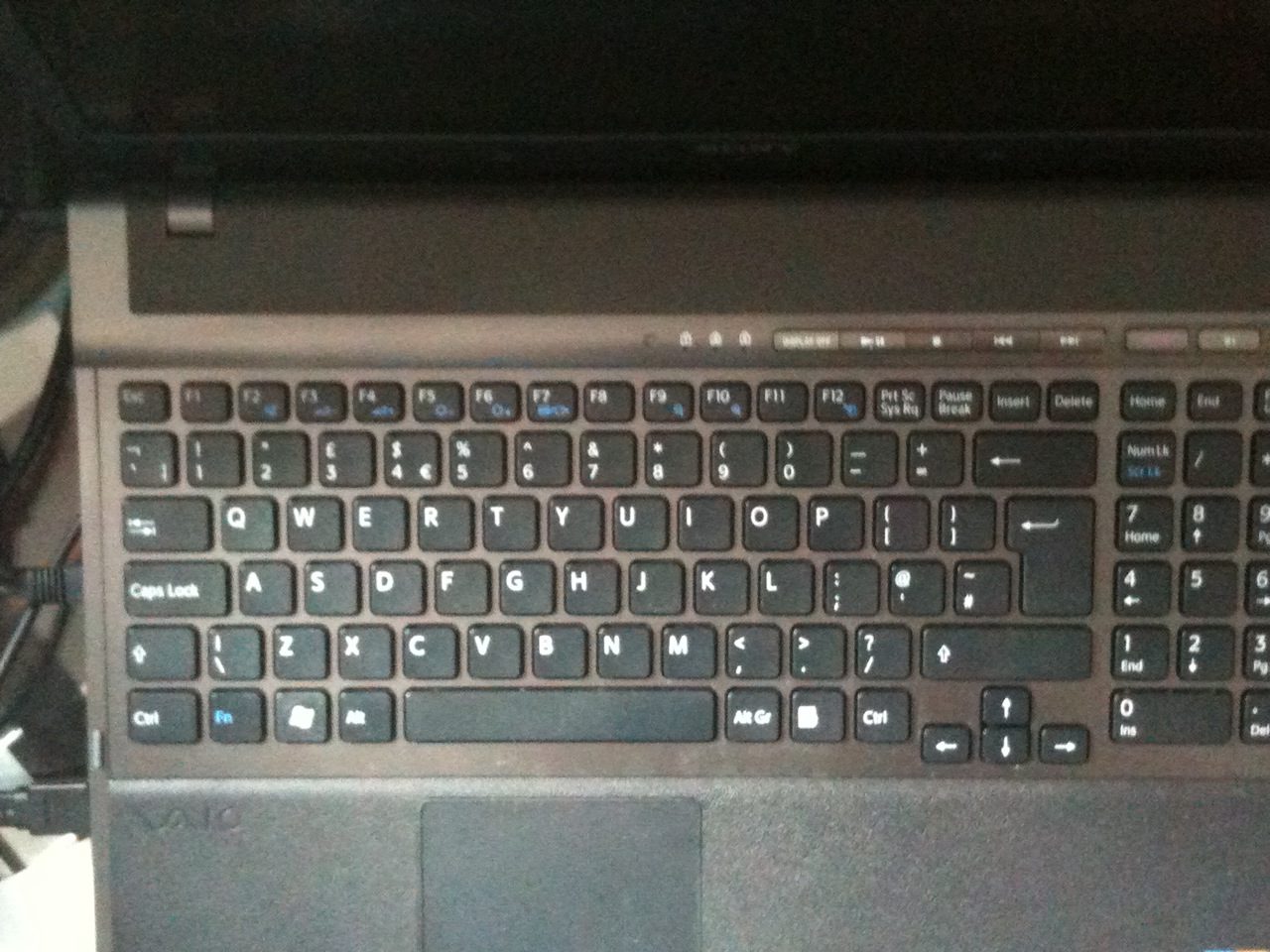
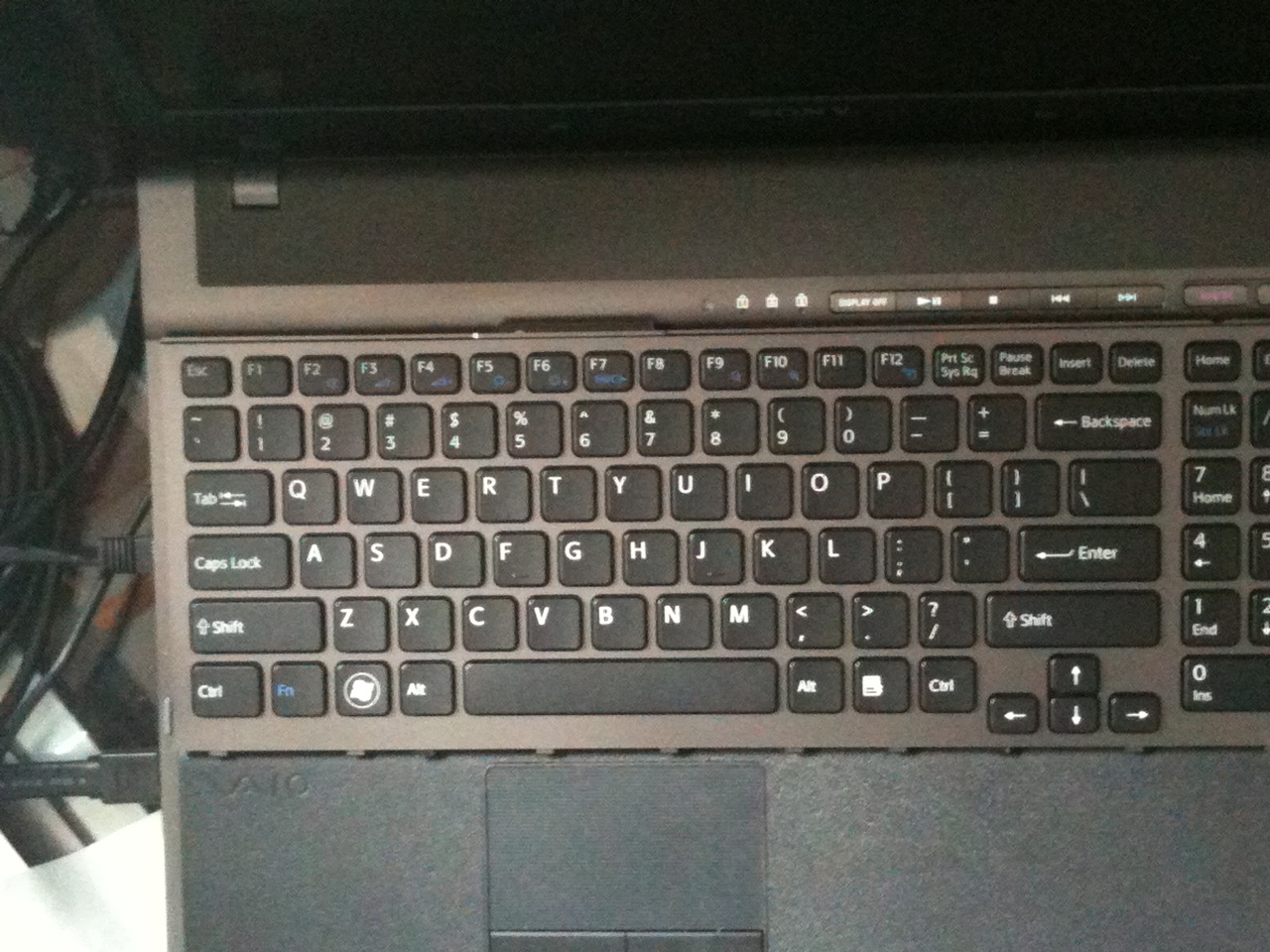
Attached are images comparing the UK with US keyboards, respectively, as promised.
I have not included the keypads as they are identical.
The UK enter key is far larger than the US one, more like a UK desktop keyboard. There are differences with shift-1 and shift-2 (3: £ and $) as well as a geographically relocated key ~#, which is next to the enter key on the UK keyboard. There may be more differences to point out.
I am unclear as to how a EU F11 with a retrofitted backlit US keyboard will behave given the above differences.There are several EU owners who have done just this , perhaps they could be so kind as to enlighten me
-
To no End, thanks a lot for the detailed autoCAD report. As I mentioned, I am a retired architect so I really don't do that much autoCAD work. And when I do, it's only 2d work. I sometimes load the 3d files done by others to look at various aspects of a building but I don't do any 3d work myself. In fact I don't do any real "work" any more but only use it to help family and friends with their projects. AutoCAD wasn't even around and computers weren't used very much for about the first half of my architectural career!
-
The keyboard is just a random PS/2 part, the european and US ones are very very likely interchangeable with no problem.
-
Search this Thread with: VPCF126FM
![[IMG]](images/storyImages/Search_MelodyMaster_Ani.gif)
Or check this post: VAIO_F12 VPCF126FM/B Best Buy or Bad Deal?
"How does this laptop compare to the big name laptops out in the market" - Well if I thought that an other brand/model would have been better for my needs then I would have gotten that one.
-
guys i finally went to the sony store, and saw the laptop, was impressed, but is this laptop as big as dell xps and also is there any update by sony in regards to the throttling when on charge.
-
You did not reply to my question about symbols being translucent or not on the UK keyboard.
They are different keyboards with different layouts so your options are:
1- Type like an American: How to change your keyboard layout and Windows 7 - Keyboard Layout - Change
and change to US English layout if the F does not automatically recognize the different layout which is very well possible.
2- If the symbols on the keys are translucent, pop off UK keys that are the same size & replace corresponding positioned key on US keyboard. Then use the free KeyTweak ( how-to) to remap the US layout to your custom layout as some keys cannot be swapped as not being the same size. From A key fell off the laptop keyboard. Fixing the problem:
![[IMG]](images/storyImages/keyboard-key-repair-2.jpg)
3- Don't swap keys but still use use KeyTweak to remap a few mostly used UK keys. Put sticker over wrong symbols or memorize the differences.
5- Crack open both keyboards to see if it's possible to swap LED grid, if any. Is it part of the keyboard printed circuit or attached under the top part, under the keys themselves?
4- Forgetaboutit & keep your unlit UK keyboard.
*****
I did not see this for a while: "This user is on your Ignore List": omaroo.
Don't feed the troll!
***** -
just curious guys. when your f series is under load does your left side of the laptop turn hot?
-
Define hot. Define "left side": are you talking about the palm rest or near the exhaust grid, etc?
If you mean the left palm rest: "The left palm rest achieved hot by even my subjective standard: Palm Rest Contact 45°C/113.4°F" reported by this Envy_17 user after 35 minutes of heavy use then: no, the F left side is not hot, it's cool as everything is relative.
-
well i would not know the exact temperature. but you can most definitely tell that its hot because there is a night and day difference between the WHOLE left side of the keyboard including the palm rest compared to the right side thats of course when under load. i was hoping to see if a laptop cooler would help but having our laptop is already superb at dealing with heat its kind of hard finding one cause the one i bought is absolutely useless...
but yah joe do you experience what im experiencing? -
"...the one i bought is absolutely useless..." - So why not name the laptop cooler you consider not good?
Willscary likes his Cooler Master U2 Laptop Cooler w/ photos w/ his F on it. He explained in other posts that the big plus of his model is that the fans are easily user movable so he located them where they are the most efficient to cool his Vaio_F11.
![[IMG]](images/storyImages/Cool_Master-left_By_Willscary_C2.jpg)
It's normal that the F's left side gets warmer when the notebook is under heavy load but it's not uncomfortable hot contrary to several other brands of notebooks with i7 CPU's.
On this Vaio_F motherboard photo, you can see that the main heat generators (CPU, GPU & PM55 chip) & cooling unit are top left side so one may expect that that part would be hotter under heavy load. Note that this is the underside of the mobo in relation to the user (everything is relative) so the CPU is more or less under the B key:
![[IMG]](images/storyImages/F11-MoBo-Bottom-3_by_jacksjw.jpg)
Unless we post actual surface temperature measurements readings we are in total subjective territory. What is hot for you may be not hot for me.
Is my F hotter to the touch than a less powerful 2 core laptop? Yes. Is my F cooler to the touch than other quad i7 laptops that I saw: yes. Is the F actual hardware temperatures under stress data lower than any other i7 laptops: yes to my knowledge so far.
Why not tape a body temperature thermometer or something on the spots you consider hot & report back?
Notebookcheck.net measures the temperatures & post data in their reviews. For example note that all 3 are hotter on the left side (top view):
![[IMG]](images/storyImages/Temperature_F11_notebookcheck.jpg)
![[IMG]](images/storyImages/Temperature_Macbook_17_notebookcheck.jpg)
![[IMG]](images/storyImages/Temperature_Envy_15_notebookcheck.jpg)
So one may conclude that the slim aluminum bodies of the MacBook_Pro 17' and the HP_Envy_15" and 17" look cool but they are not cool to the touch or when looking at the internal components operating temperatures, especially under load as reported several times in this thread.
-
Hey i was wondering if there were any new updates to this particular problem. I just got my F1290x today and i get that same ringing sound at random intervals. The fan is pretty loud and i can deal with that, but the ringing is annoying and I would like to get it fixed without having to send back to Sony. Does anyone have any information about this?
-
thanks joe appreciate it. i remember reading through those posts a while back in all different orders but since its all collecting in one post it worked out great.
oh yah i bought the Zalman NC3000s it has one big 220mm fan but it just isnt doing any justice. maybe ill try the one willscary is using. -
I know this is a random topic but about the loud high pitched WHEEEEE noise you get when having a USB device plugged in...
Have any of you guys noticed that same exact noise when you go to shut down your laptop (in Windows of course).. without anything plugged into USB?
I'm rather convinced that the noise has something to do with the SNC (SNY5001) chip.
Anyway, I've never used a laptop cooler and my machine (even with hours of TrackMania or Portal or Dofus or Crysis or Half Life 2 play) has never been too hot to handle.
Mine has a hot spot on the right side of the palm rest about an inch away, but even that isn't anywhere near 113 degrees.
OH THAT'S WEIRD...
Why does notebookcheck say the i7 15" macbook pro runs so much cooler than the 17"?!
http://www.notebookcheck.net/Review-Apple-MacBook-Pro-17-inch-2010-04-Notebook.32424.0.html
http://www.notebookcheck.net/Review-Apple-MacBook-Pro-17-inch-2010-04-Notebook.32424.0.html -
See VAIO_F Series Fan: Replacing Unit for Ever
Could you post a recording? For example, I made this Vaio_F Series Whining, High Pitch, Morse Code Fix video. The mic was directly on the keyboard & set to maximum sensitivity. If you can ear that as loud from a normal working position then send your unit for repair or return it for refund.
Video: Cooler Master Notepal U2 Notebook Cooler Review Note that the Notepal version is for smaller laptops 14" or less. The regular U2 fits the F as shown in Willscary's photos. -
I doubt the noise has anything to do with the mic since it's present when the speakers are off lol.
-
Doubt if you wish but it worked on my F. The same workaround found on the Envy_17 owner's thread with a slight variation compared to my video.
It has nothing to do with the speakers. Some say it's a i7 CPU resonance quirk at low voltage hence why the quirk is found on different brands of laptops. The fix is playing with the mobo's circuits.
I'm not talking about your USB thing. BTW I remember seeing a Realtek update in the esupport page about a fix for noise related to USB port usage. Check esupport for your specific model. -
Silly me , I thought you were going to say you actually bought one
-
You have been omarooed!
"...but is this laptop as big as dell_xps"
-
Sorry about the PQ of the images.They were done in the daytime but my Iphone 3gs has a shi-ite camera, I will need to dig up a digital camera but can't say when I will get round to doing that.
I have not removed the keyboard or any keys which is why I haven't been able to answer your question as yet.
-
You don't own a flashlight?
-
Hello!
I bought my VPCF11NFX not even 1 month ago in USA from newegg. Everything is working fine but the touchpad and the left mouse button on the laptop. Sometimes the left button completely stops working and i can't even click with tapping on the touchpad. But sometimes the left button is clicking like mad, and i can't stop it. The funny thing is, if I attach an USB mouse, the left button on the laptop still isn't working, but the USB mouse button is working just fine.
I already tried to disable apoint.exe but it doesn't help. I think it's not a hardware problem, because the laptop is new and if I push the button I can clearly hear the "click" sound. Is anyone else experiencing the same problem? How could I solve it?
Thank you in advance!
Edit: OK I'm starting to think that it IS a hardware problem, because I tried a linux Live CD and the left button on the laptop didn't work, but the USB mouse did. Still I don't know why even tapping on the touchpad isn't working
-
Cooler Master U2 laptop cooler with 2 removable fans can be found at Amazon.com here: Amazon.com: Cooler Master Notepal U2 Notebook Cooler with Two Fans R9-NBC-8PBK-GP: Electronics
I moved the fans as low as I could withouth them hitting the table (because then they buzz just a touch) and moved the F11 up so that it did NOT sit on the lower rubber pad. This put the two fans directly under the two intakes at the bottom of the F11 and lowers the temps during 20 minute stress test benchmarks by an average of 5C. It also keeps the speed of the F11 fans down and overall makes for a cooler and quieter setup. Oh, it also raises the F11 to an angle which I think is more comfortable to type on.
![[IMG]](images/storyImages/cooler-right.jpg)
![[IMG]](images/storyImages/Cooler-front.jpg)
![[IMG]](images/storyImages/Cooler-left.jpg)
-
anyone tell me any info on the throttling and any update. I prob get in next week, just waiting for VAT registration
-
The laptop should come with all updates. It's impossible for us to tell you which updates to install without first knowing what's on the laptop. That's impossible until you actually buy one.
As for throttling on battery- no, there is no new information on that because it is the correct behavior for the laptop and was completely intentional. -
deleted!!!!
-
Thanks much for posting the photos. I'd wager that most folks thought they were just fine for intended purpose, and I really appreciate you taking the time to upload them. Personally I don't intend to frame them, but I would like that UK "Enter" key on my laptop.
-
Ya, my comment was a bit over the top. It's mainly the left side of the UK keyboard pic that bugs me.
The tip about the ambient light is still valid.
-
THE F - SERIES IS DESIGNED TO ONLY USE SATA1 with that HDD. They do not have an answer to slowdown.
My Vaio will be exchanged to a new one by my reseller.
Funny to say that a 2 318,38 USD notebook will be send back and the new model will probably have the same error and also might need to be send back. This mean that they will send me 3 Vaio F12Z when I only paid for one.
xD.
They will only have Used Vaios left in STOCK.
-
Kudos Raincity. Sort of my sentiments too, if I do swap keyboards I know I will miss being able to slap the enter key and get away with it- and this would probably be my sole reason for swapping back. On the downside, the UK left shift key is smaller but I have learnt to live with it, LOL.
-
This is ridiculous.
You are driving everybody else's OEM prices up as someone will pay at the end.
As I pointed out repeatedly, your HDD cannot exceed SATA gen 1 rates anyway.
Put an SSD in your F and as all other F owners with one reported, it will show Gen 2.
Your Safe mode benchmarks proves that the machine is fine and capable of high transfer speeds with that HDD & that it's the normal OS state that is messed up with third party software running in the background or unwanted services or bad settings or bad drivers.
Maybe the notebook gods will punish you with a replacement unit with a nice red pixel in the middle or a whistling fan.
Hopefully you will run HD Tune on your unit out-of-the-box before any tweaking or cr@p installing of any kind. -
I agree. Perhaps the HDD manufacturer only allows the HDD to work in SATA I mode because it is not capable of getting anywhere near the 150MB/second speeds that SATA I is capable of. There is NOTHING wrong with your F11. You will not see a huge speed increase...well, I suppose perhaps Sony will look at your return and decide that they should upgrade your HDD to their fastest available 7200RPM HDD, in which case you MAY see a SLIGHT improvement of 10-20%.
Why purchase a product and then complain when there is no problem? In safe mode, MANY processes are shut down. If one of those processes has been corrupted in some way (settings changed, registry key changed, certain path deleted, etc.), then your computer will run faster in safe mode. This is not the fault of Sony when you wipe out the hard drive and do a clean install...which I also did. I guess I would equate this to purchasing a high end sports car and then changing the tires to all-season radials. When you do this, you have no right to return the car simply because it now performs slower in a slolom test. Of course, the tire change you made affected the cars ability to grip the road and can not be expected to perform as well as the high performance race tires that the car came with. In your case, it was more like using an inferior fuel, or some old fuel with contaminents in it. the car can't generate the same horsepower as it did with fresh fuel in it, and your computer cannot perform the same with some corrupted software in it.
If you bought a Porshe, do not expect a Lexus. If you bought a vehicle with a 4 cylinder motor, do not expect it to perform like a supercharged V-8. If you buy a computer with a standard hard drive, then wipe out the OS and reinstall your own OS with your own settings, do not expect it to be as fast as those who have purchased computers with faster hard drives or those of us who have purchased aftermarket HDDs or SSDs.
You are returning a laptop where the only flaw is that you performed a clean install and perhaps created some sort of setting change that resulted in a 10% or so loss in hard drive performance. All hardware is working as correctly as it can given the state of the newly installed software.
Perhaps you should perform another clean install first, then see how the HDD works.
No...perhaps I should return the 500GB HDD that I bought for $50 because it no longer works. Who cares if I accidentally dropped it while it was reading a file? It should work, and it doesn't. It is not my fault that the interior of my HDD was adversely modified by gravity and a sudden stop, evn though I was the one who caused it to move off of the table and onto the chair. -
Can anyone compare that display vs vaio premium (matte) displays?
Attached Files:
-
-
6 bit color is very poor. What monitor is this?
-
Sorry, but Sony and the reseller do not want to just change the HDD, they want and recommended an exchange of the laptop or money back. I told them that I only wanted a new HDD.
The drive peforms as Joes drive in a stationary PC, and this slowdown and SATA1 exists only on F-series.
I have performed ca 10 different installs in combination of different drivers, same result. It only works better in benchmark in stationary PC (same install), I will install another OS and try again to install XP too.
I did perform a HD tune test when the Vaio was finished with intro.
The drive is sold separate as a Sata2 disk, and by tests this discs performs better in Normal Mode when function as specified. However, people that got their HDD replaced by Sony has showed as Sata2.
The Seagate Momentus 500GB ST9500420AS HDD cost 95,46 USD in Sweden at minimum.
I AM STUBBORN AS I NEED TO BE IN WORK.
-
TN is only capable to show 6 bit, but with dithering is can go higher in dynamic range. However a 8 bit TN is NOT as good as 8 bit PVA or 8 bit IPS in dynamic range.
-
My Samsung 5400 rpm in the F's ODD bay works in SATA Gen 1 @ the same read average speed as your 7200 rpm HDD.
-
Thats the problem, the Seagate drive was released 2008, but when was yours released?
SATA1 drives peformance slower in Normal Mode in F-series laptops, and why did the Sony Design Team choose Sata1 Tech in a High-End Laptop.
The support recommended that I would complain at the Consumer Board in Sweden, because the guy did also not like this performance drop. He also said that Sony Design Team is a closed group that decides everything an no one can change their mind. I ask to contact them but they are "uncontactable" by support or consumer.
-
I'm going to be the first to admit that I did not read your entire post. You're operating off of imcomplete understanding of the complaint though.
Of course there is a problem. Joe Bleau's HDD perferms perfectly fine in normal mode. If EVERY ST9500420AS, performed the same way in the VAIO, then that would be a different story. No one here has found the explanation for why JB's functions optimally, and ours do not.
A "Clean Install" isn't all you make it out to be. Since you can purchase a "Fresh Install" from SONY, how is it different than doing it yourself? Let me tell you. You can do a clean install from OEM discs simplly by doing a Complete System restore and then selecting the option to NOT include SONY Value Added Software. Is the Fresh Install a process that reaches the same end, but does it throught a super secret, highly proprietary process? Most likely not. If it were, then why wouldn't a Clean Install void the warranty? Because it's harmless.
The assumption that it's the Clean Install that could be contributing to problem is not supported by my troublehsooting. I ran tests immediately after a Clean Install and also immediately after a full factory restoration, bloatware and all. The test results were the exact same. Were they to be different, then a Clean Install should void the warranty as it causes the machine to behave in a way contrary to how it was intended. It does not.
So... this being said... SOMEBODY PLEASE TELL ME WHAT THIRD PARTY PROGRAM IS THE CULPRIT! What is happening between safe mode and normal mode on a full factory oem installation that is causing the issue?
Shame on both you and Joe Bleau for criticizing lundtrom.emil for his desire to have his HDD perform in the same way as Joe Bleau's. Are you criticizing me too? I want mine to avg 83MB/s, NOT 73MB/s. lundstrom.emil is NOT complaining that he's not getting lighting fast SATA II speeds. The fact that his and mine both show SATA I is a consistency among the problem that is not duplicated in Joe Bleau's HDD performance.
Let the man get his laptop replaced. It's not going to drive up your OEM costs. My SSD shows similar performance drops between safe and normal modes - immediately after a factory restoration. Simply replacing his HDD will neither isolate the issue, nor solve it. Better troubleshooting might. -
Thanks for replying, but my issue is NOT the constant high-pitched noise caused by the mic problem. I am experiencing a ringing noise at random time intervals that can be heard coming out of the fan port. The noise lasts about 2 seconds at a time and then will stop and happen again every 10-30 seconds or so. it's definitely not as loud as the mic sound but it is sure annoying coming from a brand new laptop. Someone else mentioned they had the same problem and they found it was happening when the fan was changing speeds. I have not been able to find any other information on this issue. Does anyone else have this problem or know anything about it? I will try to make a sound recording tonight so people can understand what i'm talking about.
-
Thank anseio, where I lack of words and understanding you understand me and makes me understood.
@Joe: The first disc is being uploaded, and the Vaio will be installed with a free copy of Server 2008 Standard.
-
I'm having the same problem. The sound is not loud but is very noticeable in a quiet room. I've been considering exchanging it for a different one.
-
Yes I understand. Did you read the VAIO_F Series Fan: Replacing Unit for Ever?
Again: can you post a recording?
BTW it's not a mic problem, it's a whining noise fixed via a mic tweaking workaround. -
You are absolutely right, everybody should have an F working as good as mine!
How much is the shipping back & forth to Costa Rica?
-
Thanks for posting the link. This problem isn't enough of a problem to give up the laptop, so I guess I'll learn to live with it. I'm pretty sure it's the fan - I looked around at that mic tweaking workaround, shut down the mike completely and the noise remained. Was there something else I missed?
-
Listen to this device & Playback through this device: Digital Output. See
Vaio_F Series Whining, High Pitch, Morse Code Fix
If your problem is intermittent short whistling by the fan as it changes rpm (resonance @ certain point in the gamut), then is no fix except that I noticed that mine is doing it a lot less over time, kinda went through a break-in period.
![[IMG]](images/storyImages/Sleep_Mic_Listen_Fix_Enable.jpg)
-
don't think that it hasn't crossed my mind to ship you a flash drive with an image of my super clean install for you to try with your HDD and see what the test results are. That would be definitive, eh?
Official Sony VAIO F Series i5/i7 owners thread *Part 3*
Discussion in 'VAIO / Sony Owners' Lounge Forum' started by eagle17, Jan 7, 2010.