Problems? See this thread at archive.org.
Have not used but might be interesting and helpful to some.
Do It Again - Free, simple program to automate tasks by recording and playing back macros
-
fishon, i want to play the game, not uninstall it.
-
On my Canadian F12 with the premium display and 330m, updating to the latest 64 bit 260.89 drivers gave me multiple 'blue screens'. This includes when clicking the advanced personalization settings, starting geometer's sketch pad and possibly one more occasion which I don't remember exactly. Sometimes the aero theme dies out and it just uses the windows basic theme randomly. Most, if not all, of these problems occur after my laptop has hibernated.
The blue screens occurred with the 'clean install' option in the 260 drivers AND also using driver sweeper and ccleaner in safe mode. Both of which I uninstalled the drivers in the control panel first.
This is just a heads up for other F12 and 330m users. You may not get blue screens, but if you do the drivers MAY be why. Unless it's coincidence with something else. I have went back to the 258.96 drivers, and similar to the 3 months before updating to the 260 drivers, I did not have any problems yet. -
Maybe you want to follow this thread.
Blue Screen crash with FM2011 Demo -
Try 260.89? They're the latest WHQL now + NVIDIA recommend. And I assume you chose Windows 7 right?
-
its not get blue screen, its just a black screen and is just blank when i try to play the game.
-
Hi all--new F13 series owner here. Overall very happy with the computer, but one question. I saw the Joe Bleau color profile post that is linked to in the main tweeks post, but when I click on his set of 9 profiles, I get a broken link and am unable to download them. I already noticed significant improvement from the default by using a couple of the other profiles, but was wondering whether anyone still had access to this set of profiles as i'd like to try them out to try and figure out what's best for my screen, so if anyone knows how to still access them and could post that info here (or PM me) I'd really appreciate it.
Thanks for all the info in this thread--it was certainly useful in helping me pull the trigger on my final decision to go with the F series, and I'm not disappointed (other than the default screen, which is disappointment I was prepared for, but color profiles definitely have made a big difference already). -
This is clearly related to the game. I suggest you search the Football-Manager-2011-Bugs-Forum for answers.
-
Black is the new Blue.
You probably need to install the patch that's provided in Fishon's link. -
@danielh97
The latest WHQL and official release 260.89 drivers were the one I tried. I'm positive I chose Windows 7 64-bit. Hopefully, I didn't click the wrong OS twice causing it to mess up twice. Are there any significant improvements to 260.89 from 258.96?
Anyways, I'm not 100% it's the graphics drivers. It could be my memory dying or something (though it's only been 3 and a half months). The blue screen says something about physical memory dump, and then it starts counting. Theres a lot of text.
Edit: I got the blue screen again with the 258.96 drivers, so it might not be the drivers. This time it happened right after I hit restart... any ideas what's causing it? -
After a clean install on my f11 there is a laggish movement on minimization of folders or when you forcefully move the windows:
Imageshack - 62251047.png
I think it's a gpu's issue but after installing the latest verde drivers the problem wasnt fixed ..
Ive also installed the latest bios update which is supposed to fix temperature fan related problems ..
Before clean install i didnt have any gpu issues .. Any ideas ? -
Won't help much, that's a patch for FM 2010 and he's playing the demo of FM 2011. The game will be released the fifth of november. On the day of release SI games will release a patch. But again I think omaroo is on the wrong forum and needs to search the forum I suggested.
-
On sale again. Notepal U2 Notebook Cooler for $17 with free shipping from Amazon
Amazon.com: Cooler Master Notepal U2 Notebook Cooler with Two Fans R9-NBC-8PBK-GP: Electronics: Reviews, Prices & more -
Review released on10/18.
http://reviews.cnet.co.uk/laptops/sony-vaio-f-series-vpcf12m0eb-review-50001180/ -
Sony Offers New Gaming Headsets with Virtual Phones Technology compatible with the F.
GDN: Sony Offers New Gaming Headsets with Virtual Phones Technology -
I think... I think... I need to get these now. If only the surround one was $80. I think $199 is a bit pricy considering you can get a pair of jays IEM's for that price. They look so cool though. Argh so hard to resist!
Does it die during windows startup? Some system files might have become corrupted. If you have a windows 7 disk you should be able to fix the problem by repairing your OS. -
looks like the keyboard and touchpad are busted on my F13. It was working fine last night. Put the computer to sleep. woke it up this morning and the touchpad was dead, but the keyboard was working. I rebooted with the keyboard. Once windows boots up, both the keyboard and touchpad are dead. Device manager hows the keyboard as functioning, and the touchpad shows as not functioning. Keyboard works fine in the bios.
I put the factory hard drive back in to eliminate a software issue, but same thing. booting with F10 also doesn't work.
external keyboard and mouse works fine though.
Am I SOL? It only lasted a week. Hopefully my other F13 doesn't show the problem. It sucks that I'll have to send it back in. -
anyone with a Notepal U2 Notebook Cooler, does it fit perfectly on the f series and is it gd. I was thinking about zalman.
-
So, here I am trying to convert a bluray .m2ts file and compress it to a .mkv file, so I can help Omaroonie figure out his playback problem, when get multiple errors from DVDFab stating that the NVIDIA CUDA driver is causing crashes, which it sure was. So, I upgraded from 260.63 to 260.89 and everything is working fine. Getting a sustained 14fps on the conversion, and for once my CPU is finally getting a workout.

-
I tried to PM you but I think you're too new because I couldn't. There's a word you have to insert between www. and .org to fix the link. If you go here, you can figure out what that word is:
Vaio_F Series Monitor Calibration and Users Created Profiles Roundup -
If the keyboard is working in the BIOS, it sounds like a software problem. Have you tried reinstalling the drivers? I know you said you tried the orig HDD already but can you disconnect all peripherals, install the original HDD and do a factory restore? Did you do anything like run tools before this happened - like a registry cleaner or such? Or attach any new devices?
-
I just received my F13 about a week ago, and performance-wise, it's working fine. Before the F13, I had an F12 for about a week before I returned it because of the whining noise (I asked Sony, they said it was fixed long ago in the F11 model.). I am now getting the same problem with the F1390S (Canadian model). Once again, I asked if the problem was fixed prior to purchasing the laptop.
I am aware of the temporary fix by adjusting microphone settings, but it doesn't seem to be effective anymore. I am now thinking of returning the laptop once again.
Any other F13 owners (Canadian?) experiencing the whining noise? This is the second laptop in a row that emits a constant, ear-busting high-pitched sound. Can't just be bad luck anymore.
-
guys pls i need help for that problem
http://img220.imageshack.us/img220/5473/biosgncelleme.jpg -
try booting from a usb (dos or similar) and restore bios from there
thats the "standard" way of downgrading
my F13 will arrive tomorrow so I cant test for you sorry
Good Luck
im kind of busy now so try looking for AFUDOS -
I'd like to know if the Canadian version comes with 1) USB 3.0 ports and 2) a Backlit keyboard
someone please confirm, thanks -
yes to both. you may have to configure it with the back-lit KB (you do in the US) but it is available in Canada because user xingren says he/she has it and has posted pics of the USB.
-
There's no option to choose to the backlit keyboard on the Canadian site. The US site states "No LED Backlit Keyboard" ... ??? Just saw the pics by xingren, USB3 is there, looks like sony needs a new webmaster. Maybe ordering on the phone is different ?
-
On the US site, the option is on the second page of configuration, that's why it says "No LED Backlit Keyboard" because that is the default until you configure it differently. See if it's the same in Canada. Otherwise, I would call them.
Edit: On the Canada site, it says in the Overview page that it has a backlit keyboard so maybe it comes by default on all Canadian models. You could call them to confirm. -
Thanks so much--I was able to grab them off that link for some reason.
-
Did you get this resolved? If you are looking for resources this appears to be a good one.
BIOS Updates and upgrades, Motherboard identification and more... - Wim's BIOS Page -
I used Freecorder on my Dell (haven't tried it on my Vaio yet) and it worked great. Very good recording quality - although I don't think I'm as picky about sound as some people on here But I would say to definitely try that one out. I haven't tried any others since I was happy with that so didn't look any further.
-
Back lite keyboard is standard on Canadian version. So is USB3.
-
I have not noticed any whining yet. Now my room is not very quite but I would consider it as normal environment. If I can't hear it in my room, I am happy with it.
-
Yeah, I thought it was a software issue as well. I thought a windows update may have screwed it up. I spent about 3 hours trying various things, and couldn't get it to work in windows.
I found a couple reports of the exact same problem in part 2 of this thread, but didn't see any resolution. -
Hi All,
Having a strange problem with the optical drive on a VPCF11C5E. When I press the button on the side, it doesn't open.
It still reads properly and opens when I use a pin in the small hole. I have tried reinstalling drivers, taking it physically in and out, pressing eject on my computer and checking with Sony to see if there is a firmware for it, all to no avail.
Any ideas or do I have to send it in to be repaired?
Many thanks,
Alex -
Hi guys,
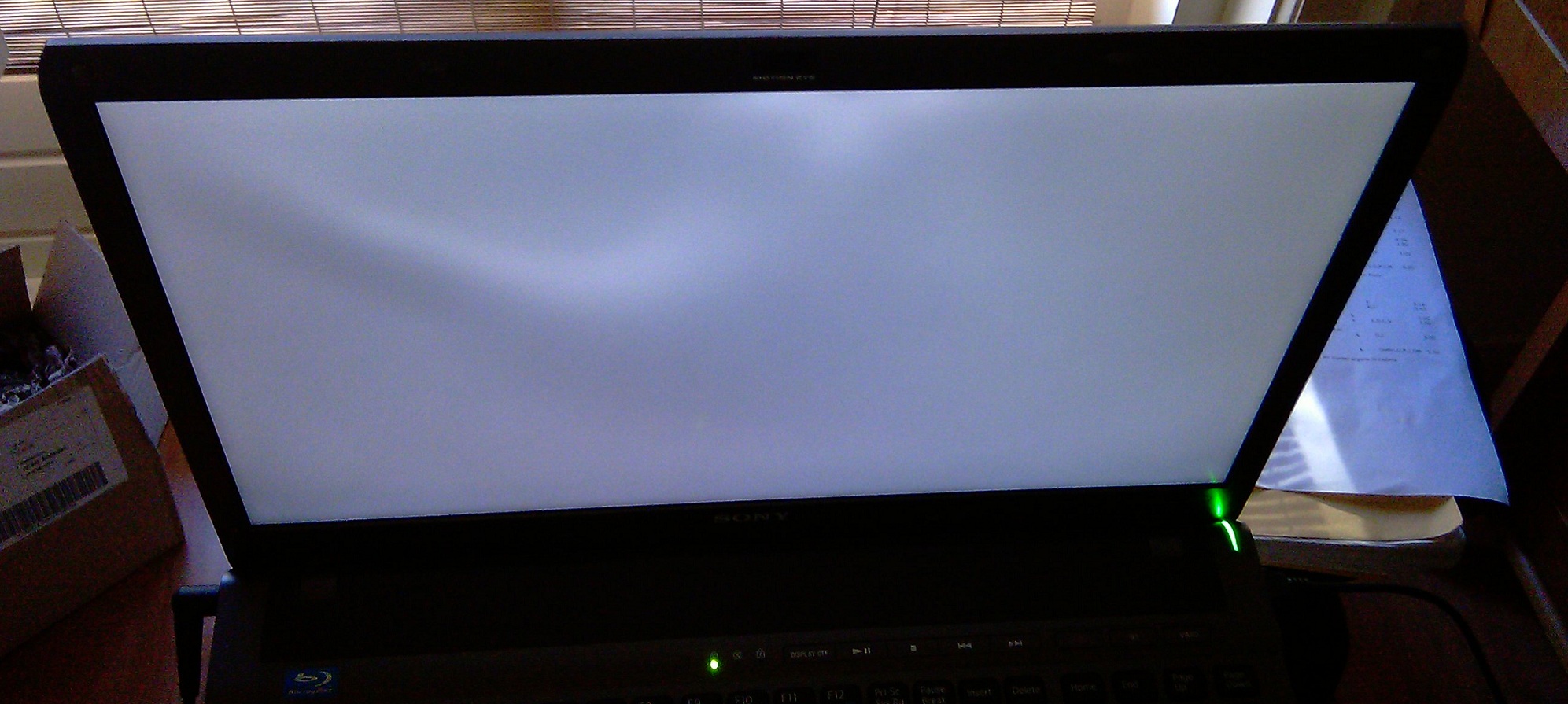
a question for all the guys with the matte HD: how is your backlighting? I just noticed that I have some definitely noticable darker areas when the screen is mostly white.
To show you, I took a picture from an angle to easier see the the problem. It almost feels like the screen isn't as well attached on that point, because if you press on the outside you can see the blot move on the screen.
What do you guys think? I can still return it. Should I return it or get it fixed?Attached Files:
-
-
@sameolg2 You should try opening Window Media Player and at the top in the options drop down menu you'll see an eject disc button and just click that. It should open.
-
Thanks for the tip Jetster. Do you know where I can find the eject button, because I can't see it?
Alex -
Thats normal and its similar to mine. See xbitlabs monitor reviews to get an idea of how common it is. No LCD has totally uniform brightness.
-
Jetser, I found out how to eject, CNTRL+J, but that still doesn't work. Do you or anyone else have any further tips?
Thanks -
Perhaps to remove the bezel and press the external switch manually to see if it works. Not the same as using a pin to access the spring mechanism.
-
Actually, it gets weirder in a good way. I use an external monitor, keyboard and mouse, so I close the laptop to minimize space. I opened it up after doing a bit of gaming and now the lighting is uniform.
-
Hi anseio,
Any ideas where I can find this switch and how it should look like?
Thanks -
Another backlighting-update: I turned off the computer and now it has returned. Apparently it's influenced by temperature.
-
Ctrl + J opens my downloads in FF.
Create a Shortcut or Hotkey to Eject the CD/DVD Drive - How-To Geek -
Exactly. I don't think that there is a built-in Windows Acceleration Key for eject. If the eject context menu on the optical drive doesn't work then it is likely a hardware failure. It might be caused by a jammed CD/DVD which can best be addressed via Anseio's suggestion of inserting a pin.
How to Eject a Stuck DVD/CD Drive | eHow.com -
guys anyone who plays alot of games on the f series, can anyone tell me how to get the games on full screen. As they dont take the full screen.
-
Try pressing Alt + Enter while running the game.
-
Were you to remove the bezel (the black superficial panel that has the eject button on it, there is a little electronic switch underneath that button. My suggestion is to remove the bezel (from the inside), remount the ODD, press the switch and see what happens. If no workie, then I'd say the hardware is malfunctioning. That switch is driver independant. The eject button works the moment the laptop gets power.
-
What games are you playing?
Every one of mine starts at fullscreen:
Star Wars: The Force Unleashed
Prince of Persia: Sands of Time, Warrior Within, The Two Thrones
X-Men Legends II
Fable: The Lost Chapters.
Official Sony VAIO F Series i5/i7 owners thread *Part 5*
Discussion in 'VAIO / Sony Owners' Lounge Forum' started by Willscary, Aug 20, 2010.