Problems? See this thread at archive.org.
Hello!
What is the difference between those two. The S0E is way cheaper in some online store and the only difference I see is it has 6 GB RAM instead of 8 GB (like Z1E has). What kind of display do F13 laptops have? I've read matte and semi-glossy, salesman says glossy... So what's the truth? Are those two good for audio recording (anyone knows how's about latency with these two models)? What about the keyboard, salesman said it's not backlit( ) but I've read somewhere that it is...
Thank you!
-
...Agreed.
-
I could help you a bit: In Europe all S models (S1E/B) have 6 Gb of ram and Premium Vaio DIsplay (Matte Full HD).
-
If you want an f series laptop, i know the european model is matte full HD and american models have glossy screen.
-
Before we had a pretty good discussion on the thread about latency and yes the F does have some. Background processes do spike it. You can buy laptops through an audio company which are designed to minimize http://www.cakewalk.com/PCResource/Buy.aspx?Type=Laptop. External sound card is the way to go. Search the threads for 'latency'.
-
Thank you all. That's what's written about the display here:
16,4" VAIO Display Premium with LED backlight, (Full HD (1920x1080)) Widescreen X-black LCD screen
If you're saying it's matte then I don't know why the salesman said it's glossy. Weird...
About the latency - did you test it with DPC latency program? I really like this F13 laptop, so could those background processes be eliminated? Or are these the crucial ones that are making the latency and cannot be eliminated? If it's the bloatware then it's no problem, I'll remove it.
It's a pitty that these laptops don't have a backlit keyboard. -
Asked same question, everybody's common agreement is European should be matte, even so on the web-site they state glossy, like here Sony VAIO VPCF13Z1E/B - Achat / Vente PC Portable sur LDLC.com SUISSE
Don't know why - could be they didn't update the default values in their db. Though haven't ordered mine, cannot confirm yet. -
Thank you.
I can't find anything about the F series there. Has anyone who has an F13 checked the latency? Can those malignant processes be disabled or are they the crucial ones which HAS to run all the time? Thank you. -
Man someone nearly broke my screen arrrrrr. The laptop does get dirty, but people are putting me of my laptop with all flaws that have been discussed. I am really getting fed up with all this negative impact which is impacting me.
-
I have owned my Sony Vaio F11 laptop for 1 year now and I don't regret buying it. It still impresses me with it's awesome speed and I the only time I can max out all the processing cores is in benchmarking. Early on I did have to send it in to Sony once for service, and they reported that all they did was reinstall the processor. Ever since then it has been great. I was a little annoyed with the slow stock Hard drive, but since I have installed a SSD drive and performed Joe Bleau's clean install I am very, very happy now. I expect this laptop has enough horsepower to keep me happy for a few years before I get the upgrade itch again.
-
Detail these "flaws" that are putting you off. We have only one has been discussed... fan noise.
-
Here's a solution for the fan noise: YouTube - SONY Vaio F Series high-pitched noise
I have a question: is it OK if I format the F13 and then install only the Windows 7 (or) XP and then download the drivers I want and install them? Can it be done this way? -
Yes, it's ok, but you lose the recovery partition that way. A lot of people clean install their laptops by installing Windows this way. If you use the recovery disc method that is popular in this forum, then you won't have activation issues with your copy of Windows.
Drivers for XP are a little more tricky. Most are easily attainable from download sites, but the NVIDIA driver might be more difficult to come by. I have a fix if it is. -
Why wouldn't you just install Windows on drive C and it will format drive C before installing windows itself (just agree to format it)?? I did it simply
-
Next Vaio F Series 3D with a new industrial design revealed, for preorder on Feb 6. An all-glossy monstrum with great specs, I suppose:
![[IMG]](images/storyImages/F_Black_LeftSideOpen_540x378.jpg)
![[IMG]](images/storyImages/galleryimagesF_1.jpg)
SonyStyle URL with details
No eSata and no Express-Card slots. -
I had my i7 Vaio F since July. The fan is still loud. All I do is go on facebook, youtube and Microsoft Word.
What is wrong with my laptop
Seriously, screw Sony.
Should've bought a Dell, my friends dell is super quiet.
Is it too late to return it? -
Why did you buy a desktop replacement laptop if that is all you want to do? A cheap dual core would have met your needs.
Yep, definately sony's fault you bought it!
Obviously! But I'd bet you would have no problem selling/swapping it for something else. -
New model in Europe: VPCF13Z8E/BI
Changes: 640GB 7400rpm drive (whatever it means). Photos also show violet shade of the cover but dont know if thats real. -
Ah, this model brings back the F12 "premium black" finish with the camera rubber palmrest. The lid cover on this model is rather brownish than violet, this picture has always been the same and misleading.
-
Brings back ? It was always in F11/F12/F13Z models.
-
No. The F13Z1 had a unicolor grey finish.
-
In case anyone is interested, J&R is taking preorder for the new 16" F21 model with the sandy bridge i7 cpu. Specs for their VPCF213FX/BI has pretty much all one could ask for. Their other model (VPCF215FX/BI) is exactly the same except having 6GB ram:
Intel Core i7-2630QM 2.00GHz Quad-Core Processor with Turbo® Boost Technology up to 2.90GHz
6MB Smart Cache
4GB DDR3 1333MHz RAM (8GB max.)
640GB 7200RPM SATA Hard Drive
16.0" Widescreen LED Backlit Display (1920 x 1080, 3D Capable, Full HD)
Built-in HD camera powered by Exmor and Microphone
NVIDIA GeForce GT 540M Graphics with 1GB dedicated memory
Blu-Ray Disc ROM Drive
Intel High Definition Audio with Dolby Home Theater Technology
Wi-Fi Intel 802.11 b/g/n WLAN
Bluetooth Integrated Stereo A2DP (2.1 + EDR)
10/100/1000 Gigabit Ethernet LAN
Multimedia Card Reader - MS media slot & SD media slot
Keyboard 103-keys & Electrostatic Touch Pad (Multi-Finger)
Ports: 1 x USB 2.0, 2 x USB 3.0, Headphone Output, Microphone Input, VGA, HDMI, RJ-45 Ethernet
Dimensions: 15.69 (W) x 1.34-1.79 (H) x 10.69 (D) inches
Weight: 6.6 pounds (approximately) -
Negative impact which is impacting you can result in you becoming physically impacted. That's never a good thing. Relax. You have a very loaded (pun intended) laptop for the price. Live with issues, flaws, inferiority, and limitations because all laptops have some. While the F Series certainly is not for everyone, it stands up well to other major manufacturers laptops especially considering price point.
-
Attempt to go back and find within the threads where this was discussed, sorry no expert here. If I remember even Explorer was a big culprit so I would say if you wanted to tweak the system to minimize latency, yes you would have a restricted machine. People have stated the F executes audio recording very well and I do not recall where latency is a recording issue.
Good to hear. -
You are very right Fishon. I think its an amazing machine for the price. No doubt every laptop has its flaws. I got this machine as even though my PC is great, and got it free from my council. The laptop is a beast and was always going to be the main machine. So far im happy, but there are things that annoy me as well as the price I paid.
-
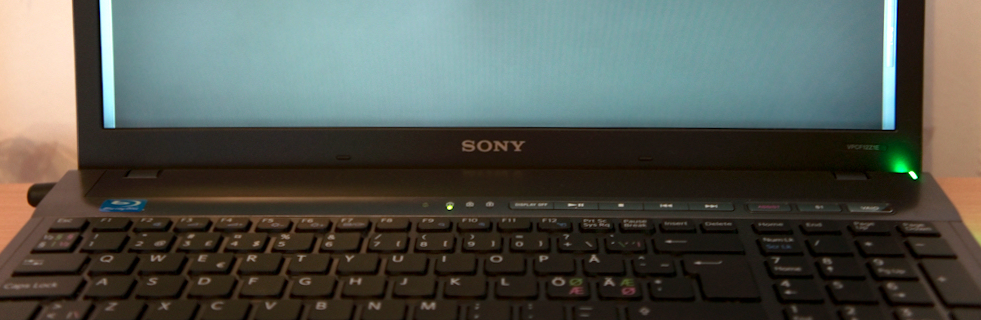
I have new F12 Vaio, and it has dark bar at bottom of the display (see pic, area which normally is covered by start menu). Can be seen best in light gray background. So anyone else have this problem? I think there was some discussion about similar problems. What do you think, does service cure that? It is European Premium display.
Attached Files:
-
-
Hi guys, it is so strange, I just visited official Sony website, it shows that the F series starting with $445, I guess it might be a bug on their website, and it turns out that the screens are out of stock... So strange!
VAIO F Series PC | Sony | SonyStyle USA
I took a screen shot of it, but I don't know how to attach the image, so I just put the link to the website. -
Sounds about right minus the screen.
-
Terhox, I got exactly same issue as you, I get that bar on ALL my videos. Don't know why it happens, I myself was wondering if other members have a similiar issue and you do.
-
HOLY BALLS! I don't believe that. Looks like it is special offer or smth. I don't think that it is virus. I think if you buy it you will get it for less than 500$.
Edit: Just imagine! You got a box. Open it... and what do you see? A real laptop... without a display
-
I just contacted Sony. They said its a website error, and they are out of stock. (They probably removed the purchasing because of this for now.)
-
I think it is because of backlighting problem. But it seems also to be feature, because it is wide spread problem.
-
What is Sony saying when you called for support?
-
Gandalf the Grey thanks for your info found in part three of the thread. There is an app for that: touchfreeze - Project Hosting on Google Code
Disables the Alps pointing device/ touchpad while typing. Seems to work well. -
Should install fresh Windows. And if problem persists then send it to service.
But is that repairable at all? -
Is it good for Win 7 x64? It must be great program because I just turned off touch pad at all before
-
Win7x64 having no issues. A mini on off button like my HP Pavilion would be preferable, but this is good.
-
I have no idea what's going on here but a little advice on how to deal with tech support. For them a fresh Windows install solves all problems. Be prepared for this expected response but get them to push beyond and really get them to help you. Acknowledge a reinstall of Windows will be a viable solution for you, but only after some research by them. Start asking some questions. Do you have any info about anyone else calling about this issue? There must be some suggested solutions before we get into a fresh install of Windows. If they offer up something, even if you believe it won't work, let them do it. Be polite and patient but state you need something better than the fresh install. I've had situations where they worked very hard for me and spend alot of time on an issue. Humanize the process and thank them for looking into this issue. They will return in kind. Finally call back again and speak with someone else. Try off hours or vice versa. Get them to get you to second level tech support and establish a case number. Good luck.
-
You are so right! Except that they pray for not fresh install but for rolling back to factory condition. Like they have no brains to give real advice. Even my marazmatic grand father would easily work there just pasting "we are sorry for...", "Have you done fresh windows install..." "I have just checked on-line that your notebook supports only Windows which was delivered with it..." and of course "use recovery disks to roll back to factory...".
All that makes me thick. -
I have spoken to them, and they have stated its not a problem. Now I am not the only one experiencing this, I am kinda of annoyed with this. I really doubt a fresh install would solve the problem.
-
No, fresh install will not solve it. Because from the very first boot in my Vaio the issue have seen clearly.
-
Found this guy with similar issue and tech replaced the monitor which solved the problem- Samsung. You may have to sent it in.
Grey line down side of Samsung HL67A750. - CNET Samsung Forums -
Fishon do you by any chance get this grey line. I had hoped it wasn't my screen.
-
Nope. It didn't work for me. Program is on however when i type or just push a button I still can move an arrow
-
Sony said there is no problem, screen is great, its just that grey line.
-
Hey guys, just curious if i were to get an F series vaio with a core i5 instead of the i7 how much more battery life will i get from it? Im seriously considering doing an exchange just because i love the F but absolutely cannot accept the horrible battery life im getting with it on an i7, i just cant anymore.
Also, would getting it with an i5 reduce any weight?
PS. Dont tell me its not possible to customize it with an i5. Sonystyle.ca allows for this, but Sonystyle.com doesn't, and im in CA. -
I think Core i5 will reduce your laptop weight by 0,78 grams. The Core i5 has 2 less cores so it should weight much less. LoL man, did you even thought for a sec before posting such q ?
Also, youre in CA so you could just order customised F with Corei5 from the sonystyle.ca. I dont understand your problem though. I just configured and F series on Canadian sony website and almost ordered it.
$1069.99
Redeem 106,999 Sony Points
Estimated Ship Date 01/22/2011
how is this estimated?
Intel® Core™ Quad i5-460M processor (2.53GHz)
Microsoft Windows® 7 Home Premium
Black
4GB (2GBx2) DDR3-SDRAM-1333
500 GB SATA Hard Disk Drive [7200 rpm]
SuperMulti
16.4" VAIO Display (1600x900)
NVIDIA® GeForce® GT 425M GPU (1GB VRAM)
Standard Capacity Battery
Without Engraving
No Fresh Start
Microsoft® Office 2010 Starter (32-bit)
Adobe Bundle(Free - $448 value)
Norton Internet Security™ 2010 (30 day subscription) -
@ReD - No clue. I did a search online and found TONS of posts of people asking the same question as you, but no answers easily found. I only looked at 2 pages of results though.
-
These are avaible on notebookcheck reviews.
Here you go:
F11M1E/H - 47 Wh (4400 mAh)
Battery benchmark:
ldle: 3h 16min
Surfing via WLAN: 1h 52min
DVD playback: 1h 22min
Stress: 1h 21min
F13M1/H - 46,62 Wh (4200 mAh)
Idle: 2h 39min
Surfing via WLAN: 1h 39min
DVD playback: 1h 39min
Stress: 1h 26min
F11Z1E/BI - 55Wh (5000 mAh)
Idle: 3h 34min
Surfing via WLAN 1h 31min
DVD playback: 1h 37min
Stress: 1h 26min -
ReD: Concerning battery life, I do not think the F is inferior in any way compared to other manufacturers of laptops with similar components. You want the power you have to pay for it in energy consumption. You have obviously considered the larger capacity battery and maybe a second battery. Don't think this laptop is hot swappable but hibernation and switching out the battery for the second is a good solution. You've obviously considered adjusting power options, disabling services, indexing, areo themes etc. 10 Ways to Improve Your Laptop’s Battery Life | Windows 7 | Windows Tools, Help & Guides and purchasing a laptop cooler. Finally, there are other Sony models which provide better battery life. You should consider.
Just received an email from Sony offering 20% on accessories which includes batteries until 1/15/2011
Official Sony VAIO F Series i5/i7 owners thread *Part 5*
Discussion in 'VAIO / Sony Owners' Lounge Forum' started by Willscary, Aug 20, 2010.