 Problems? See this thread at archive.org.
Take some Scotch Tape and smooth it lightly over the smudge. Then pick up the tape. Repeat as necessary.
-
Use cotton balls + gasoline. The zippo for lighter will work.
-
I read earlier in the thread that using the sticker itself to remove the residual adhesive will work well.
-
Interesting -- the US CTO model doesn't have a sticker like that. Must be a country or regional difference.
-
My German model doesnt have that one either. I only have a tiny Energy Star, an Intel, and a Windows 7 sticker
-
ahh, i got mine from sony canada.. guess backlit keyboards are a bit deal to them
-
Took the base off today to switch out the WWAN cards.
Dust schmutz from the CPU intake. Easy enough to clean, but ew
![[IMG]](images/storyImages/dsc00013lq.th.jpg)
-
^^ Lol that is more fans and about as much HS as the Vaio SA/SB/SC

-
Call it the CPU's ball sack
And btw, I tried to use the machine while transplanting the WWAN card. The battery will fall out without the base, so I put in two of the retaining screws but left the base off.
Much of the chassis' rigidity is in the base. The aluminium flexes really easily and one of the hinges is held in place by a screw that also secures the base. I don't recommend opening the screen with the base off. Twas a bit scary, but no damage. -
BTW, is that a teeny ferrite choke on the white WiFi antenna in that pic?
-
yes, they are on both leads. Same thing on the WiFi card
-
Mine doesn't have that one, just the usual Intel, Energy Star etc. ones. Imo a high end laptop like this shouldn't have any stickers or they should come off easily
Thanks for the suggestions, I'll see if I can fix it. I'm afraid I might cause more 'damage' though as the 'smudges' don't appear to be sticky, here's how it looks now:Attached Files:
-
-
For the love of all things great and small, don't use gas. I'm against all types if solvents, but it you are going to do it use Ronsonol (zippo) or rubbing alcohol.
Use the tape/sticker method.
Hard to tell from the pic, but you may have etched the aluminium by picking at it. -
Why don't you use a drop or two of dishwashing soap onto a damp cotton terry cloth and gently rub it out. It's what I used to clean my cousins Z2 when I borrowed it, and I was amazed at how easily it removed those greasy smears on the lid, palmist and keys. I think it should dissolve the stickiness to allow you to completely remove it.
-
Does anyone know if the Z supports 5.1 or 7.1 surround sound? I'm thinking about getting a system soon, so if i hook my computer up to it via 3.5mm, will it work properly?
-
I think you can just dump the signal via HDMI and let your home theater decode it. That's what I'm doing and 7.1 seems to work.
-
So i can just connect via HDMI to my receiver? Will it work with main unit only (no PMD)? Is there a way to do it with 3.5mm, or cacn that only carry 2 audio channels?
-
If your receiver has HDMI inputs (for video and audio), then it should work. I don't see a reason why it shouldn't work off the PMD as well as the main unit itself.
The 3.5mm output is 2-channel stereo only. Dolby Pro Logic surround sound is derived from 2-channels, if your receiver is capable of decoding Dolby Pro Logic (99.9% of surround sound receivers can). However, Dolby Digital and newer modes are 5.1/6.1/7.1 discrete channels. You need to use your HDMI since our computers don't have any optical/coaxial digital outputs. -
I use a Turtle Beach USB to TosLink adapter
-
^ nod, 3.5mm is just stereo although the head pones supplied with the Z have an extra connection for noise cancellation .
Most true surround sound headphones connect via USB. There are real Dolby 7.1 models available from a few vendors. -
You want to buy the original packaging for a Z2?
-
I have the original box, but why would you want just the packaging?
-
I think he wants to do an insurance claim.
-
...or build the worlds most expensive cardboard fort.
-
I'm much more cynical than you two then. My first thought was that he wanted to pass off his computer as new. I'll just have to adjust my world view...
-
Finally NBR is back..well I got two updates via VAIO update, events services and synaptics touchpad.
Only difference noticed was that I find the touchpad way better to use. -
Woot new touchpad drivers.
-
FS: NIB Z2. Cheap!
Cannot open due to NIB.
Rocks not inside. Honest. -
On the subject of the trackpad:
With all the Apple-addled web 'experts' hating on the touchpad because of their lack of coordination, inability to find the adjustment icon in the taskbar because they can barely use Windows and their ego compels them to think of what they can get their tiny heads around - i.e. whatever Apple makes - as the best,
(deep breath)
I'd just like to say that this is an awesome touchpad. I love the tactile feedback and control. The one bugbear I can list with it is I would like a clear ridged line between the buttons and the trackpad area. -
GPS : Hello, I would like to ask, did anyone tried to enable GPS on builtin HUAWEI EM680 WWAN card? I was trying for a short while today, but I could't get Terra Term to talk to COM4 which shows as Diagnostic port for this card.
-
I'm with you. I went back to my Z1 for a while when I was doing rebuilds on the Z2. I really prefer the new pad. It is easier to use and I like the click-anywhere function. Gestures work well also.
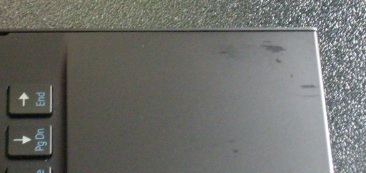
This said, Sony needs to make it bigger. This is a pic of a trackpad film protector for a 17" Macbook.
![[IMG]](images/storyImages/dsc00002ol.th.jpg)
I'm not sure what junk is crammed in the trackpad, but if anyone can squeeze stuff in cramped areas, it would be sony.
Sony, because Caucasians are just too damn tall. -
Hey guys I recently tarted having a problem with youtube, where a fullscreen video would become pixelated even if it was at 1080p. Text and lines look sheared or teared. Ever the numbers for what time the video is currently at look weird. Its as if they are blowing it up, but not antialiasing the video.
This only happens in fullscreen mode, not when in normal viewing mode. It even looks normal when you increase the player size, as long as you aren't in fullscreen.
This only happens in Chrome 14, it does not happen in Firefox. Anyone else experiencing this problem or know how to fix it? -
I've never owned an Apple product (and never will). But I have to admit that I'm not crazy about the trackpad on the Z2. Before my Z2, I had the 11" TZ series. The mouse worked awesome on the TZ. I could only wish my new Z2's trackpad worked nearly as well.
Out of the box, the trackpad was almost un-usable for me. It took quite a bit of adjustments in the mouse CP to finally get it to work much better. Not having a clear divider between the palm rest area and the touchpad area made one finger scrolling really difficult (I kept having to look down rather than doing things by touch). I solved this problem by using two finger scrolling.
I LOVE the Z2. Reason I bought it is because it's the smallest and lightest computer with full HD resolution, i7 processor, and the ability to run 3 monitors. But it's not perfect. It does take adjustments to get the trackpad to work properly. But even with these adjustments, I still like the sensitivity and feel of the TZ touchpad much better.
And just to add, I don't play games or watch movies. For me, it's purely a business machine.
If I had to do it all over again, I'd still buy the Z2. The benefits significantly outweigh the downfalls. -
OK, that was funny.
-
I just opened up my Vaio Update and it didn't show anything new. So I went to the Sony website and found the new touchpad driver there. Just installed. Need to do some testing after work. Thanks for letting us know about this new driver.
-
Same here; my Vaio Update is still broken and wont show me any updates (or information).. Guess I have to live with it ^^
-
No, that is the whole point of my ranty praise. It's fine the size it is. I do not want a giant fingerpaintpad for kids.
-
...and true
-
Children are adorable little Petri dishes. They don't touch my lappy
-
Anyone compare the 1600 x 900 vs the 1920 x 1080 screens? Are they any different in quality?
-
Any software developers (especially Visual Studio users) using this machine. Specifically can the HD3000 perform well enough for WPF/Silverlight development?
TIA -
I have 3 external monitors on my rig, two from the PMD and one from the Z2 itself. I run VS (2010) from the HDMI port on the PMD. Builds are lightning fast.
I'm just getting in to WPF and have no problems with it so far, although I'm not yet into animation, video, etc.
But running Silverlight stuff in the browser on the Z's HDMI port (I.e. The 3000) is pretty seamless. -
How do you find the keyboard for typing? I bought an SA specifically for development after trying out the keyboards on both laptops in a shop, and found the right shift key too small. Do you adjust to it?
-
That's good news. I have a Dell 3011 and a dual-link DVI KVM to manage my machines. Bummer the PMD won't let me drive the monitor to it highest res. I'll be trying to work mostly unconnected anyway.
-
I don't use the Z's keyboard to program when I'm at home. I use an external keyboard and mouse. I'm partial to split, ergonomic keyboards and use the Microsoft 7000 set. This is like the 4000 keyboard, but wireless.
For casual typing, the Z's keyboard is OK. The shift key takes a little getting use to, but I'm of the opinion that most keyboards have one or two quirks that take getting used to. Actually it's the space bar that I have the most trouble with. It seems to be harder to hit with my right thumb than with my left. -
There's a lot of discussion in the various Z-related threads about the two screens for the Z. The real bottom line is that you need to see them both for yourself and decide. People who like one are rarely comfortable with the other. "Quality" means different things to different people. It could refer to color fidelity, brightness, viewing angles or other attributes. Both Z screens are very good quality. Which is right for you only you can decide.
-
The keyboard is not great. The key travel is very shallow. I find I skip keystrokes often enough to be annoying, and that after an extended session my fingers are beginning to cramp. It's livable, but the keyboard is not one of the highlights of the Z2.
-
I agree, the size is fine. Because of the increased friction, one can up the sensitivity rate. A bigger trackpad would increase the chances of hitting it while I type, which is a major annoyance. And, at least for me, I wouldn't be using the extra space because the area my finger can cover without moving my arm is not very large.
-
A feature that helps me overcome the small touchpad size is Momentum. It's not on by default but it has totally redefined how I use the touchpad. Anyone else use this?
Official Sony VPC-Z2 (VAIO Z 2011) Series Owners' Thread
Discussion in 'VAIO / Sony Owners' Lounge Forum' started by SPEEDwithJJ, Jun 29, 2011.


![[IMG]](http://img13.imageshack.us/i/dsc00013lq.jpg/)




![[IMG]](http://imageshack.us/photo/my-images/829/dsc00002ol.jpg/)


