Problems? See this thread at archive.org.
OK. I thought you were concerned with portability e.g. storage on the go. I actually use my 64Gb iPad as a backup for photos on the road and then when I come home and plug into my PMD, there's always a USB 3.0 HDD connected there. (I don't travel without the iPad any more!)
-
In Europe, the technical support is not better. At this moment, my Z2 is in the repair a second time and we'll see what happens (two months of waiting and anger). It is a problem of signal interference when connected to VGA with charging. I recommend that everyone connected his laptop VGA output and charger at the same time, you never know without all the components in such a small place ...
luck -
Hi all,
i'm interested by the Z2 and want to keep it as long as possible.
But i've read that "you only get a maximum of 1.25GB/s of bandwidth to/from the GPU" of the PMD so "it's potentially slower than an on-board 6650M". Do you if it's because of the PMD or the "sony light peak technology" ?
Ideally if it's because of the actual PMD, Sony maybe will release a better PMD in the future so we can upgrade the Z2. -
I think I've finally settled on the Z2 after such a long time trying to decide whether to wait for my SA to be repaired or going with the SE.
I'll be ordering from Sony Outlet, and an international package forwarding service but they charge by volumetric weight. HxWxD/166
Can someone tell me what the size of the shipping box is? -
The current Intel Light Peak implementation has a 10Gbit/s (1.25GB/s) bandwidth limitation.
-
im gonna sell this piece of crap computer once I get it back, I just can't stand their customer service and especially their turnaround time. I dropped it off to the Sony store in Boston on the 12th, their "evaluation" took a week before they foudn out they couldn't repair it, so they sent it out on the 19th to Texas, they received it on the 21st, and now they probably won't be able to send it back to me until April 3rd the latest. This is very unacceptable, especially with the flagship model. Going to go back to apple, screw sony.
-
Use Google and you'll find nightmare stories with all PC manufacturers regarding repairs. I've never sent in my Z2 for repairs, but I once sent my TZ series for repairs. I dropped it off at a Sony store. Took about 2 weeks, including shipping time, to get it back.
I highly doubt Sony will make you wait 6 months for parts for a computer under warranty. If parts aren't attainable in a reasonable time frame, Sony should just replace your unit. Give them a call about once a week and ask for status. If they tell you parts will not be available for more than 30 days, ask to speak to a manager to have your Z2 replaced. -
I had a hard drive issue back in September, something with the RAID controller, they were going to send an on-site tech to fix it, but no parts were available, ok understandable, i decide to hold off, come December 2011, i had issues again with the HD, onsite would come out, but no parts available, i mean cmon, flagship model has been out for 6 months and still no parts?
I decide to send it in now because of the wobbly screen, which I have no idea how it happened, hopefully they have the parts in stock in Texas, I already have my eyes on a macbook air at this point, I had one prior to the Vaio Z, and although it's not quite as powerful, the custoemr server is Apple is way better than Sony. -
I'll let you know in a couple weeks if no one else helps you out. My Z should be coming in around then

-
Since Friday I own my new Z21
I took it up as arefurbished unit but it looks like new. No scratches or signs of the former owner. I Payed 1400 Euro for
I7, 8GB Ram, PMD, WWAN, Backlit Keyboard and 128 GB SSD.
Before I pulled the trigger to the Z I wanted to buy the Toshiba Z830 or the Zenbook 31. But now, with this price I am very happy with my choice!
Compared to my Z1 the Z2 is so ing quiet
-
Safe? took over 2 months asking, begging me to change the laptop. I am without Z and almost no hope of settlement
Bye -
Does anyone know where I could find a new back plate for my Z2 ?
I really need that part.
Thank in advance -
Great thank you! +rep
[edit] looked inexpensive at first but adding nearly 50 $ for the cheapest shipping eek... but I need it. -
Hi All,
Thank you all for being a valuable resource for me over the last few month with my Z2. Dont know what to do without this forum sometimes!
A problem has come up for me and I wondered if this also occurs for others:
When I leave my USB 3.0 external HDD plugged into my PMD, I don't seem to be able to undock it. Despite turning all programs running, the msg "can not eject because one of the devices in the docking station "generic volume" is still in use". This occurs with the msg "driver '\driver\amdkmdap' is preventing a device from being stopped (this msg comes up everytime I undock). It asks me to try closing all applications. It also tells me it's in use when i "safely remove hardware or media"
I am forced to either "shutdown" my laptop, or unplug my USB 3.0 "unsafely". Getting to a point where I am a little frustrated, and certainly don't want to compromise my backup HDD.
Interestingly enough - when i plug the HDD to USB 2.0 - no problem!
Thank you in advance. -
My new Sony VAIO Z21 arrived yesterday - and I really love it.
One question though - does your power charger cable wobble where it's plugged in? The small one of course, not the one from the PMD - this is fixed by the USB3.0 port.
Thanks. -
I would reccomend program called Unlocker, but I use my WD 3,5" 2TB drive and I didn't encounter undock problem yet so I can't help more.
-
is there a light on when z2 in charge? i would expect a light orange light, but nothing. I had to turn on the computer to make sure that it's fully charged...
-
I try to describe it further.
After plugging in the plug from the power supply into my notebook I can "move" it around a little. The plug from my previous notebook wouldn't move at all after plugging it in, that's what I'm wondering about.
I just want to know if this is on purpose (and the same for you guys) or if I should send it back to SONY right away. -
On my Z2 I can also wobble the plug a bit, so I think there's nothing to worry about.
-
it's how most (if not all) of the 19.5V female connectors are designed. at least all the VAIO's I've owned were made that way (except the Vaio X). I've had rigid plugs from HP laptops that failed on me in the past.. but none of the Sony ones have failed on me yet. i think they're designed that way to prevent the connectors from fracturing off the circuit board. giving it that extra bit of flexibility helps keep it in working order.
-
Are there any trackpad skins that will make it as smooth as a Mac trackpad?
-
Thanks mate - unfortunately that didn't work. Also now it also "locks" with my USB 2.0. Really frustrated!
Appreciate the advice
-
what about changing policy for the harddisk, open my ccomputer -> right click on hdd -> properties -> Hardware -> properties -> change settings -> Policies
-
I am searching for a TPU Skind FOR A GERMAN VAIO VPC Z21 and a GERMAN Z11!!! Does this thing exists???
Can someone tell me a good case for the Z21 where it fits inside, when used?? -
I can confirm that.
I keep getting error messages stating that there's a "Problem Undocking From Docking Station". I'm using the newest leshcat drivers.
But it's not USB3.0s fault for me - it won't work with USB2.0 either.
I get the message:
"You cannot eject your computer because the driver '\Driver\amdkmdap' is preventing a device from being stopped right now. Try closing all applications and ejecting the computer later."
Together there's a security question if I wish to continue to turn off the "AMD XGP docking station" and that I should make sure, that no applications are running etc.
Interestingly when i click continue I will get another error that it cannot eject because "USB2.0 Hub is preventing a device..." - or when I remove the USB-Hub and plug my external keyboard it it's saying sth about "HID device precventing..".
It's a little frustrating - I want to use the dock with my equipped hardware when I'm at home - and it should be easy to remove the dock and take the laptop on the go.
Any ideas?
Edit: Should I test the SONY drivers maybe? Someone else having problems with leshcats newest update? But the ATI drivers included in the SONY package are older ones..
Edit2: I think the error with "\Driver\amdkmdap" means that I have to switch to the internal display first. (Win + P - Disconnect Projector).
But I thought before updating to leshcats drivers I was able to press the small button on the PMD connector and it would switch automatically to the internal display while switching to the Intel HD3000.
How is it working for you? Maybe I just got a bad install...? -
tonyp0
I used to have that problem and so did some others if you look back through this thread.
The problem resolved itself a couple of weeks ago.
I have no what changed as I mode no conscious changes.
My system is stock W764 with an external 1920x1200 DVI panel; all windows and vaio care updates applied.
EDIT: Grammar -
I'm having the same problem. I have to manually switch off the HD before pressing the undock button, which is a bit annoying.
-
My favorite new Z photo.
Attached Files:
-
-
That laptop manages to look big in her hands.
-
Hm there're many with the PMD undock problem.
Anyone a good idea? Do people with the SONY drivers have that? -
I bought 2x of this one off eBay, it came from Hong Kong in a matter of 2 weeks, it fits perfectly and looks really nice, Protecting this lil monster from dusts and liquids is a MUST IMHO.
TPU Keyboard Cover Skin SONY VAIO Z21 z21 | eBay
Will -
This is for the US version which - according to the article - has another type of Enter key. -
Yes... Does TPU Skins for EU Versions exist? I just know that Sony Germany offers Skins vor SA/SB and CA series...
-
I'm trying to get a bottom plate replacement.
To be exact I'm looking for this :
![[IMG]](images/storyImages/dsc03962f.jpg)
I've contacted "sparepartswarehouse" and asked them what was the replacement part, I had found several that could be the one.
They told me it was this one : http://www.sparepartswarehouse.com/Sony,Laptop,Part,X25809373.aspx
209.35$ :X
I bought it :X
but then I've noticed this one : X-2581-288-2 - Sony Laptop Miscellaneous Parts
Which is much cheaper! 93.63$
I've asked after I ordered the first one, what is the difference between the two.
They answered me : "The difference between these 2 are the color. One is the carbon black you requested and the other is just a flat black."
Is there really a carbon premium bottom plate ? Never heard about it I though it was only about the lid housing.
Furthermore I do not have a carbon premium Z2 but a blue one and the bottom plate is black but it's also in carbon.
I think there's only three different bottom plate, one for black/blue and carbon premium, the other one for the gold version and the last one for the mysterious silver version am I right ?
I hope I can cancel my order because it is shipped because shipping was horribly expensive ! nearly 100€ for the standart shippment. X__X
Or maybe that is not the bottom plate replacement part ? -
^such informations are available in the service manual if they have that at house
they will be able to tell which is for u.
Try to contact their tech.!
If u manage to open it... (remove the 8 screws marked with Green arrows 1st, then the 4 Blue and last the 4 Red)
![[IMG]](images/storyImages/215eb3e8606746e5be04a3ccaa0ff456.jpg)
![[IMG]](images/storyImages/eb04db7b2192ef305b326c01cb14ed48.jpg)
the part № usually located inside
Good luck -
Hi all, Just got me a Z226 and love the blue color.
Anyway, how are you guys carrying your sheet batteries with you? Are you fixing it to the laptop all the time?
I am still looking for a good cover/sleeve for it since I typically do not want it attached to my laptop when I am carrying it. I am only interested in attaching it when the juice is low in the laptop's primary battery. -
Yeah, I've checked it inside but the part number do not match with anything on the shop.. :/
Very nice unmountt guide by the way, this should be added to the Z2 review and usefull thread & guide! -
can anyone recommend an aftermarket warranty service? its 15 days past my date for buying sony warranty.
-
Square Trade?
-
Hi everyone,
Having an issue installing sony notebook utilities on my new z2 (just did clean install). I've followed the order EXACTLY, and installed sony shared library. However, when i start the installer, it says: This update is not intended for use with your computer model. (and i got it off the sony website??) its version 1.0. any ideas? (or alternative versions?)
EDIT
FIXED. Turns out you couldn't use any of the z22... model numbers when editing the model.txt, you had to use z21... -
Going back several pages I think, there was a discussion about extra memory for media and stuff on memory stick and or sd card. Here is how I got a 64Gb Class 10 MS Duo for not too much. First, the end result:
![[IMG]](images/storyImages/ScreenShot2012-03-31at44608AM.jpg)
I decided to pick up this 2:1 microSD to MS Duo adapter from Amazon for $5 shipped (I am a Prime consumer):
![[IMG]](images/storyImages/41GS-NSSv0L._SL500_AA300_.jpg)
And these two Class 10 microSD cards, also from Amazon, for about $75 shipped:
![[IMG]](images/storyImages/41FpikijzLL._SL500_AA300_.jpg)
The card originally appeared on my Mac as a 32Gb volume, but all I did was use Disk Utility to format it as a single FAT partition and got 64Gb. Interestingly, I did not notice until after I bought the adapter, but the mfr claims it only works up to 32Gb total capacity, 16+16Gb. You could also try the much less expensive but presumably slower Class 4 Sandisk microSDHC for around $50 for the pair, so $55 total for 64Gb Class 4 or about $80 total for Class 10.
Another reason I picked this up is that I probably would never buy a real MS Pro Duo because they are more pricey and it is a more proprietary format. I don't have any devices that use this kind of card. I can leave the more universal SD card available for real removable storage. The MS Pro Duo card apparently sits more flush in the socket also, so a good place to keep the card stashed without accidentally removing it. -
I have one question regarding the VAIO Control Center:
Under Special Buttons - Button settings I can choose between several usefull options, particularly "Thermal Control Settings" and "Automatic Brightness Settings".
Is there any way to create shortcuts for these actions? It's a hazzle to click through the VAIO Control Center to change these settings.
Or any other way to toggle the "silent mode"? I get about an hour more battery time when using the silent mode.
And is it possible to remove the annoying "beep" sound when clicking the VAIO button? -
I've assigned Thermal Control Strategy to the 'Vaio' capacitive button on mine.
You can replace/remove the beep by changing the pi.wav file in:
C:\Program Files (x86)\Sony\VAIO Event Service
I am using the attached pi.wav (which is a small silent .wav file).Attached Files:
-
-
^Thanks, working like a charm!
Another kind request:
Could anyone from the US please post the noise cancelling earphones model number? I'd like to order myself some from overseas.
Edit:
Hmm.. I'm not sure if noise cancelling headphones will work with with my European (German) model at all.
According to this thread (which is for the Z1 series though) there might be different models (with and w/o noise cancelling mainboards). Is there a way to find out? Or has anyone from Europe already tried noise cancelling headphones? -
Isn't silent mode just another battery save mode, like the one you can set in windows? I used core temp to check the freq between the two modes, and saw that with "Silent Mode" from Vaio Control Center frequency scales up to 1500 MHz (~8 Watts) when under pressure, while wiith Battery Save Mode from Windows it sticks with 798 MHz (~5 Watts). So I think the Windows mode is even more efficient. Or is there something I did not consider?
-
I got a BIOS update notification today via VAIO UPDATE.
Now I have version R0172H5. -
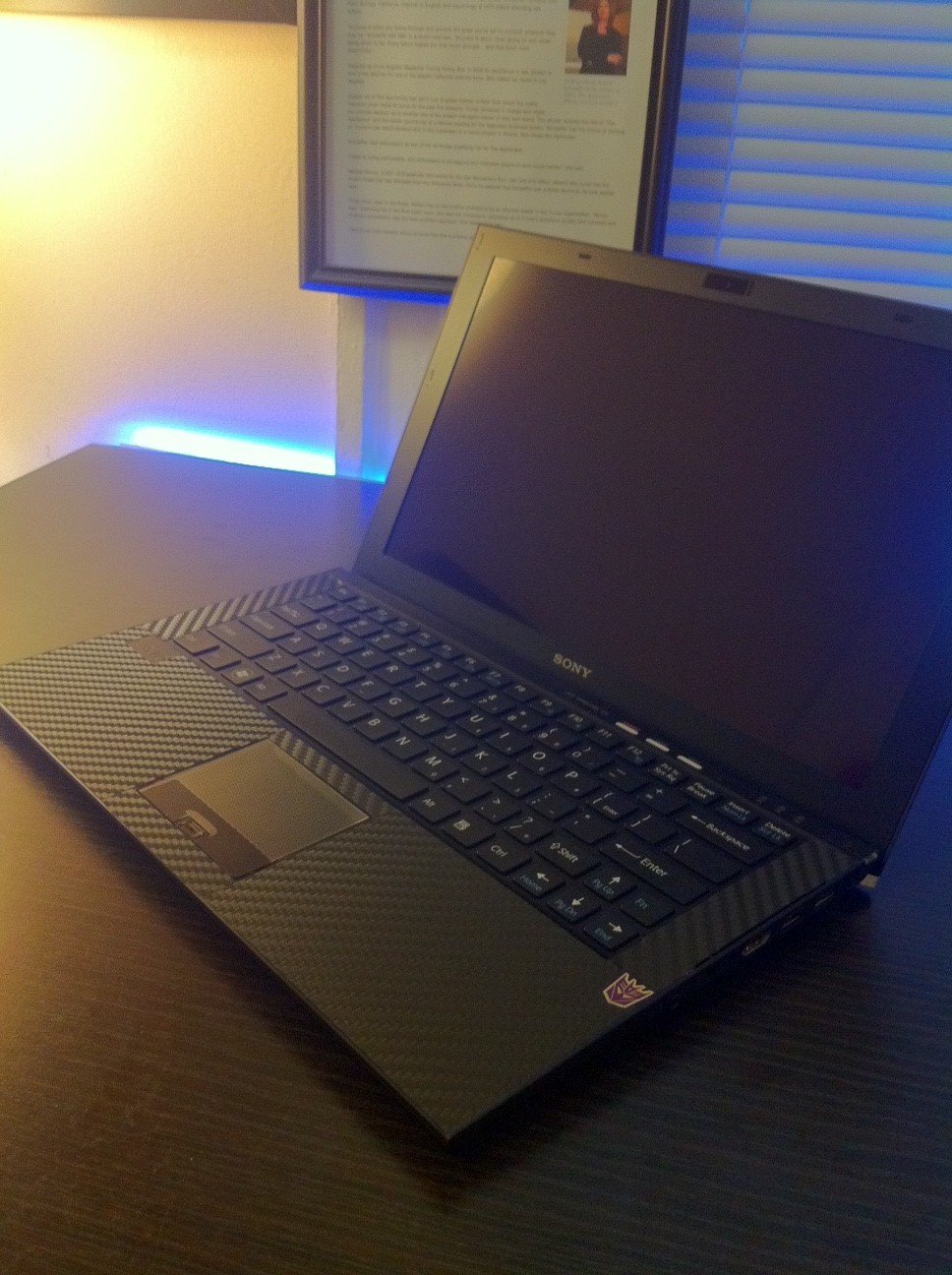
custom cutted some carbon fiber, no more shiny oily palm rests.
Attached Files:
-
-
hi everyone, i am getting a rundll error message, says i am missing btmshell.dll, does anyone know how i can recover to get that file?
-
Looks great...
Official Sony VPC-Z2 (VAIO Z 2011) Series Owners' Thread
Discussion in 'VAIO / Sony Owners' Lounge Forum' started by SPEEDwithJJ, Jun 29, 2011.