Problems? See this thread at archive.org.
That totally depends on the returns policy of the retailer. In the UK, you can return anything bought online within 14 days due to the "distance selling regulations", but that doesn't apply to shop purchases (and I don't know where you're from anyway).
If it's in mint condition, you might be able to return it by paying a 'restocking fee', even if there's nothing wrong with it.
Alternatively, push the issue of the wireless and let them know you would be happy to get an upgraded model if they allowed you to return your current one?
-
-
Well, I bought it in Canada, but I'm currently living in the UK. I would have to talk to the store over the phone and try and work something out and ship it back there, wouldn't I? I am going back in a couple months, but that would probably be a bit too late.
-
If the store have a web site, you could try to determine their returns policy before you talk to them, so you know what you're up against. I would suggest shipping it back to Canada safely and quickly might be expensive.

Are you really that dissatisfied with the Eco screen? There are several people here with Ecos that are happy with theirs (even though the HiColor owners would no doubt feel differently)... -
Well, I'm not dissatisfied with it, it's just I keep reading about how amazing the HiColor is, and it's making me paranoid about the Eco, haha. Would it be worth the hassle just for the HiColor?
-
If you're happy with the Eco, I think that it's not worth the hassle/risk of a transatlantic swap, even if they let you do it without charge. But I haven't seen the difference between the two screens, of course.
The HiColor will make an impact on battery life because of the dual lamps. I don't know how much, but there will be a difference. So that's one area where your screen is superior, if you want reassurance...
-
I have a question because i dont know whether the candian 180d(the best one) has a hicolor screen, does anybody know? Thanks in advance.
-
Well, you can tell by looking at them. The Eco screen has poor viewing angles and looks pretty good. The HiBright screen has much better viewing angles and looks amazing. So GuanYu, does your screen look "not bad" or "really, really good"?
But I agree that there should be a definitive way to check.
By the way, what are you planning to do about the hard drive mistake? I still haven't heard back from the Sony upper-management guys. (figures, right?)
Whatever direction the HiColor screen is at, that's the direction to go.
I can certainly relate to that!
I can certainly relate to that!
-
It's not that I'm unhappy with it, it's just now I know there's a (supposedly) infinitely better screen that I could have gotten. I'll see what the possibilities are, it's just that the people working at the Sony Store I bought my FW from are complete idiots, and really don't have the first idea about anything, haha.
-
I would avoid telling them that, to get the best range of possibilities...
-
I'm probably just going to keep the drive, it's honestly not a huge deal to me. I might try and swing some kind of small refund for the mistake though
And the screen does look really really good to me, but I'm paranoid that it's because I've just never had a Sony laptop screen before and I'm getting screwed out of an even better one
-
I've discovered an unexpected problem with my hard drive (a Fujitsu mhy2250bh). It seems to run warm. Quite warm.
If I put my hand on the upper right portion of the laptop, it feels very cool (next to the keyboard by the green power light). But if I put my right hand/palm/wrist on the palmrest area to the right of the trackpad, it's pretty darn warm. I think that's right above the hard drive, isn't it?
Anyone know if Fujitsu hard drives run warm?
Better question: would a different (cooler) hard drive help? -
I could only find one review of the Fujitsu mhy2250bh that mentioned temperature just now, and it said it didn't run hot...
-
Hmmm... in that case, why is this thing running so warm, I wonder?
-
Well part of it could be the design of the case. Maybe it's not running too warm, but it's just obvious because that's where your palm rests naturally?
Hard disks in general (certainly desktops) do get quite warm. I suppose we need to find someone who has swapped out their drive, to get a comparison. -
Haha, I'll try my best.
Do you think trying to sort this out when I go back in a couple months time would be too late? I've only got the warranty that comes with the laptop. -
hey joey13, since you bought it from a sony store, does that mean you bought it from sonystyle? in which case you should be able to call your regional sonystyle customer service and send it back through them. You can try that ...best of luck.
a couple of months is too late, no return policy lasts that long. it has nothing to do with your warranty since nothing is actually broken. -
Pssst... Hot Deal Alert!
$50.00 Off Promo Code: EMCAJCBAD
Sony VAIO FW VGN-FW190EEH
Was: $1199.99
Promo Price: $1149.99
http://www.newegg.com/Product/Product.aspx?Item=N82E16834117780 -
Yeah Hindu, I bought it from a Sony Style. How do I find the number for the regional customer service? They would be able to get a HiColor put on it? Or would I have to return it and get a new one on the grounds of the wireless not working?
-
Ow that’s how I was able to return my notebook with 1 stuck pixel! Ow I never knew this, I can use this with any purchase I make on the internet now!
I guess they will be shipping my old notebook off to somebody else lmao, owell unlucky them they probably won’t notice it anyway so thats ok
I’ve got a Fujitsu120Gb drive and under load it reaches a burning 50-52 deg C. This is when antivirus / de-frad is running and I am trying to use the notebook at the same time. Otherwise it is only cool when using the internet alone, or word. Any of these combined with windows media player it starts burning.
I don’t know where you heard that Fujitsu was a cool drive, I always thought they were hot running drives. This is why i bought a WD for my new FW. The 4200 drive was quite warm even under low load, never tried it out though as it’s has been sent back now for replacement. At idle it was the same temp as the opposite palm rest.
Why don’t you just upgrade the notebook yourself, and buy a decent drive you know runs cool and quirt! You’ve got yourself a sweet notebook with no problems, so now it is time to change the drive! Trying to get a replacement notebook with the correct drive you may end up with a doggy notebook. Anyway places like Best Buy and Amazon sell products with the wrong information specs. If you check on the model code at Sony you may find out it was only ever suppose to come with the 250Gb Fujitsu drive
-
uh oh, I left my FW unplugged overnight (shut down, fully charged, for about 10 hours), just to see how much battery it would drain. The settings were left on High Performance and after I turned it on and logged into Windows, the battery meter read 88%.

I've never owned a Sony laptop before so I don't know if it's normal to leak so much just over night?
-
Yeah, that's probably what I'll do. I'm looking for a good deal on a WD Black Scorpio.
Nah, Sony's page also shows the 200/7200 drive (see screenshot below). -
Do you think if I had a go at Sony, they would upgrade me to the FW180D for a discount when I returned my 160? This is the second time I've had to return the laptop (first time, it shipped with a cracked screen)
(And just to make sure, the 180 has the ATI card in it right?) -
when i read your post i turned mine on and it was at 80%
i looked around and realized that my battery care function is set at 80%
check what yours is set on, maybe it is set for 90% depending because of the high performance setting?
just a thought -
The battery was charged to 100% before and how am I able to check what it is set on?
-
go to the VAIO control center > power management tab > battery care function
when you are here see if its checked if it is then batter care is on and there might be a cap on your charge % > click on advance in the bottom right
when the new window opens then there is a little blurb in the middle of the window describes your current setting.
mine is set to batter care function so it caps out at 80%
and there is also a super batter care function that caps at 50%
there is also a custom option -
Ah yes, thanks. Mine was actually turned off, so the battery charged to 100%. I tweaked it and set it to 50% (since for about 2 weeks, I'll be mostly plugged in). But that still doesn't explain why my battery dropped 12% overnight.
-
it might just be a hiccup and the battery is getting settled, give it 2 or 3 cycles and test it then. if the problem becomes chronic then you should inquired about switching your battery but for now give it a couple of cycles.
but then again i'm no battery expect so if anyone wants to give there two cents that would be great. -
how does the black scorpio match up against the stock sony HDD in terms of heat, noise, and battery consumption?
-
thank you! i was just about to order and then read this!
-
I wanted to pair my Nokia N73 to my FW but when I went to the Bluetooth options in Control Panel, there is no hardware listed under the Hardware tab.
EDIT: I guess the driver might not have installed (after I did the restore). I'm downloading it now...
EDIT2: The Bluetooth installer could not find any Bluetooth hardware. What the?! -
when you are in the bluetooth option go to the devices tab and click add.
i had no problem finding my phone.
p.s. make sure you bluetooth is on, on your cell
EDIT- i miss understood your post, but yeah check those drivers it is odd that there is no hardware listed, the two that i have listed are:
1. Microsoft bluetooth enumerator
2. ALPS-UGPZ9-BCM2046 -
Like I said, I checked the Hardware tab and it's empty. I also got an error saying the Bluetooth Exchange Folder does not exist.
EDIT: FIXED. How noobish of me. Wireless was turned off and apparently the switch also controls the Bluetooth so literally, Bluetooth was turned off. -_- -
Get HDTune and it will tell you the drive temp. Lemme know what it says and I'll let you know if it is abnormally hot.
-
41 C / 105 F
-
Amazon decreased the price to $1016 + free Sh., already getting a $103 credit. Apparently, they have a 30 day post order price guarantee. Sweetness.
-
That's not hot. Maybe you've got cold hands?
-
Maybe.
But something (just to the right of the trackpad) is making my right wrist quite warm.
It's cooler on the left side of the trackpad, and much cooler in the upper right corner (near the green light). -
Like many others, I've been reading most of this thread prior to my FW purchase. After a week's wait, I finally received my FW yesterday. Before I continue, I'd like to raise my hat to everyone here for posting such interesting and useful content, especially TetonWolf.
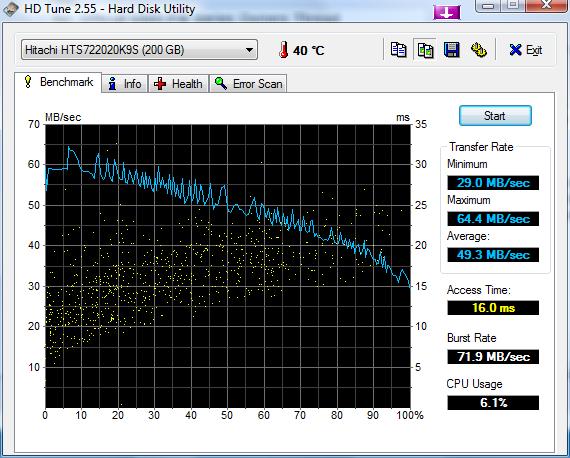
Back to the HD - When I customized the laptop, I ended up choosing the 200GB 7200RPM hard drive not knowing what make it would be. Well, in case some of you are wondering which drive manufacturer they selected, Sony packaged my FW with a Hitashi HTS722020K9SA00 200GB 7200RPM hard drive. Surprised?
I don't remember reading any post mentioning this information before (but then again my brain isn't perfect), so I thought I'd share the good news.
And for those that are extra-curious, I ran HD Tune just for you. My results were not exactly like those displayed on Tom's Hardware, but close enough in my opinion (see attached file).
Hope this may help some of you!Attached Files:
-
-
Has anyone seen the Eco and the Hi-Color screens side by side?
-
I asked about the heat near the trackpad (see the discussion of the FW review by Kevin) and JerryJ responded that this is where the Wifi card is located and that the Wifi card generates lots of heat. Link see posts # 6 and 7.
-
EDIT: I just checked your post in Kevin's thread. Looks like you're referring to the area just under the touchpad. I'm talking about the area to the right of the touchpad.
Also, Kevin's picture of the temperature on different areas of the laptop show the left side to be warmer than the right. In my case it's the other way around -- the right side is much warmer than the left. -
By under I meant underneath or below the touchpad. I did not mean south of the touchpad if that's what you're thinking. Anyway, the whole area around the touchpad has been warm whenever I've tried the FW at the stores. If the Wifi card is indeed located beneath the touchpad, then the heat generated will likely radiate in the whole area surrounding the touchpad.
-
Right, I gotcha. But in my case I mean the area to the right -- in between the right edge of the touchpad and the right edge of the laptop.
The far right edge, where the stickers are, is cool as a cucumber. But move your wrist just an inch or so to the left of the stickers and it gets quite warm. -
I ordered the FW 190EEH from Newegg and I should have it either tomorrow or early next week. I hope I don't get the 5400rpm hard drive. I'll report back about the heat as well...
Also, the area you are talking about is directly above the hard drive so it is likely that this is heat generated by the hard drive. -
whatever the heat, i felt up every laptop at bestbuy and the FW was by far the coolest
-
Ummm... oh, never mind.
-
hehe
BB guy "yes, the LG here uses superior parts on their laptop over every other manufacturer. they are the type of company who will spend on quality parts instead of going with the lowest bidder. they used *yadd yadda* copper heating to make this one of the coolest running laptops..."
*feels up LG*
*feels up Sony FW*
me "umm....that things on fire compared to the sony, buddy. so much for the expensive copper" -
by the way, just ordered the one off newegg for 1149
SONY VAIO FW Series
Core 2 Duo P8600(2.40GHz)
16.4" HI COLOR
3GB Memory DDR2 800
200GB HDD 7200rpm (or 250gb 5400rpm, whatever)
ATI Mobility Radeon HD 3470
HP can go to hell! -
lol its probably the hd in your case soundsgood, but overall its actually pretty cool. if you disagree, go feel up a dv5t, and then complain about the heat...
-
That's not bad at all particularly if that's after running HDTune test. The Hitachi 7K200 runs 48 C after HDTune. My new Hitachi 7K320 (7200) stays around 39 C when idling and 43 C when defragging in the background.
Official VAIO FW Series Owners Thread
Discussion in 'VAIO / Sony Owners' Lounge Forum' started by Hinduemperior, Jul 28, 2008.