Problems? See this thread at archive.org.
Just did a search and didn't see anything. A few questions:
Is there any way to have the laptop power up when I flip the lid open? All I see are options for closing the lid.
The woman at sony style assured me that I would be able to output blu-ray movies to my tv via hdmi with the lid shut on the laptop, to avoid light leak from the screen. I haven't been able to make that happen.
Also, I wish there was a way to disable the green/orange light on the power switch. I HATE computers that have obnoxious led lights in sleep mode and this one is more obnoxious than most. I just want to close the lid and not have flashing, glowing lights to distract me.
-
The FW's speakers aren't that bad. I just think the sound quality issue is being over exaggerated. I also have an FS and my bro has the FE and the FW speakers are way better than the both of them. They are laptop speakers so you can't expect a whole lot from them but I think the FW delivers good quality sound for a laptop. I cant remember how my old FS or my bro's FE's battery held up when they were new compared to my FW. But most FW's with the standard battery gets about 2hr 30mins. I think its worth the upgrade to the FW, the screen is amazing and will be great for photo-video editing and movie playback(as you know it has a really wide 16.4 inch screen) especially if you get it in hi-color, the eco screen compared to other laptop screens is really good. Mine has a 2.4 processor and 3gb of RAM. I run multiple apps including photoshop at once and it doesn't even glitch. I hope that helps.
-
Hi people,
Are there any battery drain issues in the FW like those in the SR and Z?
I read in one earlier post that someone's battery lost 12% over 10 hours and this got me concerned.
Furthermore, how are the screens? Are there any uneven brightness (most obvious on white background) as highlighted in the reviews? -
Oh yes, they are.
-
1. I left mine on sleep overnight unplugged just to check and it still held a 100% charge.
2. There is some bleeding and unevenness, yes. -
Bluray in this vaio has no color

I have put two blu ray movies in muy fw Vaio but control of color (and others) in ati control panel dont work
Inter video windvd for Vaio has not the color control active
I have put these movies in my ps3 and really looks better here
Anybody solve it?
Thank you a lot -
It's not that it's impssible but I have seen other, more elegant and easy solutions. It's definitely not a deal-breaker.
@reisabas: hmm, the Blu-Rays on my FW look phenomenal (and I have the Eco screen, mind you). If you have a Hi-Color, they should look even better. My guess is there's something wrong with your settings. How do you mean that the controls in ATI settings don't work? Do they have no effect or are they grayed out? -
In Ati control panel the video avivo option,when you can move the saturation color ,when I move it nothing change in the movie.(unmarking let the aplication decided)
But....it is work with dvds and with some bluray
But the big problem is taht it seems we have a not complete version of intervideo bd because in color option all buttons are ghost. -
Ah, then it must be the movies' fault if you experience the problems only on select titles. You might have more luck altering the settings in the playback program but, as you've said, you'd have to get the full version of it so it depends on how important this issue is to you. Or maybe you could try another Blu-Ray playback software. I'm using Nero ShowTime HD and I'm really satisfied with it.
-
Does anyone know which FW11 utility/driver controls the OSD notifications when pressing certain keyboard keys? The OSD for Caps Lock has suddenly stopped displaying though the OSD still shows up for some other keys like brightness adjustment and the mute volume key...
-
Hey I know what the official specs say but is there anyway the FW series supports the 4GB PC2-6400 chips such as this?
http://www.crucial.com/store/partspecs.aspx?IMODULE=CT2KIT51272AB80E -
I doubt it supports that big modules but if you're lucky, you might get them to work. But don't you think that this would be an overkill? I mean, I don't think I've ever reached 4GB of memory usage even at my worst multitasking. I really think that you don't need 8 gigs yet, if not for other reasons then because there's a high chance that your CPU will block the performance long before the usage comes near the 8GB.
-
Actually I'm running VM Workstation so I need all the memory I can get. I would also consider reinstalling 64-bit Vista from scratch. These 4GB chips are pretty rare. I think in another year or two we will see most of the OS builds at 64-bit with the option of larger amounts of memory.
-
I finally got my FW 190 CTO...I feel like i have been waiting a month for it and got really worried when i read a post about someone who had ordered one right before me and felt as if he had gotten a refurbished unit...I was lucky and mine is def. completely new, maybe because I got it personalized and its white.
I am really happy with it but I kinda wish it had the 64 bit vista instead of 32..I am not sure why really because the 32 is compatible with everything right now and when I had the 64 bit I had some issues with Norton and Flash.
I followed some directions and updated my ATI card, but am not up to the task I believe in the clean install...Knowing my abilities I am sure I will mess something up, so I just deleted what I could and deal with the rest.
My specs are as follows.
T9400 CPu
ATI 3470
4 gb ram
5100 agn card
blu ray
Hi-color
200@7200 hd
few other things...
I noticed that it really does not feel any warmer than my other fw models i had previously (139 e/h & 170 j/w). Maybe a tab more near the top near the fingerpad but hardly even noticable. I have been playing with it for almost 4-5 hours already and the bottom is comfy and not warm on my legs what so ever. I really can tell the difference from ECo screen to HiColor. Man what a difference in clarity and overall color. I will say that if you have the ECO screen dont get out of shape though. The ECo brite scrren in my opinion is still a beautiful screen and is slightly dimmer and not so poppy-maybe like a 1080i instead of a 1080p.
I really like the size of these FW's...In my opinion the screen fits great anything you are viewing and the weight is really nice as well. Typing on this thing is comfortable as well and you really can get some speed with the keys and feedback from them.
I will say it again I really dont think the speakers are bad on this thing. I remember on my 170j/w I had a few weeks back I was using it when I was painting a living room and cut the power to install a fan. The music was playing and it was def. loud enough for me.
Last thing I wanted to ask was regarding clean install and 64 bit. Do you really see that much lag from just deleting instead of the clean install and would you feel that the 64 bit is much superior version of vista as opposed to the 32 bit I am using?
Anyways, I wanted to add that my Windows Index Score was a 4.6 with this thing because of the 3D graphics but after the new install from the ATI site and using the modder, it went up to 4.7...Small improvement but put a smile on my face! -
Has anyone with a hicolor screen noticed a problem with uneven brightness on the screen? My screen is noticeably dimmer in the lower corners as well as the upper middle. This is most noticeable when I have a full white screen up, for example the home Google page. I don't know if I have a defective screen, or if this is normal. Any suggestions? I bought the computer online from Sony Style, so can hopefully exchange. I just got the computer yesterday, so have only used it for a few hours so far.
-
Is the unevenness very noticeable? After reading your post i inspected mine and it is even all around. No section is dimmer.
-
Yes, very noticeable at first. I read on an online posting elsewhere that the screen may need to "burn in", so I left it on with full brightness all night, and this morning there is less unevenness. Anyone out there know more about the "burn in" process of hicolor screens?
-
I agree... I too wish we could disable the green/orange light on the power switch. I don't mind the "ring" thing lighting up, but I do mind the button being lit.
I have that too. But I only see it along the bottom, and mostly in the bottom left corner. It bothered me at first, but I barely notice it now. -
Battery drain issues - I wonder if what is happening is folks thinking they are shutting down the computer at night, but actually putting it to sleep? When I first got my FW, I went through all the power options and noticed you can change your power options for what happens when you shut down.....like going into hibernation or sleep. If I'm not mistaken, it may even have been defaulted at 'sleep' when the power button is pressed? For the solid week I've had my FW I have powered it off and left it unplugged from AC power overnight and still had a full charge the next evening when I would get home from work. (I have the regular battery)
As for the speakers.....I will admit that when I first played music through them I was greatly disappointed.....I know they are small speakers so I didn't expect a LOT, but there was just no bass at all. After tweaking other things I stumbled into the control options for the Dolby Sound Room under speakers in the Control Panel and saw that the default settings had the bass *turned off*. After clicking the radio button to turn it on I then dragged the slider from 0 to 10 and tried another music file........MUCH BETTER!! I have no idea why something like this would be turned off out of the box??
Also, I had started a thread about the issues I had with the built quality of my FW...the palmrest to the right of the trackpad has a roughly 2 inch in diameter area where it gently slopes up...I can press the middle with my finger and it bubbles in and out maybe 1/4 of an inch in addition to a slight dent above it on the ridge before the keys. Because everything else is so darn *perfect* about my unit (including the awe inspiring HiColor screen lol) I've decided to try and let it go. I even went as far as to not use the overhead light in my home office for awhile and switch to my desk lamp as the other light highlighted the slope-y palmrest to a distracting level and was driving me batty (the OCD in me LOL) I did end up going to a few local stores and checking out their floor models and the problem did not exist on them. Oh well....there's not much I can do....and with an exchange I may have an even worse issue (like a few dead pixels, ect.)
Aside from this, I adore my new FW! I am constantly amazed by how cool this laptop runs! I've run Sims2 at full tilt, which, despite what some may think, can be pretty graphically taxing. I haven't seen even the slightest flicker...the 3470 card handles it like a champ. The Intel wireless is awesome and connects solidly to my cable internet connection from everywhere in my house. The screen.....ahhh...the screen is really gorgeous. I am so happy I bit the bullet and selected the HiColor option! When I was looking at the floor model eco-screen FW at a local store playing 'Transformers' I could most definitely tell that it was not as vivid, saturated and bright like the HiColor. It was nice, and I may have been perfectly happy with it, but I got to see a side by side comparison at my SonyStyle store and when you see the HiColor in person....wow.....you're ruined and just can't be satisfied with the eco after seeing that...lol.
** WIZO** - Since you had the FW170j/w at one point....could you confirm if it came preloaded with 32 or 64 bit Vista? I posted to this thread earlier about this, but Best Buy is listing this model on their site as having 64bit (which I thought wasn't an option for ANY FW?).
My specs:
VGN-FW190 Configure-to-Order
Customization Details
* Video Standard
* Intel® Core 2 Duo Processor P8400 (2.26GHz)
* ATI Mobility Radeon HD 3470 with 256MB vRAM
* LCD 16.4" (XBRITE-HiColor)
* WLAN (802.11a/b/g/n) with integrated Bluetooth® technology
* QuickBooks Simple Start
* 320 GB SATA Hard Disk Drive [5400 rpm]
* DVD±R DL / DVD±RW / DVD-RAM Drive
* Standard Battery
* Photo Standard
* Microsoft® Office 2007 Home/Student
* White
* Microsoft® Windows Vista® Home Premium with Service Pack 1
* 4 GB DDR2-SDRAM (DDR2-800, 2GBx2)Last edited by a moderator: Jan 29, 2015 -
Yeah the 170 j/w def. had the 64 bit version of Vista. But to be honest I did not really see a difference and that is why I am on the fence about switching mine. The only noticable I found was that the NOrton 360 had issues with the phising filter in internet explorer and that flash did not work as of yet and they were working on a patch. The real issue really I think is that because vista is new and they still have bugs with the 32 bit, they have not got around working it through with the 64 bit version. Later by next year, say Jan I am sure it will all be worked out.
-
Thanks for that info Wizo.
Wow...I had no idea Sony had started offering 64bit Vista! Last I had read, they weren't supporting it yet.
Getting 64bit Vista had been a main deciding factor when I began my search for a laptop. I had gotten the impression that a 64bit OS was the way to go if you wanted to future proof your machine somewhat. I didn't know much about it, but was concerned that software, ect. would start coming out in the next year or two that would *require* a 64but OS in order to run it. Especially when I noticed that most of the new laptops showing up in stores had Vista 64...I figured this must be the new standard (?). I had fallen so in love with the FW though that there was no turning back....even if I only had 32bit as an option.
I guess I would have *liked* to have gotten my FW with it rather than worrying about needing to upgrade later what with issues with drivers, ect. I wish I knew what a couple years down the road will bring and if I'll still be o.k. with my 32bit OS... -
ehhh, just wait. Back up your photos, documents and everything you actually need and next year around Jan. do a clean install again with the 64 bit version as soon as they have dedicated support and drivers. Wont be any problem to do it latter in my opinion...
-
Here's my take on the 32-bit vs 64-bit dilemma...
64-bit Vista pros:
* Sony has full 64-bit driver support for the FW line
* You can still use most 32-bit applications (including 32-bit web browsers with fully working Flash)
* It might make more sense to switch from XP to 64-bit Vista straight away because in both cases (Vista and 64-bit) you'll encounter compatibility issues
32-bit Vista pros:
* No driver issues for external hardware
* Almost all applications have 32-bit support (unlike 64-bit support)
* If you have already settled with 32-bit Vista, then it might make more sense to hold on and wait for a future update like Vista SP2 -
Buy this man a beer!!
-
By the way I was going to post on the Sager forum or Alienware one about over heating issues because of my avatar I was sure to get a quick response
-
I have a similar problem. when on a black screen (during boot up, for instance) there is a distinct lighter section running across the bottom half of the screen. I can also see some difference on a white screen.
Seems to be something that some people have and some people don't. Or maybe some people notice and others don't. I am not too irritated about it, though if it is a defect, I would like to know sooner rather than later, so I can get it fixed while under warranty.
Anyone else know anything about the "Burn in" technique? -
Re the uneven hicolor screen, I left the computer on all day (8 hours) with full brightness on a clean white background screen, with all screen savers etc deactivated. I figured if anything would "burn in" a screen, this would be it. Seems like the uneven brightness is now limited to the corners of the screen. Am I just being way too picky, or is my screen defective?
-
I did a really stupid thing today. I wanted to take the stickers off the case and I used an eraser after that to remove any leftover residue. Little did I know that the eraser left some major circular scratches. You don't feel them when touching it but under the light, I can see the concentrated circular scratches on the right side.
Does anybody have any kind of buffer or polisher that could hide or cover at least some of these? I tried taking a picture but the scratches are not visible in it. -
I give that a try tonight and let you know how it works out.
-
Re the uneven hicolor screen brightness: I called Sony Customer Care, explained my problem to the Tech adviser who led me through some reloading of settings, and then gave me a ref number to call Returns with. The Returns adivser was not too pleased, but since I had a ref number from the Tech side, issued me a return authorization to send the computer back for repair/replacement. I haven't yet sent the computer back, awaiting further advise/comments from other hicolor owners here. Onedeep: let me know how your experiment turns out...thanks.
-
does the Radeon 3470 come with GDDR3 memory?
-
Got the Fw11 E today
£679.99 with Comet price matching Play.com.
Really nice laptop so far, taking a while going through making the backup recovery disks. -
A few time ago the Catalyst 8.9 beta was found. You can download it for Windows XP (32/64bit) or Windows Vista (32/64bit). It contains the displaydriver v8.53.
http://www.megaupload.com/de/?d=SNHWHC6G Win XP (32/64bit)
http://www.megaupload.com/de/?d=OV07MYYQ Win Vista (32/64bit)
PS. All problems that i had with ver. 8.8 disappeared with 8.9 beta
-
has anyone taken apart their fw yet?
hahahahahaha, i know, crazy question -
If new drivers show up, do I have to uninstall the current hacked ones or could I just install over them?
-
I don't think so, but I'd love to see it from the inside!
-
Could someone list all pre-boot hotkeys for the FW line?
Edit: Had to try it out myself since nobody else did
F2 opens the BIOS setup
F10 launches the Sony Recovery utility
F11 rewrites the MBR (careful with this)
Unfortunately no boot device selection hot key, I've tried all the FN keys and most other special keys with no success, I know you can set it up in the BIOS setup but it's more of an annoyance that way... -
your driver installer should have an uninstaller for older ones.
-
@rskg4 it comess with DDR2-800 Ram cards.
rowan enjoy your new laptop and yea it takes about 25-30 minutes to burn the discs -
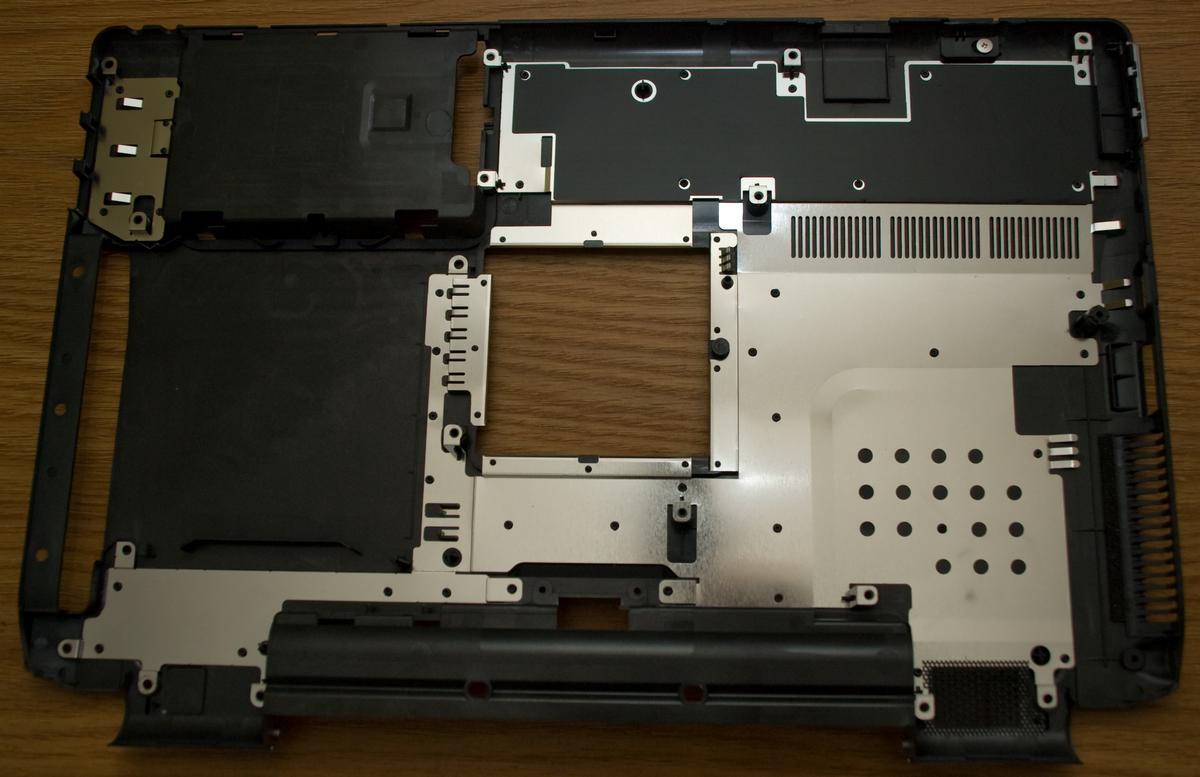
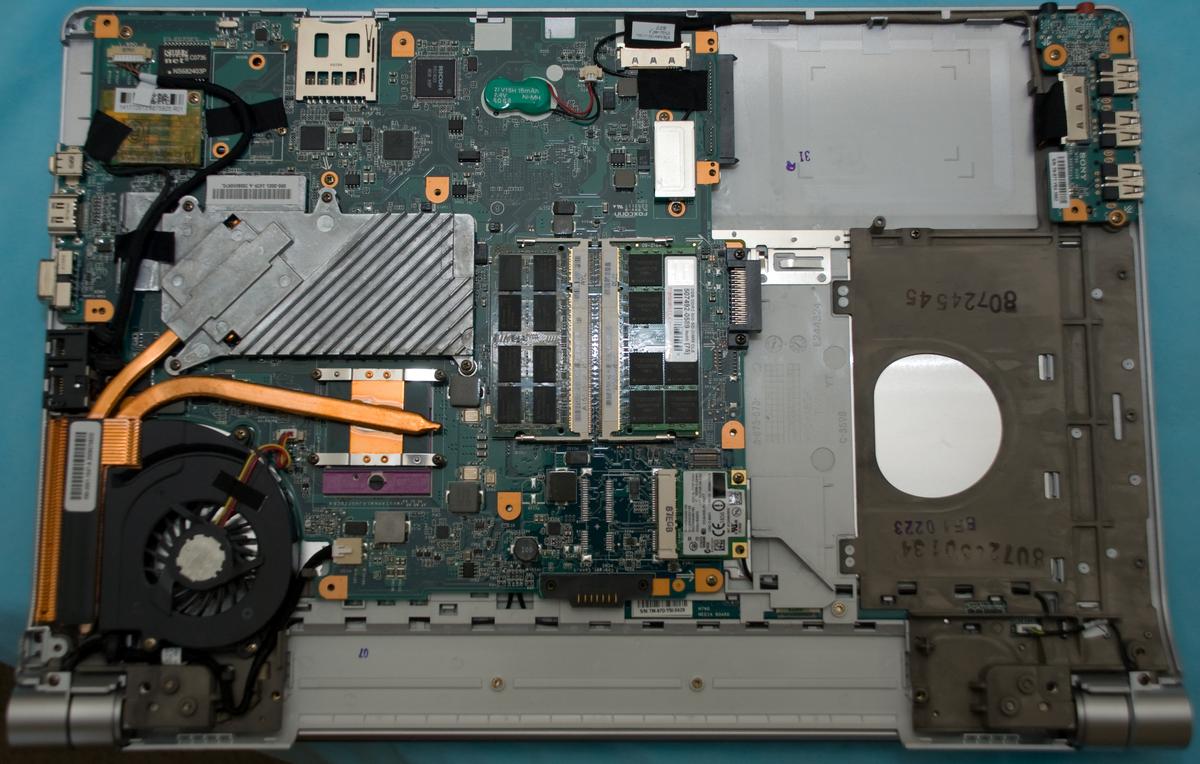
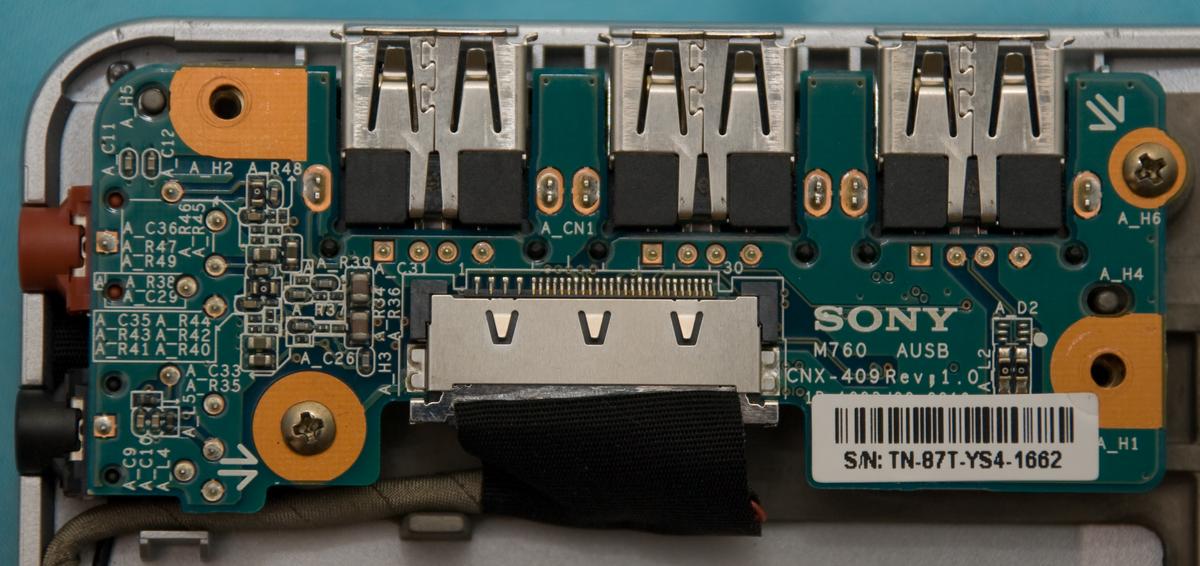
Has anyone taken apart their fw yet?
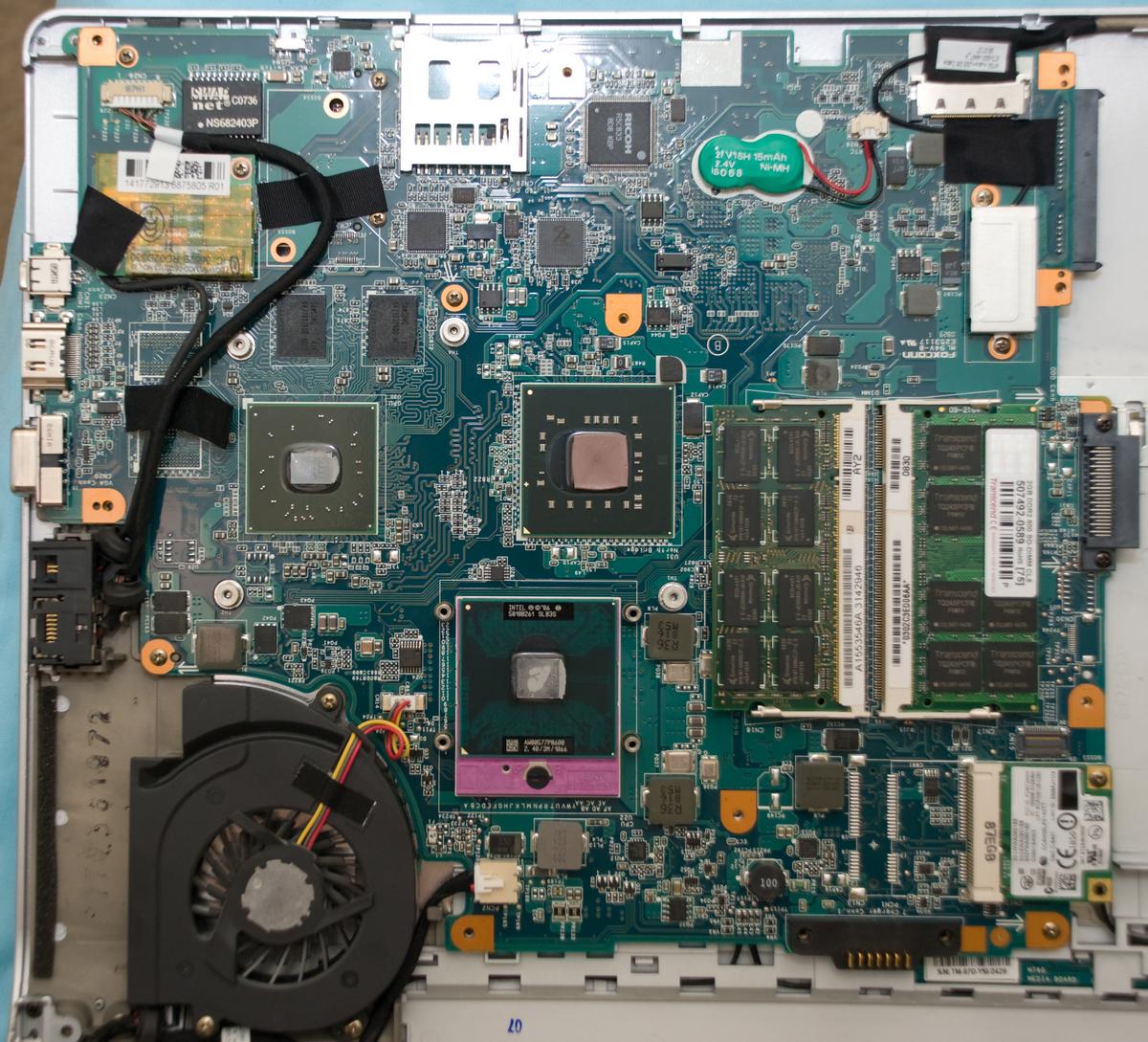
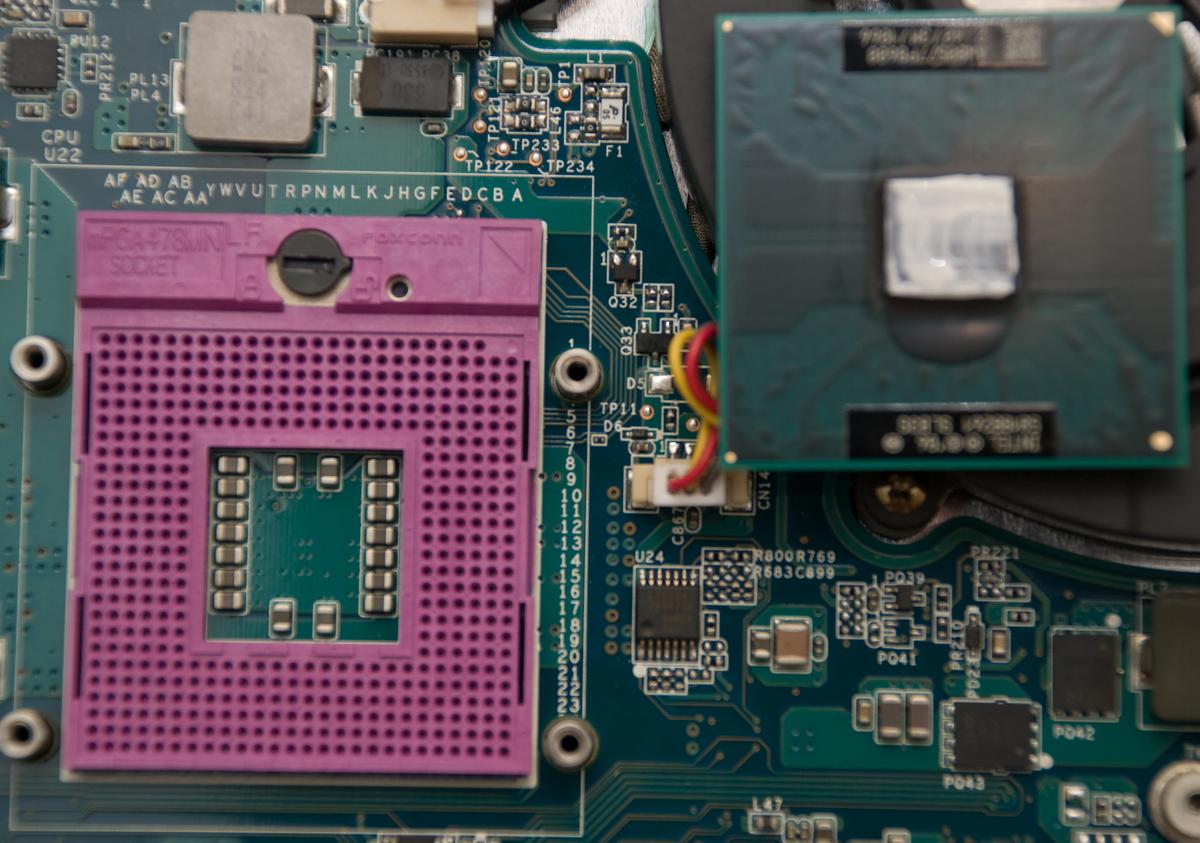
I've done that! Ohio stayed two days without power, I had nothing to do
1. I took me not more than 40 minutes to finish the work.
2. Most of screws are the same size, and no hidden screws (except 3 under CD/DVD)
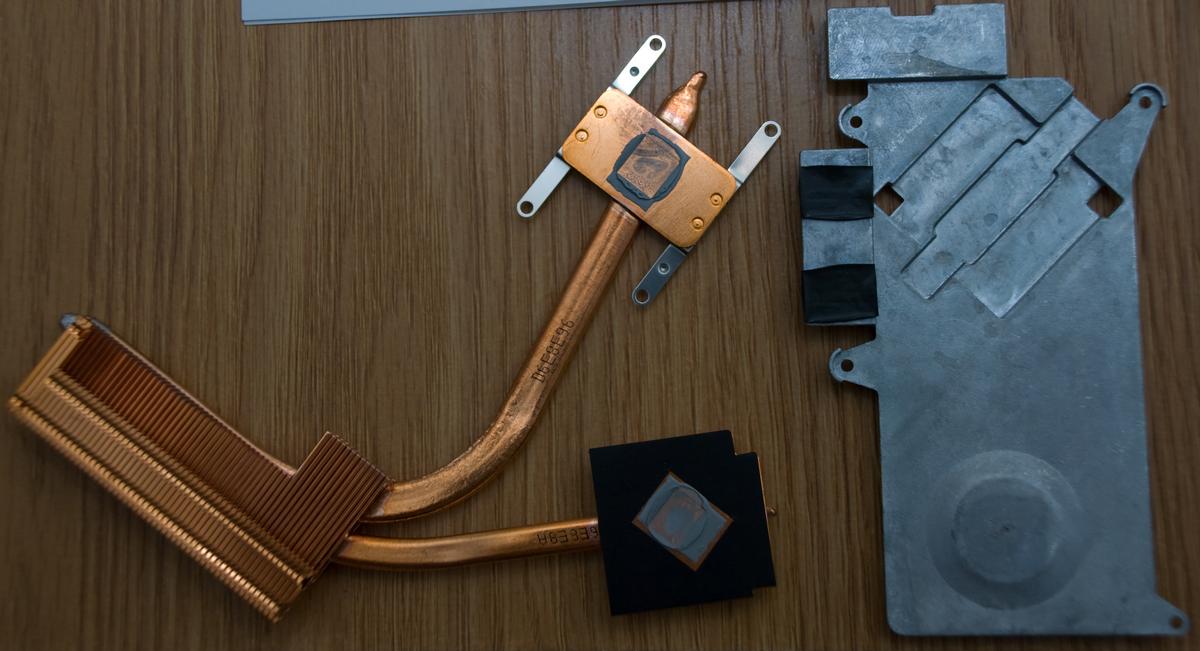
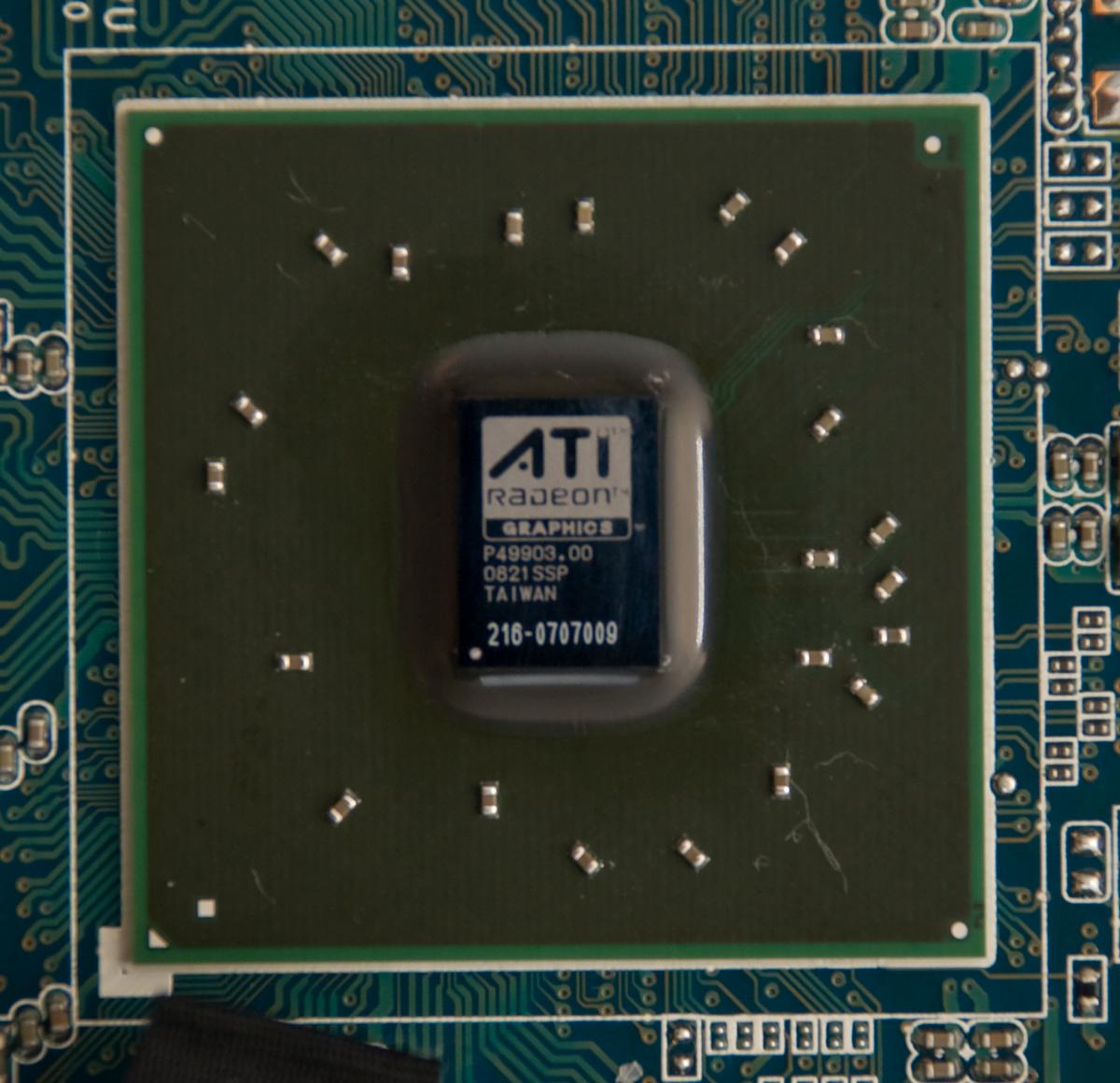
3. Probably FW has unified cooling system for 3470/3650, you can see free slots for GPU memory. No dobt now, GPU has DDR3 memory,
Samsung 816
K4J10324QD - HC12
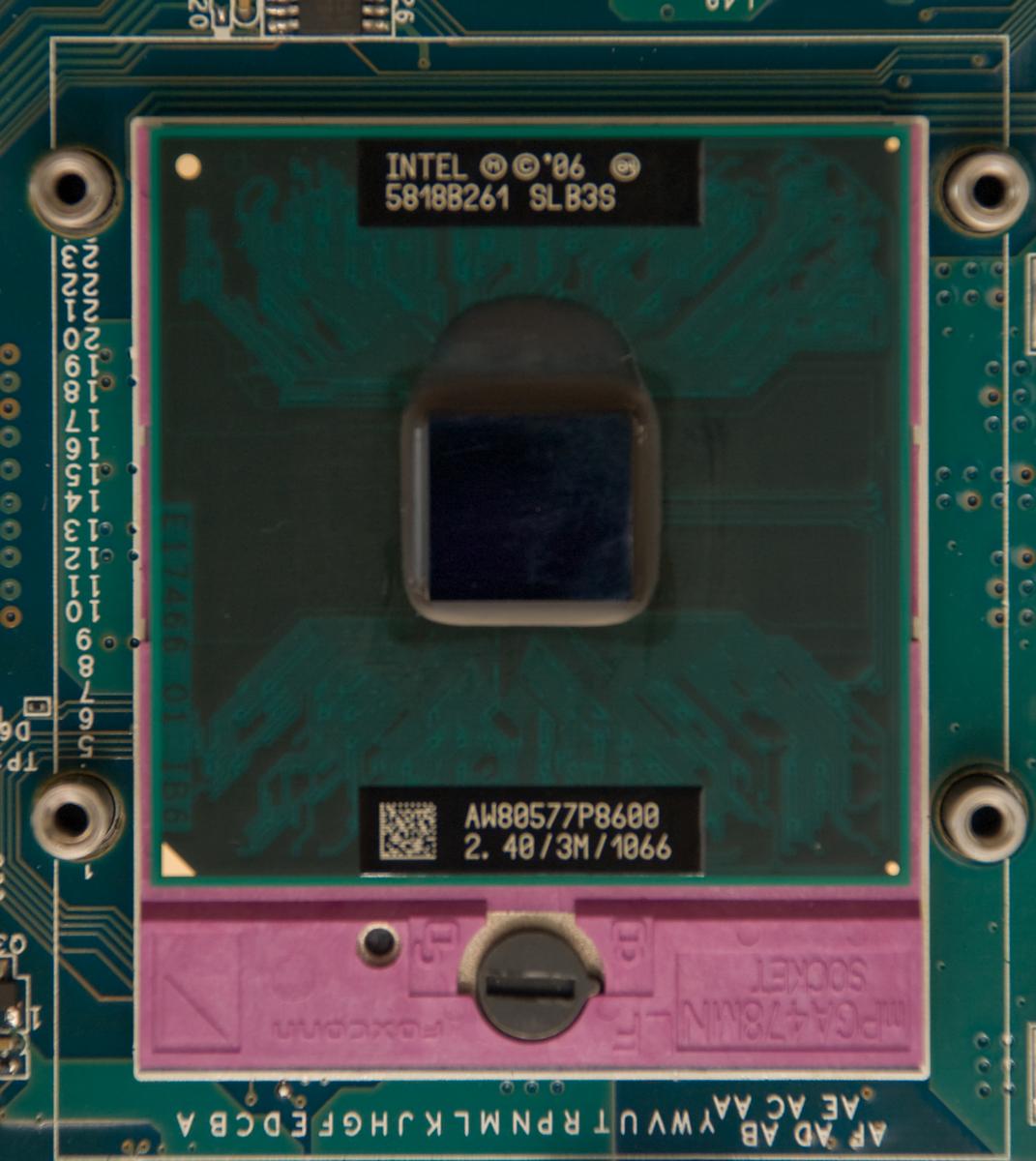
4.One can change CPU, that's good (I would like P9500 ) if BIOS will support it.
I've never seen so small core, especially as GPU has.
If somebody needs more pictures, I have them
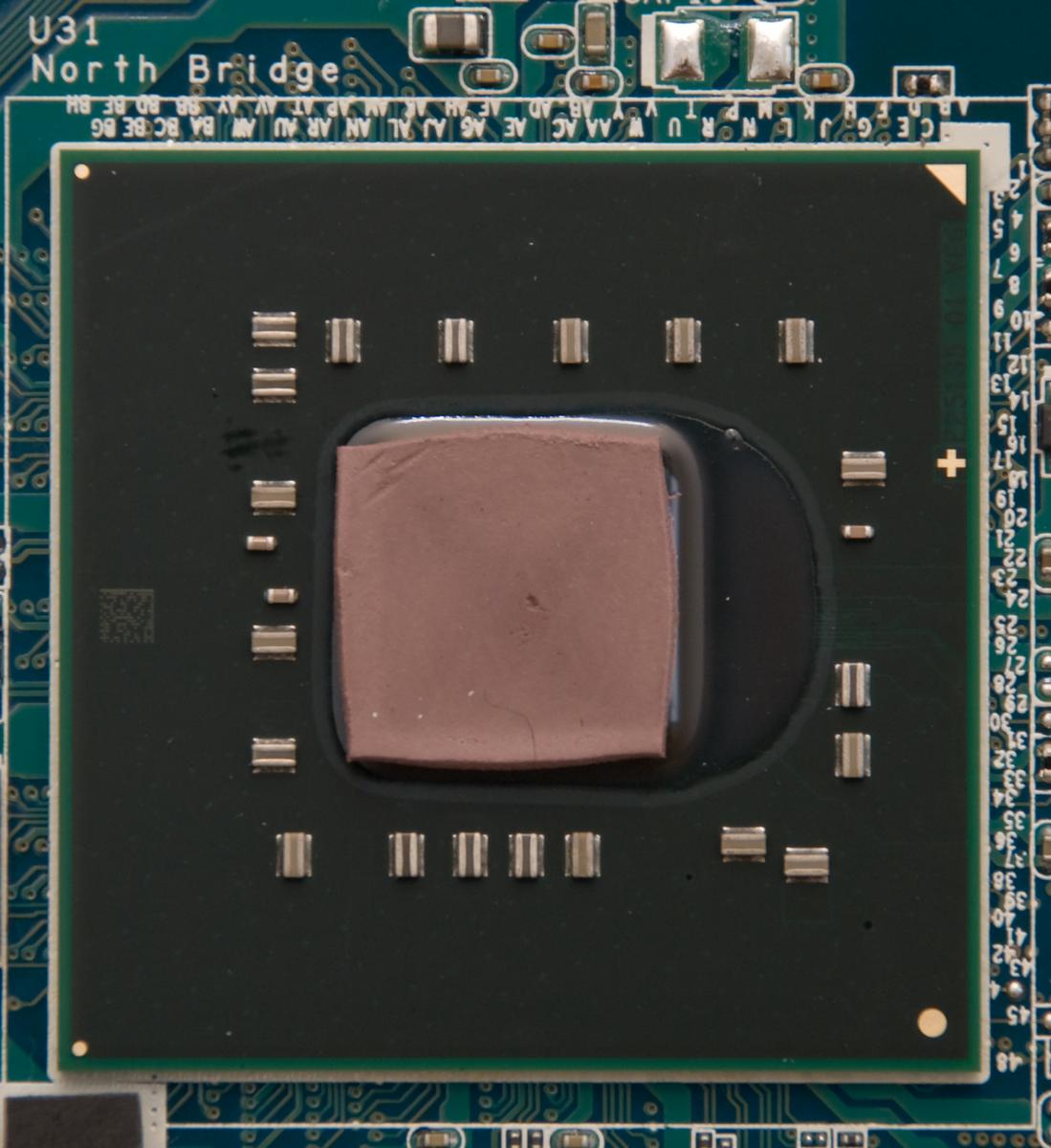
The purpose of all there operations was to change thermal interface. Temperature falled on 5 degrees C when idle and 7 C under load
Attached Files:
-
-
Some more pictures:
Attached Files:
-
-
Nice pics! You did all that to change your thermal grease?
-
Wow Raps, thats very cool. I wonder how this changes GPU temps?
Anyway, I am now a Sony FW owner! Couldn't sleep last night, looked on the SonyStyle outlet...and got a new FW190 (on clearance!) with these specs:
# Display:LCD 16.4" (XBRITE-ECO™
# Graphics:ATI Mobility Radeon™ HD 3470 with 256MB vRAM
# Color:White
# Wireless_Local_Area_Network:WLAN (802.11a/b/g/n) with integrated Bluetooth® technology
# Processor:Intel® Core 2™ Duo Processor P8600 (2.4GHz)
# Memory:3 GB DDR2-SDRAM (DDR2-800, 2GB+1GB)
# Hard_Drive:250 GB SATA Hard Disk Drive [5400 rpm]
# Optical_Disc_Drive: DVD±R DL / DVD±RW / DVD-RAM Drive
# Battery:Standard Battery
$890 shipped
Did I get a good deal? -
2 Oooopha - I had really a lot of free time after my laptop battery died ))
2 makitaki - Ati Tray Tools showed minus 6-7 degrees C of difference under load.
It seems laptop became really cooler in the area of keys Q-R-V-Z.
Moreover, I'm so happy with the result that probably I will cange thermal interface onece more, from Titan Nano Grease to (probably) Arctic Cooling MX-5. -
I L-O-V-E YOUUUUUUUU
haha, i never expected this when i made that post.
how much work is it to get to the speakers, i was wondering if i could swap out the harmon kardon speakers from my tosh if they fit once i get one of these which is hopefully this week -
How was the chassis in the laptop? Was it made out of magnesium? Was it sturdy?
-
Haha, it seems it was made of plastic. To be honest, I have no idea how to make out material it was made of. Sturdy enough, more than I expected ))
-
Hi Raps, how difficult is it to remove the casing? Is there any latch that you have to push or pull, or do you just need to remove the screws in order to remove the casing and reach the CPU?
-
Yes you did!
Can you link us the deal. Thanks! -
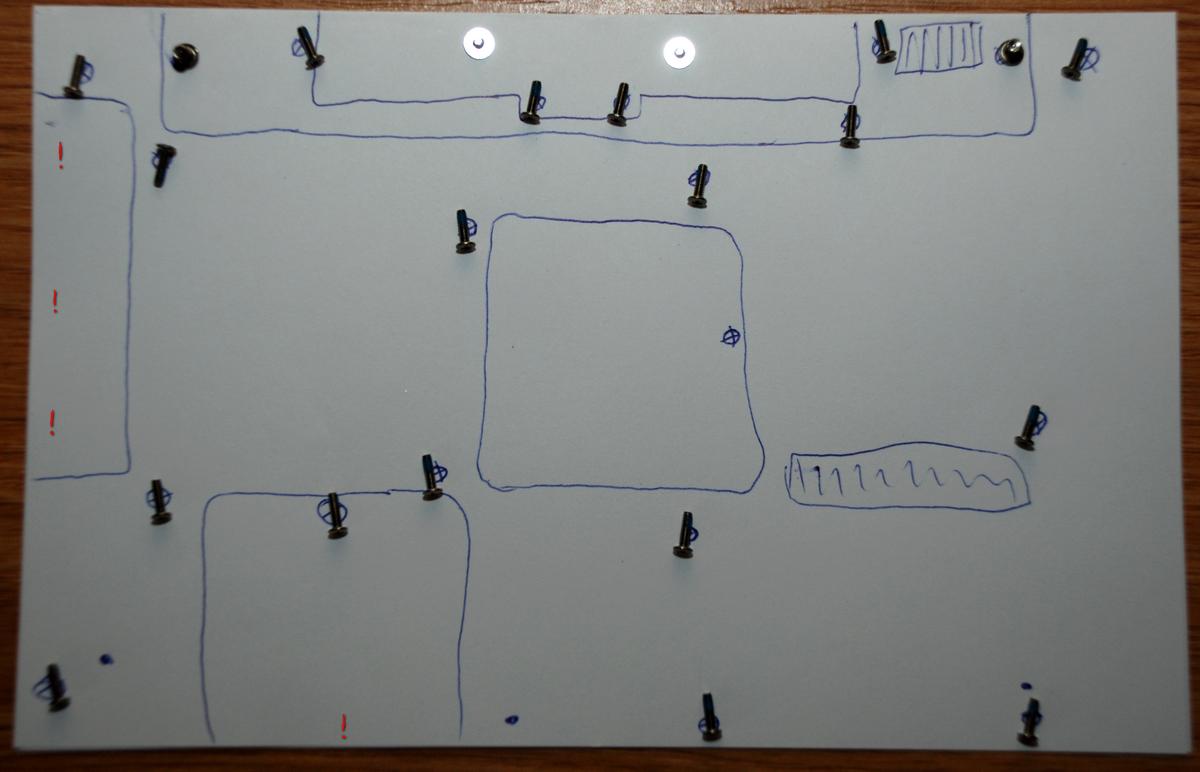
As I told, there are 3 hidden screws under CD/DVD, remove it first when you unscrew the casing. Near HDD there is latch, be careful. And be extremely careful with D-SUB (15-pin), it stands in notch, so first remove the casing starting from Cd-drive. When decide to build it again
just be sure to switch WiFi in right position.
If you decided to take apart your laptop for the first time, just look at this picture, hope it will help you
Attached Files:
-
Official VAIO FW Series Owners Thread
Discussion in 'VAIO / Sony Owners' Lounge Forum' started by Hinduemperior, Jul 28, 2008.