 Problems? See this thread at archive.org.
http://img528.imageshack.us/my.php?image=undervoltscreenshot29dekn4.jpg
there ya go.
-
-
My specs are:
VGNFW290-CTO
Microsoft® Works
LCD 16.4" (XBRITE-ECO)
No Fresh Start
320 GB SATA Hard Disk Drive [5400 rpm]
Video Standard
Standard Battery
QuickBooks Simple Start
WLAN (802.11a/b/g/n) with integrated Bluetooth® technology
ATI Mobility Radeon HD 3650 with 512MB vRAM
Intel® Core 2 Duo Processor P8600 (2.40GHz)
Blu-ray Disc Read Only Drive
Windows Live OneCare 90-Day Trial
Black
Microsoft® Windows Vista® Home Premium 64-bit
4 GB DDR2-SDRAM (DDR2-800, 2GBx2)
-------------
So if I loaded XP there would be no audio at all? That's lame I like XP.
Well, as far as gaming as well goes - what do you mean by "top of the line" games? What would I be able to play and wouldn't and what if I set the game on low settings, would I be able to play it? I'm looking at games like Spore, Left 4 Dead, maybe some Mass Effect. Etc. -
i got almost the exact same one, expect for the graphics drivers, so i guess then drivers should for mine also. We should just start another thread on how to install xp on the fw like others have done for similar models.
VGNFW290-CTO
LCD 16.4" (XBRITE-FullHD)
Fresh Start
320 GB SATA Hard Disk Drive [7200 rpm]
Large Battery
WLAN (802.11a/b/g/n) with integrated Bluetooth® technology
ATI Mobility Radeon HD 3650 with 512MB vRAM
Intel® Core 2 Duo Processor T9400 (2.53GHz)
DVD±R DL / DVD±RW / DVD-RAM Drive
Black
Microsoft® Windows Vista® Business 32-bit
3 GB DDR2-SDRAM -
that'd be great. Let me know if you do
-
anyone know of a good neopreen case for the fw besides the one sony offers?
-
Hey all, im having a problem with my fw's power button hinge. It's shaking loosely like crazy. I tried fiddling with it to see if it came out of a socket or something but no luck. What the hell should i do?
-
would someone who got their FW with teh FullHD screen let me know their take on it. I'm expecting it to be be good.
also could you check if its an updated dual-lamp screen or a led screen -
is anyone interested in purchasing my 1 month old sony fw 190 cto?
it also has a 3 year ADH extended warranty
here are the specs:
go to: img246.imageshack.us/img246/2250/sonyfwka1.jpg -
I had a FW190CTO HI-Color and returned it for an FW290CTO FullHD. (30 day return policy, no restocking fee)
The new FullHD screen is as good as the Hi-Color, if not better. Bright and crisp display that looks good at all angles. My only complaint is that the resolution (1920x1080) makes everything very small. I had to increase the DPI Scalling to 120 and its still small but managable.
1600x900 resolution resolution was better for this laptop.
Hopefully Sony will make a FullHD screen at the 1600x900 Resolution. -
Don't you have the option of changing the screen resolution in Display Settings down to 1600 x 900? I am hoping someone will try this and report back as to whether the text is sharp in that mode.
-
it wouldnt be "FullHD" if it's 1600x900...
I doubt it... using any resolution besides the native resolution will make the screen look like crap.. -
RE:FW290 - The next screen resolution available under the display settings is 1024x768. I tryed this but looks like crap.
The only thing that helps is increasing the DPI to 120 or higher. -
Yea, 1920x1080 is way too high a rez in my opinion for a 16.4" screen, that's why I ordered my 190 when they went on sale just so I got the 1600x900 native rez. Now all i have to do is find audio drivers still, but the screen looks great.
-
i got a fw with these spec
P8400, 320g hard drive , 4g of ram , 4500MHD graphic cards.
This is my first sony vaio. i love the design of this laptop. But i got some problems with it
First of all, After 2 months of used, the are below those stickers starting to scratch , i guess because of the lid because other area still look good.
My cpu average tempeture now is 45 to 46 degree. Is it normal ? I though sony suppose to run cooler.
And my fans run quiet until it kick in every 5 to 10 minutes even though i'm not doing any intense work . Is your laptop always quite ? How to fix the fan problem ? or i'm just too sensitive about this.
Should i buy a cooling pad ? -
There are angled USB cables available that can solve this problem to an extent. For example, http://www.angledcables.com/a-to-b.html
I agree though, all manufactures need to design their notebooks with the USB and firewire ports on the left upper side. -
i've got a 1080P Full HD sticker on my 1600x900 fw190 that says otherwise...
-
The sticker indicates that you can use a Full HD resolution on your external display using hdmi.
-
LOL that means it can play Full HD content when you hook it up to a 1080p hdtv through hdmi, fullhd is 1920x1080 not 1600x900
that sticker is kinda misleading -
My stickers are starting to scratch the bezel of my screen (the purple Centrino2 sticker is leaving a purple smudge). I'm going to be removing them soon.
My fan kicks on and off once in a while as well. It usually shuts off within a few seconds, and I don't pay much attention to it. -
Hi, since in my FW11j the blu-ray drive is a matshi-ta, I was thinking to remove it and put a new one. Is it possible? And is there a how-to-make-it for dummies in any thread of this forum?
Thanks in advance. -
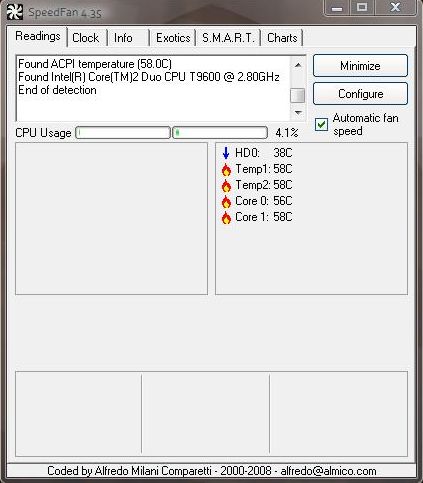
hi all I'm facing a problem with my vaio Fw190U
the CPU is very hot it reaches 58c
what should i do to reduce the heat ?Attached Files:
-
-
if your vents are dusty, clean them out with some compressed air and you may want to try undervolting if you havent already. Got my p8400 load temp from 56 degrees Celsius down to 43-44 degrees. Idling around 29-34 degrees Celsius.
-
Hi everyone.
Picked up my first Vaio about a week ago, an FW235 and am loving it so far.
Got a question and I did search.
Sometimes, when the laptop is on, it will make a loud clunking noise, like something is getting dislodged from inside. Don't know what this is and can't really think of what it may be except the hard drive. This happens whether I have the battery in or out or whether I'm plugged in or running on battery power...
Any ideas?
Cheers! -
I hear the sound too, it is the Blue-Ray drive. Which according to me is just checking for inserted media. Maybe the sound will be gone when you set the hard drive as first boot using the BIOS.
-
Hi all, im new here!
Just got a FW160D (canadian model apparently)
anyway i've got a problem..
My ATI Catalyst disappeared?? oO when i right click its not there
when i got to the ati folder its empty...
so i redownloaded the ati package from the sony support page... installed it but catalyst still isnt there?? oO
but when i boot the computer up it asks me to register my product on the ati page.. so it must be installed
anyway i then tried to download the catalyst straight from atis website installed it and still nothing :/
edit: Also, do you guys know how to change the default setting for the (vaio control center) HDMI Resolution Setting Configuration? mines stuck on 1360x768 everything else is grayed out -
It can't be the BD as the FW235 doesn't have one!
I'll try putting a disc in the drive and see if that makes a difference. -
I got my FW290 last week and I've really been enjoying it, until the display went crazy. I see a bunch of vertical lines all throughout the screen. Also, I've been getting blue screen of death when I try to boot (can still boot into safe mode though). I think the graphics card itself has gone bad, because the display looks terrible even if I pull up the BIOS menu. Its the HD3650. Has anyone else seen anything like this?
A picture I took of the problem is here: i36.tinypic.com/2ebes8k.jpg
Attached to the post is a low-res version.
I really appreciate any help. I'm totally bummed that I can't use my laptop.Attached Files:
-
-
Ok, Ok, Dvd drive
-
Thats artifacting. Your 3650 is overheating/done. RMA/Warranty it.
-
Thanks. Sucks that its a hardware issue. I hope its not common for the 3650 models.
-
same but no one seems to have posted this issue yet. maybe it was damaged during shipping?
-
LOL, i wasn't being sarcastic...just thought that the BD drive might do something than the DVD...
Anyways, threw a blank DVDR in their and it still makes the noise....
Anyone else have this problem?? I'm just worried that it's something that'll end up breaking down in the future. -
You had the same problem? Did you order yours from Newegg? The shipping box looked totally fine, so I don't know if it could have been damaged then. I'm hoping they exchange it instead of repair. I never really trust repairs...
-
no, canadian newegg has no sony laptops, I meant I hope it is not the same for all 3650 models. the same was referring to your last part of the sentence.
-
It happens, factories still have a small margin of producing defective cards, your FW just happened to be housing one. Get it completely replaced, cannot be fixed.
-
I have a Sony FW170J , fairly low specs bought at BestBuy, this is my "couch" laptop, so I can browse while on the couch watching TV and for my last email check/browsing when I am already in bed (yeah I know, I am addicted)
I have a couple other laptops, one HP and one Rock (bought in the UK) and now I have ordered a Sony Z series.
This is the "lucky" part. I ordered a medium specs Z 590 series laptop (200Gb 7200rpm, 4Gb RAM, 2.53Ghz CPU) but they took a bit longer to assemble it and they had to recapture the charge on the credit card, so happen that in that meantime my card we replaced by my bank. I thought I was ok because it had gone through at order, never thought they would need a second try, my credit card was not charged. So, the day it is supposed to get shipped order gets canceled
I called Sony and nothing could be done, I had to order again and wait wait wait...the next day I get a call from a Sony salesperson, bla bla bla we have a deal for you bla bla bla I ended ordering a VGN-Z590UAB (128 SS-HD, 4Gb RAM, Ultimate, 2.53Ghz) and it is on schedule for delivery (FedEx site) this coming Monday...but here is the lucky part, yesterday they delivered my first canceled order!!!!!
They must have mixed things up somehow and now I will have two of these Z series laptops...though my morals are nagging at me to return the first one, but I do not know yet if I will. And before someone tells me they will go into my CC and charge, they can't, the card for that order is not good anymore as explained, they cannot legally access the card used for the second purchase, they only sent it to me because they "wanted" I am not liable in anyway, on the phone with a Sony rep, he told me returning it would be totally up to me.... Honestly I am tempted to sell it on eBay and buy a TT
-
I would keep it for a bit until you are absolutely 100% sure you haven't been charged for it... then ebay it or whatever. That's indeed lucky!
I was wondering how come Sony's profit warning to the stock market was quite so drastic...
-
lol I don't have the FW yet, no 290CTO yet in canada, so have to wait.
-
Stop blaming sony and your bank. It is your responsibility to pay for the items you recieve, or you need to have it returned. If the checkout girl at your local electronics store "misses" the item in the bottom of your cart, it is still your responsibility to go back into the store and make sure it gets paid for.
However, if your above statement is true and Sony is shrugging their shoulders over the whole thing and you decide to keep it... maybe you could give the extra machine to a friend who could really benefit from it, but cannot afford their own? Maybe after you sell it you could split the money with yourself and give the rest to a local charity, or help a relative get their car fixed, or pay someone's taxes. How fun would that be!?1?!?
Not trying to preach morality, but I did want to offer some different ideas. I bet you can find something that will satisfy your morals and your greed!
-
Someone's just jealous they didn't get 2 Zs
Keep it for a few weeks in the box, then if Sony says nothing, sell it and you got your money back for the previous Z, free Z! (I'm a bad influence, so it's up to you if you listen. )
-
You could sell it to a poor college student who would love a sweet laptop (like me) haha
So has anyone been able to get temps of the 3650 when under stress? -
Does anybody have any recommendations for a messenger bag that would fit the FW?
-
This problem started 7-10 days after I purchased my computer (VGN-FW11ER).
Each time I swich on computer - I have following problem:
The display starts to blink and horizontal strokes apears across the display. It lasts for 2-3 seconds. Aftet that display is getting total frozen and it gradually chenges it colour either to White or to Black or a mixture of colors. Nothing is displayed on the display and computer is not responding to any keys or mouse clicks.
It only responds to Power button - it hibernate or standby first. I wait 1 min and that press the Power button again.
It restores from Hibernate or standby mode - and I have normal login screen. I enter my login and press enter and everything works fine..
This problem also happens during the work but not so often.. (maybe 5% of the times) but always on Startup (95%)!
-----
Today I opened SUPPORT CASE with VAIO LINK site.. so fat , no response..
Did anyone face simillar problem? -
Yes, this is an awesome bag. I went for the conservative Indigo color.
http://www.ebags.com/ogio/jack_pack/product_detail/index.cfm?modelid=88449 -
http://www.hlaska.com/17_LAPTOP_BAG?colorItem=14
This is the bag I'm getting for the AW, but it'll fit the FW too. A very nice bag! -
anyone install any vsti's on vista and the fw? say from native instruments or korg?
-
is it possible to set the screens refresh rate to anything other than 59 or 60? i'm getting jittery playback from HD files (with frame rates of 23.976), and apparently the solution is to set the refresh rate to a multiple of 28, and use a program called reclock, which will eliminate the jerky playback.
-
Are you sure the jitter is cause of the screen refresh rate? What program do you use to play your videos and what format are the files?
-
the files are .mkv, and i use MPC to play them. I have also got Haali and CoreAVC installed. Apparently they should play perfectly, but have been told that the refresh rate doesn't work with 23.976fps videos.
-
Hmm... I've been using MPC with ffdshow tryouts and the playback is very smooth. I don't know if you can adjust the refresh rate, but 60 Hz shouldn't be a problem if the videos are 23.976 fps.
Official VAIO FW Series Owners Thread
Discussion in 'VAIO / Sony Owners' Lounge Forum' started by Hinduemperior, Jul 28, 2008.




![100_8098 [640x480].jpg](images/storyImages/_100_8098-640x480.jpg)


