Problems? See this thread at archive.org.
Did you bother installing the HDMI sound drivers?
http://esupport.sony.com/US/perl/swu-download.pl?mdl=VGNFW290&upd_id=3883&os_id=34
The drivers you get from Windows Upate aren't going to up it. That's because Sony has refused to allow any of its drivers onto Windows Update.
If you didn't do a clean install, I can't help you cuz I never tried to connect to an HDTV with what came from the factory.
It was just my experience after a clean install that sometimes the sound doesn't automatically go the TV if I didn't install the HDMI sound drivers.
-
1080 is an absolute must. I mean why would you buy HD content to view on your Macbook Pro if you only have a 1440 by 900 screen?
The reason why you think the Macbook Pro's screen looks better is because it has an LED backlight.
Go the store and look at an AW with LED backlights, and I'm sure you'll like that screen better. It's Bravia technology too so it'll look a lot better than the Macbook too.
The Macbook Pro is seriously handicapped. It's a pre-1080 laptop in an post-1080 world as the saying goes.
You would need to spend an extra 150 dollars in order to get 1080 content out of a Macbook Pro 15 inch.
You have to spend 99 dollars on an mini displayport to DVI dual link cable. It has to be dual link because 1080 requires DUAL link.
http://store.apple.com/us/product/MB571Z/A?mco=MTIxODk3Mw
You have to do this because apple doesn't make a mini displayport to HDMI. Why? *Shrug* Maybe because the HDMI bunny didn't leave a present for Steve Jobs when he was a little boy and he was resentful ever since? Who knows.
Then you have to shell out another 20 bucks for an DVI to HDMI cable:
http://store.apple.com/us/product/TR842LL/A?mco=MTIxODk3Mw
And then you have shell out another 20 some out dollars for the audio cable because DVI doesn't carry sound.
Yeah... Good thing you're doing research on the FW before you take the plunge with the Macbook Pro.
Seriously, Apple is only handicapping the Macbook Pro because it wants to save its display business.
If it put an HDMI port on any of its computer, its sale numbers would drop by 25 percent overnight.
It's a matter of business survival in a tough economic climate.
If you do end up buying a Macbook Pro though, don't say I didn't tell you not to.
http://macflaws.com/2008/11/nvidia-sued-over-graphics-card-problem/
At least spend an extra $500 on an extended warranty or something. Trust me, you'll be needing it.
-
I believe the FW series have a design flaw or migth become in an issue
I have three FW series in front of me ( 285D ) laptops.
i need to return too, but the horrible weather made me stay home instead.
where the Motion Eye Camera is IF you play ur thumb or finger on there and push down you'll see there is a LOT OF FLEX that actually gets pushed down.
on two of the three FW here, when i do that, and look at top of the Motion EYE camere the front (dark grey ) and (light grey) meet starts to crack open. seperating the LID from the LCD protection lid.. -
I never noticed it until you pointed it out, but it doesn't bother me.
perhaps you should just return the fw and try another brand? -
Indeed, it's not like I'll be pushing on that specific point for the remainder of the laptop's life. It just seems like an arbitrary "flaw". It's not like for example, if you rest your palm on the laptop and the case starts to bend, that would be a real flaw.
-
if other brands had such a nice high resolutions.. i would try another brand.
I would try dell but not sure about them.
another thing to try
go in a quiet room... and lower the brightness down to 0, and you'll start hearing the LCD hum , i thought it was the fan .. but it was my LCD humming away ( in my room very quiet everyone else is sleeping )
The first other sony i had a few years back which i believe i even posted an overview on these forums had the same exact issue with the buzzing humming LCD's
try it out.. -
realisticly it is a design flaw.
Around the other edges of the LCD screen the plastic sides are right to the LCD screen with MINIMAL push. though the top where the motion cam is has a lot of flex and push.
thus creating space. and a person opened their notebook from that area and gaave enough push who knows..
Also that the top potion where the two colours match are slighting gapped when putting down on the motion camera is a flaw in itself. -
Love my FW290; thankfully no problems and works great; but do have a question. As you know laptop only outputs in HDMI which is fine for my video 1080P to my LCD TV. Sound from the TV is good, but I want to use my Yamaha receiver that is older with NO HDMI input/output. Does anyone know of a converter that can work? What have you guys done? (other than buy a new receiver) Wish Sony had optical out on the FW290.
-
Here's a solution. USB sound card like Creative Sound Blaster X-Fi Surround 5.1 Sound card.
Send video to HDMI. Send audio to this device and it has an optical (Toslink) out that you can send to your receiver. -
Thanks, sounds amazing! I ordered mine, but it's not due to ship [estimated] until Dec 30... they shipped my Location Free already (2 days after my order was placed) but get this-- FedEx shows it's shipping to LONG BEACH, MA... I live in LONG BEACH, CA...
I was on the phone with Sony for 59min 34sec and only talked to a guy for about 2 minutes (they had me waiting for a rep for about 47 min, I talked to him, he put me on hold for 7 more minutes, came back, said a few words, then it was over)...
Anyway, they're shipping me a new LocationFree expedited and he said he'd expedite my laptop shipping when it gets completed. All I know is it better not go to Long Beach, Massachusetts...
-
Wow, thanks, never thought of that...great idea....may do just that or may get a new receiver with hdmi inputs & out.....Thanks again.
-
Hmmm... I'm tempted to get one myself. It can also be used with those 5.1 computer speakers like Logitech X-530 5.1 Speaker system, X-540, G51, etc, etc...
Pictures from Newegg.. Creative X-FI Surround 5.1 -
Can't wait to get the new VGNFW290-CTO. I'm a bit bummed as I paid over $5,300 last year (September 2007) on a VGN-AR 570 (totally maxed out with every possible upgrade) and it crashed and it turns out the hard drive is broken as well as it needing a new mother board (according to Sony Style rep here).
Frustrating that it broke down a few months after the warrenty expired.
I decided to just get a new computer instead. I was going to go for the AW but I can't find a backpack large enough to carry that thing around. The AR570 was heavy enough so I can't imagine the AW's.
I can't wait to try the FW290 out. I learned my lesson this time and bought the extended warranty!
Product: VGNFW290-CTO
Component: Microsoft® Works
Component: LCD 16.4" (XBRITE-FullHD™
Component: No Fresh Start™
Component: 500 GB SATA Hard Disk Drive [4200 rpm]
Component: Video Standard
Component: No Engraving
Component: Standard Battery
Component: QuickBooks Simple Start
Component: WLAN (802.11a/b/g/n) with integrated Bluetooth® technology
Component: ATI Mobility Radeon™ HD 3650 with 512MB vRAM
Component: Intel® Core™ 2 Duo Processor T9400 (2.53GHz) [Regular price $300]
Component: None
Component: Blu-ray Disc™ Read and Write Drive [Regular price $250]
Component: Windows Live OneCare 90-Day Trial
Component: White
Component: Microsoft® Windows Vista® Home Premium 64-bit
Component: 8 GB DDR2-SDRAM (DDR2-800, 4GBx2)
Per Unit Price: $2,149.99
Quantity: 1
Total Price: $2,149.99
Description: VGN-FW290 Configure-to-Order
Ship Method: Expedited
Estimated Ship Date: 12/24/2008
Extended Service Plan:
3 Year Express Ship Service Plan with Accidental Damage from Handling Protection [Sony recommends]
Price: $349.99
________________________________________
________________________________________
Subtotal: $2,499.98
Tax: $155.34
Shipping Charges: $89.00
________________________________________
Order Total: $2,744.32 -
Not sure if that sound card can decode the new DTS-HD, etc...that may require an even more expensive card....I may just get a new Yamaha receiver with HDMI...can then connect my sat receiver hdmi with it also...but again, thanks for the idea.
-
there is a windvd(bd) update for those who needed:
http://esupport.sony.com/US/perl/swu-download.pl?mdl=VGNFW290&upd_id=4175&os_id=34 -
I guess money is no object huh. You should pick up the new Toshiba 512GB solid state drive that's coming out in the first quarter. Those things won't break like a regular hard drive.
-
No, it's won't do DTS-HD or Dolby TrueHD. It will do Dolby Digital and DTS. If you are using FW290 as your primary Blu-ray player then it's probably better to go with a new receiver.
It's a good solution if you use it on your desk with PC 5.1 speakers... -
Autumnale: That's a nice config. for sure except I would not accept a 500 gb HDD that spins at 4200 rpm. I guess it's ok for multimedia and movies you put on it, but it's too slow by what's out now. Sony has a bit of a habit of putting out of whack or behind the times components ocassionally on its product line. Although, they are not as bad as Dell with the XPS line. You should get a free base station by the way that Sony was giving out on FW CTO orders. Smart move by the way with the accidental handling warranty, Gets you a new lappie in a few years.
-
Well, I got an update from Sony Style Canada about my order being shipped 2 days after being built. Pretty good for on time delivery. The FedEx package is now in Memphis, TN & is estimated to get to me by xmas eve. It would be an xmas miracle if it does since I ordered it on Monday the 15th of Dec.
http://www.youtube.com/watch?v=_njxxQ-kmag -
That would be a miracle, indeed! I ordered mine on the night of the 14th (says 15th on my order) and my stuff is coming from Memphis as well (my Base Station did, at least)... not fair! Mine is still processing!
-
Can you guys try this..
go in a quiet room... and lower the brightness down to 0, and you'll start hearing the LCD hum , i thought it was the fan .. but it was my LCD humming away ( in my room very quiet everyone else is sleeping )
The first other sony i had a few years back which i believe i even posted an overview on these forums had the same exact issue with the buzzing humming LCD's
try it out.. -
ya if I stick my ear to the screen, otherwise I don't hear it even 30 cm away in a quiet room. Is this all you do? look for problems with laptops? This is the impression I am getting from your posts, not bashing, but nitpicking to the extreme. I am surprised you haven't mentioned the sound the hdd makes, lol.
-
So I decided to get an HDMI cable to see how the laptops outputs to the TV. It all works fine and dandy, except one problem. The FW outpts 720p (1280x720) but the TV's resolution is 1360x768. I tried changing the resolution from 3 different places: Windows, ATI, and Sony's HDMI settings to 768p but with no luck. I'm stuck with this tiny black border all around and unlike VGA, where I can stretch/zoom the picture to fill the whole screen, I can't do that with HDMI.
-
i already have.. lol
though the hitachi one i got in my new model is wisper quiet the other two had fujistus.
and in a quiet room at a normal distance (at night ) the screen is very audible besides sticking ur head right to the screen...
I was more than a ruler legnth at away and the lowest level of brightness it was fairly loud.
either that or ur an older fellow and the hearing issues are starting.
when u pay 1600+ you should nit pick.
if i had paid 500bucks i could care less.
there is a difference when u pay for quality, and when you pay for low end. -
Does anyone have the larger capacity battery for the FW? If so, would you mind taking a photo just to show me what it looks like? I've tried googling it and I have yet to see a decent picture >.< I just want to see how big it is and what it looks like when it's plugged onto the FW.
-
don't think so. I an neither old, nor have any hearing issues, my hearing is quite excellent. I do not hear the hum even at the lowest brightness or highest brightness.
-
I used sony original 3650 driver and works fine with my emprex 32" lcd at 1366x768
you can try latest ati driver with mod:
http://www.driverheaven.net/modtool.php -
I'm actually using the latest modded drivers with catalyst 8.12. My TV by the way is a Sharp Aquos 32". The problem is that I can select the 1360x768 resolution but I still get a thin black border all around. I can actually select up to the 1080p resolution despite the TV being only 768p and I still get that exact same thin black border all around.
-
I just got an FW series laptop with 4GB ram and a 2.4 Ghz processor.
Well i have it for two days and when i try to watch a downloaded 4GB blu ray quality movie it stalls every couple of minutes even with no other programs running?
Do i return this laptop immediately?
Why shouldnt it be running smoothly? -
I had the exact same problem. I don't know what I did to make it go away though. It seemed to be related to the Vaio Control Center and the fact that the 1080 mode has like two resolutions. 1920 by 1080 and 1776 by 1000 or something like that.
The problem went away after I shut down my computer and restarted and connected to the HDTV a few minutes later.
I think a complete clean install and reinstallation of all the drivers does solve the problem.
Have you tried rolling back the video drivers back to the version that's on the sony support site? -
biggamer what program are you using the watch it?
-
hey, is that what you did? a clean install?..
when i hook it up to my tv for some reason the text is not very crisp kind of blurry when running in 1080p mode -
Regular quality movies are about 4GB but a blu-ray movie will probably be at least 18 or 19GBs so you may have just downloaded a bad copy of the movie. Have you tried any other downloaded movies? I'd try that before considering returning an entire computer.
-
Um... Try 40GBs.
Speaking of blu-ray.
http://www.circuitcity.com/ssm/Sony...t/outlet/oid/163714/rpem/ccd/productDetail.do
BD-R discs for 10 bucks. Pretty good deal. 25GB capacity though. You won't be putting a "home movie" on it. You'll need a dual layer blu-ray disc for that.
-
Are you using the piece of crap blu-ray watching software that Sony included to watch the blu-ray movie? That's probably your problem there. Try PowerDVD 8.
You might be missing the codec for the movie if you're just watching like a 1080 movie file.
If it's a WMV file, don't try to play it with VLC. 1080 WMV has to be played with WM player. It just doesn't work well otherwise.
Let me know if it still stutters. It shouldn't. -
yeah I just ended up doing a complete clean install and followed the order to install the drivers back on from the sony website.
http://forum.notebookreview.com/showthread.php?t=292475
THE ORDER IN WHICH YOU INSTALL THE DRIVER matters. Well mostly just that the Sony shared library has to be installed before the Sony Utilities. And those two things are the last things to install.
Make sure you install the drivers from the website and not just use Windows update. None of the drivers for the FW are on Windows update. They're just generics that cause problems.
If you have a blu-ray rom, you'll need to pull the installation files for the WINDVD BD from the hidden parition before you do a clean install. There are directions in that link I think. -
You know I tried that too. Apparently PowerDVD 8 didn't like those drivers. I wasn't able to play Blu-ray movies after installing the latest modded drivers.
It's cuz they're not signed.
You can use AnyDVD HD to fix the problem, but I can't sanction that sort of activity since it is not kosher and all.
In fact I can't say that I have I have personal experience that AnyDVD HD would fix the problem because I would never even consider installing AnyDVD HD on my computer. O
I'm just guessing that it would fix the problem. ;-) -
VLC player
-
I Downloaded it through the torrents, its a MKV file
Very weird that no matter what movie i play it usually wont play fluidly, and thats a off on such a supposed high end laptop -
I have 2 Apple Macbook Pros (2.2 SR Glossy and 2.16 Matte) both have 1440x900 displays. I also have my new FullHD FW290 CTO 2.26 and from a display standpoint the Sony display is very nice (not quite as vibrant os the MBP 2.2 LED screen) and provides much more screen real estate for work and games. Apple missed the boat when they release the new MBP without a Hi-res 15.4 screen option. Even 1680x1050 would have been nice.
The only noticable negative I've seen on my new Sony and the blacks don't get fully black in movies. Perhaps there is a way to setup display profiles like I can on my Mac.
Cheers, -
That depends. I always download 720p Blu-ray rips, not 1080p and most ripped movies are 4 GB. DVD-Rips are usually 1 to 1.5 GB. Some Blu-ray rips are much bigger such as the Dark Knight being 8 GB since the movie is longer.
Anyways, I recommend Media Player Classic for watching any kind of movies. It even handles all my 720p HD content without problems including Blu-ray rips and TV shows like Entourage. No hiccups or anything like that here.
I've never tried PowerDVD for watching movies. But the problem is not just when watching movies, it's for the desktop in general. Like, when I just view my laptop's desktop on my TV's screen I still get that border. It doesn't really bother me with the desktop, only when watching movies. So, I'll try those 2 programs you suggested, perhaps those special programs send a different signal through HDMI, making the display fullscreen and truly 1360x768?
EDIT: Well, I installed AnyDVD. I thought this was a media playback software. This is pretty useless to me since all my movies are ripped files on my hdd and I don't use the dvd player for any movies. -
i don't think u'll get full or dark blacks on these vaio notebooks
as many reviews have said, they suffer from a lot of light leakage, and if u look at it during boot it's never a full black untilthe machine is off -
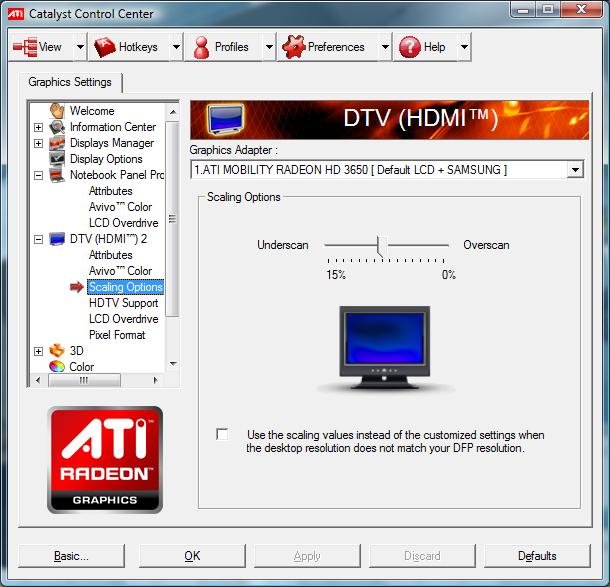
ati driver has a scaling option see attached screen shot
I just tried the 8.12 mod driver on a different tv, and it works fineAttached Files:
-
-
ah sweet thanks for the info, I just fixed my issue now for our bravia and no longer is the desktop too large for the tv, although the quality is much better on my laptop than tv, maybe its because the tv is much larger.
+ rep -
I tried using that feature but it's greyed out when my TV is connected and the "use the scaling values" option is unchecked like in the screenshot.
EDIT: I enabled GPU scaling under the DTV (HDMI) Attributes and now I go the option to overscan and it works! I can make the picture take up the whole screen of the TV!
EDIT2: After tweaking with the ATI settings some more, I found out GPU scaling has nothing to do with it. When the Sony HDMI resolution setting is set to 768p, the scaling option is greyed out, regardless if the GPU scaling is turned off or on. Basically, I had to change it to 720p, the option became available and I was able to slightly overscan the display to fill up the whole screen. -
Anyone has this bag? Any other suggestion?
Thanks in advance -
Bravias are LED backlighted I do believe. That's probably why they look better. Better color spectrum.
-
I was not aware of this issue, however, for a $999 FullHD Vista machine to play RTS and the occasional RPG game with my children and grandchildren when I travel, it is more than suitable. The ATI 3650 does just fine for most games in these genres. The added plus of being able to play blu-ray movies on the laptop or one of our HDTVs that doesn't have a player is icing on the cake.
Seems well constructed, I will start traveling again after the new year so I guess I shall see how it holds up.
Cheers, -
Does it play fluidly on a desktop? Maybe whoever encoded it was a moron?
And MKV isn't a codec. It's just a container. It has absolutely no impact on how fast it is decoded. (more or less) It's used because it supports variable bit rate mp3s and stuff like that whereas AVI files need workarounds to support VBR mp3 sound.
MKV is a really good container as fair as I can tell, but people almost always use H264 to encode when they're using MKV.
The H264 decoding is probably what is slow. The thing is though... The 3650 is supposed to have hardware H264 decoding capabilities. Did you install Avivo? I don't even know if Avivo works on the FW.
But even if you're only using the CPU to decode H264, it should've been plenty. Something is wrong.
Try playing that same video file on a desktop and see if it still stutters. Maybe some set the FPS to 5 frames per second or something.
-
Hey,
I have a Vaio FW VGN-FW235D I believe. Anyways, it's the model that does not use an ATI discrete video card, as in Canada it's $1,099.99 without any ATI, but apparently in the US it's $799.99 for one with, not really sure how the economy works out that trade agreement, but whatever.
Anyways my problem is, I have a 720p LCD TV, and I have been using the HDMI options on my laptop, but I can ONLY scale to 1080p or like 1280x738 or something, for some reason it won't let me choose a 720p signal, or set it to the 1360x720 resolution or whatever it is manually.
Is there any way to force 720p detection? I can't DTV overscan like the ATI laptops, of course. In the control panel, it's there, but grayed out, which is quite lame, and if I try to do a force of resolution from the 'Settings' in Vista, there is no 720p, just 50 other resolutions that are useless to my cause.
I figured i'd ask here. Thanks!
Official VAIO FW Series Owners Thread
Discussion in 'VAIO / Sony Owners' Lounge Forum' started by Hinduemperior, Jul 28, 2008.