Problems? See this thread at archive.org.
it should now come with ddr3 dont u think?
-
Wait until the price of DDR3 comes down. The FW is a low-cost reasonably light weight 16x9 entertainment system. I think they want to keep costs down for now.
Cheers, -
Hey guys, I bought a FW11J a few months ago and I´ve been really happy with it.One of the features I liked the most was that it was really quiet, but lately, since I accidentally dropped it (not exactly dropped, more like set it harder than I wanted to on my desk) the hard drive has been getting more noisy, and it never stops spinning (the hdd led light isnt turned on, but it keeps on spinning).It´s not a big problem, and the computer still works perfectly fine but it has become kind of annoying.Can you think of any kind of solution or test to find out what the problem is? I would really appreciate it.
-
URGENT help needed, regarding HDMI in xp
guys, I just downgraded my FW21 to windows xp. I installed all the drivers and there is no more yellow question mark in "device manager". now I try to connect my laptop to my sony lcd tv through HDMI. the FN+F7 is not working, I managed to change the screen in ATI catalyst, but there is NO sound from TV. When I was using vista, as long as the hdmi cable is connected, there is sound. I did a bit research, and install a ATI driver called 8-11_xp32-64_hdmiaudio_70228, but it does not help at all.
Can anyone help with this issue or do I have to stay with the extremely slow vista?
Also how can I get the fn+F7 working? the Fn+F2 ( mute) is working now in xp
Thank you very much in advance -
Hi I just started looking at the FW390. (I realize that this model does not utilize a nVidia GPU).
I am curious, other then the nVidia chip problem are there other, significant issues with the Sony VAIO laptops, specifically the FW series that I should know about?
I realize individuals have random problems, I am concerned about Issues that are affecting many users, ie: my chances of encountering the problem are high?
I was going to buy an HP HDX16t. After playing the HP coupon fiasco, I finally got frustrated enough and started looking at other machines.
Now looking at the Sony FW390 and new Dell 1640. A little worried about what I have read regarding support for the failing nVidia chips in older units. -
If you buy the one with 1920x1080, you may have a hard time reading the text, unless you don't mind changing the DPI or lowering the resolution, neither solution is perfect. If you buy the one with 1600x900, you have to give up the beautiful HiColor screen. If you want both 1600x900 with HiColor, you have to settle with older FW100 series, which come with much slower video card.
My suggestion is go to a store that has FW with 1920x1080 and judge for yourself if the font is too small.
BTW: I love my FW190 with HiColor screen. I just wish that I can get the one with faster video card, without having to give up the HiColor screen or live with small fonts. -
Can't you set up a user configuration for computing that downgrade the screen resolution to 1600x900 for basic computing, with another user configuration 1920x1080 for movie watching etc?
-
Lowering the resolution wouldn't look good with an LCD monitor. Text, pictures and icons would look blurry. An LCD screen would look perfect only at its native resolution. Besides, there is a limited resolution that you can pick. The official driver only allows you to choose between 1920x1080(default), 1024x768, 800x600. You can download and install modified driver to get more resolutions but there may be some complications. For example: Blu-ray software player will not work with the modified driver.
-
My FW11E HDD dies just after one month.I recommend you to check your HDD. Who is your HDD maker? . Go their web site & download testing utility to check your HDD.
-
so i am very much considering buying this laptop. So i realize that on the HD screen fonts are smaller but you get nicer picture.. my questions is is that how much of a difference does Hi-Color make compared to an eco screen because im very on cash and well $968 is really pushing it... so worth the money or not or should i just keep the regular screen
-
ECO screen is not bad at all if you just use it for internet or office application. But HiColor really shows its shine when watching movies. The color is much more vibrant and black is really black. It has anti reflective coating which is better if you work in an environment where you have lighting behind you.
-
ya if only the 290 had the option to have a HD screen then i would take it in a heartbeat... anyone know a place that might sell one of these for cheaper than 839.99?
-
My FW's HDD died after 3 weeks. These Hitachis are pieces of S#$% man. Sony sent me a replacement Fujitsu. I wonder why.
 I would you call up Sony support and convince them that your drive is about to die.
What's happen with all the constant seeking is that the reading/writing head of the HDD actually touched the surface of the hard disk when you dropped it and it scratched the surface of the HDD. Those HDDs are all laser etched with microscopic groves to help the head find the tracks. With a huge scratch on the HDD, the head won't know what to do and might even just get stuck trying to read the HDD. It'll probably die at some point.
If you're still within a year (and you must be since the FW came out in July 2008), just tell them that the hard drive started failing all on its own without your dropping it. :-D DO NOT TELL THEM YOU DROP IT. Just lie. It's just a little white lie.
Those hard drives fail on their own without your dropping them anyway.
You might want to think about getting a hard drive with a drop/freefall sensor that will part the hard drive head within 1/4 of a second when it detects that the laptop is in the process of kissing concrete.
http://www.amazon.com/gp/product/B001FBJJQ4
http://www.wdc.com/en/products/products.asp?driveid=477
That one has a drop sensor. Make sure you get the right one. There is one exactly like it except no drop sensor.
There are other companies that have drop sensors. You can just google and pick your favorite company. -
You don't need DDR3 with the GM45 and PM45 chipset. The maximum bandwidth they can handle is around 667mhz DDR2 ram because of the limitations of the Front Side Bus system. AMD has been ahead of Intel in terms of "Front Side Bus" speed.
That's why Nehalem has that new Quick Connect thingy. It's pointless to have DDR3 with the GM45 and PM45 chipsets. It's just a marketing thing to charge you more money for things that don't give you any benefit. -
The new FW 300 series are rock although they seem to be heavier than the FW290 series
But I still love it ^^!
I'm going to buy the FW 300 Series this Febuary. I'm a little nervous because Vaio does not include the Backup DVD like Apple does ! How can we backup it to a DVD (without using a shareware ). Did Vaio Includes some Sony backup softs..or sth like that ?
In my opinion, to the screen, I would prefer the Full HD, I think the small text doesnt a serious problems at all ! Because we can change the resolution right ? -
Hi Guys. I bought an FW21L in the UK and am loving it.
But I have a few niggling questions that I was hoping someone may be able to answer.
1) Firstly I have a standard single lamp screen and it is nice, but I've noticed that sometimes along the top border of the Internet browser where the border should be black, there are visible diagonal whitish shades. These shades are only on the border of the browser and not on the rest of the screen. Is this common? Is it something to be concerned about and could it get worse?
2) I've noticed that the back of the screen (i.e. the lid) is of a darker material then the rest of the laptop. It also feels stronger and colder to touch. The rest of it is a light grey. In the shops the FW laptops had a matching light grey lid, and so I'm wondering if the lids were changed in the newer FW batch, or whether I've actually got a refurbished laptop? (Perhaps this is linked to my previous question about the browser too!) Anyone else got a similar thing with their FW? Thanks in advance! -
My died HDD is SAMSUNG.They replace it with HITACHI HDD. Actually I like HITACHI HDD.All my previous HDD are HITACHI & never failed me.
-
Hi all...new poster here. My wife has enjoyed her new 140E/H but it encountered some "blunt trauma" (long story) and now I need to replace the eco screen. I have found a few online stores with screens as low as $175, question is has anyone else tried to replace one of these screens and how difficult is it?
-
Remember the saying """"ECO is JUNKO""".....HD is worth the $150 IMO...
-
but im not installing a blue-ray on it and some im basically going to be watching regular movies on it and doing a little bit of gaming mostly its going to be a college/recreational gaming computer. So w/o a blue-ray player i really dont see the benefit. If the ECO screen still looks nice and isnt like increadibly crappy i still think i will stick with it. correct me if im wrong
-
I was at the sony store to compare the difference between the hi-color and ECO screen, there is a noticeable differences in color and black even in normal browsing and pictures. The ECO black and color are very wash-out, it make the ECO look like it had extra backlight bleeding compare to the hi-color. After checking out the two screen i would rather have the FullHD with hi-color.
Also, I ask the sale rep if the student discount could be apply to the FW and he said it only works with the CS and SR. If i were to order a CTO FW390 through Sonystyle customer service, would a student discount be possible???
Do you guys know any other discounts that i could milk from sony on a notebook? -
The FullHD gives you 44% more screen to work with, if you ever need to open 2 documents side by side or take notes while web-browsing then the extra space makes this MUCH easier.
The better contrast, color, and brightness really improves photo editing and viewing and along with the hi-res it makes Google earth / maps look gorgeous.
BTW I have a FW290 with FullHD screen.
-
ya i was looking on the sony website and the fw390 was the only one that had the option for the screen plus they only gave the option for 1 color for some reason i want black and they are only offering white... i dunno if its just they are out of stock or what anyone know?
-
If you do CTO you get 3 color options white, black and titanium.
-
Except when they run short and restrict the colors to what they have on hand for each screen type. This happened around Christmas for the FW290 CTO.
Cheers, -
I tried what some of you recommended me and downloaded the diagnostic tools from the fujitsu website and it just says that there isnt an HDD connected to my laptop , when there clearly is one, I use it every day. I think I will end up calling sony and have them check my computer, its seems more and more likely the hard drive is faulty.
Thanks for your help -
If anyone is looking for a good deal on an FW290 I'm interested in selling mine. Its basically brand-new, I've only had it for about 5 weeks, and as I was quite busy over the holiday season I've barely used it. The specs are as follows:
Sony VGN-FW290CTO
* Processor - Intel® Core 2 Duo Processor T9400 (2.53GHz)
* Video - ATI Mobility Radeon HD 3650 with 512MB vRAM
* Monitor - LCD 16.4" (XBRITE-FullHD 1920x1080)
* Memory - 4 GB DDR2-SDRAM (DDR2-800, 2GBx2)
* Storage - 250 GB SATA Hard Disk Drive (7200 rpm)
* Optical - Blu-ray Disc Read Only Drive
* Battery - Standard Battery
* OS - Microsoft® Windows Vista® Home Premium 64-bit
* Colour - White
I'll also throw in the 3 Blu-ray movies that came with it (Hitch, Surf's Up and Casino Royale). I have not registered it yet, so you can register it in your name and take advantage of the 20% off accessory coupon that came with it as well.
I'm selling it for $1375 CDN (approx $1100 USD). That's a savings of over $300 compared to the same configuration on Sonystyle. -
I just got a message when i right after i logged in. It said ATI microsoft.net.framework. It said there was an unhandled exception. What doees that mean. I called sony and they weren't very helpful. I shut it down and it didn't come up again. There was nothing i could select for solution though. All it said was click continue or quit and it would try to ingnore it or something. Anyone know what this means? I don't have any programs on my computer and i've never turned it off the wrong way.
-
ECO screen is fine for office work. It is faster for gaming since you have lower NATIVE resolution. It is supposedly has longer battery life. The only thing is the color is not as good as FullHD or HiColor. And it is less bright and more reflective so it may not be appropriate for outdoor use.
If you have the opportunity, I suggest that you visit a brick and mortar store that sells both and make a decision for yourself. -
Does anyone have Ubuntu Intrepid Ibex running on a Sony VGN FW290? I have most, but not all, devices working. I haven't checked everything yet, but here's what I've checked so far that needs attention:
- Bluetooth Pairing with Sony Bluetooth speaker
- Webcam
- Screen brightness
-
On Ubuntu 8.10 (Intrepid).
I have got the brightness and S1/AV keys working, also headphone/speaker auto switching by following the instructions here, :
http://vaioubuntu.wordpress.com/ -
Which 16.4inch DELL? All Dells are 16 inchers, there's no 16.4.
-
Congrats for your FW! The XPS is not a bad machine at all, but it's a lot more expensive and the protective edge-to-edge glass on top of the already glossy display is not for everyone.
-
Thanks a lot for this guide. I don't intend to replace my HDD soon but in the future if I ever decide to do it, this guide should prove very useful.
Where did you find it? Do you have more guides for other service operations? -
Hello everyone, also thinking about buying FW series, but in Europe.
In Europe we have 4 models, of which the first three have X-black LCD, they dont have HD res.The last model has the X-black LCD with dual lamp technology and the HD res.
I am interested in, whether all of these models have antiglare coating, or only the strongest with a HD screen?
Thank you all -
Only the dual lamp has anti glare coating. Older FW has dual lamp but not HD (1600x900) but it does have anti glare coating.
EDIT: Sony mentions somewhere that ECO has anti glare coating but I have compared ECO with Dual Lamp and the Dual Lamp definitely is far less reflective than ECO. -
anti glare coating? I didn't really notice this on my FullHD dual lamp screen. Are you sure? It's not as reflective as other glossy displays indeed but didn't know there's a special coating.
-
It all depends on how the site was created. That site is what is known as a fixed width site so no matter the size of your screen the width of the page will always stay the same. There's other sites like notebook review forums that autostretch so that the page stretches to completely fill up your browser window. There is nothing that you can do to rectify the issue so you should just get used to it.
-
yea ive had to get use to it too
![[IMG]](images/storyImages/smile.jpg)
-
There are other color options. I recently purchased the fw373j/b from newegg for $1250 plus shipping. But I also used my cashback account from microsoft so it will ultimately only cost me around $1230. Also it was in stock and black in color. So far I love it. In fact I am on it right now telling you about it and how much I love it. lol
D -
Do you have the media buttons working? Do you know which app/driver controls them. Everything works for me also except the media buttons. Overall Windows 7 seems faster and easier to navigate.
-
HI!
I don't know really much about upgrading laptops.
i bought a FW - 250 J/H, does anybody knows if its possible to make an upgrade in the graphic card? I mean, it has the Intel Media Graphic Accelerator and I want the ATI RADEON 3650.
And if I can change the DVD unit for a Blu Ray one ?
Thanks in advance. -
i havent tested the media buttons as i never used them at all. i since have stopped using windows 7 cause my uni uses ttls-eap for the wireless and secure2w doesnt work in it. i even got xp64 to work on it, but i just went to ubuntu right now. i might just switch again and goto arch. hard choices for me.
-
You cannot upgrade the graphics card, however you might be able to change the DVD drive. Doesn't look simple and it might be easier to sell your system and buy a new one with the features you want.
Cheers, -
try turning off UAC. desktop gadgets doesn't work if you turn UAC off though.
-
Does anybody knows where to download x64 Vista Ultimate Touchpad drivers for Vaio FW21E?
-
If only I could read Polish. Says Vista, but I can't tell whether its for x86 or x64.
But, I guess it's a start.
Have you tried here?
http://support.vaio.sony.pl/downloads/preinstalled/preinstalled.asp?site=voe_pl_PL_cons&m=3824
Hope that helps point you in the right direction. -
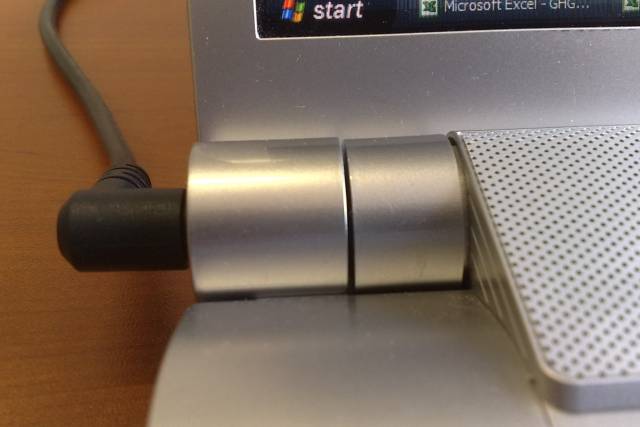
Does anyone notice that the left hinge is not lined up prefectly with like the right one is? There's two actual parts. There's the hinge itself and then there's the piece next to it that the power cord plugs into. Mine is not completely lined up.
-
Yes, mine looks out of line as well. See attachment.
Generally I find the quality of the FW's silver plastic around the keyboard to be quite poor and it scratches very easily.Attached Files:
-
-
Mine looks like that too. Just don't knock it real hard and it shouldn't fall off.
Official VAIO FW Series Owners Thread
Discussion in 'VAIO / Sony Owners' Lounge Forum' started by Hinduemperior, Jul 28, 2008.