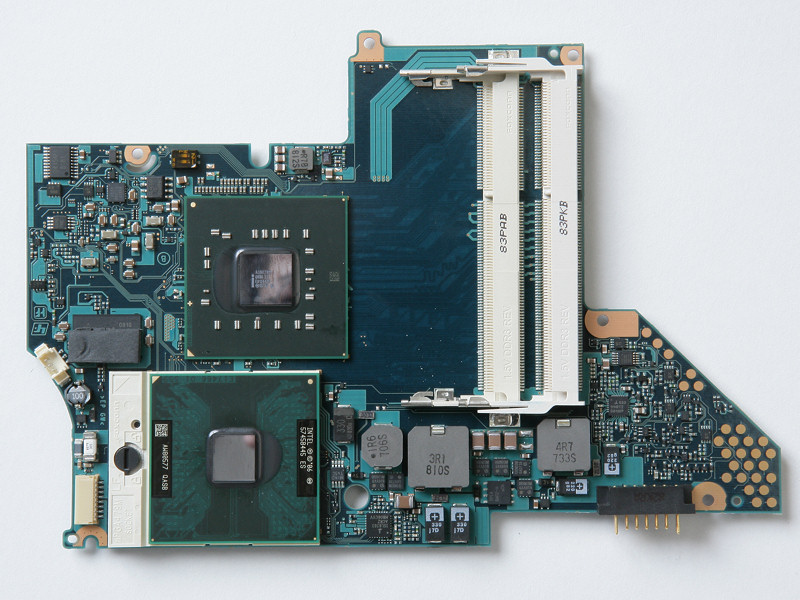
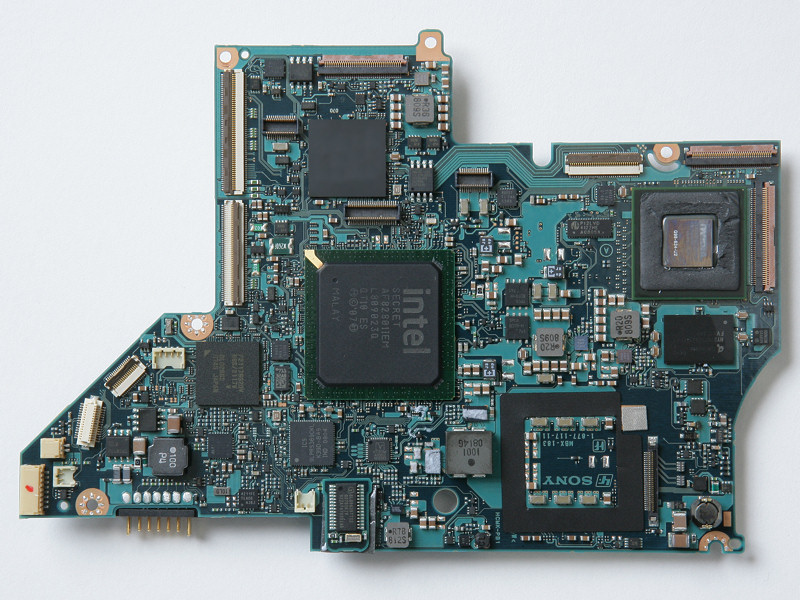
Problems? See this thread at archive.org.
Most of Sony's install packages are coded to check for model number and refuse to install unless the model number matches, no matter whether the packages would work or not. IIRC, there are one or two packages for download for the Z690 that will install on the Z590, but most of them won't, despite the hardware the drivers are for being identical.
-
All sony packages can be unpacked using "Universal Extractor"
-
What warranty is recommended for this laptop? Should I get it from Sony or are there some good alternatives?
-
No, and I'm kicking myself for it, too. I had to have a tech come on-site to replace my main board a week ago and I totally forgot to take a picture of it. It is pretty cool (and small) though. I can tell you shaped like a trapezoid that is about 5.5 inches long and about 4.5 inches wide. It is a two-sided circuit board. That means that whereas a desktop's motherboard has only one set of circuits on the top side, and nothing (or the same circuits) on the back side, the Z690 has different circuits printed on the front and back. That way a motherboard that should be twice the size can fit in half the space. Pretty cool, really.
I'm just so bummed I didn't think of taking a picture while the tech had it open. -
I actually chose a hybrid of your list: I got a Z690 with P8600, 4GB DDR3, 320GB 7200RPM HDD, nVidia 9300 GS and 1600 x 900 display. I can tell you that the laptop is fast. I plan on keeping it for 2-3 years (or longer maybe, if I can resist buying a replacement). I actually use it like a desktop replacement - and it is definately up to the task, even playing games like BioShock, Doom 3, Quake Wars, etc. Very, very nice computer. Personally, I would never consider buying a 5400RPM HDD when speed is a consideration.
-
I just have bought my Z31WN/B, in the Netherlands. This laptop has the Qualcomm Gobi WWAN module built-in and is marketed for Vodafone abbo. I cannot use it with other providers, becuase these providers do not offer a suitable connection utility. If the WWAN would have been an Oprion WWAN module, I could have used the Option Globetrotter software. Does anyone know of a similar connection utility for the Qualcom WWAN?
-
It is actually even cooler than that: the Z motherboard has fourteen (14) layers of circuitry in some areas, not just two.
-
Not to discourage you form reading the 700+ pages (that's what they wrote them for), but to answer your question:
yes, all SONY x64 drivers (except GOBI, wich is not present on the Z5xx in the US) can be installed on the z5 series running a 64-bit OS (VISTA). Everything works fine. As pointed out above you will need Universal Extractor (e_wise option) to get it done. -
 bad luck.
All I find by google is that two photos, but resolution is 800x600 onlyAttached Files:
-
-
I think he was referring to the location of components on both sides, not the number of pcb layers In fact, a modern PC motherboard can have some small components on the bottom side.
-
What happened to your Vaio Z? I thought it is fairly new...
-
It is new. A few pages back (like 6 or 7, I think) you'll find a post of mine about the wired Ethernet port not being able to maintain a connection for more than 60 seconds (it would keep cycling). Sony dispatched a local tech support guy to the house with a new port and internal wire to the motherboard and a new motherboard. After the replacement, all was well. Not a "major" issue, since I use WiFi to connect almost exclusively, but not one I was willing to let slide.
-
I wanted to let you know that I've done everything on this list. When I ran the Permissions reset program, the following warning was recorded in the log for the ENTIRE 64-bit Registry section: "Warning 5: Access is denied.
Error setting security on machine\software\classes."
I'm not sure what that means, but could that be related to the issue?
I also noted an interesting entry in the Security Policy section:
"----Configure Security Policy...
Configure password information.
Administrator account is disabled.
Guest account is disabled."
I also have NO idea what that means.
I have confirmed that my account IS set up as an Administrator account AND that the Administrator group has Full Control access to all drives.
So far, so good - Vista hasn't asked for the Key to be re-entered nor for Vista to be reactivated yet in the last 5 boots (across a 2 day span).
Please do let me know if you notice something of concern in the information above, and thanks again (in advance). -
The speakers are loud enough, but they lack bass. Of course all laptops lack bass, but the cutoff is very noticeable for the VAIO Z.
I have the Z36, I think that's the Asian equivalent of the Z690.
My charger is about 5" x 2" x 1.25". Not sure if they are any different between continents. But the lead to the wall socket is quite short.
Not sure on the weight, but it's not that heavy. -
The Z670N/B has got the 1600x900 screen. The following links should help:
http://www.advizia.com/v41/PDF/B2B-589835648-31.pdf
http://forum.notebookreview.com/showpost.php?p=4609786&postcount=100
The only pre-config (non-CTO) model of the Z600 series in the US market that has a 1366x768 screen is none other than the "Best Buy Exclusive" Z610Y/B. -
Quote:
Originally Posted by dpua
I am seriously thinking of replacing my Macbook Air, which someone wants to buy from me, for a Z. Probably the entry-level model (i.e. with the lower screen res).
Amongst a number of great irritations, one thing I love about the MBA is the power adapter -- not much bigger than a plug. Can anyone comment on how big a footprint the Z adapter is and how heavy it is?
Also, with VLC media player on the MBA you could drive the speakers up very loud, handy for movies. How loud do the speakers on the Z go and are they any good?
Thanks.
It doesn't come with it, but Sony also sells a slimline version of the adapter (for a whopping $99) it measures about 6.5" x 1.5" x 1.25" and has the same power rating as the standard adapter.
As for the speakers, ditto Jiyong's comments. The speakers are great for voices, not so much for full-range music, but they are LOUD. My kids can use the Z to play movies in the car and not have to pipe the sound through the car stereo in order to hear the movie. -
Thanks to everyone on the site. I decided on a Black Z690, with a P8700, 4GB, 320 HD @ 7200, and the EXTENDED BPL12 battery, for $1800 with tax/shipped.
Refb'd by Sony Style, but hey, everything I heard about these is that they are more likely just customer returns/refusals.
I already bought a Intel X25-M 80GB for $300 off of ebay..... this should be interesting. ;-) heehee -
It could very well be. You did make sure that you opened the command prompt with "Run as administrator" (even if you're an administrator)?
After checking that, make sure that the file listed for software in the hivelist has write access for the system process and Administrators group.
"Administrator" != "Administrators" != "administrator". The first is an account with the name Administrator, the second is a group that special right users belong to, and the third is a generic term for having elevated privileges.
On XP, there is always an "Administrator" account which you can log into. On Vista, this account has been disabled by default, but it still exists for compatibility reasons.
So disabling "Administrator" is perfectly normal. Similar with "Guest", unless you want to do things like insecure file sharing to Win95 machines (in which case the sharing software will re-enable the account if needed). -
Have the speakers changed between the Z5xx and Z6xx then? On my Z590, they are not loud at all, but start to distort at around 60% volume. At around 85%, the sound is so broken up that it's unbearable.
If you let your kids use a $2500 computer in the car, you're a very brave person. -
I think I have to agree. I'm super anal about all my notebooks & when I had my Vaio Z, I didn't allow anyone to even go near it!
-
The only thing with the Z610 is that it has the P8600. Hopefully Sony will come out with a configured 1366x768 with P9500, 320GB@7200rpm. Plz post if you hear anything. Thanks for your reply.
-
Allow me to clarify. They "use" it by watching the display while movies play on it. I made a special holder that attaches to the back of the front passenger (hard) seatback when the seat back if folded forward (flat). They don't touch the laptop at all, and the laptop is secured while we are traveling. -
I don't know as though having the P8600 is so bad; it's what I have in my 690CTO. Between that, the DDR3 RAM and the 7200RPM HDD, mine is pretty fast. Unless you habitually do tons of number crunching, I wouldn't think that the faster CPU is worth the additional expense (from a cost/benefit perspective).
-
OK so I just got my Vaio Z 620 a few days ago. Since then I have had the system freeze up anytime I am connected via powercord then disconnect. Also - the touchpad occasionally gets unresponsive and goes haywire.
So I go online and it turns out both issues happen occasionally - and neither really has any fix!
Am I crazy thinking that a notebook this expensive should not have these issues? Im kindve in shock that I have to take this back for a refund. (And that I didnt see either issue covered more seriously in this thread)
Just needed to vent. Thanks. -
Hi folks,
I recently received my CTO Z-590 as a clearance item on SonyStyles outlet (confirmed as rejected CTO, not a refurb or return) in the following configuration:
P9500 2.53GHz
4GB RAM
Vista Business 32-bit
320 GB 5400 HD
NVIDIA 9300M GS (256 Mb)
No BR
(Cost was $1700 shipped, excl taxes fyi)
After 4 days of testing, Id have to say that my expectations have not been met for the reasons below.
- Really disappointing graphics performance. I loaded GTA4 on, ran it with the onboard chip and as expected, got stuttery performance in 800x600 with mostly low settings. I switched to speed and reloaded it (did not restart but closed everything out). The result was slightly better in the same settings (I noticed that GTAs menu showed a higher refresh rate), but definitely not playable. I ran GTAs own benchmark test and it came back with a 11.9fps. Surely if you guys have been talking about playing things like Unreal Tournament at medium settings, this could handle a dated game like GTA? I dont play much, but would really like this.
- Loud fan almost constantly on regardless of activity. When in stamina, I can deal with it as background noise, but in Speed mode, it is noticeably louder and as loud as my defective Dell, which has only gotten that way after 2 years of abuse
- Long time to power up and worse, to wake up from normal suspend or hibernation. I have not removed the bloatware, so know that that is part of the slow startup. However, that shouldnt impact the time to wake up and since I usually keep my machines either on or suspended, its a serious drag to have such a powerful, machine not be able to instantly wake up -- cant more of this be loaded into cache? Is there a list of the programs pre-loaded and what they do, so I can make a decision of whether to keep or not?
- No dedicated PgUp/PGDown or Home/End keys. Not having dedicated sound buttons is also something I really miss. The lack of a function key on the right allowing one-handed use is a real boneheaded move too. This seems small, but is a constant pain. Does anyone know how to reprogram the S1 and S2 keys or otherwise have a shortcut to do this?
- The keyboard has problems and often doesnt type a letter when I hit the key. I am a fast typer and usually whack the keys pretty good, so much that in about a year, my last keyboard developed sunken pits in some of the keys. I like this keyboard, but find that sometimes twice in one sentence, I will find missing characters.
- Gets very hot on speed mode -- so much that my fingers on the keys felt hot, much less the bottom.
Itd be good to get confirmation that these characteristics are standard and not related to this being a clearance item and possibly a bad build. Any other comments or thoughts on these, specifically if theres a way to fix it would be really appreciated.
I deploy out to Iraq in 3 days, so need to make a decision and do the return and migration by then if that's the route I want to take. Thanks! - Really disappointing graphics performance. I loaded GTA4 on, ran it with the onboard chip and as expected, got stuttery performance in 800x600 with mostly low settings. I switched to speed and reloaded it (did not restart but closed everything out). The result was slightly better in the same settings (I noticed that GTAs menu showed a higher refresh rate), but definitely not playable. I ran GTAs own benchmark test and it came back with a 11.9fps. Surely if you guys have been talking about playing things like Unreal Tournament at medium settings, this could handle a dated game like GTA? I dont play much, but would really like this.
-
Badsteve and Ibcheng Thanks a lot for sharing your experience with Sony Vaio Z.You changed my mind and now I won't be buying the Z. I've been eyeing it for couple of months now. Besides Ibcheng 1 point of your post, about the graphics. What did you expect !? I mean it has only nvidia 9300M which is low end GPU. And GTA4 is not that old game, somehing like one year has passed or less
anyways GTA4 is still demanding computer resource wise.
-
I'm not sure if that's just bad quality. My Z590 works like a charm. I can run DMC4 on medium settings at a good speed at full resolution. Not sure about the temperature though since I underclocked mine. It stays at around 48 C, sometimes even less when idle and maxes out at 70 C. Usually, it only goes at around 62 C when playing a game or running 3ds Max.
-
Keep in mind that when waking from sleep, the network addresses may change, and all the software that are network aware will need to refresh.
In addition, some automated services are often (mis)configured to do things like fetch virus definitions, check for program updates or otherwise go to remote sites upon user login. Well, that's all well and fine, but when all these tasks try to do this at the same time, and even before the system has managed to obtain a new address, you get serious delays.
Get rid of or disable anything in the system tray that uses the Internet. Never ever run things like Firefox or iTunes as systray applications.
Then make sure that apps that update aren't set to do so on user login.
And yes, get rid of the bloatware. -
Don't change your mind so easy because of a few opinions Most of us here agree that the Z is a great laptop
Why don't you go to any showroom and have a look? Anyway, think about it carefully and good luck
-
I second that recommendation. There are always dissenters for absolutely everything. You could find hardware that you think is perfect and there would still be people who absolutely hate it. In the end, other people's opinions don't matter at all; you are the one who's going to use it, so you have to give it test drive of your own to see what you think. Sure, if the general consensus is that a piece of hardware isn't worth a gram of the precious metals it's made with, you should be cautious even if you like it. But it means absolutely nothing at all if only a few people say they don't like it or even if they hate it.
As for the Z's ability to play games, my 690 with the P8600, 4GB DDR3 RAM and the 320GB 7200RPM HDD plays the Bioshock, Quake Wars, Doom 3 just fine. I would not think of playing GPU-intense games like Crysis on it though, but that goes for 98% of all laptops, including many that claim to be gaming laptops (which Sony does NOT claim the Z is, BTW). -
how is it running 3dsm on the vaio? i'm planning to use it for creating models on the go and was wondering how the general performance is.
also, ibchang:
gta just came out this november for pc. the specs can be found here:
http://technodorm.com/2008/12/30/gta-4-system-requirements/
note that all the graphic cards listed in both minimum and recommended settings are HIGH END CARDS, which means that low end cards are generally excluded. there is no chance ever that it would run fluently on the 9300m gs, let alone the integrated chip.
it's a shame about it not having dedicated page up/down keys though, i've found myself using those many a time whilst browsing. -
"Don't change your mind so easy because of a few opinions Most of us here agree that the Z is a great laptop Why don't you go to any showroom and have a look? Anyway, think about it carefully and good luck "
No offense but - IMHO a great laptop is one that does not have such obvious problems. Stupid me - I was warned against Sony for these reasons but plowed ahead anyway -
The slightly smaller layout means you can use it one-handed -- at least I am able to do so.
By default, one of the keys should be undefined and will bring up the menu for configuring the keys when pressed, while the other brings up Vaio Control Center -- where you can define the S1/S2 keys in one of the menus.
Chicklet keys are not like "standard" typewriter keys with a long travel, where you hammer each key. Try to type gentler (which you can do just as fast, or actually a little faster, since each digit will have less momentum). They don't register at the bottom of the push, but halfway down, just like the much-sought-after buckling spring keyboards, but without the noise.
On these types of keyboards, missed keys are often due to other keys not having been fully released by the time the keys are hit.
It does, but you also have three different fan speed settings. If leaving it at "silent", expect it to be hotter than "balanced", which in turn is hotter and quieter than "performance". -
No, he was talking about putting a FN key in the space to the right of up arrow and above the right arrow, similar to P series' layout. I personally like that FN key better than having a dedicated column of PGDN keys. You can maneuver pages with one thumb (while the other four fingers hold the bottom)!
I don't know if Sony was the first one doing it, but it was in a lot of early Sony ultra-portables and it was in SZ's Japanese keyboard as well. So it can be qualified as a bonehead move, considering Z is the successor of SZ.
-
You absolutely want a laptop with a Quadro and not Geforce labeled chipset for this. Even when the hardware is identical apart from the label, the drivers are radically different. It's not uncommon for Quadro drivers to run 3d software 5-10 times (!) as fast as the same hardware with Geforce drivers. The flip side of the coin is that games will generally run slightly slower, and you'll be a couple of versions behind the Geforce drivers.
-
Hmm, I've never seen either of these issues...
-
The squeaking noice makes by the left hinge is kinda getting on my nerves now. It squeaks EVERY time I adjust the lid, or when I tilt my laptop.
Anyone knows how to fix this?
btw, my Z is about 2 months old. I'm alo thinking about taking off the stickers since the top layer of the Windows Vista sticker is beginning to peel off by itself. I carry it to school almost everyday in my backpack. I always put the protective cloth between the keyboard and the screen. I haven't seen any screen bruises and scratches yet. Even though the lid is beginning to leave a tiny scratch mark on my the edge of the cylinder on the left. -
Maybe you were unlucky that you received a faulty piece Try to return it and get a new one or a new laptop
-
thanks but i'm not looking to create renders or compile, just to create. i know what differs between and what quadro style cards do better than regular graphic cards. so no, i absolutely do neither want nor need a quadro laptop; i know what i am looking for.
just to clear it up: quadro style graphic cards are optimized for 3d polygon rendering whereas regular graphics cards are better at real time mathematical computations (note: with gpgpu the gpus have stopped being used for graphics only and have gone into territory of taking a load of the cpu with what it can do faster/better). -
I'm not sure what difference open box makes to a warranty - you're only buying a code in a DVD box to register. Possibly an amazing deal.
S -
Yes I think another Fn key on the right would have been great. Now that I've got used to the extra functions of the cursor buttons, this is the only thing I think is missing.
S -
Apparently, you do not know what differs, cause it's mainly modeling speed and accuracy that's improved in Quadro's 3ds Max Performance Driver, not rendering.
And no, "regular graphics cards" aren't any "better at real time mathemathical computations", because they're basically the same cards -- the only real difference being a firmware ID that identifies the card as a Quadro, and thus allows the additional specialized drivers for 3ds/maya/autocad/opengl to install and run on the card. -
Okay. Maybe I'm crazy - those who know me would be the first to say so
- but my 690 seems to be running hotter after a mainboard swap than it did before.
The History: A couple weeks ago Sony had to send a tech to my house to fix the wired ethernet port (which, of course, led the tech to replace the entire main board since Sony sent one along).
The "Problem": First, everything works just fine with no errors. HOWEVER, unless I've gone looney, the computer is now running hotter than before, at least to the external touch. The internal temps might be the same, I don't know, but since the board change, the left side of the keyboard is noticably warmer than the right (with no other setting changes)...even with "Balanced" vs. "Performance" power settings.
The Question: Is it possible that the mainboard (by itself) would be enough to cause these symptoms? Is it possible that the tech did something (wrong) or failed to do something when he reassembled my Z?
My Analysis: I know for a fact that the fan is connected. When I play games, it definately goes into "leaf blower" mode. Prior the board replacement, I noted 3 fan speeds during normal use: (1) Silent (almost unnoticable and rarely running at that speed), (2) Moderate spinning (noticable airflow, but not obnoxiously loud), and (3) "Leaf Blower" mode (fast, loud spinning). Now the fan seems to only run at 2 speeds: Silent and Leaf Blower.
Things I'm considering as possible causes are:
- The tech blocked the air intake on the left front under the "lip" and the fan can't suck in the same amount of cool air, leading to a higher overall temp
- The tech didn't apply any thermal paste (or any thermal medium) on the CPU and now the heat synch isn't channeling the heat like it should.
- The replacement board has a different, lower speed fan speed in the BIOS (not user accessible, of course) for default fan speeds
-
Are you still within the 30 day return period? If so, I'll return the Z690 & reorder it again.
To be honest with you, if I had your problem with the 30 day return period, I wouldn't even ask for a repair. I'll straight away seek a replacement (if this is not entertained, I'll return & reorder). -
FrinkTL
I agree with SpeedwithJJ. Can you exchange it for another one like it. That's terrible. I love Sony, but it seems the quality is deteriorating. I just bought a T900 and aSony 8GB memory stick duo Mark 2, whatever that means (Mark 2?). Anyway, formated the stick in the camera 3x's and tried to format it in the Z, and it just stalls. It won't do anything. The pictures on the stick can't be transferred or viewed on the Z, before it is formatted. Go figure. I know it's not the Z and the camera because when I tried an old stick (non-Mark2), it works. Just to add, the T700, which I originally bought had 4GB internal memory, I thought the T900 would have 11GB internal memory. Not the case, it has 11MB, which can hold only 2-9megapixel photos at 16:9 settings. Why even have the internal memory?
My Z also has a very slow boot up and it's looking pretty shabby with careful use. I'm slowly loosing confidence in Sony products. -
You have discovered something that few people realize: Memory cards (MS, SD, XM and other similar types) are not as good as they used to be. What happened is that the producers, due to high fault rate, started to bin their products, and sell the mediocre ones as "standard", and the ones that pass the tests are binned as either "high speed" or "Ultra", for a premium. Those would have been sold as standard before.
One way to see this phenomenon is if you try to enable ReadyBoost on a Vista machine. To enable this, the card must pass a speed test. With older regular cards, there's no problem. Any old MS Pro, for example, will easily satisfy Vista. But buy a new MS Pro Duo, and it will invariably fail. Buy a "high speed" one, and you may get it to work after a few tries. Buy an Ultra one, and it works. At three times the price.
This also causes problems for cameras that require a certain speed, and even with some readers that no longer can format the cards, seeing the card as broken if it won't format at normal speeds.
This new binning practice isn't Sony's fault, but the memory card producers who produce the cards for companies like Sony. -
Uh...no...I'm after the 30 day "free look" warranty, so returning it isn't an option. Also, there's nothing wrong with the performance per sé. To be honest, if I hadn't had the slightly cooler main board, I wouldn't have even thought anything of the left side being warmer than the right; it's only about a 2 or 3 degree difference. It's still nothing compared to the heat put out by some laptops I've used (like the older Dell's and my HP Mini-note - the entire aluminum shell of which acts like a huge heat sink. Even so, I don't want to shrug it off if it's something I shouldn't let slide. I guess I'm asking for recommendations of what to do to remediate the situation. I do have the 3 year on-site warranty coverage, so I suppose there's no risk to letting it slide...unless it's possible for it to take more than 3 years for overheating damage to surface.
Anyway, the only options available are what to do other than returning it. I value your collective opinions and await your suggestions.
Thanks! -
Thanks arth1. I'm taking the 8GB stick back to Best Buys for an exchange. If the stick I exchange it for does not allow the Z to format, I'm taking both the camera and stick back for full refund.
-
guys, i wonder what's the fastest SSD option to put into a Z690?
and can i make a raid0 from two ocd vertices? will it be even faster than a single ocd vertex?
and, where can i get a a bluray player/dvd+-rw for a s690 (any links?). is it even possible for me to change the dvd to a bluray? if i cant, i'll have to opt for the 500$ sony bluray anyway.
im planning to buy a z690 with full specs, with cheapest hdd and dvd; then manually change hdd to a ssd and dvd to a bluray (i only need a bluray player, no need for bluray burning). i need the fastest SSD possible (intels are ok, but their write speed are slow).
Official VAIO Z Core 2 Duo Series Owners Thread
Discussion in 'VAIO / Sony Owners' Lounge Forum' started by DiscCollector, Jul 15, 2008.