Problems? See this thread at archive.org.
That the physical machines support them doesn't mean that the logical entity known as a "model" supports them. Cause that doesn't just include the physical support, but also testing, documentation and customer support. While Sony may have tested Vista 64 on a Z-690, they have not done so on a Z-590, and they don't have any troubleshooting scripts and/or documentation.
So their response will be that the Z-590 doesn't support 64-bit Windows, and they will be correct -- from a logical standpoint. That doesn't mean you can't run 64-bit Windows on it, but that they can't support it.
This covers their [lower posterior], and is the expected behaviour from any big coproration. If you run 64-bit Windows on it, and the win-64-untested bluetooth stack in it shuts down your grandma's pacemaker, you can't turn around and sue them over it.
-
The following link is a good thread worth checking out that will help you install Vista 64-bit & install the necessary 64 bit drives (plus how to bypass the model check thingy) to get you up & running:
http://forum.notebookreview.com/showthread.php?t=292536
Good luck. If you still have any problems after going through that thread, feel free to post in either this thread or the thread above. I'm very sure someone knowledgeable will help you out ASAP to his/her best ability.
-
thanks i checked but the graphics driver was an issue and the link to japan sony website with the driver was not present anymore plus im not so crafty with computers so i might take it back i paid 999 brand new from sony and the only issue is 64 bit
-
What graphics card issue are you talking about? Did you go through the whole thread?
Hope the following link from that thread helps:
http://forum.notebookreview.com/showpost.php?p=4526078&postcount=291 -
Well my open box deal at BestBuy fell thru for the Z610. Unit ended up having bad hard drive. Geek Squad ending up having to take it away. That said, anyone know of any upcoming deals on a Z610? I think this unit really has the configuration I desire most (lower res screen, 320GB 7200rpm HD); just wish BB would put it on sale. If anyone hears of an upcoming sale on these please let me know.
That said, I did manage to find an older unit at Zones for $1200. It's the Z540 with P8400 2.26GHz, 2 GB, 250 HD, Windows Vista Business. What do you guys think? Any known issues with the older Z540 series or do you guys think best waiting it out and pursuing newer Z6 series? Like to take advantage of Sony rebates (mobility bundle) if possible (ends in June).
Thanks -
I just bought a similar unit and expect to qualify for the mobility bundle (or I will return it). As far as I know, the 540 or other Z models are not excluded, provided you meet all the other criteria.
-
Yes, saw it right on Zones site that it qualifies for the bundle. Was more wondering if there were any real hardware differences between the Z5 and Z6 series that would warrant pursuing the newer model. I.E. Motherboard, chipset changes, etc. If it is indeed just the obvious tweaks in regards to RAM, Hard Drive, Memory and OS then I would definitely say I can save the couple hundred bucks and go with the Z5.
-
Oh sorry, I misunderstood your question. I didn't see any integral changes when I was shopping, mostly stuff like what you mentioned and the screen resolution. Someone else can probably better answer if there were any other substantial changes from something like the 540 to a similarly configured 690.
-
One of the main changes between the Z540 & Z690 is probably that Sony "officially" support 64 bit Vista OS on the Z690.
-
Three notable differences:
- WLAN provider switched from Sprint to Verizon (with a Gobi card that can theoretically work with other providers too).
- Bluetooth updated from 2.0 to 2.1
- 64-bit Vista is now supported. (The hardware supports it in the earlier models too, but Sony doesn't.)
In my humble opinion, the first one doesn't matter, because anyone willing to spend $720 a year on a limited connection might be better off buying a 3G cell phone instead.
And Vista 64 supported is moot too, because the intersection of people who need Sony's support and will run Vista 64 and not, say Windows 7 is going to be very small.
The BlueTooth upgrade is nice, though, especially since it allows for less power use for idle connections (on both sides of the BT connection). -
If I'm not wrong, almost all the Z540 do not come with WWAN installed.
-
Can anyone provide feedback on the performance of the 128GB SSD that can be ordered on Sonystyle for the Z690 CTO? Just a quick and dirty summary would be fine. I'm about to push the order button.
I can't recall from the last few hundred pages or so if anyone had commented on this particular drive, but I do recall reading about disappointing performance with some of Sony's SSDs. -
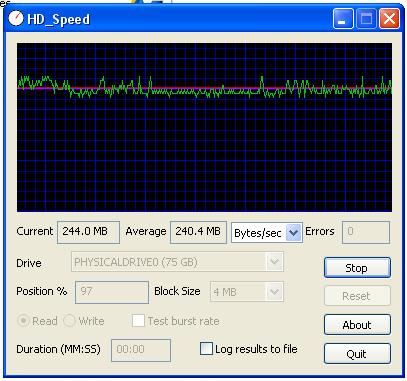
No idea who makes the sony models, but here's a result for my Intel X25-M at default settings. Combined with a semi-clean install of either Vista or XP, it resulted in about a 20% improvement in battery life. With wireless and bluetooth in use and brightness at 50%, it went from around 5 to just over 6 hours of repeatable use in stamina mode with maximum battery settings (other than brightness). This was for light use, surfing, blogging, email, etc. BatteryBar and Windows batter estimates were consistent with each other.
Published specs are 250MB read and 70MB write. Didn''t test write performance as this utility said it would destroy all data on the drive...Attached Files:
-
-
Indeed-
I picked up a scratched Nokia 3G phone for well under $100 on ebay as a spare to my N82 camera phone. Works nicely with my Z as a tethered 3G bluetooth modem and I only have to pay the $15/month unlimited data plan on AT&T. Granted, I don't use it much, but the phone has paid for itself already in savings from hotels that charge $5 to $15 extra a day for internet access. -
XP Downgrade question-
After I did an install from the XP SP3 downgrade DVD, there was an option in the VAIO control panel that let me adjust the FSB speed from 400 to 533.
Unfortunately, my S1/S2 buttons didn't work, so I reinstalled the VAIO utilities from the Sony website. That fixed the S button utility so those work. Unfortunately, it removed the FSB utility. According to CPUZ, it is 532 in stamina and speed mode, whether I use optimized, maximum battery or ultimate batter settings. Anyone know how to get it back without losing the S keys? -
Thanks, this is what I was looking for. I agree on everything mentioned. Bluetooth is not important either to me as I don't believe I will end up using it. Would have liked a license of Vista 64 but 32 bit version will do (still running XP on my desktop).
In any case, I pulled the trigger and placed my order. Just need to pick up some memory on Newegg. Will hold off on upgrading the HD till more 500 GB drives become available.
Thanks all. -
Like Smadelsky I also recently purchased the VGN-Z37GD the equivalent of the Z590 from the USA, in Australia. The unit ships with 4 Gig RAM. Smadelsky says:
"On Kingston's site it quotes the Z series as being able to utilise up to 8Gig Ram. On testing 2 x 4 GB DDR3 Ram pieces the system doesn't boot. Using 1x2GB piece and 1 x 4GB piece works and give me 6GB RAM free.
I have the latest Bios update installed. Any ideas how I can get the 2nd 4GB Ram piece to work to give me a total of 8GB Ram? I can inter change both 4GB pieces with each other and they each work, thus no errors with the 2x4GB Ram pieces. They just won't work together."
I went through exactly the same process before I read the above and achieved the same result. I rang Sony Australia and they told me the laptop would not recognise more than 4 Gb. I told them that it was clearly recognising 6 Gb and that upgrade sites say the computer is compatible with 8 Gb and those 8 Gb can be used of course if you are running Vista 64.
So Sony Australia does not seem to know quite was is going on with their own laptops. I am wondering whether Smadelsky has progressed any further and has got his or her 8 Gb working.
Leon -
How many ICs are on each DIMM? The restriction is usually with the amount of capacitive loading on the bus lines... more ICs in parallel on the bus means higher physical loading on the bus, which leads to slower edge rates and of course it won't work. I think you'll have the best success with DIMMs that have the least number of ICs [highest density memory chips] on them.
-
hey i use a 32 bit z notebook and i am planning to install windows 7 . my question is if i install the 64 bit version if my z will work and optimize the 64 bit
-
RE: Battery Drain Issue
I recently purchased a Z590 and have been very pleased with it. The one lingering issue is one that seems to plague a number of people and that is the battery drain issue.
I have read through an entire thread on it on these forums and started doing some diagnosis myself. The following is what I have confirmed to be true of my own system:
At some point in the thread I read, someone came to the conclusion that there was no battery drain, that the Z uses about 5-8% of battery life during the start-up process. The work around was to have it plugged in when starting up (of course). I confirmed this by starting up and shutting down repeatedly. Try noting your battery life, then shutting down, wait about 5 minutes and start up again. I found each time I did this a good percentage of my battery life was consumed.
Well I started plugging it in on start up and shut down to preserve that extra juice. Then last week I went on vacation so I decided to run another experiment. I charged to 100%, shut down while plugged in and then unplugged. A week later, I got home, plugged it in, started it up and I was at about 20%. I don't think a shut-off, unused laptop should lose 80% of it's juice in a week.
So now I am running the same experiment but with the battery removed to verify if it is the laptop or the battery itself. I will let you know what I find out on Saturday. If there is a similar amoutn of drain, I will obviously get the battery replaced under warranty, but if not, something really needs to be worked on to get this thing to not consume that much life while completely powered off. -
Mine uses somewhere under 1% per hour it is off. In a full day it will be about 20% or so. Startup may take some additional juice, but it clearly increases every hour. I removed the battery overnight and it only lost 1 or 2 % rather than the usual 10%.
Something is sucking an unusual amount of juice for no apparent reason. In that the unit gets very respectable battery life when on, I have to think this could be fixed in BIOS or with a simple hardware change. In that it hasn't, I suspect it is intentional. -
I know this may not strictly be the proper forum for this question, but I'll be doing this on my Z690, so...
I'm thinking/planning on installing the Release Candidate of Windows 7 into a new (clean) partition very soon...maybe tonight.
I know that Windows will automatically add the boot(strap) entry to allow me to boot to either Vista 64 (current OS) or Win7 64, but what I'm NOT sure of is what will happen when I decide I'm done playing and drop the partition. Will I have to manually update the boot file or will it be smart enough to automatically correct itself after I delete the partition?
Thanks in advance for your kind assistance. -
does anyone know the diferance between the WD Scorpio Blue 500GB Hard Drive BEVT and the one that is not BEVT
-
wrong section, but one has a fall sensor and the other doesnt
-
I don't think Sony would deliberately make a product that loses battery life when it is advertised as a mobile device with a long battery life.
-
well which one has which is the bevt the one with fall sensor
-
I just thought I'd let people know that IE8 has some severe bugs which affects just some machines, among them the 1600x900 Vaio Z.
The problem is that IE8 isn't compatible with Vista with custom DPI settings. What happens if you have correctly set your DPI and then install IE8 is that:
1: The sidebar clock freezes.
2: The sidebar weather applet gets visual artifacts.
3: Several .NET applications refuse to run unless you re-register jscript.dll with regsvr32 after every reboot.
The only solution to the problem so far is to uninstall IE8. If using automatic updates, make sure you mark it for hiding, so it won't auto-install. -
That is very good to know arth1. Just another reason why I don't use IE.
-
What kind of notebook cooler are best for the Vaio Z? The one that sucks air from the bottom and release it away. Or, the one that blows air directly toward the bottom. I know there are two intakes. One in the memory bay and another on the outer-bottom left edge of the laptop. Decisions...
-
I don't really think the Z needs one honestly. The only cases I've ever had the fan spin up is when I have a game running full load. Under normal use theres almost no heat anywhere.
-
What is the difference between 1600 res. X 1366 res.?
The screen looks better?
I know that with higher res. have more workspace.. But there is more? -
40% more pixels in the same space.
Sharper. Whether that's better depends on your use.
It doesn't. It has the exact same workspace. It has more pixelspace, which is different.
Back in the dawn of GUI computers, there was a 1:1 correlation, because everything was fixed bitmaps. Those days are mostly gone, and there are only a few remaining uses of bitmap graphics. Otherwise, fonts and widgets are specified in points and cicero -- physical measurements -- instead of pixels, and graphics scale. Even images are now starting to scale, with high-res versions being used for the master.
Correctly set up, a computer with 1600x900 will have its fonts display the same physical size as a 1366x768 display, or a 1152x864 desktop display, or a print-out for that matter. Just sharper. -
What is better? 1600 or 1366?
-
with the 1600 you will see ver small fonts if thats ok then fine get it but if you have bad eye site then it might bother you. i personally would not pay for the 1600 because i use my notebook alot and the strain would bother me and i have good eyesite
-
what kind of Ram do you guys reccomend
-
... unless, of course, you set the DPI correctly in the control panel, in which case the fonts will be the same physical size, and slightly less straining to read, because each letter will be better defined.
-
I have the new bios firmware installed (R2168M3)
I have the New Zealand Z26 model, and so far (after approx 2 weeks with the new firmware), the batt drainage has decreased significantly.
In the 8 hours, the drainage used to be about 5-8% (from batterycare at 80% charge limit). Now, I get battery drainage only 1 or 2 times a week (draining 2% at max in 8 hours). All the other days... The battery is not draining~~
In addition, the startup and shut-down power consumption with bat also seems to have improved. It consumes approx 5% for both on battery, whereas with the earlier firmware it was more like 15% to 20%. -
It is your call on which resolution is better for you because you're the one using the notebook & everyone have different preferences. Hopefully, the following link will help you out a tiny bit:
http://forum.notebookreview.com/showthread.php?t=370180
Good luck.
-
IMO, basically the only reason to buy a Z is for its high resolution screen which is amazing in picture quality and sharpness.
Otherwise, I think you're just wasting money buying such a laptop, because it has too many flaws that are unacceptable:
- battery takes forever to charge (about 4 hours)
- battery loses charge when not in use
- awkward and flimsy power connector port just waiting to break
- the dock is almost worthless
- no high resolution monitor output (1920x1200 max.)
- no eSata port
- no backlit keyboard
- bluray option that costs an arm and a leg -
Where do you go to get this new bios? Is it something that is downloaded?
-
That is the biggest flaw that bothers me. I can't believe there isn't more people that have issues with this. -
It's not that people don't have issues with that battery drainage issue but most people just live with it. This issue is not the first on a Vaio model so we all kinda get used to Sony not "giving a heck" about it.
-
Yes it is on the Sony support site. I believe it is a late January 09 update.
I just did the update and screen seems brighter and some fonts seem different, however, I hope it helps with battery drain. -
Wow. Screen seems brighter after the BIOS update? Now this is definitely very interesting.
-
Anyone have a link to this mysterious new 2168 BIOS? I don't see it anywhere, even on pages where it appears in Google results.
Anyone tried it on a USA spec VAIO Z? -
How can I find out what BIOS I have?
-
See, I'm not sure what the issue is, but I don't seem to have it. I'm using the large capacity battery on my Z690, and I used the computer yesterday for 2 hours, and when I closed the lid to standby, it was at 85%. I left it in STANDBY overnight for approximately 20 hours (6PM till 2PM), and when I opened it up today (no hibernation, mind you), I still had ~83%.
Maybe it's an issue with the smaller battery? -
I hardly think the resolution is a prime reason to get the laptop, if a reason at all. It's a 13.1" inch screen not designed specifically for 1600x900. Switchable graphics is probably the biggest reason to get the laptop, then battery life naturally follows (and not mutually exclusive to the first point.) Very lightweight is the next reason to get the laptop, then the powerful processor naturally follows when you consider the weight of the laptop. A Lenovo is the only laptop competitive at these points, but they hardly have the elegant 'high social class' look to it, which is why it naturally follows that the Z is indispensable with these points.
None of those things you listed are deterrents really, besides the losing charge ordeal, which is really a Sony flaw that sucks btw. I wouldn't mind an eSata port too but I can live without one. -
IMHO, I think whether or not one would think the Vaio Z is bad/good is subjective. You may think a certain feature is the most important point, while I would disagree as I think that another certain feature is the deal breaker & vice versa.
The only reasons I got my Vaio Z is that it has got a high resolution (1600x900) on a small screen (13.1") plus the notebook is very small. I use all the fonts & DPI settings on Windows' "incorrect" default. IMO, this is great for me because I get a great range of real estate to edit photos/pictures in PhotoShop and to write programming codes in Visual Studio. However, all this is just my opinion & I'm sure everyone will disagree with me.
However, as always, I personally feel that the most important is still down to the Vaio Z owner on whether he/she likes it.
-
Yep, I don't photo edit on the Z, so that doesn't apply to me. The resolution being the only reason to buy the Z is hardly a thought worth entertaining though. We wouldn't have these constant discussions about this if it were, it's more like an after thought, akin to 'should I get premium carbon or black carbon.' The other factors play a much bigger role to me and probably 99% of buyers. The more I read, the more I feel the regular resolution is a better choice, no reason to cripple your eyes any more than you need to if it can be avoided.
Official VAIO Z Core 2 Duo Series Owners Thread
Discussion in 'VAIO / Sony Owners' Lounge Forum' started by DiscCollector, Jul 15, 2008.