 Problems? See this thread at archive.org.
My hands are the same size; I have long, skinny fingers. My thumb tip to pinky tip (with fingers splayed as far as they'll go) is about 9 3/4 inches. The base of my palm rests on the very edge of the palmrest when I'm typing the way you aren't supposed to (in typing class they always told me not to rest my wrists anywhere while typing). In other words, the palm rest is just barely wide enough to capture my hands.
That said, that's my experience. My hands are close enough to the edge (they're on the edge) that the relative size of your palms to finger length might be different than mine, so I would still suggest that you get yourself to a store display model and spend a good 15 minutes typing an opus (or whatever) to see how your hands fit. I think you'll be fine, but if you're going to spend that kind of money, it would be prudent to check beforehand.
-
I'm sure that once the new series gets up and running (and the CTO is available for orders) that you'll be able - after emptying the entire contents of your wallet - will be able to order the aluminum piece as a replacement part.
Whether the $100 - $200 they'll probably charge you for the part is worth it just to change the color is up to you. IMHO, it seems like a waste of cold, hard cash (no matter how much it costs). -
Bad news, even if you do manage to get a black palmrest from as a spare part, you would have trouble replacing the silver plastic trim underneath the that. Note that on Z7, the plastic trim around the sides are also colored in black.
I agree with FrinkTL, I wouldn't want to pay over $100 just to change the color. We have already paid the "Sony premium", why paying it again.
If both colors are made optional, I would probably still go the the silver one (I was never a fan of the black macbook/ipod). I rarely use my laptop in direct sunlight, so the silver shade on the palmrest looks pretty dark to me. Of course, it'a all down to personal preference. -
Is Sony phasing out the silver palmrest and offer only black for all Z7's? Or do you think the black palmrest will be on higher spec. models and the silver on lower specs.? I too still like the silver brushed palmrest.
-
From the looks of all the Asian models, seems like the silver palmrest will be a goner.
However, I do like the new red screen lid quite a lot But I still prefer my premium carbon fiber lid, because that it's would not be THAT flashy of a laptop to attract unwanted attention (flashy red hot laptops tend to go missing in my school's library from time to time
). I would say whichever screen lid people get, the Z is already a pretty attractive laptop, with the sleek design and the glowing power button and all.
But I still prefer my premium carbon fiber lid, because that it's would not be THAT flashy of a laptop to attract unwanted attention (flashy red hot laptops tend to go missing in my school's library from time to time
). I would say whichever screen lid people get, the Z is already a pretty attractive laptop, with the sleek design and the glowing power button and all.
![[IMG]](images/storyImages/z4_cover_06.jpg)
-
I´ve a questing regarding the z docking station; yesterday i was testing for a customer my z in the docking station, external analog TFT. I´ve switched the display to external monitor, internal was blank. Now i disconnected the z from the dockingstation, the internal display remains black. Is that a bug? Is there no automatically switchback to internal display?
-
Yes I've always wanted this but I can seem to get it to work. I'm on XP. MY old Dell would do it but there were two differences which I suppose make sense:
1 - the power button on the laptop was under the screen, so it couldn't be turned on accidentally in a bag, etc;
2 - the dock had a separate power button, so when the laptop was in the dock you could power it up with the lid closed.
Nevertheless, I'd hoped that the Z would recognise when it was docked and then let the side power button be used to switch it on, even with the lid closed. Would look much neater!
S -
It could be a driver problem, you should try updating it, go to laptopvideo2go.com, you can even choose wich driver is the one you like most
-
Does the switchable graphics still work with the newest driver?
-
Good point, and yes it does, so in order to update the drivers it's necesary to download the latest drivers for each video card, the latest driver for intel and the latest driver for nvidia
-
Just an idea, if you primarily use it docked, make it go into standby instead of turning off and configure USB (that's where your external keyboard is connected) to wake computer from standby. Not sure if it will actually work but it's worth a try.
-
Has anyone noticed how flimsy and fragile the Z's display is? It seems like it won't last such a long time. Even when holding the notebook, you don't get the sense that its "solid." I am worried that the Z's display will bend overtime and weaken, despite the carbon fibre. I have heard too many stories of people who had their displays crack on the Z series, Has anyone here had this experience?
-
Too many stories of Z's display crack? Frankly, I have heard no stories like that on the forum. Where did you hear it?
The Z's screen lid is designed NOT to crack, but bend under pressure. Thus making it last longer than rigid screens that tend to crack upon impact.
I've seen people getting minor palmrest/keyboard scratch on the screen due to its flexisibility. But NEVER seen one crack. There is a video online showing a guy holding the laptop only by the screen, it bends quite a lot, but still works without any visible damage. -
Good point. One reason why it's deliberately flexible, as improved from earlier models, is to add more versatility and allow more pressure onto the lid. I've never heard anyone crack their cases on the lid either. Additionally, if you try to bend any other laptop's lid backwards, you may see it crack -- so it's never a good idea as it stands.
-
You know, as much as it is not really a problem under the vast majority of situations and is more durable than many more apparently substantial-seeming assemblies, Sony has to appreciate that user perception plays a huge part in ownership satisfaction and reassurance.
The less familiar you are with the materials involved, the more concerned you will be - it's been the case ever since Sony started adopting the whippy-super-thin screens. There's many ways to add more rigidity, even if it's not strictly speaking structurally necessary, to the screen while adding scant millimetres to the thickness.
It's definitely not going to happen with the current screen bezel design, but I think they should definitely consider it - too many people voice these concerns for it to be a Good Thing. -
Why do you keep b*tching about the screen, when a lot of other screens are probably just as bad (if not worse)?
You call the colours too saturated, I think the screen really stands out with saturated colours (note that is a different thing). I took some pictures of trees last fall with very intense yellow and red. The Z was the only screen I tested that was able to display it "properly", IMHO. Here you see that 100% NTSC gamut is absolutely not a worthless claim!
I have to admit I don't own any professional grade screen, but I also never heard of any professional that would take any screen with factory settings (no matter how expensive). AFAIK all professionals will tune their screen.
Did you tune the screen of the Z, instead of just b*tching about it? -
Out of curiosity, is it even possible to tune a laptop screen? Seeing as we're talking about it... i've tuned my desktops but never thought of tuning my laptops lol... does it work? I dont see why it wouldnt. Also did anyone read how Sony should be releasing a Windows 7 update program for anyone who purchases a new laptop in the near future? Is there anymore information on that?
-
Of course. Being TN however it's debatable whether it's truly worth it, especially in a mobile environment. Nevertheless - yes, hardware calibrators will work with laptop screens too.
-
anyone have a pic of the Z's with the black palmrest?
-
Probably not, except the official ones released by Sony. You may have to wait a few weeks after the new Z starts shipping in a few weeks.
Or do we have any users here that are currently living in Asia? We used to have one. He was really helpful, he was probably the first one on the forum that opened up his Z to change the hardddrive. -
Only when someone claims that the screen of the Z is so great -- it isn't. There are worse screens, sure, but there are also better ones.
Yes, it stands out. Which in my view is a Bad Thing. The very best devices are those you don't notice -- if they do their job perfectly, you don't notice them at all.
With a good stereo system, if you close your eyes, you can't tell whether it's speakers or live music.
With a good TV, if you close one eye, you can't tell whether it's a TV or a window.
With a good monitor in a well-lit room, you should not be able to tell whether you're looking at the screen, or a high quality photo covering the screen.
Oh, but it is -- it's not because of an "NTSC gamut" you had vibrant reds and yellows, but because the screen could display those colours.
But try this: Buy large fries at McDonalds. Eat them, or throw them away, but bring the cup home. Then try, with your favourite paint program, to match the colours. Look at the screen, look at the McD logo in red and yellow. You can't match the colours, because the Z's display isn't capable of displaying the hues. There's too much blue tint in the display, even with blue at zero (and no amount of adjustment or calibration can reduce it below zero). Sure, you can display bright (or vibrant) reds and yellows, but not those shades, because the gamut of the display is skewed.
Indeed, and I recommend using an i1 ("Eye One") or similar to calibrate the screen. But even if doing so, you won't be able to display more than the 262,144 shades that the display is capable of. (Actually, you'll get fewer, because of the mapping not being able to expand, only reduce.)
It's like having a stereo system with speakers that consists of a subwoofer and a tweeter. The spectrum might be 18-22kHz and announced as "over 100% of the HiFi spectrum", but it still is incapable of displaying a full sound picture. Using an equalizer won't change that. Yet, many people will ooh and aah over the thumping bass and high treble. Which is very much like the Z's display.
I most certainly have (I produce colour printouts professionally), but as said, calibration can't expand the number of visible colours -- only reduce them. If colours 253,253,0 and 255,255,0 both show up as the same shade of yellow, no amount of calibration is going to make the latter map to a colour that's MORE yellow. And you can't change the LUT for the display either, mapping individual colours. The best you can do is adjust the R and G gamma curves to make the values drop off more quickly, and then make an ICC profile that matches as well as possible to the new values. It's still going to be bad, just less bad, overall.
I have no problem with people calling the Z's display vibrant or bright, great for watching videos or lots of other uses. And it is better than many other laptop displays. But it's far from best in class, and far from a great display. An average $300 standalone monitor will be far better, and there are laptops with better displays too (*cough*dellxps*cough*).
Good, yes, great, no. -
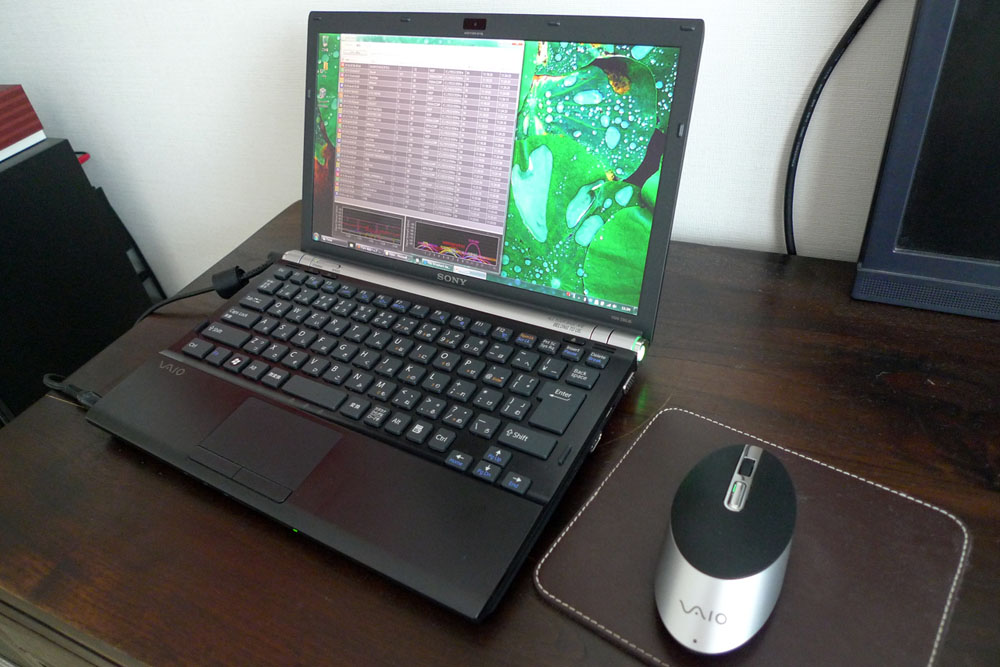
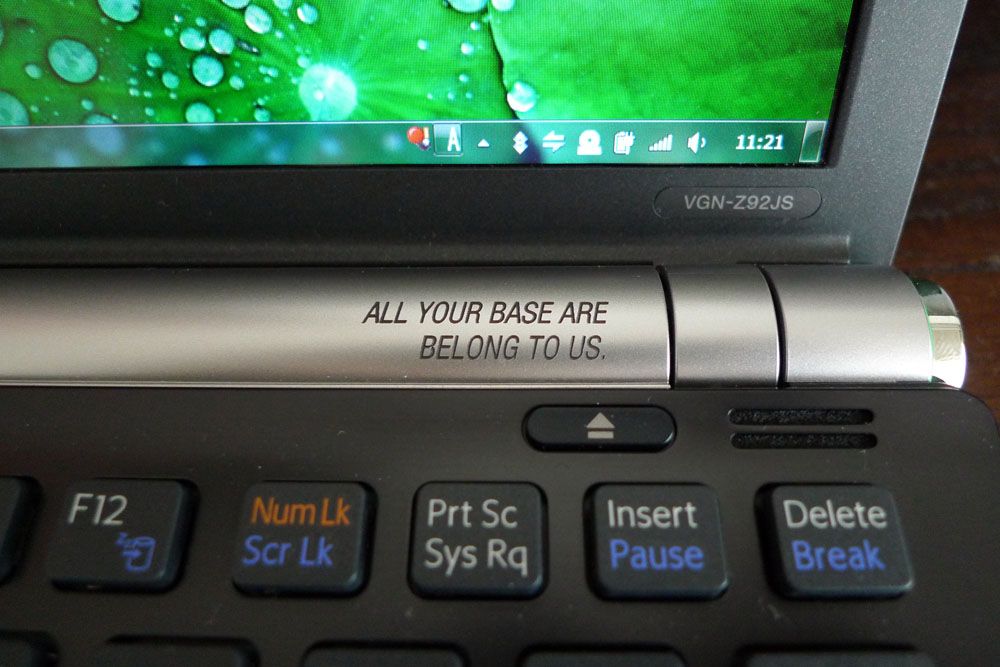
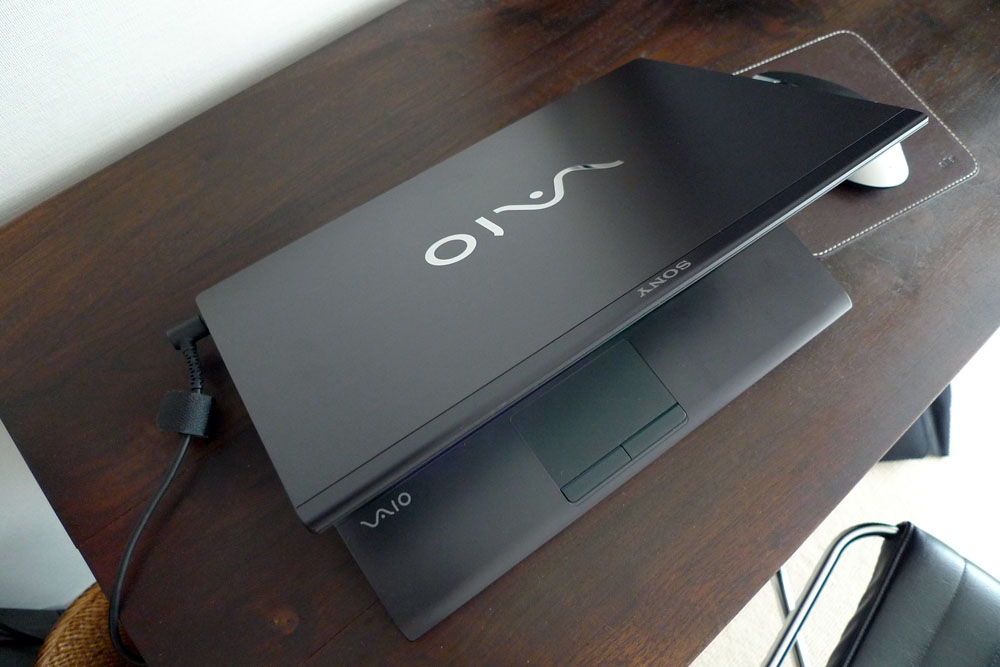
Here you go...my recently ordered Z with black palmrest. I chose the black because it looked like it would blend better in a business environment IMHO. It has the premium carbon lid, the cheapest CPU possible (P8700 2.53Ghz), 4GB RAM, 256GB SSD, Intel 5300AGN Adapter, Globetrotter HSDPA WWAN, and the 1600x900 screen (this was a promotional free upgrade). They threw in engraving for free on the spot, so I had no idea what to write. I settled on the words you see. It's probably a bit ironic that I had that engraving done here in Japan...
I haven't used the WWAN yet, but I may actually not end up using it, since I've gotten tethering to work through my iPhone on Softbank (I only need it for low bandwidth VPN/Exchange connectivity).
As for the Intel 5300AGN, I would recommend getting this at all costs (in Japan, it's a ¥3000 upgrade). The extra antennas really improve the range, and hence, speed. In one of the photos, you can see the wireless scanner picking up 26 access points from my apartment. This is a drastic change from the 5100AGN models I've used (the 5300 has 3x3 antennas, while the 5100 has 1x2).Attached Files:
-
-
Wow thanks! Looks great
-
Nice images, but is it a Japan special that it comes without a fingerprint reader, or has this now been dropped? (Not a big loss -- it's not all that great, especially not for people with large fingers.)
-
Ah, forgot to mention that I purposely didn't order that option. I don't use the fingerprint reader primarily because every time there's a browser update, the fingerprint support breaks. Therefore, I can't rely on it. I also forgot to mention that I ordered the DVD burner rather than the Blu-Ray drive. I simply can't justify the ¥50,000 additional cost. For that price, I could purchase an internal Blu-Ray drive for my desktop, 10 Blu-Ray disks, and AnyDVD HD.
-
Intel 5300!!!!!
That's something I REALLY wished that the older Z's offer. I'm not particularly satisfied with my 5100. Sure it works, just not very well.. It doesn't drop connections or anything, it just gives me random 4/5 bars in my house, when my draft n router is a room away from my laptop
Strangely, I'm getting better reception at school than most other people in my dorm. I wish I have the 5300... -
Actually the Vaio screen is the best 13.1 inch i've seen, maybe macbook's is the same or just a liitle better, i own an Asus U6 it's a nice notebook with a 12" screen, and the Vaio Z is quite better than the Asus.
So if anyone complain abaout the NOT PERFECT performance of the Vaio Z screen you have to undestand that THIS IS A ULTRAPORTABLE NOTEBOOK SCREEN, if you are a profesional designer or related you'll have to buy a bigger laptop with bigger LCD and more options to customize when you buy it, or buy an external profesional LCD, I really doubt there could be many better notebook screens than the Vaio Z, and you can not have the best featurs in a notebook, like a notebook Vaio Z sized and weighted with the color accuracy, brightness, contrast and resolution of the ultimate LCD on earth, quad core extreme i7 processor and temps under Zero degrees.
I think there is people that will never be satisfied, don't you think?
-
I have to say, the black palmrest looks slick but I still like the original gunmetal finish.
How good is this calibrator? I'm looking for something that will calibrate my Apple Cinema Display and laptop displays. -
Dell XPS 13? 16? 1730?
-
Agreed. Anyone who says the Vaio Z's screen is anythign less than spectacular is a moron. How much better of a screen could you ask for? I do disagree with you on one point. I think the Vazio Z's screen is better than the Macbook screens by a fair margin. I see tons of them at university and I would put my Vaio Z screen up against any Macbook anyday.
-
I tuned mine with an i1 - the profile made it look a little different but it wasn't a huge change. It seems it ships pretty well set up (notwithstanding the detailed explanations above).
S -
What does the engraving mean?
S -
It's from a poorly translated Japanese video game, here. Amusingly, the Japanese Wikipedia page on this topic does a point-by-point analysis of the grammar problems with this phrase.
-
Sorry if this a has already mentioned during the decade this thread has been running on, but could anyone please tell me if the Vaio Z Large Capacity Battery sticks out in any way from the machine?
While I'm at it, is it wise buying it as an upgrade with the CTO model or should I buy one as an extra elsewhere? -
http://www.anandtech.com/mobile/showdoc.aspx?i=3540
The Asus G2P was also a great laptop for photo work, but is now impossible to get. -
Never actually seen both side by side, especially in indoor daylight, have you?
-
The battery sticks down making the laptop kinda tilted forward. It's troublesome for storing Z in your bag because of the added thickness. However, the tilting also gives a more comfortable typing experience. More Ergonomic.
-
The back of laptop is raised about 2/3 of an inch. Thus far extra thickness was never a problem for storing Z in a bag: Belkin Slim Pack (love it) and Targus Radius vertical messenger. As an added bonus, it's easy to grab folded Z with one hand by the back side and be sure it does not slip out. Better air circulation is good too.
The only issue with extended battery is that, since sticking out part of the battery is narrow (about 8" wide vs. 12+" of notebook), it is not comfortable to use it on your laps. Although you can put it on one lap. -
I had to look it up before I stuck my big white american foot in my mouth and red-penned that. Thank goodness for google and wiki
http://en.wikipedia.org/wiki/All_your_base_are_belong_to_us -
Does the computer with the extended battery still fit into the docking station?
-
It has a depression for the battery. See this picture.
(However, I'm not sure why it's called a docking station, because it really seems to be a port replicator. It's a really nice port replicator, though.) -
Apparently both the P8700 & P8800 processors consume / generate 25 watts. Does that mean that they run essentially equally hot (or equally cool, depending on how you look at operating temperatures)?
-
Yes, it will fit perfectly.
-
Z400 series, is this the new palm rest?
Link
![[IMG]](images/storyImages/36411834003809f6b5a8.jpg)
-
Looks like it. Sweet, as long as the paint won't wear off. With the brushed gunmetal of the old models, at least that wasn't much of a concern, but I'm always a little wary when I see painted surfaces (and it must be painted -- there's no way they can use laser treated titanium for these things without adding another zero to the price )
I notice another difference too -- the touchpad appears to have changed, and is now wider (16:9 like the screen?), almost as wide as the space bar. Or is it just the angle of the photo that deceives me? -
It looks to be the same as on my Z690: same proportions, same size relative to spacebar. Perhaps, it's an angle of the shot that makes it look different for you. Funny how arrow keys look farther apart in that shot. But when you actually take a closer look and match them against other keys... nope, same size and location as before.
Noticed "Core" sticker instead of "Centrino 2" and a new (?) 4th sticker that seems to read VAIO at the top of it. -
Last sticker is "Official Warranty" - Touchpad is still the same.
-
Look at the Flickr link for a larger image, the sticker still says "Centrino 2".
-
Any ideas when the new Z (4x series I guess) will be available in the UK? I'm pretty desperate for a new laptop and want the z, but would prefer to wait for the refresh.
Also, the main differences are the CPU, RAM and some cosmetics, right?
Official VAIO Z Core 2 Duo Series Owners Thread
Discussion in 'VAIO / Sony Owners' Lounge Forum' started by DiscCollector, Jul 15, 2008.




![[IMG]](http://img4.imageshack.us/i/36411834003809f6b5a8.jpg/)

