Problems? See this thread at archive.org.
Guys, my Z750D came with Microsoft Streets & Trips (North America Only) license, and it was installed on factory image, but since I used P1 Optimized Image, it was lost, Now, I only got a License, how can I download and activate it using my License Key?
I tried the Trial Edition, but it does not accept my Key as a valid one, P.S.: it was not the (North America Only) version.
Having GPS in my notebook, is really awesome, wish to be able to make this work like in the Factory Image.
One more thing:
Can I download the Vaio Recovery Application, so that I can use it to install Sony Apps from my recovery Partition? Its still there, I did not delete it while installing P1 Image.
If yes, then where to Download the Sony Recovery application from?
Really appreciate the help.
-
-
Hi all.
Question about undervolting and stress-testing.
I got Z750DB model with P8800 processor which runs 2660Mgz.
I've downloaded CPUgenie and tried to undervolt latop a bit.
I run some test on low multipilers.. but that's no interesting and tried to test on the 10x mult. got some BSOD's @1.000v and @1.050v. maybe it's ok. byt then i've started at default value =1.162v. and it got 100C. and test stopped. I run it a couple of time after and got BSOD on a default voltage.
So there's no mods of laptop. all's default. OS is win7x64. Stamina mode. (what would it be in spped?)
Any comments? What was your experience with overclock? What was the voltage?
I think there's pretty bad thermal grease in my lap. or it connects bad. I got a disassemble manual but i want to see your opinion guys first. -
I suggest that you do not overclock the Vaio Z. I don't think it has a good enough cooling system to handle such heat.
This is only a suggestion, but I think RMclock is better. Also, make sure to set the processor type to mobile instead of desktop. That may cause some of the problems. -
set the processor type to mobile instead of desktop.... you mean in RMClock?
i've tried RMclock in vista 64 and got some problems, it told about drivers.
but that's not the main idea... if it normal to get up to 100 degrees and fail streess test for stock laptop?? or may be i should try another test? -
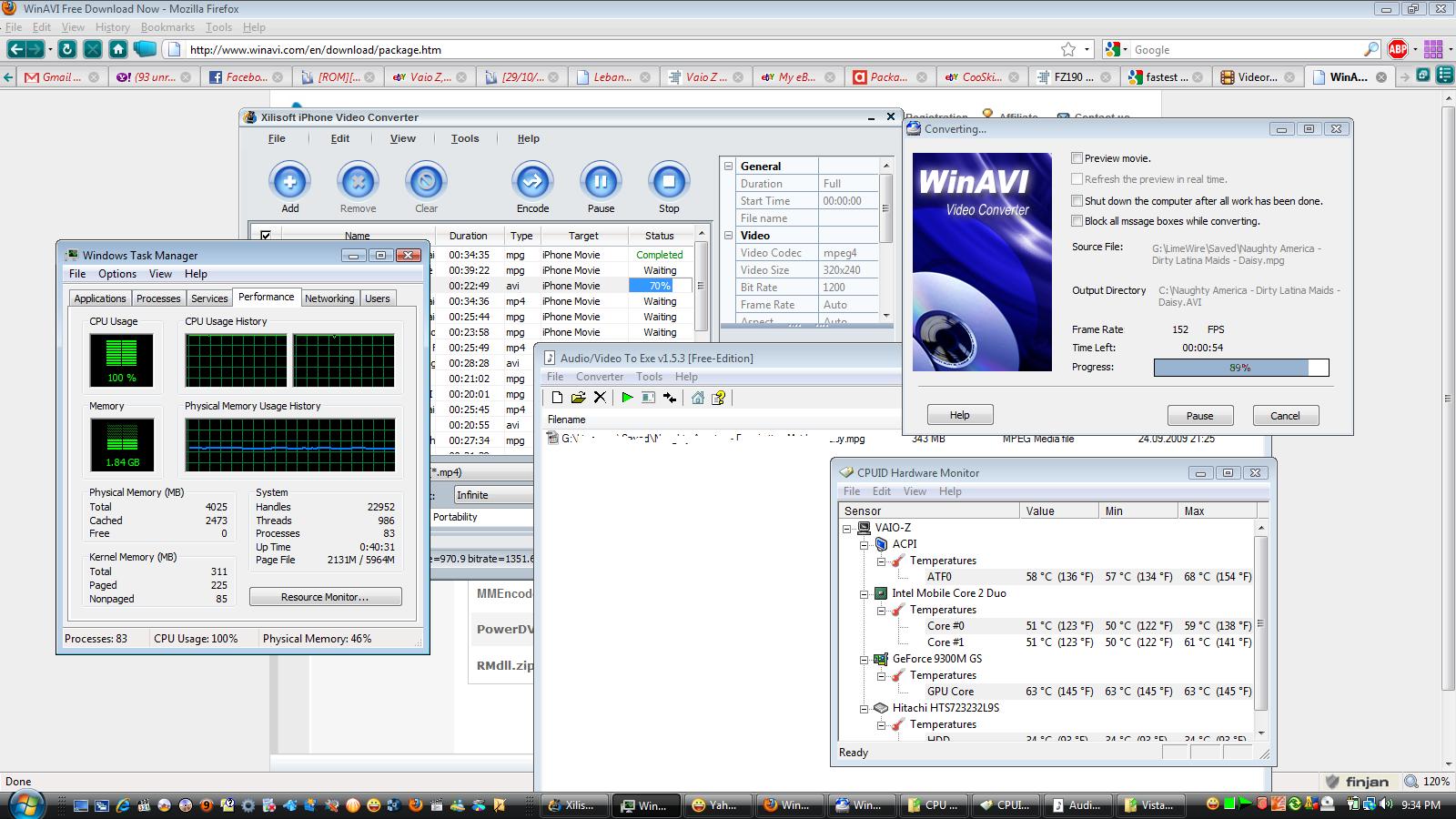
Pushing my Z to Extreme Load, yet cannot understand how HWMonitor states that my CPU Temp is <60, or even <90 Celsius.
Please have a look on the attached image to see that I was running all the following:
1. WinAVI Video Encoder - ENCODING
2. XiliSoft Video Encoder - ENCODING
3. Yahoo Messenger
4. 20 Tabs in FireFox
5. Another Audio/Video Encoding app - Running
6. Windows Task Manager - 100% Load
And yet after all of these app running (and encoding videos), my CPU temp is reported to be < 90.
I'm using SPEED MODE, with HIGH PERFORMANCE.
MY Z should have been fried out, but to my astonishment its running very very Cool (Not using any Undervolting, nor Underclocking tools.
Now, I need to know why is this happening, while running Orthos alone takes my temp to 95 degrees.
Am I getting the full potential from my machine, or its playing games with me?Attached Files:
-
-
Orthos and other stress-testing utilities are designed to heat and stress the CPU or memory to max. So it is normal that encoding, even two parallel tasks, is not so challenging as Orthos.
-
Hi Evoss-X,
As per forum rules, there is no need to triple post. Edit all of them into one. Cheers. -
the only sony driver i have installed on my laptop is the video driver on Windows 7
is there ANYWAY of getting HDD protection to work by itself without any of the vaio care crap?
NOTE: my vaio z530n gets 4:29 mins on full charge with wifi on and screen at most dim.
realistically its closer to 3.5 hrs of actual continuous usage
i think most driver suits just screw up. Just install the bare minimum
the only driver update that did anything major was the bios update
also do you guys use Speed or Stamina mode? i find that i pretty much ALWAYS use stamina mode, and i notice the laptop runs a decent amount hotter running in speed mode, even just sitting idle. -
I just noticed that the Canadian keyboard comes with a smaller left shift key. Is this always the case?
I was just about to order one and in perusing this forum I saw Torontoguy's photos of his Canadian Laptop. Do the Canadian CTO versions come with the narrower shift key too or just the store bought models?
Thanks,
C. -
Has anyone recently purchased a Z series laptop from Portable One? I am getting close to pulling the trigger on buying a new Windows 7 Z series from them and am trying to decide whether to get the regular "Sony Factory Image" or the "P1 Optimized Image" installed.
I like the idea of getting all the bloatware, etc. removed up-front, but it also looks like the "P1 Optimized Image" install also removes a number of programs like the MS Streets and Trips software that runs with the GPS, the Blu-Ray player software, etc.
A couple of questions for those of you who have ordered their Z's from Portable One and gotten their "optimized" image installed:
1) What programs are deleted that link to some of the basic hardware functionality? I don't mean trialware and oter bloatware, but things like software that will actually let you play Blu-Ray discs on the Blu-Ray drive, mapping software for the GPS, etc.
2) Can you simply install your own software to replace the removed titles (e.g. buy a new version of MS Streets & Trips, use another software package that has a Blu-Ray player, like Roxio Creator (with the add-in), etc. and install it yourself?)
3) Most importantly, does the P1 Optimized install remove any important drivers and/or utilities like the Vaio Power Management tools that will let you turn off power to the BR/DVD drive to conserve power, etc.? Those would be tougher to replace.
Any thoughts/experience on the pros & cons of the "optimized" vs "factory" install would be greatly appreciated.
Thanks -
rlw999Yes, you will be able to install any software you want on factory and optimized image.
I think there's one more choice: get a factory image and then perform clean install by yourself. there's lotsof pozitive:
-you'll get a pack of drivers for laptop, so you'll install this again fast if anything happen to system.
-you'll get a most clean system you can.
-only programs you need
i don't know if optimized cost any $$. if it's not free i'd advise to go factory and then clean install.
If clean install is hard for you i think optimized is better. and i'm pretty sure all the drivers will be installed and devices work correctly.
anyway you can install all the programs you need to any of three images so don't think about it.
my choice is clean install. once i made it(there was no updated bios at time) it took me 1-2hours to install all the programs i need. i think i'd make an clean install in a 2-3 hours now if needed. -
P1 Optimized Image removes these:
1. MS Streets
2. Norton
3. Adobe (All)
4. Office 2007 trial
5. Vaio Entertainment
6. Vaio Care
7. MS Works
Maybe another 2 or 3 useless stuff.
I noticed a great boost after installing the P1 Image, but cannot download MS Streets and register it with the License Key included in the retail box. -
I'm also getting ready to pull the trigger on a Vaio Z purchase.
Does anyone know what type of SSD Sony is using, both for the 128gb and 256gb options under the CTO? Is the 256gb in the raid 0 configuration? I emailed Sony but haven't received a response.
I'm also thinking of ordering from Portableone with the OCZ Vertex Turbo 120gb SSD, which apparently has a read/write speed of 250mb/s and 210mb/s, respectively. Would this beat the options from Sony? -
Katana:
I was under the impression that the Sony SSDs were Samsung. The primary reason I was thinking of going with Portable One was to get an Intel X-25M 160GB SSD instead of the Samsung SSD. However, I am trying to confirm with P1 that the Intel SSD is the Gen 2 version that willl support the Trim firmware update (once Intel fixes it). On the P1 website the 80GB part # is a Gen2 part #, but the 160GB # still has the G1 in it (one of their people assured me it actually was the G2 drive, but I am trying to confirm).
Willy:
Thanks for the list of what was removed with the P1 image - 2 questions:
1) Do you still get a CD/DVD with all the drivers, etc. if you do the P1 Optimized image?
2) What is in the Vaio Care and Entertainment packs - does this include the Power Management Tools and other utilities that you canuse to manage power consumption settings, turn off power to DVD, etc. (I have heard this utility is key to conserving battery power, so I obviously wouldn't want to lose it or other similar valuable utilities).
I have software and licenses for Acrobat, Office 2007 and Noton 360, so not having those installed isn't a big deal. Also, it looks like you can buy the 2010version of Trips & Maps on Amazon for $39. Not free, but not that big a deal.
Thanks,
Robert -
FYI:
I talked to Sonystyle Canada today and they said it is only pre-configured notebooks that have the "Canadian" bilingual keyboard with the narrower shift key. Any CTO notebook will come with the regular keyboard. -
Thanks Robert for the info. Would you mind sending me a message when you find out from PortableOne if it's the Gen-2? I was also considering the Intel 160gb SSD...slower right speed, but bigger capacity obviously. That reminds me that I need to check if the OCZ Vertex Turbo supports TRIM....
-
I just orderd my Z from Portable one. I did confirm that the P1 image does include 4-5 of the Sony Vaio utilities, including they Power Management tools.
Also, they confirmed that they got in the new G2 Intel 160GB X25M SSD drives and they have one reserved for me (it is also listed as a G2 drive on my invoice). I was thinking of the OCG Vertex drive as well (and t hey seem like good drives), but I read a number of reviews that said that although the OCG drives had high sequential write speeds, the Intel drive has the best random write speeds (and with the firmware update their sequential write speeds will be +40%, closer to the OCG numbers) and have the lowest power consumption under low to moderate loads. Those factors led me to choose the Intel drive. My $.02 -
ARE YOU HAPPY NOW ???
YOUR WORLD DIDN'T COLLAPSED BECAUSE OF THAT POSTS ?? -
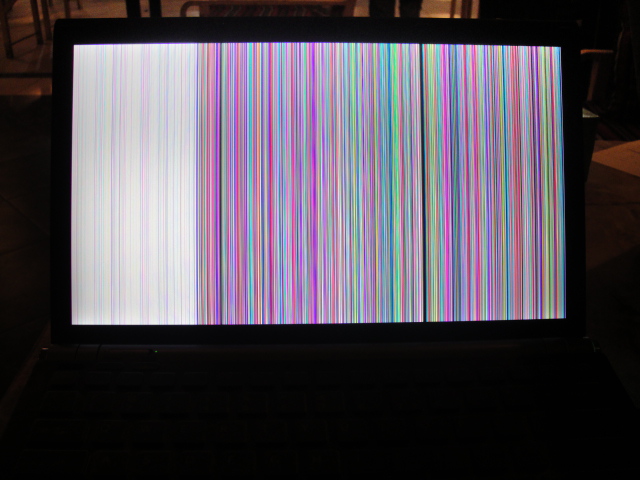
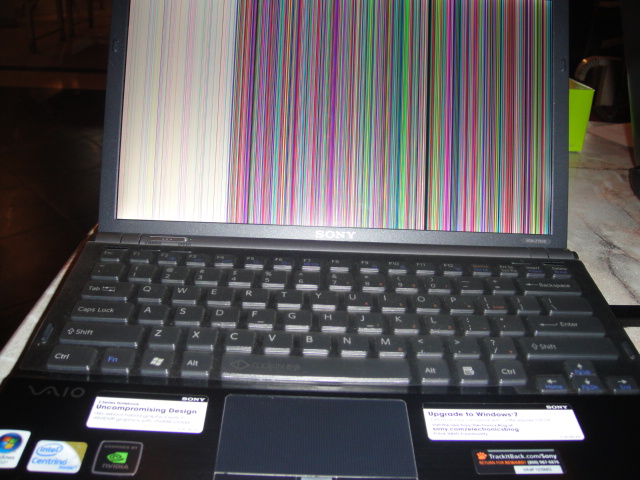
When I switched from SPEED to STAMINA, while running firefox I got this, and had to force shutdown my system.
Is this OK, or a bad nvidia driver?
Photo attachedAttached Files:
-
-
Great...thanks for all the extra info Robert. You did all the research I had planned to (also was wondering about the PI imagine and Sony utilities, SSD options and compatability with TRIM).
-
Oh dear that looks like your laptop got bricked ?

-
I have another problem in Stamina mode:
http://forum.notebookreview.com/showthread.php?t=431333 -
Regarding PortableOne: I asked them to leave the Sony/factory image on my Z750, but ship me a copy of their optimized discs (they did it for free). That way, I was able to create Sony/factory restore discs, then format, install and use their image (or at least try it out). In the end, I ended up sticking with the factory image since their optimized build was too new/buggy/missing functionality (they had only just built a 64-bit version at the time). They have probably since fixed the bugs, but then again, they probably only just put together a Windows 7 optimized image, so it's possible that there are kinks that need working out. It's not wise, in my opinion, to completely lose the ability to get your laptop back into as-shipped mode (i.e. to let them format your drive and put just their image on it)
I'm a big fan of clean install myself, so I used the factory image until I received my Windows 7 discs from Sony and then did a clean install. -
does anyone know if new sony z has 2x64=128 and 2x128=256 raid0 ssd, or single ssd's for these options? seems 512=2x256 but no information on these on the webpage. how much of a difference does it make with/without raid?
if one's thinking about getting ssd, p1 is the way to go (with an intel x25m), or sonystyle 128ssd is enough? -
I'm not completely sure about whether 128GB and 256GB are Raid 0 setup, but I've heard people who bought Vaio Z with the 256GB option has single 256GB SSD.
Is that the 80GB or 160GB X25-M? I would prefer a single SSD rather than Raid 0 SSD of the same total size. Less power consumption and still way faster than traditional HDD, I'm happy enough with that. -
P1 offers both 80 and 160 gigs, but I think I'll pass on portable1 as they only have black lids, (i want a premium carb) - and sony's warranty is better.
Then this question reduces to, is sony's 128ssd (single i assume) fast enough for the extra 260 bucks and how is it compared to x25m? -
It's normal. SONY makes crappy BIOS (R2170M3/R4043M3). But if you wan't to use Windows 7 - you don't have other option. If you want to use Windows XP, Vista or Linux - downgrade BIOS to R2168M3/R3054M3.
PS. Actually you can use Windows 7 with older BIOS and drivers from nVidia site, but in this case - backlight control using Fn keys don't work. -
I just picked up a Z720 and I was a little surprised by how loud the dvd drive is. Is this normal for this light/thin of a notebook or is there something wrong. I have had a few 15in notebooks and never had a drive this loud. Any thoughts?
-
Did anybody try to nestle Razer Kabuto mat between Z's keyboard and screen? Does it fit well? Thanks in advance.
-
does anyone know if i can somehow install a HARD DRIVE PROTECTION driver without installing any other drivers
i have two drive (one in my dvd drive) and it would be nice to have HDD protect for them.
also i got a VGN - Z530 what bios would i have to install to get everything to work right on 7? -
anybody getting the black flicker in speed mode after logging in?
-
Willy,
Do you notice much of a batt life difference between the DVD auto-off and without? I have purposely not installed Sony power mgmt because of W7's reportedly better scheme. -
This is strange, but as I was reading through this thread, my screen just went black. I hit a key, and it came back on. Minutes later, it went black again. So, I hit another key, and it came on.
As far as my settings, I always have my screen ON ALWAYS and does not go into STANBY, SHUTDOWN, or HIBERNATE after certain time has passed.
What do you think is going on? Instictively, I'm beginning to worry. I think I need to get an external HD today and start backing things up. -
I dont really know wether Switching the CD off saves more battery, I feel its, but not 100% sure, what do other users feel?
-
Yes, I have experienced that too. I have actually had that occur in both modes, but it seems to only happen when I change modes while on, versus booting in either mode.
-
Why Is a T Processor more expensive than a P?
P9700 add $150
T9900 add $660
This according to SonyStyle CTO. I was under the impression that P was better in terms of heat. -
Right, for a given manufacturing process, the slower the clockspeed, the cheaper the processor, the lower the power required, the lower the heat dissipation. You could make your system dissipate even less heat by under-clocking it.
-
Anyone know where can I download the SmartWi Connection Utility for the Z? I don't find it un the support webpage of Sony.
-
I'm interested in purchasing the Z, just wondering what kind of battery life you guys are getting.
Please list what kind of specs/hardware you have and what programs/activities you are doing on your computer.
I kind of want a ballpark range -
I'm getting about 3.5 hours pf constant web browsing over maximum performance WiFi. If I set WiFi to maximum power saving, perhaps over 4 hours, up to close to 5 hours.
-
I ordered my Z890 last week, expecting delivery in about a week. I'm looking for new wireless networking stuff so that I can convert my home network to 802.11n to take advantage of the Z's "Intel® WiFi Link 5100AGN"
My question is will the Z's wifi adapter de "dual-band"? I am trying to figure out what makes sense to spend extra on and what doesn't.
Thanks,
C. -
Hi Z-owners,
I ordered my Z890 last week, expecting delivery in about a week. I'm looking for new wireless networking stuff so that I can convert my home network to 802.11n to take advantage of the Z's "Intel WiFi Link 5100AGN"
My question is will the Z's WiFi adapter be "dual-band"? Because I notice some 11n networking stuff is dual band and some isn't and I am trying to figure out what makes sense to spend extra cash on and what doesn't.
On the network I will have one other Win7 desktop computer that I will have to buy an adapter for, a networked printer running on 11g, and intermittedntly another laptop running 11g.
Thanks,
C. -
I just got my z890 a couple of days ago with 2.8 GHz, 8 Gb Ram and 512 SSD (two 256 GB ssd in Raid 0). Trim should not work on this as Trim doesn't work on Raid.
Not sure what benefit VT would be to me as I don't have any software that uses this AFAIK.
30 sec boot and everything much more responsive than on my old Dell m1330.
I used Partition Wizard to repartition the drive to a 120 Gb systems drive and the rest data/photos.
So far very pleased. -
I've been to my local Fry's Electronics earlier this afternoon. I'm surprised to come across a great deal on the Sony Vaio Z docking station.
My local Fry's store is selling those new for
$109.99 (before taxes).
Keep in mind that this price may or may not be found in your local Fry's store.
For Vaio Z owners interested in snagging a Vaio Z docking station, I kindly urge you to check out your local Fry's to see if they have it in stock & at that wonderfully low price. Good luck.
-
SpeedwithJJ which Fry's do you go to? Usually, Fry's begins their BIG SALE the Friday before Black Friday. So check to see if that docking station goes even lower.
-
i have the z56GG dot matrix, i think this is the equivalent of a z890 dot matrix. been following this forum a lot and i read that it seems easy to swap the hdd to an SSD. I would like to ask if there are any other special modifications needed to swap the HDD to SSD or does it just involve a simple swap. thanks!
by the way, how can raid 0 also be done when there is only one slot for the SSD? -
Hello All. I was wondering when this latest version of the Sony Z series came out?
The reason is , it's basically the PERFEEEECCCCT laptop except the video card is just below the minimum spec of what I want.
If it is only a few months until the next version my current laptop can survive until then.
Thanks! -
The latest version came out when Windows 7 was released. So it is only a couple of weeks old, although the specs did not change in this latest refresh.
-
What is the usual cycle for Vaio Z hardware refreshes?
Official VAIO Z Core 2 Duo Series Owners Thread
Discussion in 'VAIO / Sony Owners' Lounge Forum' started by DiscCollector, Jul 15, 2008.