 Problems? See this thread at archive.org.
It is better then the older one....it seems the things gone be easy to use this....
-
Hi Guys,
maybe you will be able to help me,
since few months my optical drive in Sony Vaio VGNZ55V051R keeps spinning randomly.
I checked if there is no spyware or viruses but this seems not to be issue.
I have disabled drive in Windows but it still spinning. Doesn't make difference if it works on battery or mains, still spinning without disk inside,
It is really annoying me to be honest.
Do you think it should go for warranty repair? -
Did you ever get a reply I am doing the same to a z590 any tips ?
-
Go to Second Review down called "Voice of Reason... the Samsung 830 SSD in a Vaio Z790 Notebook is Fantastic!"
http://www.amazon.com/gp/product/B005T3GPXY/ref=ox_sc_act_title_6?ie=UTF8&m=ATVPDKIKX0DER
Click on comments for SSD installation tips. Pictures also available up top of the laptop taken apart. -
Go to Second Review down called "Voice of Reason... the Samsung 830 SSD in a Vaio Z790 Notebook is Fantastic!"
http://www.amazon.com/gp/product/B005T3GPXY/ref=ox_sc_act_title_6?ie=UTF8&m=ATVPDKIKX0DER
Click on comments for SSD installation tips. Pictures also available up top of the laptop taken apart. -
thanks for that quick reply
-
Hi,
I have a VGN-Z11XN/B
Can i replace my HDD with SSD?
I don't know what i need... Sata2 or Sata3?
Thanks! -
A question about how to reduce the fan noise of a Vaio VGN-Z21WN ...
Hey
Hope this is the way to "bump" this thread ...
I'm the otherwise content owner of a Sony Vaio VGN-Z21, however, I would like to be able to make the fan go off completely (no fan blowing at all) in certain situations (sound recording & editing purposes)...
I've tried to make this happen by going into the Vaio Control Center using these steps:
- Power Management - Processor Power Management (don't know if this is what it's called in English - translated from Danish) - System cooling policy - and here setting the policy to "passive" both when the computer is on battery and connected to the mains.
But even so the fan often makes quite a lot of noise also when not using challenging programs ...
Anyone here knows if it should be possible to switch off the fan completely - might there e.g. be a software "glitch" in my computer's software that causes the fan to not switch off when Processor Power Management is set to "passive"? Or do I have to do it in another way?
Thanks for reading & maybe replying - I'd appreciate any insights into this
Jesper -
Hi again,
I've decided to move my question to the Sony forum section so please disregard it in this thread.
Thanks,
Jesper -
I'm a user of the old VGN-Z21WN (different number in the US). (see sony's spec page )
It came with the VGP-AC19V26 power brick. 19.5v4.7A.
I just ordered a new one, but have received the VGP-AC19V36(also says 19.5v4.7A) instead (via amazon marketplace). It looks exactly the same as the old one. But I'm not keen to blow up my laptop - or stress the components in any way over time. The laptop is sensitive to power issues - 3 repairs so far - so I'm cautious- is it compatible to the VGN-Z21?.
Also, I've seen the VGP-AC19V30 Stick adapter on sale nearby. Again the same question - is it compatible to the VGN-Z21? -
Any Sony 19.5V 4.7A adapter works with VGN-Z, so if you are positive it's 19.5V 4.7A you are fine. I will need to google about V36, but I have V30 and it works with my VGN-Z540.
-
Hi everybody.
I have a problem with my Sony Vaio Z570N when using windows 7 now. After installing all of drivers & ultilities, everything seems work well from Fn key to Stamina-Speed switch except fingerprint function.
On ortginal windows Vista, I can use the "power on security", that means I must sweep my fingerprint right after pressing power button, before booting to HDD.
When using windows 7, when I enable "power on security", after pressing power button, I can see the machine require me to sweep my finger but I sweep many times and nothing happened, the finger sensor does not work at all. I only can pass that situation by plugging my mouse to USB port and my laptop show that I sweep 3 times and not pass, so I must enter my bios password and pass.
Anyone see my problem? If you know the solution,pls tell me.
Thanks for reading my bad English
-
***deleted***
-
Hi Megaman, replying to bit old post, but can you share me that manual again? I need to disassemble overheating vgn-z31xn/b.
Many thanks! -
Strange question for any and all. I've been offered on a classifieds website a Vaio Z11wn, C2D P8600, 4gb for 220 with a leather case. The owner says it only intermittently turns on and he says he cannot verify if its the 1600x900 or the 1920x1200 1080p display which he has advertised it as. He has posted a picture of it in better days which I have added below. Can you guys who have Z's with either resolution use your eagle eyes to tell me if the Z in the photo is a 1600 or a 1920. Its a deal maker or breaker. Thanks.

-
The Z11 you are wondering about has a 1600 by 900 screen resolution. That Z was released sometime in 2008.
-
Thanks for the info. Just wondering if you assessed it was a 1600x900 from the photo or from the model number. When I was researching the Z11 everything I found was 1600 but some people did reference a 1920 panel used (could've been a BTO option I'm not sure). Could it possibly be a 1920. I'm a Vaio hi-res but with 2 Vaio P's with 1600 res on an 8". Screen real estate is king to me. Thanks for your help.
-
Click the link for more information. The Core 2 Duo Z series all had 1600 by 900. The newer Z series with the Core I5 and I7's offered both 1600 by 900 and 1920 by 1080 options such as the VPC-Z13. You are looking to buy a VGN series Z.
Sony Vaio VGN-Z11WN - Notebookcheck.net External Reviews
http://www.notebookcheck.net/Review-Sony-Vaio-VPCZ11X9E-B-Notebook.28704.0.html -
Majority of C2D Z come with 1600x900. A few earlier models have 1366x768, but never 1920x1080.
-
I stand corrected. I forgot about those earlier 1366 by 768 models.
-
Anyone still using a Z46GD like me?
Just ordered an 512GB SSD in hopes of extending the lifespan of the notebook. Wondering are there any unofficial hacks BIOS/drivers etc done by anyone to give his "dinosaur" a bit more life?
Some stuff I've done:
I tried the eGPU and was happy for a while until one of the window updates kinda broke the setup. Not sure why and I abandon the eGPU for a expresscard USB 3.0 upgrade. Happy with the USB 3.0 speeds now. Will look into the eGPU again a bit later using the wireless card PCI-E slot. Now rocking Windows 8 too, performed the upgrade from Windows 7, although hibernation will result in a longer time to resume and might cause a reboot mid way of the hibernation. Will try a fresh install of Vista and upgrade to 8 once my SSD arrives.
Look forward to anyone's reply. -
Yes, still using mine. I upgraded the two SSD's in my VGN-Z.
I use it at work with virtual box with no problems whatsoever. -
My display fom my Z11 is broken. I'm looking right now for replace. Can I use the 1600x900 or should I use the original res 1366x768.
I found a possible display AUO B131RW02 V0 with 1600x900. Does it work? Has someone tested it already? -
I think it will work, the part nr you need is:
A-1553-752-A LCD UNIT (13.1 1600X900) -
Thank you for your answer. I bought the panel with the higher res 1600x900.
I also thougt about fullHD. But the display (B131HW02) looks a bit different and I don't know if my notebook will support the display res.
When I get it I'll tell if it works. -
It works! See the list.
Used laptop Z11WN/B
LTD131EWSX 1366x768 - my orginal and my replace for now
LTD131EQ2X 1600x900 - not tested (I wish I could)
B131RW02 V0 1600x900 - didn't work (blank screen with backlight only)
B131HW02 V0 1920x1080 - didn't work (blank screen with backlight only) -
Where can I download newest hybrid driver for win7 x64 @ vgn-z21?
-
Have you checked the Sony esupport website ?
-
hello
anybody knows places where i can get vaio vgn-z keyboard and screen?
or maybe somebady want to sell/get rid of it?
thanks! -
hello,
I'm VGN-Z41XD owner and there are 2 problems I'd like to solve...
1) lack of support for 2 external displays.
There's Mobile Intel chipset graphic + NVIDIA GeForce 9300M GS inside; then there's a switch between STAMINA / SPEED mode.
No matter in which mode, I can use the laptop only with one external monitor.
Probably there's some limitation on the driver level.
Anyone here who found some way around (maybe some generic driver ?) and who is working with 2 external displays? (if the laptop's display will be active, too, or not, this is not so important)
2) no touchpad driver for Win-8.
Obviously Sony did not bother to ensure Win-8 support for this high-end notebook (thank you, Sony!). Biggest issue I have after the Win upgrade is the lack of relevant touchpad driver (Alps).
Any idea which driver might ensure compatibility of the touchpad driver with Win-8?
Thanks in advance for any kind of help... -
I am running both the Vaio VGN-Z790DLX and VGN-Z890.
I am attempting to fully restore the hard drives to original state and to reload my software. The recovery discs are made from these computers originally.
However, when I try to do the recovery in both to restore to the original state, this message pops up:
"Cannot use this recovery disk for this computer. Confirm the moel type.
Error 114."
Would appreciate any help from members of this great forum. These notebooks are still excellent notebooks, especially as few notebooks of this size/weight/screen resolution comes with an optical drive anymore.
Thanks,
UL -
Hi there, I have a problem installing Windows 8.1 on vaio Z11VN/B (P9500 processor and integrated GMA+ nVidia 9300GS 256mb)
everything seems to work fine but the hybrid video card
I installed everything with the swith on stamina, then turned off the notebook, switched on speed mode, when started I installed nvidia sony drivers then I rebooted when sked. Now I see the screen splitted in two, with the desktop crumped on the left and some vertical lines on the right on a black background.
the only thing I can do is to manually disable the nvidia 9300gs from device manager
I also have a device not yet installed
PCI\VEN_1180&DEV_0592&SUBSYS_9025104D&REV_11
bye everybody
thanks for help -
Hi,
I have the same laptop as you and gave up installing Windows 8.1. I couldn't get the brightness function, wwan card and graphics card working correctly therefore went back to Windows 7.
I'd tried the driver from
Sony VAIO Drivers download / -
check out this thread from the linked page on...these are community drivers which are not perfect but seem to help many people with a WIN8 install on these machines!
http://forum.notebookreview.com/son...vaio-z-s-hybrid-graphics-252.html#post7176699 -
Hi guys,
If anyone is looking for the original SONY VAIO Z600 Restore DVDs for Windows XP SP3 -- I have them for sale. 2 DVDs with XP SP3 and all drivers for the Vaio Z600, my model is VGN-Z610Y, but possibly will work on other Z models, too. Just message me your model number so I can confirm.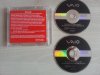

-
My VGN-Z4 (EU Model) LCD is very dim since a while. I tried to replace the LCD but it remains dim. I tried both the LCD's in another VGN-Z, and they both work . I also tried switching the cable (LCD harness) but the screens remains dim (from the moment I turn on the notebook). SO problably there's something wrong with the mainboard. If I connect a external monitor everything is fine (so the mainboards seems ok).
Does any knows if this can be fixed without replacing the mainboad? Can I do some cmos reset or something?
Thanks! -
Anyone running Windows 8.1 Pro 64-bits on a VGN-Z570N? I'm having problems with the discrete graphics and FN keys (for brightness settings).
-
Yes, I do. Got everything working, I used the win 7 graphics driver from sony and installed this as administrator and using driver signature enforcement disabled.
-
Really? Can you please explain to me what you did in a little more detail?
Which drivers did you use, exactly, and where did you download them from? Sony's support website doesn't have them. When I select my laptop model and then the Windows 7 64-bit OS, this is the message that shows up under nVidia Video Driver, in the VIDEO tab:
Drivers for this component are not available for download. The drivers for this component are included (in-box) with the Microsoft® Windows® 7 operating system and are automatically installed during the Windows installation.
Also, how do I install drivers as administrator and disable driver signature enforcement?
If you can answer these questions, it'd be much appreciated. -
this is the video drive I used (it's a win 7driver, but it works OK under win81); Sony : VGN-Z4 : nVidia Graphics driver
You have to restart the computer in win 8.1 using driver signature enforcement disabled : https://www.youtube.com/watch?v=NM1MN8QZhnk
after you computer has restarted, install the driver by run as administrator (right mouse button). Hope this helps -
Hey guys, wasn't sure if i should start a separate thread but figured i try here first..
I've got an old VGN-Z720D with a broken screen. I don't really need it anymore but hate throwing stuff away especially since it's a perfectly good laptop otherwise and would be very useful to my daughter.
The screen is a LTD131EQ2X with 1600x900 resolution and i'm really struggling to find a replacement. All sellers on ebay state that this particular screen model is 1366x768 but i would like to keep the original resolution. I've found several sellers who claim to have a high res screen that works with the VGN-Z but my research says otherwise.
There are several things i'm not quite sure about and would be very grateful if someone could shed more light on these..
1) My screen has a 30pin connector which as far as i know is LVDS only and will not work with 30pin eDP, however several sellers have told me that this is irrelevant as long as the screen has the same connector. Is that true? And how can I tell which signal type my screen uses?
2) The LTD131EQ2X seems to come in two different resolutions with the same model number. Is that normal?? How can i find the higher res version if the model number is the same. This has been the most frustrating part. I've double checked with all UK sellers to see if this might be a typo on their end but they all confirmed the LTD131EQ2X they sell is the lower res version.
3) Does anybody know of another screen model with 1600x900 res that might be compatible? There is another post here where someone tried a B131RW02 V0 but only got a blank screen with backlight on. Is this likely to happen if you use an eDP screen on LVDS? Again, i've found two different versions for the B131RW02, one that uses LVDS and another with eDP, both 30pin. Has anybody tried a B131RW02 (1600x900) or any other screen for that matter?
I've attached a couple of images from my screen if that helps.
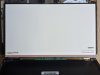
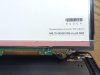
Thanks guys, any help would be much appreciated! -
Nobody out there with some knowledge on this? Particularly re LVDS vs eDP (DisplayPort) 30pin connector. Surely someone must have swapped the screen on their VGN-Z or have you all just been lucky finding an exact replacement?
-
All I know is that LTD131EQ2X is the only right 1600x900 model (source from the service manual: )
-
thanks for the reply, may have to buy one from China.
-
ok let me know if you did, I want to buy one to
-
Can't find one anywhere
Official VAIO Z Core 2 Duo Series Owners Thread
Discussion in 'VAIO / Sony Owners' Lounge Forum' started by DiscCollector, Jul 15, 2008.


