Problems? See this thread at archive.org.
hey,
i wanted to know how much battery life ppl are getting with their Z. has anyone reached the 6hr mark stated on sony's website?
-
i got approx 6 - 6.5hrs. that's with brightness 10%, wifi on, normal web surfing, stamina mode, all unnecessary items (dvd drive, modem, etc off).
and i still got some batt remaining -
So I'm a big gamer...
The video card is VERY important to me.
Are there any 3D benchmark (e.g... Doom 3 FPS on a 128 mb vs. a 256 mb Sony Z notebook) data out there?
I mean, if it's like, 40FPS vs. 45FPS, then I won't shell out the extra $200 or so.... -
Anyone have any suggestions for a good way to clean the screen? I've seen those "Monitor Wipe" type things in best buy, but I must say I'm afraid to use them on my beautiful screen ... =)
-
The Z has Nvidia 9300M GS = low end gpu. Its a lightweight, portable beauty, not a gaming rig..
Per GrooOvy's Review:
[256mb Z590, 4GB. 2.5ghz]
PCMark05 - 5840 PCMarks
3DMark 05 - 3932 3DMarks
3DMark 06 - 2272 3DMarks -
I will be using this from amazon. Its on super-fast free shipping order lmao
But with privacy filter on it says dont use any solutions just use a cloth and that still leaves smudge on screen which I HATE so I may have to come up with different solutions for it lmao -
Ordered! Thank you very much, =)
-
Yea, i know the 9300M isn't exactly for gaming.. but the question is comparing the 256mb vs. the 128mb model.
Anyone? -
I had my Z for approx. 1 month and I never heard of such a noise. I can't even imagine what a "si" sounds like; but no noise experienced. Smaller problems become bigger one's later. If you have the ability to exchange, DO IT, no loss to you!
I use a cleaner called "Monster Screen Clean, Display Cleaning Kit". Works great, no smudges and no smears. Comes in a spray solution with terry cloth. I even spray it directly onto the screen itself. About $10-15, based on size and quantity at Circuit City, Best Buys, or Frys. I use it for my HDTV as well. -
It's up to 30 % less of gpu power if you take the 128 MB model. (From a good source: c't 20/2008, page 82)
-
I may purchase a Z if it is capable of handling 2 external 1920x1200 LCD monitors. Can it do that?
-
Maybe this "noise" is related to CPU running at full speed (in that case fan also works more), but when you run in on battery, it's downclocked so less fan activity. Did you try so switch speed/stamina? Any difference?
One more thing that crossed my mind: some older Vaio's seem to have buzzing sound coming from LCD when in low brightness settings (maybe you try to experiment with this as well).
BR
Miki -
hey guys,
i have found a very disturbing pixel-problem ony my new z.
it's not visible when you look at it straight from an 90° angle (picture 1)
but it's very obious when you look at the screen from an top-down or bottom-up angle - very visible on a white sheet of a word-page.
what do you thik? is there a chance this goes away? is it a dead pixel, or a broken screen. i had a dead pixel on my samsung desktop monitor 22" - it went away with the "massage" method.
any thoughts? would you send it back? how long does it in europe normally take until the laptop gets back from the service?
here the photos:
![[IMG]](images/storyImages/Z-Screen-OK.jpg)
![[IMG]](images/storyImages/Z-Screen-top-down.jpg)
![[IMG]](images/storyImages/Z-Screen-top-down2.jpg)
![[IMG]](images/storyImages/Z-Screen-top-down3.jpg)
-
A dead is usually bright and white, and is either a cross shape or star shape, and is quite sharp and bright. A stuck pixel usually has a color (hence, stuck). In this case, it is blurry and you cannot see it directly. Maybe there is some impurity on the glass cover of the lcd. Did you try to clean it, using either an eye-glass cleaning fluid or camera lens cleaning fluid?
-
"One more thing that crossed my mind: some older Vaio's seem to have buzzing sound coming from LCD when in low brightness settings (maybe you try to experiment with this as well)."
Yes, I have had this buzzing problem too on my SZ. It only occured after I had cleaned my screen.. I thought i was rubbing the screen a bit too hard with the microfiber cloth and accidentally damaged something inside the screen that caused the buzzing. However, the buzzing noise occurs every now and then... i don't think it has anything to do with the low brightness setting... I did find a solution to stop the buzz, which was to press/hold/poke the bottom of the screen the label "VAIO" or "SONY" is, with some pressure for a few seconds, and that seemed to stop the noise.. hopefully that helps. -
What is that source? Sorry, not familiar with "C'T".
.. and how does that affect FPS? esp. for CS:S?
Thanks -
you're right it does not seem eighter to be a dead, nor a stuck pixel. (my preivious issue with the desktop monitor was actually a stuck pixel - hence being constantly red)
i've tried to clean the surface of the screen, as you proposed - no change thouh. :cry:
any ideas?
is that a reason to send it in? -
@steady602:
http://forum.notebookreview.com/showthread.php?t=108872
http://www.macfixit.com/staticpages/index.php?page=20031124074841479
I think there's no chance to fix it yourself. -
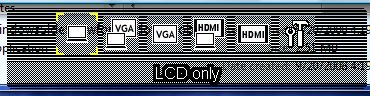
No. If HDMI and VGA are connected at the same time, the Z will present you with the option to use one or the other, but not both. (see attached image)
I have hit the 6hr mark once, with WiFi on and music playing in Stamina mode (disk drive off, 3 bars brightness or so). However the screen was off for the last 2 hrs or so.
I prefer the 256MB version with the 1600x900 screen (though I've heard you can get the 128MB version with the 1366x768 screen at some places) solely because I prefer high resolutions, and the lower res wasn't going to cut it for me.
As others have said it's not very good as a gaming machine, but I have UT2004 and UT3 installed on mine. UT04 gets an average of about 30fps, while UT3 averages around 30 on the lowest detail settings at 800x600 or so (lower frame rates become almost unplayable).
Imo, if you really, really want the Z, get the 256MB version. Otherwise, there are better gaming laptops out there.
This might be obvious, but have you tried cleaning that area? I recall having something similar on an older laptop but it turned out to be an oily mark from my finger.
If it doesn't go away, I would guess it's a defective part or panel. But don't quote me on that (just a guess!).
Attached Files:
-
-
Hi there, I am sorry to break the course of this thread.
I have a dilemma: torn between 11.1" TZ and 13.1" Z series. TZ offers an excellent form factor, but I prefer the speed and stamina of the Z. Z is however slightly bulkier. Z also allows customization of screen resolution and has a dedicated gpu.
Any idea (rumors) if the TZ will be coming with a much faster processor and more RAM? I believe Apple will be releasing a similar 13.1" MacBook Pro soon. Price seems to be comparable for the hardware.
So what would you recommend? -
After hours of inspection, it's something relate to the LCD. There is no noise when the lod is closed. I play around the brightness then I find out in full brightness the noise is more noticeable. Since not everyone's Z makes this noise, no matter what, I will return it once I get back my TZ.
Hearing this noise actually driving me crazy, it's so freaking annoying. Now it is staying in my mind and I can "hear" it even when the Z is shut down. -
Can someone explain the 2 video cards on the Z. I'm assuming this is related to the Speed/Stamina switch? Or am I wrong?
So you have both 'Nvidia chipset' and 'Integrated Intel Graphics' on the Z, and from what I understand, Speed mode ( Nvidia) is selected if you want high performance and low battery life. Whereas, Stamina mode ( Intel) is selected if you want long battery life and mediocre performance for mobility. Is this the only advantages to the 2 video cards?
So basically, it would be wise to set Z on Stamina when traveling/mobile/school and set to Speed when your in the office/home? Thanks for any input on this.
RETURN AND EXCHANGE IT!! The Z I had for a month was always on SPEED mode, and 75% always plugged via AC and never did I hear that noise you mentioned. The only noise, if you even want to call it that, is the fan, which was very faint.
Wow! a 13.1 MB Pro. Where did you hear this? And is there a forum where this is being discussed? Will Apple change the overall look of the MB Pro? And when is the anticipated release date? I realize this is all speculation. But there, IMO, are half-truths to rumors/speculations.
As for your questions on upcoming TZ, post to 'rahulnirmal', I think he may be able to answer your inquiries in the TZ. He's a big TZ fan and is very informative. -
hey lsr,
thanks for the links; looks like you're right, this is exactly my problem. i have not found any photos in those threads, but the description exactly matches my issue; my Z was defnitely allright when i bought it, i did a very close inspection, since i knew the dead/stuck pixel issue from the past.
does any1 have an idea how long a return/fix procedure with vaios take in europe??? -
c't (from Wikipedia):
c't (short for Computertechnik, i.e. computer technology, originally an abbreviation for computing today) is a German computer magazine, published by the Heinz Heise publishing house. Originally a special section of the electronics magazine elrad, the magazine has been published monthly since December 1983 and biweekly since October 1997. A Dutch edition also exists which is published monthly.
The magazine is the fourth most popular German language computer magazine with a sold circulation of about 367,000 (Q3/2005; printed circulation: 482,000). With 239,000 subscriptions it is the computer magazine with the most subscribers in Europe.
c't covers both hardware and software; it focuses on software for the Microsoft Windows platform, but Linux and Apple Computer are also regularly featured. The magazine has a reputation of being very thorough, although critics claim that the magazine has been "dumbed down" in recent years to accommodate the mass market.
VRAM:
If the video card runs out of video memory, the GPU have to access the main system RAM, which means less performance (same as shared memory). The amount of video ram you need depends on the screen addressability in pixels and the the colour depth in bits (horizontal addressability * vertical addressability * pixel depth/8). E.g. for 1024x768 and 256 colours (that's 8 bit): 1024 * 768 * 8/8 = 786432 bytes. If it's necessary to access the main RAM all the time the fps are affected up to 30 % ( 50 fps vs. 35 fps). You see the Z-series are hardly gamer's notebooks. -
Basically, the Intel chip uses less power and is less powerful. Having both means you can have the best of both worlds (long life when you want it, power when you need it).
Judging by the way my games run on the two chips, the Intel seems to be about half as powerful as the NVIDIA chip.
Some other reasons why you might want to keep your computer in Stamina mode while plugged in: heat and energy consumption. In Stamina mode the laptop dissipates a little less heat under normal use (non-intensive tasks like net browsing, word processing), and uses less energy. Heat is a computer's enemy, and energy usage is your electricity bill's ally (your wallet's enemy). But these two really are nitpicky reasons to keep it in Stamina mode.
In all truth, if I forget what mode the Z's in, I usually don't notice the difference in performance until I start playing a game. -
The replacement of the TZ series will be called the TT series and signs point to it being officially announced this Monday. It won't be a huge boost over the TZ, performance and battery life will be improved but it won't be a huge difference.
http://www.sonyinsider.com/2008/09/20/vaio-tt-information-coming-monday/
I am a huge fan of their Vaio T series but if I was to buy a Vaio again, I would buy the Z. It is only slightly larger but much more powerful and I can take that trade-off. My situation is that the TZ is my only computer and I could use the desktop like performance in the Z. But this is my unique situation, you may want a small laptop to complement your desktop or large laptop.
If size, weight and battery life are paramount to you, then the TZ/TT series would be a better fit. But I realized I am willing to take off a bit of mobility and battery life for much more performance especially when its my only computer.
What would make the Z absolutely perfect for me is an external graphics card to make it a gaming computer at home. I hope perhaps a Z refresh will use the Expresscard 2.0 standard and there can be an external videocard to take advantage of that. -
I am thinking about getting rid of the VAIO Control Center completely on my Z, since I can't see any real value that it adds. It would appear just to be more bloatware, since everything in there can be set through VISTA.
Any real reason not to blow it away? -
Unless there's another way to access the S1 and S2 shortcut settings, I wouldn't do it.
Otherwise, I think you can access near everything else without it. -
I am finally about to order the Z from portable one.. i emailed the guys over at portable one and didnt quite get an answer in which HD they put in for the 320gb 7.2k hd. so now i am debating which one i should get if i was to swap out the original hd. taking into consideration would be heat, speed, noise.
which would some of you guys recommend?
-SEAGATE 2.5" ST9320421ASG 320GB 7200RPM SATA 16MB mobil drive With G-Force Protection for added robustness and durability
-HITACHI 2.5" 320gb 0A58887 / 0A57547 SATA 7200rpm
-WD Scorpio Black 320 GB, 3 Gb/s, 16 MB Cache, 7200 RPM
Which one would you guys pick? -
Good point, forgot about those (S1, S2), although they don't have a whole lot of value to me.
The Seagate is supposed to be cool and quiet, the 200GB version of the Hitachi was problematic (7K200) and had high failure rate. The WD Scorpio could be the best, but it is new and unproven. I would probably take the Seagate.
Is there anyone in the Austin, Texas area that could put a 7200rpm drive in mine for me? I am not comfortable doing it myself after looking at the instructions. -
On my Z, you can access the S1/S2 shortcut settings by just holding down either button for a few seconds... but I don't know if that's relying on Vaio Control Centre behind the scenes?
-
I am having trouble with the search function.
Could someone send me a link to the post showing the details of how to replace a Z hard drive?
Thanks!! -
Huh. I had no idea you could do that. Thanks for that tip! lol
It does bring up the VAIO Control Center on mine tho. I did notice it's the only VAIO-branded item in the Control Panel, so I assume it's there for some reason. Another thing I noticed just now is that the hard drive shock protection settings are in there, too. I don't know how to access that other than through there. -
I just LOVE my Z.. I cant help it =P
I am afraid to take it outside, even with its leathe r cover and leather carryin case =P -
Settings for Battery Degradation...i.e. 50%/80% max. charge.
LOL! Your funny. I do the same thing when I get a new car, I'm afraid to get it wet and I park it oh so far. But with the Z, I'm not that too careful with it. -
I realize this has been done before, but I thought I'd share my personal experience. I just got back from the SonyStyle Store and they had 3 Z's on display and for sale. One was a based model Z540 ($1999.99) and the other the Z570 ($2349.99) and Z590 with 1600x900 res and 128SSD ($3999.99). Anyway, I had the chance to buy the Z550, kept for 4 weeks and returned it last week. I was hoping to upgrade it to the Z570. However, after looking at the Z with 1600x900 res. I was blown away. I did however have to change dpi from 96 to 120 for text to be comfortable for me. So here are pics depicting 1366x768 and 1600x900, both at 120 dpi.


You can tell the amount of real estate space you have with the 1600 res. I'm sold! The text is crisp, bright, vivid and clear. But I do have one question; Is this the only benefit to the 1600x900 res.? Will there be an advantage to playing Blu-Ray movies on a 1600 v/s 1366?
I have more images, but unfortunately it was saved in a .pspimage file. I forget to change it to .jpeg. If anyone knows how I can change the file, please let me know so that I can post them. I was doing screenshots on both their Z and sending them to my email, but when I realized I wasn't saving it to .jpeg, I decided to take these 2.
When working with "Word", you get one extra line before the page moves up. So say, you work with 12pt. font arial. You can type 21 lines on a 1366 before the page starts moving up, whereas 1600 will give you 22 lines of text. I have photos of that, but again they are saved in .pspimage file and I am unable to open them. Hope this helps for those of you still deciding on configurations. -
Thats basically the main advantage of the 1600x900 screen, more screen estate, more available to view onscreen.
Blu-Ray movies would look better on the 1600x900 screen but still you wouldn't see the full detail because a Blu-Ray movie's resolution is typically 1920x1080. With the 1366x768 screen, you'd see less detail than the 1600x900 screen as the picture is compressed into a smaller viewing area.
I don't think any Z's are offered with Blu-Ray and 1366x768 screen, unless you get an external drive. -
hey guys
dumb question: how do I control the volume (+ or -) by keyboard? I cant seem to find out lol :$
also, if anyone has any tips concerning the Z, please inform me. I got it about a week ago, I love it, but I dont even know how to change my s1/s2 functions, are as mentionned above, dotn even know how to control volume without clicking on the volume icon in the bottom right lol.
thanks in advance! -
hold the Fn button + the key you want to use
to change the S1/S2 go to the vaio control center -
Thanks rahul, so the only 2 advantages for 1600 res. are 1) real estate space and 2) Blu-Ray detail will look better. That's it, right? This will help me make my final decision.
Also, when I was at the SonyStyle Store, I forgot to mention that one of the reps told me that Sony will be introducing a Z with both Blu-Ray Drive and SSD, together in one unit. This was the same person that told me when the Z will be released so I can definitely rely on her word. The reason why Sony did not configure one was because of the 64 and 128SSD, it lacked storage for BD media. So expect Sony to solve this issue. She just didn't know when the launch date will be, but from speaking with her, it seemed likely to be very soon.
They had 1600x900 with 128SSD for sale at $3999.99. I can only imagine with Blu-Ray what Z would cost, especially with larger than 128 memory to handle BD media. -
There will be a small difference in sharpness when playing high-def movies, but you probably won't notice it while watching them. Games will look slightly sharper at native res (those that run fast enough to be playable). Also, if you like those Sidebar gadgets, you'll be able to have more of them on the screen at one time.
That's about all I can think of.
-
There's been an ongoing problem with my Z that's been really annoying me as of late. It started with just the on-screen notifications not showing up (volume, speed/stamina, eject, etc.), then it kinda migrated to the speed/stamina switch not working properly (the window outline would show up, but not work, thus not working), and now none of the Fn buttons are working at all. But it'll work once I restart.
Anyone else having these problems? -
I had the same problem, instead one spot i had 3 on my screen. You should send it back and claim for a repair or change. -
Did you do a clean install // remove sony drivers by any chance?
If not I would re-install Nvidia drivers, see mega-man's clean install thread and get them off there.. just a hunch. -
Fn + or - key
I just got my Z 2 days ago and mine was with Fresh Start option - so if you're like me and dont want to complicate your life, and have fresh start - dont do the clean install.
I had it turned on ac connected for the first 2 days performing these:
1. Run Microsoft Update! It found 24 recommended updates for Vista. This can be VERY helpful in solving any potential gimmicks in the sys files. I clicked Check for Updates each time it finished installing and restarting to configure system. It always found 1 or 2 more updates to download. So I kept doing this till it said No more updates.
2. Do everything on the Vista- Tweaks and Tips thread! It made my system much more responsive, and crispy-fast - kinda what a clean install feels like.
The fresh start option came with basic Sony utilities and Adobe, I have not uninstalled anything. I dont think you should for some HD space as it may complicate things.
Overall, I have Vista set to run on 'performance' with Aero disabled, but visual effects on = nice sleek start menu + icons but no aero memory hog (even tho I got 4gb LOL)
Also, I ran Vaio Update but it had none, its just good to run it though! lol -
3) 9300GS 256mb
What's the best offer for Z550 right now? Amazon's 1915$ ? -
It was $1600 2 days ago so haggle with them
-
Hey guys, someone mentioned we can increase (or is it decrease) DPI to make text bigger on the 1600x900 res?? Please let me know how! I mean its OK for me so far but if I can get the text to be bigger than it would truly become *perfect*
Edit: Omg I found it, cant believe I missed IT.
For those who don't know:
Right click Desktop
Click Personalize
On the pane with options to the Right side click Adjust Font Options, select DPI 120 (default is 90)
OMG what a world of DIFFERENCE it makes!!! My eyes were able to handle the native 1600x900 but the text on news sites and blogs sometimes became so tiny. With the 120 DPI everything IS *PERFECT*
-
Hi , does anyone have the Z11-Dockingstation (VGP-PRZ1) ?? Is the DVI-Port Dual-Link or just Single-Link?
Thanks
Official VAIO Z Core 2 Duo Series Owners Thread
Discussion in 'VAIO / Sony Owners' Lounge Forum' started by DiscCollector, Jul 15, 2008.