Problems? See this thread at archive.org.
I'm considering getting a CW that comes with i3 processor,
I happen to have an i5 processor at home, do you guys think
the motherboard is the same so I can use the i5 processor and
get the turbo boost?
-
I am also experiencing a poor wireless connection and speed on this laptop. I am also considering changing to the Intel AGN card.
-
i tried it many times .. but i couldnt find my bluetooth headphones in the computer

-
did anyone replace the HDD? I called sony and asked if i upgrade the computer to have an SSD, will it void the warranty? they said if the computer was broken later, and they found that it's b/c of the replacement parts, they'll void the warranty.
now that scare me about the replacement of HDD for an SSD... -
do all SSD come in the same size? im looking to replace my HDD for a SSD too..
and are all the wireless cards the same size? i hav had enough with this crappy atheros..what recommendations do you guys have?
oh and hav any1 you underclocked your gt 330m to get more battery time? what tools do you guys use? i dl'ed rivatuner, but i hav that x64 driver issue..
thanks! -
SSD all the same size if you looking at 2.5'' SSD.
Wireless card have 2 size, full and half length. Can consider Intel Centrino 6300.. -
thanks for the quick reply,
i'll definitely look into that card, but how do i know if my wireless card is full or half length? mine is a VPC-CW26FX -
You would need to open up your notebook,
If not mistaken yours is half-length, based on previous post that someone opened up his/her CW...
I better let other users to confirm about it. -
thank you so much! i will do more research on it
-
Thanks Peter, much appreciated!
-
Just installed the Intel Ultimate-N 6300 Wifi Card in my Sony Vaio CW.
Thought I would share some pictures of how it went.
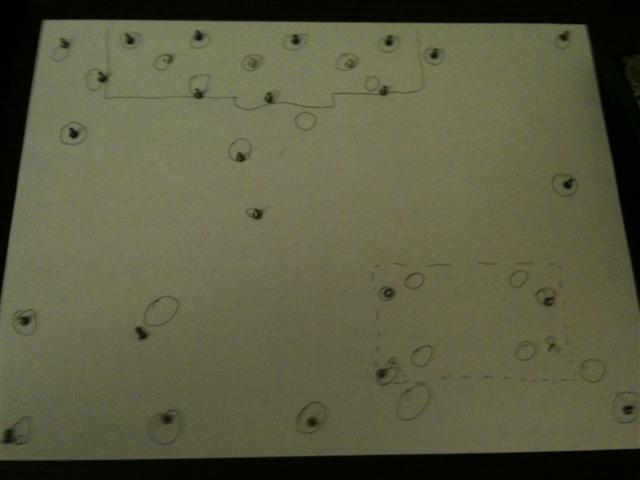
As there seemed to be a tremendous amount of screws I decided to keep track of them all by making a little map on a piece of paper. While it helped to keep track of where each screw came from I don't think that is important as all but 3 of the screws in the battery compartment appeared to be the same, but with 29 screws it helped to make sure I didn't lose any.
(first picture)
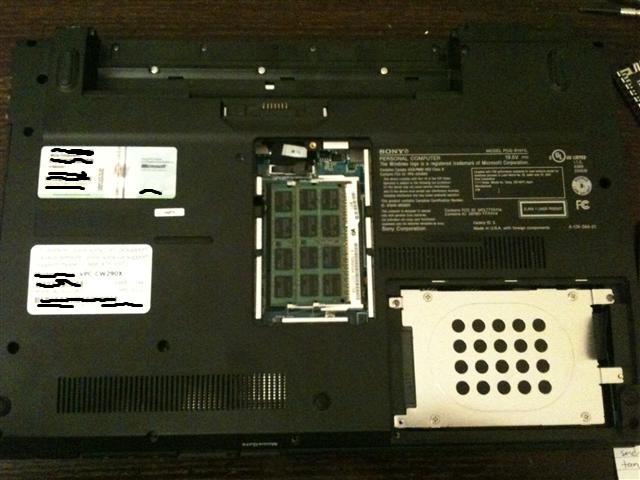
After making my map the second step was to take off the hard drive cover, RAM cover and remove the battery.
(second picture)
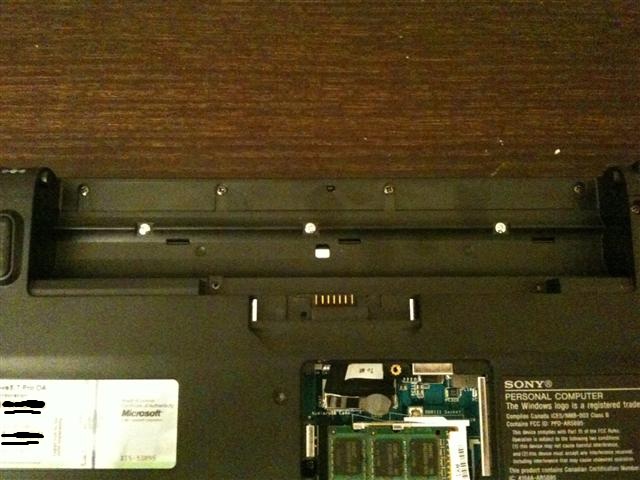
Here you can see the 3 shiny screws in the battery compartment, as far as I can tell these are the only 3 different screws on the bottom.
(third picture)
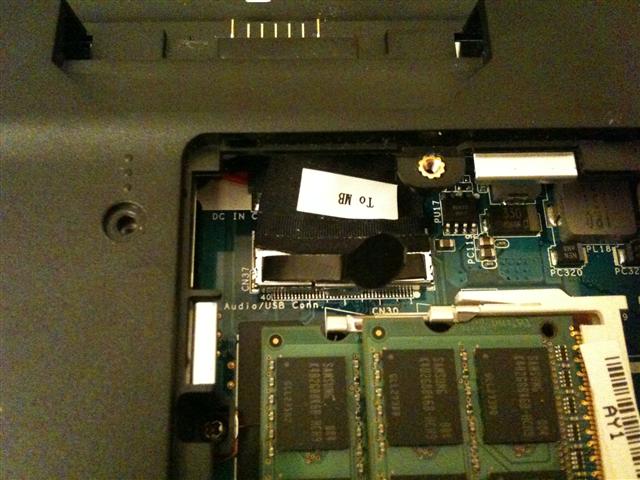
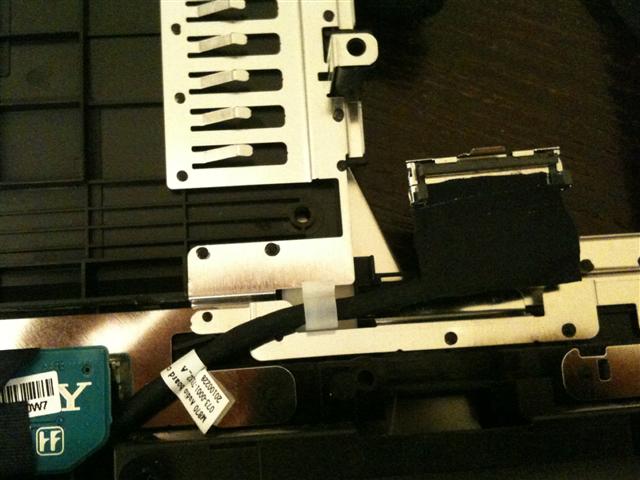
Once all the screws are removed there is one cable that connects a small circuit board on the back cover to the rest of the motherboard. You'll find it when you remove the cover over the RAM. I believe this is the connection for the USB slot and mic and speaker jacks on the right side toward the back. There is a tab which you use to gently pull the cable out. This is probably the only part of the dissection that made me nervous because I wasn't expecting it, but don't worry it's ok to detach this.
(fourth picture)Attached Files:
-
-
This is a continuation of my earlier post on installing the Intel Ultimate-N 6300 Wifi Card.
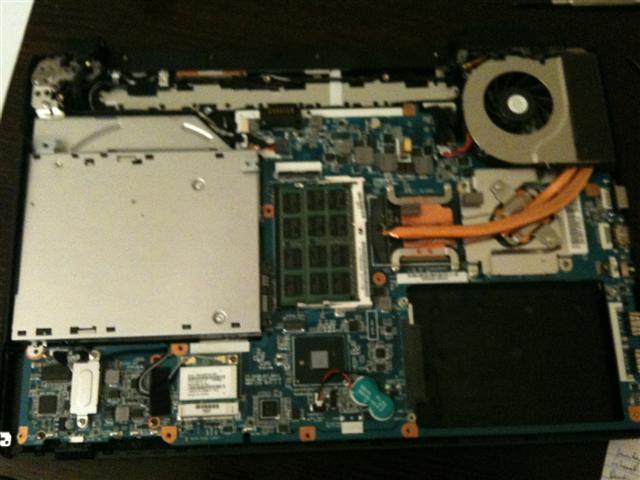
Here is a picture of the computer once the bottom has been removed.
(first picture)
Here is a picture of the cable attachment to the back cover after it's been detached.
(second picture)
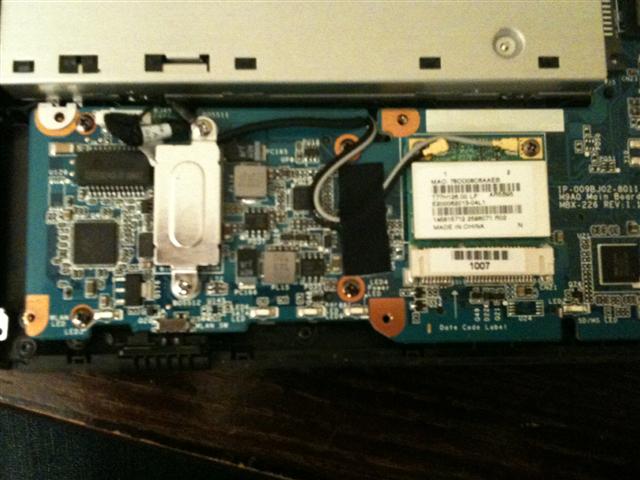
Next is a close-up of the wifi card (this is the original Atheros) there are 2 more screws to remove here and the 2 antennas which can be detached by gently prying them off with your hands. This is a half-height card and easily pops out once the screws are detached. The N-6300 fits in easily and I reattached the two antennas, I did not have a third available at the time, and currently have no need for one.
(third picture)Attached Files:
-
-
3of3. Here's the last part of my post on installing the Intel 6300 Wifi Card
I made the swap and put the cover back on, all of which was much easier than I thought it would be.
When I turned the computer back on it immediately recognized and installed the new card and connected to my router.
I then connected to my router using the 5GHz band - this was my main reason for the upgrade. It now connects to the router from a room away through a wall at 180-240Mbps, vs 60-120Mbps when I use the 2.4GHz band. Unfortunately I didn't check this speed with the atheros card - but it was only able to use the 2.4GHz band.
I've also noticed that using the online speedtest's I can get 30Mbps in my bedroom, whereas before I could only get this speed by connecting the ethernet cable or when I was in the same room as the router. With the standard card at 2.4GHz I would get about 17-20Mbps when in a different room from the router.
I bought the card from a member on these forums who has been mentioned before, great service. Here's the link
http://forum.notebookreview.com/computer-components/463916-fs-intel-centrino-ultimate-n-6300-advanced-wireless-cards.html -
thank you so much for the guide and pics! my intel 6300 and SSD should be here tomorrow, and ur guide will definitely help a lot!
-
Seriously, posts like this with detailed pictures are invaluable! We never know when we'll need help taking our laptop apart.

-
CW26FX - Anyone having trouble getting their video color settings to stick? I have adjusted my screen brightness/color/contrast via the NVidia Control Panel, but I periodically lose my settings. Initially there was a conflict with the VAIO Control Center - display settings there superseded whatever I did in the NVidia Control Panel. I eventually figured out how to get the NVidia Control Panel settings to stick by changing the display settings in the VAIO Control Center - or at least I thought I did. It would work for a few reboots, but eventually I seemed to lose my settings again. So I uninstalled the VAIO Control Center hoping that would leave my NVidia Control Panel settings alone. But lo & behold I still periodically lose those settings (the NVidia Control Panel radio button "Other applications control color settings" is inexplicably selected.) Any ideas? (And yes, I hit "Apply" before closing out the NVidia Control Panel.)
-
i have a cw27 can any one advice me on what free media player to use for playing blue ray because after i done a clean install it has no blue ray playback which is one of the down side of doing a clean install of the cw27
-
I'm planning to buy a sony cw21fx basic model. I know many stores are clearancing them now. I'm wondering why. They're in the market hardly for a few months. Is it because sony is coming up with a new series of 14" products? I know Sony launched its E series 14" ones in UK.
Anyways, my question is whether this is the right time to buy a sony cw21fx ? or is it better to wait for a few days if at all sony is launching those e series 14" laptops in US -
1.first reinstall the vaio control centre.
2.select display in vaio control centre.
3.select color mode setting and then select "DO NOT APPLY COLOR MODE" and apply.
4.NOW, go to nvidia control panel and apply your color settings.
i am sure this will solve your problem
-
Really wish this Sony line of laptops came with HDMI out. Would make them pretty perfect.
-
??? My Sony VPCCW26FX has HDMI out on it.
-
Ya, I mis-spoke. It wasn't listed on the final spec sheet for one I customized and thought it didn't come with it.
-
just saw the sony vaio 14" E series it has an ati gpu that has a 1gig or ram. upon comparison of the cw over the ea the difference are: cw has 1600x900 while the ea has 1280 x 800 but the add say it has 1600 x 900 i dont know what is that about both run win7 home HP 64bit. the it uses Hm55 boards intel 6200 wifi card it has an esata/usb drive no firewire port. the notebook itself is different right side has 3 usb ports dvd rom and power port left side has the esata drive and the mini extension slot front panel has the ear and mic ports right front, sd and memory slots and wifi switch at left front
the touch pad of the e series has a dotted texture more friction then the cw over all nice looking notebook but personally i like the cw more because the nvidia 330m packs a little more punch than the ati besides here in the Philippines it cost more the cw is 72k while the ea is 77k the intel 6200 and ati with the 1gig does not warrant the 5k mark up. what do other cw owners think? -
just to add the ea is .5kg lighter and uses a different battery than the cw but has the same battery power 2.5hrs. can any one confirm this but a guy from the e series forum says that the cw is at its end of the product lifetime? if this is true it kinda sucks cw with i5 was released like 5 months ago and its being face out that really sucks
-
the battery life mentioned is the same for both CW and EA and the weight of the CW is 2.4kg wheras EA weighs 2.35 kg, so its just 0.05kg lighter not 0.5kg.
regarding CW , its already discontinued in many asian countries and will be phased out soon in other markets like us, uk. personally, i like cw more than the Ea because touchpad of EA sucks and it has too much glitter or rain effect thingy on lid which i dont like. -
Also keep in mind that with more power comes lower battery life, and vice versa. I have another sony laptop that easily does 4-5 hours...but very slowly.
-
LakeShowRaider;6267388]Hey guys I have a question about overclocking the Nvidia GT330M GPU.
How do you do it and more importantly how safe is it? What about the temperatures that the computer should be running at to be safe?
I know a little bit but am still pretty new to the whole OC'ing thing.
What does increasing the core clock, shader clock and Memory clock exactly do?
Much appreciated -
Hi all I just got my CW2S1E/R today. I put into into hibernate and when I switched it back on a couple of hours later the battery had gone down 20%. So I've definitely got the battery drain issue too
I don't fancy reading 233 pages right now, would someone mind just telling me what the latest is with this battery drain issue? Are Sony doing anything about it?
I noticed that although it said 5% left when I switched it on I've now been using it for 15mins and the battery hasn't died on me. So is it a case of the battery isn't draining but upon resuming from hibernationg windows is somehow reading it wrong? -
Wow talking about timing, no sooner had i pressed send on that post my battery died. So soon after in fact that i wasn't even sure if it had chance to send or not!
-
Hey guys got my Sony Vaio CW on Tuesday but just turning it on tonight.
Coming from a super reliable (at least up to this point for me) Dell XPS which I have had since late 2008 that remains blazing fast, good audio, nice design, super portable etc.
However, it has been overheating and my golden rule was not to keep a laptop over 1 year so I figured at 1 year and 6 months I needed a change.
First impressions:
Nice look (wow its glossy and a fingerprint magnet)
No dedicated media keys
Its cool
Quiet
Speakers are ok and workable and trust me im very serious about my speakers. I resold a Dell Studio with wicked specs due to the speakers alone. Rest assured these speakers are nothing like the Studio's BUT fall bitterly short of HP with altec lansing and of my XPS M1330.
In terms of being fast I really thought this thing would be blazing but its seems no faster than my XPS.
Nice size screen
Fingerprint reader could have been a bonus for the price.
My CW was bought from Best Buy it is the model with the highest specs available through Best Buy.
Overall I will give this system an 8/10 based on first impressions.
http://www.bestbuy.com/site/Sony+-+...lack/9723951.p?id=1218159867078&skuId=9723951 -
I guess sony doesn't change certain things. I have like a 2 year old Fw and it has all the three ports on the right side. I had to improvise with another usb wire to hook up my external cooling fan as the wire connection is on the left end of the unit.
-
Dude, I don't know what model you're looking at but CW's come w/ HDMI. I've been attaching it to my tv w/ HDMI since day 1.
-
It's probably dependent on which CW you get...the video card it comes with determines the video out ports...if it's not a 330M then there's not an HDMI I'm willing to bet this is the case
-
no, 310m also has hdmi
-
Hey guys having video issues on my brand new CW.
Sporadic pausing, glitches, a square in the middle of videos with a ripple.
Any ideas on how to solve these issues?
Thanks in advance for the replies/help. -
Hey I just bought a CW last week and I want to put a SSD drive in. How do I take out the current harddrive? Its not soldered in like on some other VAIO models is it???
Any guides on removal??
Thanks
-
nvidia just released a new driver but as always it wont install in a cw so i went to the modded inf file but it wont work either guess im stuck in an old driver, i installed a modded inf file and a driver released in April i guess the guys who modded the inf file changed how they did it cause it doesn't work anymore
-
257.15 for windows 7 x64 with modded inf from laptopvideo2go.com worked ok for me. Just be sure to get the version of the driver they're hosting along with the inf.
-
No its not soldered in and pretty easy to remove and replace with an ssd.....
just open the hdd compartment and unscrew it remove the connectors and u r good to go for installing ur ssd.............
Cheers -
Oh I didnt know it was that easy,
Thanks Anku -
What model SSD that's semi-affordable are you guys using? I am having a hard time with the 5400 rpm
also, has anyone upgraded the ram? I know it has 4gb but with a 64-bit OS there isn't a real limit right?
-
I prefer to wait for the new Seagate Momentus XT, it's cheaper than a SSD with similar performance and it looks like good.
-
When's that being released? Also, any opinion on the RAM?
-
hello guys i have just purchased a core i3 niveda 310m and was wondering if someone can post me the best drivers for this laptop. i purchased in canada
-
I have a CW26FX and am trying to figure out what graphics driver to update to (for the 330M). I don't want to risk messing anything up, and saw comments that drivers from the nvidia site don't install properly on the CW.
Also, what are safe but decent clock settings for the gpu? I want to play it safe, but the default settings on this laptop are underclocked, right?
Any help is much appreciated. -
Having mild audio freezing and screeching issues and computer freezing now.
Why cant things just work damn. -
Does anyone know if they're still being sold? They're sold out at Newegg and Best Buy and I can't seem to configure a CW series laptop on Sony's website to have the 1600x900 resolution.
-
Yeah, I'm trying to buy a CW with GT 330M too. Newegg, Best Buy, and a bunch of other sites have them sold out
-
I don't know for sure (bought mine a month or so ago), but I did notice that Best Buy would sell out quickly, then eventually get them back in stock, and repeat. And it sounded like it's been that way for a bit now.
So they may get more in - but like I said, I don't know.
-
hi guys, I am having a dillema here in choosing between 2 sony laptops
one is CW series, one is E series
both have intel i5 processors, CW series has 330GT nvidia 512mb, E series has ATI radeon 5650 1GB, both i guess have the 1600x900 resolution
overall, I heard better temperature on CW, but I like the E model better, and the GPU is slightly better? anyone has an opinion on this? I would very much like to know, thx ^^
Sony CW i3/i5/i7 Official Owners Thread
Discussion in 'VAIO / Sony Owners' Lounge Forum' started by riverman76, Jan 11, 2010.