Problems? See this thread at archive.org.
How does one clone their hard drive to the new one, since the hard drives contain the factory install recovery disks on them these days. I had to do a reinstall 2 times on my vista machines before upgrading to Win 7 due to some problems in the past.
-
You can burn recovery DVD images using Vaio Care. To clone hard disks, you can use Clonezilla.
-
I noticed something weird. Two finger scroll works only in Google Chrome, and it's not a "smooth" scroll. It scrolls like "page down", compared to the continuous scroll we get when gliding on the right edge of the touchpad. Two finger scroll also doesn't work in MS Word, or Firefox.
Conversely, on a friend's Asus laptop, I noticed that two finger scroll is smooth (or rather, continuous) and works in all applications - Word, Firefox, etc.
Is it a driver issue? Is there any way to get this behaviour on Vaio CW touchpad? -
Mine works in all of those...there are options in the synaptics drivers to change how many lines it skips, i think
-
The drivers that ship with the sony cw dont support all the touch gestures available on the synaptics pad. Go directly to the synaptics website and download the latest drivers. Then go to the touchpad setup and enjoy all the touch gesture goodness!!!!!!!!!!!!!!!
-
So, I got a new hard drive and did a fresh install and got everything working without the sony bloatware, but the synaptic touch pad "2 finger swipe" to move back and forward when web surfing. I have tried uninstalling and re installing. All that shows up is 3 finger swipe and not the 2 finger swipe I had after installing the drivers before a fresh install.
Any Ideas anyone? -
Thanks, Mrnelson1986, cknobman. When I installed Scrybe gesture system, my touchpad drivers were automatically updated, and I now have smooth two finger scroll, and other gestures

EBAN44, even I don't have the back/forward gestures using these "updated" touchpad drivers. I think it was a Sony-specific modification. -
Has anyone installed Arch Linux on this? Just wondering before I try if there are any particular hardware incompatibilities.
-
I don't know about Arch, but I've faced a lot of problems on Ubuntu and Fedora. The latest NVidia 260.x binary driver doesn't work with Sony laptops - not even with EDID injection. So you need to stick to the older 256.53 driver. This driver does not export a backlight brightness control interface. I tried using nvidia_bl, but that also doesn't work on my laptop.
On the other hand, if you prefer to use nouveau (2D only, no 3D), don't touch Ubuntu - the latest release (10.10) won't even boot up because of some kernel/nouveau/modesetting issues. Fedora works well with nouveau, and nouveau also exposes the backlight control method, recognised by DBus and HAL. However, the Fedora kernel has CONFIG_ACPI_PROC_EVENT disabled, and thus the sony brightness control keycodes are 255, and not recognised by X. So to get the brightness control keys to work, you'll either need to recompile the kernel and use oBacklight, or wait for X to fix their input/evdev system.
To summarise: It's a world of pain. I've just been using Windows - and that's after years of using Linux. Hopefully the next releases of the distros will fix everything, or maybe I should try a rolling release like arch. If you do try it, let us know how it goes, so that I can give it a shot. -
Thanks for the response, I have Ubuntu 10.10 working almost perfectly (albeit with the older 256.53 drivers because they are the only ones that work). I believe we have had this conversation (about ubuntu) previously. I recently put Arch on a virtualbox machine inside ubuntu, and it's kind of fun to tinker with. I started to put it on an old laptop that would be used as a server, but being a rolling release and not designed for servers, I decided to use Ubuntu Server Edition instead. Maybe eventually I'll screw my Ubuntu install from too much tinkering and have to reinstall fresh, and then I'll try out Arch...just gotta have a chunk of time first and try to see if anyone has tried and learn from their misfortunes. Also I'm relatively new to Arch so it would be a learning experience. On a side note: in Arch to your knowledge is there a "software center" type deal similar to Ubuntu's? It is kind of a pain to always know the exact spelling of every package you want to install via command line in Arch using pacman (for example, chromium isn't "chromium" it is "chromium-browser" and firefox beta is "firefox-4.0" etc)
edit: and I just can't bear to use "just Windows" anymore, after tasting the freedom of linux...the capability to modify whatever I want is just too much to give up. Do you know if installing Arch on an external hard drive would have any adverse issues? or is it just safer to do it on an internal partition. I would think the internal, but I have a backup drive I could possibly partition a space out and try to install it on there. I'll have to think about it and post back what I decide. -
Ubuntu 10.10 is running fine on my machine. It took a little effort but it was worth it, and only very minor niggles remain.
Like Mrnelson, I wouldn't switch back to Windows just for the sake of avoiding a nuisance install. -
I have Arch running right now and it runs great. I did a network install so I didn't have any video problems. The only issue I had was no two finger scroll, but with some work it can be enabled. So, YES Arch runs great on this notebook!
-
Was the install difficult? Also, how do you do a network install anyway? Any files that I should have on hand or any difficulties I should anticipate?
-
I really need some advice about how to install nvidia proprietary drivers in Arch. I tried the nvidia package using pacman and it just screws the install to a black screen every time, will not start X at all...how did you get it working zinchalk? And I can't install the old versions because they don't match the kernel version, get errors using "sudo sh NVIDIA-****" I really hate that sony locks down their hardware so much.
-
The latest NVIDIA drivers (260.xx) will definitely not work. The sh file compiles the module on-the-fly, so it shouldn't give you an error. Try installing the kernel header/development packages.
As an alternative, you could try using nouveau. The latest nouveau and xorg from git has 3D support too. The 3d is definitely not as fast as the binary driver, but at least I get desktop effects on kde4. Urban terror shows some graphical glitches, though.. so ymmv. -
tyvm for your response. I definitely get some kind of error when installing the 256.xx drivers that previously worked flawlessly with my Ubuntu install (now trying Arch, silly me). I'm at work but once I get home I will check on the error and post it back if it still won't let me compile it and install.
-
I figured it out, for some reason my kernel headers weren't installed (even though I installed them before) and that was the problem...fixt!
-
How else would I be able to output digital audio from this laptop? Would i need to get a usb sound card that outputs 5.1/7.1 audio?
-
Probably, unless you have a sound system that allows an HDMI in for the audio followed by an HDMI out to the TV or whatever, the HDMI does transmit audio for my CW, other than that there's just the headphone jack as far as I know.
-
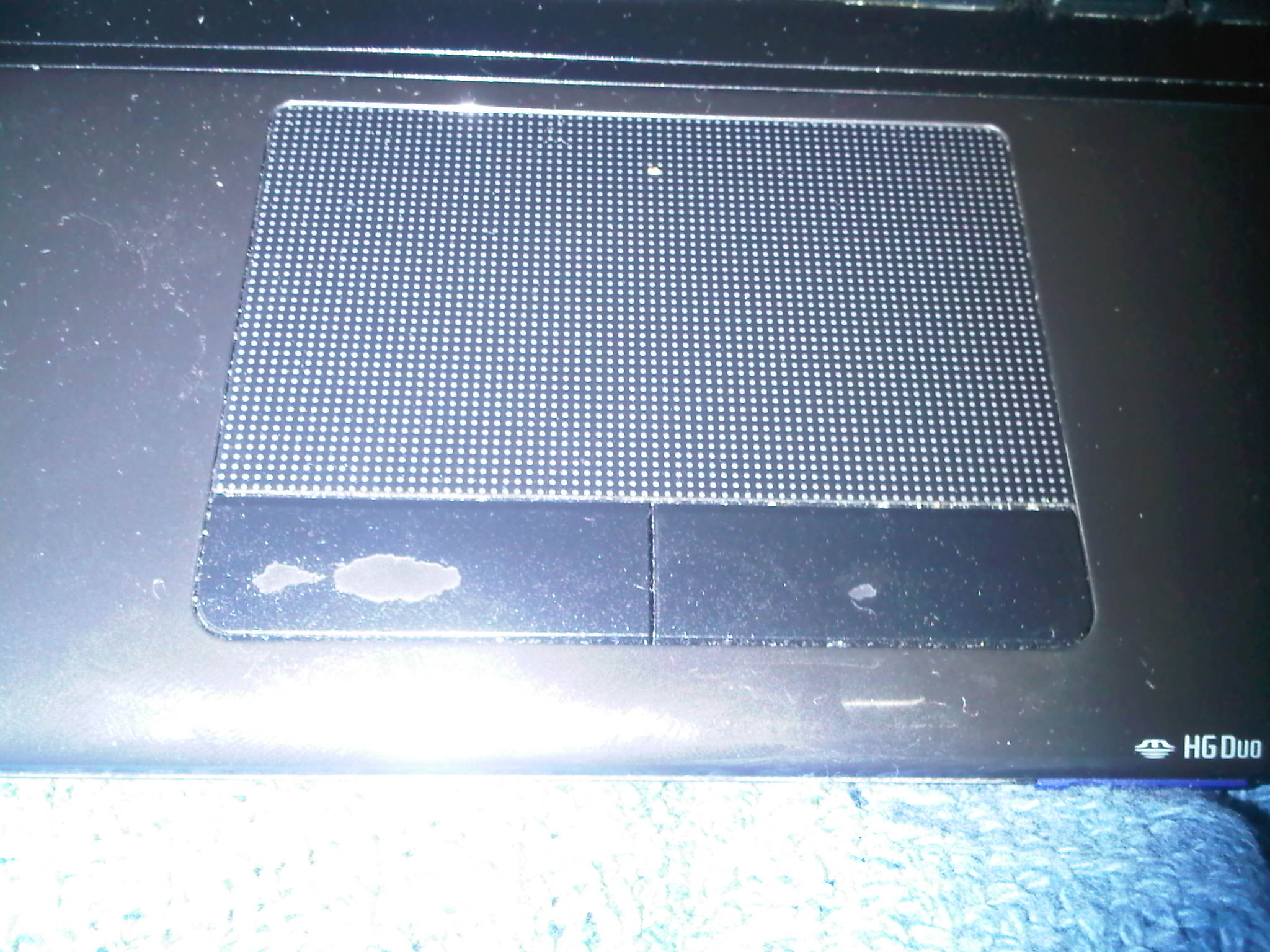
Anyone else having their left and right mouse buttons wearing away? Mine are and I would say I don't even use my laptop much. Is this a warranty thing or I guess considered a wear part?
-
My buttons are ok. I would say my wife and I use the laptop for an average of about 1.5 hours per day mainly surfing the web and I play an occasional game. I never have paid much attention to how often I click on the mouse buttons themselves but I make frequent use of the multi touch gestures on the pad and often do my left clicks without the buttons I guess. I use the right mouse button more then anything and then the left one when highlighting.
Ill keep an eye on mine but so far so good.
When you say wearing away are you just referring to the finish? Or is the actual button functionality starting to be affected? -
The VAIO recovery doesn't clone the recovery disk etc to a new hard drive, right? I want the new HDD or SSD to function as the original HDD.
If I understand correctly, I use the program to make an "image" or disk to disk copy (which one is better?) to a portable hard drive and then install the new drive in the laptop and transfer the file there? I would also have to erase the recycled drive, so I don't want to screw up in the cloning process. -
OK, I get you now. But you can still use the recovery discs - that will give you a "like-new" system. Or you can just use clonezilla and make a harddisk image to a file (which is saved on your external drive), and restore from this file to your new harddisk.
-
has anyone that has upgraded to the intel Ultimate-N 6300, managed to get intel wireless display to work.
I have the VPCCW29GX
CPU = intel i5 M540
network = intel ultimate-n 6300
it seems like I should be able to install wireless display but the install wizard won't let me. -
So moving the said file to the new drive would restore everything? How would it work since the new drive would be empty as far as any operating system is concerned. Does it mean that I would have to pop in a windows system cd, install it and then restore the image in windows?
-
Yes, restoring using clonezilla will give you an exact copy (byte for byte) on the new drive. Clonezilla is available as a Linux livecd, so you won't need any OS on the new drive. Attach both the drives, pop in the clonezilla livecd, and restore from image file to your new hdd.
-
It's my understanding that you need Intel Graphics chip alone or a dual graphics system to work. Not compatible with Nvidia alone.
-
Photo should be attached. Yeah I use a lot of the multi touch functions also and normally dont even use the left button to click. I also clean my hands so its not like I have anything bad on them when I use it. The use of them work fine its just the finish. Guess once something else goes bad I will turn it into my damage warranty and get it all fixed.
Attached Files:
-
-
My graphics card is overheating and throttling down. It reaches 100C at stock speeds and throttles to 400MHZ and 300MHZ for the memory. No wonder my games slow down mid way. Now what?
-
Uh, that's really bad, you need to contact sony or nvidia and hope it's still under warranty, mine I overclock and it only goes to 61C, 100 is going to fry your board
-
After days of tweaking I finally found the problem and fixed it. There was a ton of dust accumalated at the heatsink vent. I cleaned it a bit and now the temperatures don't go over 65 running at 600/800
-
I bought my from the NBR Market place, specs in sig. Its gonna get here Monday!!!
-
Got it in today! After a round of CoD BO multi player, my GPU only hit 55C! Thats like icy compared to my old Macbook Pro 13 2010.
-
I need help finding a replacement fan for my laptop. It's a Vpccw26fx and as far as i have researched around online I have come to the conclusion this is a lemon product that they are trying to pretend never existed. My fan seized up and now I can even use it anymore because they are no longer available as far as the fan goes. I fix my grandma's ASUS netbook with a new fan but cant get a fan for my 1 year old laptop that cost me $1000+.
Someone please help me out. Nothing is wrong with my laptop except i cant get a Replacement fan for my still fairly new Laptop
-
how is everyone's CW holding up? this has been a great laptop to me so far, aside from the niggling battery issue.
-
Great for me, no problems, I mostly use mine as a desktop replacement (always plugged in) so the battery doesn't bother me at all.
-
Yup but once your fan goes out you will be out of luck. I cannot find a a replacement fan for this laptop anywhere. Fans are mostly what goes out first in a laptop.(minus HDD's) So basically once the fan goes out you basically have a 1000$ paperweight.
Don't get me wrong I loved mine while it worked but it's a pile of trash until I can find a fan for it
-
Its been a long time since I've logged in, but its been just over a year of having mine and I've had the overheating issue that was resolved with the BIOS update, fortunately. Battery life sucks still, but I stay plugged in most times anyway.
Worse for me was my LCD screen going bad to the point to where I thought it had died on me for good. When I called for warranty service I was happy that they sent a tech out to fix it and it looks like I received an even better screen (visually vibrant). Other than that, it runs great and as long as no other issues crop up I should be able to go another year on it.
I've even managed to avoid getting scratches on it - *knocks on wood*
OT - What the heck has happened to the desktop side of the forums? I'm looking to buy a desktop with a dual monitor setup and desktop forum is a ghost town.... desktops no longer popular these days? a dying breed? Help
-
Hey fellas. I've owned this laptop for close to a year and love it! I want to replace the stock 5400 hard drive with an SSD. Question for you guys is what kind of SSD do you guys recommend? I'm looking for around 128gb. Was looking at the crucial realssd c300, would this work with this laptop?? Thanks fellas!
-
Hi! I noticed that my 1600x900 screen flickers on Sherdog.com: UFC, Mixed Martial Arts (MMA) News, Results, Fighting.
Does anyone else experience the same issue? -
I'm shopping for a ssd, but can't seem to find the cw specs that states if it suppost sata3???
-
no it does not.
-
There is plenty of Sony Vaio VPCCW Series Cooling Fan around. just google it
-
what is the latest RAM/memory that I can upgrade for my vaio VPC CW26FG ?
what kind of brand/model do you guys recommend? -
this thread is so dead
-
Looks like DDR3 (1066) though you may be able to go higher depending on the chipset and BIOS.
Says it supports a maximum capacity of 8 GB on the Specs tab
Could pick up two sticks of this GeIL 4GB 204-Pin DDR3 SO-DIMM DDR3 1066 (PC3 8500) Laptop Memory Model GS34GB1066C7SC
I don't have a CW but was going to buy it. When I was ready they weren't available new so I picked up what I have in my sig. -
I bought this: Newegg.com - CORSAIR 8GB (2 x 4GB) 204-Pin DDR3 SO-DIMM DDR3 1333 Laptop Memory Model CMSO8GX3M2A1333C9 works out of the box no problems. -
I'm not sure if it is the same problem I had but I noticed after about six months of use often when I adjusted the viewing angle on my screen, it would kinda break-up/flicker. It only happened when I actually touched the screen. The problem would kind of come and go but recently it started getting worse. So just before the 1 yr warranty expired I had SONY send someone out to replace the screen. Now no problems with it.
I also had an issue with the touchpad. The front left corner began to lift and separate from the base. This also got progressively worse so I had that fixed too. Turns out the touchpads are held down with double stick tape and mine was never taped properly. But the tech had to literally take my entire laptop apart to get to it, including removing the motherboard. He lacked any type of soft touch and I had to leave the room several times as he bent and popped pieces in and out of the case & motherboard. I baby my computers so this was quite traumatizing. But it all works fine now (except also for the battery issue.) -
Is there a performance difference between DDR3 1066 and DDR3 1333 ?
-
The 1333 will be faster. I'm not sure how noticeable but it's cheaper with the mail in rebate and since it seems to work, I don't see why you wouldn't want to go with it.
Here is a chart from Tom's hardware:
LGA 1156 Memory Performance: What Speed DDR3 Should You Buy?
Sony CW i3/i5/i7 Official Owners Thread
Discussion in 'VAIO / Sony Owners' Lounge Forum' started by riverman76, Jan 11, 2010.