 Problems? See this thread at archive.org.
fwiw, i created a signature (VPCZ11FHX/XQ) order last night (3/23) on the US site, and am now showing an estimated ship date of tomorrow (3/25), with a status of "Shipping Update".
-
In typical Sony fashion, it's proprietary, not standard size.
-
Am I the only one having trouble installing this?
I unzip it and there are a bunch of files in here...I tried clicking on them, but none of them seems to be the install file. Anyone care to shed some light on this? -
Thanks for your reply. In terms of installation, is it simply a matter of loosening the screw at the bottom of the laptop and sliding out the dvd drive? Or do you need to open up the entire laptop?
-
Sorry to burst your bubble my friend but the Shipping Update means nothing... beyond the fact that it is NOT Ready for Shipment and that you've entered the backorder list on that day.
Basically, 'Shipping Update' translates to 'We have no idea when we'll ship and we will (well, really won't but....) update you when things change !'.
StefanB and myself stayed in 'Shipping Update' for over a month. And quite a few others, Zoinks being next in line it seems, are STILL currently in 'Shipping Update' mode.
Again, sorry Pal, give them a call and you *might* get some info about when to expect it.
Like a good women, Signature Vaio Z are few and far between, hard to come by, usually late and more often seen in pictures than in the flesh... And one day, they show up, almost unexpectedly, after you've waited way too much time and spent way too much money on them... and yet you don't care 'cause it was all worth it
or something like that
-
From what all the disassembly pictures and videos have shown, I believe you need to open it as there seem to be a couple of screws inside that hold the DVD/BluRay tray.
I'm supposed to receive mine by end of week so take this with a grain of salt until somebody with one confirms though -
I wonder if signature models are also higher maintenance than typical Z models once received...
-
Great, thanks. I've installed it, and it works like a charm. I've posted SSD performance results too.
-
Just wanted to update everyone on the list. Looks like they are being shipped in order, so Mkertzman should be shipped next. This might help those of you waiting, you will have an idea of where you are in the queue...maybe
Correct me if I am wrong, fill in ??'s where needed, and tell me to add you if you are not on the list.HTML:Model: VPCZ11FHX/XQ Name Ordered Received StefanB 2/7 3/19 Treofred 2/8 3/24 * Mkertzman 2/8 3/24 ** ZoinksS2k 3/3 3/31 ** Con5179 3/5 4/1 ** Digital_Jedi_Rx 3/8 3/31 ** Rubenfl 3/12 3/30 ** STxVAIO 3/23 4/1 ** dilwaala 3/21 3/23 ** Chroma 3/23 3/25 ** ssdfreak ?? 3/10 ** * Actual Ship Date ** Last Estimated Shipment Date given
-
It doesn't really fit the definition of proprietary, it is a 9.5m ultra slim Panasonic bluray UJ242A drive. It most likely is stripped to save space. However, you probably will be able to buy an OEM drive and do this mod.
Lenovo also use the same basic UJ242A for some of their models.
-
Download and run the exe.
-
Follow the link
Grab the file: STOR_allOS_9.6.0.1014_PV.exe
run it. -
One small step:
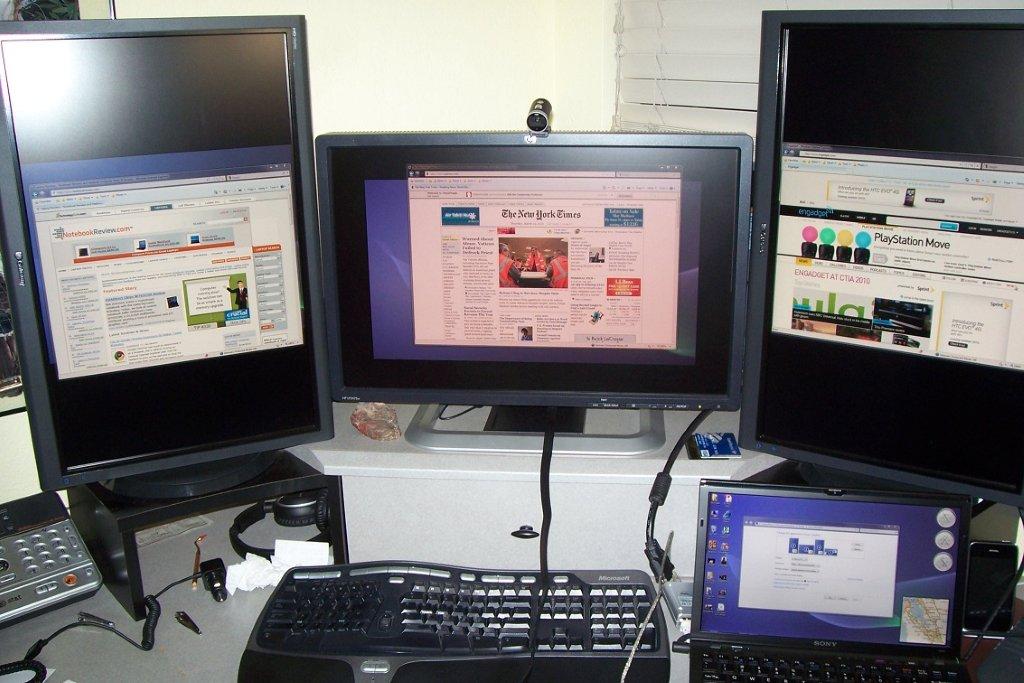
My immediate goal with the Z is to replace my desktop development environment. But that means running my triple-24" monitor setup.
As you can see from the pic, it can be done. I'm running the center monitor directly from the HDMI port on the Z and the two side monitors via Diamond USB/DVI adapters.
The center monitor is crisp and fast. Unfortunately the side monitors are SLOW and the images are not terribly exciting.
So, the Diamond adapters will go back to the store and I'll hunt around for something a little more powerful. I'll look into that adapter (forget the name) with the built-in ATI card.Attached Files:
-
-
Is it possible to use the vga and the hdmi at the same time? Or does enabling hdmi turn off vga?
-
First impression is that they are mutually exclusive but will do more testing tomorrow.
-
Hi, Folks,
As someone had posted earlier, I, too, was seeing some odd system hard hangs when running on AC, where after some time, the screen would be off, the stamina light stuck on, and nothing else would respond. After thinking about it, though, I realized that I'd just completed a clean install, but had not yet toggled the Dynamic Hybrid Graphics System switch through its other choices. After simply walking through each of the three states once, I'm now no longer seeing those hangs any more.
FYI,
Mark -
Thanks guys, the exe did the trick. Dunno why I didn't see it the first time. The crystaldiskmark scores didn't really change for me after installing this. Maybe it's cause I have the 64x2 setup...
It was $1899 on tigerdirect with 15% cashback via bing. 1899 * .85 = ~1614 No tax for CA at least, depends on what state you're in, I suppose. -
Really?! Only two in Finland so far? Well, I guess I have the other one
Well... will have later today. That damned Matkahuolto parcel service is so slow. I called the retailer on Monday, and they said they would receive my laptop from the importer on Tuesday. Sore enough, I got the tracking number for the delivery on Tuesday afternoon, and waited home the whole day on Wednesday for the packet to arrive. At 4 PM I finally called the Matkahuolto packet service number and asked why my shipment hadn't been delivered yet. They didn't have any real reason for it, and basically just said "it should be delivered tomorrow".
Anyway, I hope it's gonna be here today! I'm having a bit of a hard time concentrating on work
Regarding the problems you described, have you tried the method of making a full backup using the Sony tool, and then restoring the system without the bloatware, as described by ZoinksS2k?
I think you're right about the Nvidia drivers, they will have to come from Sony unless ZoinksS2k and Nautis (I hope I remember the names right) or someone else gets the Nvidia Optimus working on the Z, which should mean we can use any new drivers from Nvidia. -
hey i have a question - the 192GB option for the Z in the US, is it 64x3? the engadget reviewers seemed to think it was 2 separate drives (128/64).
also - if the 192GB option is indeed triple raid (64x3), would the performance actually be better than the 256GB option which is dual raid in the US (128x2)?
hope that makes sense. -
Yes, it is 64x3. One physical drive with 64x2 logical drives (referred to by Sony as 128x1), and a second physical drive with 64x1 (referred to as 64x1). When referring to the SSD options on the Z, Sony generally uses "logical drives" internationally and "physical drives" in North America, which causes no end to confusion.
Although the exact make-up of the various SSDs has been posted over... and over... and over... -
indeed - so it would constitute triple RAID, and would outperform the dual RAID in the 256GB.
which is strange, because you pay more for 256GB. -
Basically it's a trade off between speed and storage space. But I think the 192gb triple raid option is the best as you can always use an external hdd if space ever becomes a problem.
-
I changed my order to a Signature VAIO on 3/23 with an expected ship date of 4/1/10.
SonyStyle.com says that my ship date was 3/24/10 ... obviously inaccurate. -
Ok, here are some pictures of the Metal Shield version. If anybody wants pictures of something else in particular then post here or pm me.
![[IMG]](images/storyImages/P1010001.jpg)
![[IMG]](images/storyImages/P1010006.jpg)
![[IMG]](images/storyImages/P1010023.jpg)
![[IMG]](images/storyImages/P1010024.jpg)
![[IMG]](images/storyImages/P1010025.jpg)
![[IMG]](images/storyImages/P1010043.jpg)
![[IMG]](images/storyImages/P1010059.jpg)
![[IMG]](images/storyImages/P1010062.jpg)
Spec: CTO'd as 256 SSD (4x64), 8GB RAM, i7 CPU, fingerprint reader, headphones, Metal Shield.
Will post a bit more of a review later. -
Add me as ordered 3/11, received 3/24.
-
I have been using my Z for a nearly a week now. I settled and purchased at a SonyStyle BM. ONLY real complaint so far are the speakers. They are simply sub par at this price point. They are definitely the reason Sony has sold the computer with earphones. I am thoroughly enjoying everything else about this machine.
Weird thing about SSD speeds. They seem wicked fast when you first start using the machine. Then you get used to them. (No they have not slowed down.) Then you use a traditional hard drive computer and realize how spoiled you have become. It is like going from Dial up to cable modem. You cannot understand how you ever coped with traditional speeds before. Do any of you ever visit grandma with dial up and then just quit and go without the internet for a week? That is what SSD will do to you. -
That is one cool cat. It takes a fast cat like that to really show off the hardware. It must be a turbo cat. Wish Sony supplied one with my Metal Mosaic.
What's it's name? -
Awesome, thanks for compiling this!
Since forums don't handle aligned spaces very well, use the <> (HTML) wrap thusly:
HTML:Model: VPCZ11FHX/XQ Name Ordered Received StefanB 2/7 3/19 Treofred 2/8 3/24 * Mkertzman 2/8 3/24 ** ZoinksS2k 3/3 3/31 ** Con5179 3/5 4/1 ** Digital_Jedi_Rx 3/8 3/31 ** Rubenfl 3/12 3/30 ** STxVAIO 3/15 4/1 ** dilwaala 3/21 3/23 ** Chroma 3/23 3/25 ** ssdfreak ?? 3/10 ** * Actual Ship Date ** Last Estimated Shipment Date given
-
You only get one with a Metal Shield version, I'm afraid. His name is Lucy (which is now short for Lucius; we gave him a girl's name because we were told he was a girl and found later that he definitely wasn't a girl). He actually is the fastest moving of our five cats and runs around like he's on speed hence his nickname of "speedy".
-
I've been following this thread from the beginning, but this may have already been asked:
Is there any way to switch out the wireless card to one that supports WiMax + WiFI, possibly the intel 6250? -
laxer3n7,
I've looked into this. Yes, the 6250 card will fit and the current wiring in US models are correct. I'm reasonably confident it would be a direct swap.
I actually want to use the 6300, but it has a third wiring connection. The Japanese models have the extra wire, but the US models do not.
Pics:
6250
6200
6300 -
So, hypothetically, I could switch the 6200 out for the 6250 in order to get WiFi + WiMax + Verizon 3G (if i get this)? How hard is it to switch it out?
-
Thanks, I couldn't figure out how to get it lined up. It is lines up in UltraEdit where I kept it, but putting spaces in and stuff here did not work. I fixed the post and lined it up!!
-
yes the speakers are so weeny..worse than the SZ series. at 80% volume i struggle to hear NPR.
-
The 3G / WWAN card is a separate card which lives on the top-right of the laptop. The WLAN on the other hand hangs around the middle section, I think it's a matter of switching the cards and replugging the antennas. I think the two cards (WLAN and WWAN) use separate antennas as well.
-
any z owners have remapped those keys which are almost never used (to something more useful like a home/end,page down/up)? a forummer suggests using sharp keys. i have not got around to do it yet.
-
Shipped yesterday, 3/24 - scheduled to arrive this afternoon, 3/25.
-
Right, I was just wondering how difficult it was to switch out the WLAN card with the intel 6250 that has WiMax as well as WiFi. If I can switch that card out as well as get the Verizon 3G WWAN installed when I purchase, i could potentially have WiFi + WiMax + EVDO 3G. I'm just worried that replacing the WLAN card will be difficult
-
how did you get your cat to pose like that? ours will never stay in one place long enough....
like that metal shield look. -
Hello all,
i'm from germany and i plan to buy a Sony Z11 with 256 GB SSDs , the 1600x900 screen and a normal battery. I want to replace the optical drive with a 2.5 hard drive (thank you so much for testing/describing this in other threads of this forum!), but i still have some questions:
1. Is the 256 GB SDD-version a bundle of four 64 GB drives (quad raid-0 unit in BIOS with four seperate devices) or "only" two 128 GB devices (dual raid-0 unit)?
2. Is it true that the full hd panel is more colourful (Adobe RGB) and brighter as the normal 1600x900 panel?
3. Would you say that it's better to order the Z11 with the extended battery because of the additionally 2.5 hard drive (i don't know how big is the power consumption difference between the sdd and the hard drive and how much the 6,5 vendor described hours (normal battery) in stamina mode goes down with the sdd and hd during normal office work)? And has somebody a extended battery in use - if yes, can you use it easily on the fold/couch (toppled postion) or makes the extended battery any problems?
4. What's about the fan speed/noise? Had anybody tried to use a undervolting/fan tool to limit the power/multiplicator/fan/noise/heat of the cpu/gpu?
5. Do you think that a iCore7 is a better choice as a iCore5 with regard to that the fan runs constant on a low speed and don't stop to run, because it's certainly annoying when the fan goes off and on periodically?
6. Is it possible to connect and use two external monitors at the same time (maybe over the docking station - for example monitor 1 -> notebook vga port; monitor 2 -> docking station monitor connector)?
Thank you for your answers. -
Metal Shield looks awesome! Congrats!
-
I ordered mine 3/13 (did not advertise it here on forums until now though) and still have Shipping Update 3/23. I'm obviously past it already. Talked to Sony representative and was told to expect actual shipping around 4/6 but hope it will actually be earlier than that. As soon as I get it, I'm going to sell my Z690 while it still holds good value.
-
Moved the order list of the VPCZ11FHX/XQ US model to a seperate thread, so it stops cluttering the owners thread.
http://forum.notebookreview.com/showthread.php?p=6061314#post6061314 -
The WiFi card is very easily accessible.
Here's the card and the current wire layout (two leads).
![[IMG]](images/storyImages/dsc00862r.th.jpg)
Not sure how the SmartWi will handle the 6250. I'd assume since the 6300 is available in Japanese models, this one would work OK.
I'm not entirely sure I'll try the 6300. The 6200 seems to work pretty well and I get a little heartburn thinking of snaking another wire through the chassis.
I'm in the DFW area, so we've had WiMAX for some time through Clear. Seems cool, but they are positioning the service as a replacement for your home internet connection. I get 20 megs through my cable service, so that is staying. I also travel, so I need the 3G for compatibility.
I will say that this year will be very interesting. 4G, LTE, WiMAX... there can be only one. -
Ya i go to school in the philadelphia area, and they are really starting to advertise the WiMax around here which is pretty neat. It definitely sounds interesting, but I think LTE will overtake it once Verizon and AT&T get their networks up and running.
One thing to note though is that according to the CLEAR CEO, WiMax and LTE could very well combine together since they're very close to the same technology -
I replaced 5100 with 5300 on Z690 (much harder as it required full disassembly) and "snaked" 3-rd wire without any problem. If you can open Z11 case to replace Wi-Fi card, you should be able to add 3rd wire.
Going from 5100 to 5300 had definite benefits. Technically, both 5300 and 6300 have advantage of 3x3 (3 spatial streams in and 3 out, i.e. full utilization of MIMO). At least 5300 appears to have more reliable connectivity compared to 5100. I think, it should be similar between 6200 and 6300. -
I wouldn't hold my breath. Mine's been showing 3/23 for 2 days now and it hasn't shipped yet. When I contacted customer care, they replied saying they aren't sure when the stock is coming in and that as soon as it comes in, they'll start fulfilling back orders.
-
Thanks for compiling this Izzy!
-
Ayup, I upgraded to the 5300 in my current Z. The 5100 had all types of trouble holding 5GHz signals.
The 6200 seems to work as well as the 5300. I might still try the 6300, but it's low on the priority list since the 6200 does what I need it to, and does it reliably.
Now, if we could get some UWB in there, we'd be talking. -
It's on the truck for delivery !
Can't wait to put my "old" Z690 and the new Z11 side by side for some comparisons
Sony Vaio Z i5/i7 Official Owners Thread
Discussion in 'VAIO / Sony Owners' Lounge Forum' started by SurferJon, Feb 6, 2010.




![[IMG]](http://img169.imageshack.us/i/dsc00862r.jpg/)
