Problems? See this thread at archive.org.
That's strange... just to double-check (and apologies if this is silly), how did you check for Control Center? It should appear under Start > All Programs, it appears as a program around where IE and Media Player are (near the top).
-
-
Hi, no problems I'm open to all suggestions

Yes I checked there, also did a search for it, and also looked in the 'Sony' folder of start menu, and in Program Files (or any other Sony folder I could find!!).
The weird thing is that it did work first time round... :/
Is there a keyboard shortcut to turn it on and off? That sounds like a good option too. -
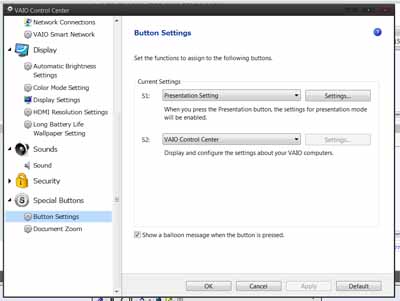
There's the setting in the Control Center, but since the program is nowhere to be found, and doesn't seem to be install-able...
![[IMG]](images/storyImages/Untitled.png.jpg)
-
Ah thanks for that.
I installed this one too:
Vaio : Sony Europe
this is directly the Control Center, However, all I see is "System Information" and "Network connections" - not the other stuff.
This is weird
-
Just another update (if it helps)...
After I installed that link I provided, I ran VAIO Update and it said it updated Control Centre, I had to reboot twice, and even when typing in my password on the login screen it prompted the backlit to light up.
As soon as windows logged in though, nothing - and it's still not altering the brightness or turning on the backlit, and I still only see those two things in control center.
Thanks for this help guys.. apart from this one prob I love this laptop. Just hope we can sort this :/ -
(I'm running out of ideas). Did you try recovering to a previous restore point, before you ran the Vaio Update (I'm not sure how much sense I'm making here)?
I'm also wondering if some other supposedly installed programs have disappeared, the Control Panel should be able to show their presence.
In the worst case, there's nothing else but restore via recovery disks
-
Thanks for the info. I'm in the same boat. Will be in Singapore next Monday and Malaysia a few days after. Hopefully will be a score a Z117 somewhere in between.
-
Sorry to keep this dragging!
I used system restore, and an earlier version brought control panel back with all the features you mention!
However, enabling the keyboard backlight with 10secs and auto brightness doesn't keep the settings. As soon as I exit control panel and go back in, they're unticked even though the changes were saved.
Any ideas or do you think whole system restore? I just finished copying my data too
-
Here is a log of system restore, something seems really screwed up with control center:
Code:22:45:20 Windows Update Critical Update 22:27:35 Restore Operation Undo 22:17:14 Installed VAIO Control Center Install 22:15:05 Removed VAIO Control Center Uninstall 22:13:16 Installed VAIO Control Center Install *** my restore is here *** 20:38:08 Removed Setting Utility Series Uninstall 19:46:5 VAIO Care Automatic Restore Point System 19:37:51 VAIO Care Automatic Restore Point System 19:36:47 VAIO Care Automatic Restore Point System 17:13:32 Avg Update Install 17:12:01 Avg8 Update Insall 17:09:07 Windows Update Critical Update 16:55:42 Windows Update Critical Update 16:19:24 Installed Microsoft Office Standard 2007 Install 15:35:39 Installed VAIO Periperhals Metadata Install 15:35:14 Installed VAIO Smart Network Install 15:34:48 Installed VAIO Event Service Install 15:34:33 Removed VAIO Control Center Uninstall
-
How is that mouse treating you? I'm still waiting for it to arrive in front of my door step.
Can you clarify whether mouse buttons customized setting works even if it's in bluetooth mode?
eg: When it's on cable I set a button to behave as a forward button. Will it still act as a forward button when in Bluettooth?
cheers -
I've not encountered that before... I don't know if this will work: right click on "Vaio Control Center", click "Run as administrator". I'm sailing in completely unfamiliar seas now...
-
DanielUK, can you check the following registry setting?
HKEY_LOCAL_MACHINE\SOFTWARE\Wow6432Node\Sony Corporation\VAIO Event Service\Modules\{205A963F-2095-4040-8C37-15F91526660B}
Should look exactly like this:
![[IMG]](images/storyImages/regz.jpg)
If this doesn't help, you should either:
- Call Sony for support
- Burn system recovery DVD's and do a reinstall
-
Can somebody look in the control center and tell me how many S Button options there are?
I don't remember if there are one or two configurable buttons. -
It has 2.
10charAttached Files:
-
-
Mine only has one
-
Mine has one as well.
However, I've been messing around with the control center files, specifically the following files in Program Files (x86)\Sony\Setting Utility Series:
SpecialButtonSetting.dll
SBMsg.exe
\EN_US\SpecialButtonSetting.dll.mui
I took the files from my Z591 and replaced the ones on the Z11. There are two S button option dialogs now, but you can't change their setting.
I'm going to try more cross-pollination between the two systems, with a focus on the registry next.
I'd really love control of all three buttons, so that's the goal.
If somebody has already figured this out, please let me know. I did a hasty search, but didn't find anything. -
my mouse problem is solved. it was either a glitch or something i was doing incorrectly.
-
There are two things I need to double check for the z. If you guys could help me out that would be awesome. One is that the disk drive needs to be DVD+-RW which I am not sure that burn double layer disks? I heard something about that.
Also this is a requirements set forth by my school and I don't really know what it means. Your NIC needs to run on a 100Base-T, or Fast Ethernet network and have an RJ-45 connector. Whats an RJ-45 connecter. Is that the same as the ethernet port for the z? -
The Z handles both of your above requirements (and then some).
RJ-45 = Ethernet. -
That's cool. Using Process Monitor, you might want to check out the xml files in this location:
C:\ProgramData\Sony Corporation\Setting Utility Series
particularly under the Function and SchemaFiles directory, as well as the SBCurrentSetting.xml. I have to run so I'll check these out later when I'm back.
-Peter -
I started a new thread for working this out.
http://forum.notebookreview.com/son...uttons-assist-dual-pane-vaio.html#post6206588
Hopefully we will have better luck than with the Optimus hacks (I still think this is doable, BTW). -
I received my new Z a few hours ago and I've been playing around with it since.
I have to say the notebook gets hot real fast, the fan is loud, and while I have DHGS setting on Auto, it runs in Speed all the time unless I'm running on battery.
I ordered 192GB SSD yet actual available space is 140GB, I was expecting around 160GB.
I fully charged the battery and I'm running it on Balance setting -- I'm getting about 4 hours and 20 minutes of battery life.
I had a bad experience with my last Vaio which was a TZ and I'm getting the same feeling about this one -- this notebook isn't going to last me a year. -
What was the problem you had with the other one and what is it about this one that you think will only last a year?
As far as the dhgs settings goes. I always leave mine on stamina unless I am running something that would benefit from the nvidia. That way it's not switching when I plug and unplug. -
To those that were helping me earlier with the Control Center / backlit problem, thanks again! I managed to resolve it by doing a system restore which brought it back fine. Very odd stuff!
It's working perfectly now and I Loveee it thanks!
-
Just pausing from watching an Outer Limits episode on Hulu to comment on the fan. Naturally I am using the noise cancelling headphones; my comment is not about noise, but the heat transference of the fan. Putting my hand very close to the exhaust it is uncomfortably hot; the stream of hot air is plainly felt, as is the cool air being sucked in from the bottom of the machine, however the plastic is not uncomfortably hot around the exhaust port area. This is the most efficient design I have ever had on a laptop. Apparently the intake of air on the bottom of the laptop also helps in keeping the bottom cool. They really did a great job on the Z. For the amount of air being piped through it is not as noisy as I would have expected. Now, back to the Outer Limits...
-
New question
Can anyone tell me how the keyboard on the new Z fares after a while? I notice it feels a bit 'rubbery' than the previous Z (I had the VGN-Z21)... i can see big grease marks sometimes unless I wash my hands before using it. Does this get shiny quicker? ;( -
The outer limits rocks!! Well the thing is it truly is a great amazing machine i love it.
-
My MBP would seriously scortch my leg with shorts on and would make me sweat like crazy. One of the main reasons I ditched my MBP, oh and it also ran @ 99c with flash videos.
I love this laptop so much! -
He guys what's up? I did a clean install of windows 7 64 bit professional, whenever i install the intel chipset drivers the screen goes black and becomes very unstable with lock ups.
-
I still have a 15" MPB which serves now only as a desktop replacement. It will fry legs when watching a DVD.
To me the noise of the Z is quite acceptable; I watch Hulu in the library and cannot really hear much noise at all above the library air conditioning. I just don't see it as a noisy machine, but I guess that depends on who you are. If you are used to laptops without a lot of power; no dedicated GPU, I guess I could see why some may complain. -
having played with it a lot more i will add this
.. the fan is quite high pitched, (though can't hear it over the fridge) but it's not enough to end my love affair with the z
battery not really loose either, a wee wobble is all
still not used to the trackpad, and can't get 2 fingered scroll to work!! -
just wondering if there is a big difference between the i5 and i7 in terms of speed and lifespan, cause im planning to buy a vaio vpc z 116GG which is an i5 and because they dont sell any i7's here i really dont have any options.. is the i5 worth it?? or should i just wait for the i7?
-
Yes oil does seem to cling onto it more than other keyboards. There's this thread about palm rest 'oiling' up, but I don't think anyone has complained about the keyboard itself. I think it's all a matter of time, I just try to remember to clean it more often.
-
That depend, if you really need the extra performance offered by the i7 (13 more mhz and 300mhz more on the turbo boost). Since the i5 is already faster than most older processors on the market.
So if you need more raw performance (video encoding or something) take the i7, your just a regular, pick the i5. -
I found that all of the gestures work better if the fingers are slightly separated.
-
Does anyone have a VPCZ117GG ? Can you take a picture of the bottom of yours ? (you can blur out the serial).
I have one here from a sony reseller, and the black sticker on the left says Model PCG-31111W, while over on the right are 3 white stickers S/N, TAG, Product Name: VPCZ1117GG
Just want to confirm thats normal. -
Interesting note: I turned the fan control to minimum noise and while I was doing some compute-bound work noticed that the system's thermal control had disabled the CPU's turbo boost.
-
Here u go
![[IMG]](images/storyImages/P1190557.jpg)
-
i posted a comparison at post #4208. In Speed mode, i did Window Index Experience test thing on both machines and not much diff. The difference would be more when Turbo boost is activated but i dunno how to measure that tho
http://forum.notebookreview.com/sony-owners-lounge-forum/457519-sony-vaio-z-i5-i7-official-owners-thread-421.html -
Yep!! Same here. On the left PCG-31111W and on the right as shown in lao3hero's photo.
Enjoy the machine It's a beauty.
-
And yeah, mine says "PCG-31111W " on left too. Sorry i think i took the wrong pic
-
Damn no read what i said before? Please answer.
-
Power Consumption Test i5-520M vs i7-620M
In this test, there is very little difference in power consumption between i5 and i7:
http://www.notebookcheck.com/Test-Intel-Core-i3-i5-i7-Prozessoren-Arrandale.25078.0.htmlPower
Thanks ZoinksS2k !!! It confirms what you have been saying all along ...Attached Files:
-
-
You must have installed the wrong drivers. Where did you get them from?
-
From Sony drivers website, intel chipset drivers.
-
Has anyone tried Windows Media Center on their Z? It looks like a part of Windows 7 so it should be installed already. At first glance it looks like I can watch full episodes of TV programming. Anyone know what this fully does? I was watching an old episode of Star Trek where the M5 computer takes over the ship, but then I stopped to post this.
-
Sometimes when I play HD videos on the Vaio Z, a black screen appears and doesn't go away. I couldn't turn my laptop off so I had to remove the battery and put it back in again. PLEASE PLEASE HELP ME!!!
What should I do???
-
You realy should let us know
1) how long you have had it; is it within the no penalty return warranty if you bought it at a store?
2) have you re-installed anything like drivers and are they stock? -
I'm in the same boat since I got my machine, its seems to be a Nvidia driver issue either display or audio not exactly sure yet. But my screen goes completely black with beeping noises and total lock up during some full screen internet video viewing.
I'm waiting for a new driver release that I hope will fix this problem.
Cheers. -
1)I bought it on 1st April. Playing HD videos were fine for the couple of days but a black screen started to appear. I have the 1 year return warranty
2)Nopp. don't think so. As far as I know, I'm downloading vaio driver updates.
BTW, this is not a clean install. I suppose its full of Sony junk!
Sony Vaio Z i5/i7 Official Owners Thread
Discussion in 'VAIO / Sony Owners' Lounge Forum' started by SurferJon, Feb 6, 2010.