Problems? See this thread at archive.org.
can someone point me to the normal nvidia specs of our 330m card since ours is underclocked? Thanks!
-
-
I am just wondering if this new Vaio Z series (VPC-Z) will support dual display outputs to TWO EXTERNAL monitors. I know the old VGN-Z series doesn't work (even with dock) and I want to know if this is still the case. Thanks.
-
Here you go:
Core Speed * 575 MHz
Shader Speed * 1265 MHz
Memory Speed * 1066 MHz
Notebookcheck: NVIDIA GeForce GT 330M -
Weird: for a super-brief time yesterday, the fully-loaded VAIO Signature Collection Glossy Carbon Fiber Z (with the i7-620M, the premium Full HD 1080 screen, 8GB, 512GB SSD, BD-R DL etc.) was back in stock at Sony Style USA. I thought it was completely sold out a couple of months ago - and never coming back.
-
Is there any info. for those countries that have received or will be receiving the refresh Z12's of new lid designs. I'm hoping they offer that glossy carbon on a silver keyboard.
-
With the upcoming refresh, will sonystyle usa finally offer an HDD int their CTO?
-
FYI
Remote Keyboard Software version 1.0.0.15190 and Remote Play Software version 1.0.0.15090 : Sony Australia
Works on both Z11x and Z12x -
Is that to allow you to control ps3 from vaio?
-
I read from endgadget that Dell will soon upgrade their Alienware m11x processor from C2D ULV to i3/i5/i7 ulv. We all know that graphic wise m11x is already better than our dearly beloved Z, now im wondering if the upgrade to i series processor will make m11x a clear winner over the z series.
-
i have a vaio z117, the automatic brightness with the brightness setting at max is too dim for me. is there anyway to tell the laptop to turn it up a notch or two?
-
The driver from synaptics has 3-finger swipe functions (and 2-finger (jerky) scrolls). The version (that comes with the vpcZ) supplied by sony does not have 3-finger gestures but 2-finger swipes.
-
Don't know; they may see it as a step backwards now for the "Premium" Z line.
Still, I get where you're coming from. It might be nice to have a lower-end CTO, like they used to. -
turn off the auto brightness setting in Vaio Control Center
its a must, i hate the auto brightness.. so bad -
Yes I wonder about the performance of a M11x with a Core i7, compared to a Z with it's i7?
-
Thank you, both of you. From your perspective, and with your rational outlook on it, I too am prepared to go the extra mile.
For some reason, you put things in perspective for me, and I feel more confident about it.
Are you guys planning to get a Notebook cooler or a Dock? I saw the Vaio Z dock had gotten very had reviews on sonystyle.com
-
I understood it that way that M11X still has culv i7, while vaio z does not?
I dont think that there are any benchmarks on i5 or i7 culvs out yet. We have no idea how fast they are...
I think it's weird how m11x and sony vaio z are the same footprint/dimensions, but m11x has a 11'' screen... the bezel dont look big. i dont know how vaio z was able to squeeze in two more inches of screen estate with the same footprint. -
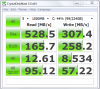
Does this seem low to you? I checked back in the thread and there are some results a LOT faster.
thanks
VPCZ117GGAttached Files:
-
-
Glad to help. I would say that you might consider purchasing a warranty. Your GPU/CPU melting is covered by the warranty (any hardware malfunction that is not user-caused is covered by the warranty). You might even tell the rep about your horror story with your previous notebook. Combine that with the fact that you are "on a budget," and you might be able to use that as a bargaining chip for getting a bettet discount on the laptop. That would make the extra for the warranty not as bad. I purchased a warranty with accidental damage protection (which is extra), because this notebook is going to travel a lot and I was worried about the screen (much more than the internals).
I admit I considered a notebook cooler, as I too was worried about temps, and I figured I'd only have it under heavy load while plugged in at my desk. But I think if the Z stays in the 80s-90s range for GPU and CPU under load, I'm not going to bother with the extra expense. Someone else in this thread who had the GPU seriously overclocked did have it paired with a cooler.
I'm going to skip the docking station. I don't mind just plugging in an external monitor when needed, nor do I think I need the extra ports, etc.
Nice avatar by the way.
-
Thanks. Avatar, is stolen from a T-Shirt design I saw at threadless.com ! Really cool gamingT's
It's also nice with a strong colored visual Avatar, so I can quickly browse through threads and find my own posts as fast as possible!
About the warranty... A 1 year warranty here in Denmark will cost me around... 250 Dollars... I think its around 350 for two years. I dont know if I can afford that.
Would you recommend me going into a physical Sony Center in my city, than just ask them over email? I was thinking of ordering their only configuration through their sonystyle store.
We're so limited in options, and services in the nordic countries
-
Hmmm...good question. I guess I'm thinking of my experience talking to a USA SonyStyle rep via phone. I believe that's how most of the folks that got discounts received theirs. But my belief is that every big ticket item has a negotiable price. When you're paying this much money, it's perfectly reasonable to seek an optimal price with the vendor that is satisfactory to both of you. I think you could try for that with any method, email or going to the physical center. But I think you probably will benefit more from going to a physical center, because your mere presence in the store is a bargaining chip in your favor. You can stay there all day until they give you the price you want. Just be nice whatever you do. And be ready to walk away if you don't get the price you want.
At least that's what I'd do in the U.S. Hopefully it works that way in Denmark too. -
Anybody else seeing this issue or offer advice?
This is not a fluke, if your laptop goes to sleep in Nvida (speed) mode & later is left to auto Hibenate. Then when you power on, any previously open or minimised windows will be resized & placed in top left corner.
This is a pain & I wonder whether anyone else has seen this or knows of a 'configuration' to avoid it?
After some research it seem to be how Windows report the resolution to Nvidia but on the Intel (graphics) setting, all work fine - only the Nvidia behaves badly.
Thanks,
T -
Hi - just got my Vaio Z (UK model) after a 4 weeks build time so very excited. I went for the HDD version. I have 2 questions as I want to change the HDD for a SSD:
Qu1 - how do I remove the base of the laptop? is there a guide?
Qu 2 - will a standard SSD (Cricial C300) fit in the space used by the HDD?
Did anyone find that their courier packaging was terrible. My outer box looked as though it had been thrown around. It was badly dented and you could see the Vaio box through a hole. Also, the Vaio box was dented on the edges - though the laptop seems fine.
Now looking forward to killing my Dell. -
You could try disabling hibernation entirely? I plan to do that, as from what I've read in this forum I think it helps to prolong the life of the SSD. -
There is something I can't garner from those reviews: Are people upset because the dock won't support 1080p output via DVI - or are they upset that it won't support GREATER than 1080p output?
Can someone who has a Z 11 series dock confirm?
Thanks,
DC -
The resolution won't go higher than 1920x1200 so it's a single link DVI port, not a dual link one (2560x1600).
-
Just noticed that the the Metal Mosaic Siganture Z is now officially SOLD OUT: VAIO Signature Collection
And no longer available to purchase here: VAIO Z Series PC | Sony | SonyStyle USA -
Will it do 1920 x 1080 (i.e. exactly 1080p)?
One of the reviews on Sony Style seemed to be complaining that it wouldn't do that.
Sure would be nice if the dock had a proper HDMI out as well - so it could send digital audio along with the video to a home theatre set-up. -
Yeah, I noticed that too when I bought my Signature Glossy Carbon Fiber Z on Friday (which I'm still shocked popped up momentarily as available). I wanted to get my wife the silver Signature, but no dice.
-
Follow Zoinks' steps in this video
YouTube - Sony Z11 Disassembly -
u can actually bargin down the price from sony style? i always thought it was a set price, can any1 confirm if i should try to bargin in the ones in canada, thanks
-
If the cabling is properly done, there is digital audio along with the video in the DVI output. Then when you convert DVI into HDMI by a little dongle, the digital audio along the video is still there.
At least that's exactly what happens on my desktop computer and monitor, at my biggest surprise. I can certify it.
If it doesn't happen on the Z, maybe it would have something to do with the audio settings, like telling to do digital sound output instead of analog, stuff like that. -
I can't see it NOT supporting 1920x1080. Actually it certainly supports any resolution up to 1920x1200.
Now I don't have (and won't have) the dock to speak from experience. But it would stun me if 1920x1200 and 1920x1080 weren't available by using the dock. -
Well I think I remember Canadians complaining about getting stomped on when fishing for discounts. But Sony Style USA handed out discounts left and right. Just look back through the early part of this thread to see people discussing discounts. I don't think anyone in the U.S. who tried for a 15% discount got rebuffed. Some got even higher discounts.
No matter where I was in the world, I would try to bargain. Don't ever believe they're losing money on a sale with a discount (they'll try to tell you that). Just be prepared to buy a warranty and some accessories to get your discount. If you don't want the warranty, you can return it later. I for one preferred to have the warranty anyway, so no problem there. In my experience, the discount only applied to the computer and the accessories, not the warranty. -
Yes of course it will do that. 1080p is nothing for any computer made in the last 10 years. It's home TV's that are relative newcomers to those sorts of resolutions
-
This may be a dumb question. Can the Z broadcast via HDMI out to a high definition TV? I just assumed so, but now I am thinking I should have confirmed...
-
Yes, I have done this.
-
A Cautionary Tale???
I'm a developer and for our current project we have a testing harness that exercises the software at a given "level".
Since I got the Z I have set this stress level to something I know can be handled. I have been running my tests at this level for weeks now.
Yesterday, I was looking around the Japanese Z site and decided to download the latest Location Services Update.
Since then my test failed at my standard level. Basically the communications between the various parts of the app began to fail. Instead of my usual testing level, I was only able to operate at about half of that.
I removed the update and sure enough, I was able to run at my standard test level again.
YMMV. -
When you say it wouldn't test at that 'level'. Are you saying because the processor is too busy all of a sudden? or what?
If it is cpu loading that you are referring to, where does resource monitor say your cpus are at before and after the location services update? -
im sure it will be back as part of the signature summer collection.
-
Thanks bud. Called my brother in law too to make sure and he said yeah. Don't know why, but all of a sudden I had the feeling that maybe that wouldn't be the simple plug-and-play that I originally thought. Glad to know it works fine.
-
The "level" to which I refer is associated with our app; it is basically the number of users we simulate simultaneously. I have been running comfortably with a load of 70 users before I installed the update. With that driver installed, however, it wasn't stable much beyond 30 or or so.
Without the driver installed a load of 70 users occupies about 80-90% of the CPU. With the driver installed the CPU was occupied somewhat higher, often hitting 100%.
However, our test diagnostics were indicating that communications between the various users had slowed down significantly and that's where our problem was. -
Any good sale on a Z with bing and other tricks?
-
Is there an indication by Sony that they're going to continue the Signature Series with each "season" like this?
I know there was a Spring refresh - but does that mean there's going to be a Summer series, a Fall series etc? It would seem to me the Summer series would be announced by now. -
I run a development and automated testing shop myself, so I'm familiar with load/regression/unit testing.
I don't know how the location package would affect a load generator like Visual Studio System Test, WAST, Neoload, Emprix, Loadrunner, etc. I believe the location utility just updates the GPS location maps so the GPS can acquire the satellites more quickly. I could be wrong, info on this package is scarce.
Weirder things have happened, I guess. Glad you got it sorted out. -
Yes, I knew the COMPUTER could do that (my old Z from two years ago can). I was talking about a limitation of the new Z 11 series dock - which someone in a review on Sony Style says won't pass "Blu-ray resolution" that the laptop can, on its own via HDMI.
-
What is the actual dimensions of this laptop? Sony lists the dimensions on the shortest area of each dimension, so I suspect that they are not including the rubber feet or possibly other things in their thickness. What is the actual thickness (height) at the back of this unit? I know they list it as 1.3 inches, but I suspect it is closer to 1.5 inches.
-
It's our own load generator, basically just running multiple (70) copies of the user app against the central engine. The apps query the engine every 5 seconds and if the engine doesn't hear from an app in 30 seconds, it assumes the user is lost. That's what I kept seeing.
I have no clue either as to how they're related unless the Location Service somehow started preempting the query path. -
Sure I did it with success and satisfaction connecting HDMI out of Z11 to my full HD TV set.
I am very accustomed in dealing prices with merchants all over the world, but with Sony style (in Italy) there was nothing to be done to get a discount.
They just offered me a big discount on accessories (spare battery, dockstation, bag, etc..).
When I ordered my Z11 (Silver, i7, 192 GB SSD, 6 GB RAM, 3G modem, extended battery, 1920 x 1080) I was told that there were difficulties in having i7 and therefore no discount.
A few days after the model was no longer available and now I had to wait for the new refresh.
I am really pleased to have bought anyway my Z11 with which I am writing these words.
-
Thanks SandyRavage. I'll try it tonight.
-
The video is about the most boring thing ever shot. And no, I've never watched the TV show 24. I just like the CTU ringtone
Here is a pictorial version: http://forum.notebookreview.com/6009997-post86.html
Sony Vaio Z i5/i7 Official Owners Thread
Discussion in 'VAIO / Sony Owners' Lounge Forum' started by SurferJon, Feb 6, 2010.