Problems? See this thread at archive.org.
Hi people...Its nice to see a post dedicated to the FZ users...big it up!
I just bought a FZ21S recently and I am having trouble with its camera and was wondering any one can help me out.
Basically, the system just isnt detecting the camera. The list to choose a camera from in the 'VAIO Camera Capture Utility' does not even show any existence of a camera on the system and says 'None Auto selection' (but it does recognize the mic though).
I have tried rebooting the system and almost searched everywhere but just cannot get it to work.
I will appreciate if any one can shed the light on this...
much appreciated!
-
right..i have gone through quite a few posts but nothing in there has helped me out..the drivers seem to be up to date, I have tried uninstalling and reinstalling but to no avail...helpppppp?
p.s. fz21s is a UK model since some posts referred to american models and their drivers. -
Hey everyone got the FZ 180E and I was hoping to ply Crysis. So do you think this laptop can even run it at low settings without any slow downs. Thanks for the help really appreciate it and BTW has anyone found a solution to 5.1 through HDMI or will this laptop never output 5.1 no matter what I do.
Cheers,
Sufs -
Has anyone been able to update their nvidia drivers? I have the 8400m gt and sony only has the original driver that the laptop came with. When I went to the nvidia driver site, they recommended that sony release the updates because the video driver also controlled a bunch of sony utilities. It doesn't seem like sony will release any updates soon. Does anyone have any ideas?
-
I got a driver update through windows update. Didn't you get one thru Windows update?
-
http://www.laptopvideo2go.com/
You can look for laptop Nvidia driver here- make sure to check their instruction for installing them.
For FZ, I like this one. It is easier to install as it is made for Sony laptop, and seems to perform very well.
http://www.laptopvideo2go.com/forum/index.php?showtopic=16276 -
I checked my update history and don't see any updates for the driver. I wanted to control some of my screen settings and don't have control for the digital vibrance or sharpness. I was thinking that maybe there was an update that allowed this since I've never updated ever since I got this laptop.
-
I could give them a try since my laptop driver version was last updated in May. My driver version is 7.15.11.128. I might just wait for the windows update since that would be the latest.
-
Have any of you had these problems? I have yet to get resolution on the two issues plaguing my new Sony Vaio.
First, the I was told (by sony esupport) the Nvidia graphics card does not support Instant Mode however two new Vaio FZ releases (FZ485U/B and FZ470E/B) both have Nvidia graphics card AND support Instant Mode. My FZ283BN was supplied with Instant Mode manual and has never worked. All I keep getting is roundabout answers NOT solving problems.
Secondly, the HDMI only outputs 2 channel stereo. I have been told (by sony esupport) that the hardware is HDMI 1.3 however the software only supports HDMI 1.1. HDMI has supported multi channel (8 channel) audio since HDMI 1.0. Again the roundabout responses I keep getting are avoiding the issues and NOT solving the problems.
Are any of you actually getting 5.1 surround via HDMI output? -
Manufacturers usually don't newer supply drivers to windows update. If you want to play newer games, I recommend you to try drivers from laptopvideo2go.
AFIAK, instant mode (which is a stripped down *nix I believe) didn't work on Nvidia models because there was problem with Nvidia linux driver. So it is more of Nvidia's fault than Sony's, although it would be nice if Sony fix older machines, now it appears the problem is fixed. -
Hi Coolguy,
Could you tell me when you got the NVIDIA driver updates through windows update ?. I did a clean install on my notebook few days back and didn't receive any nvidia updates through windows update ?.
Before doing the clean install I did receive the updates throug windows update.
I am not sure anything has to do with clean install or not.
Do you know how to get these updes through windows update ?
Thanks
Raj -
Make sure you have selected the "updates from microsoft" and "include recommended updates" in the windows update settings. I didn't get the update immediately after the clean install. I got it some time later.
-
Hi Rajesh,
I have verified my windows update settings. I already have check mark on recommended updates (Include recommended updates . -
Hi Rajesh,
Do you remember after how many days of your clean install you received your NVIDIA driver updates through windows update ?. I just did my clean install 2 days back.
Thanks
Raj -
I'm sure Nvidia updates don't come through Windows. I've only had one so far and that was from VAIO UPDATE .
-
Hi Jam12,
As far as I know there are no NVIDIA updates on sony support site.It lists only original drivers . Could you tell me from where you got the NVIDIA updates from VAIO UPDATE ?.
Raj -
YES, this is a BIG problem, and Sony needs to address it! I have the same problem with my Sony FZ285U/B. The colors are oversaturated, making green grass almost look flourescent at times! I tend to believe it is the nVidia 8400M GT video adaptor, not the monitor, because when I hook up an external monitor I have the same problem. But have you contacted Sony about this? I bought my laptop new off ebay but without a warranty, so I can't "demand" answers from Sony. (My old Sony FS630 looks perfect--all the colors are natural...and here I thought the new computer would be a step up!)
Thanks,
Brian -
It's in the Vaio control panel, I believe
-
Hi neof1z,
Thanks for the information about latest NVIDIA drivers. I prefer to receive it either as sony update or windows update. Before doing clean install I did received NVIDIA updates via windows update.
But some reason I didn't get that after doing clean install. I just want to know how can we get these updates in windows update.
Raj -
It's the same.My friend has a hp and use this from windows update.I dont know the perfomance for the games but i know its the latest from sony and everythink works(blue ray with powerdvd ultra with patch 7730 rocks no bsod)and its WHQL.Just unzip the original inf files and put it in the install folder its easy.i have clear install of vista SP1 RTM on VGN-FZ21M and i have to say 1 thing.In 1.5 year about after comes the SP2 nobody else talk about downgrade to winxp.They just forget it(Remember the Win xp without sp?)every one downgrade to WIN98SE or WIN2000 or WINME.Where are this operating system?.GOOD AND BAD MEMORIES I GUESS?
-
What's the same? We have no idea which of the hundreds of messages in this thread you are replying to. Please quote at least a small portion of the original message when you reply, so we ALL have some context.
Gary -
nVIDIA ForceWare X 167.43 for Windows Vista 32bit
Driver Version: 167.43
Driver Date: 2007-11-07 (YYYY-MM-DD)
Driver Size: 31.7 MB
Driver Released by: Sony | Clevo
MS WHQL Certificate: v
Setup Files Included:v
International Files:v
http://www.laptopvideo2go.com/forum/index.php?showtopic=16276
This is the driver in windows update -
I just got my FZ4000 today and I was wondering if anyone knew how to do a clean install on it, or if not, what would be the best way to get rid of the huge amount of bloatware. I've been slowly uninstalling stuff but it's getting tedius. I have the Intel 9300 processor, 160gb hybrid hardrive, 3 gigs of ram, and it's running slow. I can't believe that it's running slow but it has to be all of this bloatware. the 4000 doesn't have the WAU so I can't do a clean install with the directions that were posted in the other thread. I tried making back up DVDs through the Vaio system restore but they included all of the bloatware. Any help would be great as I'm not a computer expert by any means.
-
If you are certain the WAU files are not there (they MAY be there under a different folder name), then you have three options. Manually remove the bloatware. Try the "semi-clean" install method (untested on a FZ4000 at this point). Buy or borrow a Vista Install DVD and do a clean install using the license key from your laptop.
The instructions for a semi-clean install are available elsewhere in this forum. My instructions for a clean install on an FZ190 should give you a starting point on your FZ4000. It has been used by other FZ models. (See my signature below for a link. If you have questions about the clean install, please post them in THAT thread, not in this one.)
Gary -
Hello, I am about to purchase a dell xps 1330. However, my friend got a Sony Vaio and loves it. Any reasons you can state that i should or shouldn't go with the Sony fz 180/eb. I am not a gamer. This laptop is for my small business and traveling if i go to teach in italy. I need the camera option definetly. I have to been trying to narrow it down. The only reason i picked the fz 180 e/b was because it got great reviews. Any suggestions?
-
Considering one of these for my daughter:-
Sony FZ31m
web email, TV some light games and probably lots of photo editing (CS2)....
Think the blueray is a waste of time but the rest looks pretty decent.
Anybody know what battery life would be like ?
I was considering a Dell 1530 but don't have a good experience with them so far.... -
Fz is much larger than XPS1330. Among Vaios, SZ is the model that compete with XPS1330 - and imo I would take premium SZ over XPS1330. Dual-lamp (Xbrite-Hicolor) FZ tends to have low battery life, but otherwise is a great laptop. However, for portability, you may want to look for something else.
-
The Dell's are more configurable, and Dell has a more liberal return policy. Dell's are cheaper than Sony, except posibly at the high end
Sony laptops have consistently good screens, while Dell's screens are hit or miss. The Dell screens have a tendency to be grainy.
Watch out for 4200 rpm hard drives in some Sony laptops. 4200 rpm drives are too slow. -
Hi guys I was looking at the new Sony vaio fz410e/b. It does have a 15inch screen. I saw you noted to stay away from the 4200 rpm hard drive. This one has 5400 rpm. is that alright? Has anyone heard anything about this system? There are not that many reviews online. They seemed to think it was a much better buy than the xps 1330 at the store.
-
XBrite-Eco LCD and no discrete GPU - I don't recommend that model. If you configure at Sonystyle.com, you can have one with these options without adding much price.
As I said, it is difficult to compare FZ with XPS1330, as they don't target the same market. Do you plan to carry your laptop often? -
Anyone have problems with the battery? The battery on my FZ190 CTO purchased on 7/2007 has decided to crap out. It won't hold a charge any more. Initially after being charged (100%), it would last 20 mins. Then 2 days later 10 mins. Now nothing. And of course the battery is not under warranty and they cost $200 from Sony. Great. Anyone try a different battery in their FZ? I searched and saw that the SZ had problems but not the FZ.
-
Yes, 5400 rpm is typical for a laptop.
7200 rpm is for power users or impatient people; it is available on the XPS 1330, but is not available on most laptops. -
Hey guys!
I was wondering whether someone has experience with the fz31 series already?
I'm about to buy a fz31z in near future and would like to know some facts about the battery time and fan noise... I've heard that the fz21z is actually very loud and has a bad battery? Does the same go for the fz31z?
Thanks for your awnsers! -
Got the 7200 on my FZ! hehehehehe
-
I was looking over at the sony site on the new fz series that they have, and noticed in one of the product descriptions, that it states the xbrite hicolor screens are new and improved. I have a sony fz290 with the xbrite hicolor screen, and wonder if they are using the same screen or is it a brand new better screen?
-
Also, it really sucks that sony doesn't have a nice line of cases like they have for the CR series laptops. What does everyone else use?
-
Do you find that your FZ HiColor monitor has oversaturated colors? Like almost flourescent green grass? That's how mine looks. What is your GPU? nVidia 8400m GT?
-
I also got my graphics driver updated through windows update, and new drivers works fine and smooth as silk.
easy method is to manually un-install all useless stuff (especially spiderman movie). Good news is that now SONY has officialy released an utility on their support page to remove all bloatware.
go and download -
Other reports indicate it removes SOME of the bloatware but not all of it. Anyone have any first hand experience with this???
Gary -
i cant find that program, can someone link it pls?
-
I have the 8400M GT. I have it calibrated with a Huey Pro from pantene, and it looks great. There are some display options where you can change the gamma or other settings for your particular laptop, I believe it is in the control panel under the Nvidia settings. That should help knock down the garish colors you are seeing.
-
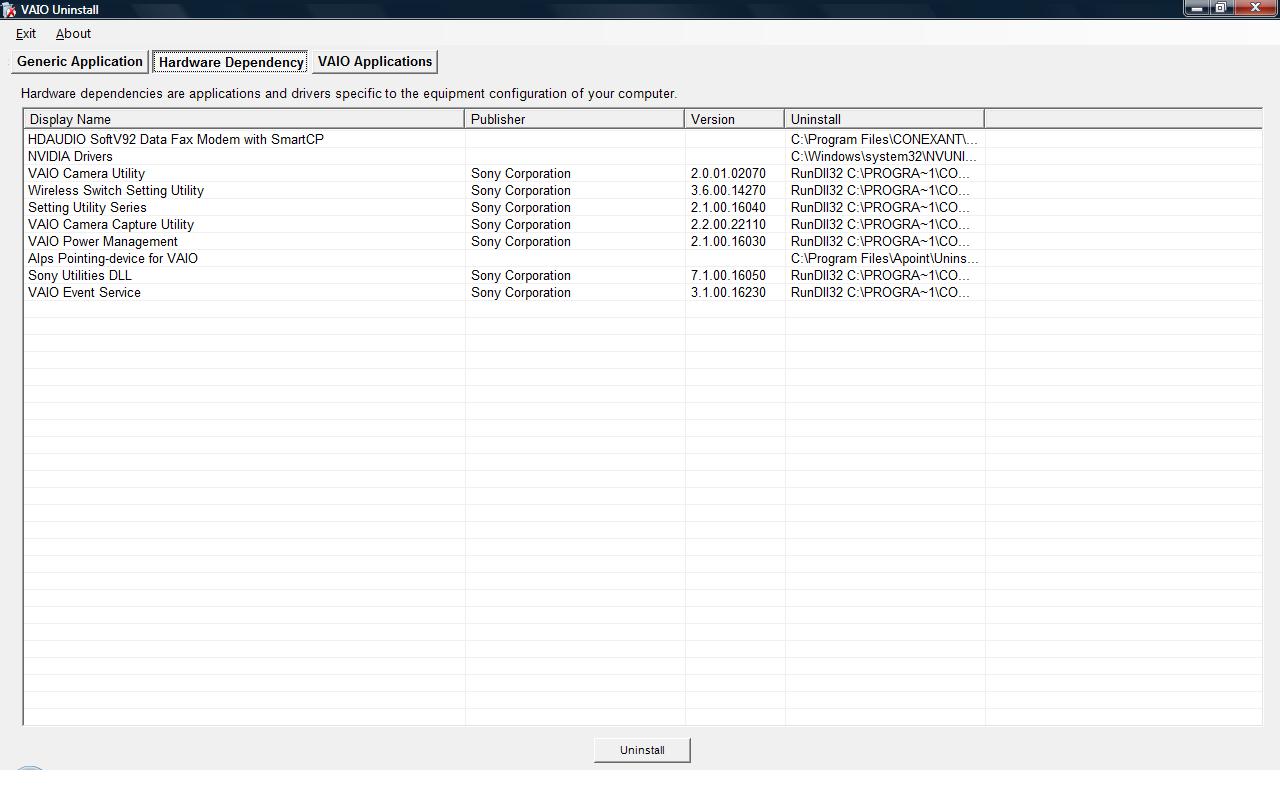
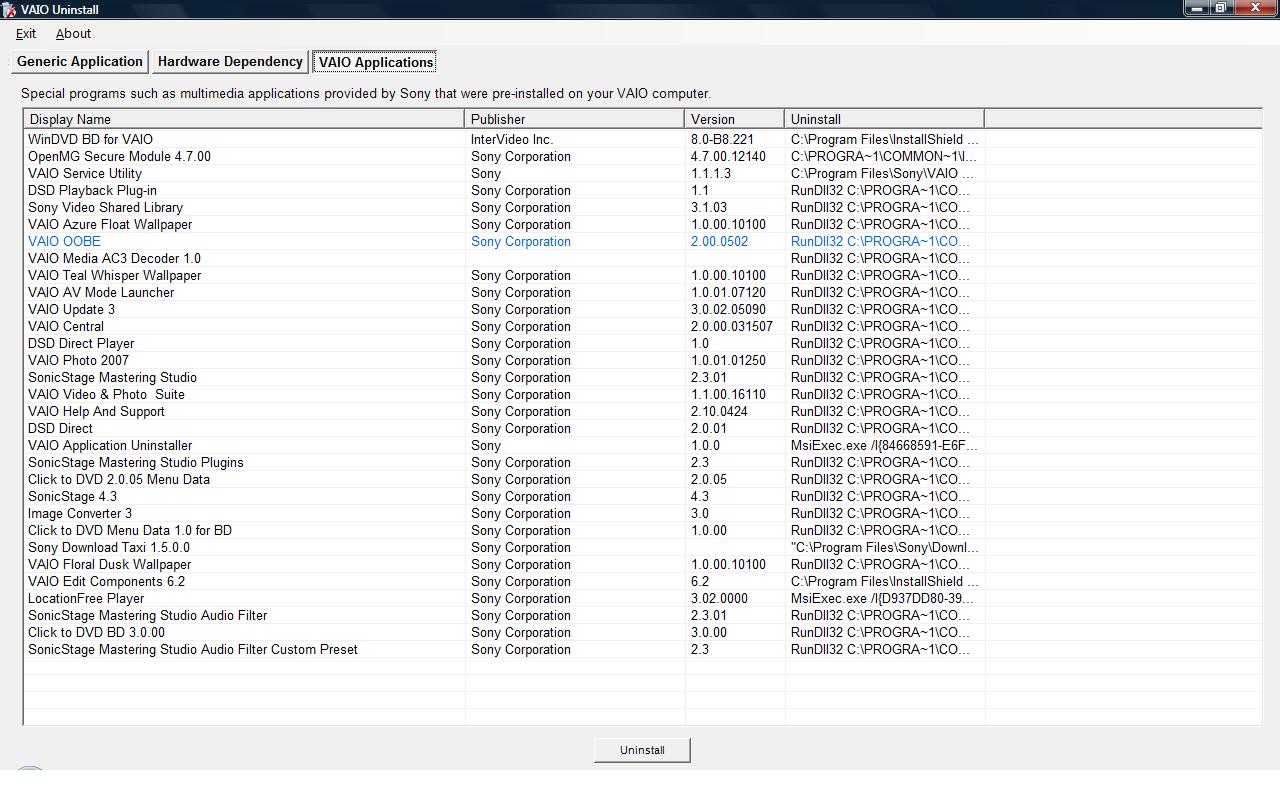
If you do download and install this, please post some screenshots to show what list of applications and trialware it is able to uninstall. The only reference I have seen indicated that it was really not much more than a "Sonyized" version of the control panel "add remove programs" applet.
Gary -
Here tis. The display when the "Generic Application" button is selected simply shows all the installed apps just like Windoze does.
Attached Files:
-
-
So the only thing it really does is provide a nice concise display for what items, and not just the drivers, are hardware related and the Sony specific items. But that is a bit better than what we had before. At least folks can easily ascertain what items Sony did preinstall and more important, which are required for hardware operation.
Gary -
I just got my FZ290. Everything seems to work wonderfully, however, there is a noise coming from the fan. It's a buzzing that sounds like something is vibrating. It's not too loud but you can definately hear it and it is constant. If the computer is on it's buzzing. Does anyone else have this issue? Is it normal?
-
I've messed with the gamma setting in the nVidia control panel, but any adjustments bring other colors out of whack. What nVidia really needs is a saturation control for the desktop like they include for the video settings. So did calibrating your monitor with the Huey make a big difference in the color saturation/realism of photographs? If so, I'd buy one.
-
Its makes a world of difference and if you have a desktop, you can use the Huey to calibrate it too. Costs about $80 dollars though, but is real easy to set up.
-
Sony Canada finally has a preconfigured FZ with a Penryn processor:
http://www.sonystyle.ca/commerce/servlet/ProductDetailDisplay?storeId=10001&langId=-1&catalogId=10001&productId=1004841&navigationPath=32009n100299n100372
No Penryn available on the configure-to-order FZ yet.
http://www.sonystyle.ca/commerce/servlet/CategoryDisplays?storeId=10001&langId=-1&catalogId=10001&categoryId=100393&navigationPath=32009
Vaio FZ Owners Official Owners Thread
Discussion in 'VAIO / Sony Owners' Lounge Forum' started by Jaymz, Jun 7, 2007.