Problems? See this thread at archive.org.
Gigabit speed is only theroritical, it doesn't necessarily mean you can achieve it.
-
-
Hi Outrigger,
Thanks for your quick reply (and for starting this thread!)
Sorry about the confusion, what I mean is when I connect my gigabit desktop to my gigabit switch, I get a green light, a gigabit (theorectical, you're right) connection, and around 30/40MB/s effective bandwidth. When I connect with another gigabit ethernet laptop (Acer TM8106WLMI), I get the same. With the Sony tz11, I get an amber light on the switch (which means it connects at 100mb/s, not gigabit speed) and an effective bandwidth of around 10MB/s (the maximum at 100mbits). Of course I'm using CAT6 cables etc... (and the same cable to test both laptops).
Hence, my question: has anyone managed to get an actual gigabit connection with the tz11 and obtain gigabit performance (ie more than 10MB/s, more around 30Mb/s)...
My switch is a netgear gigabit switch, connected to a Thecus 5200 NAS (with 5 x 500MB HDs in RAID5). Hence the need for proper gigabit speed... -
I assume this green light/amber light is on the actual gigabit switch? I always use the TZ's wireless to connect so I have no experience in its wired speed.
what is your TZ's specs and where did you purchase it from? is it possible that different region's have different specs? I really can't see sony putting gigabit ports on some and not on others. -
Yes, green/amber light is on ethernet switch. Bought my TZ from Comet in the UK, specs do specify gigabit ethernet. http://www.comet.co.uk/cometbrowse/product.do?sku=405302&tab=specification, that was actually one of my criteria for choosing the tz.
 I was just hoping that someone here would have tried the wired connection and could confirm it is gigabit and I just have a lemon. That would be better news than realise that the TZ is only gigabit when using the docking station for example...
-
can anyone verify that its indeed gigabit on wired connection?
-
hmm i'm very curious about this too.. even though i'll never used the laptop via wired because only need it mobile. Also have a dedicated desktop.
-
Yes its gigabit...
-
hi guys,
I bought a tz11m UK version with a 80gb hard drive.
Is it possible to replace this with a ssd drive later on and also , can anyhow post link to replace a harddrive in sony tz with pictures please?
thank you -
Thanks for your reply bmnotpls. Could you please tell us what's your actual bandwidth once connected on your gigabit network? You don't need to run iozone, just copy a large file (say 1Gb) to/from your network and report how long it takes both ways.
I'm starting to wonder if there is a weird bottleneck somewhere, as I can't get more than 13MB/s from my USB external HDs, which usually work fine at 30MB/s... I've tried 3 different ones, with the same result (never more than 15MB/s). Is this a chipset limitation or something?
Has anyone tried external HDs (USB or firewire) on the TZ? -
QUOTE=Manni;2304908]Has anyone tried external HDs (USB or firewire) on the TZ?[/QUOTE]
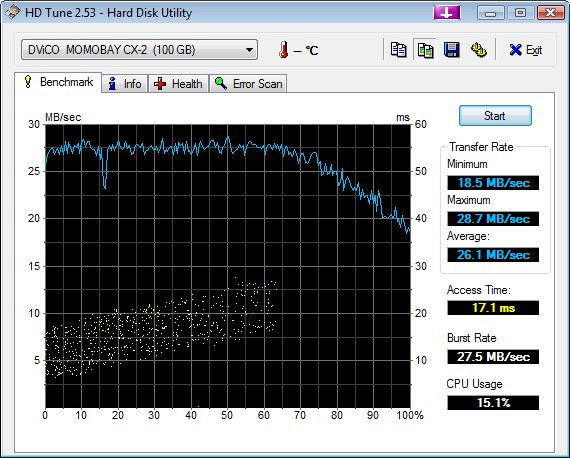
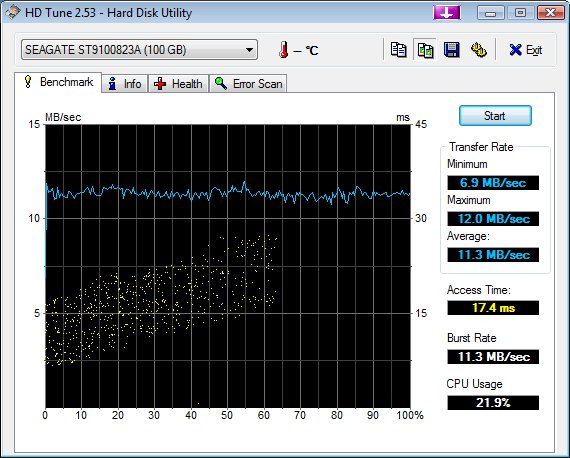
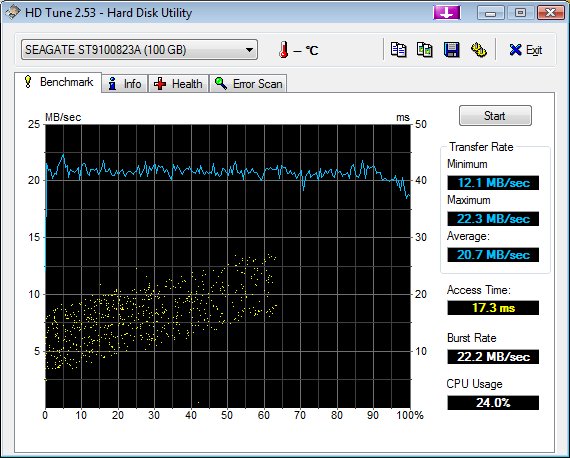
I've just done a test with an external USB HD (100MB Seagate 5400rpm in a Momobay case) that can connect in Firewire or USB2 (see attached screenshots). I get 26MB/s average in firewire and less than 12MB/s in USB2.
It looks like the USB on my TZ is capped at 12MB. And I think the ethernet is a USB to ethernet (not sure), which could explain the non gigabit performance if there is a USB problem on my TZ.
So, anyone is getting proper USB2 speed from their TZ?
-
Sorry I forgot the screenshots...
Attached Files:
-
-
...and to be exhaustive the same drive with the same cable on a Toshiba laptop (23MB/s instead of 12MB/s on the TZ)...
Attached Files:
-
-
I have a network drive that I can try when I get home.
All I have to do is run HD Tune on that particular drive with a wired connection and see what the speed is correct?
I will report the result later tonight. -
Thanks Outrigger. I don't think HD Tune works with remote drives. IOzone, Sandra or Dr Hardware do, but we just need a sense of which kind of speed you get when connected to a gigabit network, so if you time the copy of a large file (1Gb or more) and give us the length of the file and duration of copy, it will give us a rough idea.
I am now almost more worried about the USB2 performance than the gigabit ethernet. I've tried reinstalling the original chipset driver and I get the same result, just above 12MB/s with my external HD.... -
My TZ90 arrived today and she is an absolute beauty. I highly recommend conics!!!
As soon as it arrived I installed English vista which went without a hitch. The next stage was to install the drivers. My only problem is that on quite a lot of the drivers which on have a .inf file rather than a .exe setup file, when I right click and click "install" on the .inf file it says something like "cannot install via this method". Why is this?
So far the only thing which I can tell isn't working is the camera (which has a .inf only driver).
Thanks -
copying from a network drive a 250MB file to my laptop through a wired connection took 6min 45 sec. that translate to what?
-
I still haven't managed to sort out how to install the inf files! For example when I right hand click and click "install" on the R5U870FL.inf file in the camera driver I get the following message:
"The INF file you selected does not support this method of installation"
Anyone have any ideas? Outrigger you seem good with drivers, can you give me some advice please? -
Try this: Go to your device manager, then select the camera, then select update driver, and manually point to the .inf file.
-
Thanks a lot for testing this, Outrigger, but I'm afraid it's REALLY bad (less than 1MB/s). It may be because Vista loses a lot of time to start the copy, especially if you haven't installed the last two performance patches. This is why I suggested trying a larger than 1GB file, to make the lead time less significant.
Are you sure your network drive has a gigabit connection? Typically on a gigabit connection, you should get anything between 15MB/s to 30MB/s. It takes me around 1mn to copy a 1Gb AVI file from my Thecus to my desktop using a gigabit connection.
Did you try an external USB2 HD? -
I managed to get it sorted eventually...instead of using the driver already loaded on the machine I used the one for the TZ160C which ran as an executable file and installed successfully.
Just one other thing, what happens when everyone presses their "S button"?? Mine goes into standby. -
Okay, I think I've solved the USB issue . It looks like the DVD (which is connected to the motherboard through USB) is using A LOT of bandwith even when idling
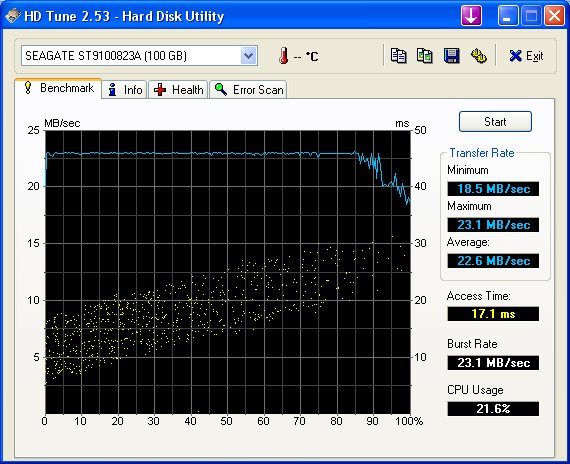
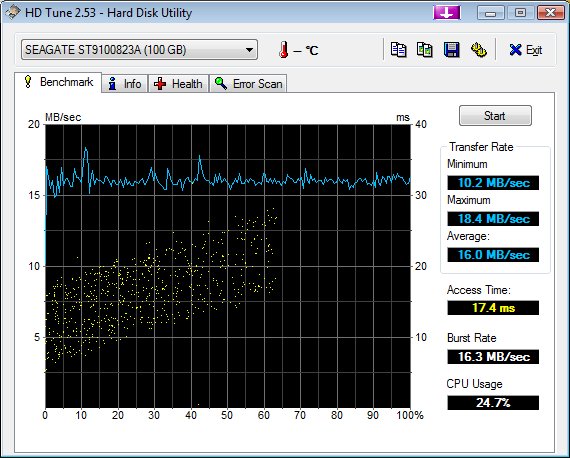
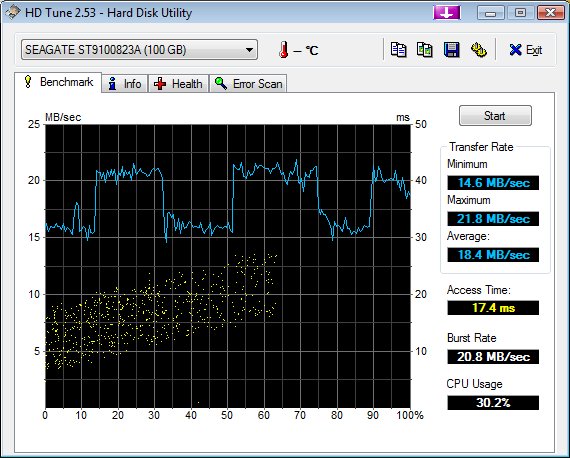
. With the DVD off, I get 22-23 MB/s (which is on par with what I get on another laptop), while when it's switched on (doing nothing) I lose 25% speed (15MB/s max). I attach screenshots (DVD off, DVD on, and one where I switch it on and off while HD tune is working to show the dramatic fall in performance when the DVD is switched on).
So at least that's one out of the way. I can't test the Gigabit connection as I'm away but I'll do this when I'm back. As it's a USB to Ethernet interface, it may solve the problem as well...
SO to summarize, if you want full USB2 speed for a fast device on the TZ, make sure you switch the internal DVD off...
Attached Files:
-
-
how do you manually switch the DVD drive off?
-
You can turn the DVD off in the advanced power settings
-
When you have the SSD + HDD option Is it possible to turn the second HDD off as well ?
-
Does this work for the second harddrive too?
-
You can indeed do it in the advanced power settings, or you can do it on the fly with the Vaio Power Management utility, which puts a little DVD icon in the iconbar.
JamesCC / PhilFlow:
This shouldn't affect the second harddrive or the SSD, as I think they connect to the motherboard through the ATA interface, not the USB. I checked with my internal HD, and it doesn't make any difference whether the internal DVD is switched on or off.
Switching the DVD on/off only makes a difference if your device is connected (internally like the ethernet) or externally (like an HD) via USB AND if you need more than 12-15MB/s (which is what the internal DVD leaves you when it's on).
I don't think you can switch the second HD independantly of the primary HD/SSD, but someone may know something I don't. -
@ Manni
I was interested for the sake of powerconsumption. I'd like to switch off the second HDD (SDD being the first) -
When you ask for the HD to be powered off after x mn of inactivity in the advanced power settings, does it treat the SSD and the second HD separately? It should stop spinning after x mn, and only start up if you need to access it, wheter you access the SSD or not.
Now if you want complete switch off, I don't know, maybe some S.M.A.R.T. utility can do this... -
I don't know.
I should be able to tell you next week when my TZ90 arrives
-
I've been looking for that kind of utility for a few days now but haven't found anything so far :/ .
I've tried applying the windows power settings on my desktop and seems the OS doesn't treat them separately. -
have you tried Notebook Hardware Control 2.0?
I heard the CPU utils in NHC don't work for Vaio TZ, but the diskmanagement functions may work. they are quite extensive. -
Haven't tried that one, looks promising though, they state that the application is able to turn the HDD off.
So I guess we'll have to wait until our TZ90s arrive and try it ourselves. -
I hope they update it to support speedstep on the ULV C2D CPU's. Without knowing the Sony app's, i'm guessing NHC is better.
-
So do I, this will be my first sony laptop ( I had Dell and Asus before ), but haven't seen a better power management tool.
The last version of NHC came out in May so we might expect a new one soon hopefully -
I tested this on my ThinkPad X61 as I was curious about your issue. I connected my notebook to the docking station with the DVD burner integrated and a mouse and USB broadband modem connected as well. I then connected my external USB harddisk and ran HD tune. The maximum it could get up to was about 18 MB/s (it was hovering between 17.4 and 17.8 MB/s).
I then un-docked from the docking station and connected the USB harddisk directly to my notebook. Suddenly it was showing results between 26.4 MB/s minimum and 26.8 MB/s maximum. -
What happens when everyone presses the S-button on the TZ90?? On mine, the laptop goes into standby. However, according to the S-button settings in Vaio Control Centre, when the S button is pressed the program "Status Monitor" is meant to open...strange!
Speaking of Vaio Control Centre, what happens when people click the following things; Bass Boost, Monitor off, Printer Port, Touch Panel?? On my laptop it says "You can't launch". -
At least in your case you had active devices which could explain the degraded performance...
By the way I'm still waiting for Sony support to come up with an explanation...
Do you still have your TZ90? -
What did you do guys with the Battery Care function? Did you enable it? I don't know if really helps the battery...
-
i have mine turned on. It is set to charge to 80% of full battery. Sony claims this helps with preventing battery degradation. Who knows if it helps it may just be all be a scam?
Oh, I have a TZ16gn/b by the way. -
I've done more testing and it looks like ANY device connected internally to the TZ motherboard through USB eats up bandwidth for active devices. For example, switching Bluetooth ON, even if no BT devices are connected, will eat a lot of the available bandwidth.
So, if you need as much as possible of the available USB bandwidth, make sure you not only switch the DVD, but also BT off.
BT+DVD switched on take almost 50% of the USB bandwidth, even when they are inactive. Switch them off and you get a more acceptable performance. Regarding my external HD, I get 12MB/s with BT and DVD on, around 16MB/s if I switch BT off, and around 20MB/s if I switch the DVD off as well.
Still no satisfying answer from Vaio support about the issue... -
Still searching for a display driver.
I have an entry like "Standard LCD display (1024x768, 60 Hz)" in the Windows Vista device manager (under "Monitors") for the LCD display of the TZ90.
The resolution can be set manually to 1366x768 but I wonder if there is a "better" driver for the display of the TZ90? Does Sony provide a display driver?
Or has everybody here "Standard LCD display (1024x768, 60 Hz)" in the device manager?
-
hi guys,
does anyone know about the online links , where i can understand how to open the sony tz , and replace the hard drive with ssd?
Can anyone , post some pictures or links -
Its a good thing this isn't my main computer, or I would be disappointed. I guess there's only so much they can do with an ultraportable. I wonder if the internals of the Tosh R500 is similar in that by switching certain things on, it eats up bandwidth.
-
I guess you are right. I can definitely live with 26-27 MB/s (HD tune results) for my external USB harddisk and even if it is lower than that it is still okay, since I only use it for backup purposes. In real life it is still plenty fast even with the docking station attached along with the other USB units.
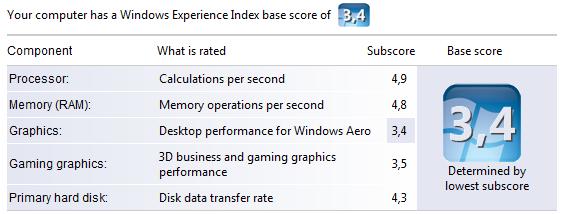
I don't have my TZ90 anymore. I swapped it for the X61. I miss the SSD in the TZ and the screen, but on the other hand the processing power is really impressive on the X61 (see attached Windows Experience Index) and mine came with 3 years international warranty.Attached Files:
-
-
That also explains why I frequently lose my Bluetooth mouse connection when I disconnect my external HD. I have to then toggle off BT to regain my mouse. I always wondered why that was.
-
When the screen is showing a dark image, does anyone notice slight light bleeding from the LED around the edges as mentioned in this review?
http://www.game-over.net/reviews.php?page=features&id=580
I noticed there is a little bleeding around the lower edge but only when the brightness is set to maximum and the image is dark. A good way to check is to set the screensaver to blank and preview. -
Hi
Has anyone tried 720p video on their device? Does it run at standard framerate or does it skip? I presume that if it can run 720p at full speed it should be fine for standard video as well.
thx
dl -
I'm glad I didnt order my tz with the dvd and chose a sata cabled hd =) =D
-
Yes it runs fine, with the occasional minor skip when panning a complex moving picture. But it's emminently watchable (and I'm quite picky with picture quality, I work in film!).
I've even tried it from an 8GB SDHC card (Transcend Class 6) to save battery and it works fine. Make sure you are in performance mode (max processor power, and switching the DDR2 speed to 533Mz instead of the default 400 really helps, although it will hit battery time).
I've also switched off the search engine in services to maximize performance. If you plan to use an internal HD and not an SSD, it also helps to switch the shock protection to performance. Also make sure your energy scheme doesn't switch to 16 bits colors when on battery, or it will seriously decrease picture quality. -
I seriously considered the X61, along with the R500, and agonized over the decision ... But in the end I decided couldn't live without a DVD (I watch these all the time for work, without always being able to convert them to DivX, so the heavy/bulky ultrabase was not an attractive option for me, as it defeated the point of having an ultraportable...). I also wanted a glossy widescreen (best to watch films), so that ruled the X61 out.
Power was less of an issue, as the TZ is not my main computer (I'd be really frustrated otherwise!). I'm planning to replace the internal HD (main bottleneck!) with a 64GB SSD as soon as they are available at a reasonable price (32GB too cramped for my needs).
The external HD issue had to be resolved though, as I plan to use an external HD for occasional/light video editing (I've just received a WD 250GB passport USB drive, highly recommended). I can survive (just) with 20MB/s, but definitely not with 12MB/s...
The R500 was another attractive option, but the absence of webcam (I use it all the time) as well as inferior design and build quality turned me away from it, despite the slightly better specs...
Sorry for the long winded reply, I'm just thinking it may help someone else to make up their mind (we all have different needs!).
Just bought the Sony VAIO TZ90!!
Discussion in 'VAIO / Sony' started by Outrigger, May 31, 2007.