Problems? See this thread at archive.org.
Sumster, yeah 185.77 are the latest ASUS and the latest officially released of any Hybrid Graphics driver period. They work well and I will be releasing them along with some more updated drivers soon. Something to note is that 185.77 are not a WDDM 1.1 as they are for Vista. Been very busy as of late sorry for being so behind, once again.
Hey, Gibbo. Yeah I haven't used High DPI settings yet but I will try to check it out. HDMI issues kinda figures, seems like every other 190 release has issues like this. Wish I had some fix suggestions for ya, but I don't. Hopefully one of the driver packages I release soon will fix some of these issues.
I will be real happy when we get an official WDDM 1.1 Hybrid Graphics release. I have been checking ASUS, Sony, Fujitsu, & BenQ a few times a day waiting.
-
UPDATE - the fuzzy screen issue appears to be related to Aero, as I have set it to 'Windows Vista Basic' under colour and appearance settings the problem goes away and the picture is sharp (unfortunately the nice aero glass features also go away............................)
Experimenting now with pre 190. versions of driver to see if I can get a decent HDMI display to TV.
Gibbo -
Hi guys, thx for your support and kindness, Nautis is my new god!

I got my VAIO VGN-Z11VRN/b
Core 2 Duo 2530 Mhz
4096 Mb DDR3 1066 Mhz
NVIDIA GeForce 9300M GS + Intel GM45
I've tested Nautis's latest 190.38, and i can say they are much better then dox's, coz this drivers are working with Win 7, finally working!!
+ Stamina \ speed switcher works just great!
Also i love to see 'direct x 11' in dialog)))
And i'am about to say thanks for that now=)
But i still got some very strong issues...
1. What's really like O_O for me - this
![[IMG]](images/storyImages/133_PNG.png)
(sorry for russian inetface))
And it's not only windows benchmark issue, aero really works SLOW and unusable.
As i test much of drivers, the good ones - shows = numbers on games & aero...
So if you use not whql nvidia drivers as main workflow, but dox's i would like to ask if this 'Dox's custumized' means overclocked?
If so, i have to say that if you try to use nvidia + intel sheme without any perfomance tweaks...it'll be really great!)
I have some suspicious that each of my graphic cards should work together in speed mode, and intel isn't working now, am i have right vision?
I think so, coz aero goes really smooth and cool, as it needs to be, only with intel drivers, so please think about it!
Also i've found some tweak inside nvidia control panel called 'nvidia power control', that i've never see before..it was enabled as 'adaptive' by default, so that's what changes my cpu goes to variable FSB rate, which have reduce system effective usage, even with 'high perfomance' mode of battery, so it was really awefull, aero seems to work better, but win 7 benchmark still shows that numbers...
Please help me to gain some stability in each applcation, include aero.
2. I think it's really bad, when GPU shows 71c temperature in it's usual condition (just after win boot), so please, try to solve this, i'am trying to tweak it by myself, but still can't get result...
3. Some Nvidia control panel istabilty like everyone have with refresh rate, can't get 60 on nvidia...
Also issue with nvidia scaling, well, at least i have software scaling...
+ of course HDMI issues, works not smooth, scaling issues, lags on HD movies etc..
It's very annoying, can't get it work still.
4. Brightness of course, i've found it intersting that i have no main brightness panel in energy settings of windows, so i think it may be some combination of istable nvidia drivers and sony events utility.
I think that's all i can see now, thanks for you support, and please help with dem issues!
Sounds really great, hope it'll work on Windows 7, coz i got no official support for win 7 from sony for my model... -
Well, I did set VGA Switching to "Static" in BIOS and it did not break the laptop and Windows XP is working as before (obviously). I have Windows 7 snapshot imaged, just need to restore it to external drive and boot from it to see how it would (or won't) work.
While searching the Web for anything on IRX-3980 (Static VGA switching) I stumbled upon http://pastebin.com/f4413454 that is a listing of strings and memory locations found in Z's BIOS. It's good to know offsets of other settings, just in case. -
Good to hear your vaio still works. Looking forward to hearing what happens in Win7. If you need me to modify custom drivers let me know. I am really curious to see what if anything those settings do. Glad to see the Vaio Z is finally being deciphered and people are starting to finally unlock some of its true potential. If I didnt pay so much for this dang computer I would feel a bit more comfortable poking around the bios with those settings.
Thank you for your report. Most of these issues I know about and it seems like you have mentioned almost all of the issues found so far. I will try to respond better to each issue tomorrow. Most of these issues happen with almost all 190 series drivers I have tested on the Vaio Z. The power management setting in the control panel is new to the 190 series and I am not 100% sure what it does.
Hmm.. interesting that Aero is causing the issue. I wonder if it somehow is related to dithering settings or something similar. I would assume pre-190 series drivers should work better for HDMI and some of the other issues. Regardless keep us all informed if you find any interesting results.
--
Update: My site/driver downloads are back up! It has just been one of those bad months. I Wish I had more answers for some of these issues. Every report helps though so keep posting them. If they don't help me fix them a fellow user or even Nvidia themselves will hopefully see them and may be able to fix things for us.
It seems the problems just keep compiling on the 190 series for hybrid graphics. I am checking 190.57 & 190.62 to see if any of these issues have been fixed. So far almost all of the recent drivers I have tested have the same issues which is why I haven't been in the biggest rush to post them. Anxious to get 185.77 posted though since they are the last official Hybrid Graphics drivers and should work better for those who do not like to be on the bleeding edge. I have slow upload speed and each driver takes a couple hours to finish uploading. For this reason I have been trying to make sure they are as complete as possible before I upload them. Two steps forward three back. -
Nautis
Thanks for feedback man, i'll wait your feedback, hope new 190 series drivers will be more stable, especially with voltages and clocks, so i still feel very anxious about my GPU temp is 72-87, it's pure WILD for z!
Hope i found every...
Also i can't use laptop + HDMI as separate screens using nvidia control pannel setting, there's just no such settings, but it was in standart vista vaio drivers and dox's...
I really feel like i have all the issues on me))
And the baddest thing is - i got very complicated sysem, that i even can't backup properly, so i can't test anymore...i need only clean drivers, so please, keep your good work and i regrad ppl sending feedbacks about newer drivers and their issues (hopefully lost them soon)
I found it's equally to 'GPU settings - Boost perfomance' at win 7 energy settings, BUT it's not work from here now it's only work in nvidia panel..
So it seems 190.38 got strong beef with energy settings of win 7, hope it's helpfull to you! -
New official mobile forceware driver are out (186.81). Hybrid Power graphics are still not supported.
The package download is 138MB!!
Honestly, you'd think that they would be able to package the Intel drivers in there as well.. -
Why you don't use mobile forceware driver to pack with Intel Driver?
I am very nervous about Brightness change,even in Stamina mode...
But the default Windows 7 driver for Intel 4500MHD
It does work. -
Just as a side note:
I went back to the Vista 64 Ultimate recovery installation in order to upgrade to Win 7 RTM. This worked perfectly fine with everything working but the brightness settings in speed mode.
So I am back to the default Sony drivers.
I actually noticed that it is easier and faster switching between stamina and speed using these drivers. E.g. the latest drivers from Nautis complain if "steam" is running... the old ones do not. I sort of prefer this "undemanding" behaviour. -
In Win 7 x64 , the default Sony drivers for Vista x64
Also worked perfectly fine include brightness settings in speed mode?
In Win 7 x86,I detected the default Sony drivers for Vista x86
Don't work when brightness changing in speed mode.... -
I was waiting for the new Nautis driver, but oh well, win7 korean released today.
Maybe I need to stick with 190.38
BTW, how can I enable physx?
I installed 8.09.04 and then updated with 9.09.0814 (as mentioned on DOX's driver), but I could not find the option on nvidia control panel.
(On Win Vista x64, 190.38) -
well, I have another problem after I install Win7 x64 + 190.38.
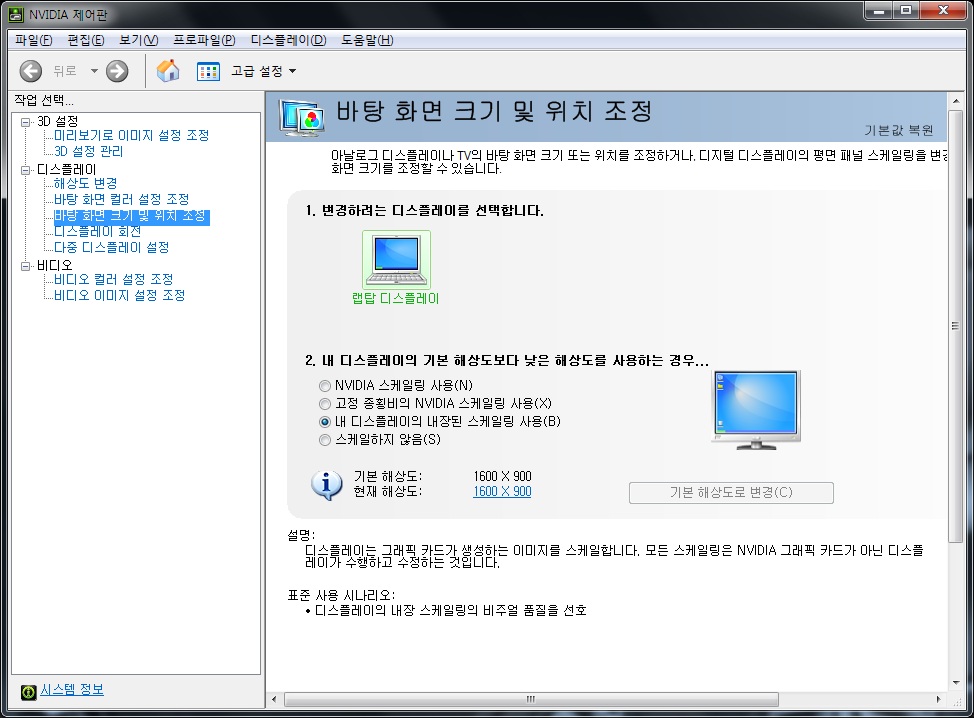
how can I enable nvidia scaling?
on nvidia control panel, even if I try to change the second option (which I want), it resets to the third one on the screenshot.Attached Files:
-
-
Try clean install...
Use "Driver Sweeper" to clean all nvidia driver...
The scale is not a problem ...
Wait.....Do you press apply button? -
I just installed Win7 and that 190.38 driver is the first one that I installed on the system.
and of course, I clicked apply button. -
No, they do not work in speed mode. That is basically what I said
-
The following is a list of issues reported with many of the 190 series (WDDM 1.1/1.0) drivers reported so far. Most of these issues are Win7 related but some affect Vista also. Not all of these issues affect everyone.
Backlight control on the Nvidia GPU
59/60Hz issue (not really a bug per say)
Video playback issues (primarily heat related)
Additional heat issues
Scaling Bug
Resolution issues (with some versions)
and I am sure there are a couple I missed.
Have I scared enough people away from them yet?
-
Pretty much
-
Change to a lower resolution, set the scaling option that you want, and then you can go back to 1600x900 and the setting should stick (at least in my experience, it appears to).
-
thank you for that information!
at lower resolution, I could change scaling but when I change back to 1600x900, it changes back to non-scaling... but that's ok! at least I can use scaling
-
Hi there Im having problems with the manual brightness setting in speed mode, when I get back from stamina to speed the brightness reminds the same. Is this normal for W7 64bit build 7600?
-
Nautis
Also problems with Photoshop CS4, problems with open gl, Photoshop can't see gpu for some reason :\ -
But 190.38 driver also can't control on Intel 4500MHD ....
The "default driver" only controlable on Intel 4500MHD ... -
Can you change the brightness when you are on the nVidia GPU?
What version of Windows, 64 or 32-bit, which driver revision? (I suppose you're still on 190.38, Windows 7, but 32 or 64-bit?) -
namaiki
Yeah, it's 190.38 Win7 x32 -
Can not....
-
Thanks Nautis!!! Your Nvidia Version: 190.38 | Intel Version: 1825 is working on my Win 7 64bit , i install it with MY Computer - Device Manager-right click 9600GT and choose my own driver update there ^_^
*update oh btw where can i find the Nividia Control panel
-
Hi, 190.38 works great on my win7 x64
as reported earlier brightness doesn't work in speed mode but that's no big deal.
I read a lot of people saying they were having problems with HDMI.
Mine is fine I didn't notice any heating problems (but maybe it will happen)
I read gobby was having missing inches of is desktop on the LCS screen, I resolved that by setting the TV to scale only instead of 16/9 (in one of the tv menus ).
My issue is with the sound, I can't get it to work with the TV it only comes out from my computer... I don't know if this is related to the driver, maybe it's something completely stupid like a bad setting on the TV...
I googled a lot but nothing... any help with that would improve my life consistently btw it is my one and only issue everything else works perfect thanks to this thread !
-
I had the same problem. Delete the realtek driver and use the win7 driver instead. HMDI stereo should work now
-
arg... didn't do the trick for me, sound still comes out of the computer, and only one option in the sound menu in the configuration pannel.
don't know what to do, this is really sad :/
Oh by the way my CS4 master suite works perfect and photoshop 64 too ! -
Whew.. A lot to digest. First let me throw out a few guesses on a couple of the issues.
The Photoshop issues are most likely to the XML files (nvwsapps & nvapps) not being correctly installed with the drivers. I believe with at least one of the driver sets I put out those files are missing or omitted from the INF and therefor form installing. Those XML files are used by the drivers to define specific settings and configuration options for certain programs. For the people having issues with Photoshop, which version of the drivers & Windows are you using?
The HDMI picture and sound issues. No clue really with the overscan/underscan issues when connected to HDMI. Most likely a WDDM 1.1 thing (as so many others are) possibly something to do with the 59Hz "feature." The sound issues with HDMI could be due to oemdspif.dll or there is a Nvidia HDMI Audio driver, that comes with many official notebook driver releases, that may need to be installed.
P.S. MingQing the Nvidia Control Panel should be accessible from the windows control panel. -
I also have this problem when on the Nvidia..
190.38 - Win7 64 - Sony Z610Y -
Thanks Nautis, i found it ^_^
-
http://blog.shiftreduce.org/?p=13
Maybe this will help somehow.. -
Well, I have a z690 and these drivers have been working great! The only issue I have is the obvious brightness control in speed mode.
But, I have one quick question. I got the drivers running correctly, but to do this I must have test mode on even though I signed the sys files. Is it supposed to be like this, or did I just sign the files incorrectly?
Not a big problem, the test mode words on the bottom right just kind of annoy me
Thanks for all your hard work Nautis, and I look forward to your next release. -
That's just how it is. Test mode must be left on, but there is a program that can get rid of the text.
Search for "RemoveWatermark_20090509.zip". -
i've a weird problem when using nautis' drivers on my benq s42 with hybrid gfx. when im on the 9600gtm and i "sleep" the pc by closing the lid, opening it will induce a totally monochrome/black&white screen this can be solved by switching to the integrated card and then back again but is there a solution to this?
-
Hi,
i have used nautis'driver on my vaio z with windows 7 x64, and when i connection my vaio z with hdmi to sony bravia tv, the resolution cannot set to 1920*1080.
Can anyone help me to solution to this problem?
(i can set to 1920*1080 in vista system but cannon in windows 7) -
Which version driver are you using, what edition of Windows and 32 or 64-bit. I have never experienced such a problem in my use so far. I have a Joybook S42, W7 64-bit using 190.38.
-
im still running vista 32bit running 190.38. can i just check, in Win7, does hybrid graphics work with the nautis 190.38 drivers? Also, do the Fn keys work out of the box? if not what drivers should i use before upgrading?
-
Nautis' 190.38 are perfect for Windows 7. Regarding Fn Keys, brightness works, F6 works, volume control works, sleep works, F10 works, F12 works. Just I haven't installed the application for Fn+F1.
-
Hey guys, now i have sleep mode issue with monchrome screen!
Just like assmonk3y, but switching is not a solution for me...
Please help, i've try to swithc pc off in every mode, trying to change resolution, bit depth etc, but speed mode is still monochrome! -
Go to the nVidia control panel and adjust the colour settings.
-
namaiki
Thanks man!!!
I was shocked haahaha
To tweak this i just need to change 'Digital intensivity' parameter=) -
Hi. Is there anyway I can use the official driver from intel? The reason is that I don't use the switch mode at all or even the nvidia graphic card. Right now intel is at version 1829 for their graphic card and when I try to install it, it won't allow me to. I remember vaio running xp wouldn't be able to use the switch mode. So I'm wondering if that's possible on vista home premium 32bit (running only the intel graphic).
Thanks if anyone can help. -
Nautis: I'm sure your pretty busy, but if you have the time can you look into adding additional 16:9 resolutions such as 1024x600?
(it's good for certain games, that's all) -
So it should be no problem to upgrade my vista to 7 ultimate?
-
My laptop is a BenQ Joybook, I believe the Vaios are still experiencing some issues.
-
Migration to windows 7 is done very well. Had to reinstall the intel and nvidia drivers. changing brightness in speed mode is not possible, on stamina mode without problems. i think changing in 32bit 7 is possible? Or is this still a bug?
-
You still can't change the brightness in Win7 32bit on the Z in Speed mode.
-
Ok so we all hope for official sony 7 drivers
The Update from vista to 7 is done. I think all is running fine, so i have to test ne next days...
My discoveries on Vaio Zs Hybrid Graphics
Discussion in 'VAIO / Sony' started by Nautis, Jan 16, 2009.


![[IMG]](http://funkyimg.com/viewer.php?img=/2/642/393/133_PNG.png)