Problems? See this thread at archive.org.
usually I turn this thing off. but after driver reinstall I thing they went ON . I will try that tomorrow. but.. model , from which i have downloaded this driver update has 1600x900 screen.
-
Maybe not completely relevant for this thread, but mentioned a few pages before.
I have tested the R4041M3 BIOS for Z3 and it not only supports VT but now also finally supports 8 GB RAM.
With the previous BIOS release, the Z3 only could use 6 GB (4+2) and refused to boot with 8 GB (4+4).
Nevertheless, we will have to wait for R4043M3 BIOS to resolve the garbled screen in nVidia "speed" mode, what's in a name ;-)
Hopefullt the sony engineers don't screw up that one... -
I found a problem in Nautis's 190.62 Driver
The nVIDIA Control Center is disappear...
![[IMG]](images/storyImages/3659215_bc8530d5cba45bd98f617ebda7b7d328.jpg)
And in Windows Conteol Panel's nVIDIA Control Center
Click it,But it doesn't work....
![[IMG]](images/storyImages/3659215_96395ffb8140e05c9d1c55fb5b208d23.jpg)
-
190.62 by Nautis should work on vaio z's
try to delete old driver and reinstall (yeah i know this sounds bad and boring) -
+1. nVidia Control Panel is present for me as well.
-
From what I've read from another thread the official Win7 driver (187.35) for the Z works when you apply a BIOS update to R4043M3...
I've tested that out and so far that works; no half screen issues in speed mode, and brightness control works.
-
Darklichy. Could you please post up a link to the BIOS page?
edit: http://support.vaio.sony.eu/computing/vaio/downloads/updates/index.aspx?l=en_EN&m=VGN-Z41ZD_X&os=10
7UPG_BIOS 32 / 64 bits 1.97 Mb 23/10/2009
I'm not sure what systems the BIOS supports, so be careful guys.. -
BIOS for R4043M3:
ftp://ftp.vaio-link.com/pub/VAIO/WIN7UPGRADE/7UPG_BIOS_SONY_M3A_R4043M3.ZIP
(from what namaiki said, the bios worked fine on mine is probably because I was on R4040M3 before... btw I'm using a Z46 if that helps anyone) -
Do these bios updates and video drivers work on the Z790? Everyone I've seen post on here are using the z4's or z3's. I don't see any video drivers yet for the Z7's.
-
Hi, i'm using z750. i've downloaded the bios, nvidia uninstaller. and installed a bios, and uninstalled add the drivers.
after that i installed the nvidia driver, that one which split the screen on an old bios and all is ok now. brightness work fine in a both modes. -
Well ill be damned.. Prove me wrong then Sony
Expect a wave of new driver releases from me. -
I'm really confused lol I tried to read these but I never see the video driver link and the bios link in the same reply... Which video card driver should be using with this bios update ftp://ftp.vaio-link.com/pub/VAIO/WIN...3A_R4043M3.ZIP
and does this work with Z790's? -
Now i´m interested what sony do to enable brightness control? Is that really a bios issue or is it something new in the inf of the driver?
-
columbusdjkc,
the video driver I've been using is 187.35 (Official) from here: ftp://download.sony.com/US/pc/NVDVID-00208041-764.EXE
and the bios is what I posted before: ftp://ftp.vaio-link.com/pub/VAIO/WIN7UPGRADE/7UPG_BIOS_SONY_M3A_R4043M3.ZIP
if the bios doesn't work it won't let you upgrade (from another post I've read). Otherwise, wait and see if someone else has done it for a Z7's if you're not too sure. -
Look at vaio ftp, and found bios for my Z21 :
ftp://ftp.vaio-link.com/pub/VAIO/WIN7UPGRADE/7UPG_BIOS_SONY_M3_R2170M3.ZIP
Just installed it on my note, and miracle! All is works: brightness in stamina and speed modes, softkeys for brightness.
PS: I don't reinstall original W7 video drivers with "bug", which i installed yesterday. -
Both the brightness/backlight and splitscreen issues were only happening for Vaio Z users and not our Hybrid Graphics cousins.
--
I definitely recommend people go with the officially released 187 series driver as it is official (and therefore has sonys testing and support), its signed (no messing with test mode), and as far as I can tell works well.
I will be releasing a new driver soon after I test it. The next release assuming no new problems will be Nvidia 191.57, Intel 1930 with patched PhysX support and all my usual Hybrid goodies. -
I just notice, that on official Euro Sony support new Bios R2170M3 also appear for Z21
-
Nautis
What BIOS should i install for my Z11VGN to let it install 187 working..And does this driver support PhysX? -
eee! finally! win7 x64 brightness working! swithing wor king too!!! bivis R4043M3 and nvidia 187 driver on my vaio z11vrn
-
Looks like it may have been an ACPI issue as there is a new entry in the registry:
[HKEY_LOCAL_MACHINE\SOFTWARE\NVIDIA Corporation\Global\Hybrid]
"Nv_AcpiIdMappingInfo"=hex:10,01,01,00,00,00,01,00,00,01,01,80,01,00,00,00,20,\
03,09,80,00,00,02,00,30,73,09,80,00,00,04,00
--
191.56/1930 seems to be working ok.. missing resolutions and other typical win7 related issues. I am working on fixing them right now. -
I got Z750, flashed a bios(it takes 2 mins) and installed driver. can confirm all is fine now. So there's no risk.
-
I just did it on my Z790 and haven't seen an issue either. Everything looks like it's working great!! Thanks for everything guy.
-
Here is an interesting quote from dannyres on the HP thread here about InsydeBIOS.
Not sure how true that is but dannyres seems to know his stuff and I know it helped with some reservations I have had about flashing the BIOS. -
just finished doing the nvidia uninstall, bios flash, and new nvidia install on my comp and now everything works! Z590
-
this new nvidia drivers are super
before that, i could play Company Of Heroes only at lowest options, but now, it recognizes it by Auto options, and everything went Ultra high. 40fps . never tried Nautis or other drivers, but i will.
Nautis, will your drivers give me more fps ? and by % how many more (if more) ?
VAIO z590 -
First, we get it working.. and then we can go for performance.
-
I can never really promise a performance boost. The only thing I really do is take newer versions of nvidia and intel drivers and package them in a way that works on our Vaio Zs and other Hybrid Graphics notebooks. I also enable some previously disabled or hidden features. The 9300M GS really isn't a very high performing GPU by todays standards so I wouldn't expect a whole lot more performance out of it.
-
ooh.. Groovy. Joybook S42 has an updated driver available as well (probably 32-bit though).
Benq Australia has 187.45 and Benq Tw has 186.80 released pretty much at the same time..
I've been running Bios R1.20, from the start.. That might explain something.. -
Hahaha good find Namaiki. Posted ya in the news over at LV2G.
-
Nautis,
Do you know if the new official graphic driver support Cuda? I notice one thing in the new Z5x. The Nvidia label on the Z5x is different from ours. The label has a few small characters "Cuda technology" under the Nvidia logo. I think that it imply Z5x supports Cuda. If we use the same graphic driver, maybe we can get Cuda as well now. Are there any small utility to check if my driver support Cuda? -
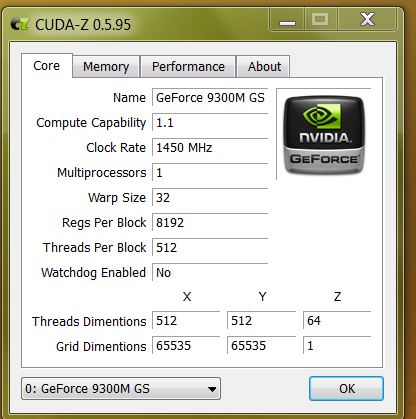
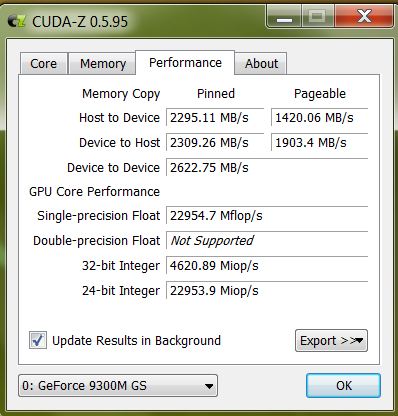
Found a small utility called Cuda-Z. It seems that the new official driver supports Cuda 1.1. However, double precision floating point is not supported. Is it a driver or 9300GM limitation?
Attached Files:
-
-
Yep, Cuda should be supported, as it's on official japanese Sony webpage presentation...
-
I get the same thing on 191.56 when I run Cuda-Z so its not a driver limitation. I believe Cuda-Z just reports what the GPU is capable of.
--
Update: Everything is working as expected on 191.56 with the only real issue that I am working on now being the limited resolution issue is back. Other than that the functionality is pretty much the same as the latest official Sony drivers. The 59hz issue & scaling issue are still present as they are on the official drivers. These issues are due to changes in the way scaling works and the resolution is reported and are not really issues. Hopefully Nvidia will change the control panel at some point to properly explain about these issues. -
is anyone else having issues with brightness control in SPEED if you resume from hibernation? if i switch back to stamina and then to speed again they will work, but initially they will not... this is with sony's nivida driver, new bios, etc etc on w7 x64
-
Even though I upgraded the bios and installed the released 7UPG-driver (64-bit), brightness control does not work for me in SPEED mode using the Fn-Keys. Only the Windows slider in energy settings does work.
Any idea why my Fn-Keys do not work?
Edit:
I used the Nvidia uninstaller remove and install the drivers again... no change... -
I have a VGN-Z46GD, i upgraded my bios from the official site for my model:
http://www.sony-asia.com/support/download/347476/product/vgn-z46gd
I have tried using the official drivers above, however it gives me the split screen graphic problem when i try to install it.
Has anybody tried this bios on their VGN-Z46GD? -
Windows 7 ?
-
by the way. if you would read this topic (few post before) you would realize that you need ANOTHER bios update. just use link provided to you. and everything will work as it should
-
Well, of course ... XD
-
try to reinstal another drivers for this system. I would try to reinstall sony lib. and another software that could affect this keys. I mean dont reinstall audio, network drivers and so on.
-
This might apply for some people, figured I'd post the solution for me here:
If you get a BSOD msg of: 'SYSTEM_SERVICE_EXCEPTION - 0x3B' when trying to install the drivers. Or windows isn't accepting your drivers and keep saying something is missing.
Do the following:
1. Uninstall the nvidia drivers
2. Download Driver Sweeper:
http://www.guru3d.com/category/driversweeper/
3. Execute Driver Sweeper, tick Nvidia Phsyx and Nvidia Graphics drivers. then press analyse, and then press Clean
4. Restart when it prompts.
5. When you load into windows, you may notice everything is GIANT, go to device manager. Change the Mobile Intel 4 Series graphics card driver to default, the default one is marked MS Corp WDDM1.1.
6. Install that, then restart. Then attempt to install the drivers.
To get your brightness buttons and other FN buttons working:
Note: do this AFTER you have restarted from Graphic Driver Install.
1. Uninstall your Vaio Event Service.
2. Download and install the following Event Service:
ftp://ftp.vaio-link.com/PUB/VAIO/ORIGINAL/VAIO_EVENT_SERVICE_5.0_5.0.0.07010.ZIP
3. Restart and Walla.
Extra Note: From the looks of it, the newest Sony Nvidia Drivers REQUIRES one of the following Bios updates:
7UPG_BIOS_SONY_M3A_R4043M3.ZIP
7UPG_BIOS_SONY_M3_R2170M3.ZIP
7UPG_BIOS_SONY_M4_R2021M4.ZIP
7UPG_BIOS_SONY_Y1_R3210Y1.ZIP
from
ftp://ftp.vaio-link.com/pub/VAIO/WIN7UPGRADE/
If you don't install the correct Bios, it will split screen and glitch you if you try to install the drivers.
Further Notes:
Install the drivers under SPEED Setting, or else your Nvidia Control Panel will be BROKEN. -
i have sony vaio vgn-z16sn model and i've tried everything but still can't get the new nvidia driver to work.
have the latest bios, everything else installed ok but when i try to install the newest nvidia, it looks like the installation finish well (it doesn't ask me to restart) but when i reboot it seems like there is no driver at all, i can't change the driver, and there is no nvidia control panel.
will be happy if anyone has any idea what i can try next because i've tried everything in the forums about the nvidia drivers. -
ghrui, which driver are you trying?
-
tried both 03a-NVIDIA.Graphics.v.8.16.11.8735
and NVDVID-00208041-764 -
What does it show in device manager. Does it show only one display adapter? Are there any yellow exclamation points on either of them?
-
with the R2170M3 bios it showed the display with both adapters (nvidia & intel) and if i went to right click properties it showed the right driver version supposedly but there was no nvidia control panel and i couldn't change the screen res to more than 800x600
with the bios of the R4043M3 bios it just didn't show any display in the device manager.
for now i'm using the NVIDIA Graphics 7.15.11.7449 driver for vista x64 which works fine. -
Thanks a lot. That did the trick...
Windows 7 64-bit now working flawlessly on my machine
(and simply due to the fact that Sony provided all necessary drivers --> appears to be quite good customer service)
Lookinf forward to scewing it again with nautis drivers...
-
@Nautis
With the new drivers available (für 64B) it is possible to create a new package with the latest Inf+Nvidia Driver?
It would be great to have some Nvidia-driver from the 19X-Series because I like to have the Screen-Adjust function.
-
I do like the drivers that you put out, I have noticed that the Official sony ones are missing a few features:
1. Auto turn off Aero if on battery
2. Power options for hybrid graphics under Power Manager.
3. Taskbar switch to other graphics card. -
Seems odd ghrui which OS are you installing these on?
But.. but.. it was Sonys BIOS that screwed everything up not my.. Good information to keep in mind for people though. These latest drivers released by Sony are some of the newest out and I recommend them highly vs all of the old packages that I have put together. The 187 series seems to be Nvidias new mobile series so its no older really than the 19X series. In fact we just started seeing the 187 series last week. And I will make sure only Jorlin can download the bugged versions of the drivers.
I am currently working on one with the latest drivers from both Nvidia and Sony. Which screen adjust function are you talking about specifically?
Most of these functions can be restored on the current sony drivers by doing a little registry editing. I may have something better though.
My discoveries on Vaio Zs Hybrid Graphics
Discussion in 'VAIO / Sony' started by Nautis, Jan 16, 2009.