Problems? See this thread at archive.org.
I did e-mail support and got a basic reply stating that they didn't know when updated drivers would be available.
Thanks for the pointed to the dx9 tip. Much appeciated
-
Im baaack..
Currently in testing 256.76 32bit & 257.07 64bit.
and yes you read that right.
-
oh yeah.
-
nautiiiiiiiiiiiiis
great
-
Hi guys
First post on this thread but I've been reading it from the start...
It seems that MSI released kind of a proprietary Optimus driver called "Intelligent GPU Boost" on their new CX623 laptop with Geforce 310M. Maybe there's something to do with, what do you think ?
Elsewhere, maybe the hybrid "GPU Boost" driver (that provide "button switch" which I suppose to be similar to our Z11 switch) could help for the intel part of drivers ? (there's no nvidia on this one which is for ATI graphics)
Anyway, I hope that Nautis could do something with 256 series ! thanks for your job Nautis ! -
No go on the 257 drivers as they are only meant for Windows TCC.
Cant really test 256 as it is 32bit but I will try to put together a package for testing.
New 256 series drivers expected to be officially released by Nvidia soon. -
Good to see you back Nautis!
-
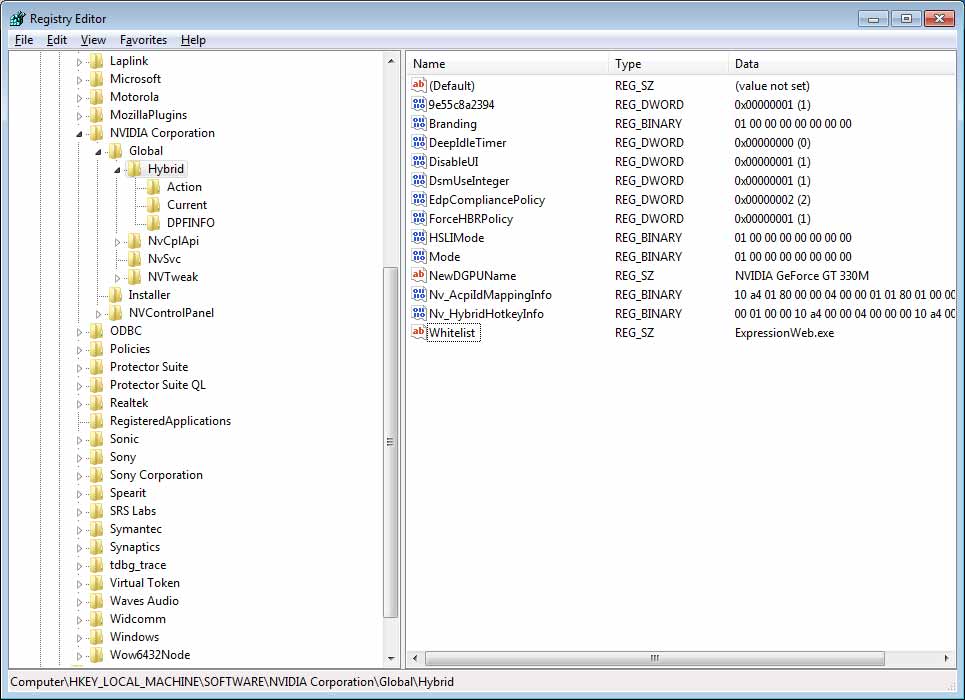
I think I might have figured it out. Delete the WhiteList key and make a Whitelist key!!!
Needs to have a small 'l'. -
Hi Namaiki,
I did that (see attached screenshot) and re-booted the computer.
But I still get the same message
To change the performance setting you must close the following applications
Microsoft Expression Web 3
If you change the performance setting without closing the open applications, you may lose unsaved data.
"Make Change"
Attached Files:
Last edited by a moderator: May 8, 2015 -
-
I'm out of ideas again. D:
-
Are you sure the exe file is ExpressionWeb.exe?
Have the program open and check the title, right-click and click go to process.
This is just very weird.
Also, try expressionweb.exe -
The spelling seems correct.
Do I have to reboot every time I make a change to regedit?
(I did reboot, just to be sure)
More info: Per Microsoft, ExpressionWeb requires "Support for Microsoft DirectX® 9.0 graphics with Windows Vista Display Driver Model (WDDM) Driver, 128 MB of graphics RAM or more, Pixel Shader 2.0 in hardware, 32-bits per pixel"
There is a free trial version of Expression Web Here:
http://www.microsoft.com/downloads/details.aspx?FamilyID=0a73a3a7-3e06-4125-b3c6-f9c10387e9cc&displaylang=enAttached Files:
Last edited by a moderator: May 8, 2015 -
-
Yes, you have to reboot for the changes to take effect.
-
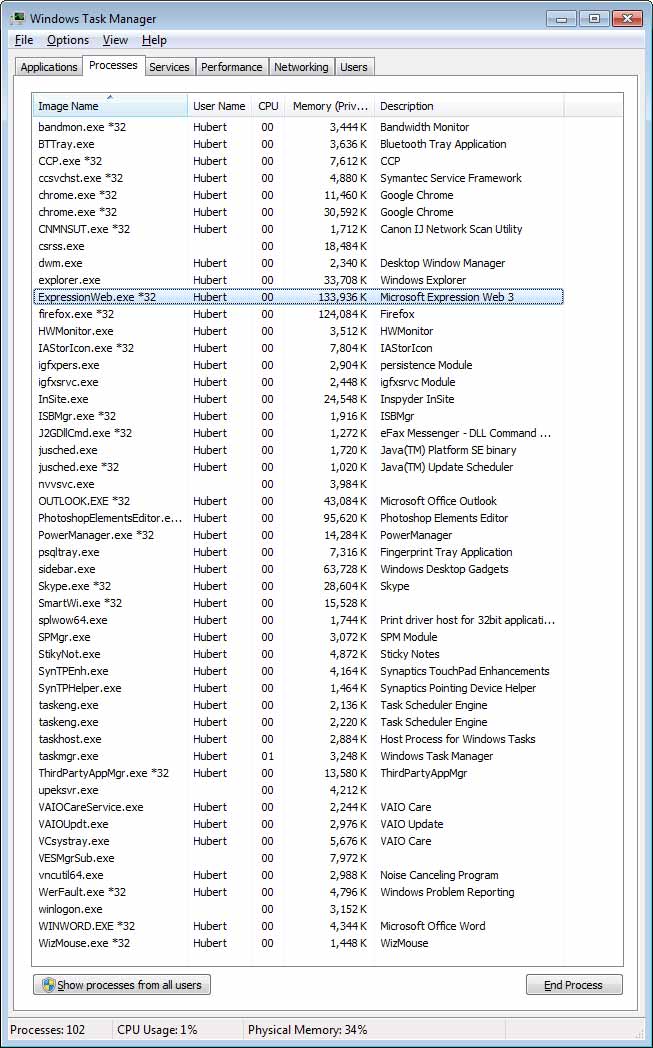
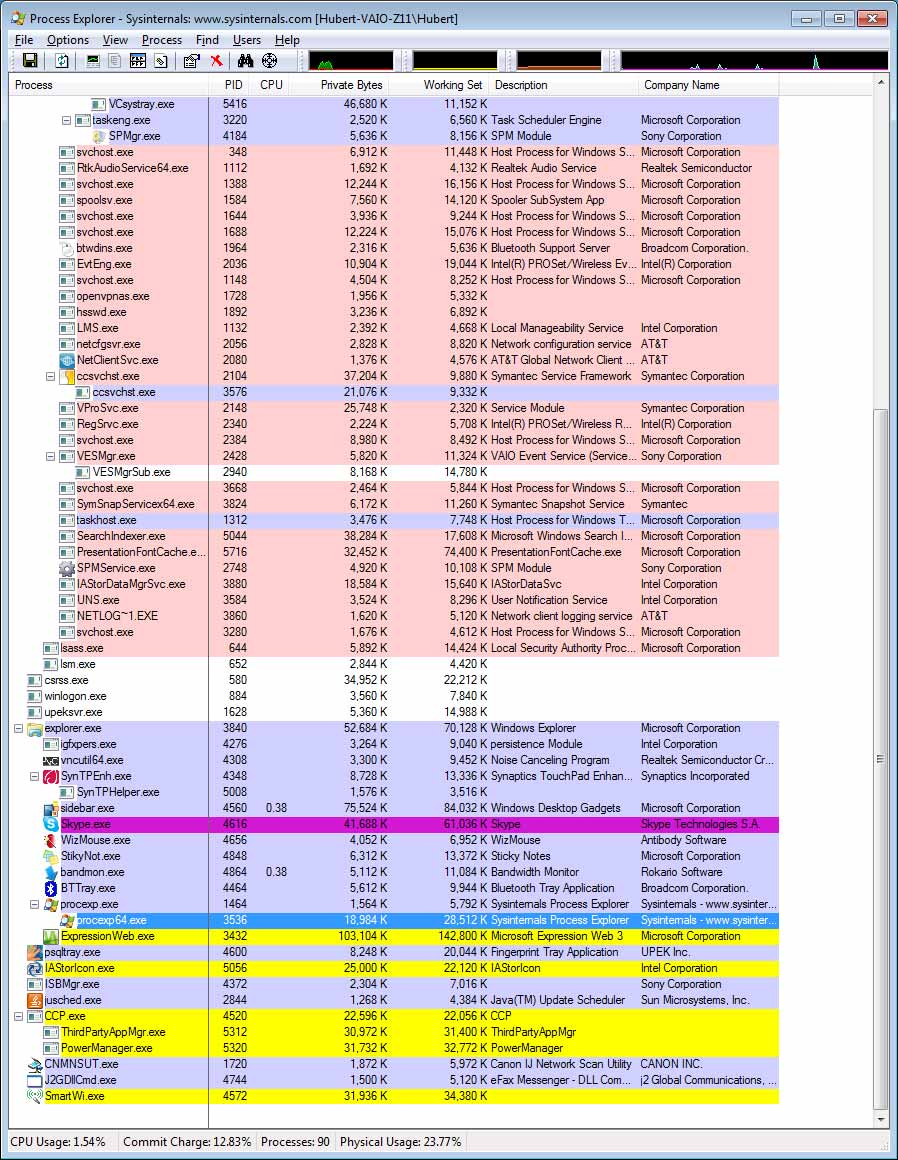
I suggest using Process Explorer since it makes things a little easier to look at. You need to make sure the executable name entered in the whitelist is the running process. Open Expression Web run Process Explorer and look for any .exes running fir Expression Web and add them to the whitelist.
-
Thanks for your help Nautis & namaki!!!
I ran ProcessExplorer.
Without ExpressionWeb there are 89 processes.
After I launch ExpressionWeb there are 90 processes.
The only new process is ExpressionWeb.exe.
(see attached)
More info about Expression web:
To use Microsoft Expression Web 3, you need:
* Microsoft Windows® XP with Service Pack 3, Windows Vista or Windows 7 operating system.
* PC with 1 GHz or faster processor
* 1 GB of RAM or more
* 1.5 GB or more of available hard-disk space
* .NET Framework 3.5 with Service Pack 1
* Support for Microsoft DirectX® 9.0 graphics with Windows Vista Display Driver Model (WDDM) Driver, 128 MB of graphics RAM or more, Pixel Shader 2.0 in hardware, 32-bits per pixel
* DVD compatible drive
* 1024 x 768 or higher-resolution monitor
* Internet access (for Internet functionality; additional fees may apply)
* Some product features require Silverlight 2.0, Firefox 3.0, Internet Explorer 7 and AJAX SuiteAttached Files:
Last edited by a moderator: May 8, 2015 -
-
Hey, sorry to just sumble in there like this.
I found this thread whilst trying to find a driver for my VAIO Z11 that was compatible with the latest CUDA SDK.
Now, I had a quick read over the thread so far, but I'm still left wondering whether the general opinion is that it's 'safe' to use custom drivers - in the sense of: it won't make the machine a complete battery hog and disable the GPU switching completely? What's the general verdict?
I'm tempted to wait for some official drivers, but someone pointed out that Sony doesn't even bother releasing new drivers for any of their devices?!
Thanks muchliest
-
Hi,
I bought a Z11 series laptop not for Intel graphics but for NVIDIA 330m. And, I do need an up-to-date driver because I am using CUDA. My question is whether there is any way I can disable Intel graphics and use NVIDIA graphics only. In other words, when a new driver comes out, I would like to install it without using a modded INF.
Any comments would be very much appreciated. -
Technically, you can put switch into "SPEED" mode and have Nvidia always active. The problem is that Nvidia have not released WHQL generic drivers that include device ID for GT330M in Z. And all drivers from OEMs include subsystem ID so they do not work with Sony without modified INF. There is some hope for Verde drivers from Nvidia - they announced future support of Sony laptops.
-
Will be taking a look at the officially released 257.15 when I get home.
197.85 has been working extremely well for me since I installed it yesterday and the brightness control issues seem to be gone.
More news later after I test the officially released 257.15 beta. -
Is there a switching issue with 197.85?
-
Which switching issue Namaiki? As far as I could tell from a day of basic testing everything on 197.85 was working well. I can control brightness in both modes. Switching back and forth seems to work fine.
Some exciting news on the 257.15 front that may interest you Namaiki. There are reports that it fixes EVR issues with MPC-HC some people were running into. All in all seems like a great driver *fingers crossed* that it works well for us. -
Did 197.45 have an issue? I think the nvidia card stays on, at least on my benq. I'm going to check it now.
-
wow nautis that is great news, that everything seems to work with those drivers. Hope you can work a driver out sometime soon ^_^.
-
So, I reinstalled 197.45. It switches, but for me on Save Power mode, the nVidia card seems to still hang around. The nVidia card is present in Device Manager, and power usage is higher than usual (~15W instead of ~10W).
-
How did you get such a high score? I only get about 1800 points with the Nvidia, my CPU is 2.4ghz but it should not make that much difference. How much did you OC your GPU?
I am currently using the 197.45's, I also did a run with the official 187's but the score was almost exactly the same. -
I do not think we have the same issue on the old VPC series Vaio Z. AFAIK it works fine. I will have to look into this further for ya. I am sort of halfway through the mod/upgrade to 257.15 after I finish it I will double check these things for you. I like it better when we are on the same page when it comes to functionality with these dang drivers. Sure makes it easier.
-
While I was checking new 257.15 beta release (I don't know why they duplicated the link for Verde Notebook Release 256 when I checked it this evening, EDT), I noticed nVidia changed warning messages under supported products. I am slightly unhappy as nVidia specifically mentions Sony VAIO.
Also it says that this release officially supports Optimus driver. I am thinking that this "might" work with new VPC-Z11 or other Optimus-compatible laptops without watermarks. Anyone wants to give a try? -
The 257.15 beta driver officially supports only GT 330M and 310M Vaio GPU's. This driver includes the Sony inf nvszf in it.
-
Wonder if these sets of drivers still have the nvidia confidential thing.
-
are you saying those drivers work out of the box on the new Z11 (2010) ?
that'd be pretty cool. -
It just means they work on a seperate nvidia card from Sony (or if your Z11 is on static mode -> speed, but you'll need the advanced bios for that). But that means you can't use the switch to switch to your intel card which is what they are trying to accomplish here.
-
Can I install drivers from NVIDIA if I change the mode to static? I changed the mode to static (I have the advanced bios, of course), but I couldn't install 257.15 beta driver from NVIDIA. Any suggestion?
Thanks, -
What was the issue?
-
I modified the inf to install 257.15 (I picked the 330M and modified the end of the device string to match the device ID in the Z11). Unfortunately when Windows rebooted it locked on the start animation and died (I left it a few minutes then gave up). I installed it on a VHD boot so I'll just roll it out again. If anybody has more luck then please let us know...
-
It worked fine here with static mode set in (advanced) BIOS(and modded inf). But i really need the switchable graphics (aka batterylife).
-
When I ran the installer, it didn't find the video device. It installed the audio driver only. Do I need to use the modded INF?
-
I successfully installed 257.15 beta version with the modded inf from laptopvideo2go.com. Everything works fine in the speed mode except for the auto brightness.
-
Yeah, not sure what the issue us on the Z11 when it comes to Hybrid Graphics. Frustrating to say the least. As was stated in the case of most Hybrid Graphics notebooks there is an option in the bios that should allow you to essentially disable Hybrid Graphics and set the Nvidia part as main. Not the best solution but it works to install new drivers.
257.15 on my VPCZ (Old Vaio Z) using Hybrid Graphics:
Random screen flickering.
Switching not working (light doesn't even come on on the switch)
So essentially it isn't working right. I am digging to see if these issues could be caused by some of the new configuration options. -
Including the manually bright control?
-
Same here.
More specifically,
1. Biggest Problem: Backlight blinks randomly on nVidia. It really distracted me when I was searching on internet for the solution. When I was playing some 3D game, blinking did not happened, but not sure because I did not put much time on 3D testing. I did not test on Intel either.
2. Switching from Intel to nVidia is not working again. On 195 or higher versions,
![[IMG]](images/storyImages/c7f56cf8cac4fbdb162a1ec69650cc4b.png)
This switching window stayed there for serveral minutes, but on 297, it goes off instantly. Also the SPEED/STAMINA LED on the Vaio cylinder does not light up.
3. Intel's 2xxx drivers are still not working (well, it is pretty obvious now).
My only hope is not nVidia nor Sony but Nautis.
Here is my development, and it is not working properly.
I think that this is very very similar to what Nautis currently has, but I am doing it anyway. I used two strings that Nautis found for switching and brightness change. Nautis, if you do not like this, I will erase ASAP.
I did not test it, but my previous Hybrid_Switch might work, so I am attaching it too.
Next time I am going to change my Z to static mode and see if there is blinking problem when it comes to nVidia only machine.
And... Isn't the VPC-Z representing the new Z?
I thought VGN-Z is the old Z... -
Manual bright control works. I got the green light on the speed, too.
-
No worries Dreamliner this is and will always be a community effort. The goal here is to push this stuff as far as we can. I was going to package one up to post here, I just seem to be extremely limited on free times these days so I am glad you did.
The old Z is VGN-Z###
The new Z is VPC-Z11##
I usually refer to the old Z as "the Z" and the new as "the Z11". -
I tried downloading Dreamliner's 257.15. When unzipping, it says some files are corrupted. Anyone else?
-
I guess you could download 257.15 from the NVIDIA website, and download the modded INF from laptopvideo2go.com. That's what I did, and perfectly working.
-
-
Thanks. I installed the driver, I can switch the nvidia card off, but not back on. The same experience you had.
Lets say, if I swapped the nvlddmkm.sys file, (the main part of the driver, I think) with the one from 191.97 or other known version, do you think that the driver would work in terms of switching (disregarding that it's probably got 191.97's functionality as well).
Or do we know which file is in charge of switching?
Also, what's the latest driver that we have that is working? Is it the 191.97? -
EDIT: Well the bigger question is which part is breaking switching. For our old Vaio Zs the switching light doesn't even come on. Could be nvlddmkm.sys which is the main driver file (switching this essentially would make the drivers whatever version you switch the new sys file to) could be nvapi.dll? or nvsvc.dll? which also effect switching. The Hybrid Graphic stuff may just not be included properly in these drivers too since they are an entirely new beast. I will post up some of the new settings I find here in a bit.
Namaiki I got the series above 191 working on our old VGN Vaio Zs right around the time you sent your laptop in for repair. AFAIK that 197.45 driver that was posted to test worked fine for us on the old Z, switching and all.
They key for us was:
HKLM,"System\CurrentControlSet\Services\nvlddmkm",EnableGoldOnHybrid,%REG_DWORD%,1
so EnableGoldOnHybrid with a dword value of 1 under
HKEYLOCALMACHINE\System\CurrentControlSet\Services\nvlddmkm
This fixed switching for the series above 191 for us up until this latest 257 series. The best fully functioning set I have found thus far seems to be 197.85 (though I haven't run it through all of my tests). -
Our last working version is 197.45 by Nautis.
If I get some time I will build 197.85 even though it does not have a lot of change. -
Big thing for me with 197.85 is that the backlight control now works properly. I have one made but I need to double check the INF as there are more than just old VGNZ Vaio Z users using my drivers now.
I am working on a installer/utility that will hopefully make things much easier for us in the future.
-
OMG! I can't wait to try this on~
My discoveries on Vaio Zs Hybrid Graphics
Discussion in 'VAIO / Sony' started by Nautis, Jan 16, 2009.