Problems? See this thread at archive.org.
Hmm, cooling problem?
Sounds like there is no cooling...
Chipset: CPU-Z can tell you that
-
-
Hrm but my system device shows it as ICH8!
But the santa rose is ICH8
Intel® Mobile Entertainment On-the-go Low Voltage PC for 2007
Code Name: Santa Rosa
Processors
Processors formerly Merom
Intel® Core™2 Duo Processor L7200 (4M Cache, 1.33 GHz, 667 MHz FSB)
Intel® Core™2 Duo Processor L7300 (4M Cache, 1.40 GHz, 800 MHz FSB)
Intel® Core™2 Duo Processor L7400 (4M Cache, 1.50 GHz, 667 MHz FSB)
Intel® Core™2 Duo Processor L7500 (4M Cache, 1.60 GHz, 800 MHz FSB)
Intel® Core™2 Duo Processor L7700 (4M Cache, 1.80 GHz, 800 MHz FSB)
Chipsets (For processor compatibility click on the chipset links below)
Chipsets formerly Crestline
Mobile Intel® GM965 Express Chipset with 82801HEM I/O Controller Hub (ICH8EM)
Mobile Intel® GM965 Express Chipset with 82801HM I/O Controller Hub (ICH8M)
Platform Technologies
Enhanced Intel SpeedStep® Technology
Execute Disable Bit
Intel® 64 Architecture
Intel® Active Management Technology (Intel® AMT)
Intel® Clear Video Technology
Intel® Flex Memory Technology
Intel® Matrix Storage Technology (Intel® MST)
Intel® Virtualization Technology (Intel® VT) -
This is the teardown guide for the SZ.
http://home.comcast.net/~nw_systems/vgnSZ.pdf
It is possible for someone with no experience to do this if they follow the guide but i don't recommend it.
The reason why i suggested trying retail discs is because i've had a couple of problems with drivers that were not picked up with the restore discs.
Although, your recovery discs should really be enough.
After doing a clean install opening it up would indeed be my next step to check if everything was at it should be. -
I have a device disable! I never in mylife seen anything disable! Beside my Geforce
Intel(R) ICH8 Family PCI Express Root Port 3 - 2843
Location: PCI bus 0, device 28, function 2
This device is disabled. (Code 22)
Click Enable Device to enable this device.
PCI\VEN_8086&DEV_2843&SUBSYS_9008104D&REV_03
If you ask me, I can't think of anyone besides me who uses this comp and I don't think I will be switching anything off. This is really strange now -
This wouldn't work at the BIOS level.
-
You are right about the drivers cause I had some problems with them, well some is an understatement. Let me repharse that
MANY
Well, I did bump into some info which might explain why. Im not sure if yours was in my batch. When I was following up with the Inquster (argh cant spell and I forgot where the link was) regarding the faulty Geforce chips found early in 2007 and the same thread has the 8000 series listed as possible faulty if the notebooks were launch after May 2007, I been looking up on all my hardware when it was manufacture and ship out. The one's I have found says Q2 07 and I suppose by the time they ship to Sony to assemble it should come out during May-July 07.
So the "Inquister" (cant spell!) started this rant on the faulty chips from 2007 till 2009 (I not sure why he is so bitter but no time to found out lol) and it seems Geforce try to fix the problem and change the GUID of the chip or something but fail to inform certain parties or something and so forth. And if I can recall the date of that particular threat posted was in December 07. So I did realise long ago that I needed a .inf for my geforce since Sony only realeases the .exe, but I have tried the .inf from here and it didn't work, could have 11 months back thou but who knows. To back up theory, if you notice the Geforce "fix" patch realease by Sony was during November-December 07 (if I recall correctly) and the file size is as huge as installing with the orginal drive @ 55mb~
But that is just a guess -
wowowowowowow This just gets more interesting
Intel(R) ICH8 Family PCI Express Root Port 3 - 2843
Location: PCI bus 0, device 28, function 2
This device is disabled. (Code 22)
Click Enable Device to enable this device.
PCI\VEN_8086&DEV_2843&SUBSYS_9008104D&REV_03
Is the device disable by WoW! When I did a search on the Hardware ID, it save me a few link to WoW forums and I was astonish, so I open them up to have a look and to my surprise more SZ having
Hi, Whenever I open WoW, it would say: "Failed to find a suitable display device. Exiting Program".
Not sure if I should run down thier forums and search for more SZ to bring up this case. -
This poor dude has a better model then me but Im curious cause he is trying to run without without any drivers install, or he doesnt know his drivers suddenly disappear? And why am I not suprise is only the graphic drivers.
System Model: VGN-SZ79MN_C
Name:
Device ID: PCI\VEN_8086&DEV_2A03&SUBSYS_9008104D&REV_0C\3&33FD14CA&0&11
Driver: n/a
Name:
Device ID: PCI\VEN_8086&DEV_2A02&SUBSYS_9008104D&REV_0C\3&33FD14CA&0&10
Driver: n/a
---------------
Display Devices
---------------
Card name:
Manufacturer:
Chip type:
DAC type:
Device Key: Enum\
Display Memory: n/a
Dedicated Memory: n/a
Shared Memory: n/a
Current Mode: 1280 x 800 (32 bit) (1Hz)
Monitor:
Driver Name:
Driver Version: ()
DDI Version: unknown
Driver Attributes: Final Retail
Driver Date/Size: , 0 bytes
WHQL Logo'd: n/a
WHQL Date Stamp: n/a
Device Identifier: {D7B70EE0-4340-11CF-B223-7037AFC2CB35}
Vendor ID: 0x0000
Device ID: 0x0000
SubSys ID: 0x00000000
Revision ID: 0x0000
Revision ID: 0x0000
Video Accel:
Deinterlace Caps: n/a
DDraw Status: Not Available
D3D Status: Not Available
AGP Status: Not Available -
So you are saying World of Warcraft (thankfully I heard the name and recognize the abbreviation, often its better using the full name) is disabling a device?
But again, this shouldn't happen at the BIOS level... -
Nah I'm not claiming anything agains't WoW. Just stating there is something wrong when World of Warcraft is disabling programs or devices. Why would it do that?
But I do have some errors I'm not able to solve from the Event Viewer. Hope you can help me out I have reported them 2 days ago but Windows hasn't reply with a solution
1. The application-specific permission settings do not grant Local Activation permission for the COM Server application with CLSID
{8BC3F05E-D86B-11D0-A075-00C04FB68820}
to the user moofo-PC\moofo SID (S-1-5-21-1423286082-3545590281-3251048975-1003) from address LocalHost (Using LRPC). This security permission can be modified using the Component Services administrative tool.
2. The Parallel port driver service failed to start due to the following error:
The service cannot be started, either because it is disabled or because it has no enabled devices associated with it. parallel port is for printers? I don't have one at all
3. The content source <csc://{s-1-5-21-1423286082-3545590281-3251048975-1003}/> cannot be accessed.
Context: Application, SystemIndex Catalog
Details:The object was not found. (0x80041201)
Task Category: Gatherer (What is Gatherer?)
4. Faulting application Explorer.EXE, version 6.0.6002.18005, time stamp 0x49e01da5, faulting module TosBtShell.dll_unloaded, version 0.0.0.0, time stamp 0x45b456f8, exception code 0xc0000005, fault offset 0x07ff4730, process id 0xf78, application start time 0x01ca7dcb8c017ce2. I have reinstall this and it continues to happen and it has a solution for me but it gives me a link to Sony US which downloads the Bluetooth drivers from one CR or SR model if not mistaken, so I didn't and maintain my orginal drivers -
I've got the Parallel Port Driver too - if you follow it up Microsoft says "ignore it"??? So why is it logged in the first place...
(We don't have a parallel port) -
Another question which Im wondering now. Is Windows Vista® Business a 32 bit or 64 bit? As I understand during XP days, XP Home is 32 bit and XP Professional is 64 bit but now Windows Vista® Business has 32 bit and 64 bit (right?) and the SZ uses 32 bit?
32bit = x86
64bit = x64
Just incase it confuses others who are reading this, took me awhile to adjust to seeing x86 when downloading stuff
I wondering is because I assuming my chip set is Intel® 82GM965 Graphics and Memory Controller Hub (GMCH) and Platform is Intel® Mobile Entertainment On-the-go Low Voltage PC for 2007 Code Name: Santa Rosa
Platform Technologies:
Enhanced Intel SpeedStep® Technology
Execute Disable Bit
Intel® 64 Architecture
Intel® Active Management Technology (Intel® AMT)
Intel® Clear Video Technology
Intel® Flex Memory Technology
Intel® Matrix Storage Technology (Intel® MST)
Intel® Virtualization Technology (Intel® VT)
So looking at Intel® 64 Architecture , but recovery does x86. I don't know what is AMT, Flex Memory and Matrix Storage. Should they be showing in the device manager?
I know Intell SpeedStep is enable and VT is disable. Execute Disable Bit must be the Bitlocker. Clear video I couldn't be bother if I don't have a working Geforce lol But please enlighten me as much if you can plus I just bump into more road distributing issues I want to ask but Im flooding here with tons already >.<
-
Professional and Home are just the same with different parts of the OS working/installed.
You can get Business as 32Bit or as 64Bit
The SZ was shipped with 32Bit - right click "my computer" and that will show you what you have installed
-
hrm.. You are RIGHT.. So why is my Error Log flooded with it? WOW.. I feel so dumb now lol.. WOWOWOWOW
Im rounding the laptop taking my first 360 degree view now as it was like the first time I caught my eyes from the distance begging me to take it home which I didn't give a second to think and all I remember my gf asking me was when did I buy something as she doesn't recall me carrying anything (was following her around shopping.. which is so boring.. Should have log down the time and could have broke a few world speed records =/)
But why is it reporting a parallel port? More digging in progressLast edited by a moderator: May 8, 2015 -
I think its just a part of Windows... on a desktop you'd possibly still would have one - it tries to load the driver - and fails that's all it reports.
And as you do not have a parallel port there is no driver to load.Last edited by a moderator: May 8, 2015 -
Im going to start crying soon, Im very confuse now. I been reading up on the chips and stuff cause I didn't understand the details of it but found which chip and specific details is mine (I think). But.. It doesn't add up
http://ark.intel.com/chipset.aspx?familyID=28117 - I would say this is my chipset but the details says it has an intergrated graphics. Mine is a GPU and I do pray that the list of 3 chips at the bottom, the chip w/o embedded means is not with intergrated graphics.
Intel® 82GM965 Graphics and Memory Controller Hub (GMCH)
If that is the case then why doesn't the info tele with processor?
http://processorfinder.intel.com/details.aspx?sSpec=SLADL#
The sSPEC number and Core Stepping are different the Tcap is off 5 degrees. I found my processor with the CPUID string which Im told, I can't go wrong there. From the processor I look at the platforms and found Intel® Mobile Entertainment On-the-go Low Voltage PC for 2007 Code Name: Santa Rosa which then shows me 4 chipset and http://ark.intel.com/chipset.aspx?familyID=28117 was more the most identical to what I have.
06FBh is my CPUID string I got from GPU-Z w/o the h, which I haven't quite understand what it means yet.
CPUID String A four character string that can be used to identify the features of the processor. The first character is typically a 0 and the second and third characters represent the family and model number. The fourth character represents the processor stepping. For example, if you find one processor with a CPUID String of 0672 and a second processor with a CPUID String of 0673, both processors have the same family and model number of 67, but with different steppings. This sometimes has an "h" at the end of it to denote hexadecimal notation. -
But I have always wonder. The Bluetooth Toshihba stack, is triggering that. Im not sure what is it trying to run, but I will get an error that the bluetooh is not compatible with windows then services report Telephony has started and then Fax has started. Then I would guess here comes the Parellel port report and so it did.
(No virus >.< Norton, Live OneCare, the other one windows have and hijack scan a couple of times per week, use to scan them back to back 2 times each - I taught I had the conflicker worm cause I saw programs creating massive files and folder from no where till I realise it was the X: which Im still not sure why it does that) -
The SZ was one of the, if not the first laptop to offer 2 graphics cards - an integrated card - X3100 and a dedicated card -NVidia 7400M GS and 8400M GS later on.
-
This is strange... very strange...
I wonder, can you do a clean instal or recovery on that laptop?
It sounds as if there are several things very wrong with it - OS and potentially hardware.
Rachel said she had some problems with the recovery process - I never had.
Its the easiest way.
I'd say first do a recovery against instructions on Stamina - see if it works well over a couple of days, if it does the hardware should be OK so far.
Then do a recovery in speed mode (wipes out the old one) - if that fails then you're possibly out of luck on speed mode.
If the recovery on Stamina works but throws up plenty of issues then we are looking at a hardware problem.
The fan - I assume that was changed by an authorized repair center, they should do a decent job... -
GPU-Z didn't gave me my CPUID, was RealTemp
Intel(R) ICH8 Family PCI Express Root Port 3 - 2843
was enable and now realtemp shows steep increase almost 3 degrees increase in temperature for doing nothing but enabling that device which was turn off by a 3rd party program cause it said it was performing badly. Hrm weird -
OK.... only major heat producers in a computer are the CPU and GPU - the HDD also to some extent.
All smaller components don't produce much heat. -
The fan was indeed change by Sony Service Centre which has no knowledge of thier own products. Very sad indeed. If I call up and ask about certain issues which has effect to Sony as a whole worldwide, and they don't even know about it, that sums up if they even plug in the correct service number for my model to begin with.
But I will try do the recovery again with my Recovery Centre in Stamina mode. And I doubt switch to Speed mode will startup for me to do a recovery in Speed mode but I didn't quite understand what did you mean by
" do a recovery against instructions on Stamina - see if it works well over a couple of days "
If speed mode don't work after I do a recovery, then I will try do what Rachel said using a retail cd which I assume sticking back to the orginal OS. Wipe clean my hard disk (which I'm assuming the recovery part goes bye bye aslo?)
Another thing, does Complete Restore C: restore the BIOS to the orginal version, as I just recall every time I do a recovery it still shows R0122S5. I have always done it with the manual open up in my other comp, reset BIOS to default then save, and after restart F10 at the logo screen. -
The BIOS should stay updated
if you do a recovery or clean instal.
You can install from a retail CD and keep the recovery partition, but you might have trouble getting at it.
Burn some extra recovery discs to be sure.
If you recover in Stamina Speed possibly won't work - but it should allow us to determine whether everything except the NVidia works properly. -
For now I don't have any retail CD. They aren't sold either. I usually try not to have CDs asscociating to windows as it it has given me some bad exprience at air port check points.
My 3rd recovery for the month >.<
Thanks again and later
-
You got that right. The "printer" port lol, really got me going there. I didn't do a fresh install but when ahead to investigate this mysterious error. I would highly recomend once I identity the fix to be noted down. Is a known error dating back in 2004 till now which makes it 15yrs and still ppl can't identify it even after multiple reinstall of the OS. There is a fix but I just want to be 100% sure before using the fix they did on non Vista OS. note: Im not sure with this fix, I would be able to run Speed mode again but is definately one of the many issues with GUID identification during recovery and installing really bad drivers
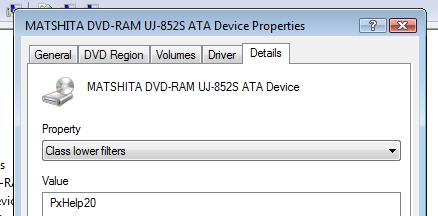
So from the PCI Express Root Port 3, it like me to the 3 Thermal Zone ports we have in System Device. 3 was unsual at first but after a long read on the 965 Express Chipset Tech and Specification PDF file (86 pages!), it was confrim we have 3 which I don't want to go into detail for many reasons. So what is the really issue disabling this Root Port 3 now? So I when back and wrote down every info I could find on this port and search one by one. Then finally something very familiar came up PxHelp20.sys, now I'm sure you will be thinking what does that got to do with all this since is a PCI Express Root Port 3 and PxHelp20.sys is link Sonic.
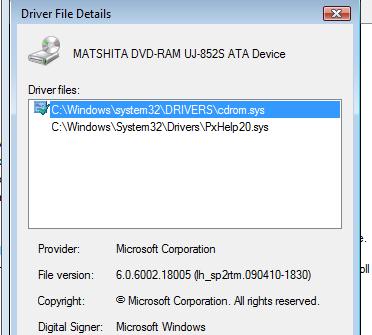
Why did I stop at Pxhelp20.sys was because I kind of when over every device in Device Manager going thru thier Properties > Details and I did so many times over the past year I kind of have it build in my flash memory drive (har har), yeah is sad case for me now. Anyhow, I when back to device manager and check my CD-ROM Drive. Open details and saw Display Name: MATA DVD-RAM UJ-852S ATA Device, which anyone would say yeap our models are the ATA/Atapi. So clearly it would seriously be the last place you look if you hadn't glance at the whole details and drivers for this device. And here is what I found as "driver" files in my CD/DVD-ROM
Hope I link the pictures right, if not the files are attach below
That clearly doesn't look right. So how does it link to the root problem I was at? I clearly don't know atm, as I got so carry away I skip lunch and is almost dinner time and haven't stop take a sip of water too! Im still alive so I guess I didn't stop breathing But Im gonna guess since PCI express root port 3 has a driect link to Desktop Windows Manager, and this ATA/Atapi isn't doing what it suppose to do is but acts also like a HDD gave bad errors to DWM somehow and it generates more heat right?!! erm.. But why windows error didn't report this but "printer" port, gosh! These are too complex for me to answer now "will be right back after these commercials" rolf
Here is a link dating back to 2007 in the Windows KB which shows a fix they had to do linking Windows 2000 -> Windows Server 2003 -> Windows XP.. bah is quite messy but they had to go back and forth, hotfix and workaround and so on, which will be easier you read for yourself if your crucious
http://support.microsoft.com/kb/817472
In short the ATA/Atapi became a PIO. Which I would assume PIO is a Parrelle Input Output. So thier hotfix is also a resgistry fix which Im not so fond off atm as I have seen others posted using this method dating this year. One of the major problems this gives you is BSOD. Im not sure how but alot has reported BSOD and very common if you use your DVD-ROM alot you will realise is not working at all as usual for you. With all that said, Im going to relax and be back later to look for a solution Im comfortable using. Maybe someone with better knowledge then me can explain the science behind this. Is just one file lol but it took the net and world for more then a decade already! >.<
Cheers
ps: For now, I can roughly say Rachel could have had this issue but a total format clean wipe to the last byte and fresh retail CD OS installation is one of the most drastic fix I would say but it would definately had done the job. Recovery by CD or Recovery Tools which alot I have read fail to address the issue.Attached Files:
-
-
EDIT with revision to this error: I suspect alot of users are or might be expriencing this PxHelp20.sys in thier CD/DVD-ROM as drivers or system files listed without knowing. It seems base on windows fact identifying the issue which cause this problem is smiliar to how notebooks work with power saving technology and battery management abilities. The so called error which I can't seem to find a name they have use to identity this error dating back as far in 2004, changes your CD/DVD profile from DMA to PIO. Choosing my words nicely here, since I didn't quite understand what was DMA (Direct Memory Access) and PIO (Parallel Input Output), is like Digital and Analog to compare the change of profile. What causes it, is when your computer goes into power saving mode it saves your display and everything (if Im not mistaken) running to your memory or virtual memory, so when you return to your computer to continue where you left off it automatically grabs all that info and straight into your display monitor. To my understanding the DVD-ROM acts also as a DRAM which does this process, and continous effect will change the profile of the DVD-ROM ATA/Atapi into PIO. Common errors I have identify in early detection would be not confrim, please do not quote me 1. devices arent able to be identify with orginal drivers use, even after doing recovery or full hard disk format, 2. unsual heat output felt from the surface of the keyboard, varies from model, 3. Unable to use DVD-ROM, 4. BSOD due to DRAM is unable to process the data like it use to as it is PIO, 5. Hard crash/Soft crash - meaning by applications loading or not responding or application hang unexpected unfortunately I have yet to find a solution for VAIO users to use without having to do registry edit which myself would prefer to use it as a last resort, and eta towards a compatible solution among all models and maybe OS might be within 24hrs, unless someone has this noted as a common error with a fix, would be great
FINAL EDIT: With the finding of http://support.microsoft.com/kb/811113 which holds an extensive list of what errors you can encounter, priority at current status to find a fix or solution which is updated to work with our computers as most link listed do have hot fix and solutions which was implented almost a decade ago
http://www.symantec.com/connect/downloads/sata-ich9-drivers-windows-xp-driver-injection-script
Link above is from the symantec forums which has a fix for people who did fresh install or recovery but still facing driver problems as regards to the mess the CD/DVD-ROM messing up things as a whole.
Please acknowledge, the person who create the fix sed "I have been unable to test them as I have no ICH9 hardware so please ensure you run this on test hardware first and provide feeback on this thread, or message me directly" Recently I link here is for my collection of notes to be edited and compile which in hope will come to some use to someone, but try it at your risk. I would think it has some legit workaround to this issue as he mention he follow microsoft's fix which only exsisted during windows 2000 to windows XP (as I have mention in this thread post #75 with the windows hotfix dated 2007)
If you have any doubts you currently have this issue and can verify, I will be looking around and hope to find a more comfortable solution for VAIO users and will be posting back here in this particular regarding this matter only.
Please note: I can't confrim that after doing a hard disk recovery or restore to factory setting you will be able to identity this error by see-ing Pxhelp20.sys in your CD/DVD-ROM but my guess would be yes. Due to fact I did a random search on CD/DVD-ROM GUID on google for the last 7 days only I had 161 identity seach identical to my GUID, and browsing thru every google page I would safely say everyone is asking for thier CD/DVD-ROM driver which imo isn't something you would expect to give so much problems or better yet identify the issue as I would think is the last place I would look at affecting the whole system.
Need some clarification VAIO SZ and VAIO Z
Discussion in 'VAIO / Sony' started by moofo, Dec 13, 2009.