Problems? See this thread at archive.org.
Teaser from a vaio store in Japan... Enjoy
VAIO Z?????VPCZ2????????????????????‏ - YouTube
VAIO Z?????VPCZ2??????????????????‏ - YouTube
VAIO Z?????VPCZ2????????????????2?‏ - YouTube
-
MBA 13 reaches 6h 45m in wifi web surfing medium brightness.. Z reaches 7h 50m in OFFLINE web surfing low brightness.. I guess that with wifi would get 5.30/6h.. not more.
-
In a few reviews the battery time was 7-9 h without the slice battery. Did they have the brightness all the way down? I know they did some work on the computer during the test.

-
I know before we were talking about SSD speed for Z vs mba. This is from the mba engadget review.
http://www.blogcdn.com/www.engadget.com/media/2011/07/air-disk-speed-test.png
so it looks like the Z ssd is quite a bit faster. -
Really that's impossible from a 44WH battery. When I played with the Z, just digging around offline it looked like 5H was the number. (just based on Windows status, I only played with it for a couple hours).
In order to hit 7h that would be just over 6W of power. That's really only possible at DEAD idle, and I've NEVER seen a full voltage windows machine hit that, ever.
But really, I'll concede that anything is possible I suppose. -
256GB raid 0 reaches sequential read of 1000MB/s and sequential write of 500MB/s ... So value of single ssd would be half of it probably.. (but the most important things are response time, 4k random and not write/reading..)
-
Yes, anything is possible The battery time from the reviews have been different every time.
I have the F12, battery is rated to 2,5h by Sony. However I have been able to get out 4h on the stock battery.
-
Well, now that I've pulled the trigger, and had 10+ days to think about it, I'm starting to have second thoughts. Namely that it would be worth my while to wait at least long enough to get the LTE-capable broadband card in the laptop, and hope that maybe they decide to offer the Signature Collection with 8GB of RAM.
For now at least I'll hold onto my order so I can keep my place in line. If I'm happy enough with the system, I'll hold on to it, otherwise I'll return it within the 30 days... -
I'll be waiting for the LTE. The reviews on the Verizon 4G are great, pretty much wi-fi speeds without needing wi-fi. The Z2 + LTE will be a combo unmatched by anything else out there for a while. However, based on what I know about the LTE, the battery times are going to significantly lower than for wi-fi connectivity.
-
^I personally find Verizon LTE pretty useless due to the data caps. If your company is paying the overages, I can see the desire.
-
I saw somewhere that they'd be offering the LTE at the end of August. Any idea where this info came from?
-
For myself, the issue is convenience and paying for only a single internet connection, the LTE would be instead of not in addition to other internet access (FIOS, etc.) other than at the office. They just started the data caps, I'm not sure how hard they bite.
-
^They bite hard, they bill for overages. You can replace your internet connection at home with 10GB/month for $80? I don't know you, but that's not attractive to me at all. Overages are $10/GB so if you used, say 50GB in a month you are looking at a $480 bill.
Even if that works for you, if you go the built in route you are going to be paying that $80/month for just one device to be connected. A LTE-WiFi hotspot would be better suited. -
It also depends on quality and type of battery.. I mean, 44Wh it's a value which tells us that battery will last for 1 hour with a discharge rate of 44W constantly (wrong statement, but it's to clarify the point)... but if the discharge rate is much lower, for example 7.33Wh.. the battery won't last 6h.. but something more..cuz' a slower discharge process is nearer to an ideal one. A better battery has a more efficient process in this range... I'd like to know how it behave this sony one..
-
^point is the machine likely uses 8-10w or so in light use so 7 hours ain't gonna happen.
-
Taking a look at video three, there's a few things that bug me about the Vaio Z2's build quality.
0:35 (5:24 on the second video really showcases its thickness) You can see just how much lower bezel there is on this computer (a lot!).
1:30 Mark you can see how the Exmor Cmos webcam doesn't sit flush from the left to the right. The left side is sunken in slightly more than the right.
2:20 You can see how the trackpad and mouse buttons work. It's a single piece and the mouse buttons actually bend down to get depressed. There's quite a bit of flex in this, so is it actually glass or plastic? I'd hate plastic since eventually it would wear down and certain areas would get even shinier- this isn't something we'd have to worry about with glass.
4:38 When the guy is typing (with a normal amount of pressure) there's quite a bit of keyboard flex. This would certainly bug me when typing. It's something I've experienced with $600 Asus computers, but never in any Sony product.
4:45 The assist button is pressed and again you can see quite a bit of flex.
Odd that these are preproduction machines in the store, the computer is labeled "VPC ZXX" as seen at the end of the second video.
Despite these QC/ build design issues, I think it's still a nice computer. I wouldn't mind picking one up in a year or two to replace my P as my note taking computer. lol -
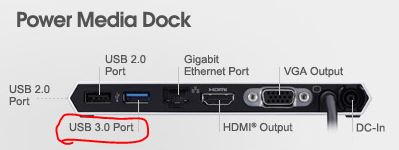
So, did we confirm that the USB port which is part of the Lightpeak configuration on the Z2 will work as a USB-3? Beaups, did you use it this way? One of my main reasons for holding off on a purchase of the Z1 was the lack of a USB-3 port. I could care less if they can't officially call it a USB-3 as long as it functions like one. Do we have a definitive answer on this? If there isn't a USB-3 on the main unit, I might as well find a Z1.
With respect to Sony's marketing, I can understand there being some price differences between markets, given the difference in VAT etc. What I find foolish on their part is the fragmentation in options. This is their premium laptop, not some prefab, lower-end model. They certainly should offer all choices in all markets. This is how you demonstrate that you value your customers. Those who are interested in the Z are, by definition, going to be more discerning, which means they will have more finely tuned needs. To create options and then apparently arbitrarily deny them to your most affluent customers is both asking for irritation and testing loyalty. The Z customer is where you build your brand and create in others a desire for a Vaio. If your highest end consumer is put off, you short circuit that synergy. My two pennies. -
^Allengeb, why not put in an Express Card USB3.0 adapter on the Z1? I can hardly believe that USB3 is that big of a selling point that you'd base your main computer choice off of that one thing. (just my personal feeling)
-
Only because that option seems to have eluded me. Thanks for that. Just to be clear, I didn't say it was the only factor.
-
The main unit hast no OFFFICIAL USB3.0 port, but it has a port, which supports USB3.0
They are just not allowed to officially call it a USB3.0 port. -
Your point is well taken. Unfortunately, based on my situation, I need WWAN access (leave aside from whom or at what speed) irrespective of any home use. I'm not able to rely on wi-fi all of the time. I don't have a smart phone connection to piggyback off of.
Although I need data access pretty much everywhere, I'm probably not much of a data hog and don't need it all the time. I don't stream movies or similar lengthy video. Most cases where I need a major data download (such as installing new software), I can schedule to work with a wi-fi connection.
The battery penalties from LTE will probably be enough on their own to minimize my use. Given that situtation, I don't really see many alternatives. For users who can go off various wi-fi connections for pretty much all of their use except for an occasional hotspot off their phone's wireless data connection, well, you're right, the LTE would be crazy expensive. -
^I still think the LTE mobile hotspot or even a USB dongle is a better buy. If you switch PC's, need access for your cell phone, a netbook, tablet, etc. the hotspot is much more flexible.
Also, when using the hotspot your laptop is only using wifi which you stated is friendlier on the battery than LTE.
Just food for thought. -
^ the MiFi thing is just that, another thing to carry around, charge, buy
I love built in WWAN -
Thanks Noap! I guess if it supports USB-3, it fully supports it. No odd bottlenecks.
-
So i think the missing express card slot is no problem
-
^ not completely... say it to those who want to use xpress card that they already have
-
Missing express card is a big problem. Expresscards expand the system in a way that USB3 can't. Also Expresscards go in the computer, USB always dangles in some annoying way that is prone to damage. USB3 is great for hard drives and stuff like that. Expresscard is better for other cool custom high end type things like ViDocks. You could say that you don't need a ViDock on the Z2 because it has the PMD... but the PMD is very limited.
-
Thanks for this answer!
I have heard though that in US GSM part in sony wwan cards is disabled-only cdma is working which will not help in Europe for instance.
Can this card be exchanged if needed, or would I have to use One Click Internet and solder the GSM slot? -
uh oh........
Attached Files:
-
-
Funny, Goldentreesang! Thanks! So, Sony doesn't have to be quite so careful? mmmmmm....
-
yeah i really prefer the LTE too, but i can't resist getting new toy now. but if the wait is end of august, i might return my CTO and replace an order : )
-
^wait, on 2nd thought, that's the usb3 ports that IS NOT being used with the light peak connection, so maybe thats why they could do that. The main unit usb3 port that uses the light peak is labeled "Docking Station Port"
-
I'm not so sure... and I explain why:
I'm taking a look at Vaio SB test on battery life... this laptop as we know has a 50.4 Wh battery. In fact, in full load with 55 W of consume it lasts nearly 1 hour. The "strange" fact is that in total idle, consuming 10.4 W... it lasts 8.40 h.. it means a real consumption of 5.82 W .. or a real battery capacity of 90 Wh with that low consumption state??? Probably reality it's in the middle (I found similar results but smaller even with R830 for example)...
Maybe voltmeter is not so precise but at the same time, with low consumption, the effective battery capacity is really higher (and this is suggested also by full load consumption, a very UNideal process with a lot of loss of energy.. and the battery capacity respects battery life with full load consumption)..
In addition, SB was with mechanical drive and odd.. and a derived power consumption in web browsing of 9.5 W .. I think that starting from here.. with ssd and without odd it would reach 8.5-8 W equivalent .. we'll see. If the Wlan module has low energy consumption, we'll be able to reach 6 h.
What I'm sure of is that Sony is using batteries with higher efficiency then usual at low power consumption. -
Has anyone pre-ordered a preconfigured Sony Vaio Z model yet?
If so, what date does it mark as shipping?
Under my Sony account it's saying that the laptop is estimated to ship out today but that does not seem accurate... -
THAT port is a normal USB 3.0. It's NOT a modified USB port.. that's why they have the right to call it USB 3.0. That port ONLY supports USB peripherics.
The Light peak Connector on the laptop is a USB 3.0 MODIFIED port. USB consortium doesn't allow to modify USB ports unless you stop call it USB and lose official reconnaissance. -
Stating the obvious, I realize, but the sheet battery for the Z2 pretty much blows away the MBA and virtually all other competition that lacks a sheet battery. Yeah, you have to pay for the sheet and yeah, it does add to weight, but when you need the endurance, 8 more hours without plugging in strikes me as the end of the discussion.
-
I've heard that the throughput speed of Expresscard, specifically older iterations of the format which might be in the Z1, are unable to handle the full speed of USB 3. Also, for powered USB 3, don't you need to plug your expresscard into a power source: another usb 2 port or a wall socket? I haven't used an expresscard. Is this the way it works?
-
does anybody know when this will hit retail stores?
-
^Mid-august is the current estimate.
-
I can't answer the first question, but my ExpressCard USB 3.0 card that I use for my Z1 does require power from another port. When using an SSD, the speed is slower than using via an internal SATA2 port.
-
Greetings, all. I've been reading the posts here for a while, thought I'd finally jump in myself. I placed my order for a Z2 on July 15th, and like a lot of you, I'm just anxious to actually get my hands on it.
Over the years I've owned at an absolute minimum at least 15 different Sony Notebooks. I finally gave up on Sony about 2 years ago mainly over issues with their drivers. I'm one of those people who like to do a completely clean install of Windows on a system to get rid of all the bloatware. For some reason though, it always seemed that some driver or another would seem to be missing from the Sony download site and then I would have to waste hours extracting the contents of their images and finding the bits that I needed. Also, the last Sony thay I had came with Vista and the promise of a free upgrade to Windows 7 when that came out. Not only did it take a long time for them to come out with their upgrade kit, but when they finally did it seemed to be a very half-hearted attempt with several items no longer working correctly. That was when I parted ways with Sony.
As a result, I strayed to other laptops including Acer, Gateway, and HP.
Well, I'm ready for a refresh cycle again I spent weeks scouring all the manufacturers web sites and driving myself nuts trying to decide between a large notebook (15 to 17 inch screen) or something smaller and more portable (13 or 14 inch). Like ComputerCowboy, I'm a huge believer in high resolution but for the most part anything with a really decent resolution tended to be large and heavy. I was literally days away from ordering one 17" for home and one 14" notebook for on rhe road when I spotted the announcement of the Z2 from Sony. As I began going over the specs I was absolutely amazed to realze that for my purposes this single system could satisfy both the needs of the smaller and the larger systems that I was planning to purchase. So, in a strange way, this system is actually a really good bargan for me. While not cheap, it actually is going to cost me less than the 2 systems I was planning to purchase
. I wanted something fairly lightweight but with good battery life for the road. A decent high res screen would also be nice. The Sony fits that bill. For home, I wanted a little more power than a ULV processor would offer and discrete graphics (doesn't need to be cutting edge, just a bit more than the onboard graphics) and support for multiple monitors was also a consideration. I was really surprised to learn that the Z2 fit that bill as well. Then when I checked the CPU benchmarks and realized that this dual core i7 actually has better performance than my current 17" notebook with a first gen i7 Quad Core (the 720QM) I was really intrigued.
I ordered it with the highest end option available in every category with the exception of the SSD where I opted for the 256GB rather than 512GB.
So now I'm trying to convince myself that I'm doing the right thing. That leads me to a couple of questions. For those with relativly current Sony systems, has Sony gotten better about posting all the necessary drivers that will allow a clean install to be performed?
Has anyone found a User Guide for the Z2 yet? I found it in French, and while I don't speak or read French, I was able to gather the odd tidbit here and there. For anyone interested, here is the French User Guide:
http://www.mgmi.fr/docs/pdfprod/MUVPCZ21V9E-B.pdf
Still, if anyone locates this in English, I would love to see a link.
- Hannes -
Here you go:
And if you scroll down and look at the spec list, you'll find:
That information is based on availability of the LTE module in Japan (for use on Docomo Xi LTE network in Japan). But there isn't any information about LTE modules for other markets/networks, so although the module for Japan won't be available until the end of August, there's no information about when/if LTE will become an option for other CTO areas. -
Woah. (C/o Engadget.)
Summary: new Dell UltraSharp U2412M display, 1920 x 1200 resolution, IPS, 24", for USD 399.
What I really want to know is whether my new Z2 is going to be able to drive it... Looks to support DisplayPort and DVI. -
Yea, sure you are right, but... I have nothing against USB3, I just want to be able to use Expresscard. USB3 is not a suitable alternative to Expresscard. Lightpeak or Thunderbolt could be a great alternative to Expresscard, but Sony LP is proprietary and there are no peripherals for either interface right now.
I am turning into a Z2 hater, the Z2 can do a lot, but it is what it can't do that kills it for me. -
I have Verizon LTE, still unlimited data (basic plan). I checked and realized my AT&T 3G data plan was also grandfathered since the days of the first iPhone, so that's also unlimited.
Do you hate me now? Kthanxbai. -
Thanks A.C. I think that answers my question. Much appreciated. So much to consider but, hey, nothing is perfect.
-
Understood. It is amazing how all the components for an exponential jump are around but they haven't quite congealed into one system. Ah well, it is a quest for perfection after all.
-
But a lustrous Gold Z2 would change everything.
-
Hi
Beeing french, i had à look at this document and it gave me some new informations...
If i understand well what this document says, the z21 supports bluetooth 3 but to do so you need to activate both Wireless LAN and bluetooth which confirms the statements of someone on this thread who claimed to see a card allwowing bluetooth 3 on the z21 photos...
Other interesting information is that you can create an external recovery file (on external usb device or DVD/BR) in order to wipe the one on the SSD to regain disk space...
If you have some other questions with answers in that document, maybe i can help you a bit more ;-) -
Nothing had changed since that, you will have to check a proper list of drivers, one by one, in a peculiar order, to make a clean install. By doing so you will have a chance to see your Sony software, utilities, and functional keys working in a correct way.
New Sony Vaio Z speculation/news thread
Discussion in 'VAIO / Sony' started by TSE, Feb 15, 2011.