Problems? See this thread at archive.org.
Finally got a successful night with 0% battery loss! I'll take another couple of nights to test this, but here's the method:
Setup:
-Disable all components that stay in D2 (still on) power state during hibernation (S4).
-Disable webcam
-Set power button to shutdown
Once you do that, here's my shutdown steps:
1. Unplug power
2. Turn wireless switch to 'off' position. Give this a couple of seconds as my card took a few seconds to turn off.
3. Push power button
-
when you say disable webcam, do you mean going into device manager and disabling it?
-
Yes, you must disable the webcam in device manager. Remember to disable both the webcam and the 'composite device' underneath the USB tree. In my opinion the webcam is not the problem to the battery drain, but I want to prove a consistent 0% battery loss before I make any changes.
-
got it. please report back with any further results from subsequent testing.
-
Arrrggh. I screwed up my experiment this morning because I forgot to boot with AC. Will report more data soon.
rmtschanz -- glad to hear it! -
Ok, I go two 24 hour periods in a row with essentially 0% loss (second day showed 99%) using my method in #51. The third day I thought "hey why not turn off wireless before I unplug, save the battery those extra seconds." Well after 24 hours of that method I turn it on to find a 4% loss!
I seriously think ACPI with AC plugged is messed on this computer. I know that the bios behaves differently between AC and battery, because on AC the computer will disable C3 processor state.
This is done at the bios level, no way to get around it. I believe the same thing is going on with the power loss. In my opinion, that's the only way that can explain my (and other people's) inconsistent results. Some get 12% per day, others 4%, and occasionally some get 0%. Anyone up for some custom ACPI programming via Notebook Hardware Control? -
Do you think the difference could be that the power state is set differently based on whether you shut down on AC power vs. on battery?
Also, have you tried to figure out whether there is any "D2" device in particular that is causing the drain (testing with just one disabled at a time)?
Thanks for taking the time to try to figure this out. You have quite a bit of patience. -
I have just done the following experiment:
Charged battery to 100%, killed ISBMGR.exe process, turned off VAIO, unplugged AC. 72 hours later: Plugged in AC, booted VAIO. Result: 88% charge!
From all of my experiments I have found that:
1. Killing ISBmgr.exe has no effect.
2. I, and others in this thread, can hold 100% charge over 24 hours.
3. It seems that the battery BEGINS to lose charge somewhere between 24-48 hours of laptop being shut off. -
I disabled all devices I could that stick to D2 in the S4 state, yet it still didn't make a difference. So it's probably not one of those devices, but I'll keep them disabled until I find a solution.
I'm willing to bet this is an issue that echos across the entire Sony line-up, people just may not care, not notice, or given up. So finding a solution could help a lot of people, not just those with a SZ.
Anyway, I'm going to test the lid sensor tonight. In all my tests, I've closed the lid after it's shutdown. Tonight, I'll leave it open and see what happens.
EDIT: Another thing I'll be trying in the future is disabling the VAIO Power Management. That seems to works at the ACPI level - it turns off power to devices, not just disabling them in the Device Manager like I previously thought. -
Can't wait to see your results.
If my SZ wasn't my primary computer, I'd run a few tests myself. Well, maybe I can still run some overnight tests just for comparison sake. I'll see what I can do. -
Still power loss with lid open and VAIO Power Management disabled. Although I achieved only a 2% loss this time. Odd. Next up is to disable any and all non-critical devices and non-critical system services.
I'll also be reverting back to an older shutdown method that achieved an inconsistent 0% loss - shutdown through the BIOS menu. -
So I disabled all non-critical devices and services. This actually made the percent loss worse! About 8% loss in 24 hour period. I'm going to try one or two more things (not sure what else to adjust at this point) and then draw some conclusions.
-
Looks like VAIO Power Management is doing something. I second occurance of of 2% loss, which charged to a 1% loss by the time the O/S fully booted up. This was using the method mentioned in post #61. I'm going to try this method again for 48 hours and see the results.
-
any further updates rmtschanxz. maybe a summary of what you have found so far
-
This is really frustrating me as well.
I have a FZ440e/b and it's draining my battery quite alot even when it is completely off! Because I only get about 1.5 - 2 hr of battery when fully charged, I need all the battery power that I can get.
I lose about 15% each night! that is alot!!
I called sony and they told me to re-install the battery driver. Didn't help at all.
Any idea?
Is it just happening to a few number of people? -
i have this problem with my vaio UX too. looses ~15% after a day from full charge

so is it the vaio power management that's causing the problem ?? how about remove that program? -
Well, after many different configurations, I've come to the conclusion that without bios modifications there is no way to prevent battery loss while supposedly 'shutdown'. VAIO power management seems to work at the bios level, but disabling that still causes 2-4% per day. With both Vaio power management and vista power management set to off, there is still 2-4% loss per day. This will happen regardless if you hibernate, or fully shutdown.
I still haven't ruled out an actual hardware design flaw, but it's difficult to pinpoint what is staying active while the computer is supposedly 'shutdown'. Since so many of Sony's notebooks suffer from this flaw (all current series that I know of, including the FW), I would guess this is a software issue and not a physical design flaw.
If anyone using any current Sony notebook (FW,SR,FZ,AR,SZ,Z,TZ,TX,UX,CR etc.) achieves 0% battery loss while 'shutdown', please post in this thread. -
what is staying active is probably some device that the government installed into each laptop (or in the battery?
) in order to track everywhere we go and everything we do on our PCs. I wouldn't doubt it.
-
This might seem kind of silly but even though the laptop might be turned off, I kind of have the impression that wireless is still hunting for a signal. It is an energy vampire after all in all devices.
Trying turning it off even when the laptop is turned off and see what happens. -
You know, I think that's why my SR drained so much today. I had it off for only 1 hour and it seemed to drain pretty fast...I noticed I had WIFI switched on, and perhaps that may be CONTRIBUTING to the issue, but I dont think its 100% at fault.
-
I suggest everyone with battery drain issues to try turning the wireless switch off and also the computer completely off and seeing what happens
THEN
Trying it again: turning off the wireless and then putting it in sleep mode to see if there is anything creeping up in the battery drain dept.
It's a group experiment. -
I don't own a newer model Vaio, just an older S4XP (but i'm ordering a TZ next week). I think one of the suggestions mentioned earlier (taking out the battery for 30 seconds after shutting down, and then re-inserting it) may be a useful thing for people to try. It may reset the laptop to a completely off state, and prevent any drain.
-
does anyone have the same issue with new FW?
-
Then you might as wel leave it out when you're not using it. That surely solves it.
-
That's what I always do.
When i'm not using my vaio sz I remove the battery and problen solved
I think this the only solution for this issue -
I turned off the wireless via the wireless switch in nearly all of my tests - it still results in battery loss. The only real way to test it is to physically remove the wireless card from the notebook, and since I'm still under warranty I'm not going to do that just yet. BTW, the wireless switch and the power button switch are monitored at the bios level. The stamina/speed switch and S1/S2 buttons are both monitored by the VAIO Power Management service in Vista/XP.
Removing the battery for 30 sec. or so does at least reset the wireless/bluetooth state, but once you put the battery back in - even while the computer is turned off - you will have battery drain. -
I did both on my TZ47cnb, I got 96% when I boot up in the morning, whether it is shutdown or in hibernation. This is definitely not good, since I do not intent to use it everyday if I am at home.
-
I have a TZ2 and loose about 10% power a day ... hence why I have looked for and found this thread!
As soon as I realised this I tried removing the battery to see if that would fix the problem (ie was it the battery or laptop that was the problem) .. which made me immediately discover that my fingerprint login no longer would work (as all the fingerprints stored in the chip for power on use had been wiped by the power loss) and I had to resort back to my power on password etc.
So, is it possibly the hardware chips used for the TPM or FingerPrint recognition that is draining the battery ? -
That's an intersting discovery. But, the FZ, FW, SR suffer from the battery drain, and those don't have fingerprint recognition, which means they may not have TPM.
-
anybody has seen if in the bios there are features regarding this?
is there the wake up on lan (wol) features? this chan be the cause of battery drain -
How do you access the detailed bios? F2 will only give limited options, e.g. passwords and booting order.
-
i don't know;
i think the only way is to finde the specific register in the cmos configuration file of the bios as to enable ahci and vt (vanderppol virtualization), features disabled by bios in quite all vaios;
in the sr the ahci and vt are disabled? -
If the cable is un-plugged, then the controller will go into a low power state.
For XP the Wake-up Lan feature could be controlled under sw (properties setting of the controller). -
Has anyone tried to charge battery 100% and then remove the battery from the Vaio at night? If it's a software problem, then it can't drain anything without a battery.
But if the battery has lost charge in the morning or so, then it's a problem with the battery it self or a draining bootup. -
i've done this. battery is at full power in the morning. even tried this leaving the battery out for a few days and battery is still at full power on bootup.
-
So the problem isn't the battery? And the problem can be "solved" by taking the battery out?
Then Sony will might fix this problem later on, in the future models. -
It's been there a few years now, I believe...
So don't expect them to do so soon... -
Oh well. But if the problem can be solved by removing the battery over night, then my worries are over
-
Just discovered this today with my tz, thought I was going mad. I am shocked this is hapening on a £1500 laptop!!!
I guess I will have to start taking out the battery.
Hello BTW. -
There is one odd thing.
For example, when shut down on AC the battery will loose 5% on the next boot up, when shut down on battery the computer will use 0-1% on boot up. How do you explain that??
And I can understand your anger. Think of all the people who bought the more expensive SZ... -
I've heard of this issue before, I think it was in a Lenovo but I'm not sure. The reason the battery in that laptop was draining even when turned off was due to the wireless card still using power.
-
Interesting.
Maybe someone could test if the battery still looses power when the wireless card is disabled in the device manager before switching off. -
I have to say I do find it bizarre that there has been no attempt by Sony to fix this problem. It must be s/w rather than a battery problem so there must be a reason why they keep it this way.
My first thought was it must be the AV mode keeping some parts live but I agree it could also be the wifi card. I've just come from an HTC shift and that had less battery drain even though it was running WM6 permanently in the background!
Apart from this problem I love my TZ, best notebook I've had (and I've had a few!) -
If you have an SZ, turning the Wireless switch to off disables both Wifi and bluetooth. However, you will still have the battery drain. If you read back through my posts, I think you'll see I've done just about everything possible (short of removing hardware components) to troubleshoot the battery drain issue. And yet I still could not pinpoint the culprit to the battery drain. With this issue spreading across so many Sony notebooks, I firmly believe this is A) BIOS issue that can be patched or B) By design (although flawed in my opinion) to retain such things as fingerprint data.
-
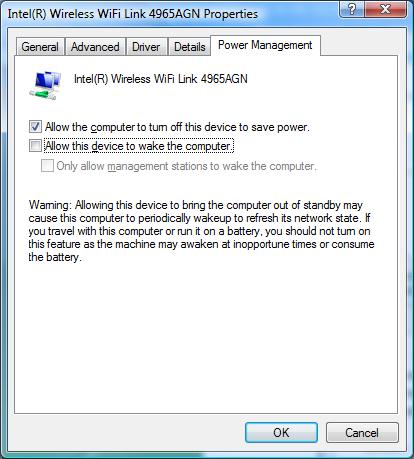
@rmtschanz - You probably already checked this, but just in case I missed it take a look at this property.
Attached Files:
-
-
nice!
LoL_Rick can you or somebody other check if disabiliting this solve the battery drain issue? -
The default setting is for it to allow the computer to turn the device off. So, I doubt if this is the culprit.
Gary -
ScuderiaConchiglia: L'opzione interessante non e' la prima e' la seconda, se abilitata abilita la scheda a poter riavviare la macchina in caso di connessione wireless, una sorta di wake up on lan; dunque la scheda rimane attiva a computer spento;
For the others [english]: The interesting option is not the first, but the second; It's a sort of wake up on Lan; So if enabled the wireless card should be set to be active also if the laptop is powered off; This is done for the card to make possible wake up is it sense a network; -
Now if only I understood Italian!!! ...big ol' grin... (I think you may be the first person to realize my screen name is in Italian. Well sort of Italian, anyway. Now a question, any guess as to WHY that is my screen name?)
Yes, I know about the second option and what it does. But that too has a default setting of unchecked, so I don't think it is the issue either.
Gary -
Well, I'm not really sure at this point, but have you tried disabling other devices such as SD card, firewire, webcam, dvd drive?
New Vaio - Battery Keeps Losing Power When the PC Is Shut Off
Discussion in 'VAIO / Sony' started by hmkim, Jul 27, 2007.