Problems? See this thread at archive.org.
Thanks MegaMan, but there are a couple of other issues...
First of all the SPRINT wouldn't work here in Germany, I need to take care of different Voltage/ electro plug, the keyboard has US layout, means I couldn't type Ää, Öö, Üü or ß, I would have to pay tax (+19%) and customs about 10%, I wouldn't have any warranty in Germany and in the end the shipping also costs a little bit....
All summed up, I would end up with about the same price, but still having the hassle with SPRINT, Keyboard and Warranty....
So I decided to go with a German Z that suits my needs pretty good...
I can always buy an external BD-reader/writer...
And well the prices already dropped from 2,299 to 2,025 Euros for a model with the 1600x900 res, 4GB RAM and the 2.4GHz Processor...
-
The power adapter will not a big issue- you simply need to buy a local 3 pin plug adapter. They don't cost more than 4 quid in uk. regardless of the delivery cost, the main problem is that, (afaik,) Sony doesn't provide any international warranty like IBM, Dell, Toshiba, et al. I can't even imagine the amount of cost and hastle it will create

afaik== as far as i know (google will set you free)
-
What does that word mean? I see that word now and then coming from european posts. Explain thy selves.
-
As far as I know, it means as far as I know.
It's an old European expression.
-
As Far As I Know
-
:twitcy: LoL I can't believe you would suggest he change his name. Whats wrong with it :twitcy: ?
Hey Fuzzielitlpanda I have the purrrrrfect Avatar for you. I think you should use it. Check it out. I just got an email recently. It was taken in China after that recent earthquake and the locals were doing a panda rescue. There were more panda photos, but I kept a few cuz their expressions were so funny.
View attachment 21354 "Baby Pandas in SUPPORT of CTO'd Vaio Z's."
Maybe, the expression you might get when you get your Z (J/K).
By the way, back to the subject at hand, GREAT REVIEW! Can you do a comprehensive, not necessarily a detailed, review of your overall experience (likes and dislikes) when you receive your Z? Thanks.
(AFAIK) Thanks for the replies. Got it -
T3 reckons these are the UK prices for the three versions we get:
VGN-Z11VN/B £1750
VGN-Z11WN/B £1650
VGN-Z11MN/B £1450 -
Based on the pricing in the rest of Europe I am expecting £1350.
-
Hey guys, I think I've got the scoop on PortableOne...
They are not listed on Sony's Authorized Dealers page because that page is for Dealers in the consumer channel. Apparently Sony considers Portable One to be a B2B Reseller, not a consumer channel Dealer. -
Nice find! I've confirmed this from Sony's business site as well.
Now there's absolutely no reason at all not to buy from Portable One
-
loll. I dunno -
How come we can configure the pre-configured Z's on Portable One?
Also, what's "P1 Optimized Bloatware Removal"?
Thanks! -
Portable One is unique in that they will take the notebook and do some installs for you before they ship it out to you. So they are taking a stock Z and putting in what you want. Something you could do yourself, but they are happy to do it for you.
-
Portable One can upgrade preconfigured model's RAM and hard drives for you (just like you would yourself), but without voiding the warranty since they're an authorized dealer / repair center.
The "Bloatware Removal" is like Sony's "Fresh Start" except it's free, and P1 probably does a more complete job removing the bloatware than Sony. And in case you don't know what bloatware is, it's tons of useless advertising and trial junk software that does nothing of value but clog up your computer and slow it down a lot.
-
I'm not sure but it sounds like "Bloatware Removal" is removing of the bloatware afterwards, where as "Fresh Start" is a clean install from scratch.
-
But wouldn't it void the warranty if we do it ourselves?
-
That's what it sounds like, but P1 definitely has a bloat-free image they use when you ask for Bloatware Removal. It's not a sloppy job of uninstalling all the "bloat" afaik, it's a proper fresh install of Vista with all the drivers, etc. You can even order a bloatware free restoration disk for the Sony Vaio SZ I think.
Not the RAM, but the hard drive would. -
Ok.
And it seems I was wrong about Sony because they say: "Opt for a Fresh Start™ and your VAIO PC will undergo a system optimization service where specific VAIO applications, trial software and games are removed from your unit prior to shipment." -
Rhetorical question / venting: why can't Sony sell us all a notebook that begins life in a blissful zero-bloat/trialware state? We pay a premium, and should get what we want and need; I realize Sony gets 'kickbacks' by including a s/w company's things. Here's a quote from the b2b site: http://b2b.sony.com/Solutions/subcategory/notebooks/ultra_portable/z-series
"Stripped-down software load
Select Z notebooks feature a greatly reduced software load for a quicker set up. This not only saves IT personnel precious time and helps them work more efficiently, but it also allows employees to get up and running on their new computers faster, which enhances overall productivity both for IT professionals and employees alike."
Why can't all customers enjoy enhanced overall productivity and quicker setup, in whichever definition they may have of 'productivity'??
[end of vent] thank you -
I see. Well then I guess it depends on what type of software you use etc. I use a bunch of progams that have tool bars in every direction, and after shaving pixels off every edge it leaves very little workspace. However, if I'm just writing in Word or something, then the 1280 screen on the sz is great.
Otherwise, the jump in screen size is pretty big up to the next decent Vaio. -
As you mentioned it yourself, 'kickbacks'. All company will try to sneeze all the money they can get. For sony, a good portion of their profits are used to cover the bottomless hole on PS3
Remember not too long ago, Sony offers a solution to bloatware free laptop for $50 extra, and how it turn out. -
How did it turn out?
-
That's not very good. I hope they defragment if all they do is uninstall the bloatware.
I agree. I hope Sony realizes that all the bloat they're putting on their laptops is hurting their reputation especially in the area of performance benchmarks. I've seen a few articles where some Sony laptops didn't perform nearly as well as a identically configured competing laptop, no doubt due to the bloatware. Is a $50 or $100 worth of paid bloatware really worth lowering your reputation and performance scores?
Anyway, hopefully the fact that they're offering to remove the bloatware at no extra charge (only on CTO's with Vista Business it appears though) is a sign that they're recognizing the problem, and maybe soon they'll learn from their mistakes. -
one of the results from google:
Breaking: Sony Won't Charge $50 To Remove Bloatware
http://blog.wired.com/gadgets/2008/03/sony-pay-an-ext.html
Well, no sure how long it lasted, but it was screamed by the public.. Sony's solution? They offer it for free now, but there's a catch, only if you upgrade to Vista Business Edition... Ouch!! -
Thanks!
But can I really trust those people to manually open up my laptop and upgrade the hdd and do a p1 bloatware removal? I mean, the whole point of buying a pre-configured Z is possibly better build quality and cheaper price.
Also, why don't they have the option to upgrade to a 320 gb hdd for z 530 and 550 on Portable One when they offer a upgrade to a 200 gb 7200 rpm? -
basically i told them that i could get 4% cashback if i bought it through the sonystyle website through ebates.com, which is true. then, the csr put me on hold and told me they would be able to give me a $100 discount. a couple of people here have been able to do it, so most likely you can too. keep in mind that you CANNOT get the $100 on top of the $200 promotion they have right now.
Hah the SN has stuck with me since high school (I'm 23 now). Yah I read your warning about CTOs in another thread and appreciate the feedback. Unfortunately, CTO is my only option since I'm very specific about what I want. I still have time to cancel since my card hasn't been charged yet, so hopefully reviews come out soon. I finally found a local Sonystyle that has the Z on display, so I'll be checking it out soon. Thanks again for the input!
I'm not in too much of a rush, but it's really just a matter of convenience. The expected release date is 8/15 and my fall semester starts the week after. I'd rather get all the researching/shopping done before school starts since it does take me a good amount of time to make a wise decision.
Hah thanks for the avatar! I'd be more than happy to do a comprehensive review, but it won't be as in-depth as the more formal reviews you see here (lots of benchmarks). -
Told you the ebates trick would work. You can send my commission check to....
-
You'll still get the good build quality of the pre-configured models - all they do is upgrade the RAM and HD for you & copy a disk image to the hard drive. Unless they seriously mess up, this is not going to compromise the laptop's quality in any way. And yes, I think you can trust them - if the fact that they're a certified Sony service center isn't enough, just take a look at their customer satisfaction rating at resellerratings.com and read a few reviews.
-
Since everyone is in the subject of bloatware, what is the difference between doing a clean install versus going to "add and remove programs", deleting all the bloatware/programs you don't want, then doing a defragment followed by a cleaning of the hard drive? Will the performance be just the same. I'm asking because I've never done a clean install, and I've read through other threads that some are having difficulties with drivers after a clean install.
-
Completely cleaning out all the bloat manually is much much more difficult and tedious to do properly because many programs, even after being uninstalled, will leave trace files, folders, and registry values. This makes it difficult to properly clean the system, but even then your file system and registry will be really fragmented (and probably slow). You could clean it all up with some work, but it's a hassle and even then there's no guarantee your system will be 100% clean and optimized.
-
Hah thanks again for the help. Too bad I wasn't able to stack it with the $200 promotion.
-
Hey guy does any one know how ican get a fresh vista option on vaio fw i looked for it in the cto but icant find it ?!?!
-
To add to this, the safest bet for quality is P1. I sought my SZ6 from them about a year ago, when there was a lot of discussion and people posting about recieving yellow banded screens and "light leakage" from Sony. Well P1 will check these things before shipping to you, which can save a lot of trouble. I ordered a 691N/X, and on the day it was supposed to ship (to Australia) I got an email from Ivan saying shipping would be delayed by a couple of days because they weren't happy with the screen on the model they got for me from Sony and were returning it for another (mine has been perfect). Can you imagine the trouble if I had ordered direct from Sony and then had to ship it back to the US?
Furthermore, there was a huge surge of posts about how to do a clean disk image because the Sony Vista install was terrible. Many people tried and generally everyone's method had a caveat - perhaps one thing they couldn't get to work. P1 responded with their own clean image for customers for free including removal of useless hidden partition. In the end, their image was pretty much perfect.
Moral of the story is that P1 are the one of the only reliable source sources of QC around, and from my experience are significantly better than Sony Style etc. -
on portable one to get the clean install you need to upgrade to Business, XP or ultimate, that's 150 bucks more, FYI.
-
A clean install is by far the best. It will keep the registry the smallest and will have the minimum processes running. You can choose to not install every vaio utility and not install all the unneccasry utilities that automatically come with some drivers.
I'm running a 3 year old Asus laptop with 22 processes running. It outperforms many of my friends brand new Vista laptops. It runs fast because it's a minimal install on a fast harddrive, I keep a clean image at hand and put the image back every 3 months or so. -
I have a question about getting a Z via portableone.com;
For upgrading your HDD from the standard 5400rpm 320GB to a 7200rpm 200GB they ask $100. But isn't the 5400rpm 320GB already about as fast as the 7200rpm 200GB HDD, as a result of the 320GB's higher 'data density'? Hence it doesn't make sense to pay $100 for a HDD that makes more noise and takes more battery life, does it?
edit: and moreover has 120GBs less! -
From what I've read they would be about the same in performance.
Now I'm just citing from what I've read in here.
The 7200rpm would be a bit faster, but its hardly noticeable and it needs more battery power.
And then, no it wouldn't make sense to spend more. -
QUESTION: Is there a way to know what PortableOne considers to be bloatware, so we know exactly what they are removing?
Do they have a list somewhere we can look at? -
They're humans as well, I'm pretty sure they know what bloatware means! For me, it's any program that doesn't come stock with a fresh install of Windows. And the Sony stuff should still be intact.
-
Still, it wouldn't hurt to know. And it shouldn't be hard for them to do (how tough would it be to post the list on a webpage?). After all, they know what they're removing.
-
Well I don't think they will touch the recovery partition, so you can still install the trial and shareware crap you want
-
Oh, I'm sure I'd be fine with whatever they remove -- and I'm sure I want won't it back.
I don't see the big deal in simply knowing what they remove. -
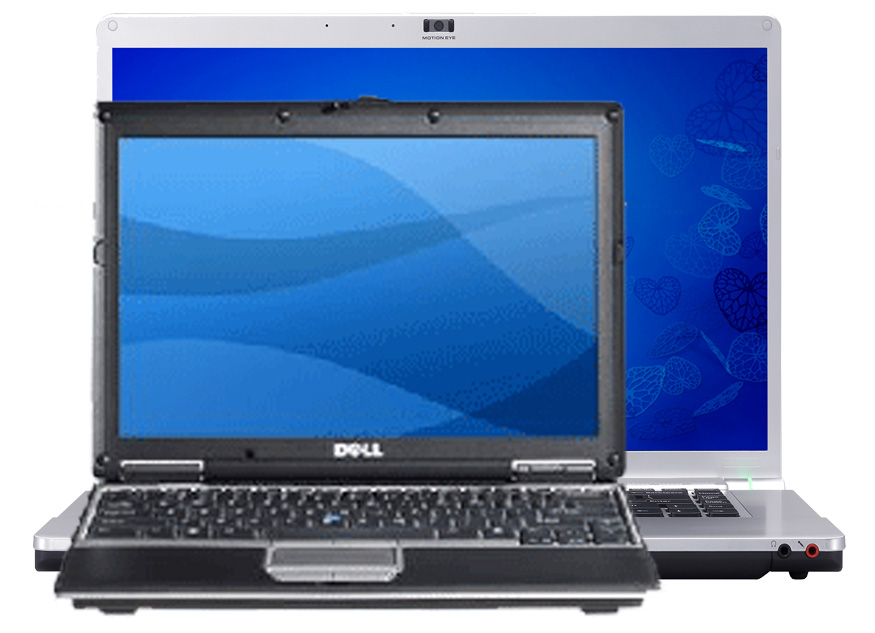
Here's a fairly accurately scaled depiction of my current laptop (Dell D420) compared to the Sony FW. It'll be quite an adjustment for me!
Attached Files:
-
-
Good to know, I doubt they'd generate a list though. This is the first time I've heard of PortableOne, via this thread. Are they here in the US or in Europe. I noticed after looking at their site last night, that they have the BX and BZ models (14" & 15") , both which are not sold in the US?
How were you able to determine a fairly accuarate scale of each photo you overlapped to get an asessment of what you may be adjusting too. And "adjusting" too meaning for the good or bad? Good, right? -
I think they're in Northern CA.
I used SizeEasy.
Good for the screen size and clarity difference... bad for the footprint size difference. -
No, they'll totally wipe the partition and give you a recovery DVD instead. That's the best part as having a wasted 5GB is pretty useless and doesn't help you when you have an HDD failure or want to change the HDD (probably the most common thing to change on a lappy).
Hidden recovery partitions = yuk!! -
Basically, you're looking at a clean Vista install + special vaio drivers, camera capture utility, vaio power management, vaio update and 'smart wi' for wifi, bluetooth and 3G.
-
I've never done one, but I definitely will if and when I get the Z, and maybe when I get rid of my SZ prior. So are these the basic steps?
1. do a clean install of Vista, I've seen a link from another thread.
2. create a recovery disk of that quick install (a.k.a clean image)
3. put the clean image back every 3 mos. to maintain performance.
And I won't have any problems with drivers as others claim in other threads? -
I always wanted to know, is there a way to make a vista dvd from the backup partition on the hdd? I never have done this before since I always had a cd os, ie xp. Why don't companies ship the os on discs anymore?
-
I don't think you will have any problems. All drivers for Vista are supplied on the Sony site.
At point 2 you need a program like Acronis True Image (or does Vista have something build in?)
New Vaio 2008 model listing with indication prices - FW - Z - SR - BZ
Discussion in 'VAIO / Sony' started by Phil, Jun 23, 2008.