 Problems? See this thread at archive.org.
There is a difference between OS software RAID and software RAID provided by an Intel (or similar) software based RAID controller. The big difference is that it is not a function of the Windows OS, but rather the driver set provided by Intel (or NVidia or whomever) Thats a significant difference.
RAID 5 requires 3 drives as a minimum. The fault tolerance of RAID 5 is that parity is distributed across the striped array effectively limiting the capacity to N-1 (less as the array gets larger, but N-1 for 3 drives). It is pretty easy to identify the drive that has failed since the RAID BIOS will. In a RAID 5 drive failure, you only replace the failed drive.
Intel doesnt get things wrong. RAID 1, RAID 0+1 and RAID "10" (1+0) are all specific things. If Intel says "RAID 01" then they mean that the drives are striped, and then the strip set is mirrored. RAID 10 implies that the drives are mirrored, and then the mirrored pairs are striped. RAID 1+0 maintains performance better since, when a drive fails, the other 3 can be used. In 0+1, if one drive fails, that stripe set is obviously taken out of the game and you are down to reads being distributed across 2 drives.
In RAID 1, obviously 1 drive is mirrored to another for 100% fault tolerance at a high cost. In many cases reads can be distributed across both drives increasing performance, but of course writes require doubling since each drive must be written to. Real world performance isnt severely impacted however, since the drives are also normally split across different channels.
In RAID 0, performance gain on reads scales with the number of drives, but risk scales with the number of drives as well. Write performance isnt impacted, but again, the risk is high.
Since SSD drives (even MLC) are considered to be far more fault tolerant than HDD (no moving parts), RAID 0 isnt considered such a horrific risk. Still... One drive down and the RAID is a goner.
None of this is news... Just spend some time on any RAID site and you can see. There are many other RAID levels as well. On enterprise builds with DAS, typically you will see RAID 10. Lots of cost, but great balance of fault tolerance and performance without any real overhead on writes.
-
-
In terms of speed, the express card has a faster transfer rate than a firewire. And sad, but true, there are still some Hotels that still don't offer wi-fi or ethernet. You can always purchase an external modem device for dial-up (lol).
The name "metal mosaic" is referred to the design and not the material used for the lid, which I guess is carbon composite. Analogous to car paint,we know that platinum silver is referred to the platinum-color tinge of the paint itself, and the word platinum has no direct reference to the steel/aluminum, in which the chassis is made of. -
「ダイナミック・ハイブリッドグラフィックス」機能の切り替えスイッチ。SPEEDは外部GPU、STAMINAはCPU統合のグラフィックスを利用する。AUTOは自動切り替えだ グラフィックス機能は、外部GPUとしてNVIDIA GeForce GT 330M(専用グラフィックスメモリ1Gバイト)を搭載し、CPU統合グラフィックス機能のIntel HD Graphicsも備えている。本体内蔵のスイッチから、高性能な外部GPUと消費電力が低いCPU統合グラフィックスコアを状況に応じて切り替えられる「ダイナミック・ハイブリッドグラフィックス」機能は、VAIO Zならではの魅力だ。
"Mr. Suzuki says that this AUTO mode is a part in which it has a hard time most in development. 「When developing, it developed by work of the person in charge's three companies (Intel, NVIDIA, and Sony) closely stuffing with the specification at the teleological conference etc. , gathering, and debugging it all together. The BIOS part etc. that supported NVIDIA and them below about Intel and external GPU were able to cooperate well with Sony, and, at last, the control related to CPU and the chipset was able to be achieved though there was an idea of an automatic GPU switch ahead as an ideal. 」It talked. Moreover, the device of making the switch three corner type so as not to change into the operational mode not intended is seen."
After reading this paragraph, I don't understand why new Z doesn't support Nvidia Optimus
-
Looks like you're right. If that's the case, I think the reason will most likely be because the new Z series is not thick enough (the height of the notebook has decreased from previous Z series) to implement a "screw-on" CPU structure. I guess that's the price of going with a "super" thin notebook.
On another note, if the CPU is really soldered onto the motherboard, then if the next refresh uses the same motherboard/chipset but includes newer CPUs, then the only way to upgrade the CPU is to replace the whole motherboard instead of just the CPU.
-
I made the mistake of pulling the trigger on the 1st gen. 32-bit Z540 - I had nothing but problems with it. After following Sony warranty service protocol and sending it away 3 times totalling 5 weeks of downtime, it was finally replaced with a 64-bit Z790 right near the end of the warranty period and I couldn't be happier (except for the 5400 HDD they shoved in there and not letting me pay extra for BluRay). I remember however that no sooner did I buy the Z540, then the Z690 came out which rendered me obsolete and then much to my surprise the Z790 and Z890 came out shortly after that! Changes were higher screen resolution, native 64-bit OS, faster processors...
Now having a bit of insight into how SONY operates and this new Z about to take off after 3 months of waiting, foresight tells me to hang in there and wait for at least the 2nd gen. of these SSD based Z's to come out because it won't be long! And perhaps they'll heed the consumer call for TRIM support & USB 3.0.
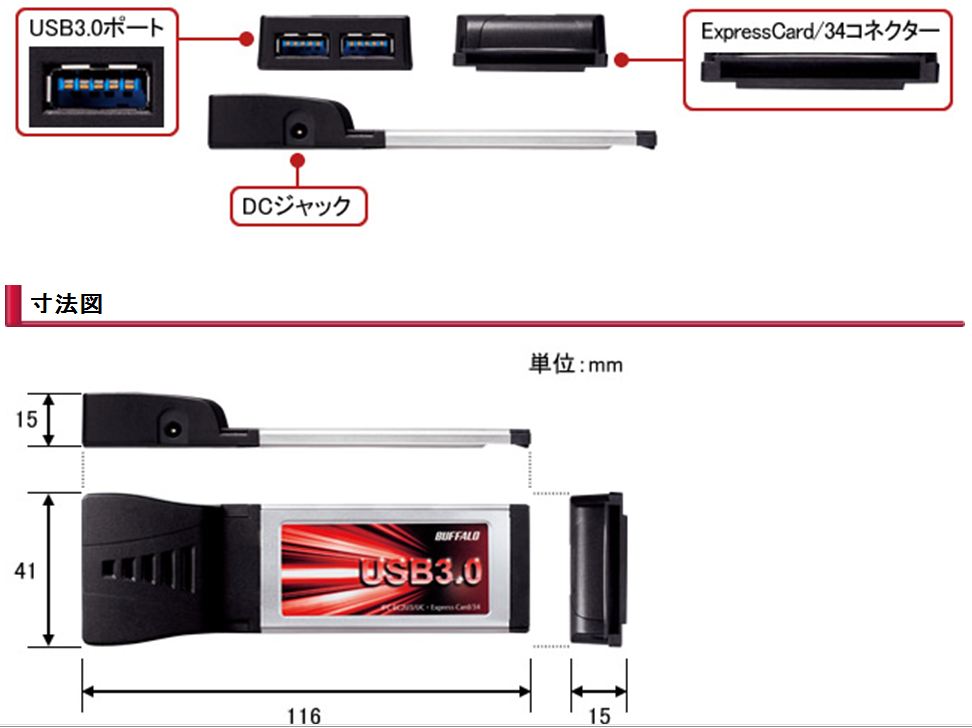
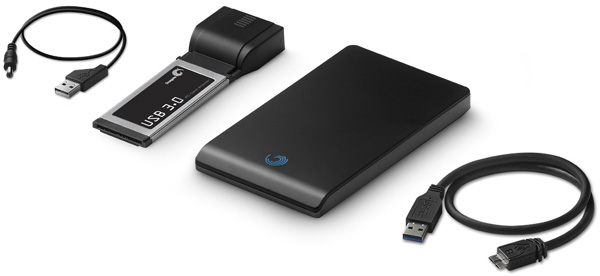
I do want another Z, especially with the backlit keyboard & BluRay since I can actually use it now and have been gearing up to accept this whole RAID 0 configuration as well resigning to the fact that I would not have native USB 3.0 support but could get it from an expresscard adapter until... research revealed that USB 3.0 expresscard adapters need to use an extra USB wire for power (and in some cases an AC Adapter!) It's not just plug and play as a lot of advertising makes it seem like it will be. As if I want a bloody USB cord dangling off my expresscard! Come to think of it, perhaps this is the reason why SONY added the 2 USB 2.0 ports right beside the expresscard 34 slot?...
http://techreport.com/r.x/2010q1/seagate-usb3-blackarmor-il.jpg
Alternatively, if waiting around for a release of what I really wanted became a bit too much or if these kinds of nuisances + too high of a price premium popped up for the new Z, I was thinking of getting another loaded Z790 with BluRay that has been on sale for $2K at SONY Canada, but after putting this off I just noticed that the Z790 has gone back up to full price for the extra options! So I either seem to have really bad timing or SONY knows how to play their cards juussssst right!
So I can't go back now and I can just feel that buying the current SSD Z will leave much to be desired. I remember feeling pretty annoyed with that Z540. Is anyone else feeling that the 2nd gen. SSD based Vaio Z, will be the one that hits the mark?Attached Files:
-
-
Yaaaaaaaaaay, CTO in the UK....!!!
Ooooooooooh, look at those prices..... lol
I'm thinking of getting the extended battery with mine... Does anyone have any idea how much it will stick out, and in which direction..?
With any luck, this machine will be the ideal replacement for BOTH my SR and TZ....
-
Hi People.
The Pre-Order Configuration on USA Sonystyle for 256GB (256GBx1) Solid State Drive with RAID 0 will be QUAD SSD ? -
I don't see what's so great about Optimus, I think what the Z will use is slightly better. Sure, Optimus allows on-demand switching of GPU, but manual switching is fine for the most part since it's not hard to remember to switch before launching any graphics intensive applications. And since the Z already does automatic switching for battery/AC power, this takes care of most of the switching scenarios anyway. The downside of Optimus is that the video output is always routed through the integrated GPU and uses the shared memory of the integrated GPU for framebuffer, so that area of the chip can never be adaptively powered down. Whereas with the multiplexing solution used in the Z, when using the discrete GPU, the integrated GPU area of the chip can be powered down because it's not being used at all. This should allow you to squeeze some extra battery life when using discrete GPU while on battery power.
-
On the French Sonystyle the new Z has this option. With either model you can select HD screen or 1600x900.
You can even configure it with and HDD in place of the DVD/BR drive.
Same for iLink (1394), you can choose between 2 USB + iLink (4pin) or 3 USB ports.
https://www.sonystyle.fr/SonyStyle/Ordinateurs-portables-VAIO/Serie-Z-13-1 -
So what about protecting our babies once we get them? Someone earlier suggested using "ZAGG" shields, but the reviews I'm reading across the net don't praise them very highly. It would be so nice to have a clear cover on the front of the Z that prevents all scratches and is invisible. Same for the palmrest areas where the paint will wear off.
-
Same here in Germany. And the HD screen only costs 50
What do you guys think is the smarter choice?
HDD without optical drive and updating to SSD later when prices are lower then today or SSD with optical drive?
The price differential is approximatly 200 in favor of the HDD.
Are there any problems in using an external optical drive as boot device? Is it possible to use the OS on a Vaio notebook its delivered with? The first action I've did with my new Dell, 2 years ago, was installing a fresh OS... -
Like i said before in this topic. Yes the 256gb SSD will be QUAD SSD (4x64) (or atleast the japanese 256gb model is)
It seems for upgradability its better to get the HDD version, but i would get the SSD version as i don't like to ''invest'' in old technology.
And about the external drive. About every notebook/desktop from the last 4 years can boot from USB. -
My experience is that it depends on BIOS support for external optical drive or USB boot.
If the BIOS supports it then it's no problem, if not... wait for Sony as usual. -
I would expect Sony to allow booting from an external DVD drive, since on the model without an optical drive you will probably still be expected to burn your own backup discs, from which you may have to re-install at a later date...
-
Does anyone think installing Linux on the new Z will be a problem..? I seem to recall the hybrid graphics system of the old Z made it a massive headache...
-
So far Sony appears to be accurate on describing how the SSD arrangements will be made up. So if it really is 1x256 it will be dual and not quad. There are other countries that are apparantly fitting 2x128 for the 256gb configuration, which would be quad. But if SonyStyle.com is describing the arrangement accurately, the US CTO 256gb will not be a quad setup. Of course those specs could be wrong, but it's never a good idea to bank on something being incorrect...
As regards the second generation... there won't be any meaningful hardware changes. If past history means anything, future generations of this Z will get new CPUs, new chipsets, new storage options and possibly new operating systems, however none of the base hardware options will change. USB 3.0 would only be added if the next (or whenever) Intel chipset supports it, and doing so wouldn't require a redesign of the motherboard. -
I was also considering to wait for the 2nd (June?) or even the 3rd (September?) generation to avoid early problems. Or at least wait for user reviews to see whether there are any issues. When did your problems with the old 1st gen Z start to appear?
My only concern is that my Vaio VGN-S (5th gen) is already 4,5 years old. It had absolutely no problems until now, so I can only hope that this won't change in the next few months. -
This is a point I'm thinking about too. But according to the whole discussion about TRIM support and decreasing speed of the used raid array it seems to be the better choice to upgrade the Z with a high performance 2,5" SSD.
As I think, the missing optical drive would increase mobility because of lower weight and better battery life. Is this a correct assumption? -
No i think its not. The SSD is (much) lighter than the HDD, i'm guessing they would be roughly the same weight.
-
Seems the US is getting screwed on CTO options, anyone know whats up with that? All other sonystyle stores can configure a higher res screen & opt for a standard HDD, both options i would jump on. How would someone in the US get a notebook with these options? Order from the UK store?
-
He said he would switch the HDD for SSD, so yes, his assumptions are right. Not sure about the battery though, as the optical drive can be turned off on battery anyway...but I quess that quad SSD will take more power than single 2.5" SSD. I would do the same. You'll get the best performance and better weight.
-
Yessssssss, here in Italy it's possible to select 2 USB + Firewire 400 ports
instead of 3 USB ports. This is great news for me.
I would ask you guys just two questions:
the difference between 1600x900 and 1900x1080 full HD screen is only
50 Euros. Why? Well, I suppose technology it's just the same, so the extra resolution (full hd) is it only interpolation?
Does anybody really know what "metal shield" means?
Materials quality or just aesthetic design?
Ciao -
Yes, you are right. With the HDD equiped, the machine will be slightly heavier than SSD+optical drive.
Of course it will be lighter if you change the HDD to SSD -
Sorry if these have been answered, but I haven't been able to keep up with the thread lately...
First question:
- Does anyone know if I can/where I can configure-to-order a VPC-Z to have no optical drive and SSD only?
Perhaps in Japan? I can't translate the flash-based configuration site. I think I would configure a model to have dual SSD 256GB (lighter and cheaper than quad SSD 512GB) and no optical drive (I just never use it) as well as no finger scanner (cleaner look on the front and I don't use it). Also, I'd go Core i5 if it turns out it has moderately better battery life, and 4GB RAM because from my usage I never need more than that.
My second question is:
- Does anyone know if drive-free configuration has a blank panel where the Optical drive door is? or if instead it uses a different underbody panel to cover the tray door seamlessly? I remember the old Z or SZ would have a extra USB in the space where the door was. Has anyone seen a picture of the optical driveless model?
Third question:
- 1920x1080 models states 96% Adobe RGB gamut, whereas the old 1600x900 state 100% NTSC Gamut. I've seen comparisons that show Adobe RGB gamut as nearly the same as NTSC gamut [1]. I also saw "wide gamut" mentioned [2] on a japanese review, in which case the newer "Adobe RGB wide gamut" would have a big advantage over NTSC. Any color gurus here who can clarify this?
If there's no big difference then I am going for the less eye-straining and probably less battery consuming 1600x900, as 1920x1090 needs a brighter lamp.
[1] http://www.babelcolor.com/download/A review of RGB color spaces.pdf
[2] http://plusd.itmedia.co.jp/pcuser/articles/1002/17/news045_3.html -
I just feel sorry for them to put so much effort on the auto switch. Then Nvidia (and Intel) released the new technology right after the Z was announced. May be they think it is still better than optimus. But I still think no dark screen during the switching of gpu is really a good selling point
-
It's just aesthetic design.
-
Um, no. I have a server over in the next room that has an Intel "northbridge-assisted" RAID. Setting up the drives in BIOS wrote a marker at the end of each disk. When I boot it, my boot loader and device driver software (in this case grub and dmraid) reads the markers, identifies the disks, assembles the array, and stripe/mirror them accordingly. No Intel driver is used at all.
The difference between this and a "pure" software raid is the BIOS screen which allows you to do maintenance tasks like adding/removing members from the arrays without booting first. That's it.
But that's awfully convenient for two reasons:
1: It allows you to use RAID even for the boot disk, as long as the OS in question supports booting from software raids (like newer Windows versions and Linux) and can read the markers on the drives.
2: It makes rebuilding when a drive fails (not for RAID 0, obviously) much easier than with a "pure" software RAID.
Drivers that the vendor provide aren't really needed, and mostly provide functions similar to the BIOS housekeeping screen from within the OS itself. Sure, that can be convenient too: if you have a designated spare drive, you can replace a failed drive on-the-fly, and you can also verify an entire RAID, and sometimes there are extra tools for realigning file systems, providing SMART alerting or otherwise extra functionality.
While your explanation of RAID 10/01 is correct, I think you misunderstood and thought that I didn't know my RAID levels and that 0+1 and 1+0 are different things. Not so.
Intel does get this wrong, and what they call RAID10 is really a RAID01.
Or, rather, they probably know the difference perfectly well, but choose to call it RAID10 for marketing reasons. To a lay man, the performance is the same while the array is running, and they likely wouldn't understand the logical difference, and might even think that the number signifies the performance.
So I understand why Intel fibs here, even if I don't like it as a professional.
But really, when you set up what intel calls "RAID10" in the ISW post-BIOS screen, what you will get is a RAID01. It's a mirror of stripes, and not a stripe of mirrors, like RAID10 would be.
The silver lining behind the cloud here is that a RAID 01 is perfect for a pair of sandwiched drives, like in the new Z. The reason being that if a drive fails in a "default" set up RAID 01, you can replace one of the physical "units" (sandwiched pairs) without losing your data, and with only one level of RAID repair after putting a new unit back.Code:# dmraid -s *** Group superset isw_ijbcgfjei --> Active Superset name : isw_ijbcgfjei_Volume0 size : 3907038976 stride : 128 type : raid01 status : ok subsets: 2 devs : 4 spares : 0
-
The majority of weight comes from the battery. Try pulling out the battery and see how light notebook itself is. The difference in weight between SSD and HDD is negligible, you won't notice it unless weighing notebook on precise scales.
It's like carrying plastic pens instead of metal ones because plastic weighs less
-
QFT. This really makes no sense to me at all. Why would multiple countries (Japan, Germany, China, etc) get a HDD option but not the US? Id buy this laptop in a minute with an HDD. Its cheaper which is helpful, I can use an external optical drive (I don't need it when traveling) and can upgrade the HDD to SSD later.
As it is it is looking increasingly likely I will have to pass on this machine because I don't want to get involved with a high maintenance SSD scheme. And buying from another country results in import issues and warranty issues so I'm not sure how viable that is either. -
Nice review accompanies that link posted a page or two back with the teardown pictures. Some interesting notes (as far as I can decipher the translation):
-Palmrest does look to be plastic
-LCD surface finish is different than previous models - has an anti-glare coating.
-Touchpad supports at least some multitouch, including pinch zoom.
-Review of performance/battery life to follow
-Peter -
Ok, Google translate is seriously letting me down here. Does this mean that the Z does indeed have multi-touch?
...
Anyone read Japanese? Seems to mention pinch to zoom.
![[IMG]](images/storyImages/l_tm_1002vaiozr57.jpg) *
http://plusd.itmedia.co.jp/pcuser/articles/1002/17/news045_5.html
*
http://plusd.itmedia.co.jp/pcuser/articles/1002/17/news045_5.html
-
Yes new Z definitly support multi touch since it has synaptics touch pad.
-
The no optical drive + SSD option is not available in Japan (or anywhere else, AFAIK). You'll have to replace the 2.5" disk with your own SSD if you want this configuration. I'm planning to do this, since I also never use the optical drive.
I guess that the new Z will be like the T Series dual-disk model. Sony had a filler plate in place of the optical drive (no separate underbody) and an extra USB port. I used to have that Owner Made T, and loved it (the resolution was just not high enough for my work, though). I'm not sure if the new Z will have a USB port there or not; it would be nice to have 3 USB + 1 Firewire port...
Can't help here, except for add that the 1080 panel is 8-bit (though my source is only a number of posters on the Japanese forum).
I'm elated that Sony finally switched away from the horrible Alps pad. The new one will have a Synaptics pad with all the various 2-finger gestures (rotate, zoom, scroll, etc.). What is the "momentum" feature? -
Well, here's our answer about the HDD model:
http://uproda.2ch-library.com/2145180Wp/lib214518.jpg
More or less as I expected; too bad there's no extra port. The text in the photo says they can tell the two apart by the optical drive eject hole.
A few more photos:
http://uproda.2ch-library.com/214520VwI/lib214520.jpg
http://uproda.2ch-library.com/214514exK/lib214514.jpg
http://uproda.2ch-library.com/214513k3T/lib214513.jpg -
Thanks v.much dimension6
I too would be interested to do what you are planning, but it would require either a) ordering the HDD version then swapping the HDD for SSD. However the SSDs Sony are using are called "proprietry", so does this mean you'd have to order it as a spare part? or would you just hook up a standard 2.5" SSD (which is not ideal)? b) order an SSD model, rip out the CD drive and either order the blank door as a spare part or superglue the existing one shut. Sigh, wish I could just CTO it how I wanted!
I assume this just mean kinetic scrolling (inertial). Flick a webpage on the trackpad and it will continue to decreasingly scroll down with momentum. -
Why standard 2.5" is not ideal? I would always go for standard 2.5" SSD of my choice than the one from Sony...
-
The HDD model just uses a regular 2.5" SATA disk (presumably) in place of the optical drive, so I would be swapping the 2.5" spindle disk with an Intel X25-M. The only worry here is the warranty.
Thanks! I guessed it would be something like that. -
Well the warranty will be surely gone if they will find out you broke into...if not, you're safe
-
I just say that because my objective would be to have the laptop be as light as possible. The 2.5" SSDs in metal enclosures will probably be heavier... Other than that, I agree with you.
-
Well, you'll not be able to notice it for sure. And I wouldn't be sure, if quad SSD with metal holder in between will be lighter than one in metal enclosure. And if you want to be sure, why don't you take it out?
-
A 2,5" standard SSD weights around 80gramms. I think the optical drive + sony ssd will be heavier then this.
A 2,5" HDD weights around 100gramms. This would be still less weight then the optical drive + the sony ssd.
According to the weight of the optical drive and the sony ssd i've just estimated. The crux will be, what they weight and how much of the parts will be left in the CTO'd Z with HDD. -
My two Vertex SSDs are held together with blu-tac and it's been like that for many months now since I didn't bother to order the bracket (wouldn't fit anyway since I am using two 2.5" SSDs and not two 1.8" ones like sony does.
As the SSDs do not heat up like a normal HDD, even after 24+ hours of operation, the blu-tac solution has proven itself. -
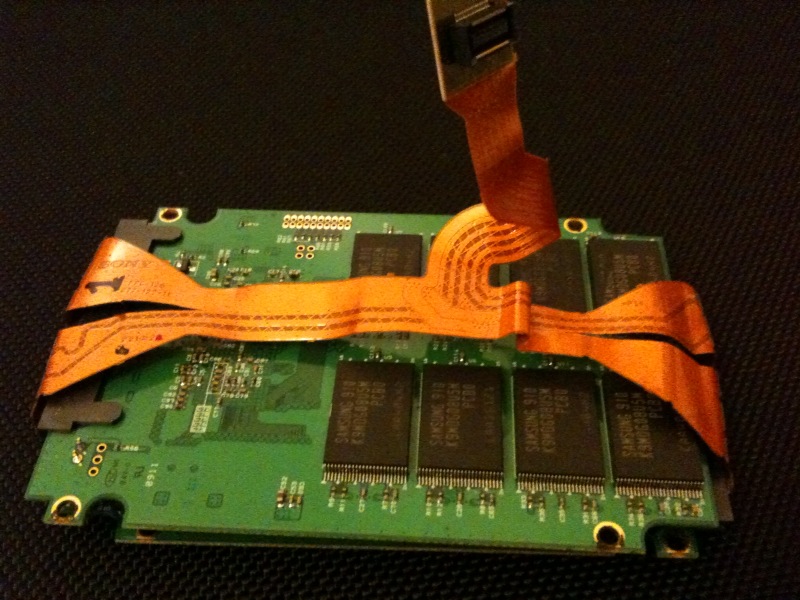
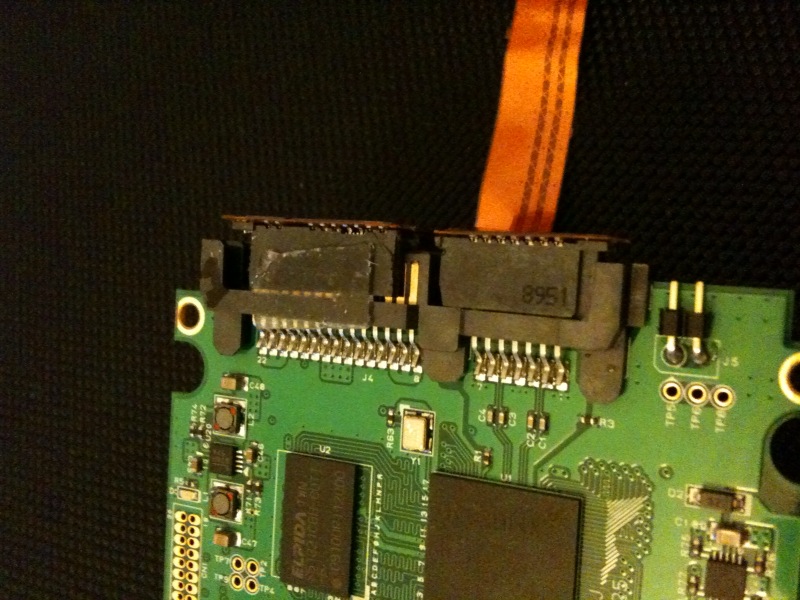
Does anybody know whether that LIF (or ZIF) connector is the same as one SATA cable or combines two SATA cables in one? I'm asking that because if it's no different from conventional SATA cable then we can use SATA->LIF (ZIF) adapter in order to connect 1.8" SSD (X-18M in particular)
Given 1.8" and Sony's SSD dimensions comparison I'd assume that it may be possible to fit two X-18M drives there. And real-life performance (especially random) will be astonishing even compared to Sony's quad setup.
![[IMG]](images/storyImages/116259.jpg)
Do you have case removed on one or both drives? I believe they aren't thin enough to fit without case mods (but I'm not sure) -
I'm just wondering if they got rid of the diagonal interference lines on screen. Maybe with the new Full HD panel...
-
Just got off the phone with Sony, my order is on the top of the list for two of the first Signature Edition Glossy Premium Carbon Fiber Zs.
Their response;
Delivery has been delayed for the 19th or March (so far). Something about a redesign, no specifics. -
Yes, cases are removed.
The ribbon cable is Sony Original Part ordered from here http://www.sparepartswarehouse.com/Sony,Laptop,Part,A1553769A.aspx
The ribbon is intended for the uSATA or Micro-SATA 1.8" SSDs sony is using on the Z so I had to cut the ribbon (and plug) down the middle to separate power from data and then mask out the two pins you see in the power socket.Attached Files:
-
-
nutman
P.S. Look what I've found
http://forums.macrumors.com/showthread.php?t=657341
Whole thread devoted to Lif-SATA <-> SATA connection
![[IMG]](images/storyImages/img0241va.th.jpg)
May work for new Z as well
-
It would be ironic if information on the Mac Rumors site sold more Sony Z's.
Bronsky
-
How future proof would you say these new Zs will be?
And will the SSDs be replaceable? Things have been said that are worrying me. Particularly about the whole TRIM deal mostly because I dont want my SSDs to significantly lose performance as the days go on..unless Im understanding that wrong.
One more thing. Besides the price, is there a reason so many are wanting HDDs instead of SSDs? -
We don't like the SSDs Sony is shipping with the Z
New Z model with Intel Core i5 CPU
Discussion in 'VAIO / Sony' started by exetlaios, Jan 2, 2010.




![[IMG]](http://img690.imageshack.us/i/img0241va.jpg/)


