Problems? See this thread at archive.org.
You are welcome.
However, you do not need to hardware ID numbers anymore. Just grab the latest modded INF and latest driver on laptopvideo2go. Extract the file, replace the INF, point the update driver from Device Manager to it and you now have the latest.
I think they abandoned informing on every hardware ID and just stuck them all in the one file. I'm running the very latest from there without trouble.
-
I want to take on the up grade from vista business 32 bit to windows 7 64 pro on my sz680 I need to upgrade the memory to 4 gig first and look into a good SSD anyone have the steps to make this easy I tried to download all the drivers from sony but the servers appear to busy with holiday traffic,well its not the servers its that crappy download manager sony has, I used another one and its much faster
-
Do not use the Sony 64bit Win7 drivers, they are useless, as are the Win7 32bit stuff. They offer minimal functionality.
Download the driver pack in the first post it has everything you need. I have a new one I am working on though, with more up to date drivers and better compatibility with older machines, I just haven't had a chance to finish it.
Most will suggest the Intel SSD because of speed and power usage and even on 2gigs, the 680 should be okay on 64bit. The 6 and 7 series run better on 64bit than they do 32bit. -
I want to buy the window 7 business upgrade or is it called pro?
but doing a clean install is always a hassle with microsoft.
the goal would be to get this done then image the drive for a backup.
right now I need a good SSD 128 gb or better reliable ! the Seagate hybrid failed and I lost a bunch of stuff I did not have backed up. 4 gb memory and a legal 7 upgrade -
Gidday guys
Has anyone tried to play a DVD using Windows Media Player since upgrading to Windows 7. I know most people don't use it, but I do, as it does everything I need. Whacked a DVD in for the first time since upgrading, and Media Player will not play it (or any DVD). Can someone let me know if it works for them
Thanks and regards
Greg -
Speaking of DVD's anyone else get pretty poor burn speeds?
I looked and my burner is only showing DMA2, and my burn and read speeds seem to be about 11x on DVD burning. Even a USB model can do 24x. I did the AHCI mod and wonder if maybe it's killing my speeds. -
Thanks for this info in the guide!
The computer crashing when I unplugged it was the only thing that was making the move to x64 frustrating (I would end up putting the computer to sleep everytime I wanted to transition from plugged to unplugged).
Haven't had a crash since I followed that step. Now x64 is working like a dream. -
Glad you got it working.

-
does f ingerprint and my safe folder work too ?
-
Happy new year to all.
I upgraded again from Vista to -->W7 64bit because i upgraded my SSD's FW to TRIM I thought i might as well try W7 64bit again because of the TRIM support.
I own a SZ71WN/C so it comes with built in Option WWAN. I also own a Corsair P128 SSD and have 4GB of ram installed.
Like before everything is working.
I tried a variety of drivers actually. I tried the Sony 64bit drivers just to see how they were. I've probably tried these 64bit drivers before but cannot rememner lol.
Anyway as leslieann wrote these are not good. The drivers do not get the wifi switch to work and toggling it on and of is not recognised by smart network. May be it is intended for smart wi only? Also, in the control centre there is no setting for the special function S1 S2 buttons.
I was wondering though i have about four repeated power plans in my power management lol. Is there anyway to deal with this? I've looked in the registry but i just cannot find what to edit.
I'll probably keep my SZ a few more months and then pass it onto someone and upgrade to something else. -
Fingerprint works, I'm not sure what "My Safe" is, but I'm sure it can work.
The Sony 64bit and Win7 stuff has no actual drivers. It is only the software and Sony applications. So no camera, no wifi switching, no disabling bluetooth, no Memory Stick. Also, Battery care is gone, and brightness will not work no matter what.
Not good support really. All they did was take their latest software from other models and offer it to us without a lot of checking.
For the power plans,
You might fix it with an uninstall then re-install of the 3 Sony utilities, like Notebook control and such. Beyond that, I have no idea. If it's an issue, i woudl just do a quick re-install since you only just put it on, it shouldn't be a big deal. Might be easier than messing with the registry.
I too am watching and thinking of upgrading, but really, there (still) just isn't much worth switching to except a Z and I can't really justify that at the moment. Toshiba has the R700 and R705, which is my most likely candidate. When the new Intel systems arrive is when I will get more serious about upgrading, I want to see what happens and I'm in no hurry. -
leslieann:
"My safe" folder is protected folder (created by vaio), we can open it just by use finger print -
Thanks for your help leslieann. CES looks like it could showcase some very interesting Sandybridge laptops. Sony could possibly be moving the Z back to the 13.3 form factor and also the appeal is there for me to get a Mac again as i just bought a new HD camcorder.
Although any purchase i make wouldn't be until around the middle of this year anyway.
I've partitioned my drive and installed Windows XP in a 10GB partition so i can dual boot because there was still some things that will only work in 32bit OS. My scanner is pretty old and the 32bit drivers won't just work in a 64 bit OS.
-
Sorry, I haven't had any use for it so I have never used it.
I'm sure there are alternatives if it doesn't work.
Macs are nice, though a bit pricey, but there is still that one button thing... I feel like I'm using a Barbie/childs laptop. I'm big enough to handle two buttons, give me them. It kills me, they went single button not to confuse people, and their fix is using two fingers instead.
I too had some old hardware that no longer worked, like my trusty serial to usb adapter that works for my GPS. There was simply no way it was going to work in 64bit, I looked everywhere, but I'm not going back! I found a cheap replacement on Ebay. Windows 8 will only be 64bit, may as well start getting ready for it.
Ugh scanners.
Scanner support, particularly HP, has been TERRIBLE. Not just for 64bit, but any one of them made without Win7 drivers always turns into an exercise in futility. I'm ready to tell customers they can have me try and mess with it, or just go buy a new one, it will cost you less. I don't think HP understands the concept of "simplicity". -
hello
is there a modified .inf to install the latest geforce 260.99 drivers? i have been looking all over for these... i still have the 19040 ones... on my vaio vgn-sz71xn/c
all other work ok.... even camera and fn button! however sometimes after reboot they do not work.... like they are stuck or something
anyway i really would like to have the latest geforce drivers installed on my vaio and the certified 260.99 can not be installed on my machine.... i get the common error....pfff
i also checked laptopvideo2go but they have sooo old drivers there(not certified ones.)... -
The first post in this thread is outdated in this regard. Unfortunately, laptopvideo2go is also lagging on things.
We can use the latest drivers, if we use their modified INF, you do not need to search the device numbers anymore, just find the latest with an INF. Unfortunately, they haven't made one for the latest Nvidia driver yet. As for certified, you can pretty much forget that happening as Nvidia and Microsoft has to do that, and neither is going to help us in that regard.
After some digging,
It looks like the newest they have with a modded INF is 266.35:
How to find it...
Go to their site, then the drivers button up top.
Scroll down to the newest one with your OS listed. With Win7 64bit, that would be 266.35.
Click the link to it.
Click the through the next page.
Scroll down, you should see the link for the driver and inf.
If ever the inf is missing (for a while it was), you just go down the list of available Win7 64bit until you find one that includes an inf. The 266.35 has the driver and inf, so you should be fine. -
Just a little info about NVidia Driver, laptopvideo2go has just updated their site. Now 266.87 and modded inf file is available to download.
I've downloaded and installed it succesfully
-
Leslieann,
Previously used this guide to convert my SZ791 to Win 7 64 bit. Generally successful, with minor issues. Thank you!
Recently had my SZ in for extended warranty service (after biting the bullet and buying a Z for my primary PC), and received it back with the originally shipped Vista Business 32 bit operating system. Oh well...
Read in a recent post that you are currently working on a new/improved/revised guide.
Any update as to when that will get posted?
What improvements do you have planned?
Thank you in advance - from the work you've done here before, I am sure the new guide will be a success, as well. -
I am going to try and get it done this week.
It will have updated drivers, and the Sony utilities will have the model lock removed so they will install on any SZ in hopes of fixing older models.
Also, it will be laid out a bit differently I think.
Since you have don it before, use what is here, it won't change much for you really and Vista stinks. I just want to get it up to date and call it finished is all. -
Vaio Camera Capture Program 2.7.03.09250 works with Sony Visual Communication Camera VGP-VCC7 6.1004.210.0 on Windows 7 64 bit
Update:
In order to get green light work while the camera is in working state - you need Vaio Camera Utilities with Sony Filter Driver.
I have installed the utilities (tried two versions 1.*** and 2.***) but VCUServe.exe doesn't start... I suppose that the problem is in driver for Sony Visual Filter, which come within the utilities but only 32 bit version. I found 64 bit filter driver and installed it succesfully but VCUServe.exe still didn't start.
More investigation is needed to solve this problem...
Sony Camera Utility:
1.0.01.01250 SOAOTH-01146101-UN.exe Sony eSupport - VGN-FJ180P/L - Actualización de Software y Controladores
2.1.00.11140 SOAOTH-01276710-US.EXE Sony eSupport - VGN-UX180P - Software Updates & Drivers
Sony Image Filter (64 bit + 32 bit):
1.1.07.04020 SODOTH-12946300-US.EXE Sony eSupport - VGN-CR120E - Software Updates & Drivers -
dear leslieann,
I just did clean install with win7 build 7600.16385 32 bit.
SZ28gp
The only problem on other device (device manager):
biometric coprocessor and 4 unknown device. sound, display and everything installed automatically
I was unable to install :
Step 4
Install the Sony Shared Library.
Step 5
Install Control Center.
Step 6
Install Notebook Utilities.
the warning was "this update can only run on microsoft windows vista"
guide me please,
thx -
Hmm, haven't had to do it in a while but try using compatibility mode.
Right click on it, go to the compatibility tab, and change the dropdown to Vista. -
Does anyone occasionally gets BSOD when closing lid, or laptop freezes, instead of going to standby (or hibernation) ? I can't believe i'm the only one.
-
well whadaya know. I was thinking about another reinstall next week. Looking forward to the update. Thanks for taking care of us who sony wouldnt.
-
had tried, compatibility mode in grey color, couldn't change it ...
-
Nope, but I would make a guess that it's a software issue. I have found Windows 7 sometimes acts funny or develops strange behavior for no reason.
You're welcome. It may be up tomorrow, we'll see.
Make a shortcut to the program on your desktp, sometimes that will let you. -
Updated!
Almost 1 year to the day since the last revision.
Updates:
Almost entirely re-written and re-worked. Only bits and parts retained along with documentation at the end, the rest is almost all new.
Updated drivers on almost everything.
No model checks, so anyone can install onto any SZ. These are the same files you find on various worldwide Sony FTP's.
This allowed me to strip out Battery Care and Sony Launcher (neither of which worked) and put in a working Battery Care without having to overwrite anything.
WWAN/SmartWI info
Added troubleshooting for older model brightness issues. Any help testing what I wrote there would be appreciated. Just need someone with an older model.
Checked, and triple checked for issues, it should be good.
Barring new info (unlikely) or bugs in the install guide, this will probably be the last significant update. It won't be too long and we will be looking for an upgrade or Windows 8 will be out and there just isn't much left to fix or newer drivers to be expected. We went a year on the last one, and this should last at least as long. Will there be a Windows 8 version? If I still have this notebook, yes.
My thanks to those who helped with this.
Oh, and if you haven't looked recently, take a look at teh views and replies for this thread, it's HUGE! -
Thanks! When you are top result, you know youve done good work. http://www.google.com/search?sourceid=chrome&ie=UTF-8&q=sz750+windows. Ill probably be using this for the next year, so you have my gratitude
-
Okay, already found some bugs...
Not sure what caused it, but it does leave you with two battery care systems in Sony Control Center, and a dual of something else. However, I think that the fact that this should work better for all SZ models makes up for that shortcoming. It's not like you see that all of the time.
I may see if I can come up with a script or something to remove the duplicates, rather than revert to the older way. This version seems to install and run well otherwise.
Wow!
Now I have to go see what all is linking here. -
Top job on the guide. It got me away with Windows 7 on my SZ58, and I'm sure I'm not the only one. Thanks for all your help. + rep to you.
-
Thanks, unfortunately I'm seeing issues here and there.
Along with the double listings in Control Panel (I may have an answer to, but not a good one), I also am seeing a problem with brightness in speed more. I can go up, but can only go down as far as what it was when it booted. If it starts at 50% it can go between 50% and 100%, up and down, but no lower.
Otherwise it seems to be running great, it's just minor things you don't see much. I rarely use Nvidia anyhow so I'm not sure how much I want to spend on it.
Glad it worked for you Wettek. -
Thank you so much for keeping this guide up 2 date. I imagine it must be a lot of work to always keep the drivers update and repackage them because of the stupid sony models checks. I really appreciate it. Thanks again!
Kind Regards
Chris -
Guys, is anybody able to use the VGP-MCA20A memory card adapter and SDHC cards?
I read it should be possible, but my microSD 4GB and 8GB cards are not working, while they are working on more latest vaio models. I have TI memory reader drivers from the first post on this thread so drivers "should" be ok? -
The adapter doesn't support SDHC, only SD.
It's an adapter limitation.
Supposedly, in Linux there is a hack to work around the limitation, but not Windows. -
Check this page:
Google Prevajalnik
It is from vaio japan, translated, saying:
For VGP-MCA20A
The ExpressCard slot supports Memorikadoadaputa.
VGP-MCA20A is compatible with the following six types of media.
• Memory Stick (1 ※
• Memory Stick PRO (8GB accommodate up) (1 ※
• MultiMedia Card (1GB can be read to)
• SD Memory Card (2GB for up) (2 ※
• SDHC Memory Card (4GB for up)
• xD-Picture Card (2GB to be read)
I am confused? -
I have W7 64 bit installed and the MCA20A adapter works perfectly with my 8GB SDHC Sandisk card. I'm using this driver 2.0.0.9 14/12/2007. I think it's the HP driver that leslieann linked in her first post. I bought a new Sony adapter as my original one failed. This though doesn't appear to be your problem.
-
The driver from first post is 2.0.0.19, dated 17/10/2007.
can you upload your driver somewhere or send it to my email so i give it a try?
Or the problem is with me using micro SD card with SD adapter, maybe that is not compatible with MCA20A and I should get a normal SD card? -
I think this is the driver
http://h20000.www2.hp.com/bizsuppor...&swLang=2&mode=2&taskId=135&swItem=ob-70996-1
The micro SD card could be the cause of this problem. -
I've installed this driver and problem remains, so I guess its because of micro SD. I will get myself a normal SD card. Should a "high speed" cards work? like class 10 or better?
Another question is flash and their hardware acceleration when watching youtube videos. I cannot get it to work, is there SZ owned that managed to get it to work? -
I watch 1080P Youtube and it works for me using the integrated card. I never use the dedicated card. I just downloaded the integrated drivers from Intel and am using the latest flash drivers.
Buck Bunny 1080p is perfectly smooth for me.
YouTube - Big Buck Bunny animation (1080p HD)
This SZ is still a decent performer.
eta:
I've got a class 4 Sandisk card. Just make sure that you get the speeds you should expect if you get a higher class card. -
Nice update leslieann.
Please don't sell your SZ, and keep accompanying us on installing Windows 8 later...
-
Rachel, is this the same SDHC you have:
SANDISK SD HC SDHC 8GB 8G 8 G GB FLASH MEMORY CARD NEW on eBay (end time 28-Mar-11 16:11:33 BST) -
Yes, that's one that i own. There's a lot of choice out there and if i wanted to spend a bit more i would go for a decent class 6 card. Many of the decent cards out perform the likes of the Transend class 10 cards.
-
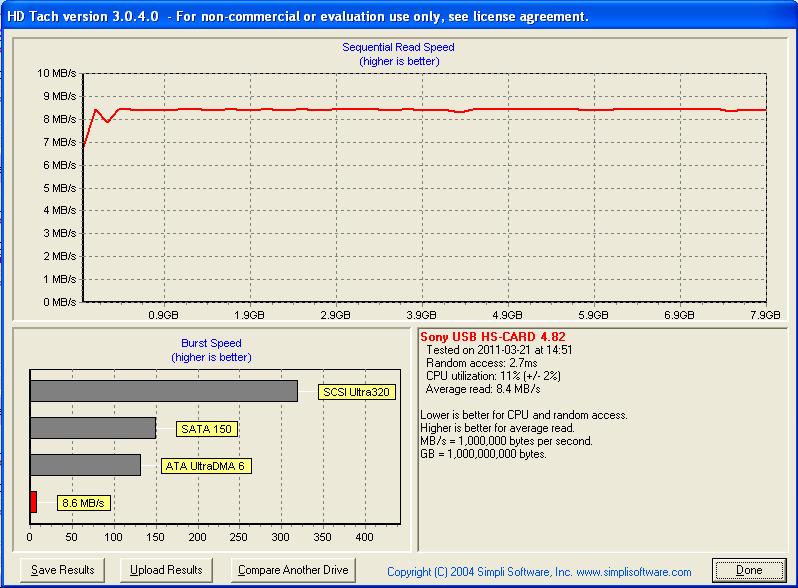
Rachel, can you do a hdtach of your card inside the MCA20A adapter:
HdTach
I only need about 2MB/s speed, so class 4 is probably enough
-
I uploaded it.
Attached Files:
-
-
Thanks!
I've ordered mine, i hope HK mail will be fas
About the youtube video...it is playable, but cpu usage is rather high. I know flash supports hardware acceleration, but i cannot get it to work on my laptop so I suspect sony removed some of GPU's specifications -
You can get it £7.99 from Amazon with free shipping.
SANDISK 8 GB Secure Digital SDHC Card: Amazon.co.uk: Computers & Accessories -
Jea, if I'd live in UK..but I dont
-
I think you used to right, anyway, good luck with that and i hope that it works for you.
-
Strange.
Documentation I saw regarding this was that it did not support SDHC.
All SDHC cards I tested also failed, then again, so have many SD cards.
I tried Rachel's driver, with no luck.
I even used Driver Max to update/find the drivers with no luck.
Mine has always been fickle, I got it used, so who knows.
Sony SZ750 Win7 64bit clean install (should help on other SZ's)
Discussion in 'VAIO / Sony' started by leslieann, Oct 24, 2009.