Problems? See this thread at archive.org.
Hello ZoinksS2k,
unfortunately for me is not easy to follow and write to the forums often time because my work keep me too busy,
last month I made the the wwan upgrade and i have already posted my result in the other forum......
now I would like to upgrade my ssd up to 512gb and I need to know which is the cheapest way.
thank you
-
-
There isn't a cheap way. You would need you abandon the 192GB drive combo to replace it with the 512.
The most cost effective way of getting the 512GB setup is to buy it that way.
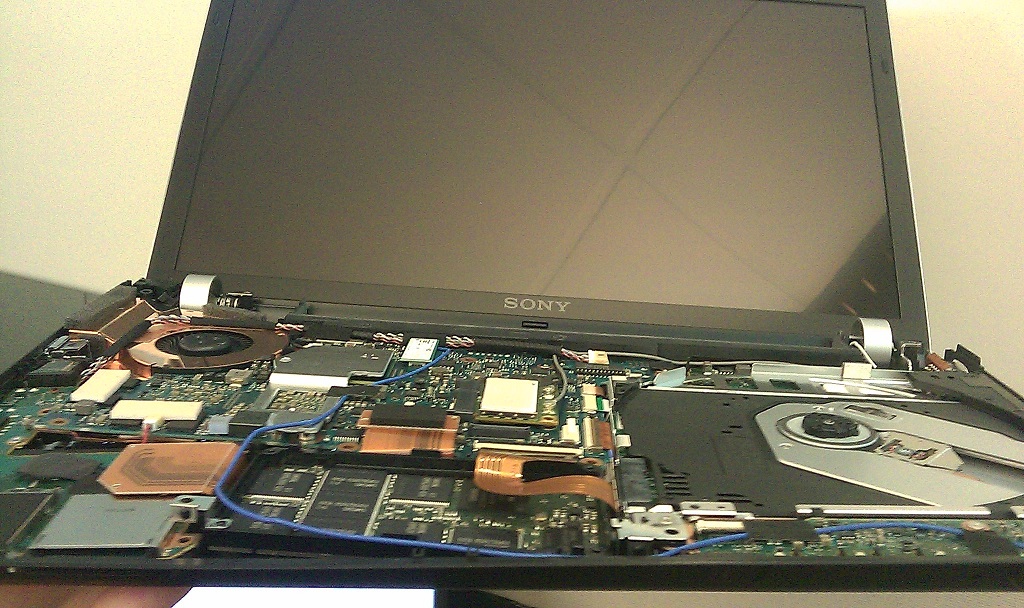
You can see this pretty clearly in the photo's I posted in the thread. -
Thanks for the review.
I'm remember seeing you did review the old Z too before
-
thanks ZoinksS2k,
do you remember the thread page? -
![[IMG]](images/storyImages/z11.jpg)
my Result with Quad SSD it`s very nice
-
Hey guys, i have a little question to those who own the metal mosaic z12:
The whole displaycover is made out of metal, right? magnesium?/carbon?
The botten is plastic? right?
And most important: What about the area around the keys - the chassis, also metal? Which metal?
Thanks alot
-
Hi everyone!
I've just recently purchased my Z11(3 weeks ago) with a 500GB HDD.
(I know.. Couldn't afford the higher spec ones with SSDs and more RAM and everything - On a student's budget! =/)
But i was wondering if it were possible for me to swap my 500GB HDD out for another standard-sized laptop HDD or perhaps SSD?
Btw, this is my first laptop purchase ever, and I must say - the Z11 is pretty darn good! =D -
Yes, swapping out the HDD with be the same as a person with SSDs swapping out their DVD drive. As long as the drive fits. I think it has to be a 2.5" drive. someone correct me if i'm wrong. Although a 1.8" drive with a 2.5" adapter should work too. I'm not sure about the connection they use though.
-
Umm, the configuration for the HDD-optioned Z is different: the place where Sony SSDs normally sit is empty, and there's a HDD-caddy where the optical drive sits. So, no additional hardware is needed beyond the new 2.5" HDD/SDD (i.e. no need for the Thinkpad ultra-bay caddy). The interface cable is that of the standardized SATA, which is the most common one today. I don't know if anyone has tried using a 1.8" in that space...
-
Thanks much!
I was also wondering why the quoted weight for my z11 was actually heavier @ 1.42kg compared to 1.38kg for those specs with SSDs and Optical drive.
I'm guessing the 500GB HDD weight is probably more than that of the SSDs + Optical drive!
Also, does anyone have an idea of what the bandwidth of the z11's SATA is?
(Sorry if this question had already been answered somewhere else and I missed it. There's alot of posts that I'd already trawled through and it can get confusing) -
It's still SATA 2, so a theoretical maximum of 3Gb/s. I believe it's usually constrained by the speed of the drives themselves.
-
Ah okay.
Now I'll just have to wait til prices drop for me to replace mine with a decent-sized SSD! =)
Say..
If the SSD that I were to use(in place of the current HDD) supports TRIM, will it be just a simple plug and play - and TRIM will work?
Or will I need to fiddle around with Windows 7?
Also, would anyone know what HDD my z11 comes with?
brand, model, etc?
Was thinking of upgrading to a Seagate Momentus XT if the difference in performance is vast. -
Heh.
Found out what it is already after fiddling around abit with the Intel Rapid Storage Technology Icon.
Toshiba MK5056GSY. =) -
Hey all,
I just have a quick question about disassembling the z11 (stock ssd and optical drive). In what step of the disassembly will the warranty be void? I am only interested in dissembling it until i am able to replace the optical drive with more storage. Planning on getting the caddy and adding a 500+GB drive on top of my 2x64GB SSD.
is there anything i should be worried about in terms of compatibility or performance issue when exchanging the optical drive with an HDD?
thanks -
hey guys,
im really in big trouble. i went ahead with the disassembly, i was very careful and took my time. After installing the hard drive, i turned the Z on and the power led would not light up! however the Z did turn on. After booting into windows i realized that my touchpad and keyboard do not work. the keyboard only types some keys (S, Space, W, Z, down arrow key maybe some others but thats it). the black lighting does work however. the graphic switcher also does not light up but it does work.
I was very careful with the keyboard ribbon cable and i made sure not to rip or tug on them. could i have ruined it? i tried taking it out and putting it back in but nothing seems to work.
could there be another cable i took out?
oh god please someone help me. Im going to kill myself if it does not work. -
try to pull out the keyboard ribbon cable and connect again. This issue must have something to do with this cable. You can test while having the laptop open until it works like it should. I had the same thing the first time I disassembled my Z, since then, I rather don't disconnect the keyboard again.
-
I concur, reattach the cable.
I've seen people with damaged cables, but the ribbon assembly isn't as fragile as some have said. I've removed the keyboard connector at least 20-25 times. Now that I jinxed myself, I'm sure the entire cable will melt next time I open the machine up
Pretty odd tho, killing the LED while leaving the button itself working. -
________________________________
update: i just ordered it from global electronics, will take 2-3 weeks to get to them then probably a week to get to me. cost less than the link above. 28 CAD with tax, plus 10-12 cad estimate for shipping.
____________________________________
hey,
thanks for the quick reply. upon further investigation, it appears i did in fact damage the ribbon cable. i need to order the ribbon cable and replace it. for those who are interested the part number is A1769469A based on this thread:
Need New VPC-Z1 Keyboard-Motherboard Ribbon Cable!
i hope i can find it here as i live in canada. through sony's part ordering website, they would not ship to canada. after calling them they told me the same thing. I then called sony canada, they would transfer me to sony parts (which is located in the states apparently) and the circle repeats itself. i am currently talking to global electronics here in canada, they are the parts providers for sony here. when talking to them, the guy was hinting that i might not be able to get the part as it is not available in canada and only the US. i think this is complete BS but hopefully ill figure it out.
anyone willing to order it and ship it up north for me if i can' find it ???
here is the link
https://www.servicesplus.sel.sony.com/sony-part-number-A1769469A.aspx
on a side note, both global electronics and sony freaked out when i gave them the part number. they were asking where i got the part number from. they must have instructions to not give customers info about this stuff or something.
thanks again -
I can't see WiFi card anywhere on disassembly pictures, can you point me to it? I'm interested in replacing it.
-
From page 9 of the VPC Z1 manual located here, the WLAN module is located on the mainboard. Here's the image from Zoinks of it:
Imageshack - dsc00862r.jpg
It's the white thing located slightly right of the center of the image (you really cant miss it) with the 2 antennae leading off into the hinges. Hope that helped
-
be aware guys that sony is scamming warranty , plus in recent times the quality of the products is going WAY down
recently i sold a VPCZ1 (Sony Vaio VPC-Z1390s) on ebay, the laptop arrived and just after a few days it did not turn on any longer
sorry agreed to service the 4 months old laptop under warranty and then they stated that the warranty is void because 1 screw is missing and there has been some damage on the bottom, and the only option is to pay $1200 repair cost
although the screw is correct as i was currius and did open both hardrive and memory bays, and in the process i lost a screw, the damage the spoke of was a minor dent in the plastic where the laptop was secured and got stuck, there was no damage mentioning worth
yet sony stated that who know the laptop probably was tempered with and maybe enen dropped... even trough the error/problem has nothing to do with such physical damage EVEN if it would be true what they accuse us
further more opening the memory and hardrive upgrade bay does not void the warranty , and if it does that alone should be a reason never to buy such product
the guy who purchased this laptop had 3 more, all 3 broke shortly after warranty expired... yet he still buyed this one
stop buying crappy sony products , they look nice but they trash, and sony is scamming where ever they can if you have an issue
BE AWARE people !!!!
here the email from the ebay buyer, im (seller) very upset, cant believe sony makes up such blunt lies to get out of the warranty... that laptop has never been dropped or tempered with, nor by me nor the buyer, and most definitely has no cracks anywhere... im disgusted with how sony treated us
Dear ******,
I heard from Sony Repair in Lorado Texas earlier today.? They said the unit is not under warranty and they want $1200.00 to repair it.? They said the unit had been tampered with?the bottom was cracked, a screw was missing and the mother board had to be replaced, someone had been into the computer, looked like it might have been dropped etc. etc..? They are sending it back and charging me for the freight. I don?t have to tell ?you what I told them but no luck?He just kept saying it was his job to pass on what the technicians had on their report.? Anyways?where do we go from here.?
? -
ok.
/10char -
Uhh... you can take them to small claims court... but you will probably lose as you lost a screw. If you open the laptop, you voided the warranty. Sony can say that's part of the agreement and once you open it they are no longer liable... sorry!
Also, how do you know the buyer didnt drop it or open it himself... -
wht the feck
-
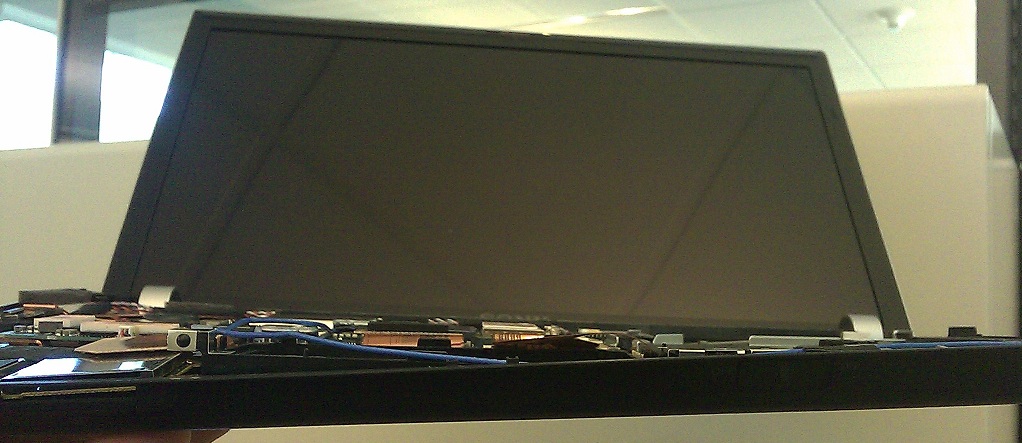
You know.. I could afford a pallet of these, and if you put aside that special feeling of style and cost, you should know that price does not equal taste. This is thing is such a piece of garbage, I absolutely hate mine for at least the knowledge that it was pieced together as cheaply as possible. I tore mine apart just to look it through.. I used to be in tech and I've used many systems, but the Sony stuff annoys me the most, the image being all a front, and cheap crap behind it all. Here are a couple pictures for you, the cheapness of it makes me just -want- to break it, I think I may.
Attached Files:
-
-
Obviously the computer is designed to have the keyboard surround attached to it when in use. What difference does it make when it's not put together?- none at all.
Making the bottom chassis stronger when there's no top piece will result in added thickness and weight. If you want something durable buy a Toughbook. -
I am not talking about its flex, how can you all not see how cheap this thing is? I suppose that has become the way of most things, cars included... In some ways it makes sense since the turn over rate that this stuff ends up back in China's e-waste piles is faster than ever. No sense in making something that will last. The picture was mostly to show how cheap and basic the SSD is. They cut every corner if you look at the internals from a hardware lab point of view. Most consumers don't have a clue though, companies know that. I am not an 'apply fan boy' but I must say that next to this, the Apple machines do a far better job at building it well (while still be cheap, as well things are..)
In corporate, we always hated the Sony's because they didn't hold up. (this is 10 years ago, I don't know how it is now) Of all lines we tried, the Sony's were the most impressive at breaking and just falling apart.. They were also strangely slow for their specs. -
Huh? The SSDs lack the casing to save space... I really don't see how any of this matters when you have the machine all put together. Now things that I complain about are creaky palmrests and palmrests that have wearing paint...
-
It is all related to me, I feel like I was ripped off, that real effort and money were not put in to what I bought. It matters to me even if it is normally covered up. I didn't just mean the lack of enclosure, it is how everything is assembled, pre-Lenovo Thinkpads were far better internally, so is Apple. Paint is one good example of the external cheapness, though common sadly... not that I rate Dell/HP higher. I really don't want to rant anymore, no one who wants to love what they got and feel ok about their choice is going to let my silly opinion bruise their ego.
-
I honestly don't care. The reason there's no enclosure is to keep it thin.
-
jtaravella, when buying laptops (Sony included) these days, the majority of the money goes to components. The actual assembly isn't worth much. Just because you have a $2000+ laptop with a blu-ray burner doesn't mean you should expect a better build quality than a $1000 laptop without, etc.
Besides, it's all relative. Those pics don't make the Z look cheap to me. It just looks like any 2011 tech imo. -
What's all this all about? I love my Vaio Z and nothing will change that fact. Would definitely buy again. Assembly details and intenal pictures - couldn't care less LOL
-
![[IMG]](images/storyImages/Scratch.jpg)
My Sony Vaio Z has a little scratch on the top cover. Does anyone know where I can have this fixed aside from sending my laptop to sony and paying about $250? -
Did you not get a service plan?
-
service plans does not cover cosmetic damages
-
The part number is not that hard to find. You can get the part from sparepartswarehouse or sony parts direct and put it on yourself. Replacing the lid is not hard if you are not squeamish.
EDIT: another better cooler easier idea that I have been thinking about doing to my totally virgin unscratched VAIOs is to buy some exotic skin of ebay like croc, snake, eel, ostrich, whatever and spray gluing it on to the cover
here are some examples for ideas http://www.notebook777.com/index_en.htm
Some of them are awful but some of them are quite fantastic.
This would also be a great solution for all those discolored/warn palm rests
Sony VAIO Z VPCZ1 - Unboxing Photos and Movie
Discussion in 'VAIO / Sony' started by ZoinksS2k, Mar 11, 2010.