 Problems? See this thread at archive.org.
Disregard my last post it seems that the update is now working....I guess my next question would be if I want to drop back down to normal clocks do I just change it in power preference? Ahead of any response thx and thx for all the help...
-
-
here, sorry

Attached Files:
-
-
Drop back as in?
If you leave it idle, it will automatically drop to 135MHz as usual.
It seems that yours haven't been flashed yet.
Have you restart your laptop? -
Yeah, I got the Bios update finishing screen... Wait, I'll try again I guess. Can I get a link to the other bios mhz options as well?
I ran it as Administrator btw -
It seems that with the bios update when I press F2 on boot up it no longer takes me into the bios. Did that change with the update, can I still access the bios menu on boot up....
-
Yup, after a retry with Restart instead on shutdown, it's running at 735mhz. Score increased to 1435.
-
OK, this is really random! After I did the bios update I was getting an error that Operating System Not Found, I thought o crap I have messed up the bios! So I took out the SSD I put back in the factory drive and the laptop booted up and went into windows. So I tried to put the SSD back in and got the same message. The weird thing is that I can no longer access the bios menu to boot off my usb drive to test to see if my SSD dead. Any ideas? Pretty weird that my SSD would die right at the same time I was performing the bios update. The other alarming thing is I can no longer access my bios menu to boot from my USB. Can any of you guys who updated your bios still access you bios menu...
-
Ok guys, sorry for all the post but it looks like my lappy has some gremlin type things going on, after multiple reboots I was finally able to access the boot menu via F2 and change to Legacy and my SSD was found...think I will leave well enough alone and call it a night! Kepler is overclocked though so it was well worth the drama....thx for the bios update!
-
Thank God.
I already removed the link once I saw your post.
So, everything is OK again is it?
Which MOD did you use though? -
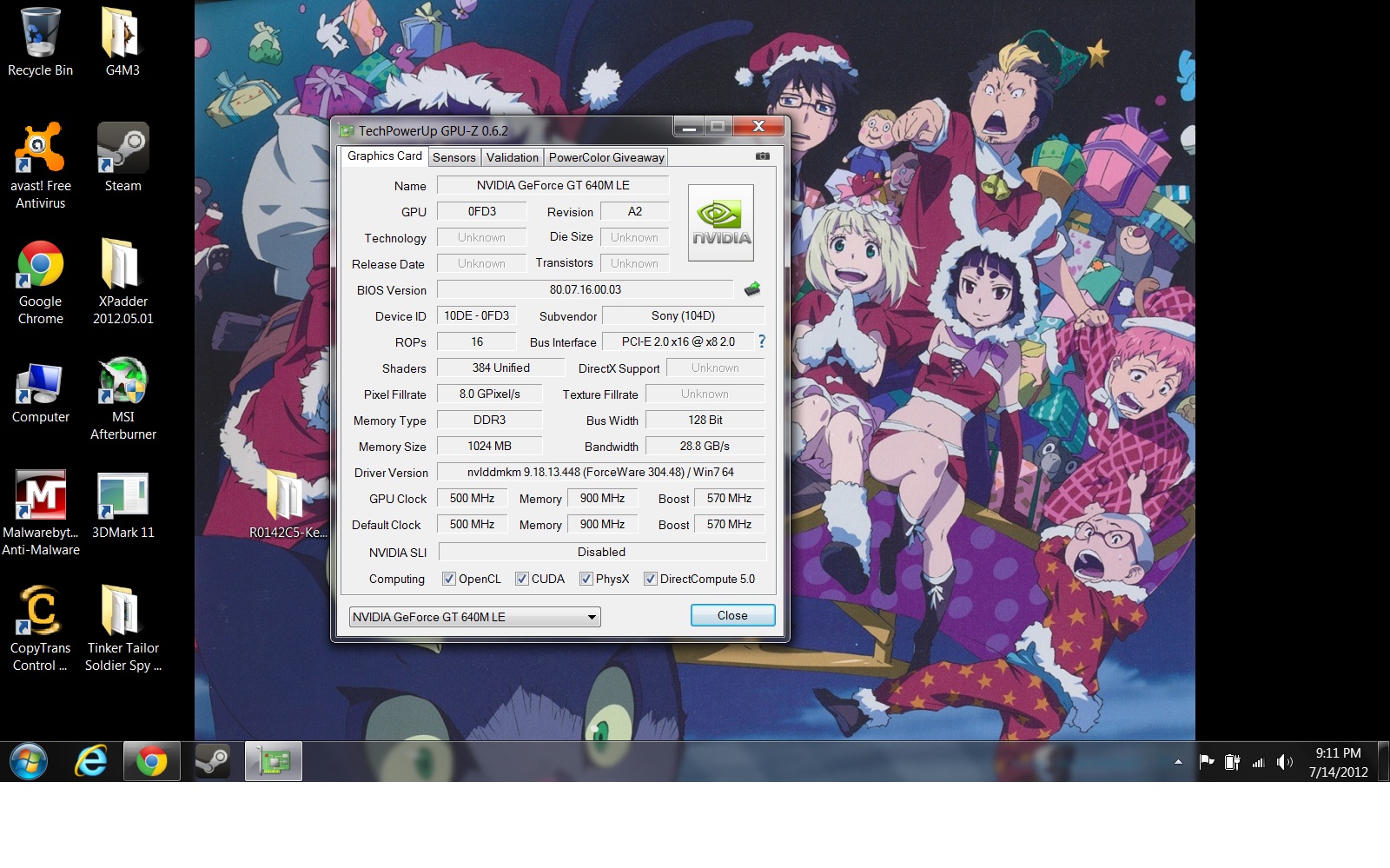
I tried the 950mhz oc and it shows up as such in GPUZ. However, I got a lower score of 1405 compared to the 735mhz/1435.
What's up? o_o
edit: I'm finding that some speeds are jumping from 570mhz and 950mhz. How do I keep it static at 950mhz? -
I used the 835 mod, the bios was acting a bit weird but all seems to be OK now. Going to try a few bios access attempts just to make sure its all working again. If I have any more problems I will be sure to post....
-
I'm following this thread closely of course. Once we have few more examples of this working ok I'll link it in the first post of the owners thread (with disclaimer!). Please post here if you've tried he mod and it works, or not - and any other tips.
Thanks a lot to Amal and the rest of you for being guinea pigs in the best secret in laptop gaming right now!
Petrov. -
The flash sets the BIOS back to default settings (fairly standard for BIOS flashing). Default includes UEFI booting. There's a few folks who are running their SSD in "Legacy" (myself included).
It's a non-issue, solved by holding down F2 during boot and setting it back to Legacy.
As for the flash not working, you'll need to flash, reboot, fire up Afterburner, reset to default in Afterburner, overclock +135 again, and then reboot once again. After that, you should be running at the full overclock, and the Boost Mode will work if you setup NCP for your programs like Amal instructed.
With the "950" BIOS flash, my S15 WEI went from 6.4 in both Graphics and Gaming Graphics up to 6.5 (1GB 640LE, i7 3520), which is a nice little bump, considering the performance test probably doesn't use Boost Mode, just the max unboosted clock of 705.
Ran Kombuster's stress test for two hours while I went to dinner this evening, and came back, still running fine at 950/1050, and my GPU only reached 75c (22c ambient). I'm satisfied that the mod is stable and that my S15 can handle the cooling.
Big huge thanks Amal77 and the creator of the mod, this is a huge free upgrade to the gaming capability of the S13/S15! -
Stupid question, how do you check your bios for compatability? Amal notes its worth checking the checksum... How does one do that?
Also, the first post on the thread has two links to the stock bios I think - this is a bit confusing, perhaps just one link per bios...?
Finally, Amal, are you going to relink the modded bios now?
Thanks again!
Petrov. -
He's referring to the downloadable BIOS from Sony.
-
The problem that I have right now is the GPU lowering back down to 570 (no MSI AB on) and 705 (MSI AB on) instead of 950/1085. How do I make it stay at 950/1085? NCP is already configured to use Nvidia GPU.
Temp. are running fine though. 65-70* C during like 10 min game test. -
One last question for the night and then truly I must call it a night. If I did the 835 mod can I just update to the 950 over it or is there something else I need to do in order to goto the 950 update?
-
In NCP, did you scroll down in the section labeled "3. Specify the settings for this program" and set "Power management mode" to " Prefer maximum performance" from the default "Adaptive" setting?
If you don't do this, you'll just get the 705 max, as the 950 is the Boost Mode max and will only be used if maximum performance mode is selected for your specific programs.
EDIT: You can choose maximum performance from the Global settings too, which hopefully means Boost Mode will be active in every 3d program when you're in Speed mode. -
Shouldn't be a problem, just remember it'll reset your BIOS settings back to default, so F2 to return to Legacy for booting.
And you'll probably need to reset Afterburner and re-apply the +135 overclock and reboot. -
Yeah, just tried that and got 2196!
gt650m level performance in a 13.3 chassis. Mother of god// -
Damn, seems I missed the boat. Guess I've just gotta wait for the BIOS to be re-linked. Seems the only real problem anyone has is if they use Legacy boot mode (which I do) and they just have to reset it to Legacy mode again.
And that people aren't setting the global setting to "Maximum performance". -
You can use tools like MD5 Cheksum Calculator : Download MD5 Checksum Calculator 0.1.7.138 Free - Calculating the MD5 checksum values of specified files. - Softpedia
The top/first link is the original BIOS sources for you to compare.
The second/last link is a flash tools with the original BIOS for you to flash back to original BIOS, because you will not be able to flash it back using the EXE files downloaded from the Sony website.
As for the link, I have just made a big mistake by sharing with everyone without asking for an official permission from the Modder.
Was supposed to use a link made by him instead.
Will try to resolve the matter with him first.
Hope he forgives me though.
-
I have a normal S13
SVS1311C5E
Bios version: R0142C5
Will it work for me?
Specs:
i5 3210
GT640M Le 1Gb version
P.S. Any idea when you will be able to share again? xD He must be aware that his wonderful work is being used for a good cause! -
Yes it will.
-
Thanks bro for the update!
Yes, by default it will goes back to UEFI. So, just have to change it back to Legacy if you're on Legacy. Forgot to mention.
Good to know that it's working great on your laptop, and nice temp.
You might want to try some other stress test like using the AIDA64, and stress your CPU and GPU at the same time.
Didn't think of that.
Yup, Global should be the best way. -
Thank you very much guy!
I've just one question when you say performance mode in NCP, you mean to use the high graphic performance? Where is this option exactly? Sorry to be so noob
I had to say that I haven't yet my S15 (2 days^^)
Where is the BIOS mod, is it already available?
Thank you again
Edit : Have my answer on the first page, thank you^^
However, you say that it won't be possible to restaure the stock BIOS, but if we downloaded it and run it after installing the mod one, it can't be reinstall? -
Ok, I joined the guinea pigs and used the modded bios. Worked a treat!
P2180 3dMark11 GPU score and 13681 3dmark06 score (I've already limited my i7 CPU usage to 99% to stop the CPU heating to 95C just because I don't need full i7 mhz for gaming). Amazing uplift!
Petrov. -
Will it work on my SVS15116GNB? PLEASE REPLY ASAP!
-
If you would bother reading the topic then you would get your aswer. -
Can people post real-world benchmark comparisons please, I've never really trusted synthetic ones. How many extra FPS can this mod give you? Also, what exactly are the dangers of trying it? Bricking your laptop? Can you unbrick it if so? Will the BIOS be able to be updated in the future and will Sony be able to tell you have a modded one? You might want to put these in the first post. Sorry for all the questions! But it'd be helpful for modding n00bs like myself who want to improve their gaming performance. Thanks in advance!
-
Amal, I've linked to this thread with some of the headlines in the first post of the S Series owners thread! Thanks again mate.
Petrov. -
Any word when we can get the file links back?
-
Means that if you download the original BIOS EXE file from the Sony Website, you won't be able to proceed with the flashing because you are currently using the same BIOS number.
But, by using the file from the link for the STOCK BIOS, you will be able to force it to flash it back to the original BIOS.
Good to know it works flawlessly on your laptop.
Please read the disclaimer about the bricking.
By right you should be able to update to a newer BIOS in the future, even using the file from Sony website, as long as the version is newer.
No prob mate.
Will update everyone if got any progress.
Sorry for the inconveniences. -
Since our card is now about on par as the GT650M.
Probably this might help a bit for those wondering how good it will perform (got it from Notebookcheck):
![[IMG]](images/storyImages/gt640mlevsgt650m.jpg)
Sources : http://www.notebookcheck.net/Computer-Games-on-Laptop-Graphic-Cards.13849.0.html
Result may vary probably by a bit.
-
Those are some pretty nice FPS jumps.
-
Anecdotally, my fps in Path of Exile jumped about 50%, now I play with all quality setting maxxed at native 1600x900 and I still get over 40fps. This is now the ultimate combination of gaming, portability, style and resolution.
Petrov. -
I did what Croak said to do in Afterburner. http://forum.notebookreview.com/sony/677079-sony-vaio-s-bios-mod-gt640m-le-7.html#post8709549 and changed the offsets to +135 for Core clock and +147 for memory clock (to get 1050, wouldn't allow me to do +150 for some reason).
Now after a reboot and according to GPUZ, my GPU clock is at 1085 and memory is at 1147. Should I reset those offsets to 0, or just go with it and see what happens? -
Nice Petrov. I've been waiting for Torchlight II to come out. How do you like Path of Exile? Is it pretty good to get into the beta program?
-
Great work, Amal! Is this mod a general bios unlock, or just a gpu overclock? If former, what features does it add in the bios setup?
Thanks
-
Does this flash the system bios or just the gpu? I'm suspicious of the insyde related flashing files
-
This isn't the best thread for it, so pm me if you want more detail - suffice to say I've spent well over 200 hrs in path of exile and it's the best arpg I've ever played, and it's only about 2/3 content. It's what d3 should have been in all seriousness. Can't recommend it enough. Pay$10 to get into beta and you won't regret it.
Petrov. -
Before:
![[IMG]](images/storyImages/8733541.png)
After:
![[IMG]](images/storyImages/8733549.png)
GPUZ
![[IMG]](images/storyImages/2wy.png)
Schweet Thanks Amal
-
In a real life test for Skyrim 900p/no AA or AF/med. quality:
Before: 45-50fps
After: 60fps
Sweet results. -
Amal - Any idea as to when you might repost the links again? I want to take the next step up to 950.....thx!
-
And what about the temps?
-
I usually got 68-70*C while gaming but with the 950mhz OC, I'm getting 70-75*C. However, I'm not using any other cooling and the laptop is just flat on my desk.
-
No prob.
Credits to the Modder (svl7) offcourse.
This MOD only do changes on the GPU clock.
Not related to BIOS features unlock.
It flashes the whole system BIOS since the VBIOS is integrated with the BIOS.
Will definitely share with you all once I get the permission and links from the MODDER (svl7).
I don't mind if I have to close this thread and open up a new one handle by the MODDER though.
He knows best on this MOD.
As long as we all can enjoy our SUPER SPEED GT640M LE, that is all I want.
Who knows, he might introduce us a 1100MHz clock speed?
-
Hmmm.....
I have the extra battery sheet add-on for my S15 and now after flashing this, it seems to report ~4hours battery life on full charge and the battery sheet plugged in, rather than the 10+ it used to.
The switch is set to stamina. Could having MSI Afterburner be causing this?
UPDATE:
Seems MSI Afterburner IS the cause of this -
So with these insane overclocks could 1GB VRAM become an issue when playing at higher settings and AA due to better FPS, or is the performance at 1600x900 to take advantage of anything over 1gb?
I'm thinking about shipping my order back when I get it and ordering a unit with 2GB VRAM.
Sent from my GT-I9100
Sony Vaio S Bios Mod For Gt640m Le
Discussion in 'VAIO / Sony' started by Amal77, Jul 14, 2012.



![[IMG]](http://imageshack.us/photo/my-images/406/gt640mlevsgt650m.jpg/)


