Problems? See this thread at archive.org.
I preferred your unedited comment which was sent to folks who subscribe to this thread via email. Good times.
-
it can be a huge deal for a programmer that has to constantly jump between many many lines of code for hundreds of lines, making changes as small as one character.
but ya, there is software to disable the trackpad when is key is being pressed. i see no reason why this wouldn't be available for the Z2. alternatively, use autohotkey so you can enable/disable the trackpad with only one button. -
Funny thing is - I have the same keyboard problem with every version of Z (and with TZ before) - sooner or later the cursor "jumps" above.
This is >especially< annoying when writing some code as you could imagine... -
^Just play with smart sense in the synaptics applet.
-
Small con: does not seem possible at the moment to have the laptop wake from sleep when the lid is opened. This is no longer an option in the VAIO Control Centre. This also affects SA users. I've not found a solution yet.
-
Returned the "old" Z2, got the VPCZ21 SHX/X.
The fan is way more active due to the i7 proc, and the fan has a decent whine to it. I'd say it is comparable to the Z1 in pitch and volume, which is a drag.
Also, the darn TrueSuite app crashes all the time. Did this on both Z2 models. -
The PMD does not wok correctly with games. It pulses the performance (Fast, Slow,Fast, Slow)
I tell the PMD can handle the games, there is somthing that is hindering the performance. Turboboost, Drivers... just dont know. -
I´m not sure but i think there is no way to use the fingerprint as replacement for BIOS password - fingerprint for windows login is working on my brand new european z. Is there a chance to set this as it was on my "old" z before?
-
I decided to save you from hearing what you deserved to hear.

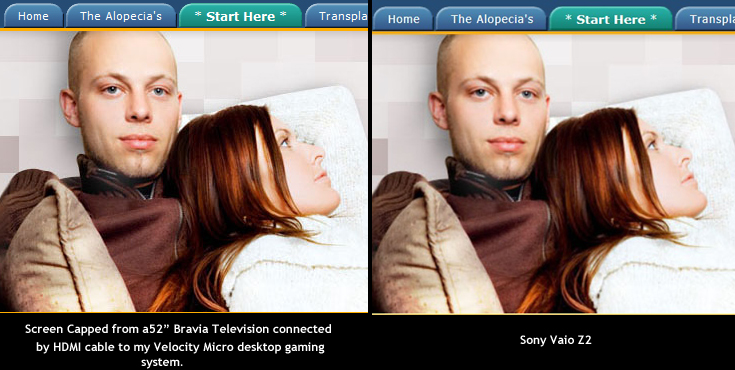
I now have a 52 inch Bravia displaying my company home page connected by HDMI from a desktop computer and the picture is 10x better than the picture on this Z2 .... in fact the guys face is blurry on this display and brilliantly clear and crisp (you can see whiskers) on the television.
Is this because I dont have the laptop connected to the external unit? -
^No, it sounds like you have something set wrong. Are you running at the native resolution?
-
- the trackpad has a different surface between the buttons and dragging area. whoever says he can't fell the button because theres no physical difference doesnt have the laptop? the difference is more than noticeable
I actually like the trackpad. Could be bigger like on the macs but def. a lot better than the Z1.
The buttons are hidden yes but they're still real. (technically its 1 button)
- the backlight is very good, white one kills the eyes over time. Dimmed yellowish is perfect. You see the keys but its not too much.
- the fan does not equal the Z1 series fan ONE BIT. It's much quieter even at full speed, not nearly as pitchy
- the PMD DOES have issues with games, even without the PMD it seems the drivers are buggy. That one is very annoying since we all know sony doesnt do updates.
- keyboard is actually good and general form factor for typing to. can hit the shift key instead of arrows a while due to the non standard position of that but that's all.
- battery is not that good but its not that bad either. mine says 4h25min right now, its a single battery and i have been on battery reading this thread and others for about 20min, via wifi, 50% brightness
I had a Z11 and at the end of its life, it didn't really do better than that. I don't know how people got 7H+ readings, never had that myself. Ever.
-i also have a MBP 13" with an i5 and im getting 5H with browsing. Not 7. Owning the thing > reading claims. This makes me even happier about the Z2.
- the sound is bad. its ok to listen to quick stuff but.. it is bad, no way around that. i dont mind so much.
- the ethernet connector is weird and seems fragile
- the audio jack output is actually very good (thanksfully)
- the screen color accuracy is good. unlike some folks i dont put it next to a non-natural screen and decide one is perfect and the other must be wrong. i use a calibration device. And the screen is very much ok, slightly too blue (which is perceived by the same folks as better anyway, bluish gives a "whiter" white. Real white is actually creamish/yellowish. Once calibrated its slightly more like the real white.) -
That isnt what was said. They (me) said that its difficult to locate the buttons when they're not even buttons. I didn't say that there wasn't a texture difference between button area and rest of mousepad.
How did you come to the conclusion that this is what people are doing? Speaking only for myself, I have the previous Z sitting right next to the new one. Unless you're saying the previous Z is the "non-natural" screen ? The older one has a blue hue. The newer one has a yellow hue. The same issue is being complained about between the old iPhone and new iPhone. Everyone prefers the blue hue. Nobody likes the yellow hue. The only people who say "its fine" arent "visual-philes" in my opinion. Same people who listen to Satellite radio and think the sound quality is comparable to regular radio.
Can you clarify for me how a calibration device is able to tell you that one computer is displaying things correctly and another one isnt, hue-wise? -
Here is a comparison showing what I mean about the Z2 and lack of clarity. Not by a longshot is this thing displaying "HD" quality graphics.
The craziest part is that the better looking one is on a hugely expanded monitor. A 52 inch television connected to a desktop computer.
Is the Vaio's graphics card that poor compared?
To answer the previous guy's question: this is an unmodified Z2. Fresh out of the box.
EDIT: The desktop is running Vista, and internet explorer 8. The Vaio is running Windows 7 and internet Explorer 9. Maybe windows 7 has a graphics "smoothing" feature that is enabled? Im aware of "cleartype" or whatever its called for fonts, but that is *enabled* on my desktop. This looks like an overall "smoothing" affecting both graphics and text.
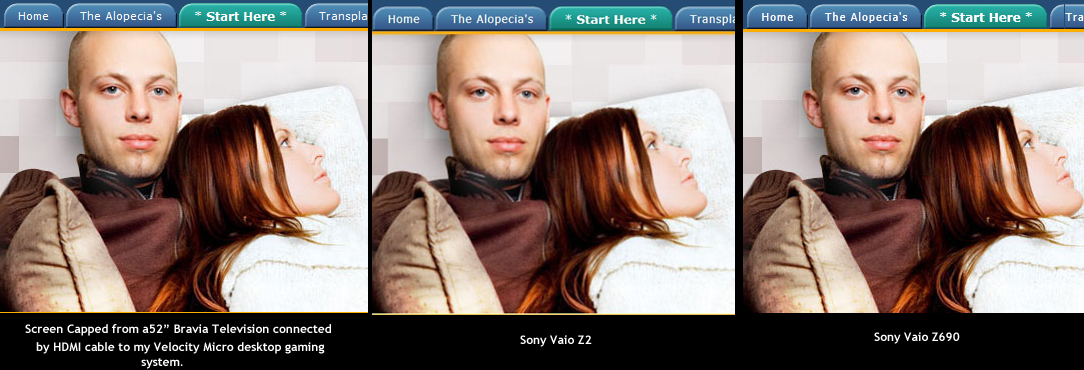
EDIT NUMBER TWO: I just did an additional screen cap using my old Z series .... and it looks as good as the Bravia. Better than the Z2 ....Attached Files:
-
-
^Hard to tell by the lousy screen cap, but I'll ask again, are you running native resolution?
-
I'm not sure if you are joking or not but there are calibration devices that can tell and adjust to exactly how it is supposed to look (ie D6500). Many people prefer a cold, blue, innacurate color temperature while those in the "know" prefer the accurate warmer color temperature.
Glad your Z is yellow, mine has a definite green push. And I prefer the warmer display of the new iphone 4 vs the old 3g. The warmer color is more accurate (closer to d6500). -
I just caught your edit. IE9 is notorious for making images look like crap.
-
Just added another edit and another screen cap. Exactly what is lousy about it? Look at his eyes and compare the two sets of eyes ... the difference on this end is strikingly obvious ... then again youre probably viewing my screen cap with the Z 2 .... which would explain the problem.
The difference between the left and middle is the difference between HD television and non HD television. Its extremely noticeable.
Have you tried looking at a very high quality HD video online yet? Try vimeo.com and see if you really feel the display is as good as the best High Definition TV out there. maybe that would help resolve it.
And it cant be blamed on IE 9 ... because my old Vaio is using IE 9 as well .... and its obviously clear ... whereas the new viao is not.
Already responded to that:
-
Because that's precisely what calibration devices are for!
Indeed, blue tinted screens are generally not representing natural colors. Note that my Z2 screen is also blueish by default. It might be different panel factories. I prefer creamish if any but most end up either blueish (users think its better) or yellowish (its closer to true colors for graphists)
Also, vimeo videos are no match for bluray content. watch the same blueray on tv an laptop if you wish.
The TV has color correction to make it looks "better" but it wont be natural.
The laptop has coating (for reflections) and is closer to natural colors, for people who actually work on it and need proper color representation (printing, photographers, etc).
All of those people who actually use a calibration device of course.
IE9 has nothing to do with it of course. -
Judging by the test in the top bar it looks an awful lot like non-native resolution to me. Humor us and double check.
Trying running the discrete gpu to see if it looks any different? -
Okay update: google chrome looks crisp and beautiful on the Z2 .... i have no idea why IE 9 looks like crap on the Z2 but looks fine on the Z690. But its clearly an IE 9 problem ....
I checked. I was running native resolution.
Im noticing that chrome also shrinks the web page width dramatically though too. Not sure whats up with that. -
This is really strange. Even sites like CNN.com show up "normal width" and size in IE 9 (albiet somewhat blurry) .... but the same site looks shrunk and tiny in Google Chrome and Firefox (and not blurry). Its basically the equivilent of setting the zoom level to 75% instead of 100% ....
-
^Told you IE does screwy stuff
-
I just got my Z tonight. After reading this thread the last few days, I was so depressed, thinking I'd made the wrong decision, I was going to hate this computer.
But I love it. The FHD display is awesome. The premium carbon fibre finish and general look scream quality. The keyboard is great. The one game I tried so far ran beautifully.
Really, some of you need to chill and enjoy this beautiful piece of hardware. I'm looking at you, NotebookBurger!
-
What do you think of the built in speakers?
Anyway, we all love our VAIOs - this thread points out areas in which they could be even better. Be extra careful of the carbon fibre lid - not as scratch-proof as you would expect. I already have a few scratches on mine and I was so careful. -
I don't know what you mean by "regular radio," but I'm glad someone else notices that Sirius/XM compress the hell out of all but a very few channels - presumably they pay for the extra bandwidth. Ever since the US FTC, in their infinite wisdom, decided to let the two companies merge, rather than go bankrupt, be bought up by two individual entrepreneurs, and give us competition in the market...
Well, don't know what this has to do with color calibration, but when I see a pet peeve out there in print, I pounce!
-
The built in speakers are ok.
The ones on the Z1 are better. -
... And the Z1 speakers were already bad.
-
Yeah......those speakers never work wonders when watching youtube videos with other people, especially in crowded areas. Even my phone delivers better sound than the Z1.
If one can make a comment that the Z2 speakers are worse than the Z1, the Z2 must have a really pitiful set of speakers. -
I came in with very low expectations following all the negative reviews, and if anything was pleased that they weren't as bad as all that. They're fine for watching a youtube video or playing a game. I wouldn't want to use them to listen to music.
-
The joys of Microsquish limpware.
-
Okay so basically IE 9 sets default zoom to 125% . Thats what the problem was. Technically my web page "width" looks correct (as intended by my designers) when IE 9 is at 125% zoom on this resolution.
Firefox and Chrome set their zoom to 100% and my web page looks so friggen tiny I can't even read it. I need to research this a little but if most people are seeing my web site THAT small, then I am goin to have to redesign it completely. All 1,000 pages.
All of you try viewing Facebook on Firefox or Chrome. I have perfect vision and it is unbearably small to read. Unrealistic in every sense.
What am I missing here? Why is the default resolution on this computer considered good?
I cant think of any other definition for regular radio than standard FM radio. I suppose terrestrial would have been more accurate, but you may have wondered if I meant FM or AM still ... nitpicky lol ... anyways i just got a new car with "HD Radio" installed and I am absolutely *floored* by the sound quality. It surpasses anything I've ever heard in a car. I initially laughed when I heard of "HD radio" ads. But this is incredible. Truly. Sorry to hijack the thread a bit. Ill tie it all in : the Z2 speakers cant even play the windows welcome sound without distorting themselves. Is disabling 'dolby digital' or whatever, the solution? -
^How many of your customers are trying to view your site at 1080P on a 13" display?
-
I have a whole paragraph in my first post saying "dont let this thread discourage you from getting this great computer" (paraphrase). So if you were all depressed and worrying .. .. thennn ... LOL ... you need to chill maybe LOL ...
Keep in mind this laptop is for people like myself. Workhorses. People who work online and with their laptop all day - to support their livelihood. I spend literally 8 hours a day on this thing. Every day. So my needs are going to be more specific than a casual user who wants a kickass laptop. I realize the pitfalls of a thread like this. I tried to go back and undo the thread title because it implies this laptop is a disaster when it isn't. But the forum software doesnt allow you to change the title. -
You do know that most browsers support text zoom? You can increase the font to a decent size - in Firefox it is CTRL+
While designing your website, be sure to try this out so that the text 'flows' correctly around the images and other stuff. -
Likewise, we can't see into your mind. Instead of jumping on people who are offering you free help, you should define your requirements better. No where did you state you needed to use your trackpad - for all we know you are using an external mouse, or don't need a mouse at all.
Next time you want completely accurate support for your problem, please pay someone to help you. Ditto with your image problem - no one else had this problem because they are viewing all your caps side-by-side, at a fixed res. For a digital display, each px is, well, 1px. Unless there is some software trying to do something fancy (cleartype), then it comes down to scaling. -
Sure you can. Edit your first post, choose advanced.
-
Problem is that obviously Firefox does not set web page content according to the system DPI settings. For Chrome, IDK because I don't use Chrome. Long story short: Firefox + NoSquint Plugin - problem solved.
-
Ha! Ha! Ha!
You weren't serious where you? The idea that paying for tech support is going to result in "completely accurate" answers is sit-com material. The advice from NBR is going to be far more technically skilled, sophisticated and responsive then most any pay-for-support service. -
wait.....what????????????
Z1 is the worst speaker of all.... (i will received mine next month. waiting for the WWAN) -
IE is reading the setting off the OS and adjusting the site to match. Firefox and Chrome are showing it as the designer intended, it's called "pixel perfection". It's not really the designers fault that your display's DPI is way way higher than they could've ever expected. If you want Firefox and Chrome to adjust it for your preference like IE does, then read the friendly manual. But for gods sake don't change the site to compensate for the eliteness of one machine. And then you *might* not want to complain/advertise your inability to learn through the blame game.
-
I dont consider that a viable solution for the masses. When you design a web site you design it to be readable in the most-used format. I cant be expecting hundreds of thousands of people to text zoom on my web site. Thats the fastest way to go out of business. Fortunately every other site looks just like mine (CNN.com, Facebook, etc). No human could possibly read the content that small.
No, you can't. That only affects the title of the first post. It doesnt change the display of the thread title in the topics list. I contacted a moderator and had her change it for me.
First off, just because its "free" doesnt mean its help. And why should bad advice be appreciated just because i didnt pay for it? I don't follow your logic at all. Likewise, you dont have to see inside my mind. I did define my requirements. I said I wanted my mousepad to work. Telling me to completely turn it off was useless advice.
Well i dont know if thats really a solution. IE chnges its zoom level to 125% because im on this cracked out resolution and quite honestly, its blurry, and the web page doesnt display at accurate width. When we design web pages, we have to make sure they are *exactly* fitting for 1024 pixel resolution. Zooming browsers adds a whole other world of inaccurate widths, blurry images, oversized / undersized page elements, etc. It makes things impossible. I think this laptop was intended for people who work in Outlook and Excel all day, quite honestly. -
Ok you are unhappy with it. Return it or sell it and buy something else, but plenty of people use this display and have no problems with readability.
-
That is one of the known downsides of high resolution small sized screens. IMO most people who use that resolution on their laptops will figure out some way of increasing the font size. Have you tried viewing web pages at 1920x1080 on a 40" TV? Still unreadable up close?
-
This thread is fun
-
lol @ this thread
-
Install a basic useragent tracking script on your site to report what browser, screen resolution, DPI, etc most of your customers are using. That way you can adjust your site design to match your customers' platforms and be confident it will render as intended. If most of your customers are using modern web browsers (CSS3 compliance), you can even use dynamic CSS rules to automatically switch between different stylesheets according to available screen resolution, DPI, and so on.
Take a look here to get started: http://www.alistapart.com/articles/responsive-web-design/
As for Z2 battery life, keep in mind that 1) Windows' own battery estimate is incredibly inaccurate, and 2) the Z2 sheet battery was designed not to power the unit until the internal battery dropped below a specific threshold, and so the Windows estimate might not be taking this into account.
Sony Z2 - The pluses and minuses
Discussion in 'VAIO / Sony' started by NotebookBurger, Aug 13, 2011.