Problems? See this thread at archive.org.
I don't think so , try so turn it off with 50 % and turn it on without plug it in !
you can't notice the drain on 80% coz battery charge over 80% with battery care function !!
-
Of course there will be SOME drain as the machine goes into hibernation. That is inevitable. Power will be consumed as the data is written to the hiberfil.sys
Gary -
No. That does not happen.
When you boot your notebook without having it plugged in it is consuming battery life. That is normal of course. You need power for booting.
You only know if your battery is draining when you plug it in after say 15 hours and watch whether it charges the battery. No charge = no drain.
The battery care function does prevent the battery from being charged over 80%! So your statement is wrong.
My Vaio isn't draining since I installed the HD Audio update. When I booted my notebook after 15 hours and plugged it in the battery was not charging (there is a LED where you can see whether the battery is charging or not). It had 80% of capacity. No charging necessary = no battery drain. -
Andre. That is good news. Many of us have the same problem with the SR. I tried doing what you did and that was to install the latest Realtek HD audio drivers but it did not make any difference for me. I Reinstalled the ones form the Sony support site. Since then I have installed SP2 for Vista 64. I guess my question for you is, are you running Vista SP1 or SP2?
-
I have Vista SP 2.
You have to update the latest Realtek drivers from the Realtek Homepage.
I have doublechecked whether there really is no drain anymore: THERE IS NO BATTERY DRAIN.
I disconnected the power cable and discharged the battery to 70% and then turned my notebook off. After about 20 hours I booted my notebook and the battery was still at 70%. -
i went to the realtek website but i dont know how to install the driver. Theres so many downloadable options i dont know which one to use. Which did you use andre?
-
I tried installing the drivers from Realtek. They installed but it didn't change anything on my SR.
As, as a side note, I ran a test to see how much a cold reboot would use up on the battery. With my battery charged to 80%, I completely shut down and disconnected the power plug. Then I rebooted. Once the system was back up and running with WiFi connected, the battery still shows 80%. The only way I have ever gooten my SR to not experience the battery drain overnight is to shut down and then remove the battery for about 30 seconds. Then I put the battery back in. When I reboot the next day, the charge is still at 80%. -
HD Audio Driver
Choose the first one in the list. -
Andre, I have read your posts and was wondering if you have tested battery drain during hibernation? I understand that on complete shutdowns, you no longer experience any drain. I have not had any issues with battery drain during shutdowns but during periods of hibernation.
Thanks. -
Battery use for hibernation should be the same as for shutting down Windows - the machine is not in a low-power state like sleep/standby. Once hibernation is completed (i.e. memory is written to the hibernation file on the drive) the machine is OFF, so battery drain should be nil. I tested this in my brief time with a new Z790 and observed (with battery care disabled) a 20% loss of battery power in a 24 hour period, whether I had chosen to Shut Down Windows or Hibernate Windows. I don't recall what the level of battery drain was while the machine was left in Standby for this period of time - I wasn't concerned with it, because battery drain while in Standby is to be expected.
-
Agreed. This has been what my understanding of the differences between the two has always been. I doubt this would have changed in Vista.
Was the Z yours and did you return it for the battery drain reason? -
anyone else tried the realtek hd audio drivers and fixed their battery problem?
-
Yes, I purchased a Z790 in August and returned it for various issues, including the battery drain issue. I suspect a solution will be discovered in time, either by the community or by Sony - in which case they'll do the proper thing and provide a fix through a BIOS update. I really liked the Z, but due to some concerns over battery drain, VT support and other minor things, I chose to return it and wait to see if these issues are addressed by the time Windows 7 is released and Z's start to be offered with Windows 7 preinstalled. I'm hoping that will add some pressure on Sony to support VT and address these lingering issues.
Someone posted a few pages back that hibernation still puts your computer in a low-power state. This is incorrect. You can check this easily: when your machine is hibernated, unplug it and remove the battery. Then, re-attach the battery and power your machine on. Windows will resume normally - this would not be the case if the machine were in a low (or any level) power state and all power sources were removed. This is the very reason hibernation support was introduced - to allow long-term retention of work in progress independent of power accessibility. -
Installed the latest realtek driver => Still, 9 hours=5% drop. I think we should stop wasting our time and work on this, Sony's the one who should be responsible.
-
Mine experienced drain too after installing the driver, installing the hotfix, and shutting down. It's hopeless at this point.
-
Actually that was CORRECT. Hibernation is definitely a low power state. It is up to each individual device driver to determine whether or not it will attempt to draw any power while in that state. 99.999% of devices will go into a "no power required mode". The notable exception to that is a network card with "Wake on LAN" turned on. If all device drivers indicate a "no power required state", then the power supply will fully turn off. If ANY device does not indicate this mode, the power supply will remain on.
See this article: System Power States
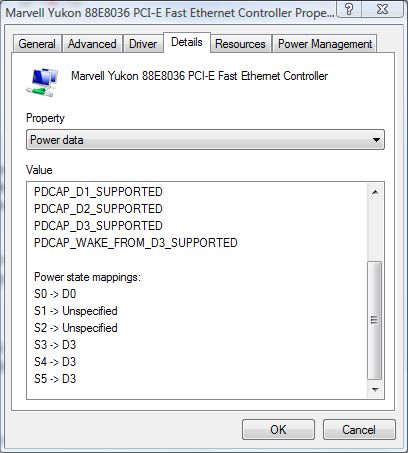
There is a way to see what mode each driver indicates for the various power states. Go to device manager, double click on a device, like the network card, then switch to the "Details" tab. From there in the drop down list select "Power Data". There you will see the power mode mappings for each of the various System Power States. (see attached example).
The key for these mappings can be seen here: Device Class Power Management Reference Specification (scroll to page 3 for a brief description of each state, or further down for WAY TOO MUCH detail.)Attached Files:
-
-
One more note, I am not a Z owner so I can't do this, but have any of you gone into the device manager and looked at the "Power Data" for ALL of the devices and looked to see what power mode each driver is requesting for the Hibernation state? Maybe there is a rogue driver that is not allowing the power supply to go fully off.
Gary -
Wake-on-LAN settings for network controllers will not prevent Windows from resuming from hibernation if the battery is removed (though it will probably prevent your system from taking advantage of this setting). Nor should it draw 20% of your battery reserve in a 24-hour period. This "low-power state" is quite different from say keeping programs in memory for fast resume. I also find it hard to believe that *drivers* for any device would be the culprit. I suspect it is a BIOS/firmware setting that needs to be changed, if not an actual hardware issue.
I listed the battery drain issue as the foremost reason for returning my Z. It was the most effective way I could communicate to Sony that they have a problem because my few attempts at communicating with technical support made it clear that they were reading from a script and would not be able to effectively diagnose the issue or escalate it to someone who could. I'm not sure what to suggest to those that already have their Z's as to how best to communicate the urgency of the issue to Sony. -
Here's the link to the Sony site https://esupport.sony.com/US/perl/contact-email.pl? . I really want to send them an email but I don't live in the US so I cant fill in some required info. If anyone interest, can they send it for me, I'll paste the contents here when there's support

-
Givien all your previous useful information, I am still not sure how to determine that. Example, there are a couple of bluetooth drivers for COM ports that all the mappings show "unspecified". I don't know if that means they won't let the power supply shut down or what. My battery drain is no where near the 20% some have reported after a few hours. It is more like 3-4% after say, a 6-8 hour period. It doesn't matter if my machine is in hibernation mode or complete shutdown for that length of time. I can always expect that I won't boot to a full battery charge. One could argue that the 3-4% is due to the machine booting back up but I have tested that theory too by simply shutting down (complete shutdown). Unplugging the power supply and immediately cold starting the laptop. When it is back up and running, the battery shows the full 80% charge that I shut down with a few minutes prior. BTW the 80% is because that is what my battery care is set to.
-
Not sure what the default would be if they are unspecified. Only way to tell if these are the source would be to image the c: drive, delete these devices via device manager and test. Then restore the image to get the machine back to normal. (I only suggest the image steps because bluetooth can be such a pain to uninstall and reinstall. Image is safer.)
Gary -
It seems to me that most people are reporting a 20% loss in battery level after a 24-hour period, so if you're losing ~4% in ~6 hours, that is consistent with what has been reported. I also doubt this is a driver issue, but I'm wondering if Sony has some kind of battery care support built into the BIOS. I do recall in the short time I had my VAIO Z that battery drain seemed more pronounced from 100% to 80% and if left in a shut down/hibernated state, the daily battery loss was less than the initial 24-hour period, but I didn't check this beyond 2 or 3 days because I didn't have it that long. I was wondering if anyone could confirm this.
Edit: never mind. I went back and read (around page 20 of this thread) how people were observing drains from 50% to 33% with battery care enabled. One previous poster from 2008 mentioned how e-Support told him that the battery discharges "for safety". Given that Sony has recalled laptop models for overheating/exploding battery problems, I could buy this as the root cause - meaning it is 'intended behavior' as unwelcome as that is to us. I am going to stop looking/hoping for a fix to the battery drain issue. However, I will not purchase another Z unless/until Sony enables VT on these systems. -
Oppps! I meant to put my question in "The official Sony Vaio Z Thread" instead of this one. Sorry, my morning eyes aren't all that good. I will repost
-
Any support?
-
You CAN do this yourself. Just put in 222-222-2222 for the phone number and 11111 for the zip code.
Gary -
What about address? If you guys are having any inconvenience reveal it here just tell me to paste the contents
-
Just type anything in the address, it is not verified in any way.
Gary -
Previous user reduced and even fixed drain with a HDAUDIO driver update, can he confirm that the laptop doesn t suffer anymore from battery drain?
-
Did not work for me
-
maybe the fix is for Z only? is it relative to your SR, i checked again the Lenovo T-61 drain issue post and the battery drain is exactly the same... caused by the hdaudio driver.
will try to disable the audio device and report here -
disabled the audio device for 7 hours, 80% to 75% always the same amount. where is the hdmi hd audio located in device manager?
-
Sony already announced they will not enable VT on Z Series, however will enable in select other models. Anyways.... I've got VT Enabled on my Z Series, which wasn't hard to do, and almost zero risk involved.
-
I disabled the audio device on my Vaio Z and it made no difference when I turned it off.
I lost 10% in about 20 hours. This is crazy and I wish Sony would do something about it. -
Anyone tried a clean install, and leaving out majority of the Sony software that comes with the machine?
Just got my Z, and creating the recovery disc now. So I'm thinking of doing a clean install without majority of the Sony software hoping this would minimize the battery drainage problem...specially since their official position is that 10-15% daily drainage should be expected since the Sony software is running even when the machine is shutdown. -
good new!! on my japanese z71JB i sucessfully stopped the battery drain for 7 hours. Stopped at 80% 12am yesterday and found today 7 am still 80%.
I just found another device to disable in device manager.
Here is my procedure i used:
- Balanced mode,
-disable HD audio device first in multimedia and apply
-disabled HD audio main device in Computer controler an apply.
(This has effect to take away the HD audio in multimedia but dont worry if reactivate the main HD audio this one will reappear).
-turn off wifi connection in VAIO smart Network and blue tooth (but i didnt turned off the switch).
- put in hibernation
So i will let my computer in the same state for another 8 or 9 hours and confirm the results but i am confident that HD audio device is the culprit like he was in the T61 forum.
another point i noticed right after the change:
- when put in hibernation the screen didn t flick as usual : the screen flick to windows is shutting down to desktop and again but now just dimm the screen to the windowss is shutting down.
I report results tonight, sorry for my approximative english... french vaio user^^
If someone in the same time can use this procedure, we can identify the culprit.
damien -
another point, before i used ESET smart security and was really light and feel my machine more effficient before i found that this AV caused Sleep of death especially when transfer from simple sleep to hibernation.
Switched again to KIS2010 and no more problem, just slow down the boot...
(note that the 2009 edition caused BSOD on my Z and caused my to switch for ESET) -
here is the report... pluged ac the charging light went on, resumed from hibernation and noticed 76% remaining from the 80% this morning. so i decided to reanable the HD audio and right after the light went off and my battery was at 80%. there is something strange with this, will report a new test this night for overnight drain.
-
My complaining email's sent to Sony, waiting for response.
-
Here's their response:
Trung Nguyen,
Thank you for contacting Sony Support.
I'm sorry that the Computer is completely turned off but the Battery is still being drained. The Battery of the Notebook will continue to drain even when it is completely turned off because the Computer constantly uses a small amount of power to maintain different built-in tools and functions. This is by design and is normal operation.
To avoid having the Battery drain completely, periodically attach the AC Adaptor and recharge the Battery.
NOTE: The Battery will drain an average of 10-15% a day, even when off, depending on the environment, temperature, and power requirements of the enabled software tools and functions.
I have provided a link* with the information to troubleshoot the Battery charge that does not last as long as it should:
http://www.kb.sony.com/selfservice/documentLink.do?externalId=C1001422
*You may be asked to enable or allow the link to work.
Thank you for choosing Sony.
The Sony Email Response Team
C6XR
Nicholas
But this is just a problem with Vaio notebook right, not the other brands? -
No, this is also a problem with a few Lenovo laptops.
Anyways my results are as followed, i DO NOT think its a sound card issue.
I also think the drainage is capped at 80% (at least for me it is).
Both tests were done when the laptop was totally turned OFF. And then AC Power unplugged.
Test 1:
Trying nothing, no turning on anything from device manager. Just normal turn off and unplug AC.
From 10:30PM to 9:15AM - 100% battery to 80%
Test 2:
I attempted some of the "advice here", this is what i did:
1. Power Plan: VAIO Optimised
2. Battery Care set at 100%
I did not turn off sound card or disable it. I did not turn off wireless or anything.
From 10:30PM to 7:30PM - 100% battery down to 80%.
This is about 12hr gap.
From my tests, since both tests i did not turn off the hd audio, they achieved same result, if it was the HD Audio it wouldn't really explain why it would always stop draining at 80%.
I am using a Z46GD -
So i think we are possibly getting close to a solution on the battery drain (I've been following it for some time)
My Girlfriend has a Z48 (Australia). Not sure what this corresponds to in the US.
It has the battery drain problem for both shutdown and hibernation.
Sony Battery care has been turned off always.
Last night i went through most of the devices in device manager, and disabled all devices whose Power State data didn't show:
S4 -> D3
S5 -> D3
For those who don't know, S4 is hibernation, S5 is shutdown, D3 is the device is off.
Some of these devices had S4/S5 set to D2 which is a low power state, but not off!!!! Devices included, the modem, fingerprint sensor (disabling this will kill fingerprint login so be careful if you use that!), sound card, webcam, and possibly a couple of others too.
I Shutdown the computer overnight for 10 hours.
This morning, when i plugged the power cable in the charging light did NOT illuminate. I unplugged the power cord, and started the computer up from battery. The battery showed 93% charge. This seemed like there was still a problem, yet before it started up it didn't want to charge the battery.
So i charged the battery to 100%, shutdown, and turned it back on (running off the battery). This showed a drain to 97% from just turning it on (less than a minute).
Possibly the discrepancy here is due the battery level not being detected accurately at high charge levels, or perhaps some device is still enabled and drawing power that i missed.
Over the next few days i'll try starting up with the power cord plugged in (after being unplugged for 8-10 hours) and see what it says. I'll also try hibernating and see what that gives.
If someone wants to try something (who has the shutdown battery drain problem), i have a suggestion to prove once and for all if it is driver related (which i think it is). Boot of a USB stick into a dos command prompt. Then shutdown the computer. Leave it for 10 hours. Check battery level in windows. The hope with this is that all devices will be turned off as the DOS prompt won't use them (possibly will need to disable battery care in windows first as i asumme this setting is stored outside of windows...)
Hope this helps someone! -
I think your S4 and S5 tests with Windows drivers are spot on. But I am not sure about the DOS one. Because I fear that the last state the drivers left the hardware in when Windows was shut down, will be the state they will stay in when DOS is booted and shut down. If the last shut down of Windows left a device in an S5 state of something other than D3, it is going to stay in that non D3 state even when DOS is booted up and shut down. The drivers only SET the state that will be maintained when S5 occurs. After that the driver is no longer in play. And as I understand it the hardware will stay in it last state until changed explicitly by a driver.
Gary -
What if you removed the battery for a significant amount of time before booting into dos?
I remember reading someone eliminated drain by removing the battery upon hibernation/shutdown for a short period of time and then reinserting it and leaving it overnight. Possibly doing this will force all devices to the off state.
Not that any of this helps with identifying the driver causing the problem! But hopefully i can identify it once i confirm the drain has been fixed in the one i have access too! -
I have no idea if that would force the devices into the off state or not. I suspect it would not, but that is an admittedly uneducated hunch. There really only one way, that I can see, that we will ever get to the bottom of this. That would be for someone to create a tool that does one of two things.
1. A Windows app that would allow the user to individually modify the S5 state value of each and every driver in the OS.
2. A DOS based app that would set the S5 state of a specific device.
Any takers? I don't have the time (nor do I have the issue on my FZ model thankfully).
Gary -
my previous test with HD audio failed again, only one time i was able to fix drain for 9hours on hibernation...
As previous user noticed, when laptop is powered of you can hear a buzz sound from the bottom of the Z, and located in the battery...
Someone heard that sounds? may be the internat circuit for battery care. -
I am running Windows XP on Z690. Complete shutdown, unplugging AC, and letting it stand for 10 hours results into 100% battery on startup. No drain whatsoever. Note, I have battery care turned off.
Hibernation is a different matter: same 10 hours lead to 7% battery drain (100% to 93%). -
Which would indicate a different power state for the S4 and S5 power modes.
D2 (low power) while in S4 (hibernation) and
D3 (power off) while in S5 (shut down).
Can you verify that in the device driver settings?
Gary -
Good news. I successfully eliminated battery drain for hibernation (well at least to 98% eliminated)!
However i achieved this by plugging in the powercord before starting up the computer (the battery doesn't charge that fast as you all know). Windows resumed in less than a minute, and the battery level was at 99% and charging.
So i think the previous test i did means that starting up drains 3-7% from the battery (at least as far as the battery monitor in vista is concerned).
So here is the list of things is disabled in task manager (maybe someone can replicate?):
Disabled Realtek HD audio
Disabled Bluetooth hands free audio
Disabled Touchstrip Fingerprint Sensor (under biometric)
Disabled HDAUDIO softv92 modem (under modems)
Disabled Sony Visual communication camera (under imaging devices)
Disabled Bluetooth Device (Personal Area Network) (under Network Adapters)
Once these are disabled I turned off wireless and bluetooth with the switch on the front on the laptop
Then hibernate or shutdown for 8-10 hours.
Before you start up your computer, plug in the power cord. You should NOT see the battery charging LED light up. When you switch on the computer, the battery charging light will illuminate (i have no idea why!). When you get into windows you should see a drain of only 1-2%.
If you start up the computer without connecting to power first, you will probably see a drain of 3-7%. As far as i can tell this is normal. Someone should do some battery length tests to see how long it lasts (stamina, doing nothing, no sleep or hibernate or screensaver) from a start up with no power, to a start up with power to immediate disconnection from power! (just to make sure its not impacting performance)
I think everyone who is experiencing a 20+% power drain will not care if they can get it stable over 90%.
If someone can replicate my results, it would be good to see what happens to the battery level if you leave it for longer (does starting without AC power after leaving it for 24 hours result in a lower battery level?)
Just as a note, a lot of the devices i disabled go into a low power state for hibernation, but off for shutdown. It's possible that only one of these is causing the shutdown power drain because it fails to go into the D3 state (someone suggested before this was the realtek audio driver)
So the hibernation power drain is most likely caused by the Fingerprint sensor, Bluetooth and webcam. Believe it or not, apparently all of these devices support Wake from D2, which is the power state the devices go into for hibernation...can't imagine how you would go about waking your computer with the webcam but there you go.
Possible other drain caused by the driver for the Realtek Audio failing to go into the D3 state.
So please, someone test this and see if you can get the same result? -
Good work Three_Pinapples. Sounds like we are getting closer and closer to a solution, no thanks to Sony!
The official VAIO Z battery drain thread
Discussion in 'VAIO / Sony' started by aamsel, Sep 13, 2008.