Problems? See this thread at archive.org.
Ok, Right clicking HDMI and making the test, there are green bars moving.
When i conect the HDMI to my laptop, the tvset make a noise, and after that, the tv control freeze, and cant increase the volume, cant change channel or even power off until disconnect the cable.
That happens before using any media player. With the default driver HDMI works fine, xcept the manual select device.
-
Replace the files from the attached audio1.zip and let me know if the HDMI works. Uninstall the driver before installing it again with the replaced ini/ inf.
The ini modding is tedious. One wrong entry, the device won't start in Windows.Attached Files:
-
-
With the new audio1.zip Este dispositivo no puede iniciar. (Código 10) This device can't start (Code 10). No more audio device in the laptop. The driver is not instaled.
-
What? I am using the same driver files in my FZ with no issues.
What is the hardware ID of your sound card from the device manager? -
HDAUDIO\FUNC_01&VEN_8384&DEV_7662&SUBSYS_104D1C00&REV_1002
HDAUDIO\FUNC_01&VEN_8384&DEV_7662&SUBSYS_104D1C00
Thats the Id hardware, means something to you? -
Mine has the same ID too. Sony sometimes changes their hardware configurations across the same model.
I don't know why the driver is not installing properly in your FZ. I will re-upload a modded ini soon. -
Thanks Rajesh, it was the only driver does not work in my lap of all your guide.
-
magnum10, I had revised the modded ini. You can install the driver and see if your HDMI issue is resolved.
I had included all the working Sony Sigmatel ini settings. This modded driver installs fine in my FZ, no code 10 error. -
Instaled Sigmatel with the new ini, code 10 disapear, HDMI working fine, you do it again, GREAT.
I tested the micro with Skype and it increased volume and quality.
Thanks a lot. -
Glad that you got the HDMI working.
-
Download the driver in my guide and replace the files from the attached zip file.
Attached Files:
-
-
thanks a lot Coolguy for the modded inf ,it installed without problems,thanks again,hope this help more people.good job
-
coolguy,
Congradulations and Thank You for coming up with a new sound driver! With my FZ-180E/B using Win 7 32 bit, the sound driver works with HDMI!
I did look at some of the modifications you did to make this work. I had looked at the original Sony Sigmatel driver files to see how they could be modified but worried that the HDCP may become comprised if you went ahead and modified them but I guess that wasn't an issue. The Intel version of the sound driver seems much cleaner than the original Sony drivers.
Here are some additional comments and questions:
1. HDMI works fine. There is no auto switching between the speakers and HDMI but I can live with that.
2.Only one microphone input is shown and only one jack shown in the jack information. However it seems to work well and does switch properly when an external microphone is used. However you may have to change gain levels manually when switching between internal and external microphones.
3. Internal microphones seem to work a little differently as it seems at least with Skype you don't need to have as high of mic level and boost (auto adjustment turned off). However when you use the Sound Recorder app built into Windows 7, the mic boost has to be increased.... maybe this is just an app problem. Using the internal microphone does have some light buzz sound in the background... which may be noise from the backlight inverter power supply. Using an external microphone the noise is not present. This is common to all sound drivers.
4. Not sure why we have now a CD Audio recording source. Maybe this is needed to get the Stereo Mix feature?
5. Stereo Mix appears to work when you use the Speakers as the Default playback device. It does not work when the HDMI playback device is chosen as Default. I believe this is due to the copy protection.
6. I see we also have a IDT tray icon as well with this driver which allows you to get at the Sound adjustments from it.
7. I am not sure this is going to work with other Sony FZ models. The hardware ID for the sound device may be different for other models. Also, the non-US models used Realtek sound drivers I believe. They still may have been using Sigmatel hardware. I don't know if the hardware ID will be the same or not. I looked at the older Sony driver and several hardware ID's are mentioned with different driver files. This sound driver I am sure covers other non FZ models as well. Since the FZ-190 and my FZ-180 have the same hardware ID I had no problems. I believe there are other models in the FZ series which don't have HDMI output. This may not work for them.
8. I was wondering how you were to make the proper mods for this sound driver? I couldn't find any technical references on how to modify these driver files....maybe you could let us in on your method?
9. The new driver seems to include XP support. Would your modded files placed into the WDM/XP directory allow XP users HDMI audio output or would other modifications be needed? Any chance you want to work on this?
Thanks again for all your help!
elmerb -
Elmerb,
The modding was easier than I thought. The intel IDT driver installed fine with just the pin configuration copied from our original ini. I will elaborate more on modding later. I am busy right now.
This driver should work fine with all FZ's with Sigmatel hardware (even the non-HDMI models), but needs testing. I don't think the non-US FZ's came with Realtek sound card.
The CD Audio is used for capturing audio directly form a audio CD, without any processing from the sound card (as told by my friend Gary). But this is not working now.
I had set the mic boost at 20dB in the driver ini. This applies to both internal and external mics. You can change this setting though.
The newer drivers use a complex process to enable auto HDMI jack switching. I couldn't get this working.
I haven't done modding for XP. But this should be similar to Vista/ Win 7. -
I'm an non US user FZ350FE, and original driver was Sigmatel.
-
coolguy,
I went back and looked at XP audio drivers on the Sony Asia Pacific website. For the FZ1 series, the audio driver is labeled "Realtek High Definition Audio Codec". I then looked inside this audio driver and it is actually a Sigmatel driver. They must have mislabeled it on the website
Note that there are several subsys ID numbers (SUBSYS_104D0C00 , SUBSYS_104D1000, SUBSYS_104D1200 and SUBSYS_104D1C00 (ours)) associated with the same Vendor and Device ID numbers... maybe these are different Sony model series but its hard to tell. I didn't have much luck in searching to find what Sony models that these subsys numbers are associated with.
I understand how you modified the I27-IDPC_V.ini file to use the Settings, Port and Pin information needed from the original Sony driver. Note that other hardware IDs in the sthda.ini file still points them to use this now modified I27 file... this may corrupt there operation.... Maybe a better way would be to point our hardware ID to a new ini file name and leave the original I27 file alone. This would also apply to the 64 bit versions of these files. This is to assure that the modified driver is still useable for the other hardware ID's if this driver is picked up by a driver search engine and be used for something else other than our Sony FZ.
elmerb -
I think that is why Rajesh supplies the INI file separately. By doing so, there is no way a driver search engine is every going to find it. Your idea would work but it's overkill, in my opinion.
Gary -
Morhpeus19,
What driver did you use for the WebCam? I have the same laptop model and cannot get it working. I'm having the same problem as gagt11 "I followed your instructions and i still cant get it goin.
When i extract out the files and tell the driver update to look for it, it tells me the drivers it has are the most up to date.
If i try to point to a specific file, i can't becuase theres no INF file in the folder?
"
Thanks! -
If you had looked my modified inf, and ini files (not the I27... ini), you will see that I had included only one Subsys number for our Sigmatel hardware (our FZ's). The driver will not install in an FZ with a different Subsys number.
Which driver engine do you think will pick up my modded driver as a source to Sigmatel hardware? Absolutely none. -
How did you extract the driver? You should extract the right driver for your webcam model VGP-VCC8. I can see all kinds of driver installer files and infs in the "TEMPEXEFOLDER" after extraction.
-
Added Sigmatel hardware ID with SUBSYS_104D2300 to the IDT modded driver.
-
Rajesh and Gary,
Concerning the reuse of the I27-IDPC_V file:
My point was that other non Sony FZ device ID's also point to use this same I27-IDPC_V file... no this will not be a problem to any Sony FZ owners who installs this driver... my only concern is if someone puts your modified files together with the driver files and posts it on line, some non FZ user might think it is a new version for their hardware as well....if it turns out to be some one with the other hardware id that points to the the I27 file, they will not get what they need but what was modded for a Sony FZ.
It is highly unlikely this would ever happen but its easy to prevent, by either removing the references to these other hardware ids or by adding a new ini file name specifically for the Sony FZ.
No disrespect to either of you.... I think this is a great accomplishment and I thank you very much for your efforts!
elmerb -
First, I think you are too worried about a situation that is, just as you said, HIGHLY unlikely to ever happen.
But I think Rajesh already did what you suggested:
Gary -
As you had said, this is highly unlikely to happen, considering that the driver released by Intel is meant for desktop boards.
I can add a different ini or remove other hardware ID's from the existing ini, in a later update. Thanks for your suggestion. -
Updated Intel RST (SATA AHCI controller) driver to 10.1.0.1008.
-
hello..
i found your information very useful, but i have problem in part 4, and especially with that:
''Now download the attached "Nvidia inf" zip file, and extract the appropriate 32/ 64-bit "nvszc" inf file. Copy/ replace the nvszc inf file into "Display.Driver" folder of the extracted driver package.''
were is it? i cannot find that --> "Nvidia inf" zip file !!! -
The Nvidia inf zip is attached at the end of the guide.
-
Hi there
Many thanks for a great guide. I followed your method and I now have a fully functional Win7x64 in my Vaio VGN-FZ31M (european model).
The only problem I'm having is the S-button which refuses to work. This is not that big an issue but if it can be fixed I'll be happy with that.
I've done what you said in your guide but still can't get it to run. I suspect maybe my vaio is NOT a 18999 model and I simply don't know where to look for it since I don't know where the CurrentSettingProfileData.xml file you've mentioned exactly is.
If in fact my model is not that one, could you please tell me which folders should I edit and add or replace the new model number ???
Many thanks -
kota8790in
The location of the CurrentSettingProfileData.xml file is mentioned in the Intructions.txt in the attached Special button_VCC zip found at the end of the guide. -
Thanks for the prompt reply but I've managed to sort it out. The thing is your instructions are a bit unclear. All I had to do was to copy the four files to BOTH the C:\ProgramData\Sony Corporation\Setting Utility Series\MConfig and C:\ProgramData\Sony Corporation\VAIO Control Center\Config folders.
It's working fine now.
Cheers -
I seem to have a problem downloading the SFEP 8.0.1.2 version. I tried downloading it a few times, and every time I tried to extract it, it gives me a "corrupted zip archive" error. Anybody else had this issue? TIA.
-
mwfu, I just downloaded this archive (in Google Chrome) and I had no problems extracting it. Try downloading it again, try a different browser, or the DownthemAll plugin for firefox.
Coolguy, I have a question regarding the newer Nvidia Drivers 260.89 and 260.99. With either one installed, does your screen flicker off then on as soon as you log off/shut down/restart. It happens for a split second before the log off chime. 258.96 does not do this, both 260.89 and .99 does, and 32 or 64 bit does not matter, it does the same in both.
I noticed this behavior with past drivers before and I always saw it as a simple glitch that got fixed, but its now doing it again in the newer drivers. Do you know what this is? Its not like a big deal, but I am curious. Thank You in advance. -
Hi!
I have an VGN-AR760U
I just upgraded it successfully to 8GB RAM and Win7 Pro 64bit.
I also installed two SSDs and was hoping to configure them as a RAID 0, but somehow the bios of this machine (bios version R2080J8) does NOT have the RAID config feature in the advanced menu activated...
I believe that all AR-7*** mainboards are identical, hence there should be a way to activate the raid function through a register... but figuring that out seems to be a little beyond me
Ideas?
I am also planning to upgrade to a Quadcore Q9000 soon...
Apart from that my FN keys (brightness etc are all not working...) Which Firmware Extension Parser is the right one to install? -
Dear Rajesh
i try on sony vaio fz-260e and totally worked
Thank u -
Please do not hijack a thread that is about a totally different topic. This thread is about a completely different model and nothing at all to do with RAID. Find another thread that is about that RAID on that PARTICULAR model or start a new thread.
Gary -
I have noticed this flicker too. I think that this is a Nvidia driver issue. I will play with the Nvidia inf settings in the next Nvidia verde driver update. I will be eliminating the unnecessary Sony specific settings in the Nvidia inf.
-
The latest version specified in my guide should be good.
-
Soooo, I redid my install sticking exactly to the order you posted.
Everything is working smoothly now.
Since my VGN-AR760U has a synaptics touchpad, I had to alter the install a tiny little bit.
Instead of installing the driver in step 5, I installed it last, because when I installed the original synaptics driver from the synaptics homepage first, my keyboard seized to work
Rolled back and did this procedure:
Download Sony Synaptics driver v14.0.16.0 here
http://s02.download.sony.com/US/pc/SPDOTH-00220740-0042.EXE
Install using uni-extract
reboot
Download update from synaptics to v15.1.22.2
Download License Agreement | Synaptics
Now I have multi-touch scrolling, flicking and turning
Iperzampem0 likes this. -
Here is a link to a more updated synaptics driver for vaio pc's (its the one I integrate)
ftp://ftp.vaio-link.com/PUB/VAIO/ORIGINAL/SYNAPTICS_TOUCHPAD_DRIVER_15.0.9.0.ZIP -
Thanks Rajesh and friends for this brilliant guide!
I have a Vaio fz31z completed all steps and have it almost working perfectly.
I probably made a mistake to connect an external disk drive before installing any of the drivers and of course it didnt instal properly.
I then installed all the drivers with the proper order and everything is working except the usb port in which i connected de external drive. I tried running the chipset driver again with the -overall parameter but it didnt fixed it. I would apreciate help if possible. In the device manager doesnt appear any problem but when i connect anything in the usb port next to the hdmi port it says unkown device with a exclamation mark and cant install any device drivers.
Hdmi connection is working good even the sound but i have to swith de default audio in vaio control center in the advanced tab. Is there an update to switch the audio default automatically?
Fn keys work, AV mode button works, S1 works, headphones work without having to change audio settings.
Thanks
Hugo
Portugal -
trying to solve the usb problem i noticed that chipset driver didnt update do version 9.xx it is still version 6.1.7600.16385. weird because when i was installing with run and -overall parameter it says in the end 9.xx.
-
noteboogie,
The chipset software only updates drivers for all necessary devices. You can see the devices being updated during the driver installation. -
Hi!
First of all thanks for your efforts in putting this guide together!
I have a question regarding the Vaio Control Centre and the installation steps for the S-Buttons:
1. I installed the Vaio Control Center 4.0.0.07130, as explained. Now how do I access it? I cannot find a similar named program executable anywhere and haven't seen anything in the Control Panel.
2. Regarding S-Button fix: In the folder C:\ProgramData\Sony Corporation\VAIO Control Center\ (as stated in the instruction text file) I do not have a CurrentSettingProfileData.xml file. What should I do?
Cheers and thanks,
CC -
Hi all
Question regarding the AV button. I have a FZ31Z and the registry folder "Wow6432Node" from the given path HKEY_LOCAL_MACHINE\SOFTWARE\Wow6432Node\Sony Corporation\VAIO Launcher\AV Mode Launcher does not exist. Instead, my AV Mode Launcher is in HKEY_LOCAL_MACHINE\SOFTWARE\Sony Corporation\VAIO Launcher\AV Mode Launcher. When I modify InstalledAVModeLauncher with the path of the program I want to launch e.g. iTunes.exe nothing happens. Any ideas?
Thanks
CC -
carlcash,
I also had problems with the AV button software as well. A more detailed explanation is found in my Supplimental Installation Notes which can be found in post 468 (about page 47 in this thread). Look at page 9 of these Installation Notes and you will get an explanation of what you can do with the AV button.
My overall opinion is it is not worth using this software with the problems it has.
Look over my Installation Notes regarding the S-Button and its use. The Vaio Control Center should show up in your list of installed programs.
elmerb -
1. Vaio Control center can be accessed from the Windows control panel (if selected to show by category) or by typing Vaio control panel in the start menu search box.
2. Press the S-button and then restart to see if you find the CurrentSettingProfileData.xml file in the specified folder. -
The Wow6432Node doesn't exist in a 32-bit platform. Sorry for not mentioning this in my guide. You need to install the Vaio event service for the AV mode button to work.
-
Hello!
First of all i want to thanks for your efforts in putting this guide together it is wery good job !!!
I have a Vaio VGN-FZ31M and my problem is with the Nvidia graphic card. When i play games ( legue of legend and not only one, C&C, etc) i have breaks during the games image, distorted, colored dots appear, and even Windows tells me that nvidia drivers have crash and have been restored. I know that some of my model is faulty models that have the nvidia chipset (GeForce GT 8400M) I also spoke to sony representatives and they told me the chipset issues that appear to be damaged is at boot and in bios. I do not have such problems, everything works ok, windows, browsing, office, all is ok only 3d games trouble.
I put many types of drivers and all I had the same problem.
Can someone help with a solution?
I mention that I have Windows 7 - 64 bits, since bought 4 GB of RAM.
Thank you in advance.
Alin -
The rep was WRONG, the boot and BIOS appearance is not the ONLY time the issue appears. Your symptoms are consistent with what others (including me) have had and Sony has replaced our motherboards.
Check the "sticky threads" at the top of the thread list page and you will find a thread dedicated to the NVIDIA chip issue. You will find LOTS of info there.
Gary -
Thank you Gary,
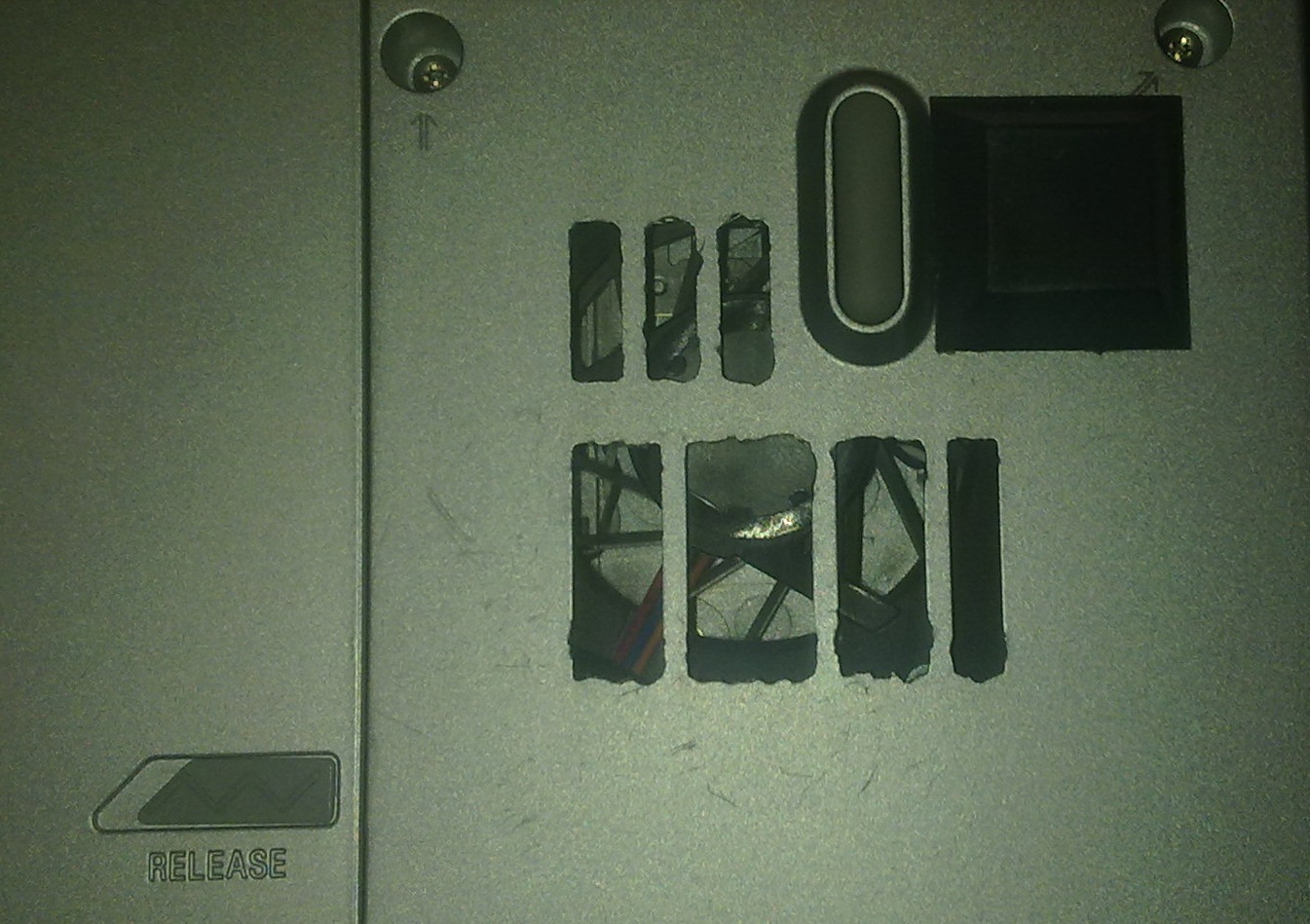
look what i have done to my case, do you think that i lost my warranty?
i do this because the temperature was to high ~70 C. And now it is much better, but in games still around 68 C.
Thank you in advance
Alin.Attached Files:
-
Windows 7 Clean install Guide for Vaio FZ
Discussion in 'VAIO / Sony' started by coolguy, Oct 28, 2009.