 Problems? See this thread at archive.org.
I have turned off the Push notification services as per Mr Fox suggestion via registry. Assassin Creed Odessey and Origins both work flawlessly. Computer works perfect. CPU usage no longer shows 100%. It could be isolated to Ubisoft games which causes this as they have all these pirate deterent applications running for the game.
Before I made the post about the Push notification services I scoured the web to see if others also had this issue and there are countless people complaining of this.
-
No, I’ve been trying to tell you that you should investigate the cause on your specific machines.
There’s a third party application that’s causing the high utilization.
Sent from my iPhone using Tapatalk -
Thanks for helping either way. Laptop and games are running perfect with the AGA again.
With that said. I finally after many trial and error finished my project and modifications to my AGA. It is not the prettiest but it works! I know I could have went with a watercooling solution and didn’t have to go through all this trouble, but didn’t feel comfortable with it so this is my solution. Noise levels with this setup is actually bearable. There is no whine or annoying high pitched fan noises and I went through many differnt fans which was annoying as hell! I have this setup in my living room and it’s barely noticeable!
I have temps on all games now at 53-55c. Whatever game I play the temps don’t go beyond that range. When I play League Of Legends the GPU barely reaches 40c! My GPU temps are now cooler than my laptop CPU temps! Lol
Vents holes on the top of the casing to allow heat from the heatsink radiator fins, and vent holes to expose both fans which now can suck air freely and not constricted by the plastic casing. The design of the AGA was not meant for two fan cards.
Top view with 92mm fans to force air to back of Casing. The front fan was not powerful enough to get the air circulating to back. Added another smaller fan to to circulate air towards the top portion.
Added a passive 27mm heatsink that fit pefectly between backplate and PSU with two mini fans to cool heatsink.
propeldragon and rickdeckard like this. -
Are you overclocking any? Are you using the factory fan speed curve?
-
I am using a custom fan curve but not OC as the FPS is solid 60 and occasionally dips to 56 on 2560x1440 with all games with resolution modifier set 120. The highest I have seen my GPU card fans spin is around 2100~rpms. I don’t find the need to OC the card and stress it when gains will be marginal. I am not looking to break any records nor I care about graphics score with bench testing. Simply want to cool the card as much as I can without watercooling it. Assassin Creed Origins I have it set to 140% the resolution modifier and it’s still at 61fps.
-
I noticed the majority of the coil whine on my AGA was coming from the PSU. So I swapped the internal PSU fan with an extra Noctura I had laying around and this didn't really seem to help. So investigated more and found that at least on my PSU, the fan was very very close to the 3M protective sleeve on large capacitor on the board. I simply cut off the part of the sleeve that was hanging past end of the capacitor and this took care of the majority of the noise coming from it. I ended up swapping in a Corsair RM850X PSU. The fan on it doesn't even kick on during use (other than the initial test spin when you boot up). Corsair says it will kick on at 40% load on the PSU, which a single RTX 2080 won't even come close to touching:
![[IMG]](images/storyImages/ADoMRxs.jpg)
If you're wondering why I went with such a big PSU, it's because I actually bought it for my desktop build in which I have another EVGA 2080 for it to run in SLI with the one currently in my AGA ( https://imgur.com/AUdOBRU).Last edited: Jan 7, 2019 -
Thanks for the feedback! We have different card versions, so I was just curious as too how much different my GPU cooler was as well as me not having the lid on mine. For me 2100rpms is 70% fan speed, I can stress test my GPU and keep it around 55-56C with the fans spinning around 2000rpms, though this is a bit loud for my taste. If I run them at 50% (1500rpm), temps usually stay around 60-62C but the noise is much more bearable. At 40% (1200rpm) the fans are silent and the GPU barely hits 65C. During gaming it's typically 2-3C less than when I stress test it for an extended time. All of this testing is with my GPU overclocked to 2025MHz peak. At stock clocks, the temperatures are even lower.
I game at 3440x1440 when I'm on the AGA, and see about 10-25% gain in FPS over my internal 1080 at the same resolution. The higher gain comes from games where I'm GPU limited, and the lower gain is where my CPU might be the bottleneck. I tested this by varying the overclock on my CPU to see if it affected the FPS gap, and on certain games it did. I hooked it up to my LG OLED in the living room and ran it at a full 4K on Witcher 3 with Ultra Settings (minus hairworks) and averaged low 60fps (52 low/80 high). I'm excited to see what it can do in a desktop.
I have some benchmarks I tested back to back between the internal 1080 and the 2080 at same resolution, same settings, to see how much of a gain I actually got. For the most part, the higher the resolution I tested on, the higher the gain I got. I will finish the testing, organize my results, and post them up on here. -
Yeah it’s definitely overkill for the AGA the PSU rated at that power level! That EVGA card is thick! With the lid off yeah you should have no issues with cooling.
For some reasons these RTX cards works better the higher the resolution. That’s why I have the modifier in game increase to 120-140%Last edited: Jan 7, 2019dsmrunnah likes this. -
Yeah there was no way to fit the lid on without some heavy modification. It's a 2.75 slot card, they have a 2 slot version, but I wanted the extra cooling. I made sure the mother board I bought has the space for two 2.75 slot cards though
 cn555ic likes this.
 -
You've got the right idea here, there's a ton of heat focused at the top of my AGA but zero ventilation, the PSU and card backplane are too hot to touch even though my GPU doesn't go above 74C. I think I'm gonna drill out some vent holes too and rest a couple of these on top.
-
When your wiring the fans if the wires are 4 pins just use the yellow and black wire and connect it to the red and black wire of the AGA fan at the front.
I chose to total encase my additional fans inside of the casing but your method can work to draw the hot air out. -
Did you just freehand drill the holes or melt them with an iron or something else? I'm thinking melt would create the least mess but either way is gonna be tedious.
-
I use a lego template with some doubles side tape and tape it to top to make it neat because the location of the AGA the only view is the top and not the sides! Lol
The sides I was lazy and did mostly free hand -
That's pretty darn slick but you know what screw it I'm just gonna bore 3" holes in the top, slap on simple wire grills and lay 80mm fans over the holes, might as well go for maximum exhaust directly over those radiator fins! Don't have much to lose, as you said these AGA's were only designed for blower-style cards so the ventilation is radically insufficient for these RTX cards that send all the hot air straight into the case.
-
Make sure to also expose the fans on the side vents. As much as your allowing it to vent, it’s important not to suffocate it!Last edited: Jan 10, 2019rickdeckard likes this. -
After completion take pics of your modifications. Helps give ideas to people who want to do the same. -
Here is my data while playing Assassins Creed Origins on 2K ultra settings with resolution modifier set to 140%. At 140% it looks amazing with gaming at 61FPS average. It’s been a month long experiment and below is a data log to show how cool the RTX2080ti can be with aircooling and passive backplate heatsink. Again if you have the AGA cover removed completely then it would work just as good and we all know this! It’s for people who want it all with the cover closed as it was intended for!! There is also undervolt on GPU to .800 and the CPU is undervolted to -.135mv.
Before modification and just undervolting the CPU and GPU, the temps were around 65-69c range. Without any undervolting it went as high as 78c. Looking at the delta there is whopping 9-13c lowered temps. I take that over hearing slightly louder fan noise
(fans that have no high pitched frequency)
Last edited: Jan 10, 2019Vasudev and rickdeckard like this. -
Appreciate all the help in this thread - especially to those that answered questions about GPU size and the AMP.
I ended up picking up this card: https://www.amazon.com/dp/B07J63W42X/ref=cm_sw_em_r_mt_dp_U_cTboCbAAE036A
The card fits perfectly - no issues.
I had no issues opening the AMP after reading the how-to's here. Had I not done so, I can certainly appreciate those that had issues. For fun, I tried to swap out the included PSU for an EVGA G2 1000w I had laying around. It fit, surprisingly enough and would have worked except the port for the power cord was not 100% with the cutout. I could cut the surrounding plastic to make it work, but lets be honest - the included PSU is already more than enough and a top end PSU would be wasted here.
I'm pairing this with a m15 (8750h, 16gb, 1070mq, 512gb, 144hz, 90w, silver). I plugged my Logitech G710 keyboard into the AMP and two 27" monitors into the 2070.
I did have some initial problems:
1 - my keyboard worked, but monitors didn't. I had to uninstall the nvidia drivers and reinstall to get it to recognize the 2070. After a reboot, both monitors worked.
2 - Lag in just Windows (mouse stutter). I disabled the Intel GPU via Device Manager and this resolved (found the answer to this here, love this forum).
3 - Lag while gaming. I disabled the 1070mq on my m15 and this resolved (figured if the Intel worked, maybe this would too - roll of the dice solution lol).
I'm now getting almost identical performance to my 8700k and 1080 desktop. Pretty happy with these results. I've only tested about 30 minutes as troubleshooting the above took a bit. I'll report back if anything changes.
Thanks for all the helpful advice!Turns>Airs likes this. -
Alright well after agonizing over whether to just take a hole saw to it, decided that your way simply looks better and allows more flexibility for future mods so got to drillin' a whole bunch of holes.
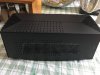
Then after slapping the USB fans on top it's done (for now).
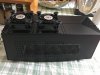
So end result is not earth shattering like yours but in Watchdog 2 maxed out 1440p my GPU went from 74-75 to 70-71 (with the case wide open it's like 66-67). I can definitely feel warm air being exhausted from the top so I think the overall effect is better than just what the GPU indicates. Like yourself I wanted to have a closed case and low noise so to that end I'm happy with the result. -
Either go with hardware modifications, or ask to buy a blower graphics card here, RTX 2080 Ti 11GB. We should start recommending blower-type graphics card from now on.
https://www.newegg.com/Product/Product.aspx?Item=9SIAB948F22307
![[IMG]](images/storyImages/14-126-248-Z07.jpg) cn555ic likes this.
cn555ic likes this. -
Yep if Nvidia had retained the blower design for RTX we wouldn't have this problem. That's a sweet Asus card but I got such a good deal on mine (under 1k) that I simply couldn't pass it up. I think it's gonna be mandatory for people with 2080 Ti (non-blower) in an AGA to do SOME type of mod as the heat inside the case is really kind of insane and I'm sure it will decrease the life of both the card and the PSU otherwise.
cn555ic likes this. -
Undervolt the GPU with MSI afterburner and those temps will drop a lot more. Remember my drop in temps are not just attributed to the mods of the AGA, it’s undervolted too.
-
How's the CPU on the m15 doing (heat/throttling) while gaming with the AGA? Is the m15's cooling sufficient with the load only on the CPU now?
-
The mouse stutter often only appears after changing monitor setup settings. You shouldnt encounter while booting with only the external monitor enabled and connected. Its an optimus bug and it sucks that intel never fixed it.
-
The CPU should be significantly cooler while using the AGA as the internal GPU is no longer used. Laptop GPU and CPU share the same heatsink piping I believe on the laptop.Turns>Airs likes this.
-
Just in case anyone is wondering about the speeds and potential bottleneck of the AGA over a full PCIe 3.0 x16 slot, I did some testing. I tested Heaven Benchmark 4.0 and Firestrike with my laptop hooked to the AGA RTX 2080, and I just finished my desktop build last night (9900K @ 5GHz, same 2080). My Heaven 4.0 scores were pretty much identical, and my Firestrike graphics scores were nearly the same as well. On benchmarks and games where my GPU was the bottleneck, I didn't see a change on scores or FPS. Obviously on apps where the CPU became the limiting factor, I saw a huge bump in performance.
Firestrike w/ AGA:
https://www.3dmark.com/fs/17785753
Firestrike Desktop:
https://www.3dmark.com/fs/17863589Terreos and rickdeckard like this. -
Hmm so you mentioned that you set the voltage to 800 mV with MSI, makes sense this will run cooler but are you losing any frequency boost under load aka losing any performance?
-
I have the RTX2080ti card and have not OC the GPU. I have my games set to 60FPS on ultra settings. I don’t notice any loss in performance but I am sure it’s negligible as I constantly see 60 FPS.
-
Ok so you're laser-focused on 60 fps gaming at max quality, makes sense. I'll have to play with it, maybe do that 'OC scan' thing in MSI or EVGA XOC and see if I can get temp down a bit further without sacrificing performance at the high-end.
-
The OC Scanner tries for max stable frequency without throttling. You could try to tweak the V/F curve, going for a decent frequency at a low voltage. I know on my internal 1080, I could run 1900MHz @ 0.950V which helped keep temps down and still performed better than stock. Even with using OC Scanner on my RTX 2080, my V/F hits 1900MHz @ 0.950V, but then the curve keeps climbing to higher to hit higher frequencies, albeit at higher voltage. You could try to do the OC Scanner, then from 0.950V and higher, just flatten the curve out and see how temps do. Also there is a fan profile you can adjust inside of the MSI Afterburner, this may help with temps a bit as well.
-
Hey everyone. I ran into a new issue recently where I cannot use the Laptop GTX 1060 graphics card when undocked from my Alienware Graphics Amplifier. I have a GTX 1080 in my amplifier, and when undocking it I cannot get it to run on the internal GTX 1060. This is after I have uninstalled drivers, reformatted multiple times, and tried what I thought was everything in-between. When I am not hooked up to a monitor, I get an error message saying that NVIDIA Display settings are not available - You are not currently using a display connected to an NVIDIA GPU . Before posting this I went ahead and made sure I removed all NVIDIA drivers from my system and did a clean manual install without Geforce Experience and removed any prior profiles and I am still getting the same error.
Any help would be greatly appreciated as my undocked R3 13 is completely useless for gaming at the moment which is what I use it for. Thanks for the help. -
Having 2-3 FPS sacrifice in order for GPU to stay under 63-64c range is worth it IMO worth it.
-
Unplug the AGA. Then run GEForce experience and then hit update driver. It will update the GPU on laptop. That’s what I did when this exact thing happened to me with my laptop 1060Last edited: Jan 13, 2019
-
The AGA has been unplugged through 2 reformats and uninstall of drivers/install of new drivers. The only time the GTX 1060 seems to activate/work is when I am plugged into a monitor which defeats the whole purpose of a laptop.
-
That is an odd. Did you try updating the BIOS to 1.5.0. -
Great suggestion, I tweaked the fan curve with MSI (tried the EVGA X1 utility but it won't even launch on my system) and took the temp's down another few degrees to 68C under full load, sweet.
-
Open question. I've now got my 2080 Ti running at temp's I'm very comfortable with fully enclosed in the AGA. What still alarms me is how insanely hot the PSU gets and its unfortunate position directly on top of the GPU. Would a replacement PSU like a Corsair CXm series run any cooler than the obviously generic junk PSU from Dell?
-
Without an undervolt, it still hits 100c. I undervolted and still hit in the high 80s, but averaged in the 70s. Biggest problem I had is that I have to disable the integrated and discreet GPU via device manager to get it to work without stuttering.
-
My PSU is warm and never hot. I think you might need to add some fans inside the AGA to allow air to circulate better. The one fan in front of the AGA doesn’t pull in enough air to the back. -
Do you have the laptop lid closed or open. Make sure to have the laptop lid a little open as it will help dissipate some heat. -
I think you're right, gonna maybe try cutting a little access port and put 1 of my 2 USB fans inside the case. Alternately though, I'm eyeballing the Corsair SF450 which interestingly has its fan on the opposite side so would exhaust the hot air out the other side of the AGA (more hole drilling) instead of on top of the GPU backplate and also allow me to use standard 3 and 4-plug case fans. Decisions, decisions.
-
It’s not the PSU that gets hot. The GPU backplate get super hot to the point you can cook an egg on it. This heat gets transferred over to the aluminum PSU casing. If you touch the GPU backplate, the hottest spot on the backplate is directly underneath the massive 2080ti die and sits directly across from the PSU fan. The backplate acts as a passive heatsink on many RTX cards. I know the FE cards use it to dissipate some of the heat. The PSU that is on there sucks air in , so having the fan on that side is a good thing. The issue is not enough cool air pushed to the back of the casing so the PSU fan is drawing air that is already hot from the GPU backplate and not able to cool the PSU unit itself. Just add two 92mm fans or even larger in front of the factory fan. This will allow the air to flow further back to the PSU location. Look at my pics of the fans from post before.
I have fiddled with this for quite some time and posted my trials and tribulations and got bantered with my “almost dangerous” mods! This AGA was built around blower style setup and these drastic mods are needed. Add some fans inside!Last edited: Jan 14, 2019rickdeckard likes this. -
heatsinks do get warm, also the one in the AGA. It even gets warm with a meager 1050TI in it. To be honest, the PSU used in the AGA is kinda poor its not even 80plus bronze certified. It has tine heatsinks on the PSU PCB itself. in the and I just replaced it with a unit from one of myt desktop PC's.
Anyway the PSU gets warm, its not ebcause of the backplate. That backplates can get quite hot I agree, but so does the PSU. -
I do agree it produces it own heat but explain why I can play for hours and my PSU is just warm to touch and also the backplate of my RTX2080ti card is warm to touch now also. I know it attributed to the GPU card backplate causing it to be even hotter and with the PSU fan injesting hot air already fit will make the PSU unit have no chance of cooling down. Do you have a RTX 2080ti in your AGA with fans?
Ask Richdechard how hot that backplate gets on the RTX2080ti cards and specifically the hottest location should be right behind the fan vents in PSULast edited: Jan 15, 2019 -
why not simply open the aga when in use, to vent the hot air?
-
Reason being some people like to have it work in its form factor and have casing closed. Others have pets that tend to be curious and open case you know how that can turn out.c69k and rickdeckard like this.
-
fair comments. i just rang dell support and they said they do not offer support for partner cards. i sent him a link to this thread. he mentioned that the fe should work ok as that is what they trst the aga with. i told him to look here.
i have bought an fe 2080 ti y.day and as dell only supports fe cards i will stick with it.
he also mentioned opening the lid an inch or two to increase airflow.
i must admit i did like someones idea to dremmel a couple of usb extraction fans on the top, i would do this also but only if opening the lid slightly was not enough.
good community here
-
i will post temps when it arrives.
my 1080ti runs @ 50deg under heavy load in the aga which is v impressive although i did have conductonaught applied to the gpu die.
which i will also do to the 2080 ti! -
Considering Dell is likely never gonna put out a revision of the AGA to accommodate non-blower cards, you should set up shop and charge some coin to mod AGA's because all your ideas work! I cut a little port on the side and snaked 1 of my USB fans inside, inline with the OEM fan, blowing across the PSU/GPU toward the rear. My GPU temp went down a further 1C but the main thing is the PSU chassis now no longer feels like it's about to self-immolate AND the GPU backplate is cooler to the touch as well, still damn hot mind you, just reasonable now.
These AC Infinity USB fans are really good BTW, would definitely buy them again, very versatile and surprisingly good airflow considering the low-power USB interface. -
I had (sold it) a heavily overclocked 1070 from EVGA that ran at if I really pushed it at 2.2ghz. But it isnt really an issue in the AGA. The VRM's are rated for a max of 130c or something like that. But not GPU comes close to that in the AGA. The PSU though gets quite hot and the capacitors are of poor quality so keeping the PSU as cool as possible is kinda essential.
*OFFICIAL* Alienware "Graphics Amplifier" Owner's Lounge and Benchmark Thread (All 13, 15 and 17)
Discussion in '2015+ Alienware 13 / 15 / 17' started by Mr. Fox, Dec 10, 2014.


