Problems? See this thread at archive.org.
For the sake of your really, really expensive 2080 Ti, do some cooling mods straight away, this AGA design is simply not meant for non-blower cards.
-
-
before i start hacking the aga up i will see what the temps are at stock, then with the lid up.
if they are bad after that then i will install 2 x extraction fans on the top of the case. -
If you pull the lid up while gaming, there will be NO issues at all. The card will run really cool. I already stated many times that if one chooses to have the lid open at all times, these modifications are NOT necessary at all. With that said if the cover is on expect temps to be 78-79c and PSU and GPU backplate be hot as hell. -
mate iv not followed the whole thread i dont have continuity, im simply suggestion obvs fixes and also relay what aw spt are saying.
-
Extraction of the hot air is NOT the issue here. It does help but the main issues are the GPU fans are restricted because of the poorly designed side vents, the top casing doesn’t have vents to allow hot air to dissipate the air from the heatsink radiator of your card and there is not enough air flow to back of casing from the one fan alone in the front of casing.
Your a brave soul to use Conductonaut on your 2080ti. The heatsink contact appears to be nickle plated and not 100% copper. I opened my FE card up and didn’t feel comfortable using it so I used Kryonaut and re padded the thermal pads.Last edited: Jan 15, 2019 -
Personal preference I guess. Aesthetically I just don't like a cracked-open case (or no case at all as some people do) so I prefer the fun and challenge of getting it working with the case fully closed, albeit with plenty of extra vent holes. =)
Also as mentioned earlier pets are a big issue and I have a dog so there's always dog fur everywhere; keeping the case closed just mitigates such environmental problems. -
yes im aware the heat not escaping is the issue hence open the lid and if that is not good enough install extraction fans on top.
i should have just copied and pasted earlier post. -
I like tinkering with stuff so it was quite gratifying playing around with it and experimenting on various fans and locations and varying heatsinks. Spent some extra coin that was wasted, but it was well worth it as it passed time. Call it a hobby! With kids in the picture, one must find ways to entertain oneself and I am not talking about pocket pool that many of you probably do a lot! Lol
rickdeckard likes this. -
what fans did you use?
-
please

-
Also what heatsink did you find that fits perfectly in the gap between GPU and PSU?
-
****Note to anyone doing this mod***
The heatsink that I used fits perfectly for the Nivdia RTX cards. I don’t know how the fitment will be with other cards as they may be thicker and the space and gap between card and PSU is less than 27~mm, so measure the spacing before ordering the heatsink if the graphic card your using is different brand.
The heatsink I am using specifically is the Evercool Low Profile CPU cooler. You might need to remove the fan which is two small screws. It will not work as it will touch the PSU and not spin so we are only using the heatsink part only. Each heatsink and fan assembly can be differnt so test it yourself before removing fan. If the fan spins without it touching the PSU your golden and then by all means use it. On mine I could not get it to work as the variance of the space needed was less than 1mm and it would have cleared. Lol. Make sure to put some thermal paste on the contact point of GPU backplate and heatsink contact. It will fit snuggly between GPU backplate and PSU. Add a little Vaseline to allow it to push down without effort
https://www.microcenter.com/product/441779/low-profile-cpu-cooler
As for the fans they are Noctua fans found here. To install them to casing you can use one small flat head screw and screw it to fan and base. Doesn’t require to much support to secure it. Do whatever you need to secure it That’s just my suggestion.
These fans comes with noise reduction wires which you will not need as these fans are so quiet to begin with. Cut the wires and only use the red and black as the blue is not used since we Are not using the PWM wiring which regulates fan speed from the CPU motherboard.
https://www.amazon.com/Noctua-NF-A9...a+92mm+fan&dpPl=1&dpID=41d9ZFtsZ7L&ref=plSrch
I added two of them close together to push more air to back. Basically add some speed of the air to ram it to back.
Since I could not get the fan to work on the heatsink I purchase two of these and took the tiny fans off the tiny heatsink by taking off 3 little screws( simple) and crazy glued the two miniature fans to the side of the PSU to cool the heatsink as well as the PSU unit (check my previous pics for the location page 400 ). These two little fan as small as they are helps to circulate air horizontally and vertically which helps the heatsink dissipate heat more efficiently. All my fans I have tapped power off the line that runs the factory fan.
https://rover.ebay.com/rover/0/0/0?mpre=https://www.ebay.com/ulk/itm/372528314698
Note. These little fans took forever to come from China! Took well over 4-5 weeks. If you can find another source who sells them locally then do so but the cost won’t be as cheap as the ones shipped out of China.Last edited: Jan 15, 2019rickdeckard likes this. -
I have the Nvidia FE 2080ti card. I am not sure it will work with other cards the heatsink so measure it. It has to be roughly 27~mm the spaceLast edited: Jan 15, 2019
-
Nickel plated copper is usually what's on the inside of desktop IHS where the die is. People use liquid metal a lot inside of there when they delid quite a bit. With that said, nickel doesn't react with gallium like copper would so it would probably be better.
Steve @ GamerNexus did a video on this and said "Gallium in general reacts with copper and leaves it pitted on the very top layer, but the reaction isn't heavy so doesn't really matter to Thermal Grizzly. Nickel has the function of a diffusion barrier and doesn't react with the Gallium which makes it more suitable for LM application." -
The way the card sits in the AGA in the upright position, I would be wary if any of the LM spills out, so even with that info I wouldn’t use it. I use LM on my laptop but Is rarely upright so I can live with that.Last edited: Jan 15, 2019 -
it was applied by a professional who specialises in LM, not some kid with masking tape following iunlock youtube tuts. using 7 nonths now no problems.
-
ok so my 2080 ti arrived an hour ago. its in the aga, lastest drivers.
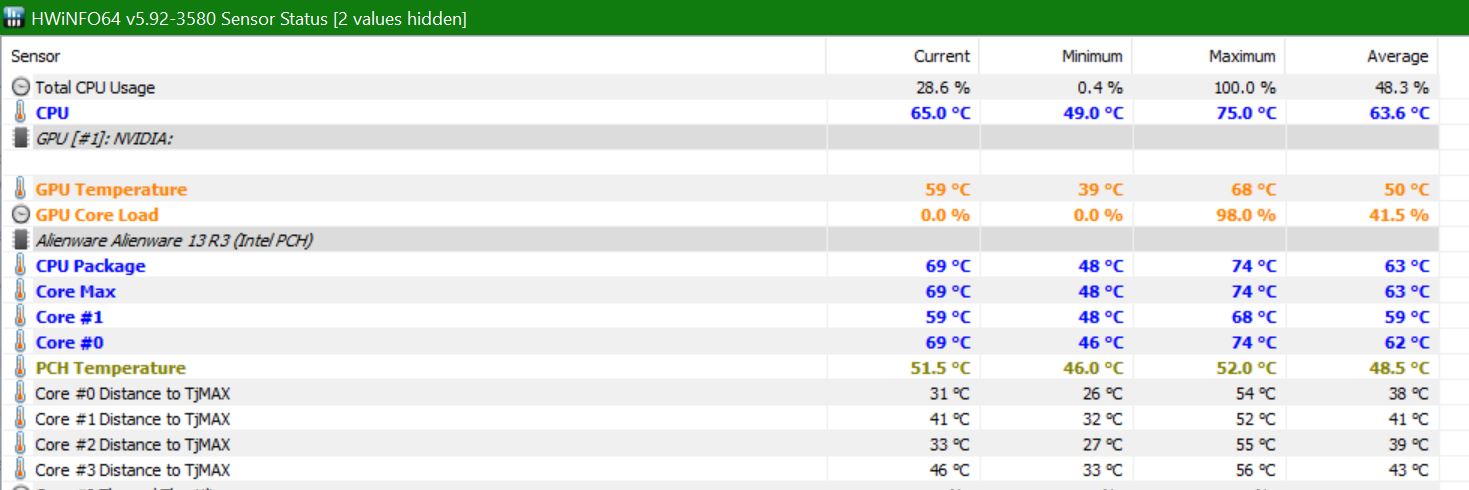
iv been running kombustor for 20 mins now and max temp on gpu?
44 deg!
iv got no heat issues at present.....
i will play a few games later but currently i think i will be ok with heat! -
lid is closed.
-
45 minutes, currently 42 deg!
-
bf5 @ ultra 71 deg!
high but well within temps.
no hacking aga required. -
Do you have Shadow of Tomb Raider? If so play it with Ultra setttings /maxed settings. That game gets my GPU the hottest each time I played it and went as high as to 78c before my mods. If you have that can you post temps of it after an 30-40 minute play ?
Is these temps you posted with repasting with LM? Did you also do any undervolt or OC the GPU?Last edited: Jan 17, 2019 -
iv not had a chance to LM the 2080 ti but i will. yes i did uv 0.145.
i dont have tomb raider! -
no oc. no need iv got 100hz 3440x1440 monitor, its already maxing fps at stock.
-
If it is at 71c then you are good to go! If you want it cooler then modify it. 12-15c reduction in temps is big difference for longevity of card.
-
im going to conductonaught the gpu die. should drop it to low 60’s.
i updated to 1809, turned on dx12 and dxr, now my bf5 fps has dropped to avg 60!!!!!!
thats not right. -
doh!
geforce forums says with ray tracing on i should only be getting 60fps on 2080 ti @ 2160x1440, but im getting that at 3440x1440!
i turned back to dx11 and fps is sitting a 100 with gpu avg 62 deg.
problem solved!
must say though bo4 looks crap on this card! -
Thinking of go watercool my 2080ti with the evga hydrocooper block and a custom loop,any suggestion?
-
-
100 FPS with ray tracing turned on at 4K on Ultra setting!! I don’t know one review that I have seen that FPS on 4K was over 60. I am not saying you don’t but if you are seeing this, you have yourself a special card if that is the case.
-
lol read it again mate
-
Yes you turned off DX12 but left ray tracing on and your getting 100fps. Am I missing something ?
-
ray tracing only works in dx12. dx11 = no RT.
-
Oh. I didn’t know that.
-
me neither until i put the card in. install drivers but still u could see card was poo. research says got to update os 1803-1809 then update again.
dxr and RT only work on os build 1809, i could not see these options in the bf5 menu, i read that info on another forum, works.
bo4 is baaaaad tho
-
my apoligies. when i said up date again i did not mean ‘the actual os’ again, just in updates from win and drvr’s etc.... etc!
-
Exactly, 71 under load (albeit with uv) is really good but all I spent was 15 bucks on USB fans and an hour with a drill and with no undervolt, gaming at full load never exceeds 68C (was 76C before I started). The real point though is the AGA simply is not built to cool a non-blower card, it's utterly inefficient in every way. You would still do very well to at least get more airflow blowing through the AGA toward the rear.cn555ic likes this.
-
Anyone with RTX 2060 yet ?
Thanks
edit: Got mine today and for those that could be looking - here are the results after 30 min of BF V [ultra/ rtx-off]Attached Files:
Last edited: Jan 23, 2019 -
-
ok so iv had conductonaught LM applied to the 2080 ti die.
https://www.tryimg.com/paulo75
quick game of SWBF 2 and temps are already 10 deg lower, 62 deg.
needs to cure but should see further nice drops. -
thats just the gpu in the aga, no mods!!!
-
That’s awesome but for me having the GPU in that upright position 24/7 with LM would make me uncomfortable but nevertheless quite impressive that LM stuff as I have it on my 13r3. -
i had 1080ti in aga for 7 months with LM, no problems at all.
if its applied correctly there should be no issue, hence why i have mine done by a LM specialist. its not cheap, but, it works! -
so here is BFV, everything in settings maxed out, ray tracing on. 3440x1440 omen x35 monitor. 85fps!!!
https://ibb.co/ZWYVwKQ
https://ibb.co/TLd6fc8
just after this i got three across map headshots in a row haha xD
-
Is the monitor 60hz refresh rate ? If so going beyond 60fps is useless so you should set game Mx FPS at 60fps
-
its 100hz, and refresh is locked to monitor refresh.
imho 100hz is better than 60. -
Absolutely better. As long as the refresh rate is higher on the display than the FPS it is always better but no opposite.c69k likes this.
-
i get a solid 200 fps SWBF2 even though only 100hz monitor lol
-
Anyone know if either of these would fit in awga? Links below. What would be the best choice between the two? I’ve heard some people take the stock fan out and replace it on the graphics amp, while others shut it off completely and let the card do the cooling itself. Anyone have any recommendations? Thank you for the help
I’m looking to pull the trigger by tomorrow on the gtx 2080 and m15 or Dell G7.
https://www.amazon.com/GeForce-Type...s=rtx+2080&dpPl=1&dpID=51NskWE7TVL&ref=plSrch
https://www.amazon.com/EVGA-GeForce...s=rtx+2080&dpPl=1&dpID=51dMp64MCTL&ref=plSrch -
I recommend you just get a laptop with a rtx2080 to begin with. Probably a 17m or Area-51m. The AGA should be looked at as something that can help extend the useful life of your laptop, not something to use up front imho. While I am satisfied with my AGA w/gtx1080ti I really wish I had just spent extra up front and bought it with a gtx1080 to begin with.
-
I appreciate the input I would if there wasn’t such a disparity in performance! Even the top of the line 2080 in the new Area 51m is only getting close to half the performance of a full fledged 2080. I’d rather spend an extra couple hundred buck on the m15+egpu vs mobile rtx with terrible performance.
-
I actually do not think the performance diffs will be that high. I don't think you can base this only on clockspeeds. Nvidia says to initially expect 15-30% lower performance for laptop rtx 2080 vs desktop but this will vary and may depend on the OEM as to how much cooling is possible. Obviously a larger platform like the new area 51m is going to fair better so I would expect this diff to be no more than 15% initially, with the potential for clocking this up later.
Remember that your will lose ~5-10% performance with the AGA and even more if you do not use an external monitor and only project to it. The net diff may only be ~5-10%. Personally I would much rather give up 10% for the convenience of not having to have an AGA and External monitor. Plus if you are actually using your laptop as a mobile I think you will find disconnecting/reconnecting the AGA could be a real pita.
Anyway, your $'s so you choose what you like. Good luck either way.c69k and childprotectorofthenight like this.
*OFFICIAL* Alienware "Graphics Amplifier" Owner's Lounge and Benchmark Thread (All 13, 15 and 17)
Discussion in '2015+ Alienware 13 / 15 / 17' started by Mr. Fox, Dec 10, 2014.