Problems? See this thread at archive.org.
It will fit.
But damn, you get a much better screen. 100% Adobe RGB and 4K!
-
-
My existing one which they replaced is 4k (I opted for it while configuration).
Here is a reference - https://www.parts-people.com/index.php?action=item&id=22155
This one is matte as well.
The issue is I am getting Dark Bands on the sides (more on the right than left) which is NOT normal. So I am suspecting screen flex... -
Your old one is only 64~ Adobe RGB.
Try prying the bezel off and see if you have excess adhesive that is used to secure the bezel to screen. This can be removed quite easily. -
Thanks for the tip Mobius, tried it.. there is no glue on the left / right side of the LCD.
But after I removed the bezel, I can maybe sense a little bend in the screen due to the mount. Not sure if that could be causing an substantial bend or angle to be created, hence the dark bands.
I have mailed back to DELL, let's see what happens next.
thanks! -
Do http://lightbleedtest.com/ + F11 fullscreen on a dark room and see if you notice improvement with bezel on bezel off.
-
Hey guys long time since I have had a notebook but finally i'm mobile again.
I have an Alienware 15 R1 and would like to replace my faulty touchscreen with a new one, can anyone point me into the right direction as to what the best glossy touchscreen replacement is and how much I can expect to pay? It seems there are a couple different screen manufacturers for these. So far what I've gathered is the touchscreen is an all in one assembly. -
still in warranty?
-
not really, long story but anyhow dell want 269+ tax for it
I figured if I could find it for a decently cheaper rate I could change the thermal paste to some prolimatech and shave some temps at the same time. If its not worth the hassle I could just pay them -
with warranty you can get both the screen that that heatsink thermal paste issue replaced (in home) -
Hi guys,
I'm having an issue with my Alienware 15 R2. Started noticing about a month ago
Typical case:
- Unplug LAN cable
- Unplug my laptop
- Plug back LAN cable
- System freezes and in some cases, screens go blank
To fix this, I have to put the system to sleep and put it back on, or wait for an unbelievable amount of time to have it start working again.
Any ideas on how I can fix this, its getting quite annoying with my system freezing almost everytime I try to connect when unplugged.
Thanks. -
seems like driver issue
clean uninstall the killer driver with revo and install the latest barebones one
@judal57 should have info on this -
Hello! Today I raised and flipped my 15 r2 laptop(I didn’t turn off the laptop, I just unplugged charger, mouse and other stuff). I wanted to look on cooling system. And I came across something really interesting. Two fans were not spinning but I heard quiet noise from laptop as if there is third fan. What is that? Does anyone know what makes this noise? I checked very carefully the fans really were NOT spinning. Also I’ve bought used laptop. Maybe previous owner added third little fan? LOL But it is very unlikely…
-
Just wanted to chime in here for R2 owners thinking of upgrading to the R3
I ordered off the dell outlet the same spec in my sig but R3, with 10708gb graphics card.
I'm returning it to Dell - it's just not worth it, and actually for my purposes the R2 is the better machine.
The main issue is 1.) No more SD card reader, and 2.) the added length is HUGE! the R3 is more of a square than a rectangle, and doesn't fit in any of my bags! in addition it is heavier and frankly i think it looks a bit bizzare.
Given the exact same CPU config, the 980M is fine for 1080P gaming (and the games I play). for added oomph i have the 1070 aga at home.
The size of the R2 is way way way better for me.. the R3 is far less mobile IMO. given the build quality of the R3, and the metal is only on the outside and they still use plastic soft touch on the inside this is a no brainer for me.
R2 all the way - the R3 is going back to dell tomorrow. -
Yeah, the formfactor of the 15R2 is great. It ahs been a solid workhorse for me for more than a year now. I like the R3 too but indeed the size increase worries me a bit. It seems not to fit in overhead cabin cases which I can bring on my travels. I do miss a 120hz panel option. WHen I am at home I can use a 165hz 27inch Gsync screen which is a blast to use for gaming combined with the AGA and 1070GTX. I wish to have this in my laptop.
-
You raise a good point here - I am also interested in the R3's 120hz 400 nits panel
Is there any way to find the Dell Part Number for this? Also; does anyone know if the 120ghz panel on the r3 uses the same 30 pin connector as the 1080p panel on the R2? -
Just got a 15 R2, this question may have been answered previously but I couldn't find it when i looked.
Is there anyway to tell when the laptop is fully charged while the lid is closed? Is there a battery indicator, or a way to have the lid leds light up when charged? -
unfortunately no :|
-
How about enabling the touchpad to be able to go "back" and "forward" on Chrome with 2 finger swipes left or right?
-
Tbh i have no idea. But gsync is out of the question.
-
If you download latest input drivers for 15 r3, you can configure gestures to suit your needs by navigating through Dell Touchpad settings. http://www.dell.com/support/home/in...nware-15-laptop&languageCode=en&categoryId=IN
-
Does the 15 R3 driver actually work with the 15 R2 touchpad? -
Tested by @judal57 and me. Dell can't/won't switch to entirely new parts and SW.
-
I installed the driver, but i still don't see the setting in the Dell Touchpad settings. Mind providing some more specifics?
-
The new ones are made by elan right? Old ones synaptics.
-
Goto C:\Program files\Synaptics\SynTP\Delltouchpad35.exe. Navigate to gestures and enable quick launch or even adjust gestures to suit your needs.Last edited: Dec 31, 2016
-
So I tried this yesterday, and the problem persists. I've had to put my system to sleep and wake it up about 4 times for me to get a usable run. It'll usually show up for about 1min then the screen flickers off, I can hear the programs in the background. Seems to only happen when the PC isn't plugged in too

Any other ideas on how I can fix this? -
have you try to unplug the network card and see if your problem persists?
I think it's really the driver that borked your windows -
PM @judal57 about your issue and he'll provide a solution.
-
Remove all the GPU drivers with DDU and reinstall the latest from the Alienware support pages.
-
Anyone has issues regarding Sound Blaster Audio driver getting stuck at 90% during re-install? I have this problem since 2 days after re-imaging my entire disk.
I just found out a gift in 15 r2's BIOS, Goto Advanced> Performance options > Enable CPU performance. You'll get the power limit amped up to 92W with aggressive fan speed curve.Last edited: Jan 9, 2017 -
have you tried to clean uninstall the driver and then installing the new driver downloaded from dell?
use revo uninstaller for cleaning out everything related to the audio driver. -
Dell driver while installing gets stuck at 20% and never progress beyond even after an hour. I think my OS is corrupt. Its strange that Dism and SFC didn't report any corruption whilst running them repeatedly.
-
are you sure it's actually stuck and not doing a lengthy install process?
also make sure you have the correct driver by searching through your service tag in the dell webiste. -
I've done that. Tried drivers from Station drivers as suggested by @VICKYGAMEBOY and it installs fine but Alchemy and creative SW stuff isn't installing. Should I try a reinstall?
-
Now that all the new 2017 laptops have been announced, does anyone know if there's a 15.6" 4k g-sync capable laptop screen? Swapping out my 4k screen for one with g-sync would alleviate a lot of headaches.
-
Not possible
-
The 4K60 on the 17" Sager actually is possible
I believe @Meaker@Sager said that the Gsync requirement is 75hz, but the AUO (and maybe Sharp?) panel on the 17" Clevos soft-break the rule since it's only 60Hz but has gsync -
But thats without optimus right?
But when Optimus is in play it doesnt matter if you put in a gsync monitor or not. It cannot enable Gsync anyway. -
oh right
-
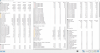
Repaste results on 15 r2.
I used Arctic Silver Ceramique 2 and unfortunately I didn't take any photos of dell paste but I will say this: It had bubbles and whole thing was overflowing and dried like hell. Cleanup up new HSF and applied the paste. DEll technician did it since it was covered under warranty.
@judal57 @rinneh. Any suggestions.
--------------------------------------------------------------------------------------------------
Before Repaste:
After Repaste:
The results are posted below. The images aren't uploading properly. Separated the two of them for better clarity.Attached Files:
Last edited: Jan 19, 2017 -
-
I suspect your heatsink is not making proper contact. Those temps are not good after a repaste. I would stress the cpu and gpu at the same time. Drive the temps up and send a screenshot to alienware and tell them your heatsink is faulty.
-
@rinneh: I'm sorry the attached are still before repaste. I'll update. I hope the reulsts are satisfactory.
After repaste:
-
@Vasudev i think your temps are good for the paste you used and depend a lot on the ambient temperature and that 83 spike could be the bad fan profile, in my case my cpu go to 78 when i start gaming because the fan take a while to start, then it reduce to 68°C make a stress test using AIDA64 xtreme edition and test only the 3 first options and then with the gpu too, with and without. and make 8 minutes each, to see the curve. dont forget to use something on the back of your laptop to allow the entry of fresh air
-
@Vasudev for example in this moment i am on a city that the ambient temperature is 35°C and the fans just dont want to spin ... in fact when is heavy stressed the fans run really low, look
![[IMG]](images/storyImages/example.jpg)
but i dont care too much, 68 is fine to me .. i think if the fans turn fast i can get 60 or less ... but simply they dont like to spin fast ... i dont care about sound, but Dell dont understand that, they dont want to give us control of the fans -
Dell is probably the only laptop brand now that doesn't want to put in a fan app for tweaking fan speed in their main software. You are forced to use Hwinfo or need go into bios for putting tweaked fan speed. People with AW have asked nicely to get a fan app now since the problems with fan behavior in the 2013 models. Nothing has happened since then. You could wonder why?Vasudev likes this.
-
@Papusan: There are alternatives put into BIOS, for instance you can enable either Fan performance mode or CPU performance mode to get moderate to aggressive fan speeds.
I really miss my God mode module present in BIOS of desktop. crtl+f1, you'll get all advanced settings though.
@judal57 you can opt for higher fan speeds by using cpu perf mode or fan perf. mode. Even in my city the temp averages between 30-40C. I played for 6hrs at high settings w/ vsync turned on, peak was 83C and low of 55C and avg was 73-79C.Last edited: Jan 20, 2017 -
There are plenty without fan control. because manufacturers worry that users damage their systems with too low fanspeeds.
-
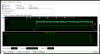
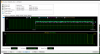
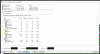
@judal57: Here are a couple of AIDA64 screenies. I didn't know how to use AIDA64 at first, so those are just for info. I ran the stress test for 32mins and observed 73C on all CPUs. I thought I need to stop the test to take screenshot that's where i messed up. Anyways, here are screenshots.
-
Heh, at least with Alienware you can still control fans with a 3rd party program.
You're stuck with no fan control at all on the ASUS ROG line which prioritizes now fan noise over decent cooling. -
Dell is late to the party. Msi, Aorus, Clevo, Gigabyte, Lenovo and Acer have fan control. They can easy prevent too low fanspeeds. Shouldnt bee a problem if they do the job proparly. Dellienware give a damn in the end users...
![[IMG]](images/storyImages/j9op8hd.png)
Yeah, Alienware is saved by HWINFO aka 3rd party software. But it should not been like this. See picture.
Without the ability to use Hwinfo would the last socket models AW17 and 18 have been totally useless if you overclocked your hardware. Dell did not care about all the complaints on the useless fan profiles yet they put in mobile Extreme.Vasudev likes this.
*OFFICIAL* Alienware 15 R1/R2 Owner's Lounge
Discussion in '2015+ Alienware 13 / 15 / 17' started by Mr. Fox, Dec 10, 2014.