Problems? See this thread at archive.org.
Have had some freezes during cold boot after login to Windows that's require a hard shutdown with the power button since oct. 14/15. Seems to be happening after the Windows update that was released on oct.13 (KB5006670 Windows 10 21H1 19043.1288). When turning on after the hard shutdown, everything loads as normal and sfc /scannow comes out clear, all SSD/HDD are healthy and all HW test is good.
Had this happening for a year or to. That time it was caused by an external monitor plugged in to the HDMI port. I have the PC connected to a dell docking station and the monitor is plugged in to the HDMI port on the docking. I saw there was a new driver for the displaylink so I updated that. Will see if that cures the problem. If not I might try to uninstall KB5006670 and see if that is the issue.
I any other have experienced similar hard freezes lately, feel free to post.
-
Dunno if anyone faced this issue wherein the PC doesn't shutdown properly and continues running. I usually look at AlienFX lighting to judge if PC is ON/OFF.
-
Is this a reply to my problem, or a problem you have?
-
I have issues same as both of you
Uninstalled all October Updates KB5004331 KB5005565 KB5006670
Problem solved
-
Questions for any owners that replaced a battery. Im trying to work out if this is an issue with something im doing or just a run of a bad batch.
Alienware 15 r2, battery isnt great, get about 30 mins, so bought a replacement off ebay, was £60 odd quid. It came, i replaced, it charges and shows it charges in windows, second you remove the power cable woosh away it goes, power off black screen, as if it was a dead battery.
Battery report shows its 8800mah, 0 cycle count, and when i got it it was at 20 percent, and i let it charge to 100. Message the seller, he thinks its doa, so he sends another, just arrived, same thing. Battery was at 60 percent, i let it charge, pull the cable, power down.
Is there a setting that causes this or is the batterys buggered. My original still works if i put it back with zero issues other than its about dead for cellsVasudev likes this. -
Express charge is just about the only setting to consider, make sure it's off but otherwise it doesn't look good. Why did you buy it off eBay? Did you try Dell Support?
-
it was half the price compared to others, and said it was official battery, not that i could find it from dell, i dunno what to do now, if i spend the double price on the ones from dell and still dont work i cant send it backLast edited: Nov 25, 2021
-
Obviously, someone on eBay pushed a lemon on you. If you buy a battery from Dell, will you not have some recourse/warranty in case of issues? You know that your original battery is working fine.
-
It's unlikely that Dell will still stock parts for these as they would be considered End of Life laptops by now, being 6 years old.
I would suggest www.parts-people.com. $110USD for an OEM battery and they ship all over the world. -
Doesn't matter if the laptop is 6 or 3 yeears old. Dell-Chris on Dell's own tech forum have replied several times that they don't sell parts. But he is good at provide you the correct parts numbers for your hunt after parts.
![[IMG]](images/storyImages/Dell_Forums.png)
-
Yeah Chris is pretty decent at trying to help out.
They have occasionally sold parts in the past. They did sell the Area-51M upgrade kits for a short while but let's not get into that one.
-
Try this Command Prompt (Admin), type powercfg /batteryreport
Report will be saved under C:\Windows\System32 as battery-report
Hope this help to see if its the battery or your laptopVasudev likes this. -
My 15 r2 battery just went kaput today. Was working till yesterday midnight. Suddenly the battery health dropped from 94 to 80% and doesn't power up with battery. Only new thing I did was apply System firmware update from WU. I was facing constant sleep of death on idle on battery and AC. This is the second battery from Dell. Just used part number and ordered from Amazon India. I searched for battery from laptopbatteryexpress.com but I'm unable to login or order and parts-people showed me 999$ shipping fee and then displayed "not shipping to India".Papusan likes this.
-
Sounds strange that the battery would do that out of the blue. But see you have had some battery related issues with the sleep feature, so that is a warning in it self. How do you messaure the battery health? I use HWinfo and mine says 11.8% wear. And I think that is quite good considering the laptop is 5 years old (2016).
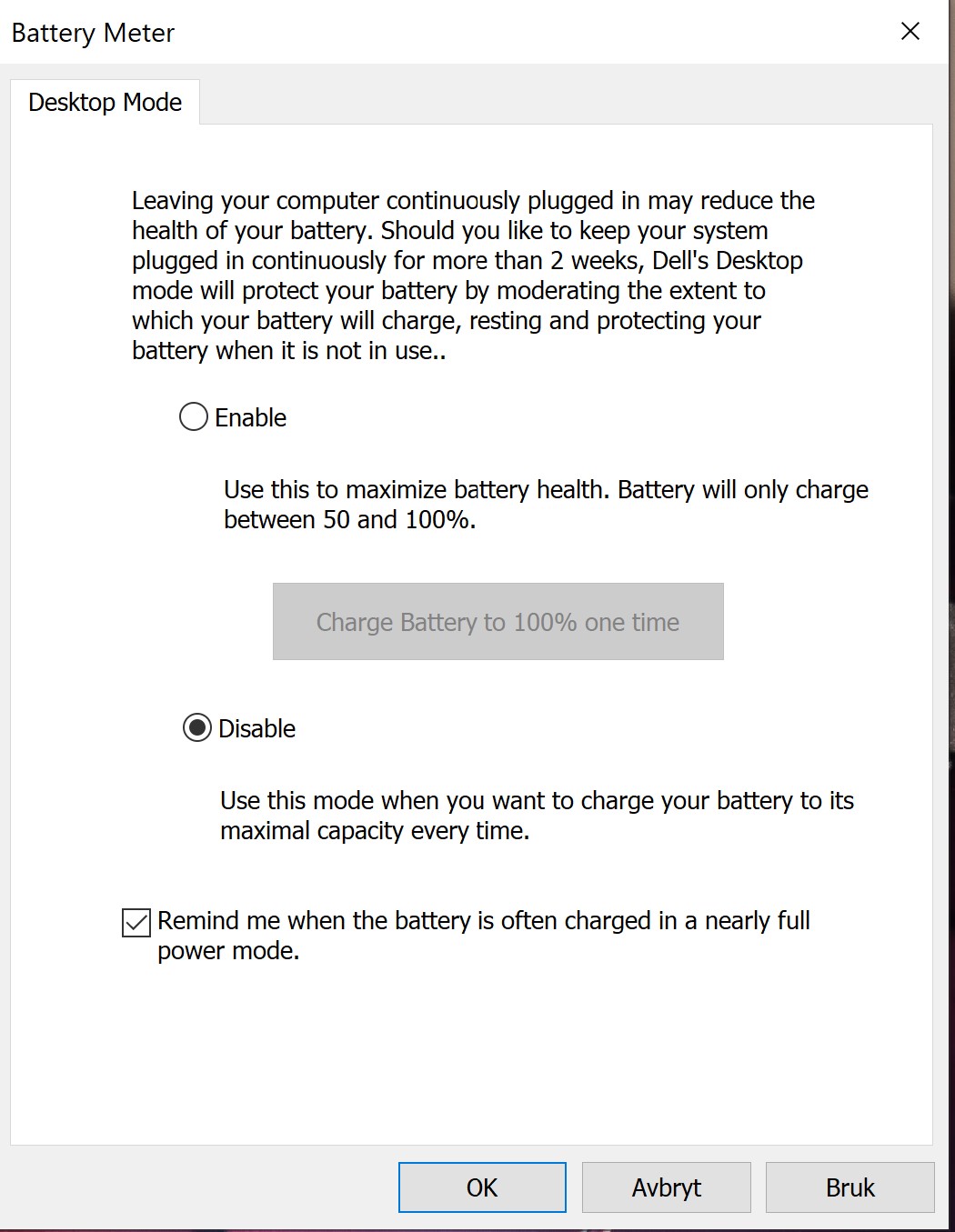
I have, as a side note, disabled the desktop mode since that seemed to take a unnecessary wear on the battery. I noticed that the % wear increased 0,x % after that was kicking in. But ut might also have helped the battery stay good. So I might activate it again...
Edit: After reading the description again for the "Desktop mode" I have turned to enabled again. Any of you have experience with this feature?
@Vasudev @VICKYGAMEBOY @Maxware79 @Papusan @etern4l @stephen0205
Last edited: Dec 4, 2021Vasudev likes this. -
Wear level was 2% and suddenly increased to 20%. Any kind of GPU load would reduce brightness to 0%, disconnect USB peripherals etc.. Garbage AW battery firmware. Not sure if its defective battery or what or GPU is being limited on batteryPapusan likes this.
-
Have you replaced the battery before, or is it the one that came with the PC? Sounds like a bad cell? And have you ever used the desktop mode feature to "maximize battery life"?
"Desktop-mode battery charge helps extend a laptop’s battery pack life cycle. When enabled, desktop mode monitors the charge status of the laptop battery, and if it spends most of the time at 100% charge while connected to the power adapter, desktop mode will automatically adjust the charge levels of the battery. The adjustments include regularly allowing the battery to discharge, even while plugged in. The benefits help slow the reduction of charge capacity over time and may even decrease the need to purchase a replacement battery during the life of your laptop.
NOTE: If desktop mode is enabled, users will see battery charge vary between 50%–100% while the power adapter is connected. To ensure batteries are charged to 100%, disconnect and reconnect the power adapter and the battery will charge to 100%."Vasudev likes this. -
Dell Desktop Charge killed my original/factory battery within 6 months and battery was stuck at 50% not charging state. Tried discharge to 0% and full charge and it failed midway. Wear level was 40%.
The second battery also failed with 20% wear level.
Got the 3rd one and cells are same as second one and has 0.2% wear level and OEM battery. EPSA didn't flag it but Desktop mode charge app isn't opening. Asked my mom to hold the battery since I tested it on live w/o disassembly since replacing battery is PITA on echo models. -
sorry long time, i had so many issues with the replacement batteries, ive tested 6 different set, all the same, the only one which has sanyo cell with 96whr on HWinfo can sustain gaming loads, the old ones used to immediatly trip when i load anything on nvidia gpu, so yeah after 6 replacements i bough a new one which is 410GJ Japan, Sanyo Cells..now its working fine, i used for almost 2 months on medium battery loads while editing, 0.8 percent wear level.. its fine.. i dont use any of those OSD application, which installs the battery mode thingy.. im using stock WU drivers and all optional updates.. Also Fresh Install of 21H2, which is way better in FSO.. let the battery drain and see if it turns on.. if not then have to get a new one..Vasudev likes this.
-
The 2nd failed battery was Sanyo the same thing you're using when I PM'ed you the pic years ago!
Without OSD will I be able to turn off AFX via Fn keys?VICKYGAMEBOY likes this. -
For me the function keys work without any of those alienware softwares.. just default windows driver on 21h2, no problems whatsoever.. If im correct the OSD application softwares install the Compal Embedded Control thing.. version 1.04 or 1.05..Vasudev likes this.
-
Yeah it does install Compal EC Sensor driver. Does it worsen perf. or kill hardware? I don't think Echo model had a EC update since ages.VICKYGAMEBOY likes this.
-
I have enabled the Battery charge in desktop mode. I have seen that it might be not much useful for me since I turn off the laptop every night, so when the mode has kicked in and drained the battery down to 75% it just charge to 100% the day after, but not to max capacity. So I assume that it protect against unnecessary wear on the battery. I have still my OEM battery that is as old as the laptop (2016).
I will monitor the wear level the coming month to see if it changes from 11,8% with the Mode Enabled.Attached Files:
Last edited: Dec 7, 2021Vasudev and VICKYGAMEBOY like this. -
-
sadly dell wont give us any updates.. just have to stick with the stock for now.. im okay with the stock drivers.. which has been published on MS catalog..
I Dont think there will be any update as of now, only those recent Thunderbolt Drivers / Wifi Drivers.. Hope they release something soon.. but give a fresh install of 21H2 from iso and use WU for all the updates.. see how it goes.. i think alienware 15r3 OSD is one version newer then R2.. u can try those.Vasudev likes this. -
Regarding the wifi driver I have used the newest intel driver (I use the Intel® Driver & Support Assistant for bluetooth and wifi). And the Dell drivers for the killer ethernet contrioller driver.
But I have a issue with the latest Thunderbolt driver package (version 1.41.1193.0, A11), as I have seen several other have also.
When I updated the the Thunderbolt driver: in Device Manager is not detecting the Thunderbolt Controller after updating the driver (they weren't showing before the update either).
In either case, it does not show under "System devices" in Device Manager. Also, "Thunderbolt Software" shows as version 1.47 in Programs and Features (and Apps and Features):
However it cannot be launched from the Start Menu search as the previous version was. The install direcory has only a Drivers subfolder:
After this new driver update it totally removed the Thunderbolt software and it was impossible to launch the application. So I reverted back to the previous driver package for my system. Now the Thunderbolt software is back. Just as a heads-up. You wont see the thunderbolt controller in device manager before you plug in a supported thunderbolt device to the actual thunderbolt port. If I have understand it correct?
Have any of you @VICKYGAMEBOY @Vasudev @Papusan problem with this driver?Vasudev likes this. -
@ThomasAAT Since day one I have used desktop mode and no issues at all. Battery wear level is only 7.1%
Laptop is always plugged in.
Just want to share.
For the thunderbolt issue, I can't help you there. I only use the usb c port to collect to my samsung phone. -
Thanks for the reply. That is good to know since I also have used it since day one. But the difference in wear % is down to use and charging cycles. I always shoot down my AW at night and then turn the AC adapter off. In the morning/day I first turn on the AC adapter and then the PC. I have the biggest battery btw.
The Thunderbolt thing is not a issue since dont use Thunderbolt regardless. When I reverted back to the previous driver I have this info when I use the Thunderbolt program:


I dont have any thunderbolt devices connected hence the empty window (I assume?)Vasudev likes this. -
Regarding the battery. If I am going to buy a new battery, will this work: https://www.ebay.com/itm/275026538078?hash=item4008dbee5e:g:hCwAAOSwtKxhj~ez
@VICKYGAMEBOY @Vasudev @0lokVasudev likes this. -
The difference is that I dont turn off the AC adapter. Always on. ^_^
-
I see. When the mode have kicked in and drained the battery to 75%. Will it then charge to 100% when you turn the PC on after turning it off the day before? Mine does that.
If that is the case I assume that since I first turn off the PC and then the AC adapter. For so turn the AC adapter on before the PC the next day, that will be the same as have the AC adapter on always, like you(?). -
When the mode has kicked in the battery won't be used at all. The desktop mode gets disabled once the AC adapter gets turned off. Everytime you turn the AC adapter off it will charge your battery which is not good as you are using the battery and it would mean more wear and tear. To make most of the desktop mode never turn off the AC adapter and the price would be your electricity bills. My take is that it won't consume much power anyway as long as the laptop is off.
Basically the point is never turn off the AC adapter to get the benefit of the desktop mode.
Hope this helps and is understandable. ^_^ -
i never used thunderbolt port tbh, not sure whats causing the issue, may be try to uninstall the driver using safe mode and then try installing the newer version..Vasudev likes this.
-
That make sense. So I don't feel it safe to leave the AC adapter on 24/7 so is it then best to disable desktop mode? And insted be reminded when the battery is often charged often to is maximum?
I figured that since the desktop mode has behavior that described, I might just leave it enabled by letting the battery be used and not stay at 100% all the time, which isn't good ether. It have preserved my battery all this years after all. I also never/rarely use the pc on battery power so I let the OEM smart battery do its own thing (not overcharging while the desktop mode is active, hence the description in the setting "charging to only 50-100%). Please correct me if you rather advice me to turn the desktop mode off. BTW: How old is your Alienware?
@0lokLast edited: Dec 8, 20210lok likes this. -
Other have tried that but the same happens regardless.
Do you have the new thunderbolt driver from dell? If so can you launch the thunderbolt program/software?
The main problem is that the new driver removes the software, it only shows under list of installed programs, and is no longer possible to start.
Btw do you use desktop mode?Vasudev likes this. -
I'd say just don't use desktop mode if you can't leave you AC on all the time.
My laptop was bought since 2016. Old now really. Have not bought a new one as I can't play much games as I used too. Only playing Dota 2 now from time to time.ThomasAAT likes this. -
Right. I have decided (for now) to have it set to enabled based on these terms: " So, the best solution is something of a compromise between the two: use it on battery power some days, and keep it plugged in on others. And whatever you do, you'll want to make sure it doesn't get too hot." and: "When enabled, desktop mode monitors the charge status of the laptop battery, and if it spends most of the time at 100% charge while connected to the power adapter, desktop mode will automatically adjust the charge levels of the battery. The adjustments include regularly allowing the battery to discharge, even while plugged in. The benefits help slow the reduction of charge capacity over time and may even decrease the need to purchase a replacement battery during the life of your laptop". And as stated in this Linus video:
Also. I have sometimes this weird freezing issue after a cold boot. Soon after or just on the login screen the computer freezes and only way to recover is to hit the power on/off. All good after that. I have had this issue more or less the whole time I have ovned this AW. It is plugged in to a dock with a external monitor and several devices. So I think that can be a factor. I had a Issue where the laptop freezed when the monitor was plugged into the HDMI port back on the laptop, so something with the intel and NVIDIA that relates to the switch between the two grapich cards?
Have any experienced something similar?
@0lok @VICKYGAMEBOY @Vasudev @PapusanAttached Files:
Last edited: Dec 9, 2021Vasudev likes this. -
-
Even my thunderbolt control panel disappeared it seems it needs UWP appx with latest driver. TB3 port has been non-functional since ages. It doesn't detect normal USB-C cable or OTG or USBC-USB-A adapter as well.
-
I don't think that's right battery. It shoud be Type 2F3W1/191YN 2F3 was for 15r1 and 191 for 15r2. Battery cap should be around 6300-6700mAh as advertised/rated capacity.
-
Had that issue with old Kionixx driver and had to use windows update suggested driver to fix slow boot/login on cold start. Also in TS check off default cache/voltage when idle/sleep in FIVR. I had several black screen of death with newer uCodes.ThomasAAT likes this.
-
Right. I let my driver be for the meantime, as I have seen other with the same problem. Dont use Thunderbolt so not in a rush. I will prefer to have the software intact and working.
Do you remember or can check the driver you updated to and the the OEM dell kinoixx driver? Think I would try that, cant hurt.
Any of these?: https://www.catalog.update.microsoft.com/Search.aspx?q=ACPI\SMO8500 -
@Vasudev Bahhhh, so fed up with Dell and drivers that mess things up.
I tried to update my dell kinoix via device manager but it showed that the newest driver was installed:
There is no newer optional drivers on Windows update either. So I headed over to Dell's driverpage for my system and found this:
Updated and rebooted as described. And after the reboot the Freefall Sensor was missing completely from device manager...
To get it back I preformed a system restore. Will not try to update again with Dell's driver. And I assume it is the same driver as I already have installed, hence the options during install; Modify, Repair, uninstall.
Anyway, I don't suffer from long boot- or restart times with this driver. In fact I think the restart time got a bit longer with the driver removed(?).Last edited: Dec 9, 2021Vasudev likes this. -
@Vasudev can you please check your Kionix KXCNL Freefall Sensor driver? Is it same as mine (1.1.4.0) or one of these:
Source: https://www.catalog.update.microsoft.com/Search.aspx?q=Kionix KXCNL Freefall Sensor
If I try to update the sensor again I will make sure to pick the correct version.Vasudev likes this. -
Let me check the driver again. hw id is acpi\kiox0095
https://www.catalog.update.microsoft.com/Search.aspx?q=acpi\kiox0095
You can choose the correct driver 1.1.5.3 for W10 1903 or later.
EDIT: If in doubt, use WUMT x64 and check for updates. Download update and choose not to install option and Go to Windows\SoftwareDistribution\Download and you should see a filename with sha1/2 has appended with .cab. Its best to clear update cache to keep better track of downloaded drivers. -
Is this the current driver you have on your AW(1.1.5.3 for W10 1903 or later)?
As of now I haven't have this freezing after reinstalling the 1.1.4.0 driver. So might wait and see. Will not loose the sensor from device manager again...
Did you have the freezing with 1.1.4.0? -
even im on 1.1.4.0 on windows 11, no freezing or anything, im not sure why they havnt published the latest drivers to MS update thing, even on optional update it still installs the 1.1.4.0 version.. im satisfied with 21H2 with clean ISO install, good FullScreen Detection, Alt Tab Works Proper and better frametimes on some games, with the older driver versions.. cant say the same for windows 11, may be HD530 is not capable to handle those transparencies and stuffs, it slows down slighly.. UI become laggy after opening few programs..Vasudev likes this.
-
Good to see that. I will stay on 1.1.4.0 for now, and consider it if it is being offered it in optional driver updates in WU. But why fix something that's not broken?
@VICKYGAMEBOY So you are on W11 on your AW15R2? What method did you use if you upgraded. Or did you reverted back to W10. Sorry of that's stated in your previous answer... -
i prefer clean installation using Windows 11 ISO or Windows 10 21H2 iso.. i dont usually go for upgrade path, just for w11 dev channels i use upgrade method.. yeah like u said the older driver works better with windows 10.. we dont need any fixes on those.. just need the gpu drivers of latest ones.. due to lack of game optimizations..
-
Yes, I'm using 1.1.5.3 on 15r2. Earlier with 1.1.4.0 I did face slow boot on cold start and HDD missing issue.
I also update to System firmware1.02.05 and EC driver 1.4 though 1.4 took out color sync on one zone and macro and when I opened up the back panel the macro backlight cable broken with slight touch and it was brittle due to high heat.
With new battery and old EC 1.4 the screen dimming/usb disconnect was not there in later stages after battery re-calibration on 10 mins of witcher3. EC 1.4 downclocks GPU clocks to 700MHz and AW provided EC 1.6 keeps it at boost clocks of 1.1GHz but FPS and frametimes are crappy. EC 1.4 has steady FPS of 40-50 at 700MHz boost clocks and no Turbo boost on CPU. -
@VICKYGAMEBOY So if I understand correctly; you are on W11 with 1.1.4.0 and gets updates etc. still on your AW15R2 with unsupported HW? Only the processor is not passing, quite irritating to say the least. I will hold off for the upgrade until at least summer 2022/next feature update to W11. Then if unsupported PC continues to get updateds, I will consider it on my 17R3Vasudev likes this.
-
I'd not consider W11 on AW Echo series due to buggy EC driver/firmware along with slow AWCC which might not function in W11 properly.VICKYGAMEBOY likes this.
-
I dont use AWCC, its a crappy software tbh, its slow even on older OS, i just set one color and removed the whole thing.. im not sure about the EC drivers.. for me it stays at 1036mhz on nvidia gpu on battery, cpu stay somewhere between 1.1 to 2.. have to test again.. just stuck with the other 2 laptops.. ROG is kinda dead to me.. with its terrible thermals.. and crippled firmwaresVasudev likes this.
*OFFICIAL* Alienware 15 R1/R2 Owner's Lounge
Discussion in '2015+ Alienware 13 / 15 / 17' started by Mr. Fox, Dec 10, 2014.