Problems? See this thread at archive.org.
If its Simplo then deep discharge the battery to less than 5% twice or thrice and charging it to 100%. That way, you can kill the battery faster. My battery on 15 r2 had a problem which caused it to overheat on light load on battery and dell refused warranty and near to the end of my warranty the battery suddenly shut down with 30% left. I did deep discharge twice and it doesn't charge anymore and stopped at 60% and never charged again. Then I got a warning to replace battery. Mind you my wear level was only 10% and temps on battery soared upwards of 75C.
I got a Sanyo battery(96Wh) which was top class battery when I held it with my hands. On constant usage I get amazing battery life of 8hrs+. I managed to get near 11-11.5 hrs mark which is more than advertised battery life on 15 r2 (Advertised as getting 10.5 hrs on 92Wh) It has wear level of 2.7%
One thing I noticed is, battery wear increases if your temps are high and charging it increases wear level. I did an experiment where I calibrated the battery by discharging it below 30% and shut down for 1 hour to cool the battery then I charged it to 100% then I observed battery wear level didn't increase at all.
So the tip to longer battery shelf life is never to play game or do graphic intensive things on battery. I would say intensive apps can be run for 30 mins or less w/o any wear level at all.
-
-
Hi, everyone. My cousin has a Alienware 15 r3. Was wondering which bios he should use.. The latest bios fix the intel security issues.. is there any problems with the new bios besides not able to roll back? thanks
-
Interesting. My battery is Compal I believe. I've desperately done "calibration" like 5 times only to ruin it more, so by now it's already pretty screwed up. It really frustrated me that the support people were pretty incompetent and clueless as to what battery wear was, hence why they just made me show them the bios battery state which doesn't have anything to do. Also the fact that they probably misinterpret the battery policy as it being a 1 year "lifespan" instead of 1 year warranty
Sent from my ONEPLUS A3000 using TapatalkVasudev likes this. -
All battery are labeled as Compal Electronics and model name as PABxxxx.
You can see it after disconnecting the battery and inspect it yourself. You will see Simplo Assembed in Korea and Made in China.
Sanyo/Panasonic has higher capacity in Wh or mAh and will be having a label saying "Assembled in Japan and Made in China" -
Hello, anyone can recommend to which bios to install in my cousins laptop? is there any issues with the latest bios besides not able to roll back? Thanks..
-
Does the 7700hq 1070 show problems such as battery drain during gaming and max load?
Last edited: Jan 17, 2018 -
It's the battery boost feature. I think there is a thread where you can turn it off or something, can't find it but I'm sure someone knows.
-
Yes sometimes. You can get around it by undervolting CPU and Pascal GPU.
BB or battery boost simply cuts FPS to 30 and that kills performance on many games, so unless you're running an old game I wouldn't suggest playing the game on battery at all. -
Maybe it's not called battery boost. But during high loads the system uses some of the battery. There isn't FPS cut or anything.
-
They only come with pascal cpu's as far as I know? BUt if i go for an AW15R3 i want to make sure I dont have battery drain issues, I see some horror stories about battery wear of more than 20% after one year of use. not sure if they have overclocked configs or not. Even makes me want to go 1060GTX and use my external GPU at home for when I need more power.Vasudev likes this.
-
If you're gonna use GTX 1060 then current laptop is fine for you. YOu already have AGA, so not much of an upgrade.
Get a battery from Sanyo for 15 r2. The label says Assembled in Japan and Made in India which is very good battery and lasts way longer than stock Simplo battery. BTW, its hard to get and has higher capacity 6300mAh @14.8V. -
Ok I can’t figure this out.
I have 15r3 with the 1080p 120 hz screen.
Some time in the last 2 months, ever since I first plugged it into my tv to play games, the computer started screwing up the black levels.
Every time I turn it off then on, it starts up in the wrong black level. The blacks are washed out and it looks like it has a rgb standard signal on an rgb full display.
But when I go to nvidia control panel, if I change betwee “use default color settings” and “use nvidia settings” in the resolution tab it fixes it. Doesn’t matter which I change to it fixed it either way.
The problem is no matter what other settings I change I can’t get it to fix itself at startup.
I have video color settings to full dynamic range 0-255. I’ve tried nvidia and video player settings under that tab neither changes anything. I’ve updated drivers. I can’t find anything relevant in windows display settings.
Any ideas? It’s really annoying. Even if I haven’t plugged it into my tv for a period of time it still starts up wrong. And it is every time I boot.
Sent from my iPhone using Tapatalk -
Hi,
I`m from germany, excuse my bad english.
I have the 7820HK with 1080-MAX-Q-Model.
With the Afterburner Curve Editor (STRG-F) I undervolted my gpu to 0,8v maximum (stable at consistent turbo boost 1733 MHz). Normally the vcore goes up to 0,8X - 0,91v.
The temperature is better now. Together with cpu-undervolting (-100mv) and repasting I can set very lower fan-rpms (with hfwinfo at autostart).
But 0,8v for the gpu isn`t enough for me. I will set 0,7 or similar, and 1500-1600 MHz is ok for me. I don`t play games at 99%load (wise graphic-settings).
Interessting - at battery mode:
- 12XX to 1531 MHz
- 0,6x to 0,75v
- cooler
- fast enough (load +10-20%)
(deactived 30 fps limiter "battery booster" in geforce experience)
But:
- I can`t find a setting, to use this mode in ac-mode
- On battery-mode I have loud coil whining
Is there a solution to set < 0,8v for gpu in ac-mode? Is there a vbios update or similar?
Best -
use nvidia inspector and activate Quiet Mode or Whisper mode(Nvidia geforce experience)
-
This is unfortunately not a solution.
This Quiet-/Whisper-mode doesn`t reduce the vcore, it only makes better ingame-settings and set a framerate limiter (60fps for fast games, 40 fps for witcher 3 and similar). -
TBH, never game on battery because it kills it way faster than battery calibration.
At the moment what temps are you seeing on cpu and gpu? -
Mhh, I dont`play at battery mode...
I justed wanted to say, that the vcore is ideal in battery mode.
I play with ac-mode and constant 1733 MHz Boost at lower / cooler 0,8v (normally up to 0,91v).
I will only know, if there is a possibility to configure < 0,8v (in Curve Editor / Afterburner this is not possible).
I think only a custom bios could help me. -
I suppose you have 120Hz GSYNC panel ?
-
No, 60Hz-IPS-GSync-Panel, but sorry, that does not matter now.
Maybe someone else can answer my question.
Thanks. -
Ordered an AW15R3 7700HQ, 1070GTX will keep you guys posted on how the QC is regarding thermals now.
Are those killer wifi card antenna connectors still so fragile? Want to replace it with an Intel card. -
Go with Killer cards since they have good drivers and better range than intel cards. Still the wires are fragile so take care while pulling it out.
For couple of days the temps will be great then it'll deteriorate. -
-
With the 1535 cards I had constant disconnects which i was never able to solve on multiple routers. So I really want to avoid them like the plague.
Regarding the temps, as long if I have even core temps I am happy. I can always repaste if needed. But I dont want to mess too much with a new laptop.
Urgh I didnt want to see that partnership happen. I have no clue why Killer network is even a thing.Pete Light likes this. -
It is what it is now. I would wait and see what will come up from users reviews. See also this thread Intel's new Wi-Fi Cards detailed on the website
-
I manually changed the channel in router for n and ac so far no issues from 6-7 months on 1535.rinneh likes this.
-
I will check it out if it helps. Thanks for the tip!
Thanks! going to check it out. For now I keep my intel card that I use now. Will take a look at the mentioned thread. -
Ok I figured out the problem. It’s not resetting the black level. It’s loading in at a higher gamma than it’s set to. If I adjust the slider up and back down even one tic it fixes itself immediately. I don’t even have to hit apply.
Like if it’s set to .75 gamma, it’s still loading the PC in what looks to be a 1.0 gamma. But the nvidia slider still says .75. If I click on it and move it to .76 it darkens immediately to correct and then if I click cancel it goes back to .75 on the slider and the picture stays correct.
Any way to fix this?
Sent from my iPhone using Tapatalk -
Use the windows calibration tool instead.
-
Still waiting for my Alienware 15 R3 to be delivered, I ordered the model with only 180G M2.SATA SSD.
One quick question, does the HDD bay contains screws necessary for HDD installation? Or you'll need to purchase them separately? -
Can anyone say his laptop fan speeds + any UV/repaste mods?
Mine 15 R3 is undervolted, GPU at 1850Mhz, 0.881V, CPU is -170v (6700HQ), and I'm getting 65-75 CPU temps at intense long games, and MAX 65 GPU, but fans are like 3600 RPM & 3900? Not too far away from 4000RPM
Is it okay or I'v done something terrible job with liquid metal (grizzly)?
I'v seen a guy who dropped fan speeds to about 2500, is it possible? -
have you heard any issues with 7th gen CPU/10 series GPUs not being compatible with Windows 8.1 on an Alienware 15 R3?
-
That's literally fine. 75° max isn't very hot for a laptop CPU, especially after intense gaming.
Sent from my Pixel XL using Tapatalk -
I know there are fine. My question is, ain't fan speeds a little too high for to achieve these?
-
Apologies, I misread. And perhaps, although in GTA right now mine are showing as 4300 rpm, and I'm at 72 degrees.
I do have the 7820hk though
Sent from my Pixel XL using TapatalkLast edited: Jan 26, 2018 -
So I tried to remove light bleeds from my 15 R3. I'v followed the guy who fixed his 17 R3 with blue tac, made similiar "improvements" with foam double tape adhesive (although I did not remove second layer of plastic cover, I did not want to glue this for good) and its all good. Main drawback is now, bezel near ALIENWARE word is sticking out a little bit, it can be fixed by double taping it, just enough for it to stick together, and too much for light bleed again. It looks like it's design flaw, there is no light bleed (or really minimal) without adhesive on the front, which is the main reason why it looks soo bad.
If you can live with it, feel free to fix yours AW
-
Anyone using the 60hz IPS Gsync panel? The model is AUO60ed, which has a horrible color reproduction and low contrast...anyone can contribute similar experience?
-
I have the same panel. Color seems good. I came off of an Aorus X5 V7 with a Pantone display and the colors seem slightly less rich but otherwise unnoticeable. Contrast doesn't seem bad either.
-
I had the 60Hz IPS screen and thought the colour reproduction was actually pretty good, if a little oversaturated; but I liked that as I'm used to AMOLED. You may have to play around with the gamma settings to get a more realistic colour scheme that works for you. The big thing that really had me was disappointing response time; it was not very good in high speed movement.
I'm glad I have the 120Hz TN again; can't take that smoothness for granted!
Sent from my SM-G950W using TapatalkPete Light, Vasudev and Onetwo345 like this. -
Thank you for replying.
Is your panel identified as AUO60ED with the model name of B156HAN (Dell Part No. Y502X)?
In my case, this panel seems not reaching 300 nits when the brightness is set to 100%, and it's not sharp when scaling at 125% in Windows 10. -
Could you please check the model no. and other info of your panel using HWINFO?
Mine is
AUO60ED
Y502X
B156HAN -
Can't because I have the 120Hz TN panel now. Due to heating issues I've had 4 replacements and the IPS was one of them. Took some pictures side-by-side when I had both of them but the IPS went back to Dell and couldn't be happier with the TN (strange I know).
Sent from my SM-G950W using Tapatalk -
Just received my AW15R3 7700HQ 1070GTX. Added my own SSD and memory. Also replaced the wifi card and it's all good.
No core temp differences! These are the results with a 150mv undervolt which was still in place from my last system (just swapped the harddisk without any reinstalling).
The only small points I could find with this laptop. Those audio jacks are really tight. Have to put some more force behind it than usual when inserting my audio jacks. Also unfortunately an AUO panel. I still have an LG panel so I might change it in the future.
Apart from that the build quality is great and the laptop performs as it should. Curious how it will last the coming months.Attached Files:
Vasudev likes this. -
-
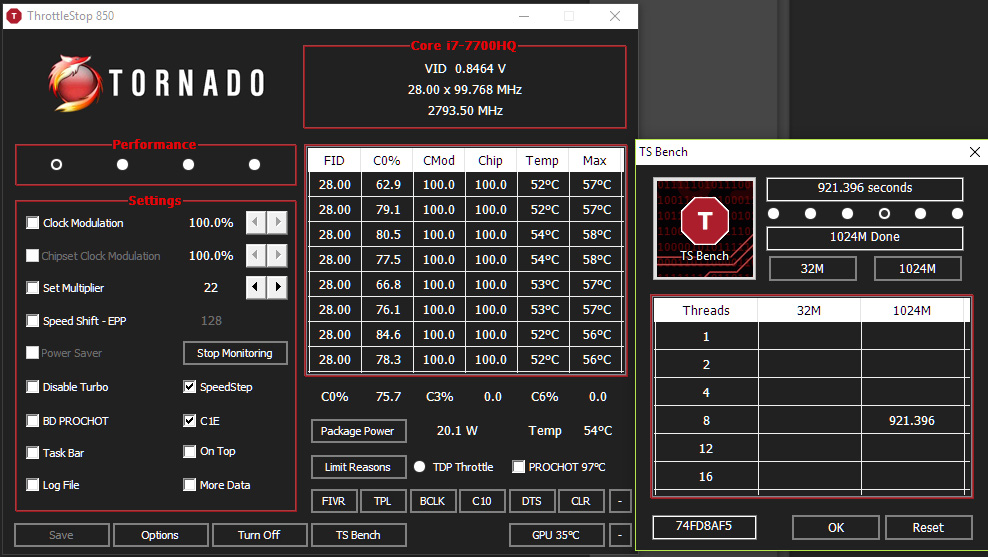
Uncheck both c1E and Speedstep. Enable speedshift in main and TPL window.
-
what is the contrast ratio? what is the color deviation and grayscale?
you cant be sure until you look at these numbers. -
What exactly will that do? I'm still not an expert in TS so any bit of learning beyond OC and voltages helps! Thanks.
-
C1E: Simply triggers enhanced halt state to power down most circuits in CPU to lower power dissipation thus improving power savings. On modern chips like Core i Series C1E is superseded by Speedstep and newer techs.
On skylake and above, disabling speedstep and enabling Speedshift guarantees max performance and max power saving w/o needing OS level driver support to manage CPU clocks. The CPU itself can manage its clocks up and down in less than 30ns.Pete Light, Kalen and 0lok like this. -
Thinking of getting an AW15 mainly for work purpose, 3 questions though.
1. Is there a AW15 R3 with Optimus or some other way to use the internal Intel GPU?
2. Have Dell finally come to terms with all the quality problems with cooling, bad screen panels etc?
3. Is there a decent 4K option?Last edited: Feb 2, 2018 -
IIRC, there's no Optimus on GSYNC based panels.
Screen issues are minimal these days but CPU/GPU cooling might be still faulty and most people still had uneven core temps differentials on newer Alienwares.
Most of them said to stick with QHD 120Hz TN panel because its very bright.
About 4K, I'm unsure of it on 15" AW but on 17" there's one model with 4K but its restricted to 60Hz GSYNC option.
About the screen ask Mobius 1 or DeeXimprowise likes this. -
In Europe there is a 4K upgrade option on a non Gsync 15R3 model. Mine came with a 1080P AUO panel. Its decent but the LG's are better. The $K pnels are made by Sharp and are very good, even for professional color woks after calibration.
Mine came without cooling issues (received it 3 days ago). The chance you get a bad machine is much lower than during launch a year back but it might still happen.Pete Light, Vasudev and improwise like this. -
Yes, GSync and Optimus does not work togheter, at least that was true the last time I checked. I actually had a Alienware 15 R3 for a few weeks about a year ago but it had to be replaced as it had both cooling problems and screen problems, which was followed by 3 or 4 (cant remember) AW17 R4s before I got a fully working one. But a 17" gaming laptop without optimus isnt exactly great for mobility
Vasudev likes this.
*OFFICIAL* Alienware 15 R3 Owner's Lounge
Discussion in '2015+ Alienware 13 / 15 / 17' started by katalin_2003, Oct 24, 2016.