Problems? See this thread at archive.org.
dell alienware support is aware of the problem
-
I'm not entirely sure but 70c on idle for an m.2 drive isn't but normal so must be something wrong with the drive. If that's the case it's possibly what could be behind the stuttering when I'm playing games and it reaches 80c
-
I'm going to try and start a refund process with Dell.
I have the 17 R4 since May. 3 Motherboards, 2 heatsinks, 2 SSDs later and I still have freezing issues.
The laptop is built like a tank but it's a sensitive, pink and fluffy tank because it can't handle any heat.
Summer in Portugal reaches 35ºC ambient no problem. 28-32ºC at night sometimes too. The 17 R4 can't handle this.
It works fine when it's cool but with this heat it's knees are shaking all over.
Even with liquid metal, good thermal pads, a great cooling base it doesn't work properly.
I think I've given it the best chance possible but still, issues.
I bought the laptop in Spain but now I live in Portugal. We have Dell here but no Alienware.
My last two interventions took forever. Parts take a long time to arrive and the issue isn't fixed yet.
I talked with support and they gave me an address for the legal team in France. I'll write them asking for a refund or a brand new unit.
Has anyone had any luck before getting refunds? I'm over the 30 day period by a while. Although I spent almost two months without a working unit.
I'm REALLY not interested in store credit or a new unit. This PC has proven not to work for me. I wish I didn't lose this much time and effort with it. Should have went for a bulky MSI or Predator in the first place. -
35°C ... You're over Operating temperature range :
http://www.dell.com/support/manuals...dc96fe-0048-4bb2-9222-7019064b7fc6&lang=en-us -
No, I'm still inside it.
Plus, I don't really game when it's 35ºC outside, but I game at night with temps between 28 and 32ºC and still I have freezing.
The return or refund process will be a gigantic pain in the ass. I have to send a letter to Dell's legal team in France, this will take months... F*ck me for ever having this brilliant idea! lol
I highly doubt they'll even take a return or give me a refund. Best case scenario I'll get in store credit which I don't want because I would not buy this laptop a second time. One was enough.
So I'm just thinking of buying the biggest warranty extension possible. Let them fix my 17 R4 every year for the next 3 or 4 years. -
Just a experiment I dunno if it works or not. If you have Geforce Experience Uninstall it and disable Nvidia Telemetry service in services.msc. Also, In nvidia control panel, click on help then un-check Allow Experience to be sent or something.
If you want disable Connected Devices and Telemetry service in services.msc
If possible attach a screenshot containing startup apps in task manager. -
Thanks dude but it was working fine before this heat. I tried with and without gfe. DDU and only installed the driver
-
Telemetry removed from Nvidia drivers?
If possible change POwer management mode from Optimal to Adaptive. -
I have not tried that step yet.
But it's the CPU that drops to 800mhz, the gpu not so much -
Have you un-checked BD PROCHOT in TS? If its persistent, return it because it is a defect. Ask @VICKYGAMEBOY because he had similar issues on 15 r1.
-
I'm on my third motherboard and second heatsink.
Not even undervolting helps.
I've lost all confidence in this laptop...
Isn't unchecking procchot a bit risky? -
Not at all, unless you are speaking about disabling that using AMIBCP?
-
wait ur telling me u got throttling issues on the new 17 r4 model.. just run Throttlestop 8.40 or latest from unclewebb sig.. and use HWINFO to monitor your PCH temps.. if BDproc Limit Reason shows up on TS windows.. it must be PCH.. Bi-Directional takes input from multiple sensors from ur chipset.. so called southbridge.. for me i got no fix on my R1, but after getting my R2 only i found out the issue was with PCH chip... and sometimes faulty VRMs can cause..Pete Light and Vistar Shook like this.
-
PCH max temp I've seen was 78.5ºC
I did the PCH mod and the stuttering worsened.
I'm really tired of troubleshooting. I got this beast laptop so I can make the most of the few hours of gaming I can still play. Got it so we can occasionaly play together in a LAN and have fun.
50% of the time I've spent with it has been either troubleshooting software or hardware. Repasted more than 10 times, 3 motherboards, weeks of waiting... Now it's still freezing...Vasudev likes this. -
there is no point in doing PCH mod, if there is no vent for dissipating the heat.. initially those heatsink will abosrb heat from the small die, and keep the temps better.. but as the system gets hotter, and no place for the heatsink to dissipate heat it might get hot.. I thought 17 R4 had good back panels with vents.. and about the stutter. are you sure its because of the PCH mod.. i doubt so.. could be faulty drivers..Vasudev likes this.
-
Yeah I know. Not my first rodeo...
I had a cooling base when I did the PCH mod. But I don't always have it with me so I removed the heatsink.
My experience with the PCH mod was: got a new motherboard. Stock pads and paste no freezing (but I really only tested it for a few mins).
Repasted with conductonaut and arctic pads, did the pch mod, booted it back up, freezing again!
Removed pch mod and no more freezing.
Software was the same
But now it's backPete Light likes this. -
try to reflash BIOS, Clear CMOS, and install OS again, Fresh install.. only way to find out..
-
Check and check.
Formatted today actually. I'll test it out. -
Layering some super 33+ to add a millimeter to the spacebar where it contacts the actual button fixed the keyboard issue, did that a bit after calling Dell because had the idea. However after i did that, the lights have been having issue after issue, and like an antibiotic resistant superbacteria, it's adapting to avoid things i do to fix it. At first the reset the broken USB device worked. But then it needed to have dim lighting on battery toggled, and now not even that works. The dell call center forced a 1.19 BIOS update on the computer, could that be the cause?
Last edited: Aug 7, 2017 -
Is there a known way to fix the USB device descriptor fail lighting breaking bug? Or do i have to hope i can get the laptop refunded? This is two lemon units in a row.
-
Anyone know why when I turn the NUM LOCK key on, this pops up?
![[IMG]](images/storyImages/2017-08-08_15-23-46.png)
-
Both 17's ive had do that as well, probably something to do with the Alienware OSD software.
-
Hi everyone right now im on call with dell technical support
cause last time they sent the motherboard with the GPU and CPU it still didnt work
i still get 91 on GPU
and they claim its still normal, it will not be normal if the temps is 93 they said
so anyone in the same GPU (GTX1070) like me give a screenshot how your temp with 5minutes on AIDA64 and monitoring with HWinfo or realtemp
cause even with they stress test support assist and the result is still 91 they still claimed normal OMG
so its just like the dell technical want some proof that my laptop isnt normal
thank you
regards
calvinLast edited: Aug 9, 2017 -
I did the stability test for 5mins. My gpu (1070) topped out at 69c.
![[IMG]](images/storyImages/aida64gpu.png) Last edited: Aug 9, 2017
Last edited: Aug 9, 2017 -
That's not normal. When doing the stress test put it on your carpet it will hit 93 in no time. Then they will send replacement. Seems like heatsink isn't balanced on the gpu die. Or needs new paste
Sent from my iPhone using Tapatalk -
Is that reply to my results? My CPU hit 94C.
-
To the guy that needs to hit 93c for replacement
Sent from my iPhone using Tapatalk -
Ahh... thanks.
-
Reminder, he is referring to GPU temp...Dell will most likely say 99C for CPU is "normal".
Sent from my SM-G930F using TapatalkPapusan likes this. -
Open the laptop and remove thermal paste and run. Dell will still say it is fine. I had to run my Dell XPS for work without thermal paste for a full week because the Dell technician ran out of thermal paste while replacing something and told me it should be fine.
Sent from my iPhone using TapatalkFalkentyne, Vistar Shook and Papusan like this. -
And they offered you lifetime Premium warranty due this? Because everything will and can happen after your warranty expires. 1-2-3 years Premium warranty ain't enough if you might think keep your laptop longest possible. Some have their laptops longer than 3 years.Vasudev likes this.
-
Its 93C I went through this with them last week on cpu temp.Vistar Shook likes this.
-
The laptop had business express service too. The next technician came and basically berated the other technician for not putting thermal paste lol.
I still have the laptop and today I will put IC Diamond on it. It is a work laptop so I want something that I will put and forget for a long time.Papusan likes this. -
Yeah, I figured he was, but just wanted to cover all the bases since I had the info there.
I have my Gateway p6860fx (that I've posted on here over 9 years ago and it's still running just fine. My G75 is used daily, and it's running on 5 years now. lol. I hope this one lasts as long. -
-
Went ahead and got the Samsung 960 Pro. 512GB one. I had $85 in rewards from Best Buy so I got it down to $210 after sales tax.
Vasudev likes this. -
What's the best way to go about installing the killer network drivers?
On Dells site there's a Killer 1525/35 Wifi driver, a E2500 driver and a 1525/35 bluetooth driver. Any particular order of installing them?
There's also the option of getting Killer's software directly thru their website, -
Ok anyone provide advice on what is causing a line across the bottom of my 4k display on alienware 17. It only appears in programmes (running witcher 3 or heaven benchmark etc) it is not present in windows desktop or booting up. Nvidia driver upgrade doesn't resolve it. Running dell screen test works fine (pressing d and holding the power button).
Attached Files:
-
-
Best way with Killer is to do INF-only install from Device Manager and not install any of the Killer Suite bloatware. You can get the INF-only files from their web site as well.
If you are using Windows 10 it already has the drivers from the Micro$loth catalog so should not have to download or install them. Should just already be working as soon as the OS is installed.Shark00n likes this. -
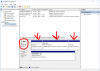
So.... After failing to have Dell support repaste my computer, i returned it and got a replacement with a newer cpu (7820HK), a 256GB Hynix NVMe drive and 16GB 2667 Mhz memory, all for a bit lower than my initial laptop that i purchased. I immediately set out to test the cpu and make sure that there isn't a big difference between cores, and so far, all of them average about 3 degrees (ran a 15 min stress test at 3.5 GHz, with average temps in the low 70s). I noticed, however that the computer is slow compared to my previous one, and to my horror, i found out that the geniuses at Dell installed the operating system on the 1TB mechanical drive NOT the Hynix M.2 SSD
 AMAZING!
Now how do i reverse this while keeping the partitions intact, especially the recovery partition. I"ve heard that it's difficult to keep the "connection" to the recovery partition once you change drives. Any help will be appreciatedAttached Files:
hmscott likes this. -
-
![[IMG]](images/storyImages/9d9208c28f37094a96b124069c51fa1f.png)
Have anyone tried heat sink on their m.2 960 pro? Mine gets toasty.
Sent from my iPhone using Tapatalk -
Use Macrium reflect to image your windows with all partitions and copy it to your SSD. I think you got a model with only HDD and they simply added an SSD.
-
Thank you,
would that work even though they are of different sizes? Would i then be able to boot windows from the SSD normally? Do i need to do anything in BIOS to tell windows to boot from the NVMe ssd? -
You might have to choose Deploy to another hardware option in Macrium Reflect, you will need to save the image to external HDD/SSD and then format the HDD and again use Macrium to restore the image to SSD.
-
Hi F34R thank you for ur help really appreciate it, and sorry for late reply
im using gelid GC extreme and i saw it when they repaste it, so i think thats thick enough, also i used grizzly kryonaut (first repaste) but still nothing changed, and actually the fan and heatsink itself already three times got lift up cause they want to change it but the new fan and heatsink couldn't be assembled because its not compatible because the socket for screw is in different location about 5mm (the barcode on the new and old spareparts are same, so they dont know why)
so i think something is clearly wrong in this machine
and i said it million times its not normal but still that hardheaded technical service make me speechless
actually i want to do that too, but looks like i will be going to malaysia to get a new replacement
so this is my conclusion after about 50minutes on phone with dell technical support
the first thing they do is ask me how the diagnostic (certainly its fine)
so they told me to change setting in bios and change the cpu performance mode to enabled and i did
using HWInfo for monitoring and supportassist for stress test on GPU, and 91 they said its FINE (WOW)
and they sent me this
so i followed everything untill the end, and i had some debate with dell technicalsupport
i said that 93 is the CPU not for GPU
and she said "no, the GPU is emebbed and become one with the CPU" (from this point i believe dell dont want to solve my problems and just want to close it)
i explain everything to her that the GPU is embedded to motherboard not the CPU, also the GPU and CPU have thermistor for each of them, so its not make sense if she said the GPU embedded into the CPU (well, we are not using intel HD for stress test right?)
and still she said the same thing over and over
so i said "ok give me 1-2 days i'll send screenshots of the stress test from user that have same specs like me"
and she said "no sir, its not countable if its come from netizen, and you know what they can do. our information come from dell US and the engineer that make the alienware so its legit"
and after some more blablabla, case "FORCIBLY" closed by dell
so here it is from my view
im not hate alienware or dell at all, for me this machine is the best and like a tank, i had ROG G752 and believe me that thing has more flex than you think
dell is superb with their service, the technician came to my home, etc
but still for me this is really dissapointing
for everyone who want to take this machine, please just stress test it exactly after u bought it so u can get a new replacement if anything happen (well this thing is not cheap at all)
after all thanks for all of you,
i'll let you know if there is some news from dell
regards
calvinLast edited: Aug 11, 2017Vasudev likes this. -
This is what happens when drones treat customers like numbers.
Even one of Apple's old business training cards said "the customer is always right, they usually just get it." -
Apple has limited no. of models and if their tech support people deny anything the buyer will see the mac for a bigger amount and buy a new one or switch to Standard PC.VICKYGAMEBOY likes this.
-
Third system shipped with 1.1.6 bios updated to 1.1.9 bios and my system get ups to about 90C instead of 86-88C.. anyone else notice this?
Also just under volted with XTU to -.145 (-.150 crashed).
Temps under full load never over 86C after 1-2 hours. So I get improvements here. XTU will auto undervolt as long as installed?Last edited: Aug 12, 2017 -
Kill XTU, use ThrottleStop instead. You will see a decrease in temps upto 5C.Papusan likes this.
-
looks like after recent update i got something wrong with windows hello
cant sign in using hello and pin
can setup a new pin already but i cant setup the new windows hello, when i setup it told me to enter pin, after i enter it nothing happen
anyone know how to fix it?
*OFFICIAL* Alienware 17 R4 Owner's Lounge
Discussion in '2015+ Alienware 13 / 15 / 17' started by katalin_2003, Oct 24, 2016.