Problems? See this thread at archive.org.
Do the same undervolt with throttle stop vs xtu?
Sent from my iPhone using Tapatalk
-
-
So throttle stop just a better software? Looks like it auto launches with windows. I'm fine undervolting.
Not sure what you mean by processing cycles.
Sent from my iPhone using Tapatalk -
More running in the background. TS is more efficient. Just ask TS author @unclewebbVasudev likes this.
-
Great I'll give that a try.
Loads on stock never went above 90 out of the box. Which is worlds better then the other two systems I had one hit 97 other 95.
However I couldn't xtu undervolt stable at -.150... -.145 is stable though. Anything else I should play with as well.
Does TS give better temps then Xtu?
Sent from my iPhone using TapatalkVasudev likes this. -
You can change Cashe voltage differently vs. core voltage with ThrottleStop. Try it. Walk into TS guide in the forum. From page around 208 when Haswell come. Still... 90c with locked down i7 or default 6820/7820hk ain't good. But that's me
 Vasudev likes this.
 -
For those setting their cache and core voltages seperately, what voltages are you using? Is cache offset typically a greater offset or does it vary from machine to machine? I have my cache and core both set to -137mV currently.
-
Any insight I bring to the subject can certainly be considered more anecdotal than empirical, so take it with a grain of salt. I have a 17r4 / 7820hk / 16G @ 2666Mhz (Micron) / 1080. I have come to "believe" the uncore (aka cache, among other names) voltage is more sensitive when pushing the CPU outside its normal operating specification (read: overclocking of the CPU and/or Memory). On the other hand, it has LESS of an effect on HEAT, than it does on system stability (read: where undervolting the uncore may be useful in reducing heat, it is probably more beneficial to system stability leaving the uncore voltage as close to untouched as possible). I can undervolt the core voltages ~-150mv without any apparent issues. I have been using OCCT 4.5 to stress the system, and work off the completely subjective premise that 20 minutes, at 91 degrees C or less, is a PASS. FYI, over 91C, the processor is subject to self throttling, not necessarily a complete failure.
I 'believe' Intel's XTU locks the core and uncore voltage to the same value. When I first got my machine (2017Apr), I used XTU to undervolt ~-100mv and used its internal stress utility. Sometime soon afterwards (a software update?), I started getting far more Win10 blue screen failures. This first concerned me, since I read on forums of people using more negative values than -100mv. I hypothesized that people were not directly comparing apples to apples, i.e., people had different hardware configurations, overclocking setups, and used different validation criteria for determining what "they" considered acceptable.
Without repasting, I can run all 4 cores @43x, and expect(assume?) a stable environment running less than 92C.
I undervolt the cores at -150mv and I can undervolt the uncore by -35mv. If I go above 43x, I don't undervolt the uncore at ALL, and I will exceed 91C quickly. I believe if any addition performance can be achieved, it will most likely involve a repaste.
I can not stress more that these machines ARE NOT LAPTOPS, and MUST be operated on hard surfaces, preferably with the rear propped up a bit for better air flow. ANY restriction of the vents, ARE going to cause you ISSUES. As far as being portable, it is far too heavy and awkward to lug around on a regular basis. I appreciate the build quality of this unit, but it carries some 'weighty' consequences.
Another thing, my criteria is ASSUMING a stressed environment. Under normal real world operating parameters, they stays comfortably under 80C, average. I wonder how many people buy Tesla's and obsess over their 'ludicrous mode' ?
;0)Last edited: Aug 13, 2017 -
What kind of thermals is everyone getting out the box. On my third replacement and still can't seem to get under 88-90C on load... Considering a return and try again but honestly I just want a mobile powerhouse. Are all 7820hks with 1080s hitting these temps on other brands?
Vasudev likes this. -
Test with my previous mentioned tests. Use Dell's advertised Oc profiles 1,2 and 3. Remember increase all power limits. You can't get correct numbers if you don't run it this way.
-
Ask for refund and order from Hidevolution with Standard US warranty.
-
Is that what other users have done? They fix theses issues before sending to you?
-
-
Oh I am asking why HidEvo comes so highly recommended. Do they vet these issues before sending a system. Or have other users used their services?
-
Well its not free though you pay more than Dell MRP with additional fixes, calibration of screen etc etc. Check out Hidevolution
-
Money isn't an issue for these types of things.
In a minute I'm going to buy a Asus zephyrus until Aleinware can fix this.... Maybe they will learn if I start putting my money elsewhere. -
If your intention is to buy a MAX Q one, then settle for 7820HK and 1070 in 15 r3.
-
15R3... Still TRIPOD!! And probably even higher max temp than its big brother. It's a lottery what you get.Vasudev likes this.
-
Will you buy a MAX Q fully gimped HW than a capable(somewhat) BGA hardware?
-
If it works ... Im just looking for a 120hz gaming experience either at 1440p or 1080.
Alienware 17 r4 is as big as I am going for a mobile gaming system.
I have a desktop that crushes this laptop so this is not for home use. Strictly travel gaming, I.E. Business or leisure. -
15 R3 will be a wise choice.
-
That doesn't solve the over heating issue though. From what I read they have the same issues at the 17r4's. I actually looked at that one first and talked myself into this one because the footprint of the 15 is close.
-
I'm sure you know what My answer would be
openglcg, Vistar Shook and Vasudev like this.
-
Then go for Eurocom Tornado F5 or similar EVOC which is 15" and quite portable workstationVistar Shook and Papusan like this.
-
-
That's a monster.
-
A very good option. Take a look into the proper threads for the baby monster. And you will see a lot of happy people. And buy from @Donald@HIDevolution if you can.Vistar Shook and Vasudev like this.
-
-
I originally had a 17 r4 and ended up returning it and swapping it for a 15 r3. You should understand that the 17 is an absolute beast. It's huge (more like an 18 inch laptop) and super heavy (but gorgeous and super powerful). Unfortunately I really needed something more portable. My legs would go numb from the weight after using it on my lap
Personally I found that the 15 r3 was the perfect comprimise. I also went for the 7700HQ instead of the 7820HK. I know most people will think this is nuts but the 7700HQ runs (for me, dunno about in general) much cooler out of the box. Also if you wish to maximize portability then abandon Gsync panels and stick with Optimus. You'll double your battery life. -
It brings up other concerns.
While battery life on the 17 is horrible its still usable. That thing with a unlocked desktop chip and 1080 will probably have 45 minutes of browsing time so its a desktop replacement. Not really what I would need.
Also 1.5" thick... thats getting up there and adding to the overall footprint etc.
Are people having similar issues with the 15r3's then the 17r4's. If I went for the 15r3 I would still get at 7820hk. -
Some concerns with the 15, is if the 7820hk is an option I would go for it. From having both side by side. I didn't think there was that much of a difference in size and weight. I also have the 13" which is an awesome travel powerhouse (plan to sell). If they could make the 15" smaller footprint in the 13" depth with the same power in the gpu I would be all over it.
Do you know if the 7820hk and the 1070 with the new vbios are having similar heat issues?Vasudev likes this. -
Yeah, it's a power house. But you can clock down to BGA speed. Powerful hardware need moore powa. It's normal. But people are happy with the machine.Donald@Paladin44, Vasudev and Vistar Shook like this.
-
Anyone recommend the Aorus X7 DT v7? Has there been any talks of that vs the 17r4?
Vistar Shook likes this. -
Hi,
Just a warning about Dell onsite service...
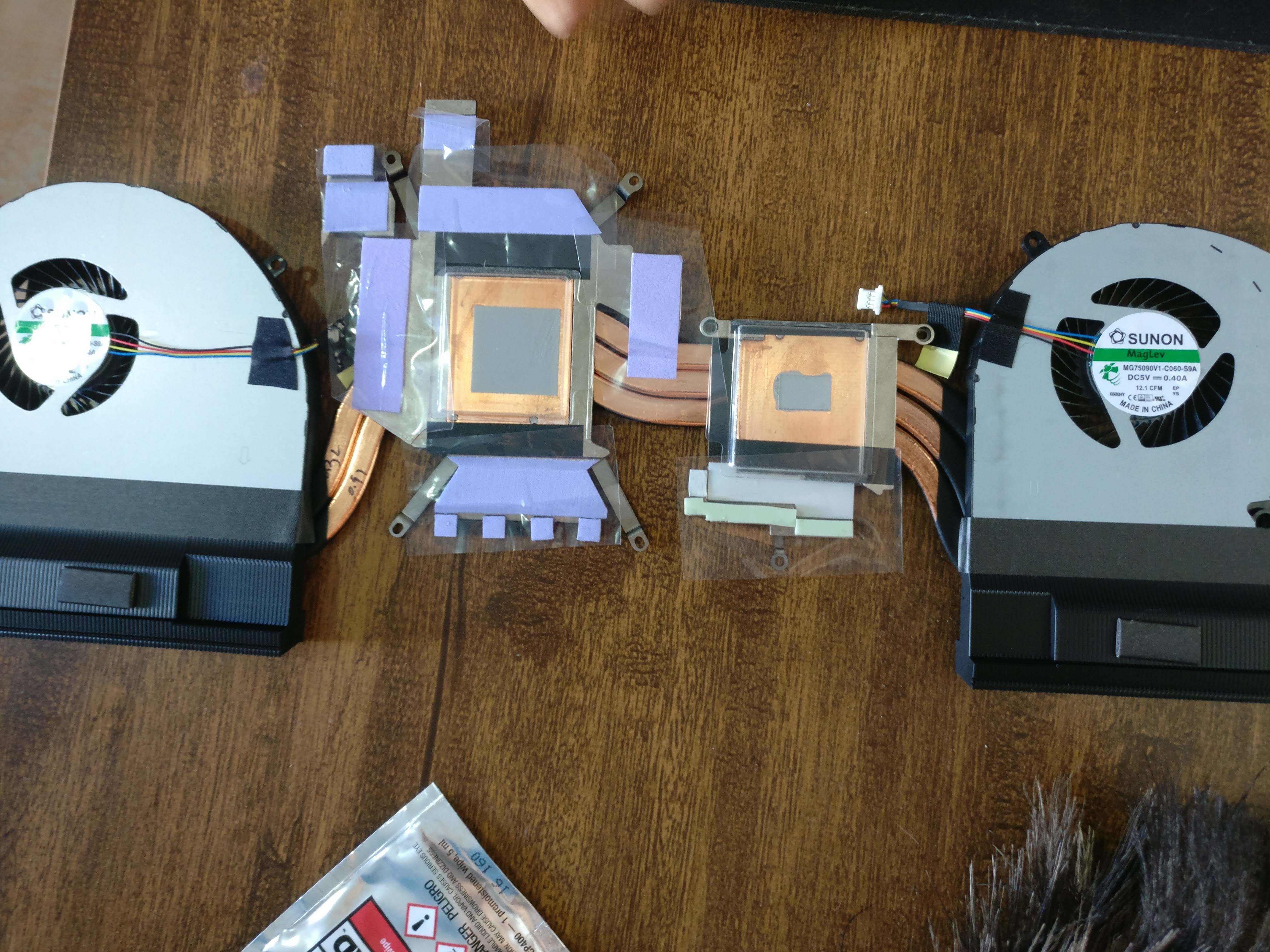
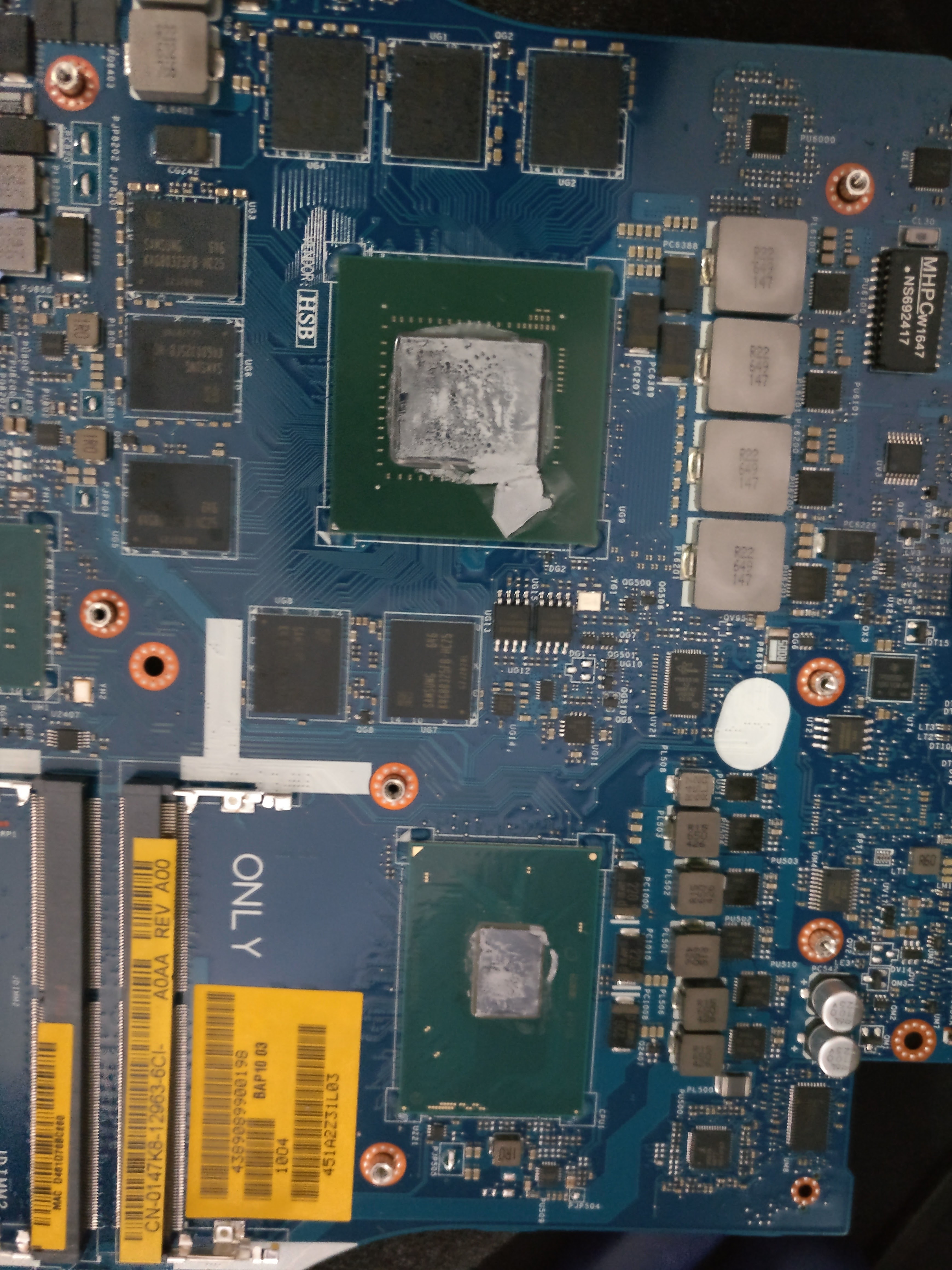
My mobo died and Dell replaced two weeks ago. They had that thermal-pad/thermal-paste pre applied on the heatsink and it's trash, they didn't send a thermal paste, only that thing in the heatsink and he told it's Dell Standard. After the first visit, the system was operating in 90+ degrees, called Dell right after and they promised to send another heatsink with a proper paste in the second visit.
They indeed sent a thermal paste in the second time, but the heatsink also had that trash pre applied. I told the technician to remove that thing and only use the thermal paste. He did as I told and the results are great but I'm conceraned about that paste leaked into the graphics card, it was a huge leak and I fear any damage shows up in the future... I already asked Dell a new mobo, lets see what they will do in the next chapter...Attached Files:
Vasudev likes this. -
-
That paste in the gpu won't damage the gpu or mobo unless it is LM.
MogRules, Vasudev and Vistar Shook like this. -
it's fine. nothing to worry about. you can clean it off with alchohol if you are worried. but it wont cause any kind of electrical damage. those stamps are not electrically conductive.MogRules, Vasudev and Vistar Shook like this.
-
So, are these temps bad, under load of course.. AIDA64 stability test:
-
To me they are. People seem to be okay with having mid to high 90s but I think it's unacceptable. Which is why this third 17r4 is going back.
Sent from my iPhone using Tapatalkhmscott, Papusan, MogRules and 1 other person like this. -
After many mobo replacements my 17 r2 had missing thermal pads. I take it that you watched and verified that they were still there during the replacement.Vasudev likes this.
-
Hello, guys!
I have Alienware R4 17 with the 1080p 60Hz screen. I saw some information on this (and on dell community) that there is the way to change LCD panel with QHD 120Hz where you will need to change connection cable 40-pin also.
But, I am looking for somebody who has successfully changed the panel. Off course, theoretically that is possible but nice to have a living example.
And one more thing. I have read that in case I haven't G-SYNC support - that with the QHD panel I will not have G-SYNC accordingly. That is right?
Very much appreciate to any helpful info.
Thanks in advance. -
Just got a few quotes from Dell regarding a warranty extension. Same Premium Support.
1yr - 415€
2yr - 630€
3yr - 790€
The 3 yr extension is enough to get a nice 2nd laptop!
It's pricey af! But I think I'm gonna go with the 2 year. Then I won't have to worry about a thing until 2020. -
Exit XTU's monitoring tool in the systray after booting, that gets rid of the temperture and other monitoring - you should see an equivalent drop in CPU Utilization and CPU temp too
-
Red text in hwinfo64 indicates thermal throttling, so definitely not good.
Vasudev likes this.
-
-
Are you serious? In ph it costs around 100-120usd max for a year. A 3 year around 300usd. If i were you, change it to another region like asia pacific and have the warranty extended there(thats if you know someone in the area that can do the payment for you in a dell concept store)Vasudev likes this.
-
The app would still be running in the systray, it's independent and is the one using CPU cycles all the time during monitoring updating it's little graphs. I've checked with older versions, you may want to verify current state
Last edited: Aug 16, 2017Vasudev likes this.
-
i still get upset about the trashing of alienware support i have been dealing with them for 9 years and would not buy any other product I have bought 3 alienware laptops and have had them serviced around the world
if you want to over clock to its extreme then take what you get it is bonus not part of the purchase agreement the r4 is one hell of a product and the support is second to none get over yourselfhmscott, dayanacelis, jane blackwater and 1 other person like this. -
I don't have an issue with their support. Although in Portugal I can assure you it's not "next day" support. More like "sometime next month"...
My issue is with this badly engineered machine. The 17R4 is way to sensitive to heatsink assemblies. If it's not making perfect contact you'll have issues.
Even if it is making perfect contact and you give it the best chance possible with liquid metal, good thermal pads, heatsink bending and lapping you'll still have issues if you live somewhere remotely warm.
That's why I want to extend the f*ck out of my warranty. Let Dell replace my motherboard every few months for the years to come.hmscott likes this. -
Yeah, well get used to it
All the AW 17/15 come out of the box with defects in manufacturing / design that makes them overheat, thermal throttle, and all at stock settings in the average case when run with proper benchmarks.
The CPU core temperature offset is key. The heatsink is being held from closing completely by a too large thermal pad, and can't make even contact across the whole CPU, so 2 cores run hotter than the other 2 and they reach thermal throttle point first. The difference is very high in some - 15c-20c, and most are 10c out of whack.
I don't agree that Dell service has always been good idea anyway, having many years of experience professionally and personally, but we all have different experiences and perspectives
Warning: Some i7-6820HKs and i7-6700HQ have Uneven Core Temps due to Uneven Heatsink
http://forum.notebookreview.com/thr...even-core-temps-due-to-uneven-heatsink.797477
How to FIX AW17R4/15R3/13R3 CPU Core Temperature Differential Issue
http://forum.notebookreview.com/thr...u-core-temperature-differential-issue.805062/
And, Dell's service response to this problem is: it's working as designed, 100c CPU temps and huge Core temp differentials are just fine...
Last edited: Aug 16, 2017Papusan likes this.
*OFFICIAL* Alienware 17 R4 Owner's Lounge
Discussion in '2015+ Alienware 13 / 15 / 17' started by katalin_2003, Oct 24, 2016.