 Problems? See this thread at archive.org.
i sure will!
well, i wont be able to film the whole process (since i'll do it at work xD), but i'll make sure to take good quality photos.
what do you mean with "on the keyboard side of the motherboard"? you mean around the f4 key?
Gesendet von iPhone mit Tapatalk
-
-
If I understand correctly its not HDR display.Last edited: Mar 18, 2019raz8020 and Spartan@HIDevolution like this.
-
If I do that on mine it says the folllowing under display capabilities:
Stream HDR Video: Yes
Play HDR games and apps: No
Use WCG apps: No
The toggle for Stream HDR video is enabled (says "This display can play streaming HDR video when available and has calibration settings).raz8020 and Spartan@HIDevolution like this. -
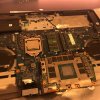
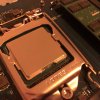
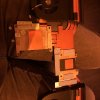
Some pics, watch out for the thermal pads when you repaste, there quite loose. Idle Temps went down from 50/55 to 40/45 pretty happy with it! (Btw that graphics board looks damn sexy!)
If anyone lives in Holland and wants a repaste, just message me, i’ll be happy to do it if you don’t want to do it yourself.Attached Files:
Last edited: Mar 19, 2019judal57, SlickDragon, raz8020 and 10 others like this. -
-
I seriously doubt it's an engineering defect, or at least one that would require a complete remake of the problem. Everything failing so quickly points to one or two things on the laptop having a problem
Not even the 2080 and 2080tis failed so quickly. Not even the laptops with bad caps in the 2000s failed this fast...Kormi likes this. -
Nice to hear, i thought the improvement would be bigger. But really happy with the results. I used the pea method for repasting like usual.
-
The X Cross method is the best in my experience as once the heatsink is fitted, it provides the maximum coverage with the least air bubbles
![[IMG]](images/storyImages/BdcadBs.jpg)
Kormi, Lantea and FrankieFrank like this. -
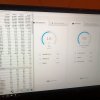
Temps while idle, fans are almost complete off. Max temp what your seeing is when i’m gaming.
Attached Files:
-
-
Thanks for the advice! If i'll repaste it again i'm sure to try that one!
-
Quick question.
I'm currently reinstalling windows 10 Home for the 3rd time, due to the latest update getting hung up and not downloading.
But my question is, should I download drivers from the link on this forum first, before downloading the Windows updates? Does it matter?
I would like this to be the last time I have to do a reinstall.. Reason I ask is I thought i read pretty early on in this forum to install some drivers before letting windows update them, can't quite remember though.. -
Right,,, Install Windows > Customize all your options/tweaks like the user library folder (ie. documents, music, pics, videos) location > Install all drivers, reboot after every driver install even if not asked to > connect to the internet and let Windows update. That way, it has no drivers to update since the ones you've installed are already the latest.SlickDragon, c69k and Amroth like this.
-
Okay, so should I disable windows update in services until I finish downloading all of the drivers in the forum?
-
FYI, for the burnt laptops:
https://www.reddit.com/r/Alienware/comments/b2r1rn/my_area51m_started_smoking_i_took_it_apart_and/?SlickDragon, raz8020, steberg and 3 others like this. -
what? You shouldn't even connect to the internet!! otherwise you'd be forced to login with a Microsoft Account which is a big NO NO!
You don't need to disable anything since you're offline anyway!
When you get the connections list on the initial Windows setup screen, just hit SKIP on the bottom left and proceed! you need to do all the tweaks and O&O Shutup stuff to disable telemetry and apps from auto installing in the background based on what Microsoft suggests before you even think of going online.
also before you start anything, go to PC Settings > Privacy > Background apps and uncheck all apps except Xbox as that's needed for the Windows Game Mode to function properly. You don't want all them apps running in the background. Then you can uninstall all the ones you don't need using CCleaner from the Tools menu on the left pane!raz8020, c69k, Kormi and 1 other person like this. -
I wonder if it's the 200W VBIOS that's causing that
-
Well.. RIP. I've already logged into Windows with internet connected, but have yet to install/check for updates. That's fine I guess though, I'll just uninstall the junk.
Soo, I guess I'll head over to the drivers on this forum and start downloading them before I check for updates on windows.
Edit: I'll remember this for the next time though, appreciate the info! -
Please make sure you read this guide which I spent months making:
NBR Windows 10 Clean Installation GuideSlickDragon, raz8020, IXVIXXII and 3 others like this. -
My Area-51m started smoking. I took it apart and this is what I found Reddid.
![[IMG]](images/storyImages/s9HyQeFl.jpg)
- I was on BIOS 1.3.0
- I updated to the 200W vBIOS
- Both adapters (330W & 180W) were plugged in
- It occured while I was gaming; I was monitoring temps and GPU and CPU never went past 80 degrees
- I also saw that the GPU would often hit 200W (sometimes a tiny bit over)
- GPU was on stock settings; CPU was undervolted
- I have no idea what those chips on the DGFF do
Edit. The opposite side of MB
@Ultra Male Are yoo ready for the barbeque party?
![[IMG]](images/storyImages/nRtkmIB.jpg) Last edited: Mar 18, 2019
Last edited: Mar 18, 2019 - I was on BIOS 1.3.0
-
-
-
Interesting!
This is on the opposite side of where other users said it smoked/smelled.
Looks like this chip:
https://www.onsemi.com/pub/Collateral/NCP303151-D.PDF
Integrated Driver and MOSFET with Integrated Current Monitor
Not good.propeldragon and Kormi like this. -
See my edit. See also pict of opposite side of MB.
Is the cooling of GPU power delivery good enough? I don't think so. The heat will go everywhere. A bad design.
![[IMG]](images/storyImages/36zuxFh.jpg) Last edited: Mar 18, 2019raz8020, Sherif_k, alexnvidia and 3 others like this.
Last edited: Mar 18, 2019raz8020, Sherif_k, alexnvidia and 3 others like this. -
exactly the thing that i was worried from day one which nobody seems to care. Those DGFF boards has no proper cooling for the VRMs. non of the VRMs are making any contacts with the main heatsink.raz8020, propeldragon, c69k and 4 others like this.
-
More info-
Found one other card that uses this chip:
https://ithardware.pl/testyirecenzj...ti_dual_czarny_kon_wsrod_turingow-8378-1.html
Note: This is NOT the same board of course, but uses this part. I just found their comments regarding this chip interesting.
Google translation from their page. See bold below:
Palit GeForce RTX 2080 Ti Dual test: component analysis
The board has GDDR6 Micron MT61K256M32JE-14: A bones , officially certified to work at 1750 MHz (14 Gbps). The power section is very strong and consists of 16 phases, of which 13 deals with power supply to the graphics core, while the last three perform this function in relation to the VRAM memory. The producer used MOSFETs by ON Semiconductor, and more specifically NCP303151 (after the piece per phase). It is an integrated solution that combines a single controller housing and high-side and low-side transistors . The permissible load of each MOSFET in continuous mode is 50/45 A (ambient temperature 25 ° C, output voltage 1.0 V and switching frequency - ang.switching frequency - 300 kHz / 1 MHz). These are not as strong transistors as FDMF3170 , mounted in more expensive constructions, but still the power section is very decent. The supervision of the phases supplying bone current GDDR6 is exercised by the PWM uP9512 controller (maximum of eight phases), while in the case of the GPU supporting part it is the second of the same type, to the company with two two-phase uP7561Q . More specifically still the issue of core silicon used, we have to deal with the standard version TU102- 300 , due to the fact that the card is described devoid of factory overclocking, so you could mount a cheaper option, which also Palit did.
Buildzoid mentions the FDMF3170 in the EVGA 2080 Ti FTW3 Ultra card. Just posting this here in case someone wants to hear his comments on the chip. How he mentions "Everyone uses them".
One other thing to keep in mind - This is just one of the 4+ people who have had the issue with their 51m. Unlikely, but it's possible there are other issues too, or that whatever caused this, could manifest as a different problem on a different part of the board/system or the same chip in a different area on the board.Last edited: Mar 18, 2019 -
@Khenglish blown FET on the dell rtx dgff, exactly I had predicted
https://www.onsemi.com/pub/Collateral/NCP303151-D.PDF -
I reckon maybe they'll care now.
It will be interesting to see how it is resolved after the fact, since not much thought was given to cooling those components when designing their special NGFF modules. Had they sent one out to me for testing like back in the good old days, I probably could have caught it on fire in about a day or two. -
the question now is whether
1. if the VRM is making proper contact with the passive mini heatsink, it would mean the passive mini heatsink is not adequate to cool those hot VRMs. only main heatsink or actively cooled heatsink can solve this.
2. if the VRM is not making proper contact with the mini heatsink, then owners might be able to resolve this themselves by doing a repad and ensure proper contact, assuming the mini heatsink is enough to cool those VRMs.
judging from the indents on the thermal pads, it would seem the VRMs are making proper contacts with the mini passive heatsink...raz8020, Kormi, Papusan and 1 other person like this. -
Are you serious with this answer?
-
Passive cooling anything on a laptop that produces heat is not too smart. I find it difficult to understand how that could ever seem like a good idea. Active cooling is enough of a challenge. Those mini heat sinks might actually be good enough if there were some kind of outlet along with a steady flow of air moving over them. But, the kiddos might mitch and boan about extra fan noise and weight if it were made right.
-
What's your problem? Can't read?
-
The guy asked if the area 51m screen was hdr capable and you linked to a page on how to turn on hdr
Can you read? -
From the guide he posted... "Make sure your Windows 10 PC has the required hardware to display HDR, and find out if your display supports HDR10. Here’s how to do that:"...........
Whats wrong with the answer? I think Bro Ultra Male was happy with the answer he got. -
Literally taken from that page I linked earlier
:
Make sure your Windows 10 PC has the required hardware to display HDR, and find out if your display supports HDR10. Here’s how to do that:
- Press the Windows logo key + R, type dxdiag, and then select OK.
- Select Yes at the prompt.
- In the DirectX Diagnostic Tool, on the System tab, look in the System Information area.
- To save the information to a file, select Save All Information, and then name and save the text file.
- Open the text file, and look at the value for Advanced Color. This provides info about your display's HDR configuration and the status of it. Look for these values:
- AdvancedColorSupported. This indicates that your installed display driver and display support HDR10.
- AdvancedColorEnabled. This indicates that HDR is currently turned on for your display.
- Look at the value for Monitor Capabilities. This provides more detailed info about the display's capabilities.
- If the value is HDR Supported, that indicates that your display supports HDR10. You might see additional values in parentheses.
- BT2020RGB or BT2020YCC. One of these color spaces must appear for the display to be considered as an HDR10-capable display.
- Eotf2084Supported. This value must appear for the display to be considered as an HDR-capable display.
- If the value is HDR Not Supported, that indicates that the display is missing one or more requirements for HDR10
- If the value is HDR Supported, that indicates that your display supports HDR10. You might see additional values in parentheses.
If you cannot read, you shouldn't be playing with an Alienware Area-51M, you might hurt yourself. -
Ouch, that thing really blew. Sometimes a blow that bad means PCB layers under the chip got welded together.
I'm guessing you are under warranty?Ashtrix, raz8020, ssj92 and 1 other person like this. -
He doesn't own that laptop and anyone who does IS under warranty, the laptop wasn't released 2 years ago!
c69k likes this.
-
I'm not used to owning hardware that has a warranty.
Those cards probably can be repaired but I'm guessing Dell is just chucking them all in the trash instead of shipping them to me. -
Not mine. But the last few last days have we seen +6 or is it 8 toasted brand new released Alienware's.raz8020 likes this.
-
Any laptop or electronics device has a 1 year warranty. I don't know where you get your *hardware* from
Yeah email Dell and tell them you would like to receive all burned/defective components, I'm sure they'll honor your request and send you some barbecue fried components as charity!![[IMG]](images/storyImages/heeur0M.gif)
-
If they were smart they would send them to someone like @Khenglish to make them better. Then they probably wouldn't be catching on fire, LOL.
They don't repair anything. Replacing one defective part with another one carrying exactly the same defects is their answer to everything.Ashtrix, raz8020, propeldragon and 3 others like this. -
Thanks for doing this!!! I was getting worried and this saves me the trouble of emailing @Donald@HIDevolution about it and my laptop just left the Chicago Intl USPS terminal headed to me in Afghanistan. I should have it in the next 4-5 days. I am still leery about OC'ing once I get it now, though.
-
We will probably see more of it. There is almost no cooling and 1/3 of the Gpu power delivery coldplate is baked between MB and graphics
For the records... The two power connectors. They have each own power intake on MB (one on top and one below). If you wonder about use of 1 psu. -
-
No, it doesn't even meet the brightness spec for the HDR400 specification.mason2smart and Spartan@HIDevolution like this.
-
It might even run cooler with nothing on it. At least it could get a little bit of air circulation rather than being insulated.
The smarter way would have been to mount the GPU directly to the heat sink cold plate on the opposite side of the heat pipes than where it is currently placed, with the power delivery elements facing the bottom panel with ventilation on the bottom panel. Since it is connected via PCIe cable to the motherboard, that would be doable. It might need to be 6 or 8 MM thicker to handle that, but people that care about being "too thick" shouldn't be buying "high performance" laptops in the first place.Last edited: Mar 19, 2019 -
Okay first wise guys, I've had HDR not work properly without the right drivers (This was mostly in the past)
And second, the mobile version of this site doesn't show signatures so I wasn't aware he had an Area 51m until I checked the desktop site............ So yeah my mistake -
I don't think too many people in this thread would know what HDR really was even if it walked up and bit them on the butt, especially with PC monitors and laptop screens!!
-
I haven't seen full pictures of the underside with the GPU mounted, but when you say that 1/3 of the GPU power deliver coldplate is baked between MB and graphics, are you referring to the heatsink covering the mosfets? From what I can see, that passive heat sink that screws on the bottom of the GPU to cover those mosfets butts right up against the mainboard underneath. I don't think that heatsink is between the MB and GPU. That would be terrible.
But even then, actually, I think that entire heatsink has no active cooling at all. The fan on that side has no venting to that part, it's closed up. The only cooling that would get at all is just radiating out of the small top vents above the keyboard/below the display. That's not enough.
Either way, I'm really not sure about this design... with that passive cooling on the VRM setup, or at least part of the VRM's, this DGFF format may not last long. MXM had everything on one side (except sometimes memory) from what I recall, and VRM components were connected to the main heatsink that was actively cooled.
I'm afraid... but also afraid to cancel my order and lose the 17% discount I had
I want to love this notebook, but i'm afraid.
Yeah I think they are going to have to re-engineer something to connect that mosfet heatsink to the other heatsink and wick away some of the heat via the active cooling. -
This is very true. And, some might know but not care too much, or may not be willing to spend more for it, or make it mandatory part of their final purchasing decision. For me, it's hard to get too worked up about something I either don't need or haven't experienced and do not feel compelled to experience. One of the dangers that comes along with frequently exposing yourself to all of the latest fancy-schmancy stuff is that it makes it difficult to be content with what you have and ends up costing you a butt-load of money for stuff you don't need, LOL. Ignorance can be bliss, but it's also more frugal. For many of us it is better to keep our distance so we don't feel compelled to spend money on things that make normal seem lame. It's too hard to go back to normal and be happy about it.
This design defect might have been more obvious to potential buyers if they hadn't been so secretive with things. You are correct about all of the hot things normally being on the actively cooled side of the PCB. This has always been the case with MXM, BGA and desktop GPUs, so I am really stumped by the concept and it doesn't seem like a smart design move to me. They obviously did not do enough testing during the early POC stage of developing their new GPU form factor to find out how hot that puppy was going to get.Last edited: Mar 19, 2019 -
The passive cold plate on graphics lying down one third part on MB. See pict in my other post.
http://forum.notebookreview.com/thr...m-owners-lounge.826831/page-533#post-10883056
All the smoke an whistles we have seen is from the graphics and the MB power delivery. Need a probably a re-design of Dell graphics. The underside of graphics doesn’t get needed cooling from that fancy passive cooled cold plate. Another options on is to use higher quality parts which survive the heat.Last edited: Mar 19, 2019 -
So does this mean for the current owners of 2080, our best bet is to figure out a way to pad the chips ourselves? Or are we screwed and need to wait for official word from Dell?
Despite the cost of the unit I would rather just open it up and do a mod myself, rather than wait months for Dell to come out with a rev.2 design...
*OFFICIAL* Alienware Area-51M R1 Owner's Lounge
Discussion in '2015+ Alienware 13 / 15 / 17' started by ssj92, Jan 8, 2019.






![[IMG]](images/storyImages/ixqNbwc.gif)


![[IMG]](images/storyImages/8Yb0Sav.gif)
