 Problems? See this thread at archive.org.
I noticed these 2 new components when installing the Alienware version of the nVIDIA Driver, anyone knows what they are exactly? Perhaps for the graphics amp?
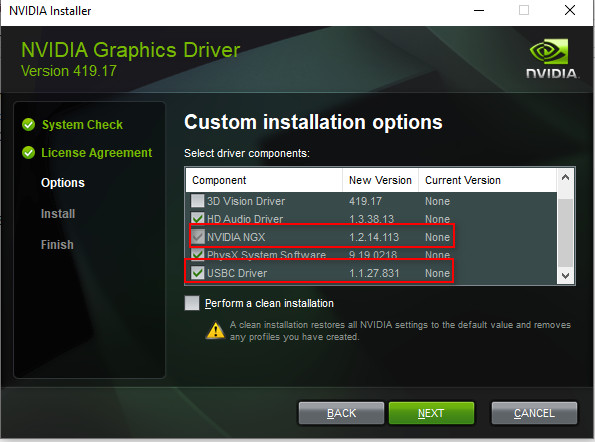
-
-
They are not Amp related. Those install on my desktop with 2080ti/s with NVidia drivers. NGX is AI for visual applications and the USB-C driver is for rtx cards (my 2080 ti's have usbc ports).Vasudev likes this.
-
Reading the last 50 Pages it seems nearly everyone in this Forum has issues with their A51M.
Until now mine is working without any problem, is anybody else there who has no issues with their Laptop, or is my situation only „the calm before the storm“ and it’s likely that i am running into all this as well? :0Last edited: Mar 31, 2019Papusan likes this. -
I wanted to chime back in. Disabling the Advanced Stream Detect did in fact fix my lag out problems. I just can't believe Killer's software is this bad and how they haven't gone bankrupt from their terrible products. Any time I've had networking and lag issues, it's always because of Killer products. Hopefully, this is the only problem I run into.
I'm just really glad that this is finally working and I can play without those massive lag spikes!SlickDragon, alberty, Papusan and 1 other person like this. -
the only thing Killer Networking is good at is killing our connections!

I used their Killer Uninstaller then rebooted, then I manually scanned for reg and file entries and I found over 50 registry entries that I had to manually delete and they were all protected so I had to run regedit.exe as a Trusted Installer using NSudo as I didn't wanna sit all day and taka ownership of every freakin' Killer/Rivet Networking reg entry
horrible piece of trash literally!SpentaTONofMoolah4k, SlickDragon, Darkhan and 3 others like this. -
About that black screen issue.
I had something similar once with my clevo, some driver issue. I had to force stop windows from driver updates (each time windows was breaking it, with gpu driver update), remove nvidia driver with DDU and install some old gpu driver, to solve this. Screen was black (internal and external) but I was able to connect remotely to my machine and windows was working fine that way. I hope it's something similar here and not hardware problem. It could be some software clash in my case because latest driver works fine now, for me.SlickDragon likes this. -
Denna offert inkluderar 1x 3N3W3
ASSY Heatsink SSD till ALIENWARE AREA 51M
Anyone else needs heatsinks? (for m.2 SSD)
I'm about to order and I know people had huge problems before getting one and order.
Just throwing the question out, gonna order tomorrow.c69k and Fire Tiger like this. -
I could use one or two for future use. You in Sweden?
-
I don’t really have any issues either...
-
I also have resolved all of my issues that I know of, and I am loving this laptop. Highly recommended... Just get an extended warranty incase your GPU burns out. xDSlickDragon likes this.
-
What? Lol. Secrets? What Secrets? Go click on the link and you can see all the details you want on 3DMark ROFL ... Max the card can hit is 180ish/1500, but every card is different so one setting is not universal for every single card. Tuning and benching is not a copy and paste gig... it takes a lot of time and patience to get to know your car to make it run at its peak. It's an art and if you want the best results it's worth taking the time to learn and to become familiar with your car.
![[IMG]](images/storyImages/549f862467092f760be0667e5a8cdc25.gif) Last edited: Mar 31, 2019
Last edited: Mar 31, 2019 -
I have a 4 year guaranty, hoping that it won’t break in year 5
-
what tools are you using to tune cpu/gpu? are you able to control fans with these tools?iunlock likes this.
-
I also have had no issues; but have only had mine for about a week
Sent from my iPhone using Tapatalk -
I haven't tried that yet. I probably will try it in a few hours though. As of now, the black screen persists. Does anyone know where I could find a copy of the pre 200w vbios update? I know gpuz will let you download your current vbios. If there is anyone who hasnt installed the 200w yet, I'd really appreciate it if I could get it. It's the only think left to try that I can think of.
-
So does anyone have any news on the higher TDP vbios for the RTX 2070? I’m currently hitting just under 23K GPU in firestrike and I’m confident we can be at around 25K with the bump in power!
Sent from my iPhone using Tapatalk -
Everything is fine here. As always, the poeple who have the most to say are people with problems, and the people benchmarking. Of course there is nothing wrong at all with that. Its should be expected.Darkhan likes this.
-
At this point everyone should avoid the 200w vbios, if you haven’t installed it yet
Sent from my iPhone using TapatalkAmroth likes this. -
Ok, but what about the 230w vbios?
-
Here you go
190W vbios -> https://drive.google.com/open?id=1V7doxPsJ53c-VC_pq2sIFTBZ4ugl7W9AVoodooChild, Darkhan, _deadbydawn_ and 1 other person like this. -
I’ve heard ppl get different screens; some get LG and some AU Opt, has this been verified?
-
Yes, I have the AUO409D. Notebook check got the LG Phillips along with some others on this forum. Seems like the biggest difference is the AUO has a better contrast ratio
Sent from my iPhone using TapatalkGorebag likes this. -
You are a saint! Thank you! Ok, now to get my bravery up a bit and flash this rollback vbios.Fire Tiger and area51m like this.
-
is this for the 2080? and if so, can one just simply flash it back ober the 200w vbios?

Gesendet von iPhone mit Tapatalk -
To be honest, I don't really know if you can flash it back, but at this point i'm willing to try. It is for the 2080 though. Since it isn't in the dell executable format I'm currently trying to figure out how to go about flashing back.
-
I still find it very strange that I can run the 2080 using Microsoft Basic Display Adapter as the driver, even with the onboard gpu turned off, but the second I install nvidia drivers, the laptop screen shuts off. It would seem to point to a driver issue, but even a 100% clean Windows 10 installation did nothing to help it, as it still shuts off once nvidia drivers are introduced. It really is maddening.
-
I've seen those exact same symptoms when a gpu goes bad.... machine only works with Microsoft Basic Display Adapter as soon as you add the manufacturer driver and it attempts to utilize the GPU to its fullest extent and it ****s the bed. Hate to say it bro but your RTX needs to be replaced
-
So you don't think it had anything to do with it happening an hour or so after the vbios update? Or that rolling that back to 190w won't help? …...Man.... I'm stationed in Afghanistan right now, and I have no idea how to go about simply ordering a new GPU from Dell... I'm sure they wouldn't just let me order that one part and send it to me. I'm still going to try the rollback, as at this point it seems damage is done regardless. I just don't really know how to rollback using a .rom . I'm looking at nvflash now to try to roll back to the 190w one.
-
No harm in attempting a roll back if it allows you, honestly though if the 200w vbios was the culprit of the recent burn outs I think they would have updated by now.... Plus I remember someone asking Frank Azor directly on Twitter if that's whats causing the burn outs and he says "no" (take that with a grain of salt)... I think if you chat with Dell support I highly doubt tech support will ship to Afghanistan.... Might have the to wait to get home... Friggin sucks I can only imagine.
-
@corona2172
When using Microsoft Basic Display Driver, does it allow you to put (game) load on the Nvidia? Because if yes, then I doubt that this is a hardware issue. -
Nice, does it depend on region or just pure, random luck?
-
That I am actually not sure of
Sent from my iPhone using Tapatalk -
Well, I just ran Rimworld which, as you might imagine, ran decently as it is minimal on gpu demand. I then tried to run ELEX. It runs for sure, but once in the actual game world it is laggy to the point of unplayability. Doesnt look terrible though. The graphics look decent, but the second you move the mouse it stutters and lags. However, the card does not cut off or go black screen.c69k likes this.
-
I’m shocked to see this how busy this thread is compared to the M15.
I would have figured this laptop to be extremely niche.
Is this laptop really good? -
https://www.3dmark.com/3dm/35038131?
I just delided my 9900k, average temps seem lower. Will confirm with a gameplay test rather than a short bench.SlickDragon, raz8020, Papusan and 1 other person like this. -
Most people are having a great experience, including myself. I’ve probably owned over 100 gaming laptops and this one is my favorite so far. Nothing else on the market like it.
Sent from my iPhone using TapatalkSlickDragon, alexnvidia, c69k and 4 others like this. -
1+3yr or 1+4yr warranty? Well, I hope it doesn't burn out after BIOS update just next day once warranty runs out!
-
Same, apart from the heat on the CPU which I cannot feel on the laptop itself, just the chip. And, the speaker issue with rattling, out of about 50 machines I have ever owned including desktops I've built myself, this is hands down the most exciting one I have worked on. I get excited when I pull up the lid and the keyboard is a complete dream, never used anything like it on a laptop. Prefer it even to the corsair k65 cherry red.
-
Absolutely ditto. This system is impressive and I've seen, worked on, have owned or still own a lot. Hands down the best system to date in the desktop replacement / gaming laptop sector.
OH btw.. Zero issues here as well.. Knock on wood.SlickDragon, Rengsey R. H. Jr. and IXVIXXII like this. -
I used Kryonaut outside and Conductonaut inside the IHS. I did a small session of Anthem and temps are below 80°C peak and around 70°C average.
I will play for 1 or 2 hours tonight to get more reliable results.
SlickDragon, iunlock and Kormi like this. -
4,6ghz max? have you underclocked the cpu? what thermal profile do you use in your games? I assume the cpu is undervolted?
raz8020 likes this. -
No OC profile, fans at 75-80% ("perf mode" I guess). I get 130fps on ultra settings so... There's no need for OC when I'm playing. Also -0,5mV UV.
-
yeah no OC ok... but the 9900k has 4.7ghz allcore stock. Thats why iam asking for underclocking.
That is Division 2, profile silent. Speedstep on, C1E on, Speedshift on, 5ghz if needed
(570w because i use 330w+240w on my desk and have 330w+180+ in my bag)
SlickDragon, raz8020, Darkhan and 1 other person like this. -
I think it must have been a HWinfo bug when I took the picture, because I'm on "no OC" mode right now and values go from 4.689GHz to 4.789GHz on each core. NOPE!!
My bad : I had the CPU capped at 4.6GHz because I was trying an UV profile. Sorry...
I'm gonna play now with a -0,5mV and stock 4.7GHz.Last edited: Mar 31, 2019 -
How did you get HwInfo to show fan speed and AC adapter?
Mine does not show that.
*OFFICIAL* Alienware Area-51M R1 Owner's Lounge
Discussion in '2015+ Alienware 13 / 15 / 17' started by ssj92, Jan 8, 2019.


